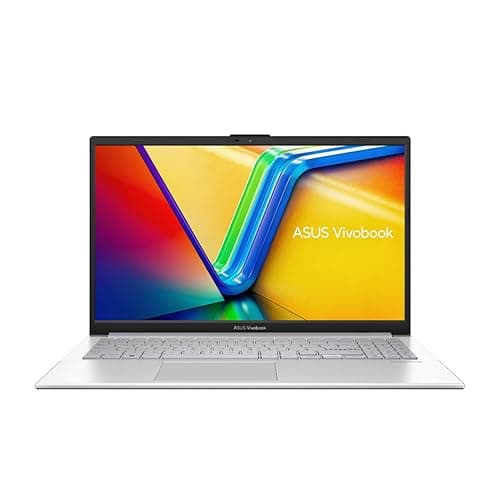
The Acer Aspire 3 A315-24P-R8DK is a plain, sensibly specified 15.6-inch laptop: AMD's Ryzen 5 7520U, 8GB of DDR5 memory, a 512GB SSD and Windows 11 Home, in a silver body Acer puts at 1.7kg. It's sold by Amazon.
We looked at it as a budget machine for two jobs, writing code and making music. For code it's a reasonable starting point. For music it comes with a clear warning: 8GB is thin for a DAW. A music project with a few virtual instruments, effects and a sample library can use that much on its own, before Windows and a browser take their share. If music production is the main reason you're buying, read the memory section before you order.
What's in the box
These details come from Acer's product listing. Where Acer makes a claim rather than stating a specification, we've said so.
| Specification | Detail |
|---|---|
| Model | Acer Aspire 3 A315-24P-R8DK |
| Processor | AMD Ryzen 5 7520U |
| Graphics | AMD Radeon graphics |
| Memory | 8GB DDR5 |
| Storage | 512GB PCIe NVMe SSD |
| Display | 15.6-inch Full HD (1080p) LED, with Acer BlueLightShield |
| Wireless | WiFi 6 |
| Ports named by Acer | USB Type-C, HDMI 2.1 |
| Cooling | Acer claims 78% more fan surface and 17% more heat capacity |
| Weight and thickness | 1.7kg, 18.9mm (Acer's figures) |
| Battery | Described by Acer as long-lasting |
| Operating system | Windows 11 Home |
| Colour | Silver |
| Price | £489.79 · Details |
The listing doesn't cover everything you might want to know, such as the full port list, keyboard backlighting or webcam resolution. If one of those decides it for you, check Acer's own specification sheet for this exact model code before you buy.

Memory: the main limit
Everything else about this laptop is reasonable for the money. The 8GB of memory is where it's tight.
For music production, memory decides how many instruments, effects and samples you can have loaded at once. Sampled pianos, drum libraries and orchestral sounds load large chunks of audio into memory, and a modest project can reach several gigabytes. Windows itself needs a share, and so does anything else you leave open. On 8GB you'll be closing other programs, freezing or bouncing tracks to audio and keeping sample libraries small. That's workable for learning, beat-making with lighter instruments, or recording a band through an interface, but it's thin for a DAW once projects grow. Many producers treat 16GB as the comfortable starting point.
For coding, 8GB is enough for an editor, a terminal and a browser with documentation open. It gets tight with heavier tools: a full IDE, several browser tabs, a local database and containers all compete for the same memory. Web and Python work on a budget is fine. Running virtual machines or several containers at once is where you'll feel it.
Acer's listing doesn't say whether the memory can be upgraded. Don't buy this laptop on the assumption that you can add more later. If you know you'll need 16GB, it's better to buy a model that ships with it.
Processor and everyday speed
Acer calls the laptop's performance "always exceptional", which is marketing. In practice, the laptop is aimed at the everyday mix of browsing, documents, email, video calls and streaming.
For code, that's usually enough. Writing, running and testing small to medium projects is light work for any current laptop chip. Big projects can involve long builds, and that's where you'll wait longest.
For music, the processor matters for how many effects and instruments can play in real time without crackles. More effects and instruments mean more work for the processor, and raising the audio buffer size during mixing helps. Recording is less demanding than mixing a full project, and a small buffer for recording plus a larger one for mixing is the normal way to work on a modest machine.
The listing names AMD Radeon graphics and no separate graphics card. That's fine for the desktop, video and the interfaces of DAWs and code editors. It isn't a gaming laptop, and software that needs a separate graphics card won't suit it. Check your intended applications' requirements if any of them use the GPU.
Storage
A 512GB NVMe SSD is a sensible size at this price. Code takes up very little space, so for programming it's plenty. Music is different: sample libraries can be large, and a few big ones plus your projects will use a good share of the drive. An external USB SSD is a cheap way to keep sample libraries and finished projects off the internal drive.
Display
The 15.6-inch Full HD screen is the standard resolution for a laptop this size, and 1080p is enough to fit a code editor and a terminal side by side, or a DAW's mixer at a readable size. Acer describes it as suited to web browsing and video streaming. It doesn't give brightness or colour figures, so treat it as a screen for working on rather than for colour-critical photo or video work.
Acer says its BlueLightShield feature reduces blue light exposure. Windows also has its own night light setting that does a similar job, so this isn't a reason to buy on its own.
For long coding sessions, a second screen makes a big difference. The HDMI 2.1 port means you can plug in an external monitor. Acer doesn't list which resolutions and refresh rates the port supports on this model, so check before buying a high-end monitor to go with it.

Ports and connections
Acer names a full USB Type-C port, HDMI 2.1 and WiFi 6. The listing doesn't give the full port list, so check how many USB-A ports there are if you plan to connect an audio interface, a MIDI keyboard and a mouse at the same time. A small USB hub solves this, but powered audio gear is happier plugged straight into the laptop.
For music, a USB audio interface is the usual way to get good-quality inputs and outputs, and most work with any Windows laptop once the maker's driver is installed. Use the interface's own ASIO driver in your DAW rather than Windows audio, which gives you much lower delay when recording.
WiFi 6 is a recent wireless standard. It helps most with a WiFi 6 router and a busy home network, and real speeds depend on your router and signal.
Cooling and fan noise
Acer claims a 78% increase in fan surface and 17% more heat capacity, and says you'll get longer, more efficient sessions. Those are Acer's figures; the listing includes no fan-noise measurements.
Fan noise matters more for music than for most uses, because a laptop sitting near a microphone can be heard on recordings. We don't know how loud this one gets. If you record vocals or acoustic instruments, keep the laptop as far from the microphone as your cables allow, or point the microphone away from it. That's good practice with any laptop.
Weight and battery
Acer gives the weight as 1.7kg and the thickness as 18.9mm, and says this is lighter and thinner than previous Aspire 3 models. That's a reasonable weight to carry to college, the library or rehearsals for a 15.6-inch machine, though check the full dimensions against your bag or sleeve.
Acer describes the battery as long-lasting but gives no runtime figure. Battery life depends heavily on screen brightness and what you're doing, and music software and builds use more power than browsing. If you work away from a socket, keep the charger with you until you know how it lasts for your own work.
Who should buy it
It suits students and beginners who want a simple Windows laptop for learning to code, coursework and everyday use, bought new from Amazon at a modest price. It also suits someone starting out with music on lighter projects who accepts the memory limit and works around it.
It suits less well anyone planning big sample-based projects, orchestral work or lots of virtual instruments, where 8GB is thin for a DAW. The same goes for developers who run virtual machines or several containers. In both cases, a laptop with 16GB of memory is the better buy, even if it costs more.

Final verdict
We give the Acer Aspire 3 A315-24P-R8DK 7/10 as a budget everyday and coding laptop. It has AMD's Ryzen 5 7520U, a 512GB NVMe SSD, WiFi 6 and HDMI 2.1 in a 1.7kg body, which covers the basics well. For music production, take a point off. The 8GB of memory is thin for a DAW, Acer doesn't say it can be upgraded, and that's the first thing you'll run into as projects get bigger.
What works. What doesn’t.
5 + 5What we liked5 reasons
- 512GB NVMe SSD is plenty for code and a fair start for music projects
- WiFi 6, USB Type-C and HDMI 2.1 for an external monitor
- 1.7kg and 18.9mm by Acer's figures, easy to carry for a 15.6-inch laptop
- Full HD screen fits a code editor and terminal side by side
- Sold by Amazon
Where it falls5 reasons
- 8GB is thin for a DAW once projects use sample libraries or many virtual instruments
- Acer doesn't say whether the memory can be upgraded
- No separate graphics card is listed, so it isn't one for gaming or GPU-heavy software
- No battery runtime, screen brightness or full port list in Acer's listing
- Fan noise is unknown, which matters if you record near the laptop
Full specifications
5 attributes| Key features | ALWAYS EXCEPTIONAL PERFORMANCE: The Acer Aspire 3 laptop has an AMD Ryzen 5 7520U processor and AMD Radeon graphics card, 15.6" FHD display, 8GB DDR5 RAM and 512GB SSD memory to do any task |
|---|---|
| IMPROVED THERMAL PERFORMANCE: With a 78% increase in fan surface, you enjoy an improved thermal system and an additional 17% heat capacity. You'll enjoy longer and more efficient sessions, without having to plug the plug | |
| DISPLAY: The 1080p FHD display notebook is perfect for occasional web browsing and video streaming, delivering crisp, detailed images. And with Acer BlueLightShield, reduce levels of blue light exposure for you and your loved ones | |
| CONNECTIVITY: Connect your latest devices to your laptop on the full USB Type-C port. Plus, WiFi 6 and HDMI 2.1 offer improved speed and functionality for the whole family | |
| FUNCTIONAL DESIGN: The Aspire 3 laptop is lighter and thinner than ever (1.7 kg per 18.9 mm). All with a long-lasting battery that allows the whole family to do more between charges |
If this isn’t right for you
2 options

Frequently asked
5 questions01Is the Acer Aspire 3 good for music production?+
For beginners and light projects it can work, especially with a USB audio interface. But 8GB is thin for a DAW: sample libraries and virtual instruments use a lot of memory, and you'll be closing programs and bouncing tracks to keep going. Many producers prefer 16GB.
02Is it good for programming?+
For learning, web development and Python, it's a reasonable starting point for an editor, a terminal and a browser, though memory demands depend on your tools and projects. Heavier setups with virtual machines or several containers will push the 8GB of memory.
03Can I add more RAM?+
Acer's listing doesn't say whether the memory can be upgraded, so don't count on it. If you know you need 16GB, buy a model that ships with it.
04Can it connect to an external monitor?+
Yes, it has an HDMI 2.1 port. Acer doesn't list the supported resolutions and refresh rates for this model, so check before pairing it with a high-end monitor.
05How long does the battery last?+
Acer describes it as long-lasting but doesn't give a figure. It depends on screen brightness and workload, so keep the charger handy until you know how it copes with your own use.