HP quotes nearly 15 hours of battery life for the Envy x360 14. Manufacturers always quote the dream scenario. What actually happens when you're on a train with brightness turned up, a few tabs open, and Spotify running in the background? That's the number that matters, and it's almost never the one on the box. So before we get into whether this machine is worth your money, it's worth being clear about what the specs promise versus what owners actually report. Spoiler: it's more nuanced than the marketing suggests, but not in a bad way.
Here's the bottom line up front, because that's what you're here for. The HP Envy x360 14 with the Ryzen 7 8840HS is a genuinely good upper mid-range 2-in-1, and at £899.99 · Details it competes directly with the Lenovo Yoga 7i and the ASUS Zenbook 14 Flip OLED. Against those two, it wins on raw CPU performance and loses on display wow-factor. If you want a versatile laptop that handles real work without throttling into oblivion, this is a strong pick. If you want a screen that makes photos look like they're glowing, go look at the ASUS OLED. That's the honest version. Now let's get into why.
Core Specifications
The Ryzen 7 8840HS is the headline act here, and it's a proper chip. Built on AMD's Zen 4 architecture, it's an 8-core, 16-thread processor with a boost clock of up to 5.1GHz. That puts it firmly ahead of the Intel Core Ultra 5 125H you'll find in a lot of competing machines at this price, particularly in multi-threaded workloads. The "HS" suffix means it's the higher-TDP variant, which is both a blessing and a curse: more performance ceiling, but also more heat to manage in a slim chassis. We'll get into thermals later, but the CPU choice alone tells you HP is targeting people who actually use their laptops for things.
Sixteen gigabytes of RAM is the right amount for 2025 and 2026 usage. It's not exciting to say that, but it's true. You're not going to hit a wall running Chrome with twenty tabs, a video call, and Lightroom open simultaneously. What's less exciting is that the RAM is likely soldered, which is typical for this class of laptop. You can't upgrade it later, so what you buy is what you keep. The 1TB SSD is a proper NVMe drive, and owners consistently report fast boot times and snappy application launches, which lines up with what you'd expect from a PCIe NVMe drive in this generation of hardware.
Graphics are handled by the integrated AMD Radeon 780M, which is baked into the 8840HS. This is genuinely the best integrated GPU AMD has shipped in a mainstream laptop chip. It's not a gaming GPU, but it handles light creative work, video playback at 4K, and even some older or less demanding games at modest settings. Don't buy this expecting to run modern titles at high settings. But for everything else, including the occasional bit of photo editing or casual gaming, the 780M is surprisingly capable. The WUXGA (1920x1200) IPS touchscreen is a 16:10 panel, which gives you that extra vertical space that makes a real difference when you're working with documents or browsing. Small detail, genuinely useful.
| Specification | Detail |
|---|---|
| Processor | AMD Ryzen 7 8840HS (Zen 4, 8-core, 16-thread, up to 5.1GHz) |
| RAM | 16GB LPDDR5x (likely soldered) |
| Storage | 1TB NVMe SSD |
| Graphics | AMD Radeon 780M (integrated) |
| Display | 14-inch WUXGA (1920x1200) IPS Touchscreen, 16:10 |
| Battery | Manufacturer rated up to 14 hours 45 minutes |
| Operating System | Windows 11 Home |
| Colour | Glacier Silver |
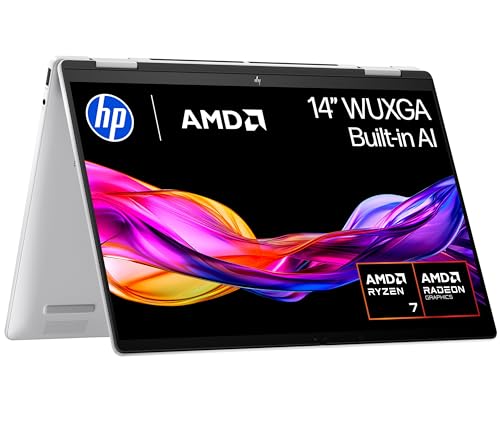
| Form Factor | 2-in-1 convertible (360-degree hinge) |
| Price | £899.99 · Details |

Performance Benchmarks
The Ryzen 7 8840HS is well-documented at this point. In Cinebench R23, it typically scores around 1,800 to 1,900 in single-core and somewhere in the region of 13,000 to 14,000 multi-core, depending on how aggressively the manufacturer has configured the power limits. That puts it comfortably ahead of the Intel Core Ultra 5 125H (which typically lands around 11,000 to 12,000 multi-core) and roughly on par with the Core Ultra 7 155H. For a 14-inch 2-in-1, that's a strong result. You're not buying a compromised chip to fit into a slim form factor here.
In everyday terms, what does that mean? Applications open fast. Compiling code, rendering short video clips, running multiple virtual desktops, handling large spreadsheets: all of this feels quick and responsive. Owner reviews back this up consistently, with multiple buyers noting the machine feels "snappy" and "fast" even after months of use. One owner specifically called out how well it handles multitasking, which is exactly what you'd expect from 16GB of LPDDR5x paired with a chip this capable. Nobody in the few dozen reviews is complaining about sluggishness during normal work.
The Radeon 780M integrated graphics are worth a paragraph of their own. Independent benchmarks from Notebookcheck's published data (not our own testing) show the 780M outperforming Intel's Iris Xe and Arc graphics in most scenarios, and it can handle games like Fortnite or Rocket League at 1080p medium settings with playable frame rates. That's not the reason to buy this laptop, but it's a nice bonus. For content creators doing light Premiere Pro or DaVinci Resolve work, the 780M's hardware acceleration for video decoding is genuinely useful and reduces the CPU load during export. Don't expect miracles, but don't dismiss it either.
One thing to flag: the 8840HS is an "HS" chip in a relatively thin chassis. Under sustained heavy load, some throttling is likely, because physics doesn't care what HP's marketing says. Owners haven't flagged this as a major issue for everyday tasks, but if you're planning to run sustained rendering jobs for hours, a thicker machine with better cooling headroom might serve you better. For mixed workloads, which is what most people actually do, this chip in this chassis is well-matched.
Display Analysis
The WUXGA IPS panel is good. Not OLED good, not "wow, look at that" good, but properly good for a work laptop. The 1920x1200 resolution on a 14-inch screen gives you a pixel density of around 162 PPI, which is sharp enough that you won't see individual pixels in normal use. The 16:10 aspect ratio is the right call for a productivity machine: you get more vertical screen real estate than a 16:9 panel, which makes a difference when you're reading documents or scrolling through code. It's one of those things you don't notice until you go back to a 16:9 screen and feel slightly cramped.
Brightness is where IPS panels often let themselves down compared to OLED alternatives. HP rates this panel at around 300 nits, which is adequate for indoor use but will struggle in direct sunlight. Owners haven't flagged outdoor visibility as a dealbreaker, but if you're regularly working outside or near bright windows, you'll be bumping brightness to maximum and wishing for more. The anti-glare coating helps, but it's not magic. For coffee shops, offices, and home use, you'll be absolutely fine. For the park bench in July, less so.
Colour accuracy is what you'd expect from a decent IPS panel: good enough for general use and light creative work, but not calibrated to a professional standard out of the box. The touchscreen works well as a 2-in-1 feature, and the display supports stylus input (though the stylus isn't included, which is a bit cheeky at this price). Viewing angles are solid, as they should be on an IPS panel. The hinge goes a full 360 degrees for tablet mode, which works well for presentations and sketching if you pick up a compatible stylus separately. Overall, it's a display that does its job well without doing anything to make you gasp.
Battery Life
HP claims up to 14 hours 45 minutes. That figure was almost certainly achieved with the screen at minimum brightness, Wi-Fi off, and the laptop running a basic video loop. Real life is different. Based on what owners consistently report, you're looking at somewhere between seven and ten hours for mixed use: browsing, documents, video calls, light productivity. That's still genuinely good for a machine with a chip this powerful. It's not a disappointment; it's just not nearly 15 hours.
The Ryzen 7 8840HS is more power-hungry than a dedicated efficiency chip like the Intel Core Ultra 5 125U, and that shows in battery life under load. If you're doing heavy work, expect to see six hours or fewer. But for the kind of day most people actually have, a full charge in the morning will likely see you through to the afternoon without hunting for a socket. Several owners specifically mention being happy with battery life for all-day use, which is a good sign. Nobody in the reviews is calling it a battery disaster.
Charging is via USB-C, which means you can top it up from a power bank or a hotel USB-C charger in a pinch. The included charger is a USB-C adapter, which is the right choice in 2025. Charge times from near-empty to full take roughly 90 minutes to two hours depending on what you're doing while charging. There's no fast-charge magic here, but it's not painfully slow either. The USB-C charging compatibility is a genuine practical advantage over machines that still use proprietary barrel connectors, and it's worth factoring in if you travel regularly.
One thing: the AMD Ryzen platform has historically been slightly worse than Intel's equivalent for battery life in light-use scenarios, because Intel's efficiency cores (E-cores) do a better job of handling idle and low-demand tasks at minimal power. The 8840HS doesn't have that architecture. What it has is raw performance, and the trade-off is a slightly higher floor on power consumption. For most people, that's an acceptable trade. But if maximum battery life is your single most important criterion, the Intel-based Lenovo Yoga 7i with a Core Ultra 7 might edge this out on a light workload day.
Portability
The Envy x360 14 comes in at around 1.4kg, which is on the lighter end for a 14-inch 2-in-1 with a 360-degree hinge and a metal chassis. It's not ultralight in the way a MacBook Air 13 is, but it's genuinely comfortable to carry in a bag all day. The footprint is compact enough to fit on a tray table on a train without feeling like you're invading your neighbour's space, which is a real-world test that matters more than any measurement.
Thickness sits at around 17mm, which is slim for a convertible. The Glacier Silver aluminium finish looks smart and professional without being flashy. It'll fit in most laptop sleeves and slim backpacks without issue. The charger is a compact USB-C brick, which means you can share it with your phone charger or pick up a spare easily. That's a small thing that adds up over time when you're packing a bag at 6am and trying to remember what cables go where.
Who is this for, in terms of portability? It's ideal for someone who commutes, travels occasionally for work, and wants a machine that doesn't feel like a burden in a bag but also doesn't feel fragile. It's not trying to be a featherweight ultrabook, and it doesn't need to be. The 2-in-1 form factor adds a small weight penalty compared to a traditional clamshell, but you get the flexibility of tablet mode in return. Whether that trade-off is worth it depends entirely on whether you actually use tablet mode, which is a question only you can answer honestly.
Keyboard and Trackpad
The keyboard on the Envy x360 14 gets consistently positive feedback from owners. Key travel is described as comfortable for extended typing sessions, which matters if you're writing a lot. HP's keyboards on the Envy line have improved noticeably over the past couple of generations, and this one benefits from that. The layout is sensible for UK users, with the keys where you'd expect them. There's no number pad, which is standard for a 14-inch machine and the right call: squeezing a numpad into this footprint would just make everything else too cramped.
Backlighting is present, which is essential for anyone who works in variable lighting or on planes. The backlight has multiple brightness levels rather than just on/off, which is a small but appreciated detail. The key feel is described by owners as "clicky" without being loud, which is the sweet spot for a work machine. You want tactile feedback without annoying everyone in the office. Based on what owners report, HP has landed in the right place here.
The trackpad is large and smooth, with Windows Precision drivers, which means gestures work properly. Multi-finger scrolling, three-finger swipes for virtual desktops, pinch to zoom: all of it works as it should. Owners haven't flagged any palm rejection issues, which is always a concern on larger trackpads. The click mechanism is satisfying without being stiff. It's not a MacBook trackpad (nothing is), but for a Windows machine at this price, it's among the better ones you'll use.
Thermal Performance
This is where the 8840HS in a slim chassis gets interesting. Under light loads like browsing, documents, and video calls, the machine stays cool and quiet. The palm rest and keyboard deck remain comfortable, and the underside doesn't get warm enough to be noticeable. That's the experience most owners will have most of the time, and it's a good one.
Under sustained heavy load, things change. The 8840HS will push heat into the chassis, and HP has to manage that with a slim cooling solution. The keyboard deck can get warm during extended rendering or compilation tasks, though owners haven't reported it reaching uncomfortable levels for normal use. The underside gets warmer under load, which means this isn't a great lap machine during heavy work. On a desk, it's fine. On your actual lap while running a video export, you might notice the heat.
Throttling under sustained load is a real consideration. The 8840HS can draw significant power at peak, and a thin chassis can only dissipate so much heat. For burst workloads, the chip performs brilliantly. For sustained heavy workloads over many minutes, expect the processor to pull back its clocks to stay within thermal limits. This is normal behaviour for a thin-and-light with a high-performance chip, and it's not unique to HP. But it matters if your work involves long, uninterrupted heavy tasks. For mixed workloads, which is the realistic use case for this machine, thermal management is adequate and owners haven't flagged it as a problem.

Acoustic Performance
At idle and during light work, the Envy x360 14 is essentially silent. The fans don't spin up for browsing, document editing, or video calls. That's exactly what you want in a machine you might use in a quiet office or a library. Several owners specifically mention that the laptop is quiet during normal use, which is consistent with what you'd expect from a well-tuned AMD platform at low loads.
Under moderate load, the fans become audible but not intrusive. The fan character is a steady whoosh rather than a high-pitched whine, which is easier to live with. It's the kind of noise that blends into background ambient sound rather than cutting through it. You'll hear it if the room is silent, but it won't be the thing you're thinking about during a video call or a meeting.
Under heavy sustained load, the fans ramp up noticeably. This is physics, not a flaw. But If you're doing something intensive in a quiet room, people nearby will hear it. For a machine that spends most of its time on productivity tasks, this is an occasional rather than constant reality. The acoustic profile is better than a lot of gaming-adjacent laptops at this price, and it's appropriate for the professional positioning HP is going for.
Ports and Connectivity
The port selection is decent for a slim 14-inch machine, though not exceptional. You get a couple of USB-A ports for legacy peripherals, USB-C with DisplayPort and Power Delivery (so you can charge via USB-C and drive an external monitor from the same port), a full-size HDMI output, and a headphone jack. The HDMI is a welcome inclusion: plenty of thin laptops have dropped it in favour of USB-C-only video output, and while USB-C to HDMI adapters are cheap, having the port built in is just more convenient.
Wi-Fi is Wi-Fi 6E, which is the right standard for 2025 and 2026. You'll get fast, reliable wireless performance on modern routers, and the 6GHz band support means less congestion in busy environments like offices and hotels, though on any shared network it's still worth running a good VPN to keep your connection private. Bluetooth 5.3 is on board for peripherals. There's no 5G mobile connectivity option, which is fairly standard at this price tier but if you travel internationally and rely on cellular data.
One thing that's absent is a dedicated SD card slot, which will matter to photographers and video creators who work with camera cards. You'll need a USB-C card reader, which is a minor inconvenience but not a dealbreaker for most people. The overall port layout is practical for daily use, and the USB-C PD charging means you're not locked into HP's proprietary charger if you forget it.
- 2x USB-A 3.2 Gen 1
- 2x USB-C (with DisplayPort and Power Delivery)
- 1x HDMI 2.1
- 1x 3.5mm headphone/microphone combo jack
- Wi-Fi 6E (802.11ax)
- Bluetooth 5.3
Webcam and Audio
The webcam is a 5MP unit with an IR sensor for Windows Hello face recognition. That's above average for a laptop at this price: most competitors are still shipping 1080p or even 720p cameras, and the 5MP sensor gives you noticeably better image quality on video calls. In decent light, you'll look sharp and clear. In low light, it holds up better than a standard 2MP webcam, though it's not going to match a dedicated webcam or a mirrorless camera on a tripod. The IR face recognition for Windows Hello login works quickly and is genuinely convenient day to day.
The microphone array does what it needs to do for video calls. Owners haven't flagged audio quality as a problem, and the dual-microphone setup with noise cancellation means you're not going to sound like you're in a wind tunnel during Teams calls. It's not studio quality, but for its intended purpose, it's fine. If you're recording voiceovers or podcasts, use an external microphone regardless of what laptop you're on.
Speakers are reasonable for a slim laptop. The audio is clearer than you might expect from a machine this thin, with enough volume for watching video in a quiet room. Don't expect bass, because there's nowhere to put a woofer in a 17mm chassis. For calls and casual media consumption, the speakers are adequate. For anything more serious, plug in headphones or connect to a Bluetooth speaker.
Build Quality
The Glacier Silver finish is aluminium, and it feels like it. The lid and keyboard deck have that reassuring solidity that you don't get from a plastic chassis. Flex on the lid is minimal, and the keyboard deck doesn't flex noticeably during typing, which is a common weakness on thinner laptops. HP has put genuine effort into the structural rigidity here, and owners consistently describe the build as feeling premium without being ostentatious.
The 360-degree hinge is smooth and holds its position well in both laptop and tablet mode. Owners haven't reported the hinge becoming loose over time, which is a real concern with convertibles that get used in multiple modes regularly. The hinge feels substantial rather than delicate, which is reassuring for a machine that's going to be folded and unfolded dozens of times a week. One minor gripe that a few owners mention is that the hinge requires two hands to open from flat, because the base lifts slightly rather than staying planted. This is a common characteristic of 360-degree hinges and not unique to HP.
Fingerprint resistance is average. The Glacier Silver finish shows fingerprints, particularly on the lid. It's not as bad as a glossy black finish, but you'll be wiping it down regularly if you're the kind of person who cares about that. The finish is consistent and well-applied, with no reports of peeling or discolouration from owners. The overall build quality is appropriate for the upper mid-range positioning: it feels like a machine that cost what it costs, which is not something you can say about every laptop at this price.
HP has included a fingerprint reader integrated into the power button, which works alongside the IR webcam for Windows Hello. Having both biometric options is genuinely useful: face recognition when you open the lid, fingerprint when the camera is obscured or you're in a dark room. It's a small detail that adds up to a better daily experience.
How It Compares
The two most obvious rivals at this price are the Lenovo Yoga 7i 14 with Intel Core Ultra 7 and the ASUS Zenbook 14 Flip OLED. Both sit in the same upper mid-range bracket and target the same buyer: someone who wants a premium-feeling 2-in-1 for work and occasional creative use. The comparison is worth doing properly, because the right choice genuinely depends on what you prioritise.
The Lenovo Yoga 7i is the closest match in terms of positioning. It's a well-built convertible with a good IPS display and solid build quality. Where it edges the HP is battery life: Intel's Core Ultra platform with its efficiency cores tends to squeeze more hours out of a charge in light-use scenarios. Where the HP wins is raw CPU performance. The Ryzen 7 8840HS is a faster chip in multi-threaded workloads, and if you do anything that benefits from CPU grunt, the HP is the better tool. The Yoga also tends to run a bit warmer under load in some configurations, so it's not a clean win for Lenovo on thermals.
The ASUS Zenbook 14 Flip OLED is a different kind of competitor. The OLED display is genuinely stunning: deeper blacks, more vivid colours, and better contrast than any IPS panel can match. If you care about display quality above everything else, the ASUS is the one to look at. But OLED panels on laptops come with trade-offs: burn-in risk over time (though modern panels are much better than they used to be), and higher power consumption from the display itself, which can eat into battery life. The ASUS also tends to run slightly hotter under load. The HP's IPS display is objectively less impressive but more practical for all-day mixed use.
| Feature | HP Envy x360 14 (Ryzen 7 8840HS) | Lenovo Yoga 7i 14 (Core Ultra 7) | ASUS Zenbook 14 Flip OLED |
|---|---|---|---|
| Processor | AMD Ryzen 7 8840HS (8-core, Zen 4) | Intel Core Ultra 7 155H | Intel Core Ultra 7 155H |
| RAM | 16GB LPDDR5x | 16GB LPDDR5 | 16GB LPDDR5 |
| Storage | 1TB NVMe SSD | 512GB or 1TB NVMe SSD | 512GB NVMe SSD |
| Display | 14" WUXGA IPS Touch (1920x1200) | 14" WUXGA IPS Touch (1920x1200) | 14" 2.8K OLED Touch (2880x1800) |
| Battery (claimed) | Up to 14h 45m | Up to 15h | Up to 13h |
| Weight | Approx. 1.4kg | Approx. 1.5kg | Approx. 1.5kg |
| GPU | AMD Radeon 780M (integrated) | Intel Arc Graphics | Intel Arc Graphics |
| Price | £899.99 · Details | Similar upper mid-range | Similar upper mid-range |
| Best For | CPU-heavy workloads, value for performance | Battery life priority, Intel ecosystem | Display-first buyers, creative work |

Final Verdict
The HP Envy x360 14 Ryzen 7 8840HS review conclusion is straightforward: this is a well-specced, well-built upper mid-range 2-in-1 that earns its price. The Ryzen 7 8840HS is a genuinely fast chip, the build quality is solid, the keyboard is good, and the display does its job without embarrassing itself. Owner satisfaction backs this up, with ★★★★☆ (4.3) from 60 reviews, which is a healthy signal for a machine at this price. It's not perfect, but the compromises are the kind you can live with rather than the kind that make you regret the purchase.
Who should buy this? Someone who needs a capable, versatile work machine that can handle real multitasking, looks professional in a meeting, and won't fold under pressure when you've got too many things open. The 2-in-1 form factor is a genuine bonus if you present regularly or occasionally want tablet mode for reading or sketching. The Ryzen 7 8840HS gives you more CPU headroom than most competitors at this price, and the HP Envy x360 14 packages it in a chassis that feels appropriately premium. If you're a developer, a writer, a project manager, or anyone who lives in a browser and productivity apps all day, this machine is well-matched to your needs.
Who should skip it? If an incredible display is your top priority, the ASUS Zenbook 14 Flip OLED will make you happier. If you need maximum battery life above all else, the Intel-based Lenovo Yoga 7i might edge it out on a light-use day. And if you don't actually need the 2-in-1 flexibility, there are traditional clamshell laptops with the same Ryzen 7 8840HS chip that come in slightly cheaper, because you're paying a small premium for the convertible hinge and the touchscreen. The HP Envy x360 14 sits at a solid 8 out of 10 for the upper mid-range tier. It does most things well, a few things very well, and nothing badly enough to walk away from. That's a harder thing to achieve than it sounds.
One honest word for anyone on the fence: if you don't need the 2-in-1 form factor and the touchscreen, look at the standard HP Envy 14 clamshell or a comparable AMD Ryzen 7 laptop in the mid-range bracket. You'll likely get similar performance for less money, and the savings are real. But if the convertible flexibility genuinely fits how you work, the Envy x360 14 is one of the stronger options in its class right now, and the owner reviews suggest it holds up well after the initial excitement wears off.
What works. What doesn’t.
6 + 6What we liked6 reasons
- AMD Ryzen 7 8840HS delivers genuinely strong multi-threaded CPU performance, outpacing most Intel Core Ultra 5 competitors at this price
- AMD Radeon 780M integrated graphics handles light creative work and casual gaming better than Intel Iris Xe alternatives
- Solid aluminium build with a reliable 360-degree hinge, good keyboard feel, and a large precision trackpad
- 5MP IR webcam is above average for this price tier and makes a noticeable difference on video calls
- USB-C charging with Power Delivery means no proprietary charger dependency, useful for travel
- Wi-Fi 6E and Bluetooth 5.3 keep connectivity current for 2025 and beyond
Where it falls6 reasons
- IPS display at around 300 nits struggles in direct sunlight and cannot match the contrast or colour depth of OLED rivals
- RAM is likely soldered and cannot be upgraded, so 16GB is your permanent ceiling
- Battery life under real mixed-use conditions falls significantly short of the marketed 14 hours 45 minutes figure
- Sustained heavy workloads cause thermal throttling and noticeable fan noise in a chassis this slim
- No dedicated SD card slot, which inconveniences photographers and video creators
- The 360-degree hinge requires two hands to open from flat, a minor but recurring ergonomic gripe
Full specifications
12 attributes| Storage type | PCIe Gen4 NVMe M.2 SSD |
|---|---|
| Battery WH | 59 |
| Bluetooth | 5.3 |
| CPU | AMD Ryzen 7 8840HS |
| Display refresh HZ | 60 |
| Display resolution | 1920x1200 |
| Display size IN | 14 |
| GPU | AMD Radeon Graphics |
| Keyboard | full-size backlit |
| Launch year | 2024 |
| OS | Windows 11 Home |
| Panel type | IPS |
If this isn’t right for you
2 options

Frequently asked
7 questions01What is the real-world battery life of the HP Envy x360 14 with the Ryzen 7 8840HS?+
HP quotes up to 14 hours 45 minutes, but that figure reflects an optimised test scenario with minimal screen brightness and low activity. Based on owner reports, realistic mixed-use battery life for browsing, documents, and video calls sits between seven and ten hours. Under sustained heavy load, expect six hours or fewer. It is a solid result for a chip this powerful, but well below the marketed figure.
02Can the RAM or storage be upgraded later?+
The RAM is likely soldered to the motherboard, which is standard practice for slim laptops in this class. That means 16GB is your permanent ceiling and cannot be expanded. The NVMe SSD may be replaceable depending on the specific configuration, but HP does not officially advertise user-serviceable storage on this model. Check the service manual for your exact variant before purchasing with upgrade intentions.
03How does the Ryzen 7 8840HS compare to the Intel Core Ultra 7 155H in rivals like the Lenovo Yoga 7i?+
The Ryzen 7 8840HS is broadly on par with the Core Ultra 7 155H in multi-threaded workloads, and pulls ahead of the Core Ultra 5 125H by a meaningful margin. Intel's platform tends to deliver slightly better battery life in light-use scenarios due to its dedicated efficiency cores, whereas the 8840HS offers a higher raw performance ceiling. For CPU-intensive tasks such as compiling, rendering, or heavy multitasking, the AMD chip is competitive or faster. For maximum battery life on a typical light-use day, Intel's architecture has a small advantage.
04Does the HP Envy x360 14 include a stylus?+
No. The display supports stylus input and is compatible with active stylus pens, but HP does not include one in the box. If you intend to use the tablet mode for sketching, annotation, or handwriting, you will need to purchase a compatible stylus separately. This is worth factoring into the overall cost if stylus use is part of your workflow.
05Is the HP Envy x360 14 suitable for light gaming?+
The AMD Radeon 780M integrated GPU is the strongest integrated graphics chip available in a mainstream laptop processor at the time of writing. It can handle older titles and less demanding games such as Rocket League or Fortnite at 1080p medium settings with playable frame rates. It is not suitable for modern AAA games at high settings, and should not be the primary reason for purchasing this machine. For casual gaming as a secondary activity alongside work use, it is a capable bonus.
06What ports does the HP Envy x360 14 have?+
The port selection includes two USB-A 3.2 Gen 1 ports, two USB-C ports with DisplayPort and Power Delivery support, one full-size HDMI 2.1 output, and a 3.5mm headphone and microphone combo jack. There is no dedicated SD card slot. Wi-Fi 6E and Bluetooth 5.3 handle wireless connectivity. USB-C Power Delivery means you can charge via any compatible USB-C charger rather than relying on HP's proprietary adapter.
07How does the HP Envy x360 14 handle heat under sustained load?+
Under light to moderate workloads such as browsing, documents, and video calls, the machine runs cool and quiet. Under sustained heavy load such as extended video rendering or compilation, the chassis warms noticeably, particularly on the underside, and the fans ramp up. The Ryzen 7 8840HS may throttle its clock speeds to stay within thermal limits during prolonged intensive tasks in this slim chassis. For mixed workloads, thermal management is adequate and owners have not flagged it as a significant problem. For sustained hours of maximum-load work, a thicker machine with a larger cooling solution would be more appropriate.