Creative professionals, whether you are a graphic designer, video editor, motion graphics artist or digital illustrator, need a laptop that goes well beyond basic productivity. You need a display that renders colour accurately, a processor that handles heavy export queues without throttling, and enough RAM to keep a browser, editing suite and asset library open simultaneously. Since last year, the landscape has shifted meaningfully: Qualcomm Snapdragon X Plus chips have arrived in mainstream-priced machines, Intel's Core Ultra 9 285HX pushes mobile workstation performance to new heights, and OLED and high-resolution IPS panels are now available at far lower price points than before. This guide covers five carefully selected laptops, from a sub-£700 everyday workhorse to a flagship powerhouse, so you can match your budget and workflow to the right machine without overspending on specs you will never use.
Quick Verdict
Best Overall: Samsung Galaxy Book4 Pro 360 (2024) 16", the Dynamic AMOLED 2X display and 2-in-1 versatility make it the most well-rounded creative laptop in this selection, combining a stunning canvas with genuine portability and strong Intel Core Ultra 7 performance.
Best Value: ASUS Vivobook S 14 S3407QA, a 2.8K IPS screen, 1TB NVMe SSD and Copilot+ AI features at a price that leaves room in the budget for software subscriptions or peripherals. Exceptional value for freelancers and students entering creative fields.
The Samsung Galaxy Book4 Pro 360 is aimed squarely at creative professionals who refuse to compromise on display quality but still need a machine they can carry to client meetings, coffee shops and studios without breaking their back. The 16-inch Dynamic AMOLED 2X panel running at 2880×1800 resolution is the centrepiece here: it covers an exceptionally wide colour gamut, produces deep blacks thanks to its OLED pixel structure, and supports Samsung's S Pen stylus, which ships in the box. For illustrators and digital artists, the ability to sketch directly on a high-fidelity AMOLED display is a genuine workflow advantage that no IPS competitor at this price can match.
Under the hood, the Intel Core Ultra 7 155H is a capable chip for creative workloads. It handles multi-track audio in Logic-equivalent Windows DAWs, manages 4K timelines in DaVinci Resolve at a reasonable pace, and exports Lightroom catalogues without the kind of prolonged fan noise that plagued older thin-and-light designs. Intel Arc Graphics provides a modest GPU boost for GPU-accelerated tasks, though it is not a replacement for a dedicated Nvidia GPU if 3D rendering or heavy After Effects work is central to your day. With 16GB of RAM and a 512GB SSD, the storage feels slightly tight for large video or RAW photography projects, so external drives or cloud storage will be needed for heavy asset libraries.
The 2-in-1 form factor, with a 360-degree hinge, means the Book4 Pro 360 doubles as a tablet or tent-mode presentation device. Connectivity is strong for a machine this slim: two Thunderbolt 4 ports, a full-size HDMI output, a USB-A port and a microSD slot cover most professional scenarios. Battery life is solid for a 16-inch OLED machine, typically delivering a full working day of mixed creative tasks. Windows 11 comes pre-installed and the machine integrates well with Samsung's ecosystem if you use a Galaxy phone or tablet alongside it.
This is the best all-round creative laptop in this selection for professionals who value display excellence and versatility above raw GPU muscle. If your work centres on illustration, photo editing, graphic design or light video work, the Book4 Pro 360 delivers a genuinely premium experience.
Pros
- Dynamic AMOLED 2X display with 2880×1800 resolution offers exceptional colour depth and contrast for photo and illustration work
- S Pen included in the box, enabling direct stylus input on a high-quality OLED panel
- Two Thunderbolt 4 ports plus full-size HDMI cover professional connectivity needs
Cons
- 512GB SSD is limiting for video editors or photographers with large RAW libraries
- Intel Arc Graphics cannot match a discrete Nvidia GPU for GPU-accelerated rendering or 3D work
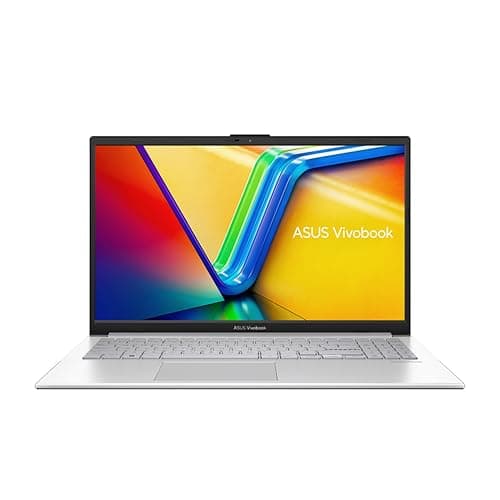
The ASUS Vivobook S 14 S3407QA represents the most compelling value proposition in this entire selection. At its price point, it delivers a 2.8K (2560×1600) IPS display, a 1TB PCIe Gen4 SSD, and a Qualcomm Snapdragon X Plus processor with Copilot+ PC certification, a combination that would have seemed implausible at this price bracket just eighteen months ago. For freelance designers, students in creative disciplines, or professionals who need a capable secondary machine, the Vivobook S 14 punches well above its weight.
The Snapdragon X Plus chip is worth understanding properly. It is an ARM-based processor, which means native app compatibility is broader than it was at the platform's launch but is not yet universal. Adobe Creative Cloud applications including Photoshop, Lightroom and Premiere Pro now run natively on Snapdragon X, and performance in these applications is genuinely impressive for a chip at this price tier. The integrated Qualcomm Adreno GPU handles GPU-accelerated tasks in Lightroom and Photoshop without issue, though it will struggle with heavy 3D rendering or real-time effects-heavy Premiere Pro timelines. For photographers and graphic designers, however, the performance is more than adequate.
The 2.8K IPS panel is a highlight. At 2560×1600, sharpness is excellent on a 14-inch screen, and ASUS has tuned the display for reasonable colour accuracy out of the box. It is not an OLED panel, so contrast ratios and black depth do not match the Samsung Book4 Pro 360, but for colour-critical work in well-lit environments the difference is less dramatic than the spec sheets suggest. The 1TB SSD is a significant advantage over competitors at this price, giving photographers and designers room to store working project files locally without immediately reaching for external storage.
Connectivity includes two USB 4 Type-C ports, two USB 3.2 Type-A ports and an HDMI 2.1 output, which is a strong port selection for a slim 14-inch machine. Battery life on Snapdragon X Plus is a genuine strength: expect 12 to 15 hours of mixed use, making this one of the longest-lasting laptops in this category. The Copilot+ AI features, including live captions and image generation tools, are a bonus for creatives exploring AI-assisted workflows.
Pros
- 1TB PCIe Gen4 SSD offers generous local storage for project files at this price point
- Snapdragon X Plus delivers outstanding battery life, typically 12 to 15 hours of mixed creative use
- 2.8K IPS display provides sharp, colour-accurate output for photo editing and graphic design
Cons
- ARM architecture means some niche creative applications may still lack native Snapdragon X support
- No discrete GPU limits performance in 3D rendering, heavy video effects and GPU-compute tasks
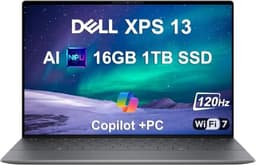
The Dell XPS 13 9345 is the most portable machine in this selection, and it makes a strong case for creative professionals who prioritise mobility and build quality above all else. The 13.4-inch form factor and Snapdragon X Plus processor combine to produce a laptop that is genuinely light and slim while still delivering meaningful performance for everyday creative tasks. Dell's XPS line has long been associated with premium build quality, and the 9345 continues that tradition with a precision-machined aluminium chassis that feels reassuringly solid.
The Snapdragon X Plus chip, shared with the ASUS Vivobook S 14, performs similarly in CPU-bound creative tasks: Photoshop, Lightroom and Illustrator run natively and responsively, and the integrated GPU handles GPU-accelerated operations in these applications without issue. The 13.4-inch FHD+ IPS display at 120Hz is sharp and pleasant to use, though it lacks the resolution of the Vivobook's 2.8K panel and the colour depth of the Samsung's AMOLED. For a machine this size, however, the display is well-suited to on-the-go creative work and client presentations.
Where the XPS 13 9345 stands apart from the Vivobook S 14 is in its premium positioning and Windows 11 Pro operating system, which is relevant for professionals working in enterprise environments or who need BitLocker encryption and advanced remote management features. The 512GB PCIe 4 NVMe SSD is fast, though the capacity is modest for creative professionals with large asset libraries. Battery life on Snapdragon X Plus is a genuine strength here too, with the compact chassis and efficient ARM chip combining to deliver all-day and sometimes beyond-all-day battery performance.
The port selection is minimal, as is typical for a machine this slim. Creative professionals who rely on a wide range of peripherals will need a USB-C hub or dock, which adds cost and desk clutter. The price is notably higher than the Vivobook S 14 for similar core specifications, which means the premium is largely for the XPS brand, build quality and Windows 11 Pro. For professionals who value those attributes and need the most portable creative machine possible, the XPS 13 9345 is an excellent choice.
Pros
- Premium aluminium build quality and compact 13.4-inch form factor make it the most portable creative laptop in this selection
- Snapdragon X Plus delivers exceptional battery life for all-day mobile creative work
- Windows 11 Pro pre-installed suits enterprise and professional security requirements
Cons
- Minimal port selection requires a USB-C hub for professionals using multiple peripherals or external displays
- 512GB SSD is tight for creative professionals with large RAW photo or video libraries
Buying Guide
Display quality: the single most important specification for creatives
For creative professionals, the display is not just a window to your work, it is a tool in its own right. Resolution matters: a 2.8K or higher panel on a 14-inch screen delivers noticeably sharper text and finer detail in illustrations and photo edits compared to a standard 1080p panel. Panel technology matters too: OLED and AMOLED displays like the one on the Samsung Galaxy Book4 Pro 360 offer superior contrast ratios and colour depth compared to IPS panels, which makes them particularly valuable for photographers and illustrators working with dark tones and rich colour gradients. However, IPS panels avoid the risk of image retention that can affect OLED screens when static UI elements are displayed for extended periods, which is worth considering if you spend long hours in the same application layout. Colour gamut coverage, typically expressed as a percentage of sRGB, DCI-P3 or Adobe RGB, is critical for anyone producing work intended for print or professional digital distribution. Look for displays covering at least 95% sRGB or 70% DCI-P3 for serious colour work.
Processor architecture: x86 versus ARM
The arrival of Qualcomm Snapdragon X processors has introduced an important consideration for creative professionals: ARM-based chips offer outstanding battery life and strong performance in natively optimised applications, but not every creative tool is fully optimised for ARM on Windows yet. Adobe's flagship applications now run natively on Snapdragon X, but some specialist plugins, niche audio software and legacy tools may still require emulation, which reduces performance. Intel Core Ultra processors offer broader native application compatibility and stronger GPU-accelerated performance when paired with discrete graphics, at the cost of shorter battery life. Consider which applications are central to your workflow before choosing between platforms.
RAM and storage: plan for your actual project sizes
Creative applications are memory-hungry. Photoshop recommends at least 8GB of RAM but performs significantly better with 16GB or more when working with large layered files. Video editing in Premiere Pro or DaVinci Resolve benefits from 32GB or more when working with 4K or higher footage. For most creative professionals, 16GB is the practical minimum in 2025, and 32GB or 64GB is preferable for video and 3D work. Storage capacity is equally important: RAW files from modern mirrorless cameras can exceed 40MB each, and video projects accumulate gigabytes rapidly. A 512GB SSD is workable with disciplined file management and external storage, but 1TB or more is far more comfortable as a primary drive.
GPU: integrated versus discrete
For photo editing and vector graphic design, an integrated GPU is generally sufficient. For video editing with GPU-accelerated effects, 3D rendering, motion graphics and AI-assisted creative tools, a discrete Nvidia GPU makes a substantial difference to render times and real-time playback performance. If your work involves any of these disciplines regularly, prioritise a machine with a dedicated GPU even if it means compromising on portability or battery life.
Portability and battery life
Creative professionals who work in studios or at fixed desks can prioritise performance and display size without worrying about weight or battery life. Those who work on location, at client sites or in shared workspaces need a machine that lasts a full working day without a charger. ARM-based Snapdragon X machines currently offer the best battery life in this category, typically delivering 12 to 15 hours of mixed use. Intel Core Ultra machines offer 8 to 12 hours depending on workload. High-performance machines with discrete GPUs consume significantly more power and should be treated as portable desktops rather than all-day mobile workstations.
For the majority of creative professionals, the Samsung Galaxy Book4 Pro 360 (2024) 16" is the overall winner. Its Dynamic AMOLED 2X display at 2880×1800 resolution is the best screen in this selection for colour-critical creative work, the included S Pen stylus adds genuine value for illustrators and designers, and the 2-in-1 form factor provides flexibility that no other laptop here can match. The Intel Core Ultra 7 155H handles the full range of everyday creative workloads capably, and the Thunderbolt 4 connectivity ensures compatibility with professional peripherals and displays. If budget is a primary concern, the ASUS Vivobook S 14 S3407QA delivers remarkable value: a 2.8K display, 1TB SSD and excellent battery life at a price that makes professional-grade creative computing accessible to freelancers, students and those building their first serious creative setup. For those who need maximum GPU performance and budget is not a constraint, the MSI Raider 18" is in a class of its own, but it is a specialist tool for specialist workloads rather than a recommendation for most creative professionals.