Choosing the right laptop in 2026 is harder than ever, not because there are too few options, but because the market has fractured into distinct tiers that suit very different needs. Whether you are a student after a lightweight machine for essays and video calls, a creative professional who needs real processing muscle, or a gamer chasing high frame rates on a budget, the laptop you should buy depends heavily on what you actually do day to day. Since last year, the big shifts have been the wider availability of Intel 13th-generation processors in mid-range Windows machines, the continued dominance of Apple Silicon at the premium end, and a wave of affordable Chromebooks that now ship with 8 GB of RAM as standard, making them genuinely usable for more than just browsing. This guide cuts through the noise, covering five carefully chosen picks across a range of price points, from under £250 to over £1,200, so you can spend your money wisely rather than overpaying for specs you will never use.
Quick Verdict
Best Overall: Apple MacBook Air (M1) strikes the best balance of performance, battery life, and build quality for most buyers. Best Value: Lenovo IdeaPad 1 (Ryzen 5 7520U) delivers a surprisingly capable Windows experience with 16 GB of RAM at a price that undercuts most rivals.
The Apple MacBook Air with the M1 chip remains one of the most compelling laptops you can buy in 2026, and it is particularly well suited to students, writers, professionals, and anyone who wants a machine that simply works without fuss. Apple introduced the M1 chip back in late 2020, but the architecture is so well optimised that this machine still outperforms many newer Windows laptops running Intel 12th-generation silicon in everyday tasks, and it does so without a cooling fan, which means it runs completely silently.
The 13-inch Retina display uses an IPS panel with a resolution of 2560x1600, which works out to a pixel density that makes text look crisp and photos genuinely pleasing to edit. Colour accuracy is strong out of the box, covering the P3 wide colour gamut, so creative work is well served even if this is not a professional-grade display. The M1 chip pairs an 8-core CPU with a 7-core GPU, and unified memory means the 8 GB of RAM is shared efficiently between both, giving you more effective performance than the raw number suggests.
Port selection is minimal: you get two Thunderbolt/USB 4 ports and a 3.5 mm headphone jack. That is it. If you need USB-A, HDMI, or an SD card slot, you will need a hub. This is a genuine limitation, but one that many buyers accept given everything else the machine offers. Battery life is extraordinary, regularly hitting 14 to 17 hours of mixed use in real-world conditions, which means most people can leave the charger at home for a full day out.
The keyboard is excellent, with well-spaced keys and satisfying travel. The trackpad is the best in the business, full stop. macOS is intuitive once you adjust from Windows, and the integration with iPhone and iPad is a genuine productivity boost if you are already in the Apple ecosystem. At its current price point, this machine represents exceptional value for what it delivers.
The main caveat is the 256 GB of storage, which fills up faster than you might expect if you store video, music, or large project files locally. If your budget stretches, the 512 GB configuration is worth considering. Also note that macOS will not run Windows-native software without workarounds, so if you rely on specific Windows applications, this may not be the right machine for you.
Verdict: The best all-round laptop for most people who do not need Windows or high-end gaming, combining class-leading battery life, silent operation, and a superb display in a slim, light chassis.
Pros
- Fanless design runs completely silently under everyday workloads
- Exceptional real-world battery life, regularly exceeding 14 hours
- 2560x1600 IPS Retina display with P3 wide colour gamut coverage
Cons
- Only two Thunderbolt ports, no USB-A or HDMI without a hub
- 256 GB base storage fills up quickly for users with large media libraries
The Lenovo IdeaPad 1 powered by AMD's Ryzen 5 7520U is the pick for buyers who want a capable, everyday Windows laptop without spending close to £1,000. At its price point, the headline specification that stands out immediately is the 16 GB of RAM, which is double what most rivals offer at this price and makes a tangible difference when you have a dozen browser tabs open alongside a spreadsheet and a video call. Most budget Windows laptops ship with 8 GB, and you feel the constraint within weeks of regular use.
The Ryzen 5 7520U is built on AMD's 4 nm process node and delivers a meaningful step up from the older Ryzen 5000-series chips found in many competing budget machines. It handles office productivity, web browsing, video streaming, and light photo editing without complaint. The integrated AMD Radeon 610M GPU is not designed for gaming, but it will cope with casual titles and older games at modest settings. The 512 GB NVMe SSD is fast enough for day-to-day use and provides ample space for most users.
The 15.6-inch display runs at 1920x1080 on a TN panel, which is the main compromise at this price. TN panels have narrower viewing angles and less accurate colours than IPS alternatives, so if you frequently share your screen with someone sitting beside you, or if you do any colour-sensitive work, this will be noticeable. For solo use in a fixed position, it is perfectly acceptable for everyday tasks.
Port selection is practical: one USB-C, two USB-A, one HDMI 1.4, one microSD card slot, and a 3.5 mm audio jack. This is a well-rounded set of connections that means most peripherals will plug straight in without an adapter. The machine ships with Windows 11 Home in S mode, which restricts app installation to the Microsoft Store by default. You can switch out of S mode for free, and most buyers should do so immediately to unlock the full Windows experience.
One frequently asked question is whether HP or Lenovo is the better brand. Both are reputable manufacturers with large support networks in the UK. Lenovo tends to score well for keyboard quality and build consistency in the budget segment, while HP often edges ahead on display quality at similar prices. The IdeaPad 1's main disadvantage, a common criticism of Lenovo's budget range, is that the chassis feels plasticky and flex is present in the lid. It is not a premium-feeling machine, but it is solid enough for daily use.
Verdict: The best value Windows laptop in this selection, offering 16 GB of RAM and a fast NVMe SSD at a price that most rivals cannot match, provided you can accept the TN display and plastic build.
Pros
- 16 GB of RAM at this price point is genuinely rare and makes multitasking smooth
- Comprehensive port selection including HDMI, USB-A, USB-C, and microSD
- AMD Ryzen 5 7520U on 4 nm process delivers strong efficiency for the price
Cons
- TN display has narrow viewing angles and weaker colour accuracy than IPS rivals
- Ships in Windows 11 S mode, requiring a manual switch to unlock full functionality
The ASUS ROG Strix G16 is the pick for anyone who wants a serious gaming laptop in 2026 without crossing into four-figure territory at the very top end. It is a machine built unambiguously around performance, and it delivers that in abundance. The combination of an Intel Core i7-14650HX and an NVIDIA GeForce RTX 5060 Laptop GPU puts it in a position to handle virtually any current game at high settings, and the 16-inch FHD+ display with a 165 Hz refresh rate and 3 ms response time ensures that performance translates into a smooth, responsive visual experience.
The 16:10 aspect ratio is a thoughtful choice for a gaming laptop, giving you slightly more vertical screen real estate than the standard 16:9, which is useful both in games and when browsing the web or working in documents. The FHD+ resolution keeps the GPU load manageable, meaning the RTX 5060 can push high frame rates without being asked to render at 4K. The panel type is IPS, which means colours are accurate and viewing angles are wide, a genuine improvement over TN alternatives that were common in gaming laptops a few years ago.
The 16 GB of RAM and 1 TB Gen 4 SSD are appropriate for a machine at this price. The SSD in particular is notably fast, reducing game load times significantly compared to older SATA or Gen 3 NVMe drives. The i7-14650HX is a high-performance mobile chip with a mix of performance and efficiency cores, and it handles demanding workloads including video editing, 3D rendering, and streaming while gaming without throttling under sustained load.
Gaming laptops have inherent trade-offs. This machine is heavy, runs warm under load, and the fans are audible when the GPU is being pushed hard. Battery life when gaming is measured in hours rather than the all-day figures you get from ultrabooks, though for lighter tasks away from a plug it is more reasonable. The ROG Strix line also carries ASUS's Republic of Gamers aesthetic, which includes RGB lighting and angular styling that some buyers love and others find excessive.
For buyers asking which generation of laptop is best in 2026, the answer in the gaming segment is that Intel 13th and 14th generation chips paired with RTX 40 and 50 series GPUs represent the current sweet spot. The ROG Strix G16 sits squarely in that bracket, making it a machine that should remain relevant for several years of gaming ahead.
Verdict: The best gaming laptop in this selection, delivering RTX 5060 performance, a fast 165 Hz IPS display, and a Gen 4 SSD in a package that is expensive but justifiably so for serious gamers.
Pros
- RTX 5060 Laptop GPU handles current games at high settings with headroom to spare
- 165 Hz IPS panel with 16:10 aspect ratio is excellent for both gaming and productivity
- 1 TB Gen 4 NVMe SSD delivers very fast load times for games and large files
Cons
- Fans are loud under sustained gaming load, which can be intrusive in quiet environments
- Battery life drops significantly when the discrete GPU is active during gaming sessions
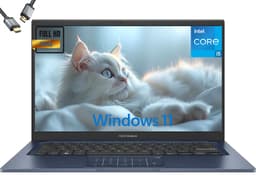
The ASUS Vivobook 14 for 2026 is positioned as a mainstream Windows laptop for students, home workers, and professionals who need a reliable, well-specified machine for everyday productivity. It is not designed for gaming or heavy creative work, but within its intended use case it is impressively well equipped, particularly given that it ships with 16 GB of RAM and a 1 TB NVMe SSD as standard, specifications that were considered premium just two years ago.
The Intel Core i5-1334U is a 13th-generation chip built on Intel's Evo-optimised architecture, combining two performance cores with eight efficiency cores to balance responsiveness and power consumption. In practice, this means the Vivobook 14 handles web browsing, Office applications, video conferencing, and light photo editing comfortably, while also managing battery life more effectively than older quad-core designs. The integrated Intel UHD Graphics are not intended for gaming, but they handle 4K video playback and basic image editing without issue.
The 14-inch FHD display uses an IPS panel, which is a step up from the TN panels found in cheaper machines and means colours are more accurate and viewing angles are wider. This matters if you use your laptop in different positions or share your screen with colleagues. The compact 14-inch form factor makes the Vivobook 14 meaningfully more portable than 15.6-inch alternatives, and the slim chassis keeps weight down for commuters and students carrying it in a bag daily.
The 1 TB NVMe SSD is a genuine highlight at this price. It means you are unlikely to run out of storage in the near future, and the NVMe interface ensures file transfers and application launches are fast. The 16 GB of RAM means you can keep many applications open simultaneously without performance degradation, which is a common frustration on 8 GB machines used for multitasking.
ASUS has a strong reputation for build quality in the Vivobook range, and the 2026 model continues that tradition with a chassis that feels solid without being heavy. The keyboard is comfortable for extended typing sessions, and the trackpad is accurate and responsive. Windows 11 Home is pre-installed, and ASUS typically includes a relatively clean software load without excessive bloatware.
The main limitation is the lack of a discrete GPU, which rules it out for gaming and GPU-accelerated creative work such as video rendering. Port details were not confirmed in the verified specifications for this model, so buyers with specific connectivity requirements should check the full product listing before purchasing.
Verdict: A well-rounded Windows laptop for students and home workers, offering a generous 16 GB of RAM and 1 TB of storage in a portable 14-inch form factor at a mid-range price.
Pros
- 16 GB RAM and 1 TB NVMe SSD are generous specifications for the price bracket
- 14-inch IPS panel offers better colour accuracy and viewing angles than TN alternatives
- Intel Core i5-1334U balances performance and efficiency well for everyday productivity
Cons
- No discrete GPU limits suitability for gaming or GPU-accelerated creative applications
- Priced above some rivals with similar everyday performance for non-gaming tasks
Buying Guide
What to look for when buying a laptop in 2026
Processor generation and architecture
The processor is the single most important component in determining how a laptop will perform over its lifetime. In 2026, buyers should look for Intel 12th generation or newer, AMD Ryzen 5000 series or newer, or Apple M-series chips. Older processors such as Intel 10th generation or AMD Ryzen 3000 series are still functional for light tasks but will feel increasingly slow as software demands grow. Intel's 13th-generation Core i5 and i7 chips, found in machines like the ASUS Vivobook 14 and ROG Strix G16, offer a good balance of performance and efficiency. AMD's Ryzen 5 7520U, found in the Lenovo IdeaPad 1, is built on a 4 nm process and delivers excellent efficiency for everyday tasks. Apple's M1 chip, while technically a 2020 design, remains competitive with much newer x86 processors due to its highly optimised architecture.
RAM: how much do you actually need?
For most users in 2026, 8 GB of RAM is the minimum acceptable specification. It will handle web browsing, email, video streaming, and basic document work, but you will notice slowdowns when multitasking heavily. 16 GB is the sweet spot for students, home workers, and anyone who keeps many applications open simultaneously. If you are doing video editing, 3D work, or running virtual machines, 32 GB is worth considering, though machines with that configuration tend to cost significantly more. Avoid 4 GB configurations entirely for any Windows machine, as the operating system alone consumes a significant portion of that capacity.
Storage type and capacity
NVMe SSDs are the current standard for mid-range and premium laptops, offering significantly faster read and write speeds than older SATA SSDs or eMMC storage. eMMC storage, found in budget Chromebooks, is adequate for ChromeOS but would feel sluggish running Windows. For Windows laptops, aim for at least 256 GB of NVMe SSD storage, though 512 GB is more comfortable for most users and 1 TB is ideal if you store large files locally. For Chromebooks, 64 to 128 GB is typically sufficient given the reliance on cloud storage.
Display quality
IPS panels offer better colour accuracy, wider viewing angles, and generally more pleasant extended use than TN panels. If you are choosing between two otherwise similar laptops, the one with an IPS display is almost always the better choice for everyday use. Resolution matters too: 1920x1080 (Full HD) is the minimum worth accepting on any screen 14 inches or larger. Higher resolutions such as 2560x1600, found on the MacBook Air, look noticeably sharper but demand more from the GPU and reduce battery life slightly.
Battery life expectations
Manufacturer battery life claims are almost always optimistic. Real-world battery life is typically 60 to 75 percent of the quoted figure under mixed use. Apple Silicon machines are the notable exception, frequently matching or exceeding their quoted figures. For a laptop you plan to use away from a desk, aim for a quoted battery life of at least 10 hours to ensure you get a comfortable full working day. Gaming laptops will always have shorter battery life under load due to the power demands of discrete GPUs.
Operating system considerations
Windows 11 remains the most versatile choice for users who need broad software compatibility. macOS is excellent for creative professionals and those in the Apple ecosystem. ChromeOS is ideal for users whose workflow is browser-based and who want a low-maintenance, automatically updated system. The wrong operating system for your workflow will undermine even the best hardware, so be honest about what software you actually need before committing to a platform.
The Apple MacBook Air with the M1 chip is the overall winner in this selection. It delivers the best combination of real-world performance, battery life, display quality, and build quality for the broadest range of users. The fanless design, extraordinary battery endurance, and crisp Retina display make it a machine that is genuinely pleasant to use every day, and the M1 chip remains competitive with much newer processors in everyday tasks. For buyers who need Windows, the Lenovo IdeaPad 1 with the Ryzen 5 7520U and 16 GB of RAM is the best value option, punching well above its price with a specification that most rivals at similar prices cannot match. Gamers should look to the ASUS ROG Strix G16, which brings RTX 5060 performance and a 165 Hz IPS display to a price point that was previously the domain of less capable hardware. Whatever your budget or use case, the right laptop in 2026 is the one that matches your actual workflow rather than the one with the most impressive specification sheet.