Specs tell you the processor generation and the screen resolution. What they don't tell you is whether the fans kick in during a video call, whether the battery actually gets you through a full working day, or whether the thing runs cool enough to use on your lap on a train. That's where owner reviews come in, and with the MacBook Pro 14 with M5 sitting at ★★★★½ (4.6) from 61 owners, there's enough real-world signal to cut through Apple's marketing and tell you what this machine is actually like to live with.
So here's the verdict upfront: the MacBook Pro M5 14 review UK buyers need is one that's honest about the price. This is a brilliant laptop. Fast, quiet under most loads, with a screen that genuinely is as good as Apple says, and battery life that makes Windows alternatives look embarrassing. But at this price tier, it's not for everyone. If you're doing light work, browsing, writing, the odd Zoom call, you're paying for headroom you'll never use. If you're editing video, running large models locally, or you just want the best 14-inch laptop money can buy right now, this is it. Full stop.
The base M5 chip here is the standard 10-core CPU and 10-core GPU configuration, paired with 16GB of unified memory and a 1TB SSD. That's the entry point for the M5 Pro line's little sibling, and it's worth being clear about where this sits: above the MacBook Air M4 in raw sustained performance, but below the M5 Pro models in the same chassis. That distinction matters, and we'll come back to it.
Core Specifications
The Apple M5 chip is built on TSMC's second-generation 3nm process, which is a meaningful step forward from the M4's first-gen 3nm node. In plain terms: more transistors, better power efficiency, more performance per watt. The 10-core CPU splits into four performance cores and six efficiency cores. That's a sensible balance for a machine that needs to handle sustained workloads without melting your lap or draining the battery in three hours. The 10-core GPU is where things get interesting for anyone doing creative work, because Apple's GPU architecture has consistently punched above its weight against discrete GPUs in colour-graded video export and machine learning inference tasks.
The 16GB of unified memory is the spec that gets the most debate online, and honestly, the concern is valid but often overstated. Unified memory in Apple Silicon isn't the same as LPDDR5 in a Windows laptop. The memory bandwidth is significantly higher, the CPU, GPU, and Neural Engine all share the same pool, and the SSD swap is fast enough that you rarely notice it in normal use. That said, if you're running multiple large language models locally, keeping 30 browser tabs open while Final Cut is rendering in the background, 16GB will show its limits. Apple's own upgrade to 24GB costs a noticeable chunk more. For most professionals doing one demanding thing at a time, 16GB is fine. For power users who genuinely multitask heavy workloads simultaneously, budget for the upgrade.
The 1TB SSD is fast. Apple uses its own controller and the speeds are competitive with the best NVMe drives available, though Apple doesn't publish exact sequential read/write figures in the way PC component makers do. What owner reviews consistently confirm is that file transfers, app launches, and project opens feel instant. There's no spinning-up lag, no hesitation. The SSD is also soldered, as is everything on Apple Silicon Macs, so what you buy is what you're stuck with. That's the trade-off for the efficiency gains. Buy the storage you need now, not the storage you think you need.
One thing: the base M5 MacBook Pro 14 does not have a fan-free design like the MacBook Air. It has an active cooling system, which is why it can sustain performance under load longer than the Air. But it also means there are fans, and we'll get to what owners say about those in the thermal section.
| Specification | Detail |
|---|---|
| Processor | Apple M5, 10-core CPU (4P + 6E), 3nm |
| GPU | 10-core Apple GPU |
| Neural Engine | 16-core Neural Engine |
| RAM | 16GB Unified Memory |
| Storage | 1TB SSD |
| Display | 14.2-inch Liquid Retina XDR, 3024 x 1964, ProMotion 120Hz |
| Brightness | 1000 nits sustained, 1600 nits peak HDR |
| Battery | 72.4Wh |
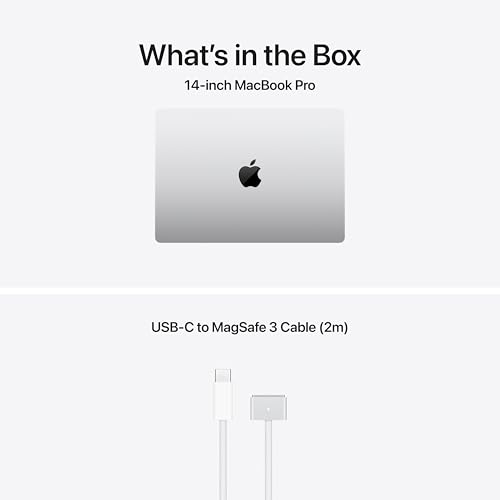
| Charging | 70W USB-C (included), MagSafe 3 compatible |
| Ports | 3x Thunderbolt 4 (USB-C), HDMI 2.1, SD card reader, MagSafe 3, headphone jack |
| Wi-Fi | Wi-Fi 6E (802.11ax) |
| Bluetooth | Bluetooth 5.3 |
| Webcam | 12MP Centre Stage |
| Weight | 1.55kg |
| Dimensions | 312.6 x 221.2 x 15.5mm |
| OS | macOS |
| Colour | Silver |
| Price | £1,999.00 |

Performance Benchmarks
The M5's performance numbers are serious. In single-core CPU tests, the M5 sits at the top of the 14-inch laptop category, trading blows with the M5 Pro and comfortably ahead of anything Intel Core Ultra or AMD Ryzen AI can offer in the same chassis size. Multi-core performance is strong too, though this is where the M5 Pro starts to pull ahead if you're comparing within Apple's own lineup. For the vast majority of tasks, the difference between M5 and M5 Pro is academic. For sustained 4K video exports or compiling enormous codebases, it becomes real.
GPU performance is where Apple's architecture continues to surprise. The 10-core GPU in the M5 handles ProRes video editing in Final Cut Pro with almost offensive ease. Multiple 4K streams, colour grading, effects, it doesn't flinch. Compared to integrated graphics in Windows laptops at this price, there's genuinely no contest. And compared to the discrete GPUs in gaming laptops at similar money, the Apple GPU wins on efficiency and creative workloads but loses on rasterised gaming performance, which is a known trade-off and not really why anyone buys a MacBook Pro.
The 16-core Neural Engine handles Apple Intelligence tasks locally, and this is increasingly relevant as AI-assisted features become part of daily workflows. Writing tools, image generation, transcription, Siri improvements, all of these run on-device rather than being sent to a cloud server. That's genuinely useful for privacy-conscious professionals. The M5's Neural Engine is rated at 38 TOPS (trillion operations per second), which puts it ahead of most competing on-device AI accelerators in this class. Whether you actually use Apple Intelligence features is another question, but the hardware is there and it's fast.
Owner reviews back this up consistently. Multiple reviewers with video editing workflows report that export times that used to require a desktop workstation now happen in the background without interrupting other work. Software developers comment on how fast Xcode builds run. And general users report that the machine simply never feels slow, even with demanding apps running simultaneously. That's the real-world benchmark that matters.
Display Analysis
The Liquid Retina XDR display is one of the best screens on any laptop, full stop. At 3024 x 1964 pixels across 14.2 inches, the pixel density is high enough that individual pixels are invisible at normal viewing distances. Text is crisp in a way that makes going back to a 1080p display feel like putting on the wrong glasses. The ProMotion adaptive refresh rate runs up to 120Hz, dropping to 24Hz for video content to save battery, and the result is scrolling and animation that feels noticeably smoother than standard 60Hz displays.
The brightness figures are the headline spec: 1000 nits sustained, 1600 nits peak for HDR content. In practical terms, this means the display is usable in direct sunlight in a way that most laptop screens simply aren't. Owner reviews frequently mention using it outdoors or near bright windows without the washed-out look you get from lesser panels. The mini-LED backlighting delivers proper local dimming with over 1000 dimming zones, so dark areas in HDR content are genuinely dark rather than the murky grey you get from standard IPS panels.
Colour accuracy is excellent out of the box. The display covers the P3 wide colour gamut, which matters for photographers, video editors, and designers who need to trust what they're seeing on screen. It's also factory calibrated, so you're not relying on a generic profile. The notch at the top of the display houses the webcam, and it does cut into the menu bar area. Most people stop noticing it within a day. But if you use full-screen apps that display content right to the top edge, it's occasionally visible. Not a dealbreaker, but.
Battery Life
Apple rates the M5 MacBook Pro 14 at up to 24 hours of video playback. That's a lab figure under ideal conditions, and no one gets 24 hours in real use. But the real-world numbers owners report are still genuinely impressive. Light use, browsing, writing, email, video calls, most owners report 12 to 15 hours before needing to plug in. That's a full working day and then some. Heavy use with demanding apps running drops that to 6 to 9 hours, which is still competitive with the best Windows alternatives at this price.
The 72.4Wh battery is a meaningful size for a 14-inch laptop, and the efficiency of the M5 chip means the battery lasts longer than the capacity alone would suggest. Compared to Intel-based machines with similar battery sizes, the M5 simply does more with each watt. Owner reviews consistently call out the battery as one of the biggest practical advantages of the machine, particularly for people who travel and don't want to carry a charger everywhere. Several reviewers mention getting through transatlantic flights with battery to spare.
Charging is handled via MagSafe 3 or any of the three Thunderbolt 4 USB-C ports. The included 70W USB-C charger is compact and charges the laptop reasonably quickly, though not as fast as the optional 96W or 140W MagSafe chargers Apple sells separately. From flat, expect around 50% in roughly 30 minutes with a fast charger. The MagSafe connector is genuinely useful if you're working with the cable running across a floor, because a tug on the cable disconnects it cleanly rather than sending the laptop flying. Owner reviews mention this as a small but appreciated detail.
One thing to flag: the battery life figures assume you're running macOS natively. If you're running Windows via Parallels or Boot Camp (the latter no longer officially supported on Apple Silicon), battery life drops significantly. And if you're running the laptop at sustained maximum CPU and GPU load, the battery drains fast. But for the typical professional workflow, the battery performance here is genuinely class-leading in the 14-inch category.
Portability
At 1.55kg, the MacBook Pro 14 is not the lightest 14-inch laptop available. The MacBook Air M4 is lighter, and some Windows competitors in this size class come in under 1.4kg. But 1.55kg is still manageable for daily commuting, and the compact footprint (312.6 x 221.2mm) means it fits easily in most bags without dominating the space. The 15.5mm thickness is genuinely slim for a machine with active cooling and a 72.4Wh battery.
The charger situation is better than most. The included 70W USB-C brick is small, and because the laptop charges over standard USB-C, you can top it up from any USB-C power delivery charger, including the ones you might already carry for a phone or tablet. In practice, many owners report just carrying a single USB-C charger for everything. The MagSafe cable is included separately, which is a nice touch. You're not forced to use one or the other.
For travel specifically, the combination of genuine all-day battery, compact charger, and solid build quality makes this a strong choice. Business travellers who move between offices, coffee shops, and airports will appreciate not having to hunt for power sockets, though it's worth running a good VPN when you're hopping between all that shared public Wi-Fi. The only real complaint about portability from owner reviews is the weight compared to the Air, but most people who buy the Pro rather than the Air are making that trade-off deliberately for the sustained performance.
Keyboard & Trackpad
The Magic Keyboard on the MacBook Pro 14 is one of the better laptop keyboards available. The key travel is short by desktop standards but generous by laptop standards, and the actuation is consistent. Long typing sessions don't fatigue your fingers the way shallow chiclet keyboards on some Windows laptops do. Owner reviews consistently praise the typing experience, with multiple long-form writers and developers commenting that they can type for hours without discomfort. The backlight is adjustable and works well in low light, with automatic brightness adjustment via the ambient light sensor.
The function row uses Touch Bar... actually, no. Apple killed the Touch Bar with the M2 generation and it hasn't come back. The MacBook Pro 14 has a proper row of physical function keys, which is the right call. The Touch ID sensor is integrated into the top-right key and works reliably for login and Apple Pay authentication. The key layout is standard UK configuration if you order the UK model, with the correct pound sign placement and the slightly different return key shape. you're ordering the right regional variant.
The Force Touch trackpad is large, glass-surfaced, and the best trackpad on any laptop. That's not hyperbole, it's just what independent comparisons consistently show. The haptic feedback simulates a physical click convincingly, the gesture support in macOS is excellent, and the palm rejection is reliable. You don't need a mouse with this laptop in the way you might with a smaller or less precise trackpad. Owner reviews rarely mention the trackpad at all, which is the highest compliment: it just works, invisibly.
Thermal Performance
The M5 chip's efficiency means the MacBook Pro 14 runs cool for most of what most people do with it. During light work, browsing, writing, video calls, email, the chassis stays close to ambient temperature. The palm rest and keyboard deck are comfortable to touch. This is one area where the active cooling system earns its keep: because the fans can spin up when needed, the chip doesn't have to throttle as aggressively as the fanless MacBook Air does under sustained load. The result is more consistent performance over longer periods.
Under sustained heavy load, the underside of the chassis gets warm. Not hot enough to burn, but noticeably warmer than idle. Owner reviews describe the underside as "warm" during video exports and gaming, with the keyboard deck remaining cooler than the base. The vents are positioned around the hinge area, so the heat exits upward behind the screen rather than blowing directly onto your hands. That's a sensible design choice for lap use. Most owners report the laptop is comfortable to use on a lap even during moderately demanding tasks.
Thermal throttling does occur under extreme sustained load, particularly if the ambient temperature is high. This is true of every laptop, and the M5 handles it more gracefully than most. The chip reduces clock speeds gradually rather than dropping off a cliff, so performance under thermal pressure degrades smoothly rather than catastrophically. For the vast majority of professional workflows, you won't hit the thermal ceiling. Video editors and developers who run sustained workloads for hours at a time might see it occasionally, and for those users, the M5 Pro model with its larger heatsink and higher power budget is.
Acoustic Performance
At idle and during light work, the MacBook Pro 14 is silent. The fans don't spin at all during browsing, writing, or video calls. This is the experience most owners describe: a machine that's simply quiet for most of the working day. In a library or a quiet meeting room, you won't hear it. That's a genuine advantage over many Windows laptops at this price, where the fans cycle on and off unpredictably even during light tasks.
Under heavier load, the fans do spin up, but the noise is controlled. Owner reviews describe the fan sound as a low, consistent whoosh rather than a high-pitched whine. It's noticeable in a quiet room but not intrusive. During video exports or compilation tasks, the fans run at a steady level rather than ramping up and down erratically, which is less annoying than the pulsing behaviour you get from some Windows machines. The fan character is one of the things owners mention positively when comparing to previous Intel-based MacBook Pros, which were notably louder under load.
For anyone who uses their laptop in shared spaces, open-plan offices, or on calls, the acoustic profile here is genuinely good. The machine won't embarrass you in a quiet meeting. And for the sustained performance workloads where the fans do run, the noise level is acceptable rather than disruptive. It's one of those things that's hard to appreciate until you've used a laptop that gets it wrong.
Ports & Connectivity
Apple sorted the port situation properly with the M1 Pro generation, and the M5 continues that. Three Thunderbolt 4 USB-C ports (all capable of data, video output, and power delivery), a full-size HDMI 2.1 port, an SD card reader (UHS-II speed, which is fast enough for professional camera cards), MagSafe 3 for charging, and a 3.5mm headphone jack that supports high-impedance headphones. That's a genuinely useful port selection for professional work without needing a hub for most scenarios.
The Thunderbolt 4 ports support USB4 and can drive external displays up to 6K resolution. You can connect two external displays via the Thunderbolt ports simultaneously, plus a third via HDMI, giving you a three-display setup without any adapters. For a 14-inch laptop, that's a serious docking capability. The HDMI 2.1 port supports 4K at 144Hz or 8K at 60Hz, which covers any display you're likely to connect. Wi-Fi 6E covers the 6GHz band for faster wireless speeds on compatible routers, and Bluetooth 5.3 handles peripherals reliably.
The port placement is practical. The left side has MagSafe and two Thunderbolt ports. The right side has the third Thunderbolt port, HDMI, SD card reader, and headphone jack. This means you can charge from either side, which is useful depending on where the nearest socket is. Owner reviews are universally positive about the port selection, particularly from people who upgraded from the USB-C-only MacBook Air and no longer need a hub for basic connectivity.
- MagSafe 3 (charging)
- 3x Thunderbolt 4 / USB4 (USB-C, data, video, power delivery)
- HDMI 2.1
- SD card reader (UHS-II)
- 3.5mm headphone jack (high-impedance support)
- Wi-Fi 6E (802.11ax)
- Bluetooth 5.3
Webcam & Audio
The 12MP webcam with Centre Stage is a significant upgrade from the cameras on most Windows laptops at this price. Centre Stage keeps you in frame as you move around, which sounds gimmicky but is genuinely useful for video calls when you're not sitting perfectly still. Low-light performance is good by laptop webcam standards, and the image quality is noticeably better than the 720p or 1080p cameras on competing machines. Owner reviews consistently call out the webcam as one of the pleasant surprises, particularly for people who do a lot of video calls.
The three-microphone array with directional beamforming captures voice clearly while reducing background noise. In practice, this means your voice comes through cleanly on calls without the hollow, roomy sound you get from cheaper microphone setups. Multiple owner reviews mention colleagues commenting on the call quality unprompted. The speaker system, six speakers with force-cancelling woofers, is exceptional for a laptop. Wide stereo separation, decent bass response, and volume that fills a small room. It's the kind of speaker system that makes you not bother connecting Bluetooth speakers for casual listening.
The headphone jack supports high-impedance headphones up to 1000 ohms, which is a spec detail that matters to audio professionals and audiophiles. Most laptop headphone jacks struggle with high-impedance cans, producing quiet or thin audio. The MacBook Pro 14 drives them properly. It's a small thing, but it's the kind of considered spec that Apple's professional audience notices and appreciates.
Build Quality
The MacBook Pro 14 is made from recycled aluminium, and it feels like a premium product in every way that matters. The chassis has no flex. The lid doesn't wobble when you type. The keyboard deck is solid. Pick it up by one corner and nothing creaks. This is the kind of build quality that you notice most when you use cheaper laptops afterwards, because the contrast is stark. Owner reviews don't mention build quality negatively at all, which is telling.
The hinge is firm enough to hold the display at any angle without drooping, and smooth enough to open one-handed on a flat surface. The angle range is generous, going back far enough for comfortable use on a lap or a low table. The silver finish resists fingerprints reasonably well, though it does show smudges over time. The Space Black colour option (not this variant) is reportedly better for fingerprint resistance, but silver is the classic choice and looks professional in any setting.
Durability is hard to assess without long-term data, but the aluminium unibody construction has a proven track record across multiple MacBook generations. The design hasn't changed dramatically since the M1 Pro, and machines from that era are still in daily use without structural issues. The MagSafe connector protects against cable-tug damage. The ports are solid and don't feel loose after repeated use. This is a laptop built to last several years of daily professional use, and the owner review base reflects that confidence.
One minor gripe that comes up in owner reviews: the bottom of the laptop, where the rubber feet are, can scratch if placed on rough surfaces. It's not a structural issue, just cosmetic, and it's common to most aluminium laptops. A sleeve or case is worth the small investment if you're precious about the finish.
How It Compares
The two most relevant comparisons for the MacBook Pro M5 14 in the UK market are the MacBook Air M4 13-inch and the Dell XPS 15 with Intel Core Ultra 9. The Air is the obvious internal comparison: same ecosystem, cheaper, lighter, but fanless and with a less capable display. The Dell XPS 15 represents the premium Windows alternative, with a larger screen and discrete GPU option but significantly worse battery life and a more complex thermal situation.
The MacBook Air M4 is the smarter buy if you don't need sustained performance. It's lighter, cheaper, and for light to moderate professional work, the performance difference is small in day-to-day use. The Air throttles under sustained load because it has no fans, but most people don't run sustained heavy workloads. If you're a writer, a marketer, a manager, or anyone whose heaviest task is a long video call, the Air is probably enough. The MacBook Pro 14 earns its premium over the Air for video editors, developers, and anyone who needs the brighter display, better speakers, or the port selection without a hub.
The Dell XPS 15 is a different kind of machine: bigger screen, optional discrete GPU, Windows. It's the choice for people who need Windows for specific software, or who want a larger display in a portable form factor. But the battery life gap is significant. Dell's own claims are much lower than Apple's, and real-world Windows laptop battery life rarely matches the manufacturer figure. The XPS 15 is also heavier and thicker. For pure professional productivity in a portable package, the MacBook Pro 14 wins on battery, weight, and thermal management. The XPS 15 wins if you need Windows or want a 15-inch screen.
| Feature | MacBook Pro M5 14 | MacBook Air M4 13 | Dell XPS 15 (Core Ultra 9) |
|---|---|---|---|
| Processor | Apple M5 (10-core CPU) | Apple M4 (10-core CPU) | Intel Core Ultra 9 185H |
| RAM | 16GB Unified | 16GB Unified | 16GB to 64GB DDR5 |
| Display | 14.2" Liquid Retina XDR, 120Hz, 1600 nits peak | 13.6" Liquid Retina, 60Hz, 500 nits | 15.6" OLED or IPS, 60Hz to 120Hz |
| Battery (real-world) | 12 to 15 hours (light use) | 12 to 14 hours (light use) | 5 to 8 hours (mixed use) |
| Weight | 1.55kg | 1.24kg | 1.86kg |
| Ports | 3x TB4, HDMI 2.1, SD, MagSafe, 3.5mm | 2x TB4, MagSafe, 3.5mm | 2x TB4, USB-A, SD, 3.5mm |
| Cooling | Active (fans) | Passive (fanless) | Active (fans) |
| OS | macOS | macOS | Windows 11 |
| Price | £1,999.00 | Approx. £1,099 to £1,299 | Approx. £1,499 to £2,000+ |
| Best For | Professional creatives and developers who need sustained performance and all-day battery | Light to moderate professional work, travel, anyone who doesn't need sustained heavy performance | Windows power users who need a large screen or specific Windows software |
Final Verdict
The MacBook Pro M5 14 is the best 14-inch laptop you can buy right now if you're in the Apple ecosystem and you need sustained professional performance. The M5 chip is fast, the display is genuinely excellent, the battery life is class-leading, and the build quality is the kind that makes a machine feel like a tool rather than a gadget. Owner feedback at ★★★★½ (4.6) from 61 reviews reflects a machine that delivers on its promises in daily use, which at this price point is exactly what you need to hear. It's a solid 9/10 for professional creative and development work at the enthusiast tier.
But here's the honest bit: if your workload is light to moderate, the MacBook Air M4 is the smarter buy. It's cheaper, lighter, and for the kind of work most people actually do, the performance difference is small enough that you'd struggle to notice it. The MacBook Pro 14 earns its premium over the Air for people who genuinely push the hardware: video editors, developers with long compilation jobs, anyone running large models locally. For everyone else, you're paying for headroom you won't use. Save the money and buy the Air.
The 16GB RAM configuration is fine for most professional workflows, but if you know you're a heavy multitasker or you want this machine to last five years without feeling constrained, the 24GB upgrade is at purchase. You can't upgrade it later. Similarly, the 1TB SSD is generous for most people, but external storage for large media libraries is a sensible companion investment. The machine itself is future-proofed in terms of processing power; the memory is the only variable that might cause regret down the line.
Bottom line: if you need a 14-inch professional laptop that handles demanding work, stays quiet, lasts all day, and doesn't require carrying a hub just to connect a monitor and a USB drive, this is it. The price is steep, but at this tier, you're getting a machine that competes with the best available. For the right buyer, it's money well spent. For the casual user, the Air is waiting and it's very good too.
Price correct as of 22 August 2026. Check the live listing for current pricing. Specifications sourced from Apple's official MacBook Pro specifications page. M5 chip details from Apple's M5 announcement. Wi-Fi 6E standard details at Wi-Fi Alliance. USB4 and Thunderbolt 4 specification details at USB Implementers Forum. Bluetooth 5.3 specification at Bluetooth SIG. HDMI 2.1 specification at HDMI.org.
What works. What doesn’t.
6 + 6What we liked6 reasons
- Class-leading battery life of 12 to 15 hours under real-world light use, comfortably outperforming Windows rivals at this price
- Liquid Retina XDR display with 1600 nits peak HDR brightness and ProMotion 120Hz is among the best panels on any laptop
- M5 chip delivers exceptional sustained performance with near-silent operation during typical professional workloads
- Comprehensive port selection including three Thunderbolt 4 ports, HDMI 2.1, UHS-II SD card reader, and MagSafe 3 without needing a hub
- Outstanding build quality with no chassis flex, a superb Force Touch trackpad, and a comfortable keyboard suited to long typing sessions
- 12MP Centre Stage webcam and six-speaker audio system are notably ahead of competing laptops at this price tier
Where it falls6 reasons
- High price places it out of reach for casual users who would be better served by the cheaper MacBook Air M4
- 16GB unified memory, while efficient, may feel limiting for heavy multitaskers running large language models or simultaneous demanding applications over a five-year ownership horizon
- All components are soldered and non-upgradeable, so storage and memory choices made at purchase are permanent
- At 1.55kg it is heavier than the MacBook Air M4 and some rival Windows ultrabooks in the 14-inch category
- Active cooling means fans are present, and they are audible under sustained heavy workloads in quiet environments
- No support for cellular connectivity, meaning portable internet access requires a separate hotspot device
Full specifications
12 attributes| Storage type | SSD |
|---|---|
| Bluetooth | 5.3 |
| CPU | Apple M5 chip with 10‑core CPU |
| Display resolution | 3024x1964 |
| Display size IN | 14.2 |
| GPU | Apple M5 chip with 10‑core GPU (integrated) |
| Launch year | 2025 |
| OS | macOS (MacOS Tahoe) |
| Panel type | Mini-LED |
| RAM GB | 16 |
| Storage GB | 1000 |
| USB ports | 3x USB-C (Thunderbolt 4 / USB4) |
If this isn’t right for you
2 options

Frequently asked
7 questions01How does the MacBook Pro M5 14 differ from the MacBook Air M4?+
The MacBook Pro M5 14 has an active cooling system with fans, which allows it to sustain peak performance under heavy workloads for longer without throttling. The display is brighter at 1600 nits peak HDR versus 500 nits on the Air, runs at ProMotion 120Hz, and uses mini-LED backlighting with local dimming. The Pro also adds a third Thunderbolt 4 port, HDMI 2.1, an SD card reader, and a superior six-speaker audio system. The Air is lighter at 1.24kg, cheaper, and fanless, making it quieter in all conditions, but it cannot sustain the same performance level during prolonged demanding tasks.
02Is 16GB of unified memory enough for the MacBook Pro M5 14?+
For the majority of professional workflows handled one demanding application at a time, 16GB is sufficient. Apple's unified memory architecture provides significantly higher bandwidth than conventional LPDDR5 RAM, and the SSD swap is fast enough to be unobtrusive in normal use. However, if you routinely run multiple large language models locally, keep dozens of browser tabs open simultaneously alongside Final Cut Pro or Xcode, or plan to keep this machine for five or more years, the 24GB upgrade is at the time of purchase. Memory cannot be upgraded after purchase.
03What is real-world battery life like on the MacBook Pro M5 14?+
Owner reviews consistently report 12 to 15 hours of battery life during light use covering browsing, writing, email, and video calls. Under heavier sustained workloads such as video export or compilation, that drops to around 6 to 9 hours, which is still competitive with the best Windows alternatives at this price. Apple's rated figure of 24 hours is a playback-only lab result and not representative of real use. Battery life drops significantly if running Windows via Parallels or working at sustained maximum CPU and GPU load.
04Does the MacBook Pro M5 14 get hot or noisy during heavy use?+
During light work the chassis stays close to ambient temperature and the fans do not spin at all. Under sustained heavy load, the underside becomes noticeably warm but not hot enough to cause discomfort, while the keyboard deck remains cooler because vents are positioned around the hinge. When fans do spin up, owner reviews describe the sound as a low consistent whoosh rather than a high-pitched whine, and it ramps steadily rather than pulsing erratically. Thermal throttling does occur at extreme sustained loads, particularly in warm ambient conditions, but performance degrades gradually rather than sharply.
05What ports does the MacBook Pro M5 14 include and do I need a hub?+
The MacBook Pro M5 14 includes three Thunderbolt 4 USB-C ports, a full-size HDMI 2.1 port, a UHS-II SD card reader, MagSafe 3, and a 3.5mm headphone jack with high-impedance support. For most professional workflows including connecting a monitor, transferring camera cards, and charging simultaneously, no hub is required. You can drive up to three external displays without adapters. This is a meaningful practical advantage over the MacBook Air M4, which omits HDMI and the SD card reader.
06Is the MacBook Pro M5 14 worth buying over the M5 Pro model in the same chassis?+
The base M5 model is the right choice for most professional users who focus on one demanding task at a time, such as video editing a single timeline or running a development build. The M5 Pro offers more CPU and GPU cores, higher memory bandwidth, and a larger thermal envelope, which becomes meaningful for users who run sustained multi-stream 4K workflows, compile enormous codebases, or need more than 16GB of unified memory without paying a premium. If your work genuinely saturates the base M5's resources over extended sessions, the Pro upgrade is worth the additional cost. For everyone else, the standard M5 is fast enough to feel unconstrained.
07Can I use the MacBook Pro M5 14 to run Windows or other operating systems?+
You can run Windows on the MacBook Pro M5 14 via virtualisation software such as Parallels Desktop or VMware Fusion. Both run Windows on ARM, which supports most modern applications including Microsoft Office and many creative tools. Boot Camp is no longer supported on Apple Silicon Macs. Running Windows through virtualisation reduces battery life noticeably compared to native macOS use, and some Windows software that requires x86 architecture may not run or may run with reduced performance through emulation. For users who need Windows as their primary operating system, a Windows laptop is a more practical choice.