Buying a laptop with a decade-long lifespan in mind is a very different exercise from picking the cheapest machine on the shelf. You need hardware that will handle software bloat five years from now, a build quality that survives daily use, and a manufacturer that actually pushes operating system updates. Since last year, Apple Silicon has matured further, Intel's 13th-generation chips have become more affordable, and AMD's Ryzen 7000 series has landed in mainstream price brackets, meaning there are now genuinely strong long-term options at every budget. This guide is for students, home workers, and small-business owners who want to buy once and buy well, rather than replacing a machine every three or four years. We have selected five laptops from the catalogue that offer the best combination of processing headroom, build quality, software longevity, and repairability prospects for UK buyers in 2025.
Quick Verdict
Best Overall: Apple MacBook Air (M1), Apple Silicon's efficiency, macOS update longevity, and fanless reliability make it the single most future-proof machine on this list for most people. Best Value: Lenovo IdeaPad 1 (Ryzen 5 7520U), 16 GB RAM, a modern AMD processor, and a sub-£600 price point give it more headroom than almost anything else at this price.
The Apple MacBook Air with M1 remains one of the most compelling long-term laptop purchases available in the UK, and its case for a ten-year lifespan is surprisingly strong. Apple typically supports its Mac hardware with full macOS updates for seven to eight years after release, and the M1 chip's architecture is so far ahead of what most users actually need day-to-day that it will not feel slow for a very long time. The fanless thermal design means there are no cooling fans to clog, fail, or degrade over years of use, which removes one of the most common hardware failure points in portable computers.
The M1 chip pairs four high-performance cores with four efficiency cores, delivering snappy responsiveness for office work, video editing, photo processing, and web browsing, all while sipping battery power. Apple quotes up to 18 hours of battery life, and real-world usage typically lands between 10 and 14 hours, which means the battery will degrade more slowly than on machines that need recharging twice a day. The 13-inch Retina display runs at 2560×1600 on an IPS panel, which is sharp enough to remain comfortable for reading and creative work for years without feeling outdated.
The 256 GB SSD is the one area where buyers should think carefully. If you plan to store large video libraries or use the machine as your only computer, 256 GB will feel tight within a few years. Cloud storage and external drives can offset this, but it is worth noting. The 8 GB of unified memory is soldered and cannot be upgraded, so you are committing to 8 GB for the life of the machine. For most productivity tasks this is adequate, but power users should consider whether it is enough. Connectivity is limited to two Thunderbolt/USB 4 ports and a 3.5 mm jack, so a hub is likely needed for most desk setups.
Who it suits: home workers, students, writers, and anyone who values reliability and long software support over raw power. The macOS ecosystem, iCloud integration, and Apple's track record of long update cycles make this the single most future-proof choice on this list for non-gaming use cases. The verdict: the best all-round long-term laptop for most UK buyers.
Pros
- Apple Silicon architecture provides years of performance headroom for everyday tasks
- Fanless design eliminates the most common hardware failure point in laptops
- macOS update support typically extends seven to eight years after release
Cons
- 256 GB SSD will feel restrictive within a few years without external storage
- Only two Thunderbolt ports means a hub is essential for most desk setups
Gaming laptops are not always the obvious choice when thinking about longevity, but the ASUS ROG Strix G16 (2025) makes a strong case. The Intel Core i7-14650HX is a high-performance desktop-class mobile processor with six performance cores and eight efficiency cores, giving it substantially more compute headroom than any mainstream productivity chip. Paired with an NVIDIA GeForce RTX 5060 Laptop GPU, this machine can handle the most demanding games and creative applications available today, and the GPU's architecture is modern enough that it should remain capable for several years of gaming at high settings.
The 16-inch FHD+ display runs at 165 Hz with a 3 ms response time on a 16:10 panel, which is a genuinely premium specification. The 16:10 aspect ratio gives more vertical screen space than the standard 16:9, which is useful for productivity as well as gaming. The 1 TB Gen 4 SSD provides ample storage without needing to manage space carefully, and 16 GB of RAM is the current sweet spot for gaming and content creation workloads.
The honest caveat with any gaming laptop is thermals. High-performance chips generate significant heat, and the fans and thermal paste will degrade over time. ASUS ROG laptops are generally well-regarded for repairability, with accessible internals that allow RAM and storage upgrades, and some models allow thermal paste replacement. The battery life will be modest under gaming loads, typically three to five hours, though lighter tasks will be more efficient. At over £1,200, this is a significant investment, but for someone who wants a machine that can handle demanding workloads for a decade, the raw performance reserves here are unmatched on this list.
Who it suits: gamers, video editors, 3D artists, and power users who need sustained heavy performance and are willing to accept a heavier, less portable machine. The verdict: the most future-proof choice for demanding workloads, with the caveat that thermal management will require periodic maintenance.
Pros
- RTX 5060 GPU provides substantial headroom for demanding games and creative software for years to come
- 1 TB Gen 4 SSD and 16 GB RAM are generous specifications that will not feel limiting quickly
- 16:10 FHD+ 165 Hz display is a premium panel suitable for both work and play
Cons
- Thermal paste and cooling fans will require periodic maintenance to sustain peak performance over a decade
- Battery life under load is short, making it less suitable as a portable daily driver
The ASUS Vivobook 14 (2026 edition) is a strong productivity-focused choice for buyers who want a compact, lightweight machine with enough RAM and storage to remain useful for a long time. The Intel Core i5-1334U is a 13th-generation chip with two performance cores and eight efficiency cores, designed specifically for thin and light laptops where thermal headroom is limited. It is not a powerhouse, but it handles office applications, video calls, light photo editing, and web browsing with ease, and the efficiency architecture means it does so without excessive battery drain.
The headline specification that makes this machine compelling for long-term ownership is the combination of 16 GB RAM and a 1 TB NVMe SSD. Most laptops at this price point ship with 8 GB and 512 GB, which can feel limiting within three to four years as software grows more demanding. Having 16 GB from day one means the machine will handle multitasking and browser-heavy workflows without strain for considerably longer. The 1 TB NVMe SSD provides room for a growing library of files, applications, and media without constant management.
The 14-inch FHD IPS display is a good everyday panel, sharp and colour-accurate enough for office and creative work. Windows 11 Home is pre-installed, and Microsoft has committed to supporting Windows 11 until at least 2031, with the expectation that Windows 12 will follow. The compact 14-inch form factor and relatively light build make it a practical daily carry. ASUS Vivobook machines have a reasonable reputation for build quality at this price tier, though they are not premium-grade aluminium builds.
Who it suits: students, home workers, and small-business users who want a portable, well-specified Windows machine that will not need replacing for many years. The verdict: the best-specified Windows productivity laptop on this list for the price, with 16 GB RAM and 1 TB storage giving it real longevity credentials.
Pros
- 16 GB RAM and 1 TB NVMe SSD are generous specifications that extend useful lifespan significantly
- Compact 14-inch form factor makes it practical for daily commuting and travel
- Intel 13th-generation efficiency architecture balances performance and battery life well
Cons
- Integrated graphics only, so it cannot handle demanding games or GPU-accelerated creative tasks
- Build quality is mid-range plastic rather than premium aluminium, which may show wear over a decade
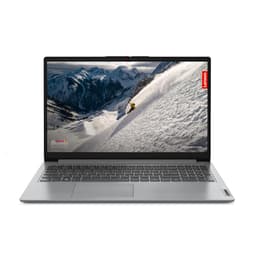
The Lenovo IdeaPad 1 with the AMD Ryzen 5 7520U processor is the best-value long-term laptop on this list. At under £600, it ships with 16 GB of RAM, which is genuinely unusual at this price point and is the single most important specification for longevity. Software memory requirements have roughly doubled every five to six years, and having 16 GB today means this machine will handle the demands of the early 2030s without feeling starved. The 512 GB NVMe SSD is a respectable size for everyday use, though heavy media users may want to supplement it with external storage.
The AMD Ryzen 5 7520U is a 4 nm architecture chip, which gives it strong energy efficiency and respectable multi-core performance for productivity tasks. AMD's Radeon 610M integrated graphics are capable of light gaming and media playback, though not demanding 3D titles. The 15.6-inch Full HD display is a TN panel rather than IPS, which means viewing angles and colour accuracy are not as strong as on the MacBook Air or Vivobook, but brightness and sharpness are adequate for everyday use.
Connectivity is practical: one USB-C, two USB-A ports, HDMI 1.4, a microSD slot, and a 3.5 mm audio jack cover most everyday needs without requiring a hub. The machine ships with Windows 11 Home in S mode, which restricts app installation to the Microsoft Store by default. This is easily switched off in settings, but it is worth being aware of. Lenovo's IdeaPad range has a solid reputation for reliability in the budget segment, and the brand's global service network means repairs and parts are generally accessible in the UK.
Who it suits: budget-conscious buyers, students, and home workers who want the maximum RAM headroom for the lowest outlay. The verdict: the best-value long-term purchase on this list, with 16 GB RAM giving it a meaningful advantage over similarly priced competitors.
Pros
- 16 GB RAM at under £600 is exceptional value and provides real multi-year headroom
- AMD Ryzen 5 7520U on 4 nm architecture delivers strong efficiency for everyday tasks
- Good port selection including HDMI and microSD reduces the need for additional accessories
Cons
- TN display panel has narrower viewing angles and weaker colour accuracy than IPS alternatives
- Windows 11 S mode requires manual switching off before installing third-party applications
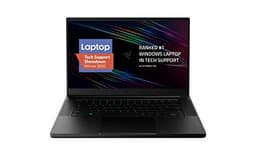
The Razer Blade 15 Base (2020) is a premium gaming laptop with a build quality that genuinely sets it apart from the rest of this list. The CNC-machined aluminium chassis is one of the most robust in the laptop industry, and Razer's build standards have historically produced machines that remain physically sound for many years of daily use. For buyers who want a premium-feeling machine that will not creak, flex, or fall apart, the Blade 15 is the standout choice.
The Intel Core i7-10750H is a 10th-generation six-core processor, which remains capable for gaming and content creation workloads, though it is now a few generations behind current chips. The NVIDIA GeForce RTX 2070 Max-Q with 8 GB of VRAM is still a strong GPU for 1080p gaming and GPU-accelerated creative tasks, though it will struggle with the most demanding titles at high settings as the decade progresses. The 15.6-inch FHD IPS panel at 144 Hz is a quality display for both gaming and everyday use.
The 16 GB RAM and 512 GB M.2 NVMe SSD are solid specifications, and importantly, the Blade 15 allows RAM and storage upgrades, which is a significant advantage for long-term ownership. If 512 GB becomes insufficient in five years, you can swap in a larger drive. The port selection is generous: three USB-A ports, one Thunderbolt 3 USB-C, HDMI, Ethernet, and a 3.5 mm jack, covering virtually every peripheral need. Battery life is limited under gaming loads, but the build quality and upgradeability make it a strong long-term investment for the right buyer.
The price is the significant caveat: at over £2,500, this is by far the most expensive machine on the list, and the 2020 hardware means you are paying a premium for build quality rather than cutting-edge performance. Who it suits: premium buyers who prioritise physical durability and upgradeability over the latest chip generation. The verdict: the best-built machine on this list, but the price-to-performance ratio is hard to justify unless build quality is your primary concern.
Pros
- CNC-machined aluminium chassis is among the most physically durable laptop builds available
- RAM and storage are user-upgradeable, extending the machine's useful life significantly
- Comprehensive port selection including Thunderbolt 3, Ethernet, and three USB-A ports
Cons
- 2020 hardware means the i7-10750H and RTX 2070 Max-Q are several generations behind current chips
- Price exceeds £2,500, making the value proposition difficult to justify against newer alternatives
Buying Guide
How much RAM do you actually need for a 10-year laptop?
RAM is the specification that ages most visibly over time. In 2015, 4 GB was considered adequate for everyday use. By 2020, 8 GB had become the minimum. The pattern suggests that by 2030, 16 GB will be the comfortable minimum for smooth multitasking on a modern operating system. If you are buying a laptop today with the intention of keeping it for a decade, 16 GB should be your starting point. 8 GB is acceptable only on Apple M1 machines, where the unified memory architecture and tight macOS optimisation mean it performs more like 12 to 16 GB of conventional RAM in practice.
Which processor architecture ages best?
Processor architecture matters more than raw clock speed for longevity. Apple Silicon (M1 and later) is built on ARM architecture with exceptional energy efficiency, meaning the chip runs cool, extends battery life, and avoids the thermal degradation that affects high-performance x86 chips over time. AMD's Ryzen 7000 series uses a 4 nm process node, which is modern enough to remain relevant for many years. Intel's 13th-generation chips are strong performers, though their thermal output is higher than AMD equivalents at similar performance levels. Older Intel chips, such as the 10th-generation i7 in the Razer Blade 15, are still capable but will feel more dated by the end of the decade.
Does operating system support matter?
Yes, significantly. A laptop with outdated, unsupported software is a security risk and will gradually lose access to new applications. Apple has a strong track record of supporting Mac hardware for seven to eight years after release, which is the best in the industry. Microsoft has committed to Windows 11 support until 2031, and future Windows versions are expected to support current hardware. ChromeOS devices receive automatic updates for a defined period, typically eight years from the device's Auto Update Expiry date, which is worth checking before purchase.
Which brand laptop lasts the longest?
Apple and Lenovo's ThinkPad range consistently top reliability surveys for build quality and longevity. Apple's MacBooks benefit from tight hardware-software integration and long update cycles. Razer's aluminium Blade chassis is among the most physically robust in the consumer laptop market. ASUS ROG machines are well-regarded for repairability. Budget-tier machines from any brand, including entry-level IdeaPad and Aspire models, use thinner plastics and cheaper components that are more likely to show wear within five years.
Should you prioritise upgradeability?
Upgradeability is one of the most underrated factors in long-term laptop ownership. A machine with soldered RAM and a non-replaceable SSD is limited to its launch specifications for life. A machine with accessible storage slots can have its drive doubled or replaced when it fails. The Razer Blade 15 and Lenovo IdeaPad 1 both allow storage upgrades. Apple's MacBook Air has soldered storage and RAM, which is a genuine limitation, though Apple's software optimisation largely compensates. When comparing machines at similar price points, always check whether RAM and storage are upgradeable before committing.
What about battery longevity?
Lithium-ion batteries degrade with every charge cycle, typically retaining around 80 per cent of original capacity after 500 cycles. A machine that is charged once per day will reach this point in roughly 18 months. Machines with larger batteries that last a full working day on a single charge will cycle less frequently, degrading more slowly. The MacBook Air's exceptional battery life means fewer daily cycles, which is a genuine longevity advantage. For any laptop you intend to keep for a decade, budget for a battery replacement at some point, and check that replacement batteries are available and affordable for your chosen model.
For most UK buyers who want a laptop that will genuinely last ten years, the Apple MacBook Air (M1) is the clear overall winner. The combination of Apple Silicon's efficiency and performance headroom, macOS's long update cycle, the fanless thermal design that eliminates the most common hardware failure point, and the quality Retina display makes it the most future-proof everyday laptop on this list. The 256 GB storage is a genuine limitation, and buyers should factor in cloud storage or an external drive from day one, but for reliability, software longevity, and day-to-day performance, nothing else on this list matches it for most people.
For buyers on a tighter budget, the Lenovo IdeaPad 1 (Ryzen 5 7520U) with 16 GB RAM is the standout value pick. Getting 16 GB of RAM at under £600 is genuinely unusual, and that RAM headroom will matter more than almost any other specification as the years pass. For power users and gamers who need sustained heavy performance, the ASUS ROG Strix G16 (2025) provides the most processing and GPU headroom on this list, making it the most future-proof choice for demanding workloads, at the cost of portability and battery life.