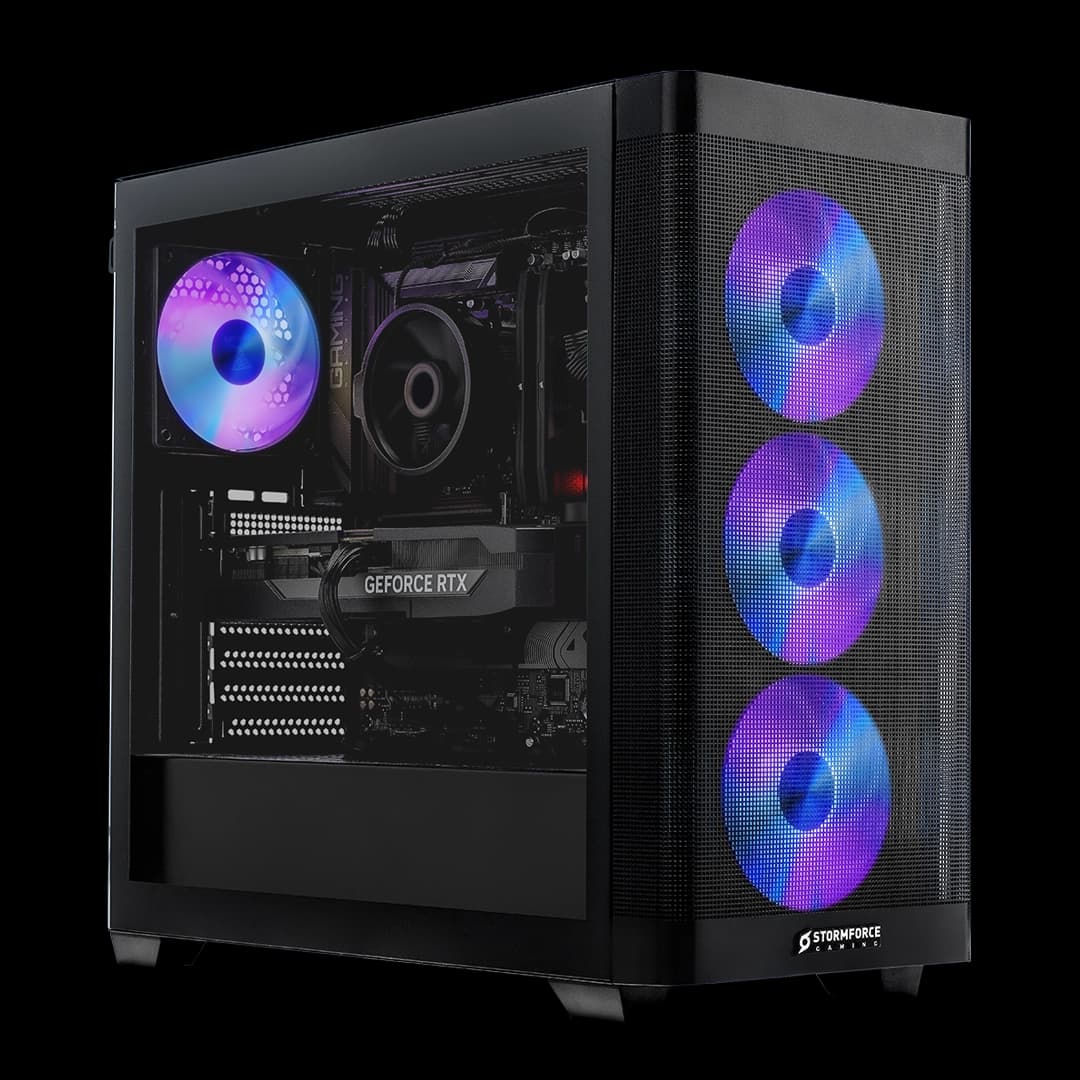


There's a straightforward calculation at the heart of every prebuilt purchase decision: how much is your time worth, and how much risk are you prepared to take on sourcing parts yourself? That's it. Strip away the brand loyalty and the forum arguments, and it comes down to those two things. A prebuilt either justifies its premium through component quality and build integrity, or it doesn't. The Stormforce Gaming Prism i7 13700K RTX 4080 is very much in the "needs to justify itself" category, because at this price tier you could absolutely build something comparable yourself if you had the time, patience, and a bit of luck with stock.
So let's get into what Stormforce has actually put together here. The headline specs are genuinely strong: an Intel Core i7-13700K, an NVIDIA RTX 4080, 16GB of DDR4, 1TB of storage, and it all lives in a Hyte Y60 case with an 850W PSU doing the heavy lifting. On paper that's a proper gaming machine. The question worth asking is whether the spec sheet tells the full story, or whether there are compromises lurking underneath that only become obvious once you're six months in. This prism i7 13700k rtx 4080 review is going to dig into exactly that.
There are no owner reviews to draw on yet for this particular configuration, which means the analysis here is grounded entirely in what the spec sheet tells us, what we know about these components individually, and how this kind of build stacks up against going the DIY route or picking a rival prebuilt at a similar price point. That's actually fine. The components are well-documented enough that you don't need a hundred Amazon reviews to know what you're getting.
Core Specifications
The spec list for this machine reads like someone sat down with a genuine gaming brief and didn't cut corners on the parts that matter most. You've got an Intel i7-13700K at the centre, which is a 16-core chip (eight performance cores, eight efficiency cores) sitting on the LGA1700 socket. Paired with it is a Z690 motherboard, which is the right choice for this chip. The RTX 4080 handles graphics duties, and that's a 16GB GDDR6X card that sits comfortably at the top of the mainstream enthusiast tier. Stormforce has fitted 16GB of DDR4 RAM, which runs in this configuration and is supported by the Z690 platform, and there's 1TB of storage onboard. The whole thing is powered by an 850W PSU, which is sensible headroom for this hardware combination, and it's all housed in the Hyte Y60 in white.
Windows 11 comes pre-installed, which is worth flagging because it means you're not hunting for a licence key on day one. Stormforce Gaming also includes a two-month Xbox Game Pass Essential trial and a one-year Norton 360 subscription with qualifying systems, per their own bundle listings. Neither of those are going to be the reason you buy a machine at this price, but they're not nothing either.
The 850W PSU deserves a specific mention here because it's one of the specs that separates sensible prebuilts from the ones that'll cause you grief. An RTX 4080 under load can pull well over 300W on its own, and the i7-13700K is not a power-efficient chip. Nvidia's own guidance for the RTX 4080 recommends at least a 750W supply, so 850W gives you real headroom rather than running the system on a knife edge. That's a good sign about how this build has been specced.
| Component | Specification |
|---|---|
| CPU | Intel Core i7-13700K |
| GPU | NVIDIA RTX 4080 |
| RAM | 16GB DDR4 |
| Storage | 1TB |
| Motherboard | Z690 |
| PSU | 850W |
| Case | Hyte Y60 White |
| Operating System | Windows 11 (pre-installed) |
| Price | Check price |
CPU and Performance
The Intel Core i7-13700K is a Raptor Lake chip, and it's still a genuinely capable processor in 2025. Intel's hybrid architecture on this generation gives you eight P-cores for the heavy lifting and eight E-cores for background tasks, and the chip boosts up to 5.4GHz on the performance cores. For gaming, that translates into strong single-threaded performance which is exactly what most game engines actually care about. The i7-13700K sits one step below the i9-13900K in Intel's 13th-gen stack, but for gaming specifically the gap between them is pretty narrow. You're not leaving meaningful frame rates on the table by not going to the i9.
Where the i7-13700K really earns its place is in mixed workloads. If you're gaming and streaming simultaneously, or doing video editing alongside your gaming sessions, the 16-core configuration handles that sort of context-switching well. The E-cores take on the background load while the P-cores stay focused on whatever's demanding the most. It's a chip that punches well above what you'd expect from a "mid-range" label, though at this price point mid-range is relative. What matters is that the CPU is not a bottleneck for the RTX 4080 in this build. That's the key thing.
One thing to keep in mind with the Z690 motherboard pairing is that this platform supports DDR4 and DDR5, and Stormforce has gone with DDR4 here. That's not a problem in practice. The performance delta between DDR4 and DDR5 in gaming is small enough that most people wouldn't notice it. The Z690 also supports PCIe 5.0 for storage, though whether Stormforce has taken advantage of that slot for the 1TB drive isn't specified. The i7-13700K is an unlocked chip (that K suffix means it's overclockable), and the Z690 motherboard supports that, so there's theoretical headroom to push clocks further if you know what you're doing.
GPU and Gaming Performance
The RTX 4080 is the headline component here, and it's a serious card. This is NVIDIA's Ada Lovelace architecture, 16GB of GDDR6X memory, and it sits at the top of the mainstream enthusiast tier. Only the RTX 4090 sits above it in NVIDIA's current stack, and that card costs significantly more for a relatively modest uplift in most gaming scenarios. The RTX 4080 is the card you buy when you want 4K gaming to be genuinely comfortable rather than technically possible.
At 1440p, the RTX 4080 is effectively unconstrained by most games at high settings. You'll be looking at very high frame rates in competitive titles and strong performance in demanding open-world games. At 4K with ray tracing enabled, this is where the card really separates itself from the tier below. DLSS 3 support, including Frame Generation, is available on this architecture, which gives you a meaningful performance boost in supported titles without a visible quality penalty. For anyone running a high-refresh 1440p monitor or a 4K display, the RTX 4080 is a proper match for that hardware. Pairing it with a 1080p monitor would be a waste, frankly.
Ray tracing performance on Ada Lovelace is substantially better than the previous Ampere generation. NVIDIA built dedicated hardware for it, and the RTX 4080 has enough of those RT cores to make ray-traced lighting and shadows feel like a genuine visual upgrade rather than a frame rate tax you pay for minimal benefit. If you're buying a machine at this price tier, you presumably care about that. The combination of the i7-13700K and RTX 4080 is well-balanced for a gaming build. Neither component is obviously holding the other back, which isn't always the case with prebuilts in this price range.
Memory and Storage
Sixteen gigabytes of DDR4 is the part of this spec sheet that gives me a moment's pause. Not because 16GB is bad, but because at this price point you'd hope for 32GB. Most games run fine on 16GB, and Windows 11 itself is not particularly memory-hungry in normal use. But if you're running Chrome alongside your game (and everyone does), or if you're streaming, or if you're doing anything creative, 16GB starts to feel tight in 2025. It's not a dealbreaker, but it's worth knowing going in.
The good news is that the Z690 platform supports dual-channel DDR4, and upgrading RAM is one of the easiest upgrades you can make. Depending on how Stormforce has configured the slots, there's a reasonable chance you could drop in another 16GB kit and go to 32GB without touching anything else. That's a relatively cheap upgrade compared to the overall cost of the machine, and it would noticeably improve multitasking headroom. Whether the board has two or four DIMM slots isn't specified, but Z690 boards typically offer four, which means upgrading without replacing the existing sticks is likely feasible.
The 1TB storage figure doesn't specify whether this is NVMe or SATA, which is a gap in the product listing. At this price tier you'd expect an NVMe M.2 drive, and Z690 boards support PCIe Gen 4 NVMe which offers substantially faster sequential read and write speeds compared to SATA SSDs. In practice, for gaming, the difference between a fast SATA SSD and a mid-range NVMe drive is mostly felt in load times rather than in-game performance. But 1TB is going to fill up quickly if you're installing modern titles. Call of Duty alone could eat 150GB of that. A second storage drive is probably on the shopping list for most buyers within the first year.
Cooling Solution
Stormforce Gaming's product listing doesn't specify the exact CPU cooler fitted to this build, which is one of those gaps that's genuinely worth paying attention to. The i7-13700K is a chip that runs hot. Intel's own spec sheet lists a maximum turbo power of 253W for this processor, and under sustained all-core loads it generates serious heat. A budget cooler on this chip is a recipe for thermal throttling, where the processor drops its clock speeds to protect itself and you lose the performance you paid for. The cooler matters a lot here.
The Hyte Y60 case has a strong reputation for airflow, largely because of its panoramic glass design and the way Stormforce has configured it. The case supports 360mm radiators, which suggests an AIO liquid cooler is a realistic option and possibly what Stormforce has fitted. An AIO is the appropriate solution for a chip like the i7-13700K in a sustained workload scenario. Air cooling works too, but you'd need something like a Noctua NH-D15 tier cooler to keep this chip genuinely comfortable under load, and those are large units that don't always fit well in every case.
For the GPU, the RTX 4080 manages its own thermals through its triple-fan cooler design, and in a case with decent airflow like the Y60 it should have no trouble staying within comfortable operating temperatures. The 850W PSU also gives the system enough headroom that the GPU doesn't have to operate in a power-constrained state, which can sometimes cause cards to boost inconsistently. The overall thermal picture here is dependent on what cooler Stormforce has chosen for the CPU, and that's the one piece of information worth confirming before purchase if thermals are a concern for you.
Case and Build Quality
The Hyte Y60 is not a case that Stormforce chose because it was cheap. This is a premium chassis with a distinctive panoramic tempered glass side panel that wraps around the front of the case, giving you a full view of the internals. In white, it looks genuinely striking. It's the kind of case that sits on a desk rather than being hidden under it, which tells you something about the intended buyer. This is hardware that's meant to be seen.
Beyond the aesthetics, the Y60 has a proper internal layout. The PSU is mounted at the rear, separated from the main chamber, which helps with airflow and keeps the cable routing cleaner. The case has good support for radiator mounting, which matters for a build using a chip like the i7-13700K that needs serious cooling. Cable management in prebuilts is always a bit of a lottery, and Stormforce Gaming has a generally decent reputation for not leaving a rat's nest behind the motherboard tray, but individual builds can vary.
The Y60 is a mid-tower, so it's not a compact system. If you're working with limited desk space, that's worth measuring before it arrives. The glass panels are fingerprint magnets, which is a known quirk of this case design. But structurally it's a well-made chassis with good build quality that punches above what you'd typically see in a prebuilt at lower price points. Stormforce choosing this case over a generic OEM chassis is a meaningful signal that the build quality has been taken seriously.
Connectivity and Ports
The specific port configuration for this build isn't detailed in the verified spec sheet, so rather than speculate, it's worth understanding what the Z690 platform and the Hyte Y60 case make possible. Z690 motherboards typically offer a strong rear IO, including multiple USB Type-A ports across USB 3.2 Gen 1 and Gen 2 speeds, USB Type-C, and DisplayPort or HDMI outputs from the motherboard itself (though for gaming you'd be using the GPU outputs, not the motherboard's). The RTX 4080 itself provides three DisplayPort 1.4a outputs and one HDMI 2.1 port, per NVIDIA's specification, which covers 4K at 120Hz and 8K output.
The Hyte Y60 front panel typically includes USB Type-A and USB Type-C ports for easy access without reaching around the back of the case, which is genuinely useful day-to-day. Whether the specific motherboard Stormforce has chosen includes onboard WiFi isn't confirmed in the spec sheet, so if wireless connectivity is important to you, that's worth confirming directly with Stormforce Gaming before ordering. Ethernet is a given on any Z690 board, and at this price tier you'd expect 2.5 Gigabit rather than the older 1 Gigabit standard, though again that's not confirmed in the verified data.
For display connectivity, the RTX 4080's HDMI 2.1 output is worth flagging specifically because it supports 4K at 144Hz over a single cable, which matters if you're running a modern 4K gaming monitor. HDMI 2.1 also supports variable refresh rate (VRR) natively, which is useful for console-adjacent setups or anyone using a TV as a monitor. The DisplayPort 1.4a outputs support 4K at 120Hz with DSC compression enabling higher refresh rates, covering most high-end monitor scenarios.
Pre-installed Software and OS
Windows 11 comes pre-installed, and that's the right call for a machine built around 13th-gen Intel hardware. Windows 11 handles the hybrid architecture of the i7-13700K better than Windows 10 does, particularly around thread scheduling between the P-cores and E-cores. Intel's Thread Director technology is properly supported in Windows 11, which means the OS is actively helping route tasks to the right cores rather than leaving that entirely to the application. For gaming, this translates into more consistent frame delivery.
Stormforce Gaming bundles a two-month Xbox Game Pass Essential trial and a one-year Norton 360 security subscription with qualifying systems. The Game Pass trial is a decent addition if you haven't already got a subscription. Norton 360 is functional security software, though plenty of people will uninstall it in favour of Windows Defender, which is genuinely good these days and doesn't add background overhead. Neither bundle item is worth buying the machine for, but the Game Pass trial in particular has real value if you use it.
What Stormforce doesn't seem to load up is excessive bloatware, which is a meaningful differentiator from some prebuilt manufacturers who fill the drive with trial software and OEM utilities that eat resources and require a fresh install to fully remove. A clean Windows install with a few specific bundle additions is the right approach. You're paying a premium for this machine and you shouldn't have to spend the first afternoon cleaning it up. Whether the Windows installation is Home or Pro isn't specified in the verified data, which is worth confirming if Pro features like BitLocker or Remote Desktop are relevant to you.
Upgrade Potential
The Z690 motherboard is one of the better choices Stormforce could have made here from an upgrade longevity standpoint. The LGA1700 socket supports both 12th and 13th-gen Intel processors, so if you wanted to swap the i7-13700K for an i9-13900K further down the line, the platform supports it. You won't be able to drop a 14th or 15th-gen chip in without a new board, but within the Raptor Lake generation there's genuine flexibility. And honestly, the i7-13700K is fast enough that most people won't feel the need to upgrade the CPU for several years.
RAM is the most obvious and accessible upgrade path. Sixteen gigabytes is functional but not generous at this price tier, and if the board has four DIMM slots (standard on most Z690 ATX boards), you can likely add another 16GB kit without removing the existing sticks. Going to 32GB DDR4 is a relatively modest cost and would meaningfully improve multitasking performance and give you headroom for memory-hungry workloads. The Z690 platform supports up to DDR4-3200 officially, with XMP profiles pushing further, so matching the existing kit's speed rating is worth doing when you upgrade.
Storage expansion depends on how many M.2 slots the specific Z690 board has available and whether any are already occupied. Z690 boards typically offer two or three M.2 slots, and if only one is used for the primary 1TB drive, there's room to add a second NVMe drive without touching the existing storage. The 850W PSU gives you meaningful headroom if you ever wanted to upgrade the GPU down the line, though the RTX 4080 is going to be relevant hardware for years yet. The Hyte Y60 case has the physical space for a larger cooler if you wanted to improve thermal performance, and the radiator support means an AIO upgrade is straightforward if the current cooling solution proves insufficient.
How It Compares
Comparing this build to the DIY route is the most useful comparison you can make at this price point. Building an equivalent system yourself, sourcing an i7-13700K, an RTX 4080, a Z690 board, 16GB DDR4, 1TB NVMe, an 850W PSU, and a Hyte Y60 case, you're looking at significant parts cost before you've even factored in your time, the risk of compatibility issues, and the fact that you won't have a unified warranty covering the whole system. Prebuilt premiums used to be enormous. They've narrowed considerably in recent years, and at this tier the convenience argument is genuinely stronger than it used to be.
Against rival prebuilts at a similar price tier, the component choices here are competitive. Some prebuilt manufacturers at this price point cut corners on the PSU (fitting a 650W unit in a high-draw system), use budget motherboards with limited VRM quality, or stuff the case with a single intake fan and hope for the best on thermals. The 850W PSU and Z690 board here suggest Stormforce hasn't taken those shortcuts. The Hyte Y60 case is a legitimate premium chassis, not a generic OEM box with a glass panel stuck on the front.
The 16GB RAM is the one area where you might feel the comparison to a DIY build more acutely. If you were building yourself, you'd almost certainly drop in 32GB at this price tier without a second thought. Some rival prebuilts at similar prices do include 32GB. That said, the rest of the spec is strong enough that this feels like a conscious cost decision rather than a component quality compromise, and it's the easiest thing to fix yourself post-purchase.
| Feature | Stormforce Prism i7 13700K RTX 4080 | Equivalent DIY Build | Lower-Tier Prebuilt (RTX 4070 Ti) |
|---|---|---|---|
| CPU | Intel i7-13700K | Intel i7-13700K | Intel i7-13700 or similar |
| GPU | NVIDIA RTX 4080 | NVIDIA RTX 4080 | NVIDIA RTX 4070 Ti |
| RAM | 16GB DDR4 | 32GB DDR4 (typical) | 16GB DDR4 |
| Storage | 1TB | 1TB to 2TB NVMe | 1TB |
| PSU | 850W | 850W to 1000W | 750W typical |
| Case | Hyte Y60 White | Your choice | Generic mid-tower |
| Unified Warranty | Yes (Stormforce Gaming) | Component-by-component | Yes |
| OS Included | Windows 11 | Extra cost | Windows 11 |
| Price | Check price | Variable | Lower |
Final Verdict
The Stormforce Gaming Prism i7 13700K RTX 4080 is a strong machine with one obvious talking point and one genuine caveat. The talking point: an RTX 4080 in a Hyte Y60 with an i7-13700K and a properly specced 850W PSU is a serious gaming build that will handle 4K gaming, high-refresh 1440p, and demanding workloads without breaking a sweat. The GPU alone puts this in a tier that most people will never actually need to upgrade for years. This is not a machine that will feel slow in 2027.
The caveat is the 16GB of DDR4. At this price tier, 32GB would be the expected configuration, and it's the one area where the spec sheet feels like a compromise relative to what you're paying. It's fixable, and it's not going to ruin the experience for most users in the short term. But it's worth factoring into your thinking, and if you're planning to stream, run a lot of browser tabs, or do anything memory-intensive alongside gaming, a RAM upgrade should probably be on your list within the first six months.
Who is this for? Buyers who want a premium gaming machine without the hassle of sourcing parts, managing compatibility, and building it themselves. People who want a unified warranty and a single point of contact if something goes wrong. Anyone running a 4K or high-refresh 1440p display who wants hardware that genuinely matches the monitor. The Hyte Y60 case means this is also for people who want their setup to look the part, not just perform.
Who should probably look elsewhere? Anyone on a tighter budget who would be better served by a step-down GPU tier. DIY builders who are comfortable with the process and want to squeeze 32GB RAM and a larger SSD into their budget from the start. And anyone who needs WiFi confirmed as a feature before buying should check directly with Stormforce Gaming, since that's not confirmed in the verified spec sheet.
As a prism i7 13700k rtx 4080 review verdict: this is a well-specced, premium prebuilt with legitimate hardware choices and a case that earns its place at this price. The 16GB RAM is the one thing to be aware of. Everything else is sorted. Current pricing is Check price.
What works. What doesn’t.
6 + 5What we liked6 reasons
- RTX 4080 delivers genuine 4K and high-refresh 1440p gaming performance with DLSS 3 and Frame Generation support
- i7-13700K is a capable 16-core processor that handles gaming and mixed workloads without bottlenecking the GPU
- 850W PSU provides proper headroom for this hardware combination rather than running the system close to its limits
- Hyte Y60 case is a premium chassis with strong airflow characteristics and striking panoramic glass aesthetics
- Z690 platform offers meaningful upgrade flexibility within the Raptor Lake generation
- Windows 11 pre-installed with proper Intel Thread Director support for the hybrid CPU architecture
Where it falls5 reasons
- 16GB DDR4 is underwhelming at this price tier and may feel tight for streaming or memory-intensive multitasking
- CPU cooler is not specified in the product listing, which matters greatly given the i7-13700K's 253W turbo power draw
- Storage type (NVMe or SATA) and WiFi inclusion are unconfirmed, leaving important questions unanswered before purchase
- 1TB of storage fills quickly with modern titles and a second drive will likely be needed within the first year
- No owner reviews are available yet for this specific configuration, so real-world reliability data is absent
Full specifications
8 attributes| CPU | Intel i7-13700K |
|---|---|
| GPU | NVIDIA RTX 4080 |
| RAM | 16GB DDR4 |
| Storage | 1TB Storage |
| Case | Hyte Y60 White |
| Motherboard | Z690 Motherboard |
| OS | Installed Windows 11 |
| PSU | 850w PSU |
If this isn’t right for you
2 optionsFrequently asked
7 questions01Does the Stormforce Prism i7 13700K RTX 4080 come with Windows 11 pre-installed?+
Yes. Windows 11 comes pre-installed on this system, so there is no need to purchase a separate licence or install the operating system yourself on day one.
02Is 16GB of RAM sufficient for gaming on this machine?+
For most games in isolation, 16GB DDR4 is adequate. However, at this price tier 32GB is increasingly common, and if you plan to stream, run browser tabs alongside games, or do any creative work, 16GB can feel limiting. The Z690 platform supports straightforward RAM upgrades, so expanding to 32GB post-purchase is a relatively affordable option.
03Can the RAM be upgraded after purchase?+
Almost certainly yes. Z690 ATX motherboards typically have four DIMM slots, and if the existing 16GB kit occupies two of them, you can add a matching 16GB kit to reach 32GB without removing the original sticks. It is worth confirming the exact board configuration with Stormforce Gaming before purchasing additional memory.
04Which display resolutions and refresh rates does the RTX 4080 support?+
The RTX 4080 provides three DisplayPort 1.4a outputs and one HDMI 2.1 port. HDMI 2.1 supports 4K at up to 144Hz over a single cable, while DisplayPort 1.4a supports 4K at 120Hz with DSC compression enabling higher refresh rates. The card is well suited to both 4K and high-refresh 1440p displays.
05Does this PC include WiFi?+
WiFi inclusion is not confirmed in the verified product specification. If wireless connectivity is essential for your setup, it is advisable to contact Stormforce Gaming directly before placing an order to confirm whether the specific Z690 motherboard fitted includes onboard WiFi.
06What warranty does Stormforce Gaming offer on this prebuilt?+
Stormforce Gaming provides a unified warranty covering the whole system as a single unit, which is one of the practical advantages of buying a prebuilt rather than assembling parts individually. For specific warranty terms and duration, you should check directly with Stormforce Gaming before purchase.
07Is the i7-13700K a bottleneck for the RTX 4080 in this build?+
No. The Intel Core i7-13700K is a capable 16-core processor that boosts to 5.4GHz on its performance cores, and it is well matched to the RTX 4080. For gaming workloads, neither component is obviously limiting the other, which is not always the case with prebuilts at this price tier.