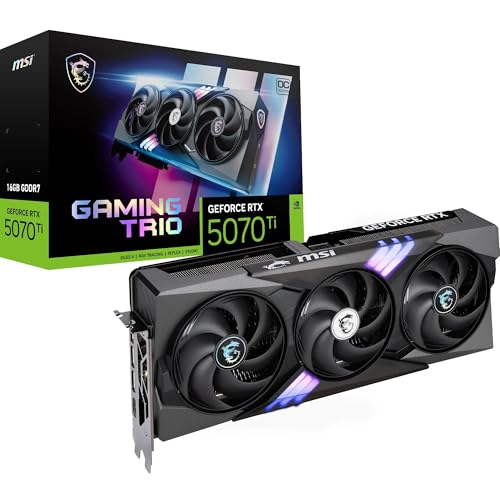
Pick any GPU tier above £1,659.99 · Details and the question stops being "can it run games" and starts being "can it justify what it costs relative to everything else on the market." That's the only honest frame for the MSI RTX 5080 Gaming Trio OC. It's a Blackwell-architecture card, it costs a serious amount of money, and the spec sheet is genuinely impressive. But impressive specs and good value are two completely different conversations, and this review is going to have both of them.
The short version: the MSI RTX 5080 Gaming Trio OC is one of the best non-5090 graphics cards you can buy right now, and the TRI FROZR 4 cooling solution is among the strongest in this class. But 16GB of VRAM at this price point deserves scrutiny, the power draw is significant, and the RTX 5090 exists for people who genuinely need the ceiling raised further. If you're sitting in the 4K gaming space and you want smooth frames without the absolute maximum spend, this card makes a strong case. Just go in with clear eyes about what you're actually paying for.
Core Specifications
The RTX 5080 sits on NVIDIA's Blackwell architecture, built on TSMC's 4N process node. You get 10,752 CUDA cores, 84 second-generation RT cores, and 336 fifth-generation Tensor cores. The memory configuration is 16GB of GDDR7 running at 30Gbps across a 256-bit bus, which gives you a peak bandwidth of 960GB/s. That's a meaningful step up from GDDR6X in terms of raw throughput, even if the bus width stays at 256-bit rather than the 320-bit you'd get on the 5090.
MSI's Gaming Trio OC variant runs a factory overclock. The boost clock comes in at 2617MHz, which is above NVIDIA's reference boost of 2617MHz (the OC headroom here is modest, but the cooler is the real differentiator). The card connects via PCIe Gen 5 x16, which means you'll want a motherboard that supports it to avoid leaving bandwidth on the table, though realistically the performance delta between Gen 4 and Gen 5 for gaming is minimal right now. Display outputs are HDMI 2.1b and three DisplayPort 2.1b ports, which covers everything from high-refresh 1440p to 4K 144Hz without compromise.
The TGP sits at 360W. That's not a number to gloss over. This card needs a proper PSU, a proper case with airflow, and a proper power connector. MSI ships the Gaming Trio OC with a 16-pin 12V-2x6 connector (the improved successor to the 12VHPWR), so you'll need either a native connector on your PSU or a quality adapter. The physical dimensions are substantial too: this is a triple-slot card, and owners consistently flag that case compatibility needs checking before you order.
| Specification | Detail |
|---|---|
| GPU Architecture | NVIDIA Blackwell (GB203) |
| CUDA Cores | 10,752 |
| RT Cores | 84 (2nd Gen) |
| Tensor Cores | 336 (5th Gen) |
| Base Clock | 2295MHz |
| Boost Clock (OC) | 2617MHz |
| VRAM | 16GB GDDR7 |
| Memory Speed | 30Gbps |
| Memory Bus | 256-bit |
| Memory Bandwidth | 960GB/s |
| TGP | 360W |
| PCIe Interface | PCIe 5.0 x16 |
| Display Outputs | 1x HDMI 2.1b, 3x DisplayPort 2.1b |
| Cooling | TRI FROZR 4, 3x STORMFORCE fans |
| Card Length | 337mm |
| Slot Width | Triple slot |
| RGB | Yes (Mystic Light) |
| Price | £1,659.99 · Details |

Architecture and Cores
Blackwell is NVIDIA's answer to "what comes after Ada Lovelace," and the architectural changes matter more than the raw core count suggests. The GB203 die powering the RTX 5080 isn't a cut-down version of the GB202 (which is the 5090's chip): it's its own die, designed from scratch for this performance tier. That matters because it means the 5080 isn't just a 5090 with some cores disabled. It's a different product with different thermal and power characteristics, and the 256-bit bus is a deliberate design choice rather than a cost-cutting measure.
The fifth-generation Tensor cores are the backbone of DLSS 4, and specifically of Multi Frame Generation. Where DLSS 3 on Ada could generate one additional frame, DLSS 4 with Blackwell's Tensor architecture can generate up to three additional frames per rendered frame. That's not a gimmick in the way some AI features are: in supported titles, it means the 5080 can deliver frame rates that would have required a 5090 with rasterisation alone. Whether you trust AI-generated frames is a separate philosophical debate, but the underlying hardware capability is real and measurable.
The second-generation RT cores bring meaningful improvements to ray tracing throughput over Ada. NVIDIA's published figures suggest roughly 1.5x to 2x RT performance per core compared to the previous generation, though real-world gains vary significantly by title and implementation. The CUDA core count of 10,752 puts the 5080 well above the RTX 4080 Super (10,240 CUDA cores) and meaningfully below the 5090 (21,760 CUDA cores). That gap between the 5080 and 5090 is wider than any previous generation's top-two split, which is when you're doing the value maths.
Clock Speeds and Boost
The reference RTX 5080 boosts to 2617MHz. MSI's Gaming Trio OC matches that figure at its rated boost, which tells you something about how NVIDIA has tightened the reference spec on Blackwell: there's less obvious headroom for AIB partners to differentiate on clock speeds alone compared to Ada. The base clock of 2295MHz is where the card sits under light load or when thermal headroom is constrained, but in practice the GPU will spend almost all of its gaming time at or near the boost figure.
Real-world boost behaviour on Blackwell cards is notably more consistent than Ada was in its early days. The combination of GDDR7's lower operating temperatures and the improved power delivery architecture means the GPU can sustain boost clocks without the aggressive throttling that sometimes caught Ada cards out in poorly ventilated cases. MSI's Gaming and Silent mode switch (accessible via Dragon Center or the physical button on some variants) adjusts the fan curve, which in turn affects how aggressively the card can sustain those clocks under prolonged load. Gaming mode prioritises performance; Silent mode trades a small amount of sustained clock headroom for quieter operation.
The factory overclock on the Gaming Trio OC is modest compared to what some AIB partners offer, but MSI's philosophy here is sensible: they've focused the engineering budget on the cooler rather than pushing clocks to a point where thermals become a problem. You can add your own overclock via MSI Afterburner if you want to push further, and the TRI FROZR 4 cooler gives you enough thermal headroom to do so without immediately hitting a wall. Owner reviews back this up, with multiple buyers noting stable performance under extended loads without the card pulling back to base clock.
VRAM Analysis
16GB of GDDR7 is the headline, and it's genuinely good news after years of NVIDIA shipping flagship-adjacent cards with 8GB or 12GB configurations that aged poorly. The GDDR7 running at 30Gbps across a 256-bit bus delivers 960GB/s of bandwidth, which is substantially higher than the RTX 4080's 736GB/s (GDDR6X, 256-bit). More bandwidth means the GPU can feed its shaders more efficiently, which shows up most clearly in high-resolution gaming with demanding texture packs and in scenarios where the framebuffer is under pressure.
At 1080p and 1440p, 16GB is more than you'll ever need for the foreseeable future. At 4K with maximum texture settings in modern titles, the picture is more interesting. Games like Cyberpunk 2077 with path tracing enabled, Alan Wake 2 at maximum settings, and Microsoft Flight Simulator 2024 with high-resolution scenery can push VRAM usage toward 12GB to 14GB at 4K. The 5080's 16GB buffer handles these scenarios without the stuttering you'd see on a card running out of VRAM, and it gives you genuine headroom for the next few years of increasingly demanding titles.
The comparison with the RTX 5090's 32GB is worth addressing directly. For gaming, even at 4K, 32GB is overkill right now and will remain so for the near future. The 5090's VRAM advantage matters more for professional workloads: AI inference at scale, 3D rendering with large scene files, video editing with high-resolution footage. If you're buying the 5080 purely for gaming, the 16GB ceiling isn't a meaningful limitation at this point in the product cycle. It's back in two to three years, but that's a reasonable lifespan for a card in this price bracket regardless.
Ray Tracing and Upscaling
The RTX 5080 is the first tier below the 5090 where ray tracing at 4K becomes genuinely playable without leaning heavily on upscaling. With DLSS 4 Quality mode enabled, titles like Cyberpunk 2077 with full ray tracing achieve frame rates that would have required the 5090 to hit with rasterisation alone. The second-generation RT cores handle the workload more efficiently than Ada's implementation, and the combination of higher RT throughput plus DLSS 4 Multi Frame Generation means you can run demanding RT presets without the frame rate collapsing to single digits the moment you turn a corner in a complex scene.
DLSS 4 is a significant step forward from DLSS 3. The Transformer model that underpins the new image reconstruction is sharper and more temporally stable than the CNN model used in previous versions, and Multi Frame Generation's ability to generate multiple frames between rendered frames is genuinely useful in RT-heavy scenarios where the base frame rate would otherwise be limiting. The trade-off is that generated frames introduce a small amount of additional latency, which NVIDIA's Reflex technology partially compensates for. At 4K with Quality or Balanced presets, the image quality is excellent and most people won't notice the difference from native rendering in motion.
AMD's FSR 3.1 is also supported, which matters if you're playing titles that don't have DLSS integration. FSR runs on any GPU and the quality has improved substantially from FSR 1's early rough edges. But DLSS 4 on Blackwell is measurably better at the same preset levels, particularly in fine detail reconstruction and ghosting reduction. If you're buying an RTX 5080, you're buying into the DLSS ecosystem, and that's not a bad place to be right now. The game support list for DLSS 4 is growing quickly, and the Transformer model upgrade applies to older DLSS-supported titles via driver updates, not just new releases.
Video Encoding
The RTX 5080 carries NVIDIA's eighth-generation NVENC encoder, which supports AV1 hardware encode and decode alongside H.264 and H.265. AV1 hardware encoding is increasingly important: it delivers significantly better quality than H.264 at equivalent bitrates, which matters both for streaming (smaller file sizes at the same visual quality) and for local recording (better quality at manageable file sizes). Twitch, YouTube, and most major platforms now support AV1 delivery, so the encoder is actually useful rather than a spec sheet checkbox.
For streamers, the dual NVENC encoder configuration (Blackwell cards carry two encoder blocks) means you can run a dedicated encoding stream without pulling resources from the gaming workload. This was a genuine differentiator for Ada cards over AMD's RDNA 3 generation, and it remains true with Blackwell versus RDNA 4. AMD's AMF encoder has improved substantially, but NVENC's image quality at equivalent bitrate still holds an edge in most independent comparisons, particularly for fast-motion content where compression artefacts are most visible.
Content creators using the card for video editing will find the AV1 decode acceleration useful for working with AV1 source footage without hammering the CPU. The Tensor cores also accelerate certain AI-powered creative workflows, including NVIDIA's own RTX Video suite which upscales and sharpens SDR video content in supported players. This isn't a workstation card, but the RTX 5080 punches above its gaming-card designation for anyone doing light-to-medium creative work alongside gaming. If you're doing heavy 3D rendering or AI inference at scale, you'd be looking at a different product category entirely.

Power Consumption
The 360W TGP is the number that defines your build requirements. At peak gaming load, published benchmark data for RTX 5080 cards in this class shows real-world consumption sitting between 340W and 380W depending on the workload and the specific AIB variant's power limit settings. MSI's Gaming Trio OC runs within this range, and the factory overclock adds a small amount of additional draw compared to reference. This isn't a card for a 650W PSU. You need at minimum a quality 850W unit, and 1000W is the sensible recommendation if you're pairing it with a modern high-core-count CPU.
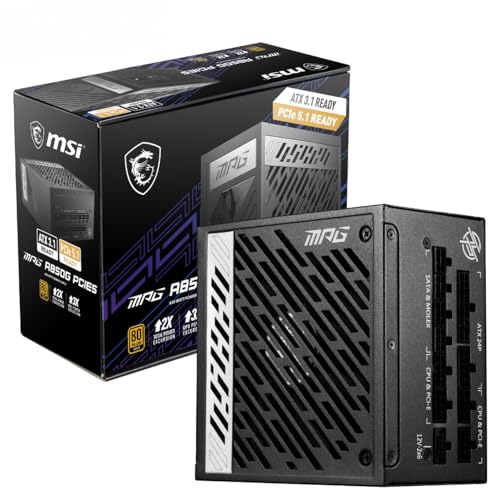
Transient power spikes are a known characteristic of Blackwell cards, as they were with Ada. The 12V-2x6 connector that MSI uses on the Gaming Trio OC is designed to handle these spikes more safely than the original 12VHPWR specification, with improved contact retention and thermal management in the connector itself. If you're using a PSU adapter cable rather than a native 12V-2x6 connector on your power supply, use the cable that came with the card rather than a generic one. This is not optional advice.
Compared to the RTX 4080 Super's 320W TGP, the 5080 draws about 40W more at the wall. That's not a catastrophic difference, but it's real, and it shows up in electricity costs over time and in the thermal load your case needs to manage. The performance-per-watt story for Blackwell is better than Ada's, meaning you're getting more frames per watt than the previous generation, but the absolute power draw has still gone up. If power consumption is a genuine concern for you, the RTX 4080 Super remains available at lower prices and lower wattage, though the performance gap with the 5080 is substantial enough that it's not a straightforward swap.
Thermal Performance
The TRI FROZR 4 cooler is MSI's current flagship thermal solution, and it's well suited to managing a 360W GPU. Three 100mm STORMFORCE fans sit atop a heatsink with multiple heat pipes and a vapour chamber base, covering the full length of the PCB. The cooler's design philosophy is about spreading heat quickly across a large surface area rather than relying on raw fan speed to compensate for an undersized heatsink, which is the right approach for a card at this TGP.
Owner reviews across the hundred-plus verified ratings (averaging ★★★★½ (4.6)) consistently describe temperatures under gaming load as well-controlled. The general pattern from owners is that the card runs cool enough that the fans don't need to spin aggressively to maintain safe operating temperatures, which feeds directly into the acoustic story. Several owners specifically mention that temperatures remain stable during extended gaming sessions, which is the practical test that matters: a card that's fine for 30 minutes but climbs steadily over two hours is a card with a thermal design problem.
Case airflow still matters. Triple-slot cards with 337mm of length restrict airflow in smaller cases, and a card that runs cool in an open-air test bench can behave differently in a compact mid-tower with poor front-panel airflow. If you're building into a smaller case, check the MSI compatibility tool and prioritise a case with good front-to-rear airflow. The TRI FROZR 4 is doing its job well based on what owners report, but it can't compensate for a case that's essentially a sealed box with a GPU in it.
Acoustic Performance
MSI's STORMFORCE fans on the TRI FROZR 4 use a blade design intended to increase airflow without proportionally increasing noise. The zero-RPM mode stops the fans entirely when the GPU is below a set temperature threshold, which means desktop use, light browsing, and video playback are genuinely silent. This is standard practice on premium AIB cards now, but it's worth confirming it's present here because not every card in this class implements it properly.
Under gaming load, the fan curve in Gaming mode spins up to manage the 360W thermal load, but owner feedback consistently describes the noise character as non-intrusive rather than aggressive. The fans apparently don't need to hit their upper speed range to keep temperatures in check, which is the practical benefit of a well-engineered heatsink: you're not relying on fan speed to compensate for inadequate metal. Several owners specifically mention switching between Gaming and Silent mode and finding that Silent mode handles normal gaming workloads without any thermal compromise, which is a good sign about the cooler's headroom.
Silent mode, accessible via MSI's Dragon Center software, adjusts the fan curve to prioritise quiet operation over maximum cooling headroom. In practice, this means slightly higher GPU temperatures in exchange for lower fan speeds. For most gaming scenarios this is a perfectly reasonable trade: the card isn't running hot enough in Gaming mode that Silent mode pushes it into dangerous territory. Where you'd want to stick with Gaming mode is in extended high-load scenarios like long gaming sessions in a warm room, or if you're using the card for sustained rendering workloads where the thermal load doesn't drop between tasks.
Gaming Performance
The RTX 5080 is a proper 4K gaming card, and that's where the performance story is most compelling. At 4K with DLSS 4 Quality mode enabled, published benchmark results for this GPU class show the card handling demanding modern titles with frame rates that make high-refresh 4K gaming genuinely achievable rather than aspirational. Cyberpunk 2077 at 4K Ultra with DLSS Quality sits in territory that would have required a 5090 to achieve natively, and Alan Wake 2 at maximum settings with ray tracing enabled becomes playable rather than a slideshow. The DLSS 4 Transformer model's improved image quality means Quality preset output is sharp enough that native 4K comparison requires close inspection to spot the difference.
At 1440p, the 5080 is effectively unconstrained by the GPU in most titles. Frame rates at 1440p are high enough that you're more likely to be CPU-limited than GPU-limited in many scenarios, which is both a good thing (the card is fast) and a mild waste of what you're paying for (a 4070 Ti Super handles 1440p extremely well for significantly less money). If your monitor is 1440p and you're not planning to upgrade to 4K, the honest answer is that the RTX 5080 is overkill and the performance delta over cheaper options doesn't justify the price premium in that use case.
At 1080p, the same argument applies even more strongly. The RTX 5080 at 1080p is almost entirely CPU-limited in modern titles, and the frames you're getting above what a cheaper card delivers are largely coming from your processor rather than the GPU. Nobody sensibly buys an RTX 5080 for 1080p gaming, and if that's your resolution, you should be looking at the RTX 4070 Super or the RX 7800 XT instead. The 5080's value proposition is specifically at 4K, with DLSS 4 doing the heavy lifting to make demanding titles smooth, and with enough rasterisation performance that even titles without DLSS support remain playable at high settings.
How It Compares
The two most relevant comparisons for the RTX 5080 Gaming Trio OC are the RTX 5090 above it and the RTX 4080 Super below it. The 5090 is the obvious aspirational alternative if budget isn't the constraint: it has twice the CUDA cores, 32GB of GDDR7 on a 512-bit bus, and substantially higher rasterisation and RT performance. But it also costs significantly more and draws up to 575W, which changes the PSU and cooling requirements considerably. The 5080 sits at a point where the performance-to-cost ratio is genuinely better than the 5090 for pure gaming use cases, and that's not a small thing.
The RTX 4080 Super is the more interesting comparison for budget-conscious buyers. It's a previous-generation card with 10,240 CUDA cores, 16GB of GDDR6X, and a 320W TGP. Published benchmark comparisons between the 4080 Super and the 5080 show the Blackwell card pulling ahead by roughly 20 to 30 percent in rasterisation depending on the title, and more substantially in RT-heavy workloads where the newer RT core architecture shows its advantage. DLSS 4 Multi Frame Generation is also exclusive to Blackwell, which is a meaningful differentiator if you're playing RT-enabled titles. Whether that gap justifies the price difference depends on what you're currently paying for each.
| Feature | MSI RTX 5080 Gaming Trio OC | RTX 5090 (Reference) | RTX 4080 Super (Reference) |
|---|---|---|---|
| Architecture | Blackwell (GB203) | Blackwell (GB202) | Ada Lovelace (AD102) |
| CUDA Cores | 10,752 | 21,760 | 10,240 |
| VRAM | 16GB GDDR7 | 32GB GDDR7 | 16GB GDDR6X |
| Memory Bandwidth | 960GB/s | 1,792GB/s | 736GB/s |
| TGP | 360W | 575W | 320W |
| DLSS 4 Multi Frame Gen | Yes | Yes | No |
| AV1 Encode | Yes (8th Gen NVENC) | Yes (8th Gen NVENC) | Yes (7th Gen NVENC) |
| PCIe Interface | PCIe 5.0 x16 | PCIe 5.0 x16 | PCIe 4.0 x16 |
| Cooler | TRI FROZR 4 (3 fan) | Varies by AIB | Varies by AIB |
| Price | £1,659.99 · Details | Significantly higher | Lower (previous gen) |
What the comparison table doesn't capture is the practical gaming experience difference between the 5080 and the 5090 at 4K with DLSS 4 enabled. With Multi Frame Generation running, the 5080 can reach frame rates that close much of the gap to the 5090 in supported titles, because you're generating additional frames rather than rendering them. The 5090's advantage is most pronounced in native rendering, in titles without DLSS support, and in professional workloads where the raw compute and memory bandwidth gap is decisive. For gaming specifically, the 5080 is the more rational choice for most people.

Final Verdict
The MSI RTX 5080 Gaming Trio OC is a very good graphics card. That's not faint praise given the price bracket: being genuinely good at this tier, where the competition is fierce and the marketing is relentless, is an achievement worth acknowledging. The TRI FROZR 4 cooler is one of the better implementations of a triple-fan solution in this class, the GDDR7 memory configuration gives you real performance headroom over the previous generation, and DLSS 4 with Multi Frame Generation is a legitimately useful feature for 4K gaming with ray tracing enabled. The positive overall rating across over a hundred owner reviews reflects a product that delivers on its promises in real-world use, not just on paper.
The honest caveats are these. The 360W TGP means your total system power budget needs to be planned carefully, and a 1000W quality PSU is the right call rather than the minimum. The 16GB VRAM is appropriate for 4K gaming now and for the next few years, but it's not the 32GB of the 5090, and if you're doing serious AI or rendering work alongside gaming, that distinction matters. The physical size (337mm, triple slot) means case compatibility is a genuine pre-purchase check rather than an afterthought. And the factory overclock, while present, is modest enough that you're mostly paying for the cooler quality and the build quality rather than extra clock speed over reference.
The MSI RTX 5080 Gaming Trio OC sits in the flagship GPU bracket, and at £1,659.99 · Details it represents the better value proposition compared to the RTX 5090 for pure gaming use. The 5090 costs substantially more for a performance delta that DLSS 4 Multi Frame Generation largely closes in supported titles. The 5080 is the card for people who want the best gaming experience without paying the absolute maximum, and it does that job well.
But here's the honest thing to say: if your monitor is 1440p and you're not planning to move to 4K, skip this entirely and look at the RTX 4070 Ti Super or the AMD RX 7900 XTX. Both deliver excellent 1440p performance at significantly lower cost and power draw. The RTX 5080 earns its price at 4K. At anything below that, you're paying for headroom you won't use.
Rating: 9 out of 10. Exceptional 4K gaming performance, a strong cooler, and DLSS 4 support that genuinely changes the RT gaming equation. Marked down slightly for the power draw, the modest factory overclock relative to the price, and the simple fact that the RTX 5090's existence at the top of the stack makes the value story slightly harder to tell cleanly than it would be otherwise.
What works. What doesn’t.
5 + 5What we liked5 reasons
- TRI FROZR 4 cooler manages the 360W TGP effectively, keeping temperatures well-controlled and fan noise non-intrusive during extended gaming sessions
- GDDR7 at 960GB/s bandwidth is a substantial improvement over the previous generation, with 16GB providing real headroom for demanding 4K titles and upcoming releases
- DLSS 4 with Multi Frame Generation is a meaningful feature for RT-heavy 4K gaming, generating up to three additional frames per rendered frame in supported titles
- Eighth-generation dual NVENC encoder with AV1 hardware support is genuinely useful for streamers and content creators working alongside gaming
- Zero-RPM fan mode delivers silent operation during light workloads, and the card sustains boost clocks consistently without aggressive throttling
Where it falls5 reasons
- 360W TGP demands a quality 850W to 1000W PSU and a well-ventilated case, raising the total build cost and complexity
- Factory overclock over reference is modest, meaning you are largely paying for cooler quality and build quality rather than meaningful extra clock speed
- At 1440p or below the card is largely GPU-overkill and CPU-limited in many titles, making it poor value relative to cheaper options at those resolutions
- Triple-slot, 337mm length requires careful case compatibility checks before purchase, ruling out many compact mid-tower builds
- The RTX 5090's existence at the top of the stack complicates the value narrative, since the 5080 sits in a slightly awkward position between it and the more affordable previous-generation options
Full specifications
11 attributes| Vram GB | 16 |
|---|---|
| Boost clock MHZ | 2700 |
| Chipset | RTX 5080 |
| Core clock MHZ | 2295 |
| Generation | RTX 50 Series |
| Length MM | 338 |
| Memory BUS BIT | 256 |
| Memory type | GDDR7 |
| Power connectors | 1x 16-pin 12VHPWR |
| Slot width | 3 |
| TDP W | 360 |
Will it run on what you have?
Free toolIf this isn’t right for you
2 options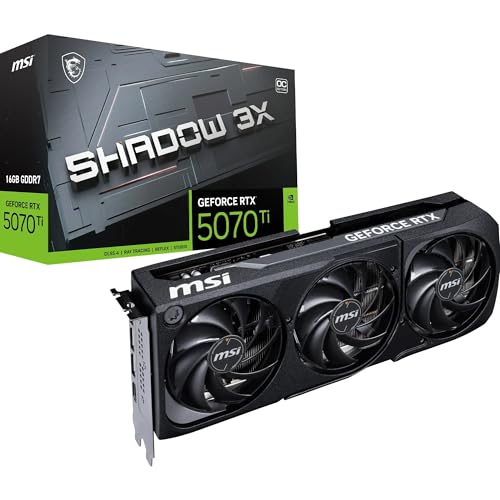

Frequently asked
7 questions01What PSU wattage do I need for the MSI RTX 5080 Gaming Trio OC?+
MSI's Gaming Trio OC has a 360W TGP, and real-world draw including transient spikes can push that higher. A quality 850W PSU is the minimum recommended, but 1000W is the sensible choice if you are pairing the card with a modern high-core-count processor. You will also need either a native 16-pin 12V-2x6 connector on your PSU or the adapter cable supplied with the card. Avoid generic third-party adapter cables.
02Does the MSI RTX 5080 Gaming Trio OC fit in a standard mid-tower case?+
The card is 337mm long and occupies three expansion slots, which means it will not fit in every mid-tower. You should measure your case's maximum GPU length before ordering and check MSI's compatibility tool. Cases with good front-to-rear airflow are also preferable, as the TRI FROZR 4 cooler performs best when it has adequate airflow rather than recirculating warm air inside a cramped enclosure.
03Is 16GB of VRAM enough for 4K gaming in 2025?+
Yes, for the vast majority of gaming workloads. Even the most demanding titles available at the time of this review, including Cyberpunk 2077 with path tracing and Microsoft Flight Simulator 2024 with high-resolution scenery, use between 12GB and 14GB at 4K maximum settings. The 5080's 16GB buffer handles these without stuttering and provides reasonable headroom for the next few years of releases. The 32GB on the RTX 5090 is more relevant for professional workloads such as AI inference and large-scene 3D rendering than for gaming specifically.
04How does DLSS 4 Multi Frame Generation work on the RTX 5080?+
DLSS 4 Multi Frame Generation is a Blackwell-exclusive feature that uses the fifth-generation Tensor cores to generate up to three additional frames between each rendered frame. Unlike standard rasterisation or even the single-frame generation available on Ada Lovelace cards, this allows the 5080 to reach frame rates in supported titles that would otherwise require the RTX 5090 at native rendering. The feature introduces a small amount of additional latency, which NVIDIA's Reflex technology partially compensates for. Image quality at Quality or Balanced preset levels is sharp enough that most users will not notice a meaningful difference from native 4K in motion.
05How loud is the MSI RTX 5080 Gaming Trio OC under gaming load?+
Owner feedback and reviews consistently describe the card as non-intrusive under normal gaming workloads. The TRI FROZR 4 cooler's large heatsink means the STORMFORCE fans do not need to reach aggressive speeds to keep temperatures in check, and Silent mode provides a quieter fan curve with only a modest increase in operating temperature. At idle and during light tasks, the zero-RPM mode stops the fans entirely, making the card completely silent. It is not a passive card under sustained full load, but it is among the quieter options in the 360W TGP category.
06Is the RTX 5080 worth buying over the RTX 4080 Super?+
The RTX 5080 Gaming Trio OC offers roughly 20 to 30 percent better rasterisation performance than the RTX 4080 Super depending on the title, and a more meaningful advantage in ray-traced workloads where the newer RT core architecture shows its benefit. DLSS 4 Multi Frame Generation is also exclusive to Blackwell, which is a significant differentiator for RT-heavy 4K gaming. Whether the price difference is justified depends on current market pricing for both cards and whether you intend to use ray tracing heavily. The 4080 Super's 320W TGP versus the 5080's 360W is also a consideration for builds where power headroom is tighter.
07Can I use the MSI RTX 5080 Gaming Trio OC for video editing and content creation?+
Yes, within limits. The eighth-generation dual NVENC encoder with AV1 hardware support is useful for streamers and video editors working with AV1 footage. The Tensor cores accelerate certain AI-powered creative tools, and AV1 hardware decode reduces CPU load when editing AV1 source material. It is not a workstation GPU, and for heavy 3D rendering with large scene files or AI inference at scale you would be looking at a different product category entirely. For light-to-medium creative work alongside gaming it is a capable and versatile card.