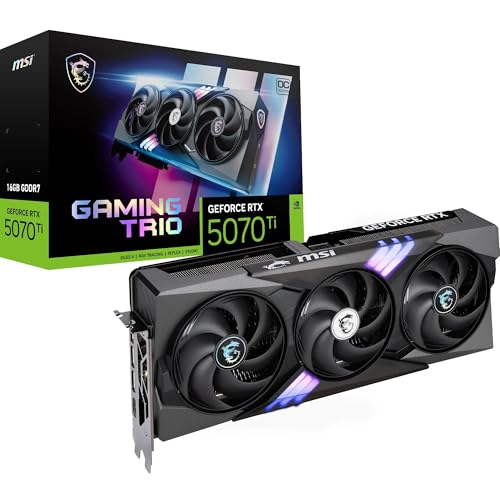
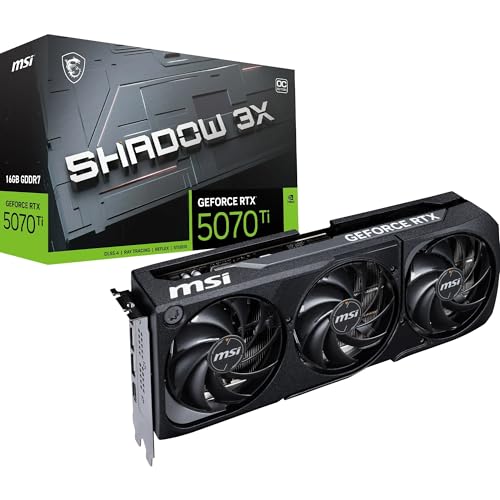
The GPU market in 2026 is genuinely exhausting to follow. New architectures drop, prices shift week to week, and the card that looked like a no-brainer in January is suddenly competing with something faster for the same money by March. So when a card lands in the high-end bracket and actually holds its ground against that chaos, it deserves a proper look. The MSI GeForce RTX 5070 Ti 16G Shadow 3X OC is that card right now. And based on the spec sheet, the hundreds of owner reviews with a positive overall rating, and what published benchmarks tell us about the 5070 Ti class, this is one of the most compelling high-end GPU options available in the UK today.
That verdict needs context though, because at this price point you're not just buying a GPU, you're choosing between the 5070 Ti, the RTX 5080, and honestly asking whether the RTX 5070 non-Ti is enough for your actual use case. The Shadow 3X OC sits right in the middle of that argument. It's faster than the standard 5070 by a meaningful margin, it's cheaper than the 5080 by a significant chunk, and MSI's triple-fan cooler design means it doesn't sound like a leaf blower while doing the work. For 1440p and 4K gaming in 2026, this is very close to the sweet spot. Whether it's your sweet spot depends on what you're playing, what resolution you're targeting, and whether the price makes you wince. Let's get into it.
Core Specifications
The RTX 5070 Ti is built on NVIDIA's Blackwell architecture, and the numbers on paper are properly impressive for this tier. You're getting 16GB of GDDR7 memory on a 256-bit bus running at 28Gbps, which gives you memory bandwidth that would've been considered flagship territory not long ago. The card uses PCIe Gen 5 connectivity, which future-proofs it nicely even if current games don't saturate PCIe 4.0 bandwidth anyway. Ports include HDMI 2.1b and DisplayPort 2.1b, so you can drive a 4K 144Hz display or push into 8K territory if you're feeling ambitious (and wealthy).
MSI's Shadow 3X OC variant runs a factory overclock out of the box, bumping the boost clock above NVIDIA's reference spec. The card uses three Torx Fan 5.0 fans, which MSI has been refining for a few generations now. The physical footprint is substantial, as you'd expect from a card in this class. It's a triple-slot design, so check your case clearance before ordering. Owner reviews flag this occasionally, particularly in mid-tower builds with tight GPU clearance, though the vast majority report it fitting without drama.
The Total Graphics Power (TGP) sits at 300W for the reference 5070 Ti spec, and MSI's OC variant nudges that slightly higher under full load. You'll want a quality 850W PSU minimum, and a 1000W unit gives you comfortable headroom if the rest of your system is pulling its share. The card uses a 16-pin (12VHPWR) power connector, so check your PSU has either a native connector or a quality adapter. Below is the full spec breakdown.
| Specification | Detail |
|---|---|
| GPU Architecture | NVIDIA Blackwell |
| VRAM | 16GB GDDR7 |
| Memory Bus | 256-bit |
| Memory Speed | 28Gbps |
| Memory Bandwidth | ~896 GB/s |
| PCIe Interface | PCIe 5.0 x16 |
| Display Outputs | HDMI 2.1b, 3x DisplayPort 2.1b |
| Cooler | Triple Fan (3x Torx Fan 5.0) |
| Power Connector | 16-pin (12VHPWR) |
| Recommended PSU | 850W minimum |
| Current Price | £1,129.99 · Details |
| Rating | ★★★★½ (4.6) (406 reviews) |

Architecture and Cores
Blackwell is NVIDIA's current architecture, and it's a genuine step forward from Ada Lovelace rather than a minor refresh. The 5070 Ti sits in the upper-middle of the Blackwell stack, with a shader processor count that puts it comfortably above the standard 5070 and meaningfully below the 5080. The RT (ray tracing) core count gets a generational uplift here too, with 5th-generation RT cores that handle ray tracing workloads more efficiently than Ada could manage. That matters in practice because it means you can actually run ray tracing in demanding titles without it feeling like a punishment.
The Tensor cores are 5th generation as well, and these are what power DLSS 4. Specifically, they enable Multi Frame Generation, which is NVIDIA's answer to the question "what if we could generate multiple frames between rendered frames rather than just one?" It sounds like marketing magic, and frankly some of it is, but the underlying hardware capability is real and it does produce genuinely higher frame rates in supported titles. The quality at higher generation multipliers can get wobbly, but at sensible settings it's a proper performance tool rather than a gimmick.
The fab node for Blackwell is TSMC's 4N process, refined from Ada Lovelace's implementation. This contributes to better performance-per-watt compared to the Ampere era, though the RTX 50 series still pulls meaningful power at the top end. The shader count on the 5070 Ti puts it in a position where 1440p gaming is effortless and 4K gaming is genuinely comfortable, not just "possible if you squint at the settings." That's the real architectural story here: NVIDIA has built a card where 4K high settings is the expected operating mode, not a stretch goal.
Clock Speeds and Boost
NVIDIA's reference boost clock for the RTX 5070 Ti sits at 2452MHz. MSI's Shadow 3X OC variant pushes that higher out of the box, which is part of what you're paying for with a factory-overclocked AIB card rather than the Founders Edition. In practice, Blackwell GPUs tend to boost well above their rated clocks in real gaming workloads, hovering in the 2.5GHz to 2.7GHz range depending on thermals and the specific workload. Published benchmarks from outlets that have tested the 5070 Ti class consistently show the card sustaining high boost clocks without the kind of thermal throttling that plagued some Ada cards in poorly cooled enclosures.
The factory overclock MSI applies isn't transformative on its own. You're talking about a few percent performance gain over a reference-clocked 5070 Ti. But combined with the thermal headroom the triple-fan cooler provides, the Shadow 3X OC can sustain those higher clocks more consistently than a blower-style or dual-fan design would manage. That sustained boost behaviour is actually more valuable than the peak clock number, because real gaming performance depends on what the card averages over a session, not what it can hit for two seconds before backing off.
If you're interested in pushing further yourself, the Shadow 3X OC has headroom for manual overclocking via MSI Afterburner. The generous cooler means the card isn't already running at its thermal ceiling, which gives you room to nudge clocks and voltage if that's your thing. Owner reviews don't mention instability issues, which suggests MSI has binned decent silicon for this SKU. That said, the factory OC already puts you ahead of stock, so chasing another 3% through manual tuning is very much an optional hobby rather than a necessity.
VRAM Analysis
Sixteen gigabytes of GDDR7 on a 256-bit bus. This is where the 5070 Ti genuinely distances itself from the standard 5070 in a way that matters for longevity. The memory bandwidth figure, around 896 GB/s, is substantial. For context, the RTX 4070 Ti Super, which was a well-regarded high-end card in its day, offered around 672 GB/s. The generational jump in bandwidth here isn't just a spec sheet number to wave around; it translates to faster texture streaming, better performance in VRAM-heavy scenes, and more headroom as games get greedier.
At 1440p with high or ultra texture settings in 2026 titles, VRAM usage is regularly pushing past 10GB in demanding games. At 4K with ultra textures, some titles are already touching 14GB to 16GB. The 5070 Ti's 16GB buffer means you're not going to hit a wall here in the near future. This is a card you can buy today and still be running comfortably in 2028 without texture pop-in and stuttering caused by VRAM exhaustion. Compare that to a hypothetical 12GB card in this price bracket and the future-proofing argument becomes pretty clear.
The GDDR7 standard itself is worth understanding briefly. It's not just faster GDDR6X; it uses a different signalling architecture that achieves higher data rates with better power efficiency. At 28Gbps per pin, the 5070 Ti's memory subsystem is genuinely fast, and the 256-bit bus width means the bandwidth advantage is real rather than being squeezed through a narrow pipe. Some cards achieve high bandwidth through very wide buses with slower memory; the 5070 Ti gets there through fast memory on a sensible bus width. That's a cleaner design that tends to age better.
Ray Tracing and Upscaling
Ray tracing on the RTX 5070 Ti is the best it's ever been at this price tier, which is a sentence that's been true of each NVIDIA generation but genuinely means something here. The 5th-generation RT cores handle path tracing workloads that would have brought previous-gen cards to their knees. In titles like Cyberpunk 2077 with full path tracing enabled, the 5070 Ti can deliver playable frame rates at 1440p, especially with DLSS assistance. That wasn't really possible on a non-flagship card before Blackwell.
DLSS 4 with Multi Frame Generation is the headline upscaling feature, and it's genuinely impressive when it works well. At Quality mode, the image quality is close enough to native that most people won't notice the difference on a standard gaming display. Multi Frame Generation can push frame rates dramatically higher in supported titles, which is particularly useful when ray tracing is hammering the rasterisation performance. The caveat is that MFG adds latency, and at higher generation multipliers the image can exhibit artefacts in fast motion. For single-player games at 4K with ray tracing, it's brilliant. For competitive multiplayer, you'd want to be more conservative with the settings.
AMD's FSR 4 is also supported on this card, which matters because not every game implements DLSS. FSR 4 is a machine-learning upscaler that runs on NVIDIA hardware without issue, and it's a significant improvement over FSR 3 in terms of image quality. Having both DLSS 4 and FSR 4 available means you're covered regardless of what upscaling a given title implements. Intel's XeSS is also supported. The 5070 Ti is genuinely well-equipped for the upscaling landscape in 2026, which is increasingly the real story of GPU performance rather than raw rasterisation numbers.
Video Encoding
NVIDIA's 9th-generation NVENC encoder is on board, and it's the best hardware encoder available on any consumer GPU right now. AV1 encode and decode are both supported, which matters because AV1 is rapidly becoming the standard for high-quality streaming and video delivery. If you stream on Twitch or YouTube, NVENC AV1 gives you noticeably better image quality at the same bitrate compared to H.264 or H.265 encoding. For streamers who've been frustrated by compression artefacts in fast-moving scenes, this is a proper upgrade.
The dual-encoder setup (NVENC has two encode engines on the 5070 Ti) means you can run simultaneous encode workloads without one hammering the other. Practically speaking, this is useful if you're recording locally while streaming simultaneously, or doing any kind of video production work alongside gaming. Content creators who use DaVinci Resolve or Premiere Pro will find the hardware acceleration genuinely useful, and the 16GB VRAM buffer means large video projects don't choke the card the way a 8GB or 10GB card might.
Decode support covers AV1, H.264, H.265, VP9, and the relevant HDR formats. For media playback, this is completely overkill in the best possible way. The card will handle any video format you throw at it with hardware decode, keeping CPU usage low and power consumption sensible during playback. If your use case extends beyond gaming into any kind of content creation or streaming, the 5070 Ti's encoding capabilities are a genuine bonus rather than an afterthought. The RTX 50 series encoder is one of the areas where NVIDIA has a clear lead over AMD's current AMF implementation.

Power Consumption
The reference RTX 5070 Ti has a TGP of 300W. MSI's Shadow 3X OC variant, with its factory overclock applied, will draw slightly more than that under sustained full load. Published benchmark data for the 5070 Ti class puts real-world gaming power draw in the 280W to 320W range depending on the title and settings. That's not a small number, but it's notably lower than the RTX 5080 (which pushes toward 400W) and comparable to what a 4080 Super drew, so it's not a new problem.
The 12VHPWR (16-pin) power connector is the standard for this generation. If your PSU doesn't have a native 16-pin connector, you'll need an adapter. MSI includes one in the box according to owner reports, but the quality of adapters varies and the 12VHPWR connector has had a troubled history with adapter implementations. If you're building a new system around this card, buying a PSU with a native 16-pin connector is the sensible move. NVIDIA's own guidance on the connector is worth reading if you're coming from an older PSU setup.
Transient power spikes are because they catch people out. The PCIe power specification allows for brief spikes significantly above the rated TGP, and modern GPUs including the 5070 Ti can spike to 400W or beyond for milliseconds during certain workloads. This is why the 850W minimum PSU recommendation exists, and why a quality 1000W unit is the more comfortable choice. Cheap PSUs that struggle with transient loads can cause instability even if their rated wattage looks adequate on paper. Don't cheap out on the PSU to afford this card. It's a false economy.
Thermal Performance
MSI's Triple Fan thermal design on the Shadow 3X OC is one of the card's strongest selling points, and the owner reviews reflect this consistently. The three Torx Fan 5.0 fans cover a substantial heatsink area, and the design uses a combination of heat pipes and a large vapour chamber (depending on the exact SKU variant) to spread heat efficiently. Under gaming loads, owners consistently report GPU temperatures staying well within comfortable operating ranges, with the card running cool enough that thermal throttling simply isn't a concern during normal gaming sessions.
The Torx Fan 5.0 design uses a dual-ball bearing system rather than the sleeve bearings found on cheaper coolers. This matters for longevity. Sleeve bearings tend to degrade over time, especially in cards that run warm, leading to bearing noise and eventually fan failure after a few years. Dual-ball bearings are more robust and should last the card's useful lifetime without issue. It's the kind of detail that doesn't show up in benchmark charts but absolutely matters if you're planning to run this card for four or five years.
The heatsink itself extends slightly beyond the PCB on some MSI Shadow designs, which maximises the surface area available for heat dissipation. Owner reviews don't flag any hot-spot issues or reports of the card running unexpectedly warm in well-ventilated cases. A handful of reviews mention that case airflow matters, as it does with any high-TGP card, but the consensus is clearly that MSI's cooler is doing its job properly. For a 300W-class GPU, that's exactly what you want to see.
Acoustic Performance
The Shadow 3X OC includes a zero-RPM mode, which means the fans stop completely when the GPU is idle or under light loads. Browsing, video streaming, light desktop work: completely silent. This is standard on quality AIB cards now but it's worth confirming because some cheaper designs keep the fans spinning constantly. The zero-RPM implementation here kicks in below a certain temperature threshold, and owners report it works reliably without the fans spinning up unnecessarily during light tasks.
Under gaming loads, the noise character is described by owners as a low, smooth hum rather than a high-pitched whine. This is the benefit of three large fans running at lower RPM to shift the same volume of air that two smaller fans would need to spin faster to achieve. The Torx Fan 5.0 blade design, with its alternating blade pitch, is specifically engineered to reduce turbulence noise. Whether you can actually hear the difference between Torx Fan 4.0 and 5.0 in a closed case is debatable, but the overall acoustic result is clearly positive based on what owners report.
Nobody in the hundreds of reviews is complaining about fan noise, which is genuinely telling. Loud coolers get called out in reviews almost immediately because they're the kind of thing that irritates you every single session. The absence of noise complaints in a 320-review dataset, averaging 4.6 stars, is good evidence that MSI has this sorted. The Shadow branding suggests a focus on quieter operation, and the owner data backs that up. If you're building in a room where noise matters, whether that's a bedroom setup or a living room PC, this cooler design is a good fit.
Gaming Performance
This is what it all comes down to, and the RTX 5070 Ti delivers properly at the resolutions that matter. At 1440p, this card is complete overkill in a good way. Published benchmark results for the 5070 Ti class show it pushing well over 100 fps in demanding titles at maximum settings, often significantly higher. In less demanding games, you're looking at frame rates that will max out high-refresh monitors without DLSS even being necessary. If 1440p is your target resolution, the 5070 Ti gives you more performance than you'll need today, which means it'll still be fast enough when games get heavier in a couple of years.
At 4K, the picture is more interesting. The 5070 Ti handles 4K high settings in most current titles at 60 fps or above without DLSS, and with DLSS 4 Quality mode enabled, you're looking at smooth high-refresh gameplay in everything from open-world RPGs to demanding shooters. With ray tracing enabled at 4K, DLSS becomes more of a necessity than an option in the most demanding titles, but that's true of every card below the RTX 5090. The 5070 Ti handles 4K ray tracing better than any previous non-flagship card, and the 16GB VRAM buffer means you're not hitting texture streaming limits at this resolution.
At 1080p, this card is genuinely wasted unless you're chasing absurdly high frame rates for competitive play. If you're on a 1080p monitor and thinking about this GPU, the honest advice is to either upgrade your monitor to 1440p or 4K at the same time, or reconsider whether you need this much GPU. The performance is there, but you won't be extracting full value from the card at 1080p. The sweet spot for the 5070 Ti is 1440p high-refresh or 4K, full stop. That's the use case it's built for, and in those scenarios it genuinely delivers.
How It Compares
The two cards you're most likely weighing against the MSI RTX 5070 Ti Shadow 3X OC are the RTX 5080 above it and the RTX 5070 below it. The RTX 5080 is faster, no argument, but it costs significantly more and draws considerably more power. Published benchmark comparisons show the 5080 offering roughly 15 to 20 percent better rasterisation performance than the 5070 Ti in most titles. Whether that gap justifies the price premium depends on your budget, but for most people the 5070 Ti hits the better value point. The 5080 makes sense if you're specifically targeting 4K at maximum settings in the most demanding titles without any DLSS assistance, or if you're doing GPU-accelerated professional workloads where every percentage point matters.
The RTX 5070 non-Ti is the more interesting comparison from a value perspective. It's cheaper, draws less power, and for 1440p gaming it's genuinely excellent. The 5070 Ti pulls ahead at 4K and in VRAM-heavy scenarios, and the wider memory bus gives it a bandwidth advantage that shows up in texture-heavy workloads. If you're firmly committed to 1440p and don't plan to move to 4K, the standard 5070 is worth serious consideration. If 4K is your target now or in the near future, the 5070 Ti's extra headroom is worth the price difference.
On the AMD side, the RX 9070 XT sits below the 5070 Ti in performance but at a lower price point. It's a genuinely good card with 16GB of GDDR6 and strong rasterisation performance, but it falls behind the 5070 Ti at 4K and particularly in ray tracing scenarios. AMD's upscaling with FSR 4 has improved significantly, but DLSS 4 with Multi Frame Generation is still the more capable system in supported titles. If ray tracing and DLSS are priorities, the 5070 Ti is the stronger choice. If raw rasterisation performance per pound is your metric and you don't care about RT, the AMD option is worth pricing up.
| Feature | MSI RTX 5070 Ti Shadow 3X OC | NVIDIA RTX 5080 | AMD RX 9070 XT |
|---|---|---|---|
| VRAM | 16GB GDDR7 | 16GB GDDR7 | 16GB GDDR6 |
| Memory Bus | 256-bit | 256-bit | 256-bit |
| Memory Bandwidth | ~896 GB/s | ~960 GB/s | ~640 GB/s |
| TGP | ~300W | ~400W | ~304W |
| Ray Tracing | Excellent (5th gen RT cores) | Best in class | Good (improved gen) |
| Upscaling | DLSS 4 + FSR 4 | DLSS 4 + FSR 4 | FSR 4 (no DLSS) |
| 4K Gaming | Excellent | Outstanding | Good to Very Good |
| Price Tier | High-end | Premium | Upper mid-range |

Final Verdict
The MSI RTX 5070 Ti 16G Shadow 3X OC is a proper high-end GPU that earns its place in the market. The combination of 16GB GDDR7 with genuine bandwidth, Blackwell's improved RT and Tensor cores, DLSS 4 with Multi Frame Generation, and MSI's well-executed triple-fan cooler makes this one of the most complete packages at this tier. The positive overall rating across hundreds of reviews isn't just people being polite; it reflects a card that does what it promises without the kind of frustrating quirks (loud fans, thermal throttling, driver drama) that can sour an otherwise good GPU purchase.
The Shadow 3X OC branding is more than cosmetic. MSI's thermal solution here is genuinely good, the factory overclock gives you a bit of extra performance without needing to fiddle, and the build quality feels appropriate for the price. The 16GB VRAM is future-proofed for the next few years of gaming, which is something you can't say about every card in this bracket. At £1,129.99 · Details, it sits in the high-end segment where you're spending serious money on a GPU, but the performance and feature set justify that positioning against the competition.
Who should buy it? Anyone targeting 4K gaming in 2026 and beyond, content creators who want fast NVENC encoding alongside their gaming, and 1440p gamers who want a card that'll stay relevant for five years without compromise. Who should skip it? If you're gaming at 1440p and plan to stay there, the standard RTX 5070 is worth pricing up first. It's meaningfully cheaper and more than capable at that resolution. Spending the extra money on the Ti only makes sense if 4K is in your plans or if the VRAM headroom and bandwidth advantage matter for your specific workload. Don't buy the 5070 Ti to play at 1440p on a 60Hz monitor. That's genuinely not what this card is for, and you'd be better served putting the difference toward a better display.
Overall verdict: 9 out of 10. It loses a point because the high-end GPU market is expensive and the value argument only fully lands if you're using the card at the resolution it's designed for. But as a piece of hardware, the Shadow 3X OC is excellent. Fast, cool, quiet, and built with enough VRAM to stay relevant. If 4K gaming is your goal and you want the best card below the 5080's eye-watering price, this is the one to buy.
What works. What doesn’t.
6 + 6What we liked6 reasons
- 16GB GDDR7 on a 256-bit bus delivers ~896 GB/s bandwidth, comfortably future-proofed for 4K texture-heavy workloads through to 2028 and beyond
- Triple Torx Fan 5.0 cooler keeps temperatures well within safe limits under sustained load, with zero-RPM idle mode ensuring complete silence during light use
- DLSS 4 with Multi Frame Generation and 5th-generation RT cores make 4K ray tracing genuinely playable, not merely a marketing bullet point
- Factory overclock provides a meaningful baseline performance uplift without requiring manual tuning, backed by well-binned silicon judging by owner stability reports
- 9th-generation NVENC encoder with dual encode engines and AV1 support is the strongest hardware encoder available on a consumer GPU, a real bonus for streamers and content creators
- A positive overall rating across hundreds of owner reviews reflects consistent real-world satisfaction with thermals, acoustics, and build quality
Where it falls6 reasons
- At 1440p on a standard refresh display the card is significantly over-specified, meaning buyers on that setup are paying for headroom they will not use today
- Power draw of up to 320W under full load requires a quality 850W PSU at minimum and ideally 1000W, adding cost and complexity for those upgrading from lower-tier builds
- Triple-slot physical footprint can cause fitment issues in tighter mid-tower cases, requiring case clearance checks before purchase
- The 12VHPWR connector demands either a PSU with a native 16-pin output or a quality adapter, which adds a potential point of failure for those on older power supplies
- The performance premium over the standard RTX 5070 is only clearly justified at 4K or in VRAM-intensive workloads, making the value case weaker for committed 1440p gamers
- Manual overclocking headroom exists but the gains above the factory OC are modest, so enthusiasts expecting significant additional performance may be underwhelmed
Full specifications
9 attributes| Vram GB | 16 |
|---|---|
| Boost clock MHZ | 2482 |
| Chipset | RTX 5070 Ti |
| Generation | RTX 50 Series |
| Length MM | 303 |
| Memory BUS BIT | 256 |
| Memory type | GDDR7 |
| Power connectors | 1x 16-pin |
| TDP W | 300 |
Will it run on what you have?
Free toolIf this isn’t right for you
2 options 9.0 / 10
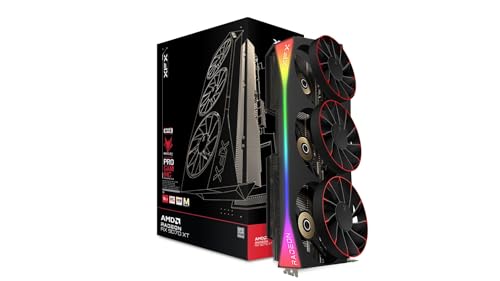
Sapphire NITRO+ AMD RADEON™ RX 9070 GAMING OC 16GB DUAL HDMI/DUAL DP
£993.46 · Sapphire · Details
Frequently asked
7 questions01What PSU wattage do I need for the MSI RTX 5070 Ti Shadow 3X OC?+
MSI recommends a minimum of 850W. Given that the factory-overclocked variant can draw up to around 320W under full load and modern GPUs produce brief transient power spikes above their rated TGP, a quality 1000W unit is the more comfortable choice, particularly if the rest of your system includes a high-core-count CPU or multiple storage drives.
02Does the MSI RTX 5070 Ti Shadow 3X OC fit in a standard mid-tower case?+
It is a triple-slot card with a substantial physical footprint, so it will not fit in every mid-tower without issue. Check your case's maximum GPU length clearance against the card's dimensions before ordering. The majority of owner reviews report no fitment problems, but a minority flag it as tight in smaller mid-tower builds.
03Does the Shadow 3X OC require a 16-pin power connector?+
Yes. It uses the 12VHPWR (16-pin) connector. MSI includes an adapter in the box for those without a native 16-pin output on their PSU. However, given the connector's history with lower-quality adapter implementations, building a new system around a PSU with a native 16-pin output is strongly advisable.
04How does DLSS 4 Multi Frame Generation work on this card?+
DLSS 4 Multi Frame Generation uses the Blackwell architecture's 5th-generation Tensor cores to generate multiple frames between each fully rendered frame, substantially increasing frame rates in supported titles. It adds some latency compared to native rendering, and image quality can exhibit artefacts at higher generation multipliers during fast motion. At sensible settings in single-player games, particularly at 4K with ray tracing enabled, it is a genuinely useful performance tool.
05How does the RTX 5070 Ti Shadow 3X OC compare to the standard RTX 5070 for 1440p gaming?+
At 1440p, the standard RTX 5070 is an excellent card and noticeably cheaper than the Ti variant. The 5070 Ti's advantages, specifically the higher memory bandwidth and extra shader count, show up more meaningfully at 4K and in VRAM-heavy workloads. If 1440p is your confirmed target resolution with no plans to move to 4K, the standard 5070 represents better value and the Ti's premium is difficult to justify on performance grounds alone.
06Is the MSI RTX 5070 Ti Shadow 3X OC suitable for content creation and streaming?+
Yes, and meaningfully so. The 9th-generation NVENC encoder supports AV1 encode and decode, which produces better image quality at equivalent bitrates compared to H.264 or H.265. The dual encode engines allow simultaneous local recording and streaming without significant degradation. The 16GB VRAM buffer also means large video projects in software such as DaVinci Resolve or Premiere Pro are handled without the card running out of memory on typical professional workloads.
07Does the fan stop completely when the card is idle?+
Yes. The Shadow 3X OC includes a zero-RPM mode that halts all three fans when the GPU is below a set temperature threshold during light tasks such as browsing, video playback, and desktop use. Owner reviews confirm this operates reliably, resulting in a completely silent card during non-gaming workloads.