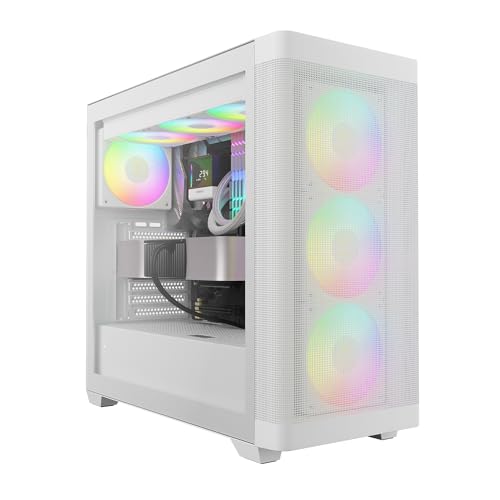
There's a certain type of PC case that catches your eye in a product photo and then quietly disappoints you once you start reading between the lines. And then there's the type that looks decent, reads decent, and turns out to be... actually decent. The GAMDIAS ATLAS M1 WH is firmly in that second camp, but with a few asterisks about before you hand over your money. This is a white ATX mid-tower with a panoramic tempered glass side panel, three ARGB PWM fans included out of the box, and a built-in status monitor that you can customise with software. At the entry-level price point it sits at, that's a lot of features on paper. Whether those features hold up is where things get interesting.
The hundred-plus owner reviews have a positive overall rating, which is genuinely good for a budget case. You don't hit that score by accident. But dig into the feedback and a picture emerges: people love the look, appreciate the included fans, and find it easier to build in than expected for the price. The complaints are real but minor, mostly around cable management space and the monitor software being a bit fiddly. So is this a hidden gem or a budget case that's just photogenic? Honestly, it's a bit of both. Here's what you actually need to know.
Core Specifications
The ATLAS M1 WH is a standard ATX mid-tower, which means it'll sit comfortably on most desks without dominating the room. It supports ATX, Micro-ATX, and Mini-ITX motherboards, so you've got flexibility there. GAMDIAS has fitted it with a perforated PSU chamber at the bottom, which is a nice touch for keeping hot air away from your components. The side panel is tempered glass across a large portion of the chassis, and the white finish is consistent across the panels rather than being a cheap paint-over-grey-steel job, which owners confirm looks clean in person.
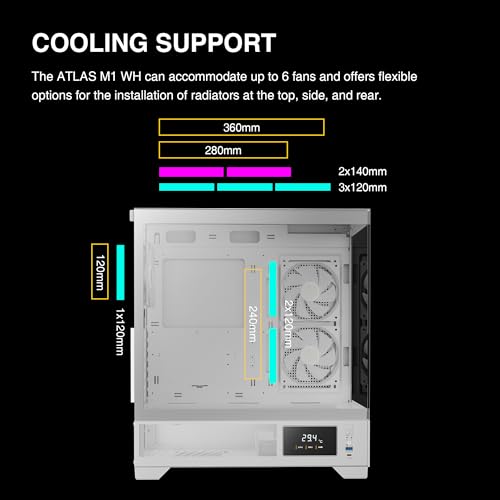
Fan support is where this case earns some of its keep. You get three 120mm ARGB PWM fans included: two at the front as intake and one at the rear as exhaust. The case supports up to six 120mm fans in total, or you can swap some of those for 140mm fans in certain positions. Radiator support goes up to 360mm at the front, 240mm at the top, and 120mm at the rear, which covers the vast majority of AIO coolers on the market. GPU clearance sits at a generous 380mm, and CPU cooler height limit is 165mm. Those are solid numbers for a case in this price bracket.
Build materials are steel for the chassis, tempered glass for the side panel, and ABS plastic for the front panel and I/O area. The steel gauge is what you'd expect at this price: functional, not flimsy, but you're not getting the kind of rigidity you'd find in a Fractal or a be quiet! chassis. Owners generally don't complain about flex or rattling, which is the real-world test that matters. The case ships with the three fans pre-installed, which saves you the faff of fitting them yourself and means you can get a build running straight away without buying extras.
| Specification | Detail |
|---|---|
| Form Factor | ATX Mid-Tower |
| Motherboard Support | ATX, Micro-ATX, Mini-ITX |
| Included Fans | 3x 120mm ARGB PWM (2 front intake, 1 rear exhaust) |
| Max GPU Length | 380mm |
| Max CPU Cooler Height | 165mm |
| Radiator Support (Front) | Up to 360mm |
| Radiator Support (Top) | Up to 240mm |
| Radiator Support (Rear) | 120mm |
| Drive Bays (3.5") | 2 |
| Drive Bays (2.5") | 3 |
| Front I/O | 2x USB 3.0 Type-A, 1x USB 2.0, HD Audio |
| Side Panel | Tempered Glass (panoramic) |
| PSU Clearance | Up to 200mm |
| Finish | White |
Form Factor and Dimensions
Mid-tower is the sweet spot for most people building a mainstream gaming PC, and the ATLAS M1 WH sits squarely in that category. It's not going to take up your entire desk, and it's not so small that you'll be fighting to fit a full-size ATX board and a decent GPU. The footprint is typical for the class: roughly 210mm wide, 450mm tall, and around 480mm deep. That means it'll fit on a standard desk with room to spare, and it'll slide under most desks if you're a floor-placement person (though I'd argue you're wasting that white finish if you do that).
The panoramic tempered glass side panel is one of the bigger selling points here. GAMDIAS has gone for a design that maximises the glass surface area, so you get a proper view of your components rather than a small window. That's increasingly common on cases above this price point, but it's still a nice thing to see on a budget chassis. Owners consistently mention that the case looks more expensive than it is, which is exactly what you want when you're trying to stretch a build budget without it looking like you stretched a build budget.
The white finish wraps around the front panel, top panel, and the steel side opposite the glass. It's a proper white rather than an off-white or cream, which matters if you're building a white-themed system with white RAM, a white GPU shroud, and white fans. Colour matching is a real concern for aesthetic builds, and GAMDIAS seems to have understood that. The front panel has a fairly clean look without too many vents cut into it, which we'll come back to in the airflow section because it does have implications.
Motherboard Compatibility
The ATLAS M1 WH supports ATX, Micro-ATX, and Mini-ITX motherboards. That covers the overwhelming majority of consumer builds. If you're running a standard gaming build on something like a B650 or Z790 board, you're fine. If you're going smaller with a Micro-ATX board to save a bit of cash on the motherboard side, you're equally fine. Mini-ITX technically fits too, though running a Mini-ITX board in a mid-tower is a bit like wearing a suit jacket with shorts: it works, but it looks a bit odd and you're paying for space you don't need.
The standoff layout is standard, and owners haven't flagged any issues with misaligned standoffs or boards not seating properly, which is more of a concern than it sounds with cheaper cases. A misaligned standoff can short your board, so it's genuinely important. The motherboard tray has a reasonably large CPU cutout behind it, which matters for installing certain coolers without pulling the motherboard out entirely. GAMDIAS hasn't published exact cutout dimensions, but owner reports suggest it's adequate for most tower coolers and AIO pump heads.
One thing is that E-ATX is not supported here. If you're running a high-end workstation board or a dual-socket setup (why would you be looking at this case if you are, but still), you'll need something bigger. For a gaming mid-tower at this price, E-ATX support would be unusual, so that's not a criticism, just a clarification. The vast majority of gaming builds use standard ATX or smaller, and those are all covered without any fuss.
GPU Clearance
The 380mm GPU clearance is the headline number here, and it's a good one. To put that in context, an RTX 4080 Super runs about 336mm long. An RTX 4090 Founders Edition is around 336mm too, though some third-party 4090 cards push past 350mm. A 380mm limit gives you a comfortable buffer for most current-generation cards, including the big triple-fan cooler designs that have become standard on anything above the mid-range. You're not going to be measuring with a ruler and sweating about whether your GPU fits. That's the right outcome.
The PSU shroud at the bottom of the case does affect GPU clearance slightly in terms of how the card sits visually, but it doesn't eat into the 380mm length limit. The shroud is a separate compartment with its own vented panel, which keeps the PSU cables out of sight and the main chamber looking tidy. That's a design choice that's become standard on cases above a certain price, and it's good to see it here.
There's no vertical GPU mount option on the ATLAS M1 WH, which matters if you specifically want to show off your GPU cooler through the glass. Vertical mounts require a riser cable (usually sold separately anyway) and often compromise airflow, so their absence isn't a deal-breaker. But if you were planning to buy this case specifically for a vertical GPU showcase build, you'll need to look elsewhere. For a straightforward horizontal installation, though, 380mm of clearance is plenty, and the glass side panel gives you a decent view of the card anyway.
CPU Cooler Clearance
The 165mm CPU cooler height limit is solid. A Noctua NH-D15 is 165mm tall, which means you're right at the limit with one of the biggest air coolers you can buy. Most popular tower coolers, including the Noctua NH-U12S at 158mm and the be quiet! Dark Rock 4 at 162mm, sit comfortably within that limit. Anything in the 120mm to 160mm range, which covers the vast majority of mainstream coolers, fits without issue. Budget coolers like the DeepCool AK400 (155mm) are well within spec.
AIO coolers are where this case genuinely shines for the price. Front support for up to a 360mm radiator is excellent. That means a 360mm AIO fits in the front of the case, which is the best thermal position for a liquid cooler because the fans can pull cool air in from outside rather than pushing already-warm case air through the radiator. Top support for up to 240mm covers most mid-range AIOs. Rear support for a 120mm rad handles the smaller single-fan AIO options. So whether you're running a budget 240mm AIO or a premium 360mm, this case accommodates it.
The pump head clearance on the motherboard side is something owners haven't flagged as a problem, which suggests the CPU cutout in the motherboard tray is adequate. Some budget cases have a tiny cutout that forces you to remove the motherboard to fit a backplate or a cooler, which is genuinely annoying. The ATLAS M1 WH doesn't seem to have that problem based on owner feedback, though it's always worth double-checking your specific cooler's mounting hardware before you commit. GAMDIAS's product page for the ATLAS M1 has the full spec breakdown if you want to verify clearances against your specific components.
Storage Bay Options
Storage options on the ATLAS M1 WH are functional without being exciting. You get two 3.5-inch bays for traditional hard drives, which is enough for most people. If you're running a primary NVMe SSD on your motherboard (and at this point in 2026, you almost certainly are) and want a large-capacity spinning disk for games or media storage, two bays covers that nicely. Three 2.5-inch bays add options for SATA SSDs, though again, most people have moved to NVMe for primary storage and only use 2.5-inch bays for secondary drives.
The drive mounting setup is straightforward. The 3.5-inch trays are located in the PSU shroud area, which keeps them out of the main chamber and maintains the clean look through the glass. The 2.5-inch bays include a couple of positions on the back of the motherboard tray, which is a sensible place to put them since they're out of sight and don't clutter the cable management area. Owners haven't flagged any issues with drive mounting being fiddly or requiring unusual tools, which is the baseline you want.
What the ATLAS M1 WH doesn't have is a huge array of drive bays, but that's fine for a modern gaming build. If you're building a NAS or a media server, this isn't the case for you, but you wouldn't be looking at a gaming mid-tower for that anyway. For a gaming PC with a primary NVMe boot drive, maybe a secondary NVMe for games, and potentially a large HDD for storage, the bay count here is perfectly adequate. The case isn't trying to be a storage monster, and it doesn't pretend to be.

Cable Management
This is the section where budget cases often let themselves down, and the ATLAS M1 WH is... mixed. The PSU shroud is a genuine help because it hides the PSU and its cables from view, which immediately makes the main chamber look tidier. The rear of the motherboard tray has some cable routing channels and tie-down points, and there are cutouts in the tray for routing cables through to the back. That's the right setup on paper.
In practice, owners report that the rear cable management space is a bit tight. The gap between the back of the motherboard tray and the side panel is around 20mm to 25mm, which is on the thinner side. You can make it work, especially if you're using a modular PSU and only running the cables you actually need, but if you've got a non-modular PSU with a full bundle of cables to tuck away, it gets cramped. A few owners mention that getting the non-glass side panel back on after routing cables is a bit of a squeeze. That's a common complaint across budget cases, and it's not unique to this one.
There are Velcro cable tie points in the rear chamber, which helps. The cutouts in the motherboard tray are reasonably well-positioned for routing the 24-pin ATX connector and the CPU power cables. The GPU power cables route fairly naturally from the PSU shroud area up to wherever your card sits. It's not a cable management masterclass, but with a bit of patience and a modular PSU, you can get a tidy result. Owners who've built in it and posted pictures generally have clean-looking builds, so it's doable. Just don't expect Fractal-level routing channels.
Airflow and Thermal Design
Here's where things get a bit complicated, and it's worth being straight about it. The front panel on the ATLAS M1 WH is not a mesh panel. It's a solid-ish panel with some ventilation, but it's not the kind of open mesh you'd get on a Fractal Meshify or a Montech Air 100. That matters because the two front intake fans need to pull air through that panel, and a restrictive front panel is the single biggest thermal bottleneck in a PC case. The perforated PSU chamber at the bottom helps with PSU thermals specifically, but it doesn't compensate for a restricted front intake.
That said, the three included fans are ARGB PWM fans, which means they're speed-controlled. At higher loads, they'll spin faster and pull more air through whatever restriction the front panel creates. Owner feedback on temperatures is generally positive, with people running mid-range GPUs and CPUs without thermal complaints. The rear exhaust fan does its job, and the top panel has ventilation for either fan or radiator mounting. The case isn't a thermal disaster, but if you're planning to run a high-TDP CPU and a power-hungry GPU, you might want to consider whether a more open front panel design would serve you better.
The airflow balance here is two intake fans at the front and one exhaust at the rear, which creates positive pressure in the case. Positive pressure means air is being pushed in faster than it's being pulled out, which generally results in less dust ingestion through unfiltered gaps. The PSU chamber has a perforated vent, and there's a dust filter at the bottom for the PSU intake. The front panel has a dust filter too. So GAMDIAS has thought about dust management, which is more than some budget cases bother with. The ARGB PWM fans are controlled via the included hub and the GAMDIAS software, which we'll cover in the I/O section.
Front I/O and Connectivity
The front I/O panel sits at the top of the case, which is the standard position for a mid-tower. You get two USB 3.0 Type-A ports, one USB 2.0 port, and a combined HD Audio jack for headphones and microphone. There's no USB Type-C port, which is the main thing to flag here. In 2026, USB-C on the front panel is increasingly expected, and its absence is a genuine gap. If you regularly plug USB-C devices in and out, you'll be routing cables around the back of the case instead, which is annoying.
The power button and reset button are clearly positioned, and owners haven't reported any issues with them feeling cheap or sticking. The RGB and fan control is handled through the included hub, which connects to your motherboard's USB 2.0 header and ARGB header. The GAMDIAS software lets you customise the lighting effects and fan curves, which is a step up from a lot of budget cases that just give you a basic controller with a few preset modes. The customisation monitor mentioned in the product name is a small status display on the case that you can configure through the software to show system stats or custom graphics.
That monitor is a bit of a novelty, and owner opinions on it are split. Some people love it as a conversation piece and find the software straightforward enough. Others find the software a bit clunky and end up leaving it on a default display mode. It's not the reason to buy this case, but it's a differentiator that you won't find on most competitors at this price. The USB 3.0 ports are standard SuperSpeed at 5Gbps, which is fine for most peripherals, external drives, and controllers. The lack of USB-C is the real omission, and GAMDIAS should address that in any future revision.
Build Quality and Materials
For a case in the entry-level price bracket, the build quality is better than you might expect. The steel chassis is solid enough that owners aren't reporting flexing or creaking, and the white finish is consistent rather than patchy. The tempered glass side panel is a proper tempered glass panel, not acrylic, which means it won't scratch as easily and looks cleaner. It attaches with thumbscrews, which is the right call for easy access. No tools required to get the side panel off, which matters when you're mid-build and need to check something.
The panel alignment is where budget cases sometimes show their cost, with panels that don't quite line up or gaps that look uneven. Owners of the ATLAS M1 WH generally report that the panels align well out of the box, with no significant gaps or misalignment. A few people mention that the top panel has a slight flex to it, but nothing that affects function. The front panel clips on and off without requiring tools, which is useful for cleaning the dust filter. Sharp edges inside the case, which are a real hazard in some budget chassis, don't seem to be a major complaint in the owner reviews, though it's always worth being careful when routing cables.
The included fans deserve a mention here too. Budget cases often include fans that are so loud or so ineffective that you replace them immediately. The GAMDIAS ARGB PWM fans included with the ATLAS M1 WH get reasonable marks from owners: they're not premium fans, but they're quiet enough at low speeds and move adequate air at higher speeds. The ARGB lighting is consistent and bright, which matters if you're building a lit system. You could upgrade to better fans later if you wanted to chase lower noise levels, but you're not forced to do it on day one, which is the right starting point for a budget build.
How It Compares
The ATLAS M1 WH sits in a competitive part of the market. Budget white ATX mid-towers with tempered glass and included fans are everywhere right now, and a few cases compete directly. The Montech X3 Mesh is a common comparison point: it has a proper mesh front panel for better airflow, similar fan support, and competes at a similar price. The mesh front is a genuine thermal advantage over the ATLAS M1 WH's more restrictive front panel. If thermals are your primary concern, the Montech is worth a look.
The Corsair 4000D Airflow is a step up in price but a significant step up in build quality, cable management space, and airflow. It's a well-regarded case that consistently gets recommended for good reason. If your budget stretches to it, the 4000D Airflow is the smarter long-term buy. But if you're trying to keep costs down and want a case that looks good, comes with working fans, and has a built-in monitor as a bit of a party trick, the ATLAS M1 WH makes a reasonable argument for itself.
The built-in status monitor is genuinely the thing that sets the ATLAS M1 WH apart from most of its direct competitors. Cases with integrated displays are usually found at higher price points. Whether that's worth trading some front-panel airflow for is a personal call. If you care about aesthetics and want something a bit different on your desk, the ATLAS M1 WH offers something most budget cases don't. If you're optimising purely for thermals and build quality, there are better options at similar or slightly higher prices.
| Feature | GAMDIAS ATLAS M1 WH | Montech X3 Mesh | Corsair 4000D Airflow |
|---|---|---|---|
| Form Factor | ATX Mid-Tower | ATX Mid-Tower | ATX Mid-Tower |
| Front Panel | Solid/vented panel | Full mesh | Perforated mesh |
| Included Fans | 3x 120mm ARGB PWM | 3x 120mm ARGB | 2x 120mm (no ARGB) |
| Max GPU Length | 380mm | 380mm | 360mm |
| Max CPU Cooler Height | 165mm | 170mm | 170mm |
| USB-C Front I/O | No | Yes | Yes |
| Status Monitor | Yes (customisable) | No | No |
| PSU Shroud | Yes (perforated) | Yes | Yes |
| Price Tier | Entry | Entry | Mid-Range |
| Owner Rating | ★★★★☆ (4.4) | ★★★★☆ (4.4) | ★★★★☆ (4.4) |

Final Verdict
The GAMDIAS ATLAS M1 WH is a case that punches above its weight in a few specific areas and accepts some compromises in others. The positive overall rating across over a hundred owner reviews isn't a fluke: people who buy this case tend to be happy with it, and that's a meaningful signal. It looks good, it comes with three working ARGB PWM fans, it supports 360mm AIOs at the front, it handles GPUs up to 380mm, and it has that quirky built-in status monitor that gives it a personality most budget cases lack. For someone building their first gaming PC and wanting something that looks the part without spending a fortune, this hits a lot of the right notes.
The gaps are real though. No USB-C on the front panel is a miss in 2026. The front panel airflow isn't as open as a mesh design would be, which matters if you're pushing high-TDP components. The rear cable management space is a bit tight, so a modular PSU is strongly recommended rather than optional. And the status monitor software, while a nice idea, gets mixed reviews for usability. None of these are fatal flaws, but they're the kind of things that add up if you're comparing it carefully against alternatives.
Who should buy it? Someone building a mid-range gaming PC, probably with a Ryzen 5 or Core i5 class CPU and a GPU in the RTX 4060 to RTX 4070 range, who wants a white case with good lighting and doesn't want to spend over the odds. The three included fans mean you're not immediately spending more money on fans to make the case functional, and the 360mm AIO support means you've got room to grow if you want to add liquid cooling later. The Micro-ATX and Mini-ITX compatibility also means it works for smaller board builds if that's where your budget takes you.
Who should skip it? If you're running a power-hungry system and thermal performance is the priority, look at the Montech X3 Mesh or similar mesh-front designs instead. If you want USB-C on the front panel (and honestly, you probably should want it by now), again, the Montech or the Corsair 4000D Airflow are better choices. And if your budget genuinely doesn't stretch to the ATLAS M1 WH, there are simpler cases without the monitor that do the basics well for less. The monitor is a fun feature, but it's not worth paying a premium for if you're really trying to cut costs.
As a value proposition at its current price, the ATLAS M1 WH is solid. It's not the best case you can buy at any price, but it's a good case for what it costs, and the owner feedback backs that up. The ATX standard compatibility, the generous GPU clearance, the AIO support, and the included fans make it a genuinely complete package for entry-level builds. Score it a 7.5 out of 10: recommended with the understanding that you're buying a budget case that happens to look better than most, not a premium case at a budget price.
What works. What doesn’t.
6 + 6What we liked6 reasons
- Three 120mm ARGB PWM fans included out of the box, meaning no immediate extra spend to make the case functional
- Supports 360mm radiators at the front and 380mm GPU clearance, generous figures for an entry-level case
- Built-in customisable status monitor is a genuine differentiator not typically found at this price point
- Consistent white finish across all panels looks more expensive than it is, according to owner feedback
- Panoramic tempered glass side panel gives a proper full view of components rather than a small window
- Tempered glass rather than acrylic, so it resists scratching and maintains clarity over time
Where it falls6 reasons
- Front panel is not a mesh design, which restricts intake airflow compared to competitors such as the Montech X3 Mesh
- No USB Type-C port on the front I/O panel, which is a notable omission in 2026
- Rear cable management space is tight at approximately 20 to 25mm, making a modular PSU effectively mandatory
- Status monitor software receives mixed reviews for usability, with some owners finding it clunky
- No vertical GPU mount option for those wanting to display their graphics card through the side panel
- Steel gauge is functional rather than premium, lacking the rigidity of higher-end chassis from Fractal or be quiet!
Full specifications
11 attributes| Form factor | Mid-Tower |
|---|---|
| CPU cooler clearance MM | 160 |
| Dimensions MM | 420 x 210 x 465 |
| Fans included | 3 |
| GPU clearance MM | 410 |
| MAX FAN count | 6 |
| MAX radiator MM | 360 |
| PSU support | ATX up to 180mm |
| Side panel | tempered glass |
| Supported motherboard | ATX, Micro-ATX, Mini-ITX |
| Weight KG | 7.6 |
Got a motherboard yet?
4 reviewsThe maker lists ATX, Micro-ATX and Mini-ITX boards for this case. These ATX boards fit it.
Frequently asked
7 questions01Does the GAMDIAS ATLAS M1 WH support a 360mm AIO liquid cooler?+
Yes. The front of the case supports radiators up to 360mm, which is the best thermal position for a liquid cooler because the fans draw cool air in from outside the case. The top supports up to 240mm and the rear supports a single 120mm radiator, so most AIO sizes on the market are covered.
02What is the maximum GPU length the ATLAS M1 WH can accommodate?+
The case supports graphics cards up to 380mm in length. That comfortably covers current-generation cards including large triple-fan designs such as the RTX 4080 Super and most third-party RTX 4090 coolers, so you are unlikely to need to measure unless you have an unusually long card.
03Is the front panel a mesh design for good airflow?+
No. The front panel is a solid-ish vented panel rather than a full mesh design. It does include a dust filter, and the two front 120mm ARGB PWM fans are PWM speed-controlled to compensate, but airflow is more restricted than on mesh-front competitors such as the Montech X3 Mesh. Owner temperature feedback is generally positive for mid-range components, but high-TDP builds may want a more open front panel.
04Does the ATLAS M1 WH have a USB-C port on the front panel?+
No, it does not. The front I/O includes two USB 3.0 Type-A ports, one USB 2.0 port, and a combined HD Audio jack. The absence of a USB Type-C port is one of the most notable omissions on this case, and anyone who regularly connects USB-C devices will need to use the ports on the rear of their motherboard instead.
05What is the built-in status monitor and is it worth having?+
The ATLAS M1 WH includes a small display panel on the chassis that can be configured via the GAMDIAS software to show system statistics or custom graphics. Owner opinions are divided: some find it a fun conversation piece that genuinely sets the case apart, while others find the software a bit clunky and leave it on a default mode. It is not the primary reason to buy the case, but it is a differentiator you will not find on most competitors at this price point.
06How many fans does the GAMDIAS ATLAS M1 WH include, and can you add more?+
The case ships with three 120mm ARGB PWM fans: two at the front as intake and one at the rear as exhaust. The case supports up to six 120mm fans in total, and certain positions can also accommodate 140mm fans. All three included fans are connected via a hub that links to your motherboard's USB 2.0 and ARGB headers for software control.
07Is cable management difficult in the ATLAS M1 WH?+
It is manageable but requires some care. The PSU shroud hides the power supply and its cables from view, and there are routing cutouts and Velcro tie points behind the motherboard tray. However, the gap between the back of the tray and the rear panel is around 20 to 25mm, which is on the tighter side. Owners using a modular PSU report clean results, while those with non-modular PSUs find it more of a squeeze to close the rear panel.