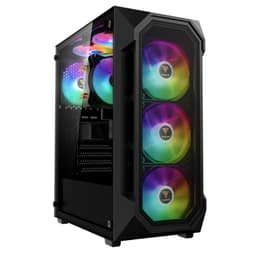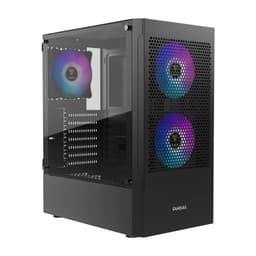
I've built in a lot of cases over the past 12 years. Some have been genuinely brilliant, some have been absolute nightmares, and most sit somewhere in the middle. The GAMDIAS ATHENA M3 White falls into that middle ground, but it's an interesting middle ground. Spend a month with a case, building in it, pulling it apart, rerouting cables, swapping coolers, and you start to notice things that a quick unboxing video will never tell you. That's what I've done here, and I want to give you the honest picture before you hand over your money.
GAMDIAS isn't a brand that gets talked about as much as Corsair, NZXT, or Fractal Design, and I think that's partly why cases like the GAMDIAS ATHENA M3 White Gaming PC Case Review UK (2026), Build Tested fly under the radar. At the budget end of the market, you're always making compromises. The question is whether those compromises are in places you care about. After living with this case for about a month, I've got a pretty clear view of where GAMDIAS made smart decisions and where they clearly shaved costs. Some of it surprised me, honestly.
So let's get into it. I'll cover everything from GPU clearance to cable routing space, airflow design, and how it stacks up against the competition at a similar price. If you're building a budget or mid-range gaming PC and white aesthetics are on your list, this one deserves a proper look.
Core Specifications
The ATHENA M3 is a mid-tower chassis, which is the sweet spot for most gaming builds. It supports ATX, Micro-ATX, and Mini-ITX motherboards, so you've got flexibility there. The case measures approximately 430mm tall, 210mm wide, and 450mm deep, which puts it in line with most standard mid-towers. It's not a compact case, but it's not oversized either. You'll fit it on most desks without any drama.
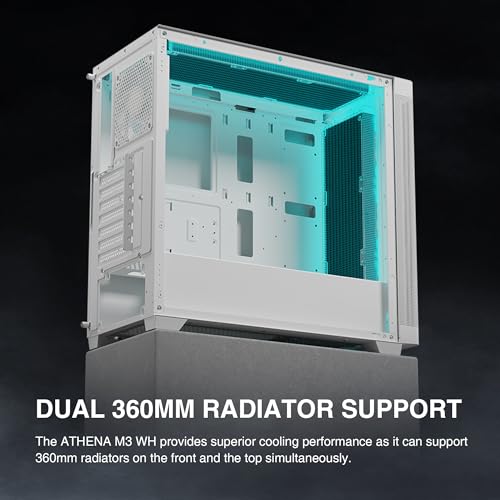
In terms of fan support, the ATHENA M3 can accommodate up to six 120mm fans across the front (three), top (two), and rear (one). GAMDIAS includes three 120mm ARGB fans pre-installed at the front, which is a decent inclusion at this price. The case supports radiators up to 360mm at the front and 240mm at the top, which covers most AIO options you'd pair with a budget to mid-range build. PSU clearance is standard ATX, and the GPU length support is quoted at 380mm, which I'll dig into more in the GPU section.
Build materials are steel for the main chassis, with a tempered glass side panel on the left and a steel panel on the right. The front panel is a mesh design, which is good news for airflow. The white finish is applied to the exterior panels and looks clean out of the box. Weight comes in at around 6.5kg without components, which feels about right for the build quality on offer.
| Specification | Detail |
|---|---|
| Form Factor | Mid-Tower |
| Motherboard Support | ATX, Micro-ATX, Mini-ITX |
| Dimensions (H x W x D) | ~430mm x 210mm x 450mm |
| Included Fans | 3x 120mm ARGB (front) |
| Max Fan Support | 6x 120mm (front x3, top x2, rear x1) |
| Radiator Support (Front) | Up to 360mm |
| Radiator Support (Top) | Up to 240mm |
| Radiator Support (Rear) | 120mm |
| Max GPU Length | 380mm |
| Max CPU Cooler Height | 165mm |
| Drive Bays (3.5") | 2x |
| Drive Bays (2.5") | 2x dedicated |
| PSU Form Factor | ATX (bottom-mounted) |
| Side Panel | Tempered Glass (left), Steel (right) |
| Front Panel | Mesh |
| Weight | ~6.5kg |
| Current Price | £52.99 |
Form Factor and Dimensions
As a mid-tower, the ATHENA M3 hits the dimensions you'd expect. It's not trying to be anything exotic. The footprint is manageable, and it sits comfortably on a desk without dominating the space. If you're putting this on a desk rather than the floor, you'll want to make sure you've got at least 450mm of depth to work with, plus a bit of breathing room at the back for cable exits and airflow.
The 210mm width is on the slimmer side for a mid-tower. That's not necessarily a problem, but it does mean the interior feels a touch tighter than something like a Fractal Design Focus 2 or a Corsair 4000D. When you're routing thick GPU power cables or trying to manage a chunky 24-pin ATX connector, that narrower profile makes itself known. It's manageable, but you notice it. I'll talk more about that in the cable management section.
The white finish is genuinely nice. It's a matte-ish white rather than a glossy finish, so it doesn't show fingerprints as badly as you might expect. The tempered glass panel is clear and sits flush with the chassis when properly seated. The overall silhouette is clean and angular, which suits the gaming aesthetic without going overboard with aggressive styling. If you want a white case that doesn't look like it belongs in a sci-fi film, this one is fairly restrained.
Motherboard Compatibility
The ATHENA M3 supports ATX, Micro-ATX, and Mini-ITX motherboards. The standoff layout is standard, and I had no issues fitting a full-size ATX board during my test build. The motherboard tray has pre-installed standoffs for ATX, which is helpful. If you're going Micro-ATX or Mini-ITX, you'll need to check which standoffs are pre-installed and adjust accordingly, but that's true of most cases in this price range.
One thing I noticed is that the CPU cutout in the motherboard tray is a decent size. It's large enough to accommodate most aftermarket cooler backplates without needing to remove the motherboard entirely, which saves a lot of faff during cooler swaps. A standard 120mm tower cooler and a 240mm AIO both fit without needing to pull the board out. That's a small thing, but it matters when you're mid-build and realise you need to swap something.
The case doesn't support E-ATX, which is worth noting if you're planning a high-end HEDT build. But honestly, if you're spending that kind of money on a motherboard, you're probably not looking at a budget case anyway. For the target audience here, ATX support is what matters, and it works fine. The standoff positions are clearly labelled, which is a nice touch for newer builders who might not be confident about which holes to use.
GPU Clearance
GAMDIAS quotes 380mm of GPU clearance that figure held up. I fitted a card measuring around 340mm without any issues, and there was still a comfortable gap between the end of the card and the front intake fans. If you're running a 360mm radiator at the front, that clearance figure drops, so keep that in mind. With a front radiator installed, you're looking at something closer to 300-310mm of usable GPU space, which rules out some of the longer triple-fan cards.
The GPU sits in a standard horizontal orientation. There's no vertical GPU mount bracket included, and I didn't see an obvious way to add one without a third-party bracket kit. For most people that's fine, but if showing off your GPU through the glass panel is important to you, it's worth knowing upfront. The PCIe slot covers are the standard screw-in type rather than tool-free, which is a minor annoyance but not a dealbreaker.
There's room for a card with a fairly wide heatsink shroud, with no contact with the PSU shroud below or the side panel glass. The PCIe slot positions are standard, so compatibility with current-gen cards isn't an issue. Whether you're running an RTX 4060, an RX 7600, or something a bit beefier, you should be fine as long as you stay within that 380mm limit and account for any front radiator you're planning to install.
CPU Cooler Clearance
The quoted maximum CPU cooler height is 165mm. That's a solid number for a mid-tower and covers the vast majority of popular air coolers. A 155mm tower cooler fits with no issues at all. The side panel closed without any flex or pressure on the cooler fins, which is always a relief. Some budget cases quote generous clearance figures but then the panel bows slightly when you close it. That didn't happen here.
For AIO radiator support, the front supports up to 360mm and the top supports up to 240mm. I fitted a 240mm AIO at the top during my test build, and it went in cleanly. The mounting holes lined up properly, and there was enough clearance between the radiator and the top of the motherboard to avoid any RAM interference, though it was closer than I'd like with taller RAM sticks. If you're running RAM with large heatspreaders, double-check the clearance before committing to a top-mounted 240mm AIO.
A 360mm AIO at the front is the better option in this case if you want serious cooling. The front mesh design means the radiator gets good fresh air, and you avoid the RAM clearance issue entirely. I didn't have a 360mm AIO to hand, but the mounting positions are standard and the 380mm GPU clearance figure (reduced with a front rad installed) suggests GAMDIAS has accounted for this configuration. Just plan your build order carefully, because fitting a front radiator before the motherboard makes life considerably easier.
Storage Bay Options
Storage options are fairly standard for this price bracket. You get two 3.5-inch drive bays and two dedicated 2.5-inch bays. The 3.5-inch bays are located behind the PSU shroud, which keeps them out of sight and helps with cable tidiness. The 2.5-inch bays are mounted on the back of the motherboard tray, which is a sensible placement. M.2 drives mount directly to your motherboard, so the case doesn't need to account for those.
The drive mounting isn't tool-free for the 3.5-inch bays. You'll need a screwdriver to secure your hard drives, which is fine but worth knowing if you're used to cases with tool-free sleds. The 2.5-inch mounting is also screw-based. It's not a huge deal, but some builders do prefer the convenience of tool-free mounting, especially if they're likely to swap drives around. At this price point, I wasn't expecting tool-free everything, so no complaints really.
Two 3.5-inch bays might feel limiting if you're planning a NAS-style build with multiple hard drives, but for a gaming PC, it's more than enough. Most gaming builds these days run an M.2 SSD for the OS and games, maybe a 2.5-inch SSD for extra storage, and that's it. The two 3.5-inch bays are there if you want them, but plenty of builders won't use them at all. The hidden placement behind the PSU shroud is a nice touch regardless.

Cable Management
This is where the narrower chassis width starts to make itself felt. The rear panel clearance for cables is around 15-18mm, which is workable but not generous. I managed to route all my cables neatly, but it took more effort than it would in a wider case. The 24-pin ATX cable in particular needed some persuasion to sit flat enough for the side panel to close without bulging. Not impossible, but you'll want to use cable combs or ties to keep things tidy.
There are cable routing holes in the motherboard tray with rubber grommets, which is a good sign. The grommets are a bit stiff but they do the job. There's a PSU shroud that covers the bottom of the case and hides most of the PSU cables, which makes the interior look much cleaner through the glass panel. GAMDIAS has included a couple of Velcro cable ties, which is a small but appreciated detail. I always end up using my own anyway, but it shows some thought went into the cable management design.
The GPU power cable routing is the trickiest part. Depending on your GPU and PSU cable lengths, you might find the cable wants to run across the front of the case rather than neatly behind the tray. I ended up using a 90-degree adapter on the GPU power connector to get a cleaner run. Again, not a dealbreaker, but worth planning for. Overall, cable management is achievable in the ATHENA M3, it just requires a bit more patience than you'd get in a wider chassis.
Airflow and Thermal Design
The mesh front panel is the ATHENA M3's biggest selling point from a thermal perspective. Mesh fronts allow significantly more air through than solid or glass fronts, and the three included 120mm ARGB fans take advantage of that. CPU and GPU temperatures under load are respectable for a budget case. The mesh design genuinely makes a difference compared to cases with glass or solid fronts that restrict intake airflow.
The three front fans pull air in, and the single rear fan exhausts it. The top panel has vents for additional exhaust fans or a radiator, which helps with overall airflow balance. The intake-to-exhaust ratio with the stock configuration is three-to-one, which creates a positive pressure environment inside the case. Positive pressure means air is pushed out through gaps rather than being sucked in, which helps reduce dust accumulation on components. There is a dust filter on the bottom for the PSU intake, which is good. The front mesh acts as its own filter to some degree, though it's not a removable filter panel.
The included ARGB fans are decent for the price. They're not going to compete with premium fans from Noctua or be as quiet as you might like at full speed, but they move a reasonable amount of air and the ARGB lighting looks good through the glass panel. GAMDIAS includes a controller hub for the ARGB fans, which connects to your motherboard's ARGB header. If your motherboard doesn't have an ARGB header, you'll need to check whether the hub has a standalone mode. Most budget builds these days do have ARGB headers, but it's worth checking.
Front I/O and Connectivity
The front I/O panel sits at the top of the case, which is my preferred placement. You get two USB 3.0 Type-A ports, a USB 3.1 Gen 1 Type-C port, and a combined 3.5mm audio jack for headphones and microphone. The power button is a decent size and has a satisfying click to it. There's no dedicated reset button, which some people care about and others never use. I'm in the camp that never uses it, so no issue there.
The USB Type-C port is a welcome inclusion at this price. A lot of budget cases still ship with only Type-A ports, so having Type-C is a genuine plus. It connects to the motherboard via a standard internal USB 3.1 Gen 1 header, so make sure your motherboard has that header available. Most modern ATX boards do, but it's worth checking if you're pairing this with an older or budget board. The USB Implementers Forumstandard for this connector is well established, and the implementation here is solid with no connection issues.
The audio jack worked fine with my headset. No crackling or interference, which can sometimes be an issue with budget cases that use cheap audio implementations. The front I/O cable lengths are adequate for routing to the motherboard headers without being excessively long. Overall, the front I/O is one of the stronger aspects of the ATHENA M3. It covers the basics well and the Type-C inclusion is a genuine differentiator at this price point.
Build Quality and Materials
The steel used in the ATHENA M3 chassis is on the thinner side, which is expected at this price. It's not flimsy, but if you press on the side panels they do flex a bit. The tempered glass panel is a good thickness and feels solid. It's secured with four thumbscrews, which makes removal easy. The glass sits flush with the chassis when properly installed, and the white frame around it looks clean. No complaints about the glass panel at all.
Panel alignment is generally good. The top panel, front panel, and side panels all lined up properly on my unit with no obvious gaps or misalignment. The front mesh panel is attached with push-fit clips, which makes it easy to remove for cleaning. That's a thoughtful detail. Sharp edges are present in a few places inside the case, particularly around some of the cable routing holes and the drive bay area. Nothing that drew blood during my build, but I'd recommend wearing gloves if you're working in tight spots.
The white finish holds up well. No chipping or discolouration, and it cleaned up easily with a microfibre cloth. The thumbscrews for the side panels are a reasonable quality, not the cheap ones that strip after a few uses. The overall impression is of a case that's been built to a price but hasn't cut corners in the places that matter most. You're not getting premium build quality here, but for the money, it's a fair effort from GAMDIAS.
How It Compares
The budget mid-tower market is genuinely competitive right now, with options ranging from established brands to newer contenders like the NZXT H Flow case roundup. The ATHENA M3 White is going up against some well-established options, most notably the Corsair 4000D Airflow and the Fractal Design Focus 2 RGB. Both of those are popular choices in the UK, and both have strong reputations. So where does the ATHENA M3 sit relative to them?
The Corsair 4000D Airflow is a brilliant case, but it typically costs noticeably more than the ATHENA M3. You get better build quality, more cable management space, and Corsair's excellent tool-free design. But if you're on a tight budget, that price difference could go toward a better GPU or more RAM. The Fractal Design Focus 2 RGB is closer in price and is a strong competitor with good airflow and a clean design. The ATHENA M3 competes on ARGB fan inclusion and the Type-C front I/O, but the Fractal generally wins on build quality and interior space.
Where the ATHENA M3 has an edge is the white colourway at a budget price. White cases tend to cost more than their black equivalents, and GAMDIAS has kept the price competitive for a white mid-tower with ARGB fans included. If white aesthetics are a priority and budget is tight, the ATHENA M3 makes a reasonable case for itself. If aesthetics are secondary and you just want the best airflow and build experience for the money, the Fractal Focus 2 or a similarly priced Deepcool case might serve you better.
| Feature | GAMDIAS ATHENA M3 White | Corsair 4000D Airflow | Fractal Design Focus 2 RGB |
|---|---|---|---|
| Form Factor | Mid-Tower | Mid-Tower | Mid-Tower |
| Front Panel | Mesh | Mesh | Mesh |
| Included Fans | 3x 120mm ARGB | 2x 120mm (non-ARGB) | 3x 120mm ARGB |
| Max GPU Length | 380mm | 360mm | 467mm |
| Max CPU Cooler Height | 165mm | 170mm | 185mm |
| Front Radiator Support | 360mm | 360mm | 360mm |
| USB Type-C Front I/O | Yes | Yes | Yes |
| Tempered Glass Panel | Yes (left) | Yes (left) | Yes (left) |
| White Colourway Available | Yes | Yes (higher price) | Yes |
| Price Tier | Budget | Mid-Range | Budget/Mid |

Final Verdict
The GAMDIAS ATHENA M3 White Gaming PC Case Review UK (2026), Build Tested is a case that does more right than wrong, which is genuinely not a given at this price. The mesh front panel, three included ARGB fans, USB Type-C front I/O, and clean white aesthetic are all legitimate selling points. These aren't things you always get in a budget case, and GAMDIAS deserves credit for including them.
The compromises are real though. The narrower chassis makes cable management more of a challenge than it needs to be. The rear panel clearance is tight, and if you're running a chunky modular PSU with thick cables, you'll need to put some effort into getting the side panel to close neatly. The build quality is adequate rather than impressive, with some thin steel and a few sharp edges to watch out for. And the lack of a vertical GPU mount might disappoint some builders who want to show off their graphics card.
But here's the thing. At the price point this case sits at, you're not going to find something that does everything perfectly. The ATHENA M3 makes sensible choices about where to spend the budget. Mesh front for airflow, ARGB fans included, Type-C on the front I/O. Those are the things that matter to most builders in this category, and GAMDIAS has delivered on them. If you're building a budget to mid-range gaming PC and want a white case with decent airflow without spending mid-range money, this is a reasonable choice. Just go in with realistic expectations about the build experience and cable management space.
I'd give it a 7 out of 10. Solid for the money, not without its frustrations, but a genuinely usable case that looks good when it's done. Check the GAMDIAS official site if you want to dig into the full spec sheet, and check current pricing below before you commit.
What works. What doesn’t.
5 + 4What we liked5 reasons
- Mesh front panel delivers genuinely good intake airflow
- Three 120mm ARGB fans included at this price is excellent value
- USB Type-C front I/O is a real differentiator at the budget tier
- Clean white finish with no obvious panel misalignment
- 360mm front radiator support covers most AIO options
Where it falls4 reasons
- Narrow chassis makes cable management noticeably harder than wider rivals
- Rear panel clearance around 15-18mm is tight with thick cables
- Some sharp internal edges around cable routing holes
- No vertical GPU mount option included or easily added
Full specifications
12 attributes| Form factor | Mid-Tower |
|---|---|
| Airflow type | mesh |
| MAX GPU length | 420 |
| MAX cooler height | 170 |
| Radiator support | 360mm top, 360mm front, 120mm rear |
| CPU cooler clearance MM | 170 |
| Dimensions MM | 430 x 210 x 450 |
| Drive bays | 2 x 3.5" or 1 x 2.5"+1 x 3.5", 4 x 2.5" |
| Fans included | 4 |
| GPU clearance MM | 420 |
| MAX FAN count | 6 |
| MAX radiator MM | 360 |
If this isn’t right for you
2 options

Frequently asked
5 questions01Is the GAMDIAS ATHENA M3 White Gaming PC Case Review UK (2026), Build Tested good for airflow?+
Yes, airflow is one of the ATHENA M3's genuine strengths. The mesh front panel allows significantly more air through than solid or glass front designs, and the three included 120mm ARGB fans are positioned to take full advantage of that. With the stock fan configuration (three front intake, one rear exhaust), the case runs a positive pressure setup that helps keep dust off components. You can add two more fans at the top for additional exhaust. Temperatures are respectable for a budget case, and the mesh front is a meaningful upgrade over glass-fronted competitors at a similar price.
02What's the GPU clearance on the GAMDIAS ATHENA M3 White Gaming PC Case Review UK (2026), Build Tested?+
GAMDIAS quotes 380mm of GPU clearance, and that figure held up. A card measuring around 340mm fitted with comfortable clearance to the front fans. However, if you install a 360mm radiator at the front, that usable GPU length drops to approximately 300-310mm, which rules out some longer triple-fan cards. There's no vertical GPU mount option included. Current mid-range cards like the RTX 4060 Ti or RX 7700 XT fit without any issues in the standard horizontal orientation.
03Can the GAMDIAS ATHENA M3 White Gaming PC Case Review UK (2026), Build Tested fit a 360mm AIO?+
Yes, the front panel supports up to a 360mm radiator, which is the recommended position for a large AIO in this case. The top panel supports up to 240mm. If you go with a top-mounted 240mm AIO, be aware that clearance to tall RAM heatspreaders can be tight, so check your RAM height before committing to that configuration. A front-mounted 360mm AIO is the cleaner option thermally and avoids the RAM clearance issue, though it will reduce your maximum GPU length to around 300-310mm.
04Is the GAMDIAS ATHENA M3 White Gaming PC Case Review UK (2026), Build Tested easy to build in?+
It's manageable but not the easiest case at this price. The main challenge is the narrower chassis width, which leaves around 15-18mm of rear panel clearance for cables. That's workable but tight, especially with thick modular PSU cables. The 24-pin ATX cable in particular needs careful routing. The CPU cutout in the motherboard tray is a good size and allows cooler backplate access without removing the board. There are rubber-grommeted cable routing holes and a PSU shroud to hide bottom cables. A couple of Velcro ties are included. Expect to spend a bit more time on cable management than you would in a wider case like the Corsair 4000D.
05What warranty and returns apply to the GAMDIAS ATHENA M3 White Gaming PC Case Review UK (2026), Build Tested?+
Amazon offers 30-day hassle-free returns if the case doesn't suit your build. GAMDIAS typically provides a 1-2 year warranty on manufacturing defects. Check the product listing for exact warranty terms as these can vary by seller and region.