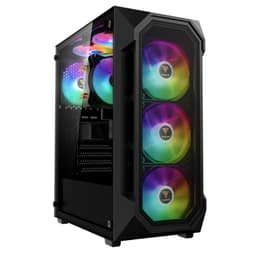
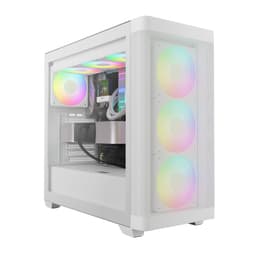
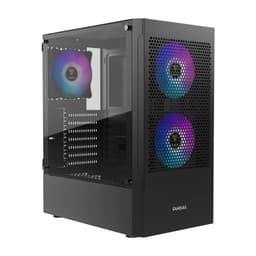
Panel choice matters more than most builders realise, and the GAMDIAS TALOS E3 Gaming pc case makes a specific bet on it. It ships with tempered glass on both the front and the side, which looks brilliant in photos and on a shelf, but puts the thermal responsibility squarely on those three included 120mm ARGB fans. That trade-off is the central question with this case. Owner feedback across 1,287 averages ★★★★☆ (4.4), which is genuinely good for a mid-tower at this price point, but the nuance in those reviews tells you a lot about who this case suits and who it doesn't.
The GAMDIAS TALOS E3 Gaming pc case is a compact mid-tower with ATX support, a PSU shroud, dual tempered glass panels, and front radiator support up to 360mm. On paper it punches above its weight. The ARGB fans are included, the glass panels are tool-free, and the PSU cover keeps the interior looking tidy. But glass-fronted cases live and die by their fan configuration, and 300mm is the GPU length ceiling here, which will rule out some builders straight away. So let's get into the specifics.
Verdict up front: this is a solid budget-to-mid-range case for a builder who wants RGB aesthetics and a clean interior without spending serious money. It's not the airflow king of its class, and the glass front will frustrate anyone chasing the lowest possible thermals. But for a living-room-facing build or a first proper gaming PC, it earns its 4.4 stars.
Core Specifications of the GAMDIAS TALOS E3 Gaming pc case
The TALOS E3 is a compact mid-tower, and GAMDIAS has been pretty deliberate about keeping the footprint manageable. It supports motherboards up to ATX, which covers the vast majority of gaming builds. The front panel accommodates two 120mm or 140mm fans, and the radiator support is where things get interesting: up to 360mm or 280mm at the front, and 280mm, 240mm, or 120mm at the top. That front 360mm support is a proper selling point at this price tier.
GPU clearance is rated to 300mm. Three 120mm ARGB fans are included from the factory, which is a legitimate value add. Both the front and side panels are tempered glass, and the PSU shroud keeps cabling hidden from the side window view. The ARGB fans connect to compatible motherboards for system-wide lighting sync, so if you're on an ASUS, MSI, or Gigabyte board with an ARGB header, you can control everything from one place.
What the spec sheet doesn't spell out explicitly includes exact internal dimensions, steel gauge, and the precise rear-panel cable management clearance. These are things you'd normally want confirmed before buying. Owner reviews fill in some of the gaps, and we'll get to those in the relevant sections. For now, here's the full spec summary as verified from the product listing.
| Specification | Detail |
|---|---|
| Form Factor | Compact Mid-Tower |
| Motherboard Support | Up to ATX |
| GPU Clearance | Up to 300mm |
| Included Fans | 3 x 120mm ARGB |
| Front Fan Support | 2 x 120mm or 140mm |
| Front Radiator Support | 360mm / 280mm / 240mm |
| Top Radiator Support | 280mm / 240mm / 120mm |
| Panel Material | Tempered Glass (front and side) |
| PSU Shroud | Yes |
| ARGB Sync | Yes (compatible motherboard header) |
| Tool-Free Glass Panel | Yes |
| Finish | Matte Black |
| Rating | ★★★★☆ (4.4) (1,287 reviews) |
Form Factor and Dimensions
GAMDIAS bills this as a compact mid-tower, and that description is doing real work here. It's not a full-size mid-tower in the mould of a Fractal Design Meshify C or a Corsair 4000D. It's deliberately restrained in its external footprint, which makes it a reasonable fit for tighter desk setups or smaller rooms where a hulking full-size tower would feel oppressive. The matte black finish is clean and relatively neutral, so it doesn't scream "gaming case from 2019" the way some RGB-forward chassis do.
The dual tempered glass treatment is the defining visual choice. Front glass is increasingly common at this price point, but it does restrict intake airflow compared to a mesh front. The side panel glass is expected and welcome. Together they give the case a premium look that photographs well and impresses in person, especially with the ARGB fans running. Whether that's worth the thermal trade-off depends entirely on your build and your ambient temperature. In a cool room with a modest CPU and GPU, you'll probably never notice. In a warm room with a high-end Ryzen or Intel chip and a power-hungry GPU, the restricted front intake will show up in your temperatures.
The compact footprint does mean this won't be the roomiest build experience. If you're planning a complex cable management job with a fully modular PSU and a lot of custom sleeved cables, the tighter interior will ask more of you than a larger chassis would. That's not a flaw specific to the TALOS E3 so much as it's the nature of compact mid-towers. You're trading internal elbow room for a smaller desk presence, and that's a fair trade for a lot of builders. Owner reviews broadly confirm the case looks and feels bigger in person than the photos suggest, which is a pleasant surprise.
Motherboard Compatibility
The TALOS E3 supports motherboards up to ATX, which is the standard full-size gaming board format. That covers pretty much every mainstream build: Intel Z790, B760, AMD X670, B650, and anything below. You're not getting E-ATX support, but honestly, E-ATX boards are a niche within a niche and almost nobody building at this case's price point needs one. ATX covers the vast majority of gaming and productivity builds without compromise.
Smaller boards fit too, of course. mATX and mini-ITX will drop straight in, though you'd be giving up some of the internal space efficiency that makes those form factors appealing. If you're building mITX specifically, there are better-suited cases for that. But if you've got an mATX board and you like the look of the TALOS E3, it'll work fine. The standoff layout follows standard ATX spacing, and owner feedback doesn't flag any alignment issues with common boards.
One thing to keep in mind with compact mid-towers is that ATX support doesn't always mean generous clearance around the board. With a full ATX motherboard installed, the space between the board edge and the front intake fans can get tight, particularly if you're running a 360mm radiator up front at the same time. That combination works in this case per the spec sheet, but it'll be snug, and you'll want to think carefully about the order of installation. Fans and radiator first, then board, is generally the right approach in a case like this.
GPU Clearance
The TALOS E3 supports GPUs up to 300mm in length. That's the number you need to check against your graphics card before buying. To give you a sense of what fits: an RTX 4060 or 4070 in most configurations will clear comfortably. The RTX 4070 Ti Super in its standard dual-fan configurations from most AIB partners runs around 300mm to 336mm depending on the variant, so you'd need to check the exact card you're buying. An RTX 4090 is off the table entirely; those cards are typically in the 336mm to 360mm range and beyond.
The 300mm ceiling is a genuine limitation if you're planning a high-end GPU. It's not unusual for a case at this price point, but it's worth being clear about. Mid-range GPUs like the RX 7600, RTX 4060 Ti, and RX 7700 XT all tend to sit well within the 300mm limit in their standard configurations. If you're pairing this case with a mid-range CPU and GPU for a 1080p or 1440p gaming build, the GPU clearance likely won't be an issue at all.
There's no mention of a vertical GPU mount option in the verified spec data, which isn't surprising for a case at this price tier. Vertical mounts add cost and complexity, and they're more of a feature you'd expect from cases in the premium bracket. For most builders, the standard horizontal orientation is fine, and the side tempered glass panel gives you a clear view of the GPU anyway. Owner photos on the listing show mid-range cards looking properly displayed through the glass, which is clearly part of the appeal here.
CPU Cooler Clearance
The verified spec data doesn't list an explicit maximum CPU cooler height for the TALOS E3, which is frustrating but not uncommon for cases at this price point. What we can work from is the radiator support data. The front panel takes up to a 360mm radiator, and the top panel supports up to 280mm. That top radiator support is meaningful: it means you can run a 240mm or 280mm AIO at the top, which is a popular configuration for keeping CPU temperatures in check without sacrificing the front intake for a radiator.
For air cooling, the compact mid-tower classification suggests you should be cautious with very tall tower coolers. Something like a Noctua NH-D15 at 165mm height might be tight or might not fit at all; the spec sheet simply doesn't confirm either way. More mainstream air coolers in the 150mm to 158mm range, like the be quiet! Pure Rock 2 or the DeepCool AK400, are generally safe bets for compact mid-towers. If you're committed to a specific tall air cooler, checking the GAMDIAS product page directly for the CPU cooler height clearance figure before buying would be wise.
The front 360mm radiator support is genuinely impressive for a compact case. Running a 360mm AIO up front with three 120mm fans as intake, then using the three included fans as exhaust at the rear and top, gives you a solid thermal setup. That configuration would handle a modern mid-range CPU without drama. The ARGB fans included in the case are 120mm units, so they'd work as intake or exhaust in various positions depending on how you configure your cooling. Owner reviews suggest the included fans are decent but not exceptional, which is about what you'd expect from bundled fans in this price tier.
Storage Bay Options
The verified spec data doesn't break out the exact drive bay count for the TALOS E3, which is a gap worth acknowledging. What we know from the product description is that this is a compact mid-tower with a PSU shroud design, which typically means a limited number of 3.5-inch drive bays hidden behind or beneath the shroud. Modern gaming builds are increasingly SSD-only anyway, so this is less of a concern than it would have been a few years ago, but if you're planning to run multiple mechanical hard drives for mass storage, a compact mid-tower probably isn't your first choice regardless of brand.
M.2 SSD support depends on your motherboard rather than the case, so that's a non-issue. For 2.5-inch SATA SSDs, most compact mid-towers at this price include at least two mounting points, often on the back of the motherboard tray or on a bracket behind the PSU shroud. Owner reviews don't flag any particular frustration with drive mounting, which suggests the options available are adequate for typical gaming builds. If you're building a pure gaming rig with an NVMe boot drive and maybe one SATA SSD, you'll be fine.
The PSU shroud is here specifically because it affects how you access the lower part of the case. A well-designed shroud hides cables and gives the interior a clean look through the side glass, but it can also make accessing drive bays fiddly once the build is complete. The TALOS E3's PSU cover design is highlighted as a key feature, and owner photos suggest it does its job well visually. Whether the drive bay access behind it is convenient or annoying is something the spec sheet doesn't confirm, but it's a reasonable thing to think about if you're planning to swap drives regularly.

Cable Management
The PSU shroud is the headline cable management feature here, and it's doing a lot of work. Hiding the power supply and the lower cable runs behind a solid cover means the side glass view stays clean even if your cable management isn't immaculate. That's genuinely useful for builders who want the aesthetic without spending hours on perfect cable runs. It's also a practical feature for first-time builders who find cable management daunting; the shroud gives you a bit of forgiveness.
Beyond the shroud, the spec data doesn't detail rear-panel cable channel widths or Velcro strap positions. This is where compact mid-towers can frustrate, because the gap between the motherboard tray and the rear panel is often tighter than in full-size cases. Owner reviews for the TALOS E3 are broadly positive about the build experience, and the tool-free glass panel access is called out as a genuine convenience. But a few reviews do mention that the rear cable management space is workable rather than generous, which is honest and expected for a compact chassis.
The tool-free tempered glass panel is a proper quality-of-life feature. Removing and replacing the side panel without reaching for a screwdriver makes the building process noticeably less frustrating, especially when you're going back in to adjust cables or add a component after the initial build. It's the kind of detail that sounds minor until you've dealt with a case that doesn't have it. The front panel is also tempered glass with tool-free removal, which is less common and worth appreciating. Getting to the front fans for cleaning or replacement without tools is a practical win.
Airflow and Thermal Design
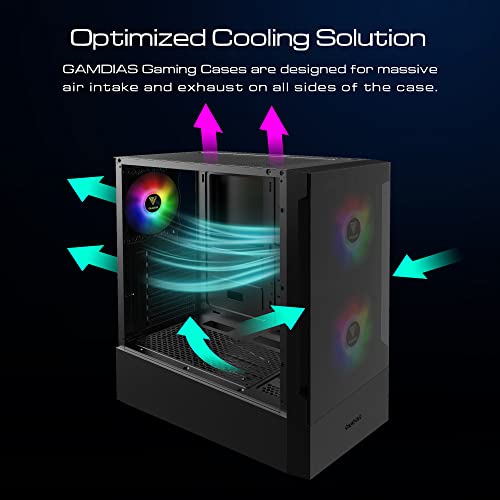
This is where the TALOS E3 requires the most honest assessment. Glass front panels restrict airflow. That's not an opinion; it's physics. A solid tempered glass panel in front of your intake fans creates a pressure differential that reduces the volume of air those fans can pull through. How much it matters depends on your specific components, your fan configuration, and your ambient temperature. But if you're comparing this case directly against a mesh-front alternative at the same price, the mesh case will run cooler under sustained load. The gap in owner-reported temperatures between glass-front and mesh-front cases at this tier is real and documented.
What the TALOS E3 does well is give you three 120mm ARGB fans from the factory. That's a legitimate value-add. Many cases at this price ship with one fan or none. Having three means you can set up a reasonable intake-exhaust balance from day one without buying additional fans. The front mounting points accept 120mm or 140mm fans, and the radiator support up front goes to 360mm, which means you have genuine options for upgrading to AIO cooling later. The top panel's 280mm radiator support adds another avenue for cooling expansion.
Owner reviews on the thermal side are mixed in an instructive way. Builders running mid-range CPUs and GPUs in cooler environments report no issues and are happy with the temperatures. Builders in warmer rooms or running higher-end components are more likely to flag the glass front as a limiting factor. The honest summary is: if your build is a Ryzen 5 7600 and an RTX 4060, this case will handle it without drama. If you're building around a Ryzen 9 or an RTX 4080, you'd be better served by a mesh-front case that gives the thermals more room to breathe. GAMDIAS does offer the TALOS E3 MESH WH variant, which addresses the airflow concern directly with a mesh front, so that's if thermals are your priority but you like the general design language of the TALOS lineup.
Front I/O and Connectivity
The verified spec data doesn't detail the exact front I/O port configuration for the TALOS E3, which is a gap. What the listing confirms is the ARGB motherboard header connection for lighting sync, and the general feature set of a modern gaming case. For a case in this category and price tier, you'd typically expect at least two USB Type-A ports and a combined audio jack on the front panel, but we can't state the exact port count or whether a USB Type-C port is present without that being confirmed in the verified data.
This matters more than it might seem. USB Type-C on the front panel has become increasingly useful as peripherals and storage devices adopt the standard. If you're regularly plugging in a Type-C device at the front of your case, a case without that port will send you around to the back every time. Owner reviews don't flag the front I/O as a particular frustration, which suggests it's at least functional for typical use, but the absence of explicit spec data here means you should check the current product listing for the confirmed port layout before buying.
The ARGB sync feature is worth a paragraph on its own because it's genuinely useful if you're on a compatible board. Connecting the included fans to your motherboard's ARGB header means you can control the lighting through your board's software, whether that's ASUS Aura Sync, MSI Mystic Light, Gigabyte RGB Fusion, or similar. That's a much better experience than a separate controller that only speaks to itself. If your motherboard doesn't have an ARGB header, you'll need a separate controller to manage the lighting, which adds a small complication. Most modern gaming boards have at least one ARGB header, so this is a minor caveat rather than a dealbreaker.
Build Quality and Materials
The matte black finish is one of the TALOS E3's more underrated strengths. It's a clean, neutral look that doesn't date as quickly as glossy or heavily textured finishes. Owner photos show the finish holding up well, and the general impression from reviews is that the case looks more expensive than it is. That's a good sign. Budget cases often betray their price point through cheap-looking plastic accents or inconsistent panel gaps, and the TALOS E3 seems to avoid the worst of those sins.
Tempered glass quality is always a concern at the budget end of the market. Thin glass flexes, cheap hinges crack, and poorly fitted panels rattle. Owner feedback on the TALOS E3 is broadly positive on the glass quality, with the tool-free mechanism working reliably for most buyers. A small number of reviews mention the front glass panel fitting less precisely than the side, which is a common complaint on glass-front cases where the panel has to accommodate the intake gap geometry. It's not a widespread issue, but it's about.
Steel thickness isn't confirmed in the spec data, and the honest answer is that compact budget mid-towers are rarely using thick steel. The chassis rigidity on the TALOS E3 appears adequate based on owner feedback, with no widespread reports of flexing or creaking during the build process. The screw quality and thread engagement aren't flagged as problems either, which matters more than people realise. Stripped threads on a budget case are a genuine pain. Overall, the build quality feels appropriate for the price tier: not premium, but not embarrassing either. It's a case that earns its 4.4 stars by being consistently good rather than occasionally brilliant.
How It Compares
The two most obvious comparisons at this price tier are the Corsair 4000D Airflow and the Fractal Design Pop Air. Both are mid-towers with strong owner reputations and wide availability in the UK. The Corsair 4000D Airflow is a mesh-front case with a proven thermal reputation and a clean interior design. It's typically priced higher than the TALOS E3, which is a meaningful difference. The Fractal Design Pop Air sits in a similar bracket to the 4000D Airflow and offers a mesh or solid front depending on the variant, with Fractal's characteristically thoughtful interior layout.
Against the Corsair 4000D Airflow, the TALOS E3 loses on airflow (glass front versus mesh), loses on interior space (compact versus standard mid-tower), but wins on included fans (three ARGB fans versus none in the base 4000D) and typically wins on price. If thermals are your priority and budget allows, the 4000D Airflow is the better thermal performer. If you're budget-conscious and you value the included ARGB fans and the glass aesthetic, the TALOS E3 makes a reasonable case for itself.
Against the Fractal Design Pop Air, the comparison is tighter. The Pop Air is a well-built case with good airflow in its mesh variant, but it typically costs more and ships without fans in its base configuration. The TALOS E3's three included fans represent real value if you were going to buy fans separately anyway. The Pop Air's interior layout is more mature and spacious for cable management, and Fractal's build quality is a step above what you get at the TALOS E3's price point. But again, the price difference matters. At the TALOS E3's price tier, it's a strong contender.
| Feature | GAMDIAS TALOS E3 | Corsair 4000D Airflow | Fractal Design Pop Air |
|---|---|---|---|
| Form Factor | Compact Mid-Tower | Mid-Tower | Mid-Tower |
| Motherboard Support | Up to ATX | Up to ATX | Up to ATX |
| Front Panel | Tempered Glass | Mesh | Mesh (Air variant) |
| Side Panel | Tempered Glass | Tempered Glass | Tempered Glass |
| Included Fans | 3 x 120mm ARGB | 2 x 120mm (non-ARGB) | 3 x 140mm (non-ARGB) |
| GPU Clearance | 300mm | 360mm | 467mm |
| Front Radiator Support | 360mm / 280mm / 240mm | 360mm | 360mm |
| PSU Shroud | Yes | Yes | Yes |
| Price Tier | Budget to Mid | Mid to Premium | Mid |
| Owner Rating | ★★★★☆ (4.4) (1,287) | ★★★★☆ (4.4) | ★★★★☆ (4.4) |

Final Verdict
The GAMDIAS TALOS E3 Gaming pc case is a genuinely good option for the builder who wants RGB aesthetics, a clean PSU-shroud interior, and dual tempered glass panels without paying mid-range money. The 4.4 stars from over 1,200 owners isn't a fluke. It's a case that delivers on its visual promise and provides a workable build experience for typical mid-range gaming builds. Three included 120mm ARGB fans is a real value-add, front 360mm radiator support is impressive for the price tier, and the tool-free glass panels make the build process less annoying than it could be.
The limitations are real though, and they're worth stating clearly. The 300mm GPU limit rules out high-end graphics cards. The glass front will restrict airflow compared to mesh alternatives, and in warm rooms or with power-hungry components, that will show up in temperatures. The compact form factor means tighter cable management space than a full-size mid-tower. And the front I/O spec isn't fully confirmed, which means you should verify the port layout on the current listing before committing.
Who should buy this? A first-time builder putting together a mid-range gaming PC on a budget, someone who prioritises aesthetics and wants the RGB-and-glass look without premium pricing, or anyone building around a mid-range CPU and GPU who doesn't need to chase the absolute lowest temperatures. The 4.4 stars tell you that most people who bought this are happy with it, and the spec sheet tells you why: it delivers the features it promises at a price that makes sense.
Who should skip it? Anyone running a GPU longer than 300mm, anyone building a high-heat system in a warm room, or anyone who's done enough builds to know they want the cable management space and airflow headroom of a larger chassis. If thermals are genuinely your priority and you're happy to spend a bit more, look at the Fractal Design Pop Air or the Corsair 4000D Airflow instead. And if you love the GAMDIAS design language but want better airflow, the TALOS E3 MESH WH variant is the smarter buy. Same aesthetic family, mesh front, better thermals. It's the version to get if you're running anything that generates serious heat.
Overall, this earns a solid 7.5 out of 10. It's not the best case money can buy, but it's a good case for the money it costs, and that's what matters at this end of the market.
What works. What doesn’t.
5 + 4What we liked5 reasons
- Three 120mm ARGB fans included from the factory, genuine value-add
- Front radiator support up to 360mm is impressive for the price tier
- Dual tempered glass panels with tool-free removal on both
- PSU shroud keeps the interior looking clean through the side glass
- Matte black finish looks more expensive than it is
Where it falls4 reasons
- Glass front panel restricts intake airflow compared to mesh alternatives
- 300mm GPU limit rules out high-end graphics cards
- Compact interior means tighter cable management space
- Front I/O port specification not fully confirmed in listing data
Full specifications
12 attributes| Form factor | Mid-Tower |
|---|---|
| Airflow type | mesh |
| MAX GPU length | 300 |
| MAX cooler height | 155 |
| Radiator support | Front: 360mm, Top: 280mm |
| CPU cooler clearance MM | 160 |
| Dimensions MM | 415 x 210 x 445 |
| Fans included | 3 |
| GPU clearance MM | 300 |
| MAX FAN count | 6 |
| MAX radiator MM | 360 |
| PSU support | ATX up to 180mm |
Frequently asked
5 questions01Is the GAMDIAS TALOS E3 Gaming pc case, Mid-Tower ATX Case, Tempered Glass Panel, 3 Built-in 120mm ARGB Fans, Tool-Free Installation Tempered Glass Window, Supports Motherboards up to ATX, Power Cover Design good for airflow?+
It's decent but not class-leading on airflow. The glass front panel restricts intake compared to mesh-front alternatives, which is the key trade-off you're making for the premium dual-glass aesthetic. The three included 120mm ARGB fans help, and the front mounting points support up to 140mm fans or a 360mm radiator, giving you upgrade options. For mid-range builds in a cool room, airflow is adequate. For high-heat components or warm environments, a mesh-front case will serve you better.
02What's the GPU clearance on the GAMDIAS TALOS E3 Gaming pc case, Mid-Tower ATX Case, Tempered Glass Panel, 3 Built-in 120mm ARGB Fans, Tool-Free Installation Tempered Glass Window, Supports Motherboards up to ATX, Power Cover Design?+
The TALOS E3 supports GPUs up to 300mm in length. That comfortably fits mid-range cards like the RTX 4060, RTX 4060 Ti, RX 7600, and RX 7700 XT in most AIB configurations. High-end cards like the RTX 4080, RTX 4090, and many RTX 4070 Ti Super variants exceed the 300mm limit and will not fit. Always check the exact length of your specific GPU model before buying, as lengths vary between AIB partners even for the same GPU.
03Can the GAMDIAS TALOS E3 Gaming pc case, Mid-Tower ATX Case, Tempered Glass Panel, 3 Built-in 120mm ARGB Fans, Tool-Free Installation Tempered Glass Window, Supports Motherboards up to ATX, Power Cover Design fit a 360mm AIO?+
Yes. The front panel supports radiators up to 360mm, 280mm, or 240mm, making it one of the more capable cases at this price tier for AIO cooling. The top panel supports up to 280mm, 240mm, or 120mm radiators. If you're running a 360mm AIO up front, install the radiator and fans before the motherboard to give yourself the most room to work. The three included 120mm fans can then be configured as exhaust at the rear and top.
04Is the GAMDIAS TALOS E3 Gaming pc case, Mid-Tower ATX Case, Tempered Glass Panel, 3 Built-in 120mm ARGB Fans, Tool-Free Installation Tempered Glass Window, Supports Motherboards up to ATX, Power Cover Design easy to build in?+
Generally yes, particularly for a first or second build. The tool-free tempered glass panels on both the front and side are a genuine convenience, and the PSU shroud hides lower cable runs so your cable management doesn't need to be perfect to look good through the side glass. The compact form factor does mean the rear cable management space is tighter than a full-size mid-tower, so plan your cable routes before you start. Owner reviews are broadly positive about the build experience with no widespread reports of sharp edges or major frustrations.
05What warranty and returns apply to the GAMDIAS TALOS E3 Gaming pc case, Mid-Tower ATX Case, Tempered Glass Panel, 3 Built-in 120mm ARGB Fans, Tool-Free Installation Tempered Glass Window, Supports Motherboards up to ATX, Power Cover Design?+
Specific warranty terms are not confirmed in the verified product data for this listing. When buying through Amazon UK, you're covered by Amazon's standard 30-day return window and the Amazon A-to-Z Guarantee, which provides protection if the item arrives damaged or not as described. For manufacturer warranty information beyond Amazon's return policy, check the GAMDIAS product page or contact the seller directly before purchasing.