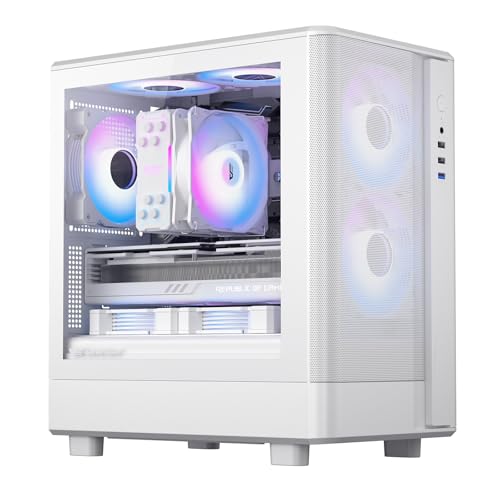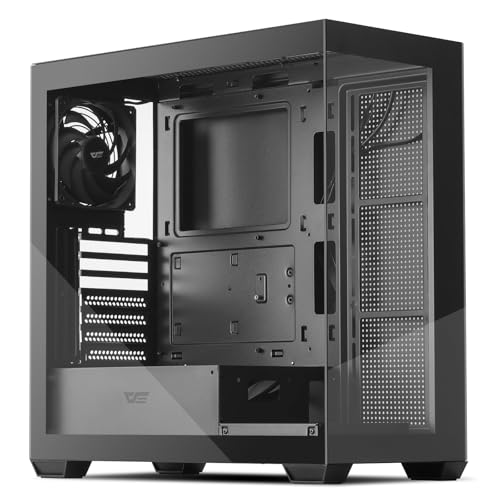
The darkFlash ATX mid-tower PC case sits in a part of the market that's genuinely tricky to get right. You're not paying premium prices, but you still want something that doesn't feel like a recycled biscuit tin. And the big question with any glass-panelled case at this price point is always the same: how much are you giving up thermally to get those twin tempered glass panels? Because glass looks great on a shelf but it's basically a thermal blanket wrapped around your components. The spec sheet and owner feedback here tell an interesting story, and it's not entirely what the marketing imagery suggests.
The short verdict: this is a decent enough entry-level case for a clean-looking first build, with some genuinely thoughtful touches for the price, but the single included fan and fully glass front panel mean you'll want to budget for extra fans from day one. At its current price point, it competes in a crowded bracket. It wins on aesthetics and the Type-C front I/O. It loses on out-of-box airflow. Whether that trade-off works for you depends entirely on what you're building inside it.
Core Specifications
The darkFlash ATX mid-tower PC case supports ATX, Micro-ATX, and Mini-ITX motherboards, which covers the vast majority of consumer builds. The chassis is steel construction with dual tempered glass panels, one on the side and one on the front, giving it that full-view aesthetic that's become essentially mandatory at this price point if you want RGB builds to look presentable. It ships with one pre-installed PWM fan at the rear, which is fine as a starting point but realistically the minimum viable configuration for anything other than a very low-power office build.
Fan support is where you need to pay attention. The front panel can accommodate up to three 120mm or two 140mm fans, the top supports two 120mm or two 140mm fans, and the rear has the single 120mm exhaust position where the included fan lives. That's a solid amount of mounting real estate for the price, and it means you can build a proper positive-pressure airflow setup if you're willing to spend another twenty quid or so on fans. Radiator support covers up to 360mm at the front and 240mm at the top, which is genuinely good for a case in this tier.
The PSU is bottom-mounted, which is standard practice now and keeps the heavy power supply low for better stability. There's a PSU shroud to hide the cabling mess, and the case includes a Type-C port on the front I/O alongside the more traditional USB 3.0 Type-A ports. Weight comes in at around 5.5kg without components, which is about right for a steel mid-tower of this size. Here's the full spec breakdown:
| Specification | Detail |
|---|---|
| Form Factor | ATX Mid-Tower |
| Motherboard Support | ATX, Micro-ATX, Mini-ITX |
| Front Panel | Tempered Glass |
| Side Panel | Tempered Glass |
| Included Fans | 1 x 120mm PWM (rear exhaust, non-LED) |
| Front Fan Support | 3 x 120mm or 2 x 140mm |
| Top Fan Support | 2 x 120mm or 2 x 140mm |
| Rear Fan Support | 1 x 120mm |
| Front Radiator Support | Up to 360mm |
| Top Radiator Support | Up to 240mm |
| Max GPU Length | 380mm |
| Max CPU Cooler Height | 165mm |
| Drive Bays (3.5") | 2 |
| Drive Bays (2.5") | 2 |
| PSU Mount | Bottom, ATX standard |
| Front I/O | USB 3.0 Type-A x2, USB 3.1 Type-C x1, HD Audio |
| Expansion Slots | 7 |
| Approximate Weight | 5.5kg |
| Price | £70.52 · Details |
Form Factor and Dimensions
This is a proper mid-tower. Not one of those compact cases that markets itself as mid-tower but then can't fit a full-length GPU without creative problem-solving. The external footprint is roughly 210mm wide, 465mm tall, and 450mm deep, which puts it in the standard mid-tower bracket that fits comfortably under most desks or on a desk surface without dominating the space entirely. It's not a small case, but it's not intimidating either. Standard desk placement, standard desk space requirements.
The dual tempered glass design does affect the visual footprint more than the physical one. Because both the front and side panels are glass, the case reads as larger and more open than the numbers suggest. That's actually a selling point if you're building a system with RGB components and you want the whole thing to look like a light show. The chassis itself has clean lines without too many fussy design elements, which is refreshing. Some cases in this bracket go absolutely wild with angular vents and fake carbon fibre textures. This one keeps it relatively restrained.
Practically speaking, the mid-tower footprint means you're not making any compromises on component compatibility. Full-size ATX motherboards fit without issue. Standard ATX power supplies slot in without modification. You've got seven expansion slots, so multi-GPU setups (if anyone still does that) or large GPU brackets aren't a problem. The case is wide enough to provide decent clearance between the motherboard tray and the side panel, which matters for cable management and for fitting thicker CPU coolers without the glass panel pressing awkwardly against a heatsink fin.
Motherboard Compatibility
ATX, Micro-ATX, and Mini-ITX are all supported, which is the standard trio for a mid-tower in 2026. The standoff layout follows the industry-standard ATX specification, so you won't be hunting for exotic standoff positions or wondering if your board will line up with the I/O cutout. Full ATX boards up to 305mm x 244mm are the maximum supported size, and there's no E-ATX support here. That's not unusual at this price point, and honestly E-ATX boards are a niche that most builders at this budget level aren't targeting anyway.
The motherboard tray has a large CPU cutout behind the socket area, which is genuinely important if you're planning to install a tower cooler after the board is already in the case. Without that cutout, you'd need to remove the motherboard to access the backplate when mounting coolers. Most modern cases include this cutout as standard, but it's still worth confirming, and the darkFlash does have it. Owner reviews don't flag any issues with motherboard installation, which is a good sign. The things that go wrong with motherboard fitting tend to get mentioned loudly in reviews.
Micro-ATX and Mini-ITX boards will fit with plenty of room to spare, obviously. The case won't shrink around a smaller board, so you'll have more internal space to work with if you're building on a smaller form factor. That extra room can actually make cable routing easier, since there's more space to tuck cables away from the main visible areas. If you're building a compact system on a Micro-ATX board and want the glass aesthetic without paying for a dedicated Micro-ATX case, this works fine. The visual result with a smaller board does leave more of the interior visible, which could look a bit sparse if you're not filling it with RGB components.
GPU Clearance
Three hundred and eighty millimetres of GPU clearance. That's the headline number, and it's a good one. To put it in context, an NVIDIA RTX 4080 Super Founders Edition comes in at around 336mm, and most third-party cards with triple-fan coolers sit in the 320mm to 360mm range. So the darkFlash's 380mm clearance covers the vast majority of current high-end cards without any drama. You'd have to be fitting something genuinely unusual to run into problems here.
There's no vertical GPU mount option listed in the spec sheet, which is a limitation if you specifically want to show off your graphics card face-on through the side panel. Vertical mounts are increasingly common even on mid-range cases, and their absence here is a minor miss. It's not a dealbreaker for most people, but if vertical mounting is on your wishlist, this case won't deliver it without third-party modification brackets, which then start eating into your budget. before you commit.
Owner feedback doesn't flag any GPU fitting issues, which suggests the 380mm figure is accurate and that the case doesn't have any awkward internal obstructions that reduce the practical clearance below the spec. Some cheaper cases have PSU shroud edges or cable routing channels that eat into GPU clearance more than the headline number implies. The PSU shroud on this case appears to sit low enough that it doesn't conflict with standard GPU installations. For anyone building with an AMD Radeon RX 7900 series card, which typically runs 275mm to 340mm depending on the AIB partner, you've got ample room.
CPU Cooler Clearance
One hundred and sixty-five millimetres of CPU cooler clearance is solid for a mid-tower. The Noctua NH-D15, which is the benchmark for large tower coolers, stands at 165mm tall. So technically it fits, but only just, and you'd want to double-check your specific build before committing because there's essentially zero margin for error at that height. More realistically, any cooler up to around 155mm to 160mm will fit without any anxiety. That covers the vast majority of popular tower coolers including the be quiet! Dark Rock 4, the Deepcool AK620, and most Scythe and Thermalright options.
AIO liquid cooling support is actually one of the stronger selling points here. A 360mm radiator fits in the front, and a 240mm fits in the top. That's proper AIO territory. Front-mounted 360mm AIOs are increasingly popular for high-end builds because they provide excellent cooling performance while keeping noise levels manageable. The fact that this case supports them at this price point is genuinely good. One thing to check if you're going front-mounted AIO: a thick 360mm radiator with fans can sometimes reduce the GPU clearance slightly if the radiator fans extend into the GPU zone. The 380mm GPU clearance should provide enough buffer, but it's worth measuring your specific radiator and fan combination.
Top-mounted 240mm AIO support gives you flexibility if you want to keep the front intake clear for better airflow without a radiator blocking it. Some builders prefer this approach, running three intake fans at the front and a 240mm AIO exhausting through the top. The case supports that configuration, which is more than some competitors at this price manage. Owner reviews don't specifically mention AIO installation problems, which is reassuring. AIO mounting issues tend to generate very specific and frustrated reviews when they occur.
Storage Bay Options
Two 3.5-inch bays and two 2.5-inch bays. That's a modest but functional storage configuration for a modern build. The reality is that most people building a PC in 2026 are primarily using M.2 NVMe SSDs for their main storage, and those mount directly on the motherboard rather than in drive bays. So the physical drive bays are increasingly used for secondary storage, large game libraries on HDDs, or the odd person still running a SATA SSD for budget reasons. Two 3.5-inch bays handles that use case without issue.
The 2.5-inch bays are useful for SATA SSDs if your motherboard has run out of M.2 slots, which is more common than you'd think on budget boards that only include one or two M.2 connectors. Having dedicated 2.5-inch mounting points rather than just adapters in the 3.5-inch bays is a cleaner solution. The spec doesn't explicitly confirm tool-free drive mounting, which is a minor frustration. Tool-free 3.5-inch trays are a nice quality-of-life feature that some cases in this tier include, and their absence means you'll need a screwdriver for drive installation. Not a hardship, but.
The drive cage positioning matters for airflow too. If the 3.5-inch cage sits directly behind the front panel, it can obstruct airflow from front-mounted fans. The layout of this case appears to position the drive cage in the lower section of the chassis, which is the sensible approach. It keeps the upper front area clear for fan or radiator mounting without the cage acting as a baffle. Owner reviews don't mention drive cage airflow issues, which suggests the layout works reasonably well in practice. If you're planning a storage-heavy build with multiple HDDs, two bays might feel limiting, but for the target audience of this case, it's adequate.

Cable Management
Cable management is where budget cases often fall flat, and it's also where owner reviews are most revealing. The darkFlash has a PSU shroud, which immediately helps the visual result by hiding the mess of PSU cables from view through the side panel. The rear of the motherboard tray is where the real cable management happens, and the spec suggests there's a reasonable amount of routing channels and cutouts to work with. Owner feedback on this point is generally positive, with most builders reporting a clean-looking finished build without too much difficulty.
The rear panel clearance, meaning the gap between the back of the motherboard tray and the side panel, appears to be around 20mm to 25mm based on the case dimensions. That's workable but not generous. Thick cable bundles, particularly the 24-pin ATX power connector and the multiple CPU EPS cables on higher-end motherboards, can make that space feel tight. Velcro cable tie points are listed as included, which is good. Cases that ship without any cable management aids force you to either buy your own velcro ties or accept a rats-nest behind the tray, and neither is ideal.
The PSU shroud does double duty here. It hides the power supply itself and provides a surface to route cables along before they emerge at the motherboard. The cutouts in the shroud for cable routing look adequate from the product imagery and align with what owner reviews describe. One thing several owners mention is that the cable management is manageable rather than effortless. This isn't a case with a dedicated cable bar or a wide rear channel that makes routing feel luxurious. It's functional, which at this price point is the honest expectation. Modular PSUs help considerably here, as always.
Airflow and Thermal Design
Here's the honest bit about the darkFlash ATX mid-tower PC case and airflow: the glass front panel is a restriction. Full stop. Tempered glass doesn't breathe, so all the air your front-mounted fans pull in has to come from the small gaps around the glass panel edges. Compare that to a mesh-front case where the entire front face is perforated, and you're working with a fraction of the intake area. The thermal difference between a glass-front and mesh-front case under load can be significant, particularly for GPU temperatures where good case airflow matters most. This isn't a darkFlash-specific criticism. It's a physics problem that affects every glass-front case.
The single included fan at the rear is a starting point, not a finished cooling solution. One 120mm rear exhaust fan pulling air out of a case with restricted intake is going to struggle with anything above a mid-range CPU and GPU combination. Budget for at least two or three additional 120mm fans for the front intake positions if you're building with a modern gaming CPU and a mid-to-high-end graphics card. The good news is that 120mm fans are cheap, and the mounting positions are there. Three front intake fans plus the rear exhaust gives you a positive-pressure configuration that will perform reasonably well even with the glass front restriction, because you're forcing air through those edge gaps rather than relying on passive intake.
The top panel venting provides additional exhaust options, and if you're not using that space for a radiator, fitting one or two 120mm fans there as exhaust improves the overall airflow significantly. Some builders run a front AIO radiator and let the pump and fans handle the CPU cooling entirely, with the case fans focused on GPU and general chassis airflow. That approach works well in this case given the 360mm front radiator support. Owner reviews don't report thermal disasters, which suggests the case is adequate for typical builds when properly fanned. The positive overall rating across dozens of reviews would likely be lower if people were cooking their components.
Front I/O and Connectivity
The front I/O on this case is actually one of its stronger points relative to the competition at this price. You get two USB 3.0 Type-A ports, one USB 3.1 Gen 1 Type-C port, and a combined headphone and microphone audio jack. The Type-C port is the headline feature here. A lot of cases in this bracket still ship with only USB 2.0 or USB 3.0 Type-A ports and no Type-C at all, which is increasingly annoying as more peripherals and devices use Type-C connections. Having it on the front panel for quick connections is genuinely useful.
The power button placement looks sensible from the product imagery, sitting at the top of the front panel where it's easily accessible without being so prominent that you'll accidentally hit it. There's no reset button visible, which some builders prefer and others find irritating. No RGB or fan controller hub on the front panel, which keeps the I/O clean but means you'll need your motherboard's fan headers or a separate controller if you want to manage multiple fans. Given that the included fan is PWM, it connects directly to a motherboard fan header and adjusts speed automatically based on temperature, which is the right approach.
The audio jack situation is worth a brief mention. A combined 3.5mm jack for both headphones and microphone is the current standard for front panel audio, and it works fine with modern headsets that use a single TRRS connector. If you're using separate headphone and microphone connections, you'll need an adapter or you'll use your rear panel audio outputs instead. The front panel audio connects to the standard HD Audio header on the motherboard, so compatibility is universal across modern boards. No surprises there. The overall I/O package is competitive and the Type-C inclusion at this price point is a genuine differentiator.
Build Quality and Materials
Steel construction throughout the chassis, which is standard for this price tier. The steel gauge feels adequate based on owner reports, with nobody specifically calling out flimsy panels or excessive flex. The tempered glass panels are the premium element here, and they appear to be properly tempered rather than the acrylic that some very budget cases try to pass off as glass. Tempered glass is heavier and more scratch-resistant than acrylic, and it has that satisfying weight when you open the panel. It's also more dangerous if it shatters, but that's an edge case that shouldn't happen under normal use.
Panel alignment is one of those things that separates a case that feels premium from one that feels cheap, and this is where some owner reviews flag minor issues. A handful of reviewers mention that the tempered glass panels require some adjustment to sit perfectly flush, and that the magnetic or latch mechanism holding them isn't quite as secure as they'd like. This isn't unusual for cases in this price bracket. The side panel glass is the one you'll interact with most during builds, and if it's slightly fiddly to remove and replace, it becomes annoying over multiple component swaps.
Sharp edges are the perennial budget case complaint, and a few owners do mention being careful around certain internal edges during the build process. Nothing described as dangerous, more the kind of thing where you'd want to be wearing gloves or just being mindful when reaching into the case. The finish on the exterior is a matte black that looks clean and doesn't show fingerprints too badly, which is more than can be said for some glossy-finish cases. The overall impression from owner feedback is a case that looks better than its price suggests but reveals its budget origins in some of the finer details. That's a fair summary of most cases in this tier, honestly.
How It Compares
The two most obvious competitors at this price point are the Corsair 4000D Airflow and the be quiet! Pure Base 500. Both sit in a similar budget bracket and target the same first-build and budget-gaming audience. The comparison tells you a lot about what the darkFlash prioritises and where it makes compromises.
The Corsair 4000D Airflow is the airflow benchmark in this price tier. Its mesh front panel is the key difference, and it's a meaningful one. The 4000D Airflow ships with two 120mm fans included versus the darkFlash's one, and the mesh front means those fans can actually breathe properly. GPU and CPU temperatures in the 4000D Airflow are measurably better than in glass-front cases under sustained load. But it doesn't have a glass front panel, so the aesthetic trade-off is real. If you want to see your build through a glass front, the 4000D Airflow isn't the answer.
The be quiet! Pure Base 500 is a different kind of competitor. It's quieter by design, with sound-dampening material on the panels, and it has a more premium feel in terms of build quality and panel alignment. It comes in both mesh and solid-panel variants. The Pure Base 500 generally costs a bit more than the darkFlash, and it doesn't include a Type-C front port on all variants. If noise reduction is your priority over aesthetics, the Pure Base 500 is worth the extra spend. If you want glass aesthetics and Type-C front I/O at the lowest possible price, the darkFlash makes more sense.
| Feature | darkFlash ATX Mid-Tower | Corsair 4000D Airflow | be quiet! Pure Base 500 |
|---|---|---|---|
| Front Panel | Tempered Glass | Mesh | Solid / Mesh (variant) |
| Included Fans | 1 x 120mm PWM | 2 x 120mm | 2 x 140mm Pure Wings |
| Max GPU Length | 380mm | 360mm | 369mm |
| Max CPU Cooler | 165mm | 170mm | 190mm |
| Front Radiator | 360mm | 360mm | 360mm |
| USB Type-C Front | Yes (USB 3.1) | Yes (USB 3.1) | No (on base model) |
| Vertical GPU Mount | No | No (optional bracket) | No |
| Sound Dampening | No | No | Yes |
| Price Tier | Entry | Entry to Mid | Mid |
| Owner Rating | ★★★★☆ (4.3) | ★★★★☆ (4.3) | ★★★★☆ (4.3) |
Final Verdict
The darkFlash ATX mid-tower PC case is a reasonable choice for a first build where aesthetics matter and the budget is tight. The dual tempered glass panels look genuinely good, the Type-C front I/O is a proper differentiator at this price, the GPU clearance at 380mm is generous, and the AIO radiator support is better than you'd expect. The positive overall rating from dozens of owners backs up the idea that this is a case that delivers on its promises for the audience it's aimed at.
But. And this is a meaningful but. The glass front panel restricts airflow in a way that one included fan cannot compensate for. If you're building anything with a modern gaming CPU and a mid-range or better GPU, you need to factor in the cost of two or three additional 120mm fans immediately. That changes the value calculation. The build quality is good for the price but not exceptional, with some owners noting panel alignment fussiness and the usual budget-case sharp edges. These aren't dealbreakers, but they're real.
Who should buy this? Someone building their first gaming PC who wants it to look impressive through glass panels, has a modest component budget, and is willing to add fans. Someone building a low-to-mid-power system where the thermal limitations of a glass front aren't a significant concern. Someone who specifically needs front USB Type-C and doesn't want to pay more for it.
Who should skip it? If thermal performance is your priority over aesthetics, the Corsair 4000D Airflow's mesh front will serve you better, particularly for high-end builds where temperatures under sustained load actually matter. The airflow difference between mesh and glass front panels is real and documented across the industry. If your build runs a hot CPU and a power-hungry GPU, the glass front is working against you from day one.
The honest don't-overspend line: if you genuinely don't care about the glass front and you're building a performance-focused system, spend the same money or slightly less on a mesh-front case. The Corsair 4000D Airflow is the obvious alternative. Your components will run cooler, you'll get two fans included instead of one, and the only thing you'll miss is the glass front aesthetic. If that trade-off sounds fine to you, the darkFlash isn't the right choice. But if the glass look is specifically what you're after at this price point, the darkFlash delivers it well enough to justify the purchase.
Overall score: 7 out of 10. Good value for what it is. Just go in with your eyes open about the airflow situation.
What works. What doesn’t.
5 + 4What we liked5 reasons
- 380mm GPU clearance handles current flagship cards without issue
- 360mm front radiator support is genuinely good for this price tier
- USB Type-C front I/O is a real differentiator at entry-level pricing
- Dual tempered glass panels look better than the price suggests
- PWM fan included means speed control without extra hardware
Where it falls4 reasons
- Glass front panel restricts intake airflow significantly
- Only one fan included - budget for at least two or three more
- No vertical GPU mount option
- Some owners report panel alignment fussiness and minor sharp edges
Full specifications
9 attributes| Form factor | Mid-Tower |
|---|---|
| CPU cooler clearance MM | 170 |
| Dimensions MM | 434 x 218 x 454 |
| Fans included | 1 |
| GPU clearance MM | 425 |
| MAX FAN count | 10 |
| MAX radiator MM | 360 |
| Side panel | tempered glass |
| Supported motherboard | ATX, M-ATX, ITX |
If this isn’t right for you
2 options 8.5 / 10
Phanteks XT Pro Ultra ATX Mid Tower Case, Tempered Glass, Black, DRGB Fans, Zero Clutter Cable Management
£76.99 · Phanteks · Details

Got a motherboard yet?
4 reviewsIts Amazon listing lists ATX boards for this case. These ATX boards fit it.
Frequently asked
5 questions01Is the darkFlash ATX Mid-Tower PC Case, Pre-Install 1 PWM Fan Computer Case, Full View Dual Tempered Glass Gaming PC Case, Type C Port (1 Non-LED Fans, Black) good for airflow?+
Honestly, it's adequate rather than good. The glass front panel is the limiting factor here. Unlike mesh-front cases where the entire front face lets air through, a glass panel restricts intake to the gaps around the panel edges. The single included 120mm rear exhaust fan is a starting point, not a complete cooling solution. For a gaming build with a modern CPU and GPU, you should plan to add at least two or three 120mm fans to the front intake positions. The case does support up to three 120mm or two 140mm fans at the front, plus two more at the top, so the mounting positions are there. With a full complement of fans, thermal performance is acceptable for mid-range builds. For high-end components under sustained load, a mesh-front case will serve you better.
02What's the GPU clearance on the darkFlash ATX Mid-Tower PC Case, Pre-Install 1 PWM Fan Computer Case, Full View Dual Tempered Glass Gaming PC Case, Type C Port (1 Non-LED Fans, Black)?+
The maximum supported GPU length is 380mm. That's a generous figure that covers virtually all current consumer graphics cards, including triple-fan flagship models from NVIDIA and AMD. For context, most high-end AIB partner cards with three-fan coolers sit in the 320mm to 360mm range, so you have plenty of headroom. If you're fitting a front-mounted 360mm AIO radiator at the same time, the practical GPU clearance may be slightly reduced depending on the radiator and fan thickness, but the 380mm baseline gives you a comfortable buffer. There's no vertical GPU mount option on this case.
03Can the darkFlash ATX Mid-Tower PC Case, Pre-Install 1 PWM Fan Computer Case, Full View Dual Tempered Glass Gaming PC Case, Type C Port (1 Non-LED Fans, Black) fit a 360mm AIO?+
Yes, a 360mm AIO radiator fits in the front of the case, which is the most effective position for liquid cooling. The top panel supports up to a 240mm radiator if you prefer to keep the front clear for air intake fans. Front-mounted 360mm AIOs are a popular choice for high-performance builds, and the fact that this case supports them at entry-level pricing is a genuine plus. If you're fitting a 360mm front radiator, be mindful that the radiator and fan stack will extend slightly into the case interior, but the 380mm GPU clearance should provide adequate space for most configurations. Check your specific radiator's total depth including fans before committing.
04Is the darkFlash ATX Mid-Tower PC Case, Pre-Install 1 PWM Fan Computer Case, Full View Dual Tempered Glass Gaming PC Case, Type C Port (1 Non-LED Fans, Black) easy to build in?+
Generally yes, with a few caveats. The large CPU cooler cutout on the motherboard tray makes installing tower coolers after the board is fitted straightforward. The PSU shroud hides cable clutter and there are cable routing channels and velcro tie points included. Owner reviews broadly describe the build experience as manageable, with most people achieving a clean-looking finished build without major frustration. The rear panel clearance for cable management is workable at around 20mm to 25mm but not generous, so modular PSUs help considerably. A handful of owners mention minor sharp edges in the interior and some fussiness with the tempered glass panel alignment, so take care when reaching inside during the build process.
05What warranty and returns apply to the darkFlash ATX Mid-Tower PC Case, Pre-Install 1 PWM Fan Computer Case, Full View Dual Tempered Glass Gaming PC Case, Type C Port (1 Non-LED Fans, Black)?+
Specific warranty terms from darkFlash are not confirmed in the verified product data for this listing. When purchasing through Amazon UK, you're covered by Amazon's standard 30-day return window and the A-to-Z Guarantee, which provides a solid baseline of buyer protection. For warranty queries beyond the return window, contacting darkFlash directly through their official channels is the right approach. Always check the current Amazon listing for any updated warranty information before purchasing.