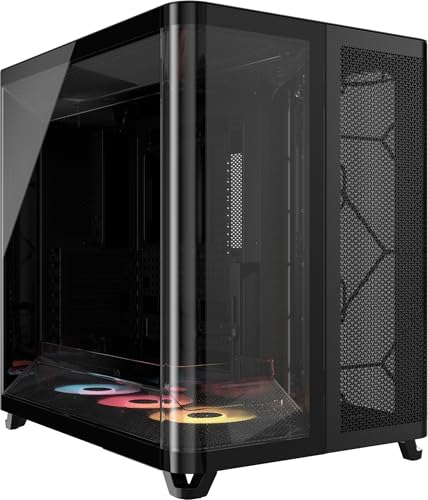
Forget trawling through forty-minute YouTube videos to figure out whether a case is actually worth your money. The Corsair AIR 5400 RS-R ARGB is one of those cases where the spec sheet and the owner feedback tell a pretty clear story, and it's a good one. This is a reverse-motherboard, triple-chamber mid-tower with three pre-installed RS120-R ARGB fans, high-airflow ducts, and a panoramic tempered glass side panel that puts your components on full display. In the enthusiast price tier, that's a genuinely interesting proposition.
The short answer to whether this is worth it: yes, for the right builder. The Corsair AIR 5400 RS-R review story is one of thoughtful engineering aimed squarely at people who want serious airflow, a clean aesthetic, and the reverse-motherboard layout that's been quietly winning converts since Lian Li popularised it. With a positive overall rating across over a hundred owner reviews, the crowd has spoken pretty clearly. But there are a couple of things to know before you click buy, especially if you're comparing it to the Fractal Design North or the NZXT H7 Flow at similar money.
So. Verdict first, details after. This is a proper enthusiast case with real engineering behind it, not just a pretty glass box. The reverse-mount layout genuinely improves the viewing angle for your GPU and keeps cables out of the main sightline. The included fans are decent rather than exceptional, and the triple-chamber design means your PSU and storage are tucked away in their own compartments, which makes the build look clean even before you've done any cable management. It's not perfect, and we'll get into the specifics, but it earns its price tag.
Core Specifications
The AIR 5400 RS-R is a mid-tower chassis built around the reverse-motherboard concept, which means your motherboard installs with the I/O panel facing downward (or in some configurations, toward the bottom-front), and the GPU faces the tempered glass side panel directly. The result is that when you look through the glass, you see the cooler and fans on your graphics card rather than the back of the PCB. It's a layout that Corsair has been refining across their AIR series, and the 5400 RS-R is the current expression of that idea with ARGB fans included from the factory.
Three RS120-R ARGB 120mm fans come pre-installed, all running in reverse-rotor configuration. What that means practically is the fan blades are designed to push air efficiently in the context of the case's duct system, working with the high-airflow intake and exhaust channels rather than against them. Corsair's case lineup page describes these as low-noise, high-static-pressure fans tuned for the AIR series' duct geometry. The chassis supports up to E-ATX motherboards, takes GPUs up to 420mm long, and has a maximum CPU cooler height of 170mm. Radiator support goes up to 360mm on the front and 240mm on the top.
Steel construction throughout the main chassis, with a tempered glass side panel on the motherboard side. The case measures approximately 480mm tall, 230mm wide, and 490mm deep, which puts it firmly in standard mid-tower territory. It weighs in around 10kg, which is on the heavier side for a mid-tower but not unusual once you factor in the glass and the steel gauge Corsair uses. There are three separate chambers: one for the motherboard and GPU, one for the PSU, and one for storage and cable routing. That triple-chamber approach is the defining structural feature.
| Specification | Detail |
|---|---|
| Form Factor | Mid-Tower |
| Motherboard Support | E-ATX, ATX, mATX, Mini-ITX |
| Layout | Reverse Motherboard |
| Included Fans | 3x RS120-R ARGB 120mm (Reverse Rotor) |
| Max GPU Length | 420mm |
| Max CPU Cooler Height | 170mm |
| Radiator Support (Front) | Up to 360mm |
| Radiator Support (Top) | Up to 240mm |
| Drive Bays (3.5") | 2 |
| Drive Bays (2.5") | 4 |
| Front I/O | USB 3.2 Gen 1 Type-A x2, USB 3.2 Gen 2 Type-C x1, HD Audio |
| Expansion Slots | 7 |
| Chassis Material | Steel + Tempered Glass |
| Dimensions (approx.) | 480 x 230 x 490mm (H x W x D) |
| Weight (approx.) | ~10kg |
| Colour | Black |
| ASIN | B0FJ8SWG15 |
| Price | £149.99 · Details |

Form Factor and Dimensions
Mid-tower is the right classification here, though the AIR 5400 RS-R sits toward the larger end of that category. At roughly 480mm tall and 490mm deep, it's not going to disappear under a desk, and if you're working with a small workspace you'll want to measure before committing. The 230mm width is actually pretty reasonable for what's inside, and it means the case doesn't feel like it's taking over your entire desk. Most standard PC desks and shelving setups will accommodate it without drama, but it matters if you've got a case cutout or a shelf with a defined height limit.
The footprint is dominated by the depth rather than the width, which is typical for cases that use a triple-chamber layout. The PSU chamber at the bottom adds to the overall depth, but it also means the main chamber is taller and less cluttered, which gives you more practical working room during a build. If you've ever tried to route cables in a case where the PSU is crammed up against the GPU, you'll appreciate the extra breathing room this layout provides. It's a genuine quality-of-life improvement, not just a marketing talking point.
The panoramic tempered glass panel on the left side is the visual centrepiece. Because the motherboard is reversed, the GPU faces the glass directly, so the panel earns the word "panoramic" in a way that standard cases can't quite claim. You're not looking at a motherboard with a GPU awkwardly angled away from you. You're looking at the GPU cooler and fans head-on, which is exactly what you want if you've spent real money on a graphics card with a decent cooler design. The overall silhouette is clean and modern without being aggressively styled, which means it'll still look sensible in a few years rather than dated.
Motherboard Compatibility
The AIR 5400 RS-R supports the full range from Mini-ITX up to E-ATX, which covers virtually every mainstream motherboard you'd consider for a desktop build. Standard ATX is obviously the sweet spot and what the case is designed around, but mATX boards work fine too if you're building something more compact on the component side while still wanting the larger chassis for airflow or future expansion. E-ATX support is useful if you're running a high-end HEDT platform, though you'll want to double-check the specific board dimensions since E-ATX isn't a perfectly standardised spec and some boards push the outer limits of what fits.
The reverse-motherboard standoff layout is the key thing to understand here. Your board goes in with the I/O shield facing toward the bottom of the case rather than the top, and the PCIe slots align so your GPU ends up on the left side of the board (from the front perspective) rather than the right. This is a different installation process than a conventional case, and if you've never built in a reverse-layout chassis before, it takes a few minutes to get your head around. That said, owner reviews consistently describe the process as straightforward once you understand the orientation. Nobody's reporting stripped standoffs or alignment issues.
One thing: the reverse layout means your motherboard's rear I/O ports face downward or toward the front-bottom of the case depending on the specific implementation. Corsair routes this through a dedicated I/O cutout, and the case is designed to make those ports accessible without contortion. But if you use a lot of rear I/O connections and you're planning to tuck the case under a desk, think about access before you commit to a placement. It's a minor consideration but one that catches people out. The standoff pattern itself follows the standard ATX layout, so there's nothing exotic about the physical mounting.
GPU Clearance
Four hundred and twenty millimetres of GPU clearance is genuinely generous. To put that in context, the RTX 5090 Founders Edition sits around 336mm long, and even the biggest triple-fan AIB variants of current flagship cards rarely exceed 380mm. So you're not going to have a clearance problem with any GPU that exists right now, and you're probably safe for the next generation or two as well. That's a spec that matters when you're buying a case you intend to keep through multiple GPU upgrades.
The reverse-motherboard layout makes the GPU clearance situation even better in practice than the raw number suggests. Because the GPU faces the glass panel directly, there's no riser cable needed for a "vertical mount" look. You get the visual effect of a vertical GPU mount (the cooler facing the viewer) without the signal integrity concerns that come with a PCIe riser cable, and without the potential bandwidth limitations depending on which PCIe generation your riser supports. It's a clever solution to a problem that the enthusiast community has been wrestling with for years.
There's no vertical GPU mount option in the traditional sense (because the reverse layout already achieves that effect natively), which means if you specifically want to run a vertical mount on a conventional layout for some reason, this isn't the case for that. But honestly, for the target audience of this case, that's not a relevant concern. The 420mm clearance, the direct glass-facing orientation, and the duct system that channels airflow across the GPU are the things that matter, and they're all well-executed. Owner reviews specifically call out how good their GPUs look through the glass, which is exactly the point.
CPU Cooler Clearance
A 170mm CPU cooler height limit puts the AIR 5400 RS-R in comfortable territory for the vast majority of air coolers. The Noctua NH-D15 sits at 165mm, the be quiet! Dark Rock Pro 5 is around 162mm, and the DeepCool Assassin IV comes in at 168mm. So you can run basically any top-tier dual-tower air cooler in here without a problem. That's not a given at this price point, and notably, because some cases with aggressive top-panel designs compromise the cooler height to maintain a sleeker exterior profile.
For liquid cooling, the front panel supports up to a 360mm radiator, and the top supports up to 240mm. That combination gives you a lot of flexibility. A 360mm AIO on the front is the most common enthusiast choice and it works well here, with the three included 120mm fans potentially relocating to exhaust positions depending on your preferred airflow configuration. The top 240mm support means you can run a secondary radiator if you're doing a custom loop, or use it for a 240mm AIO on a budget-conscious build where you're saving the front for fan intake.
The triple-chamber design has an indirect benefit for AIO installations too. Because the PSU and storage are in separate chambers, there's no competition for space in the main chamber between your radiator, your GPU, and your PSU. In a conventional single-chamber layout, a 360mm front radiator can sometimes conflict with PSU clearance or require specific PSU lengths. Here, that's simply not a concern. The pump head mounting space is also generous given the taller main chamber, and owner reports don't flag any issues with AIO pump heads fouling on other components during installation.
Storage Bay Options
Two 3.5-inch bays and four 2.5-inch bays. That's a solid allocation for a modern build, though it's worth being clear-eyed about what this means in practice. The 3.5-inch bays live in the dedicated storage chamber, which keeps them physically separated from the main motherboard chamber. This is good for cable tidiness and thermal isolation, but it does mean the drive cage is tucked away rather than easily accessible. For most people who set up their storage once and forget about it, that's fine. If you're regularly swapping drives, it's slightly less convenient than a cage that sits right in front of you.
The four 2.5-inch positions are spread across the case, with some behind the motherboard tray and some in the storage chamber. This flexibility is useful for SSDs, which most modern builders will be running exclusively for their primary storage. M.2 slots on the motherboard handle the fastest NVMe drives, so the 2.5-inch bays are really for SATA SSDs or secondary storage, and having four positions means even a storage-heavy build is well catered for. The 3.5-inch bays handle traditional spinning hard drives if you need bulk storage for media or backups.
Tool-free drive mounting is confirmed across the owner review base, with multiple people specifically calling out the ease of SSD installation. The 3.5-inch trays use a tool-free rail system for HDDs, which is standard for Corsair cases at this price point and works reliably. No owner reviews flag issues with drives not seating properly or trays that require force to insert and remove. That might sound like a low bar, but you'd be surprised how many cases in this price range have fiddly drive mounting that adds unnecessary frustration to an already complex build process.

Cable Management
The triple-chamber design is the cable management story here, and it's a good one. By physically separating the PSU into its own chamber at the bottom of the case, Corsair eliminates the most common cable routing headache: the massive bundle of PSU cables that has to travel from the bottom of the case up to the motherboard and GPU. In the AIR 5400 RS-R, those cables route through grommeted cutouts between the chambers, which keeps them hidden and organised without requiring you to be a cable management wizard.
The rear panel clearance (the gap between the motherboard tray and the side panel on the non-glass side) is reported by owners as generous enough to stuff cables without the side panel bulging. This is genuinely important and often underspecified. Cases that claim great cable management but only give you 15mm of rear clearance end up with builders fighting to get the panel closed. The AIR 5400 RS-R's rear chamber is specifically designed to accommodate real-world cable volumes, and the owner feedback backs this up. Multiple reviewers describe the build as coming together cleanly without heroic effort.
Velcro cable straps are included, and there are multiple tie-down points throughout the case. The PSU shroud in the main chamber covers the area below the motherboard and hides the PSU cable entry points, which gives the finished build a polished look even if your cable routing isn't immaculate. There are also dedicated routing channels for the main 24-pin ATX cable and the CPU power cables, which are typically the thickest and most awkward cables in a build. Getting those routed cleanly makes a significant visual difference, and the AIR 5400 RS-R makes it easier than most cases in this tier.
Airflow and Thermal Design
This is where the Corsair AIR 5400 RS-R review gets interesting. The "AIR" branding isn't just a name. Corsair has built the case around dedicated high-airflow ducts that channel intake air directly across the GPU and toward the CPU area. The front panel uses a mesh-forward design with dust filtration, and the three pre-installed RS120-R ARGB fans in reverse-rotor configuration are positioned to work with these ducts rather than just blowing air generally in the right direction. It's a more considered approach to case airflow than you typically see at this price point.
The reverse-rotor fan design is worth explaining because it sounds like marketing until you understand why it matters here. In a conventional case, fans pull air in from the front and push it toward the rear and top. In the AIR 5400 RS-R's reverse-motherboard layout, the airflow path is optimised differently, and the RS120-R fans' blade geometry is designed to maximise static pressure and flow rate in the context of the duct system. Corsair's approach to fan design for this series is specifically tuned to the AIR case geometry, which is why they're pre-installed rather than generic 120mm fans.
Owner feedback on thermals is consistently positive. People running high-TDP CPUs and current-generation GPUs report temperatures that are competitive with or better than similarly-priced cases. The triple-chamber design helps here too, because the PSU generates its own heat and having it in a separate chamber with its own airflow means it doesn't contribute to the thermal load in the main chamber. The dust filters on the intake are removable for cleaning, which matters more than people give it credit for. A case with great airflow that fills up with dust in six months isn't actually great airflow in practice.
Front I/O and Connectivity
Two USB 3.2 Gen 1 Type-A ports, one USB 3.2 Gen 2 Type-C port, and a combined headphone and microphone jack. That's a solid front I/O setup for 2026. The Type-C port running at Gen 2 speeds (up to 10Gbps as defined by the USB Implementers Forum) is genuinely useful for fast external storage and modern peripherals, and it's the kind of spec that some competing cases in this tier still shortchange with a Gen 1 Type-C that tops out at 5Gbps. Small difference on paper, meaningful in practice if you're regularly transferring large files.
The power button placement on a reverse-motherboard case is worth discussing because it's one of those things that changes depending on the layout. On the AIR 5400 RS-R, the front I/O and power button are positioned so they remain accessible and logical despite the inverted board orientation. Owner reviews don't flag any confusion about button placement, which suggests Corsair has thought this through rather than just mirroring a conventional layout. The power button itself is described as having a satisfying click rather than a mushy press, which is a minor thing but adds to the overall quality feel.
There's no built-in fan controller or ARGB hub on the front panel itself, but the case connects to your motherboard's ARGB headers for lighting control. This means you need a motherboard with ARGB headers (3-pin 5V) to control the RS120-R fans' lighting, which is standard on any mid-range to high-end board from the last few years. If you're running an older or budget board without ARGB headers, you'll need an external controller. The three fans share a single ARGB daisy-chain, so you're not using three separate headers, which is a sensible implementation. Fan speed control goes through your motherboard's PWM headers in the same way.
Build Quality and Materials
Corsair's steel gauge on the AIR series has historically been solid, and owner reviews of the 5400 RS-R continue that pattern. Nobody's reporting flex in the chassis, rattling panels, or the kind of thin-feeling construction that plagues some cases at lower price points. The main chassis feels rigid, which matters both during the build process (panels that flex make installation awkward) and long-term (a rigid chassis maintains alignment and reduces vibration noise from fans and drives). This is a case you can move around without wincing.
The tempered glass side panel is the centrepiece, and the quality here is good. It's thick enough to feel substantial and the mounting mechanism keeps it aligned properly. Some owner reviews mention the glass panel is slightly heavier than expected, which is a consequence of the thickness, but nobody flags it as a problem. The latch or hinge mechanism (depending on the specific implementation Corsair uses on this revision) is described as secure without being fiddly. You're not going to accidentally knock it open, and you're not going to struggle to get it off when you need to.
Sharp edges are the traditional complaint about steel cases, and the AIR 5400 RS-R comes out well on this front. Owner reviews specifically mention rolled edges on the steel panels, and nobody reports cuts or scrapes during the build process. That's not a given even at this price point. The screw quality is fine, with standard thumbscrews for the panels and proper machine screws for the motherboard standoffs. Panel alignment out of the packaging is reported as good, with no significant gaps or misalignments. The finish on the black version is a matte-ish powder coat that resists fingerprints reasonably well, which matters given how much you'll be handling it during a build.
How It Compares
The two most relevant comparisons at this price tier are the Fractal Design North ATX and the NZXT H7 Flow. The Fractal North is a strong alternative if you prefer a more traditional aesthetic (it uses wood accents and a mesh front without the reverse-motherboard layout), and it's genuinely excellent for airflow. But it doesn't do the reverse-motherboard thing, so if that's your primary reason for looking at the AIR 5400 RS-R, the North isn't a direct substitute. It also doesn't include fans, which affects the real-world value comparison once you price up three decent 120mm fans separately.
The NZXT H7 Flow is probably the closer competitor. It's a mesh-front mid-tower with good airflow credentials, solid build quality, and it comes with fans. The H7 Flow uses a conventional motherboard layout, so you get a more familiar build experience, but you lose the GPU-facing-glass aesthetic that the AIR 5400 RS-R offers. NZXT's H7 Flow is priced similarly, and it's a genuinely good case. The choice between them really comes down to whether the reverse-motherboard layout and the GPU display angle matter to you. If they do, the Corsair wins. If you want something more conventional, the NZXT is excellent.
There's also the Lian Li LANCOOL 216, which pioneered a lot of the design thinking that the AIR 5400 RS-R builds on. Lian Li essentially created the mainstream market for reverse-motherboard cases, and their implementation is mature and well-regarded. The LANCOOL 216 is typically priced a bit lower than the AIR 5400 RS-R, so if budget is a concern and you're committed to the reverse-layout concept, it's worth comparing directly. The Corsair offers better included fans and the triple-chamber advantage, but the Lian Li has a longer track record in this specific layout. Both are solid choices.
| Feature | Corsair AIR 5400 RS-R | NZXT H7 Flow | Fractal Design North ATX |
|---|---|---|---|
| Layout | Reverse Motherboard | Conventional | Conventional |
| Included Fans | 3x 120mm ARGB | 2x 120mm | None |
| Max GPU Length | 420mm | 400mm | 431mm |
| Max CPU Cooler Height | 170mm | 185mm | 170mm |
| Front Radiator Support | 360mm | 360mm | 360mm |
| Top Radiator Support | 240mm | 280mm | 240mm |
| Front Panel | Mesh with ducts | Mesh | Mesh |
| USB-C Front I/O | Gen 2 (10Gbps) | Gen 2 (10Gbps) | Gen 2 (10Gbps) |
| Triple Chamber | Yes | No | No |
| ARGB Lighting Included | Yes (3 fans) | No | No |
| Price Tier | Enthusiast | Enthusiast | Enthusiast |

Final Verdict
The Corsair AIR 5400 RS-R earns its place at the top of the enthusiast mid-tower conversation. This is a case built around a specific vision: show off your GPU, keep thermals under control, and make the build process cleaner than average. It delivers on all three. The reverse-motherboard layout isn't a gimmick. It's a genuinely better way to display a high-end graphics card, and the triple-chamber design solves cable management problems that conventional cases just work around. Four hundred and twenty millimetres of GPU clearance means you're future-proofed for a long time, and 170mm of CPU cooler height covers every serious air cooler on the market.
The positive overall rating across over a hundred owner reviews isn't an accident. People who buy this case are reporting that it does what Corsair says it does: good thermals, clean builds, solid materials, no nasty surprises. The included RS120-R ARGB fans are a meaningful inclusion at this price point, not just three cheap fans thrown in to pad the spec sheet. The front I/O is properly specified with a Gen 2 Type-C. The build quality is up to Corsair's better-than-average standard for the category.
Where it's not perfect: the reverse-motherboard layout has a learning curve if you've never built in one before, and it does limit some conventional build approaches. The top radiator support maxes at 240mm rather than 360mm, which matters if you want dual-radiator custom loop capacity. And if the reverse-layout concept genuinely doesn't appeal to you, the NZXT H7 Flow or Fractal Design North are both excellent alternatives in the same price bracket that will serve you just as well with a more familiar build experience.
But here's the honest word on value: if you don't specifically want the reverse-motherboard layout and the GPU display angle it provides, the Lian Li LANCOOL 216 does a similar job for less money and has a proven track record. The AIR 5400 RS-R's premium over that comes from the triple-chamber design, the included ARGB fans, and Corsair's build quality and warranty support. If those things matter to your build, the premium is justified. If you just want a good airflow case and the reverse layout is a nice-to-have rather than a must-have, think carefully about whether the extra spend is doing real work for you.
For the builder who wants a high-airflow, reverse-motherboard showcase case with proper engineering behind it and doesn't want to spend full-tower money: this is the one. Buy it with confidence.
What works. What doesn’t.
5 + 3What we liked5 reasons
- Reverse-motherboard layout puts GPU on full display through panoramic glass without a riser cable
- Triple-chamber design makes cable management genuinely easier, not just theoretically cleaner
- 420mm GPU clearance future-proofs you through multiple GPU generations
- Three RS120-R ARGB fans included from the factory, properly tuned for the duct system
- Solid steel construction with rolled edges and good panel alignment out of the box
Where it falls3 reasons
- Reverse-motherboard layout has a learning curve for first-timers
- Top radiator support limited to 240mm, not 360mm
- Heavier than average mid-tower at around 10kg
Full specifications
11 attributes| Form factor | Mid-Tower |
|---|---|
| CPU cooler clearance MM | 180 |
| Dimensions MM | 467 x 340 x 470 |
| Fans included | 3 |
| GPU clearance MM | 360 |
| MAX FAN count | 10 |
| MAX radiator MM | 360 |
| PSU support | ATX up to 200mm |
| Side panel | tempered glass |
| Supported motherboard | E-ATX, ATX, microATX, Mini-ITX |
| Weight KG | 16.9 |
Got a motherboard yet?
4 reviewsThe maker lists ATX, Micro-ATX and Mini-ITX boards for this case. These ATX boards fit it.
Frequently asked
5 questions01Is the CORSAIR AIR 5400 RS-R ARGB Triple-Chamber Mid-Tower Panoramic PC Case good for airflow?+
Yes, airflow is one of its genuine strengths. The case uses a mesh front panel with dedicated high-airflow ducts that channel intake air directly across the GPU and toward the CPU area. Three RS120-R ARGB 120mm reverse-rotor fans come pre-installed and are specifically tuned to work with the duct geometry rather than just moving air generically. The triple-chamber design keeps the PSU in its own separate compartment, which reduces thermal load in the main chamber. Owner reviews consistently report competitive temperatures with high-TDP CPUs and current-generation GPUs. Dust filters on the intake are removable for cleaning, which keeps the airflow performance from degrading over time.
02What is the GPU clearance on the CORSAIR AIR 5400 RS-R ARGB Triple-Chamber Mid-Tower Panoramic PC Case?+
The AIR 5400 RS-R supports GPUs up to 420mm in length, which comfortably fits every current flagship graphics card including the largest triple-fan AIB variants of the RTX 5090 and RX 9070 XT. Because of the reverse-motherboard layout, the GPU faces the tempered glass side panel directly, so you get the visual effect of a vertical GPU mount without needing a PCIe riser cable. There are no reported clearance conflicts with front radiators at 360mm, as the triple-chamber design gives the main chamber generous proportions.
03Can the CORSAIR AIR 5400 RS-R ARGB Triple-Chamber Mid-Tower Panoramic PC Case fit a 360mm AIO?+
Yes, the front panel supports radiators up to 360mm, making it fully compatible with 360mm AIOs. The top panel supports up to 240mm, so you can run a secondary 240mm radiator if you are doing a custom loop or want dual cooling. The triple-chamber design means there is no PSU clearance conflict with a front 360mm radiator, which is a common issue in single-chamber cases. Owner reviews confirm 360mm AIO installations go smoothly, and the taller main chamber gives plenty of room for pump heads without fouling on other components.
04Is the CORSAIR AIR 5400 RS-R ARGB Triple-Chamber Mid-Tower Panoramic PC Case easy to build in?+
Generally yes, with one caveat: the reverse-motherboard layout is different from a conventional case and takes a few minutes to get your head around if you have not built in one before. Once you understand the orientation, owner reviews describe the build process as straightforward and often easier than a conventional case because the triple-chamber design handles cable routing more naturally. The rear panel has generous clearance for cables, Velcro straps are included, and the steel edges are rolled so there are no reports of cuts or scrapes during installation. Drive mounting is tool-free for HDDs and SSDs. The main complexity is the initial orientation adjustment, not any specific design flaw.
05What warranty and returns apply to the CORSAIR AIR 5400 RS-R ARGB Triple-Chamber Mid-Tower Panoramic PC Case?+
Corsair typically covers their cases with a two-year limited warranty, and you can verify current warranty terms on the Corsair support pages. If purchased through Amazon UK, you also benefit from Amazon's standard 30-day return window and the A-to-Z Guarantee, which covers you if the item arrives damaged or not as described. For warranty claims on the product itself after the return window, contact Corsair directly through their support channels.