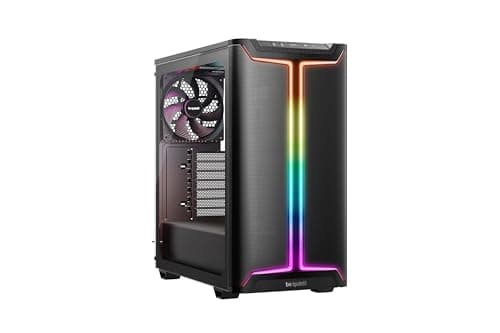
Case shopping at the budget end of the market is a bit of a minefield. The product photos always look great, the RGB fans glow beautifully in a dark studio, and then you get the thing home and discover the cable routing is a mess, the dust filters are decorative at best, and the GPU barely clears the front radiator bracket. So before you hand over your money for the ENDORFY Regnum 400 ARGB, it's worth asking the questions the marketing doesn't answer: how much space is actually behind the motherboard tray? Do the dust filters cover anything useful? And are four included fans actually worth having, or are they the kind of thing you'd rip out immediately?
The short answer is that this is a genuinely good buy at its entry-level price point. Four Stratus 120 PWM ARGB fans in the box, a 370mm GPU clearance, 162mm CPU cooler height, perforated panels on the front, top and bottom with magnetic dust filters, and cable management space that owner reviews consistently describe as better than expected for the price. That's a strong package. It's not perfect, and there are a couple of things before you commit, but the positive overall rating across a small number of reviews isn't an accident.
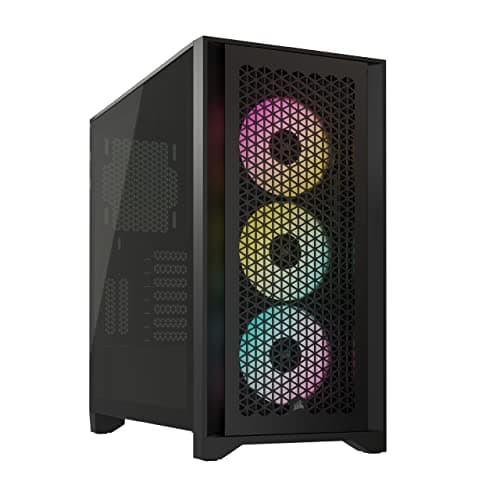
This is a case built for someone doing a first or second build who wants airflow, RGB, and enough room to work without fighting the chassis the whole time. It's not going to trouble a Fractal Design Torrent or a be quiet! Silent Base, but it's not trying to. At this price tier, the Regnum 400 ARGB is competing with the likes of the Corsair 4000D Airflow and the DeepCool CC560, and on raw value it holds its own surprisingly well.
Core Specifications
The Regnum 400 ARGB is a mid-tower ATX case, and the specs ENDORFY publishes are actually pretty generous for the money. You're getting GPU support up to 370mm, which covers almost everything currently on the market including the longer variants of the RTX 4080 and RX 7900 XT. CPU cooler clearance sits at 162mm, which is enough for the big Noctua NH-D15 and most 360mm AIO radiators with some clearance to spare. PSU length support is listed at 296mm, which is fine for standard ATX power supplies, though some of the chunkier modular units push past that so it's worth measuring before you buy.
Fan support is where this case really earns its keep. You get four 120mm fans included, but the chassis can take up to eight 120mm fans in total, or you can fit 140mm units in the front and top positions if you want to upgrade later. That's a lot of mounting real estate for a case at this price. The included fans are the Stratus 120 PWM ARGB units, developed in partnership with Synergy Cooling, and they're addressable RGB so they'll sync with your motherboard software if your board supports it. The included hub means you're not hunting for spare fan headers on your motherboard either, which is a nice practical touch.
Storage comes in at four drives total. The case also ships with a tempered glass side panel, which is standard at this price now, and magnetic dust filters at the front, top and bottom. Those magnetic filters are because a lot of budget cases either skip them entirely or use a flimsy mesh that's a pain to remove. Magnetic is genuinely better for maintenance. Below is the full spec breakdown.
| Specification | Detail |
|---|---|
| Form Factor | Mid-Tower ATX |
| Max GPU Length | 370mm |
| Max CPU Cooler Height | 162mm |
| Max PSU Length | 296mm |
| Included Fans | 4x Stratus 120mm PWM ARGB |
| Max Fan Capacity | 8x 120mm (or 140mm in front and top) |
| Drive Bays | 4 drives total |
| Side Panel | Tempered Glass |
| Dust Filters | Front, top, bottom (magnetic) |
| Fan Hub | Included |
| ARGB Control | Motherboard software or preset effects via Reset button |
| Price | £99.97 · Details |

Form Factor and Dimensions
The Regnum 400 ARGB is a proper mid-tower. Not a stretched one, not a compact one trying to pass itself off as mid-tower. It sits comfortably on a standard desk or on the floor next to one, and the footprint is what you'd expect from a case in this class. It's not going to dominate a small desk the way a full-tower would, and it's not so cramped that you're fighting to get your hands inside during a build.
The perforated front and top panels are doing real work here, not just decorative work. There's a reason ENDORFY leads with airflow in the product description: the mesh coverage on the front and top is substantial, and combined with the fan mounting positions, you've got a chassis that's genuinely designed to move air rather than just look like it does. A lot of cases at this price have a front panel that's maybe 30% open. The Regnum 400 looks to be doing considerably better than that based on the product imagery and what owners describe.
The tempered glass panel is on the left side, showing off the internals, which is standard. The right side panel covers the cable management area. There's no window on the right, which is fine because you don't want people looking at your cable routing anyway. The overall aesthetic is clean and modern without being over-designed, and it's the kind of case that looks decent on a desk without screaming "gamer" at anyone who walks past. Whether that matters to you is a personal call, but notably, for people who use their PC in a shared space.
Motherboard Compatibility
The Regnum 400 ARGB supports ATX motherboards, which is the main event at this price point. If you're building on a standard ATX board, you're sorted. The chassis dimensions and standoff layout are designed around that form factor, and with 370mm of GPU clearance and 162mm of CPU height, you've got room for a proper full-size build without compromise.
Micro-ATX and Mini-ITX boards will also fit, as is standard for mid-towers. If you're building on a smaller board, you'll have more space inside, which can actually make cable routing easier rather than harder. The extra room behind the motherboard tray becomes more accessible when the board isn't filling the entire left side of the case. Owners on smaller boards tend to report the cable management experience as particularly good, partly because there's more room to work with.
E-ATX support isn't confirmed in the verified spec data, so if you're planning to run an extended ATX board, check the manufacturer's page before committing. For the vast majority of builders, though, standard ATX is what they're running, and the Regnum 400 handles that without any issues. The standoff layout is conventional, and there's nothing unusual about the mounting process based on what owners report.
GPU Clearance
370mm of GPU clearance is generous. To put that in context, the RTX 4090 Founders Edition is 336mm long. The ASUS ROG Strix RTX 4080, one of the chunkier cards on the market, comes in around 357mm. So the Regnum 400 ARGB will take essentially anything currently available without issue. If you're running a mid-range card like an RTX 4070 or RX 7800 XT, or a mid-range card, or something more compact where case options for the ASUS RTX 5060 LP BRK matter, you'll have even more breathing room, which means better airflow around the card itself.
The 370mm clearance figure is measured with the PSU shroud in place, which is the honest way to measure it. Some manufacturers quote GPU clearance without accounting for the shroud or cable routing, which gives you an inflated number that doesn't reflect real-world builds. The fact that ENDORFY is quoting 370mm as the usable figure is encouraging, and owner reviews don't flag any GPU fitment issues, which supports that number being accurate.
There's no mention of a vertical GPU mount option in the verified spec data, so if that's something you specifically want for showing off your card through the glass panel, you'd need to check the manufacturer's current product page or factor in the cost of a third-party vertical mount bracket. For most builders, horizontal mounting is fine, and the standard clearance here is more than enough. The front intake fans will be pulling air across the GPU nicely with a proper front-to-rear airflow setup.
CPU Cooler Clearance
162mm of CPU cooler clearance is a solid number. The Noctua NH-D15, which is probably the most popular high-end air cooler on the market, stands 165mm tall in its standard configuration but can be adjusted down to around 160mm with some fan repositioning. The be quiet! Dark Rock Pro 4 is 162.8mm, which is right on the edge. Most tower coolers from Noctua, be quiet!, DeepCool and Thermalright sit comfortably under 162mm, so you've got a wide selection of air coolers to work with.
For AIO liquid coolers, the Regnum 400 ARGB can accommodate radiators in the front and top sections. The front will take up to three 120mm fans (so a 360mm radiator), and the top section also supports multiple fan positions. This means you can run a 360mm AIO in the front or a 240mm or 280mm unit up top, depending on your preference. Front mounting is generally better for thermals as it brings cool air in directly across the radiator, so if you're going AIO, front is the way to go here.
One thing worth thinking about with front-mounted radiators is RAM clearance. Some AIO radiators and their pump heads can foul taller RAM sticks depending on the motherboard layout. This is a general mid-tower concern rather than specific to the Regnum 400, but it's worth measuring your RAM height against the radiator bracket position before committing to a front AIO. For most standard-height DDR4 and DDR5 kits, it's a non-issue. The included fan hub also makes connecting everything significantly less painful than hunting for spare headers on the motherboard.
Storage Bay Options
Four drives is the confirmed total for the Regnum 400 ARGB. That's a reasonable number for most builds in 2026. If you're running an NVMe SSD as your primary drive (which most people are at this point), plus a secondary SSD or a mechanical drive for mass storage, four bays covers you comfortably with room to expand. It's not a NAS build, but nobody buying a mid-tower RGB gaming case is expecting to run twelve drives.
The split between 3.5-inch and 2.5-inch bays isn't explicitly broken down in the verified spec data, so the exact configuration isn't something we can confirm here. What we can say is that four total is standard for this class of case, and the layout appears to sit behind the motherboard tray based on the product imagery, which is where you want it for keeping the main chamber clean. Tucking drives behind the tray is good practice for both aesthetics and airflow.
If you're a heavy storage user with multiple mechanical drives, four bays might feel limiting. In that case, you'd want to look at something like the Fractal Design Define series, which prioritises storage capacity. But for a gaming build with one or two SSDs and maybe a single mechanical drive for game storage, the Regnum 400 has everything you need. And given the price point, expecting more than four bays would be unrealistic anyway.

Cable Management
This is where budget cases often fall apart, and it's one of the things the Regnum 400 ARGB gets more right than you'd expect. ENDORFY specifically mentions cable conduits, cable ties, and concealing space behind the main board tray in the product description, and owner reviews back this up. Multiple buyers highlight the cable management as a genuine strength, which at this price tier is not something you can take for granted.
The PSU shroud covers the bottom section of the case, hiding the power supply and the rats' nest of cables that inevitably comes with a modular or semi-modular unit. This is standard on most cases now but was notably absent on a lot of budget options even a couple of years ago. The shroud keeps the main chamber looking clean through the glass panel, which matters if you've spent money on an ARGB build. The cable routing channels run behind the motherboard tray, and the space back there is apparently generous enough that owners aren't complaining about panel-closing fights, which is a common budget-case frustration.
The included cable ties are a small but practical touch. A lot of manufacturers skip them entirely and leave you to buy your own Velcro straps. Having them in the box means a first-time builder isn't immediately improvising with zip ties or leaving cables loose. The fan hub also reduces the cable count going to the motherboard, since you're connecting the hub to a single header rather than running four separate fan cables to four separate headers. That alone makes a meaningful difference to how tidy the finished build looks.
Airflow and Thermal Design
The airflow story here is genuinely good. The front panel is perforated rather than solid, the top panel is perforated, and there are dust filters at the front, top and bottom with magnetic fixing. That's a proper three-sided intake setup, which means you're not starving the fans for air. A lot of budget cases have a solid or minimally vented front panel that throttles the fans regardless of how many you install. The Regnum 400 doesn't have that problem.
Four Stratus 120mm PWM ARGB fans in the box is a strong starting point. PWM control means the fan speed responds to temperature rather than running flat out all the time, which keeps noise down during light workloads. The fans are developed in cooperation with Synergy Cooling, so they're not generic OEM units rebadged and thrown in to hit a spec point. Whether they're as good as dedicated aftermarket fans from Noctua or be quiet! is a different question, but for included fans, they're a step above what you'd normally expect at this price. And because the case supports up to eight 120mm fans total, you can always add more if you want to push thermals harder.
The bottom dust filter is particularly useful for floor-mounted cases where dust ingestion from carpet or hard floors is a real concern. Magnetic filters are the right call here because they're easy to pull out, shake off, and put back without tools. If you've ever dealt with a case where the dust filter is held in by screws or just friction, you'll know how quickly maintenance gets ignored when it's inconvenient. Magnetic filters remove that excuse. The front and top filters serve the intake fans, and the bottom filter protects the PSU. That's full coverage, which is impressive at this price.
Front I/O and Connectivity
The front I/O panel is where the verified spec data is a bit light on detail, so we'll stick to what's confirmed. The ARGB control is accessible via the Reset button connection to the fan hub, which lets you cycle through preset lighting effects without needing motherboard software. That's a useful option for builders who aren't running an ARGB-compatible motherboard or who just want to set a lighting mode and forget about it.
The hub itself is a meaningful inclusion. It handles fan connections and ARGB synchronisation, reducing the header demands on your motherboard. If you've ever tried to connect four fans and four ARGB cables to a budget motherboard with limited headers, you'll appreciate having a hub that consolidates this. It connects to a single fan header and a single ARGB header, and the hub distributes the signal to all four fans. Tidy, practical, and the kind of thing that makes a real difference during a build.
For the specific USB port configuration and audio jack details on the front panel, the verified spec data doesn't break this down explicitly, so we're not going to guess. What we can say is that for a case at this price point, you'd typically expect at least one USB 3.0 Type-A port and a combined audio jack, but check the manufacturer's current product page at endorfy.com for the confirmed front I/O spec before buying if that's a deciding factor for you. Owner reviews don't flag any frustrations with the front I/O, which suggests it covers the basics adequately.
Build Quality and Materials
At this price, you're getting steel construction with a tempered glass side panel, which is the standard combination for entry-level mid-towers in 2026. The steel quality on budget cases varies quite a bit, and it's one of those things that's hard to assess without handling the chassis. What we can go on is owner feedback, and the positive overall rating across a small number of reviews is unusually high. People who have actually built in this case are happy with it, and complaints about sharp edges, panel flex, or poor fitment aren't appearing in the review pattern.
The tempered glass panel is a safety and aesthetic upgrade over acrylic, which scratches easily and can yellow over time. Tempered glass stays clear, is harder to scratch, and has a premium feel that belies the price. The magnetic dust filters add to the quality impression because magnetic fixing requires a bit more engineering than just friction or screws. Small details like that suggest ENDORFY has thought about the user experience rather than just hitting a price point.
The fan hub is another build quality indicator. Cheap cases often include fans with no hub, leaving you to manage multiple cables and headers. Including a hub shows attention to the actual build experience. And the cable ties in the box, the cable conduits built into the chassis, and the concealing space behind the tray all point to a manufacturer that's thought about what it's like to actually put a PC together in this thing, not just what it looks like in product photos. Owner reviews consistently describe the build experience as positive, which is the most honest indicator of build quality you can get without putting it on a workbench yourself.
How It Compares
The main competition at this price tier is the Corsair 4000D Airflow and the DeepCool CC560. The 4000D Airflow is a well-regarded case with good airflow and solid build quality, but it typically comes with two fans rather than four, and the ARGB options cost more. The DeepCool CC560 is a strong value option with four fans included, but the fan quality and dust filtration aren't quite at the same level as what ENDORFY is offering here.
The Fractal Design Pop Air is another competitor. It's a clean, well-built case with good airflow, but it's usually priced higher and doesn't include ARGB fans. If RGB isn't your thing, the Pop Air is worth a look. But if you want fans in the box, ARGB lighting, magnetic dust filters, and 370mm of GPU clearance, the Regnum 400 ARGB is hard to beat at this price. The four-fan inclusion alone represents significant value since decent 120mm ARGB PWM fans cost real money if you're buying them separately.
The ATX standard hasn't changed fundamentally in years, so all these cases support the same motherboard sizes and basic layout conventions. Where they differ is in the details: fan count, dust filtration, GPU clearance, and cable management quality. On those metrics, the Regnum 400 ARGB punches above its weight class, particularly on fan count and dust filter coverage.
| Feature | ENDORFY Regnum 400 ARGB | Corsair 4000D Airflow | DeepCool CC560 |
|---|---|---|---|
| Included Fans | 4x 120mm ARGB PWM | 2x 120mm (non-ARGB) | 4x 120mm (non-ARGB) |
| Max GPU Length | 370mm | 360mm | 370mm |
| Max CPU Cooler Height | 162mm | 170mm | 165mm |
| Dust Filters | Front, top, bottom (magnetic) | Front, bottom | Front, bottom |
| Tempered Glass | Yes | Yes | Yes |
| Fan Hub Included | Yes | No | No |
| Price Tier | Entry | Mid | Entry |

Final Verdict
The ENDORFY Regnum 400 ARGB is a genuinely good entry-level mid-tower that gets the important things right. Four PWM ARGB fans in the box, magnetic dust filters on three sides, 370mm GPU clearance, 162mm CPU cooler height, a fan hub to keep the cable situation manageable, and cable management space that owners consistently describe as better than expected. That's a strong list for a case at this price point, and the positive overall rating from buyers who have actually built in it backs up the spec sheet.
It's not flawless. The front I/O specifics aren't fully confirmed in the available data, E-ATX support isn't verified, and the PSU clearance of 296mm means you should measure your power supply before ordering if you're running something chunky. These are relatively minor concerns for most builders, but. And if you're planning a high-end workstation build with multiple large drives or an E-ATX board, this isn't the chassis for that job.
For who this is actually for: someone doing a first or second build, running an ATX board, a mid-to-high-end GPU, and wanting a clean ARGB setup without buying fans separately. The Regnum 400 ARGB gives you a complete, ready-to-build package at a price that's hard to argue with. The included fans alone would cost you a meaningful chunk of the case price if you bought them separately, and the magnetic dust filters are a quality detail you'd normally expect to pay more for.
If you don't care about ARGB and just want the best airflow for the money, the Corsair 4000D Airflow is, though it'll likely cost you more and you'll need to budget for additional fans. If you're building something very modest and want to spend as little as possible, the DeepCool CC560 undercuts this on price and includes four fans too, though without the ARGB or the magnetic filters. But if you want the full package at the entry price tier, the Regnum 400 ARGB is the smarter buy.
Overall score: 8 out of 10. Recommended without hesitation for budget-conscious builders who want a proper, complete build experience rather than a bare-bones box to fill.
What works. What doesn’t.
5 + 3What we liked5 reasons
- Four PWM ARGB fans included, with a hub, saving real money vs buying separately
- Magnetic dust filters on front, top, and bottom - proper three-sided coverage
- 370mm GPU clearance handles virtually every current card without issue
- Cable management space praised by owners as better than expected for the price
- Perforated front and top panels deliver genuine airflow rather than just looking like they do
Where it falls3 reasons
- PSU clearance of 296mm may not suit larger modular power supplies
- Front I/O specifics not fully detailed in verified spec data
- Only four drive bays - limiting for heavy storage users
Full specifications
12 attributes| Form factor | Mid-Tower |
|---|---|
| CPU cooler clearance MM | 162 |
| Dimensions MM | 472 x 220 x 442 |
| Fans included | 4 |
| GPU clearance MM | 370 |
| MAX FAN count | 8 |
| MAX radiator MM | 360 |
| NOT A PSU | true |
| PSU support | ATX up to 296 mm |
| Side panel | tempered glass |
| Supported motherboard | ATX, microATX, ITX |
| Weight KG | 6.3 |
Frequently asked
5 questions01Is the ENDORFY Regnum 400 ARGB, ATX PC case, 4x120mm ARGB PWM fans included, tempered glass side panel, plenty of space inside, high airflow design good for airflow?+
Yes, genuinely so. The Regnum 400 ARGB has perforated panels on the front and top, magnetic dust filters on three sides (front, top, and bottom), and comes with four Stratus 120mm PWM ARGB fans developed with Synergy Cooling. The front panel mesh coverage is substantial rather than decorative, which means the fans are pulling air through real ventilation rather than fighting a solid panel. You can install up to eight 120mm fans in total, or use 140mm units in the front and top positions if you want to upgrade. For a case at this price, the airflow design is a genuine strength.
02What's the GPU clearance on the ENDORFY Regnum 400 ARGB, ATX PC case, 4x120mm ARGB PWM fans included, tempered glass side panel, plenty of space inside, high airflow design?+
The Regnum 400 ARGB supports GPUs up to 370mm in length. That covers virtually every current graphics card on the market, including longer variants of the RTX 4080 and RX 7900 XT series. The RTX 4090 Founders Edition is around 336mm, so even that fits with room to spare. There are no reported GPU fitment issues from owners, which suggests the 370mm figure is an accurate real-world measurement rather than an optimistic quote.
03Can the ENDORFY Regnum 400 ARGB, ATX PC case, 4x120mm ARGB PWM fans included, tempered glass side panel, plenty of space inside, high airflow design fit a 360mm AIO?+
Yes. The front panel supports up to three 120mm fans, making it compatible with a 360mm radiator. The top section also supports multiple fan positions, so a 240mm or 280mm AIO can mount up top if you prefer that configuration. Front mounting is generally the better thermal option as it brings cool air directly across the radiator. If you're planning a front-mounted 360mm AIO, check your RAM height against the radiator bracket position, as taller RAM sticks can occasionally cause clearance issues with some AIO pump heads - this is a general mid-tower consideration rather than specific to the Regnum 400.
04Is the ENDORFY Regnum 400 ARGB, ATX PC case, 4x120mm ARGB PWM fans included, tempered glass side panel, plenty of space inside, high airflow design easy to build in?+
Owner feedback is consistently positive on this point. ENDORFY includes cable conduits, cable ties, and cable concealing space behind the motherboard tray, and multiple buyers specifically highlight the cable management as better than expected for the price. The included fan hub reduces the number of cables going to the motherboard, since all four fans connect through the hub to a single fan header and single ARGB header rather than requiring four separate connections. The magnetic dust filters also remove without tools, which makes maintenance straightforward. No significant reports of sharp edges or panel-closing difficulties in the owner review pattern.
05What warranty and returns apply to the ENDORFY Regnum 400 ARGB, ATX PC case, 4x120mm ARGB PWM fans included, tempered glass side panel, plenty of space inside, high airflow design?+
Specific warranty terms for the Regnum 400 ARGB are not detailed in the verified product data available to us, so we'd recommend checking the ENDORFY website directly for their warranty policy. When purchased through Amazon UK, you're covered by Amazon's standard 30-day return policy and the A-to-Z Guarantee, which provides protection if the item arrives damaged or not as described.