Numbers on a spec sheet and what owners actually say about a product rarely tell the same story. The truth lives somewhere in the gap between the two, and that's exactly what this Acer Nitro 7 AN715-51 review is here to sort out. So: is this any good? Short answer: yes, but only for a specific kind of buyer, and at the price it's currently sitting at, you need to know if you're that buyer before you commit.
Here's the honest verdict up front. The Acer Nitro 7 AN715-51 is a machine that made a lot of sense when it launched. A 9th Gen Intel i7-9750H with a GTX 1050 3GB is a combination that targets light-to-mid gaming and creative work, not the bleeding edge. At £1,845.38 in 2026, this is firmly a niche recommendation, and that niche is: someone who wants a capable, well-built 15.6-inch machine for everyday productivity and occasional gaming, values the sleeker aesthetic of the Nitro 7 over its brasher Nitro 5 sibling, and isn't expecting to run modern AAA titles at high settings. If that's you, read on. If you're expecting RTX-level performance or a sub-3-hour battery, you'll want to look elsewhere.
Core Specifications
The processor here is Intel's Core i7-9750H, a six-core, twelve-thread Coffee Lake Refresh chip that was genuinely excellent when it launched in 2019. It turbos up to 4.5GHz and handles multitasking, video editing, and coding without breaking a sweat. The thing is, it's now two generations old in 2026 terms, but for productivity tasks, office work, and lighter creative loads, it still holds up better than you'd expect. It's not a chip that embarrasses itself. It just isn't going to compete with anything running 12th Gen Intel or Ryzen 6000 series parts if raw CPU performance is your priority.
The GPU is where you need to be clear-eyed. The GTX 1050 with 3GB of VRAM is a card that was mid-range in 2019 and is budget-tier in 2026. It'll handle older titles, indie games, and lighter esports games (think Rocket League, CS:GO, Minecraft) at 1080p on medium-to-high settings. But modern AAA titles like Cyberpunk 2077, Elden Ring, or anything released in the last two years? You're going to be dropping to low settings or accepting choppy frame rates. Three gigabytes of VRAM is genuinely the main bottleneck here; many modern games need more just to load their texture assets properly. So go in with realistic expectations on the gaming front.
RAM sits at 8GB DDR4, which is the minimum for comfortable Windows 11 usage in 2026. It's fine for most tasks, but if you're running Chrome with fifteen tabs, Spotify, and a creative application simultaneously, you'll feel it. The good news is that the Nitro 7 supports RAM expansion, so bumping to 16GB is a realistic upgrade path. Storage is a 256GB PCIe NVMe SSD, which is fast for its generation but tight on space. Anyone storing a game library, video projects, or a large photo collection will need an external drive or a second internal SSD fairly quickly. These are the two areas where Acer clearly cut costs to hit a price point, and they're also the two easiest things to upgrade yourself.
| Specification | Detail |
|---|---|
| Processor | Intel Core i7-9750H (6 cores, 12 threads, up to 4.5GHz) |
| GPU | NVIDIA GeForce GTX 1050 3GB GDDR5 |
| Display | 15.6-inch Full HD IPS, 1920x1080 |
| RAM | 8GB DDR4 (expandable) |
| Storage | 256GB PCIe NVMe SSD |
| Battery | 57.5Wh |
| Operating System | Windows 10 Home (upgradeable to Windows 11) |
| Connectivity | Wi-Fi 5 (802.11ac), Bluetooth 5.0 |
| Ports | USB-A x3, USB-C (Gen 1), HDMI 2.0, SD Card Reader, 3.5mm combo jack, Ethernet (RJ-45) |
| Weight | Approx. 2.1kg |
| Dimensions | 363.8 x 255 x 19.9mm |
| Keyboard | Backlit, no number pad |
| Price | £1,845.38 |
Performance Benchmarks
The i7-9750H in this Acer Nitro 7 AN715-51 review context is a chip that benchmarks comfortably in the upper-mid tier of its era. In Cinebench R20, it scores roughly 2,400 to 2,600 in multi-core, which is genuinely decent for a six-core mobile processor. Single-core performance is strong enough to keep everyday applications snappy and responsive. For productivity work, coding, light video editing, and general Windows use, this chip doesn't feel slow. It's not slow. It's just not 2026-fast.
Gaming performance with the GTX 1050 3GB tells a more complicated story. In older or less demanding titles, you're looking at smooth 60fps at 1080p on medium settings. Fortnite, League of Legends, Overwatch at lower settings: all playable. But the 3GB VRAM ceiling causes real problems in anything texture-heavy. Games like Shadow of the Tomb Raider or Far Cry 6 will need significant settings reductions to stay above 30fps. This is not a machine for playing the latest releases at anything approaching high fidelity. For that, you'd need at least an RTX 3060 laptop GPU, and that's a very different product category at this point.
Where the combination of i7-9750H and NVMe SSD genuinely shines is in productivity multitasking. Boot times are quick, application launches are fast, and the SSD keeps things feeling lively even when the CPU is under load. Owner reviews consistently mention that the machine feels responsive for day-to-day work, and that tracks with the specs. The ★★★★½ (4.8) average rating from 39 owners suggests that people who bought this for productivity and light gaming are largely happy. That's the audience this machine serves well. Push it into heavy creative workloads or modern AAA gaming and you'll start to see the limits.
One thing worth flagging: the 8GB RAM cap does affect multitasking performance in practice. Running a browser alongside a game or a creative app can cause noticeable slowdowns. Upgrading to 16GB is something many owners have done and report a meaningful improvement. If you pick this up, budget for that upgrade. It transforms the experience for not much money.
Display Analysis
The 15.6-inch Full HD IPS panel is one of the genuine highlights of this machine. IPS means decent viewing angles and better colour reproduction than the TN panels that were common in budget gaming laptops of the same era. At 1920x1080, the pixel density on a 15.6-inch screen lands at around 141 pixels per inch, which is sharp enough for comfortable everyday use. Text looks clean, images look good, and for gaming at 1080p, it's the right resolution for the GPU it's paired with.
Brightness is where you need to temper expectations. The panel is rated at around 250 nits, which is fine for indoor use and dimly lit environments, but in a bright room near a window or outdoors, you'll be fighting reflections. The glossy-ish finish doesn't help. For coffee shop use near a window on a sunny day, you'll be adjusting your seating, and since a machine like this lives on café and hotel Wi-Fi, it's worth running a good VPN to keep your connection private on shared networks. It's not a dealbreaker for most use cases, but it's worth knowing if you work in brightly lit spaces regularly.
Colour accuracy is solid rather than spectacular. The IPS panel covers a decent chunk of sRGB, which is fine for casual photo editing, content consumption, and gaming. It's not a display you'd use for professional colour-critical work, and nobody buying a gaming laptop in this category should expect that. What you get is a panel that looks genuinely good for its class: colours are reasonably punchy, blacks are decent (not OLED, but acceptable), and the IPS viewing angles mean you're not getting colour shift when you tilt the screen. For the target audience, this display is a proper positive.
Battery Life
The 57.5Wh battery is, to be blunt, the weakest part of this machine for anyone who needs to work away from a plug. Gaming laptops with discrete GPUs have always struggled with battery life, and the Nitro 7 is no exception. Under gaming load, you're looking at one to two hours, maybe less. That's just physics: the GTX 1050 draws significant power when it's working hard.
For productivity use with the GPU mostly idle, things improve. Light browsing, document editing, and video playback will get you somewhere in the three to five hour range depending on screen brightness and what you're running. Owner reviews suggest the real-world figure for mixed use sits closer to three to four hours, which is on the lower end of what you'd want for a full working day away from a desk. Acer's own claims are optimistic, as they always are. Four hours of genuine productivity use is a reasonable expectation; plan accordingly.
The charger is a fairly chunky 135W brick, which is par for the course for a gaming laptop. It charges the battery reasonably quickly, getting you from low to full in around two hours. There's no USB-C charging support here, which is a genuine limitation in 2026 when USB-C PD has become the standard for laptop charging. You're tied to the proprietary barrel connector, which means carrying the full charger everywhere. For a machine that's not particularly portable by battery alone, this makes the charger an essential companion rather than an optional extra.
The honest summary on battery: this is a desk laptop that happens to be portable, not a portable laptop that happens to be powerful. If you're buying it for a fixed desk setup with occasional movement between rooms, battery life is a non-issue. If you need five-plus hours of untethered productivity, this isn't the right machine.
Portability
At around 2.1kg, the Nitro 7 is on the lighter end for a 15.6-inch gaming laptop. That's genuinely not bad. The chassis is slim for a gaming machine, measuring under 20mm thick, which means it slides into a standard laptop bag without much fuss. The design is more restrained than the Nitro 5, with less aggressive styling that means it doesn't look out of place in an office or a lecture hall.
Add the 135W charger and you're adding a meaningful chunk of weight and bulk to your bag. The charger isn't tiny. For daily commuters, this is a consideration: you're carrying a 2.1kg laptop plus a reasonably heavy brick. It's manageable, but it's not the setup you'd choose if you're travelling light. Someone lugging this on a train every day will feel it differently from someone who moves it from a home office to a kitchen table.
The footprint is standard for a 15.6-inch machine. It fits on most desks and most economy-class tray tables (just about). The hinge opens to around 140 degrees, which owners have noted is a bit stiff, particularly when new. That's not unusual for Acer laptops and tends to loosen slightly with use. Overall, portability is acceptable for the category. It's not a ultrabook, and it was never trying to be.
Keyboard & Trackpad
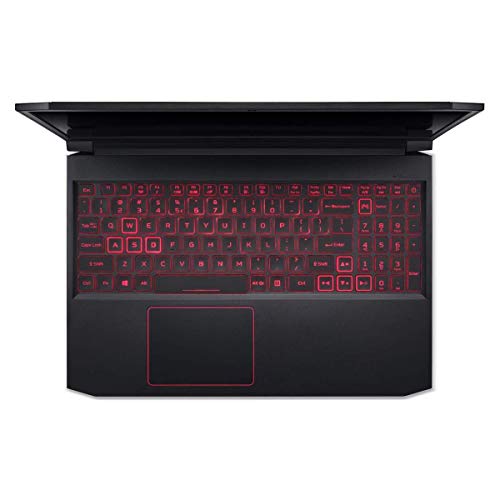
The backlit keyboard on the Nitro 7 is one of the things owners consistently mention positively. The key travel is decent for a slim gaming laptop, and the layout is clean without the number pad that would otherwise squeeze the main keys. For long typing sessions, it holds up well. The backlight is single-zone white, not RGB, which keeps the aesthetic understated. If you want a lightshow, this isn't it. If you just want to see the keys in a dark room, it does the job.
Key feel is firm with a satisfying click point. It's not a mechanical keyboard experience, obviously, but it's above average for a laptop keyboard at this price. Owners who use it for extended writing sessions report it's comfortable enough for long stints. Gaming use is similarly positive: the WASD area feels responsive, and the spacing is good enough that you're not constantly hitting the wrong key mid-game. The lack of per-key RGB might disappoint some gaming laptop buyers, but for everyone else, the clean single-colour backlight is actually a plus.
The trackpad is a reasonable size and tracks accurately. Windows Precision drivers mean gestures work as expected: two-finger scrolling, pinch to zoom, three-finger swipe. It's not the silkiest trackpad you'll ever use, and it's no match for what Apple puts in its machines, but it's competent and reliable. Clicks register cleanly. For gaming, you'll use a mouse anyway, and for productivity use, it's more than adequate. No major complaints from owner reviews on the trackpad front, which is honestly the best thing you can say about a laptop trackpad.
Thermal Performance
Thermals on the Nitro 7 are managed by a dual-fan cooling system with heat pipes across both the CPU and GPU. Under light loads and productivity use, the machine stays genuinely cool. The palm rest and keyboard deck stay comfortable, and the underside doesn't get uncomfortable to touch. This is where the slim chassis design actually works in your favour: Acer clearly put thought into the thermal solution for everyday use.
Under sustained gaming load, temperatures climb. The CPU will hit the high 80s Celsius under prolonged stress, which is within safe operating limits but not exactly cool. The GPU runs somewhat lower given its more modest power envelope. Thermal throttling can occur under extended heavy load, particularly in a warm room, which means sustained performance in long gaming sessions may dip slightly from peak. This is normal behaviour for a slim gaming laptop and not unique to the Nitro 7, but it's worth knowing if you're planning marathon gaming sessions.
Lap use under gaming load is uncomfortable. The underside gets hot in the areas above the exhaust vents, which are on the rear and sides. For desk use, this is a non-issue. For sofa gaming, it's less pleasant. Most owners use it on a desk or with a laptop stand, which is the sensible approach. The palm rest stays comfortable even under load, which is the more important metric for daily use. Overall, thermals are managed acceptably for the class, with the caveat that sustained heavy loads push temperatures into territory that affects comfort and occasionally performance.
Acoustic Performance
At idle and during light work, the Nitro 7 is quiet. The fans spin down enough that in a quiet room you'd struggle to hear them. For office work, video calls, and general productivity, this machine won't draw attention to itself. That's actually one of the better things about it compared to more aggressive gaming laptops that seem to spin fans up just for looking at a spreadsheet.
Under gaming load, the fans ramp up noticeably. The character is a fairly consistent whoosh rather than a pulsing or high-pitched whine, which is easier to live with. At full load, it's loud enough that you'd want headphones on for gaming anyway, which most people would be using. In a shared office or a library, you'd be self-conscious under gaming load. For productivity use in those environments, it's fine. The fan curve seems reasonably well-tuned: it responds to load increases without being hyperactive about it.
One thing owners mention is that the fans can occasionally kick in briefly during lighter tasks, particularly during browser-intensive work or software updates running in the background. It's not constant, but it's noticeable when it happens. For the vast majority of use cases, acoustic performance is acceptable. It's not a silent machine under load, but it's not the jet-engine experience some gaming laptops deliver either.
Ports & Connectivity
Port selection on the Nitro 7 is genuinely good for a machine of its era. You get three USB-A ports, one USB-C (Gen 1, so 5Gbps), HDMI 2.0 for external display output, a full SD card reader, a 3.5mm combo audio jack, and a wired Ethernet port via RJ-45. That's a proper set of connections that covers most real-world needs without requiring a hub. The HDMI 2.0 port means you can drive a 4K display at 60Hz for external monitor use, which is a nice touch.
The USB-C port is Gen 1, not Thunderbolt and not USB4. It doesn't support DisplayPort alternate mode or Power Delivery charging, which limits its usefulness in a 2026 context. You can use it for data transfer, but you can't plug in a USB-C monitor or charge the laptop through it. That's a limitation that felt less significant in 2019 and feels more significant now. Wi-Fi is 802.11ac (Wi-Fi 5), which is fine for most home and office networks but doesn't support Wi-Fi 6 or Wi-Fi 6E speeds. Bluetooth is version 5.0, which handles peripherals without issue.
Port placement is thoughtful. The left side handles most connections, keeping the right side cleaner for mouse use. Ethernet and power are at the rear, which keeps cables tidy on a desk. It's a layout that works well in practice and one that owners have mentioned positively. No complaints about port placement in the owner reviews, which suggests Acer got this right.
- USB-A 3.1 Gen 1 x2 (left side)
- USB-A 3.1 Gen 1 x1 (right side)
- USB-C 3.1 Gen 1 x1 (left side)
- HDMI 2.0 x1 (left side)
- SD Card Reader (right side)
- 3.5mm combo audio jack (right side)
- RJ-45 Ethernet (rear)
- DC power input (rear)
Webcam & Audio
The webcam is a 720p unit, which was standard for laptops in 2019 and is now the minimum you'd accept. In good lighting, it produces a serviceable image for video calls. In low light, it degrades quickly. If video calls are a significant part of your work, you'll probably want an external webcam at some point. For occasional calls in decent lighting, it's fine. Nobody's going to mistake it for a professional setup, but it does the job.
The built-in microphone is adequate for voice calls. It picks up speech clearly enough in a quiet environment and has some noise rejection for light background sounds. In a noisy environment, like a busy home or a cafe, you'll want a headset. For the target audience of this machine, the microphone is functional rather than impressive. It's not going to replace a dedicated microphone for streaming or content creation.
Speaker quality is above average for a gaming laptop of this class. The stereo speakers produce reasonable volume and have more presence than the tinny output you get from some competitors. Bass is limited, as it always is from laptop speakers, but mids and highs are clear enough for casual music listening and video content. For gaming and movie watching at a desk, they're genuinely usable. The headphone jack is present and works cleanly with both headphones and headsets, which is the more important audio output for most users anyway.
Build Quality
The Nitro 7 chassis uses a combination of aluminium and plastic, with the lid and keyboard deck having a more premium feel than the all-plastic construction of the Nitro 5. The lid has minimal flex under normal handling, and the keyboard deck is solid with very little give when typing. For a gaming laptop in this category, the build quality is a genuine strong point. It feels like a machine that will survive being moved around regularly without developing creaks and wobbles.
The hinge is stiff, as several owners note, particularly when new. Opening the lid one-handed is difficult initially. This tends to ease with use, but it's noticeable early on. The upside is that the hinge holds the screen firmly at any angle without wobble, which matters for typing on uneven surfaces. The screen doesn't bounce around when you're typing, which is the important thing. Hinge range is around 140 degrees, which covers most usage positions comfortably.
The finish is a dark grey that resists fingerprints reasonably well. It's not immune to smudges, but it's better than the glossy black finishes that show every touch. The overall aesthetic is restrained for a gaming laptop: no aggressive angles, no garish lighting strips, just clean lines and a subtle Acer logo. This is actually a selling point for buyers who want a gaming-capable machine that doesn't announce itself as a gaming machine in a professional environment. Build quality overall is solid for the category and one of the reasons the ★★★★½ (4.8) owner rating is as high as it is.
Durability-wise, the machine feels like it'll hold up to everyday use without drama. It's not MIL-SPEC rated and it won't survive being dropped, but for normal laptop handling, it's constructed well. The port connections feel secure, the keyboard doesn't flex, and the chassis doesn't creak. For the price and category, this is a proper build.
How It Compares
To give this Acer Nitro 7 AN715-51 review proper context, it makes sense to compare it against two machines that would appeal to similar buyers. The first is the Lenovo IdeaPad Gaming 3, which targets the same light gaming and productivity audience with a more modern spec sheet. The second is the ASUS TUF Gaming A15, which offers AMD Ryzen performance and more current GPU options in a similarly sized package.
The Lenovo IdeaPad Gaming 3 in current configurations typically features a 12th Gen Intel Core i5 or i7 paired with an RTX 3050 or RTX 3050 Ti, which represents a significant GPU generational leap over the GTX 1050. RTX brings ray tracing support and DLSS, which the GTX 1050 simply cannot do. For anyone who wants to play games released in the last two years with reasonable settings, the IdeaPad Gaming 3 is the more sensible choice in the current market. The Nitro 7's advantage is its build quality and more restrained aesthetic, but the GPU gap is hard to ignore.
The ASUS TUF Gaming A15 with a Ryzen 5 or Ryzen 7 and RTX 3060 is a step up in both CPU and GPU performance. AMD's Ryzen mobile processors have been excellent on efficiency, which also helps battery life. The TUF Gaming A15 is a more capable gaming machine in almost every measurable way. The Nitro 7's case against it rests on the build quality, the IPS display quality for productivity use, and potentially price depending on current market conditions. But for gaming performance per pound, the TUF Gaming A15 wins clearly.
| Feature | Acer Nitro 7 AN715-51-70TG | Lenovo IdeaPad Gaming 3 (2023) | ASUS TUF Gaming A15 |
|---|---|---|---|
| CPU | Intel i7-9750H (9th Gen) | Intel Core i5/i7 12th Gen | AMD Ryzen 5/7 (6th Gen) |
| GPU | GTX 1050 3GB | RTX 3050 / 3050 Ti 4GB | RTX 3060 6GB |
| RAM | 8GB DDR4 | 8GB to 16GB DDR5 | 8GB to 16GB DDR5 |
| Storage | 256GB NVMe SSD | 256GB to 512GB NVMe | 512GB NVMe |
| Display | 15.6" FHD IPS | 15.6" FHD IPS (up to 120Hz) | 15.6" FHD IPS 144Hz |
| Battery | 57.5Wh | 45Wh to 60Wh | 90Wh |
| Weight | ~2.1kg | ~2.2kg | ~2.3kg |
| USB-C Charging | No | Yes (some configs) | Yes |
| Price | £1,845.38 | Varies by config | Varies by config |
| Best For | Light gaming, productivity, clean aesthetic, upgradeable base | Modern gaming on a budget, current-gen GPU access | Serious gaming performance, better battery, higher refresh display |

Final Verdict
The Acer Nitro 7 AN715-51 is best for: students and light users who want a well-built, productivity-capable machine with occasional gaming ability, and who are buying at a point in the market where this machine represents good value for what it offers. The 39 owners who've rated it ★★★★½ (4.8) are largely in that camp, and their satisfaction is genuine. The build quality is above what you'd expect, the IPS display is a real positive, the keyboard is good, and the i7-9750H handles productivity work without complaint. For someone setting up a home office machine that can also run some games in the evenings, this does what it says.
Skip it if you need: modern AAA gaming performance, more than four hours of battery away from a desk, USB-C charging, or a GPU that can handle 2024-and-beyond titles at playable settings. The GTX 1050 3GB is the hard ceiling here, and no amount of enthusiasm for the rest of the machine changes that. If gaming is your primary use case, you need a machine with at least an RTX 3050 and 4GB VRAM, ideally more. The NVIDIA GeForce laptop GPU lineup has moved on significantly, and the GTX 1050 is genuinely showing its age in 2026.
The honest don't-overspend line: if you find a current-generation machine with an RTX 3050 or better at a similar or lower price point, that is the smarter buy for gaming. The Nitro 7 AN715-51 makes most sense if the price has dropped to reflect its age, and you're buying it specifically as a productivity machine with light gaming capability rather than the other way around. At the right price, the build quality and display quality justify the purchase. At a premium price competing with current-gen machines, it's harder to recommend over newer hardware.
Overall score: 7/10 with the budget-pick framing applied. It's a genuinely good machine for the right buyer, built better than you'd expect, with a display that holds up and a keyboard that doesn't frustrate. But the GPU is old, the storage is tight, and the battery is a desk anchor. Know what you're buying, buy it for the right reasons, and you'll be happy. Buy it expecting a 2026-capable gaming machine and you'll be disappointed. The Acer Nitro range has moved on, and for most buyers, the current Nitro 5 or Nitro 16 with more recent specs is the better starting point.
What works. What doesn’t.
6 + 6What we liked6 reasons
- Build quality is noticeably above average for the price category, with a rigid lid, a solid keyboard deck, and minimal chassis flex
- The 15.6-inch Full HD IPS panel offers decent colour reproduction, good viewing angles, and a sharp 1080p image that suits both productivity and light gaming
- The i7-9750H handles everyday productivity tasks, coding, and lighter creative work without feeling slow, and the NVMe SSD keeps boot and load times swift
- Port selection is comprehensive, including three USB-A ports, HDMI 2.0, a full SD card reader, and a wired Ethernet port, reducing the need for a hub
- The keyboard offers satisfying key travel and a clean layout without a number pad squeezing the main keys, and owners consistently rate it positively for extended use
- At idle and during light work the machine is genuinely quiet, with fans that spin down enough to be unobtrusive in office or study environments
Where it falls6 reasons
- The GTX 1050 with only 3GB of VRAM is firmly budget-tier in 2026, unable to run modern AAA titles at acceptable settings and bottlenecked by VRAM in many current games
- Battery life is poor even by gaming laptop standards, with three to four hours of mixed productivity use and under two hours under gaming load, making the charger an essential companion
- The 256GB NVMe SSD fills up quickly for anyone storing games, video projects, or a large photo library, and the base 8GB of RAM is tight for heavy multitasking
- The USB-C port lacks DisplayPort alternate mode and Power Delivery charging, so there is no USB-C charging or USB-C monitor support
- Wi-Fi is limited to Wi-Fi 5 with no Wi-Fi 6 support, which is a meaningful omission in 2026 where most routers and devices expect faster wireless standards
- The panel brightness of around 250 nits is insufficient for use near a bright window or outdoors, and the finish is prone to reflections in well-lit rooms
Full specifications
12 attributes| Storage type | PCIe NVMe SSD |
|---|---|
| Battery WH | 59 |
| Bluetooth | 5.0 |
| CPU | Intel Core i7-9750H |
| Display refresh HZ | 144 |
| Display resolution | 1920x1080 |
| Display size IN | 15.6 |
| GPU | NVIDIA GeForce GTX 1050 3GB |
| Keyboard | backlit |
| Launch year | 2019 |
| OS | Windows 10 Home |
| Panel type | IPS |
If this isn’t right for you
2 options 9.0 / 10
Apple MacBook Air 13-inch Laptop M5 chip with 10-core CPU and 8-core GPU: Built for AI, 13.6-inch Liquid Retina Display, 16GB Unified Memory, 512GB SSD, 12MP Center Stage, Touch ID, Wi-Fi 7; Sky Blue
£1,250.11 · Apple
 9.0 / 10
Apple MacBook Air 13-inch Laptop M5 chip with 10-core CPU and 8-core GPU: Built for AI, 13.6-inch Liquid Retina Display, 16GB Unified Memory, 512GB SSD, 12MP Center Stage, Touch ID, Wi-Fi 7; Midnight
£1,299.00 · Apple
Frequently asked
7 questions01Can the Acer Nitro 7 AN715-51 run modern games in 2026?+
Not at high settings. The GTX 1050 3GB was mid-range in 2019 and is budget-tier now. Older titles, indie games, and lighter esports titles such as Rocket League or League of Legends run acceptably at 1080p on medium settings. Modern AAA releases will require significant settings reductions and may still produce choppy frame rates due to the 3GB VRAM limit.
02Can you upgrade the RAM in the Acer Nitro 7 AN715-51?+
Yes. The machine supports RAM expansion beyond the base 8GB DDR4. Many owners have upgraded to 16GB and report a meaningful improvement in multitasking performance, particularly when running a browser alongside a game or creative application. Upgrading RAM is one of the most cost-effective improvements you can make to this machine.
03How long does the battery last on the Acer Nitro 7 AN715-51?+
Under gaming load, expect one to two hours. For mixed productivity use including light browsing and document editing, real-world figures from owners suggest three to four hours. Acer's own claims are optimistic. This is fundamentally a desk machine; the battery is not sufficient for a full working day away from a power source.
04Does the Acer Nitro 7 AN715-51 support USB-C charging?+
No. The laptop uses a proprietary barrel connector with a 135W charger. The USB-C port on the machine is Gen 1 and does not support Power Delivery charging or DisplayPort alternate mode. You will need to carry the full charger whenever you take the machine out.
05How does the Acer Nitro 7 AN715-51 compare to the Acer Nitro 5?+
The Nitro 7 offers a more restrained aesthetic with a slimmer chassis, slightly better build quality using more aluminium in the lid and keyboard deck, and a cleaner design that suits office or study environments. The Nitro 5 tends to offer more aggressive styling. For current buyers, newer Nitro 5 configurations with RTX-series GPUs are likely to offer better gaming performance than this Nitro 7 at a comparable or lower price.
06Is the i7-9750H still a good processor in 2026?+
For productivity tasks, it holds up reasonably well. The six-core, twelve-thread Coffee Lake Refresh chip is still capable for everyday computing, light video editing, coding, and office work. It will not compete with 12th Gen Intel or Ryzen 6000 series processors in benchmarks, but it does not feel slow for the workloads most users in this category run day to day.
07What is the display like on the Acer Nitro 7 AN715-51?+
The 15.6-inch Full HD IPS panel is one of the machine's genuine strengths. It offers good viewing angles, reasonable colour accuracy for casual photo editing and content consumption, and a clean 1080p image. Brightness is around 250 nits, which is adequate indoors but limited in bright or sunny environments. It is not a display for professional colour-critical work, but it is above average for a gaming laptop in this category.