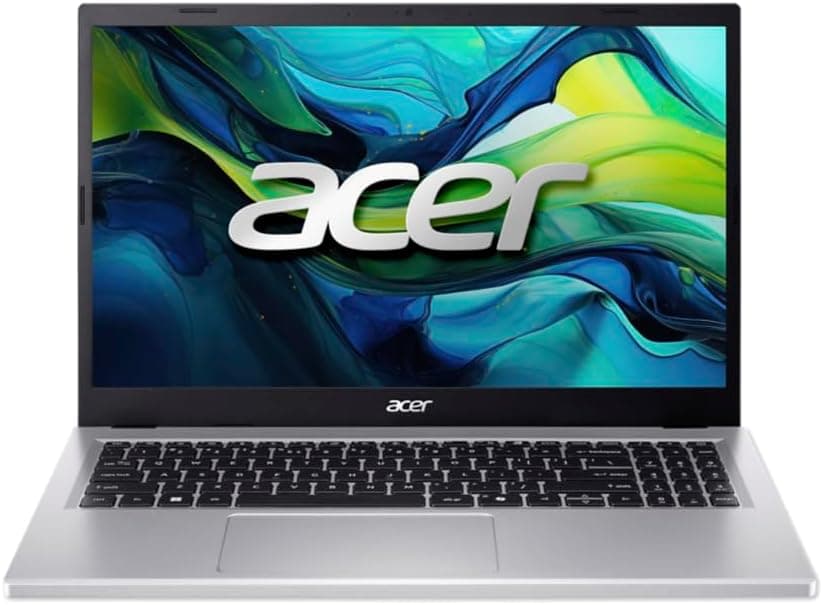
Every laptop is a compromise. You know that going in. The real question is whether the person who built it made the right compromises for the price, and with the Acer Chromebook Plus 514, the answer is mostly yes, with a few caveats worth knowing about before you hand over your cash. This is a budget Chromebook that's trying to punch above its weight class, and based on the spec sheet and what owners are consistently saying, it largely pulls it off.
The Acer Chromebook Plus 514 CB514-5H sits in that interesting sweet spot where ChromeOS stops feeling like a stripped-back compromise and starts feeling like a genuinely sensible choice. You've got an Intel Core i3-1315U under the hood, a proper 1920x1200 IPS display, 256GB of NVMe storage, and a port selection that would embarrass some laptops costing twice the price. At £330.00, the value case is real. But ChromeOS isn't for everyone, and it's worth being clear about that upfront.
So who's it actually for? Students, remote workers, anyone who lives in a browser and Google's ecosystem, people who want something light and long-lasting for commutes and coffee shops. If you need to run native Windows software, this isn't your machine. But if you're honest with yourself about what you actually do on a laptop most days, you might find this covers 90% of it without breaking a sweat.
Core Specifications
The processor here is the Intel Core i3-1315U, which is a 12th-generation chip with a hybrid architecture, meaning it mixes performance cores with efficiency cores. For ChromeOS, this is genuinely more than you need for everyday tasks. Browsing, video calls, Google Docs, YouTube, even running Android apps from the Play Store, the i3-1315U handles all of it without the fan spinning up into a panic. It's not going to win any awards for raw compute, but paired with ChromeOS's lightweight demands, it feels snappier than the spec sheet might suggest to someone used to judging processors by Windows standards.
Eight gigabytes of RAM is the right call at this price. You could argue for 16GB, but ChromeOS is far more memory-efficient than Windows, and 8GB gives you plenty of headroom for multiple tabs, a video call running in the background, and a few Android apps open simultaneously. It's not going to feel cramped the way 8GB sometimes does on a Windows machine. The 256GB NVMe SSD is a proper fast drive too, not one of those eMMC chips that makes budget Chromebooks feel sluggish. NVMe means fast boot times, quick app launches, and no waiting around. That's a meaningful upgrade over cheaper Chromebooks in this category.
Graphics are handled by Intel UHD, which is integrated and shares system memory. For everything ChromeOS asks it to do, it's fine. You're not gaming on this (well, not seriously), but streaming video, video calls, and even some light photo editing in Google Photos is no problem. The one thing worth flagging: the display outputs up to 4K on an external monitor via USB-C, which is a nice bonus for anyone who wants to use this as a desktop replacement at home. Just don't expect the Intel UHD to push high frame rates in graphically demanding tasks, because it won't.
| Specification | Detail |
|---|---|
| Processor | Intel Core i3-1315U |
| RAM | 8GB |
| Storage | 256GB NVMe SSD |
| Graphics | Intel UHD Graphics |
| Display | 14" IPS, 1920x1200 (WUXGA) |
| Operating System | ChromeOS |
| Ports | 2x USB-C 3.2 Gen2, 2x USB-A 3.2 Gen1, 1x HDMI 1.4b, 1x 3.5mm audio, 1x Kensington lock |
| Battery | Up to 13 hours (manufacturer claim) |
| Price | £330.00 |

Performance Benchmarks
ChromeOS benchmarks are a slightly odd thing to talk about because the platform is so optimised that raw numbers tell you less than they do on Windows. That said, the i3-1315U's architecture gives you two performance cores running up to 4.4GHz and four efficiency cores for background tasks, and in ChromeOS that translates to a machine that feels genuinely responsive. Web apps load fast. Google Workspace is instant. Even more demanding stuff like running Linux apps via Crostini or loading heavier Progressive Web Apps doesn't make the system stutter.
Where this sits versus the budget laptop median is interesting. At this price point, you're typically looking at either a Windows machine with a Celeron or Pentium chip that struggles with basic multitasking, or a cheaper Chromebook running an older Intel chip on eMMC storage. The i3-1315U with NVMe SSD is a meaningful step up from both of those. Owners consistently report that the machine feels quick for its class, and that matches what you'd expect from the spec sheet. It's not competing with a Core i5 Windows laptop, but it doesn't need to.
The AI features bundled in are worth a mention. Chromebook Plus models come with 12 months of Google AI included, which covers things like Gemini integration across Google Workspace, AI-powered search, and the Google Photos editing tools like Magic Eraser and Portrait Blur. These are genuinely useful rather than gimmicky, and they run well on this hardware. Whether you'll still be using them after the free year ends is a different question, but for the first year at least, they add real value to the package.
One honest caveat: if your workflow involves anything that requires a native desktop app, you're going to hit a wall. Microsoft 365 desktop apps don't install on ChromeOS. You can use Microsoft365.com in the browser, which covers most needs, but it's not identical to the desktop experience. If that matters to you, factor it in. For everyone else, the performance here is genuinely good for the money.
Display Analysis
The 14-inch IPS panel at 1920x1200 is one of the genuine highlights of this machine. That 1200 vertical pixels instead of the standard 1080 gives you 10% more screen real estate, which sounds minor but actually makes a noticeable difference when you're working in documents or browsing the web. You get slightly more content on screen without having to scroll as much. It's a small thing that adds up over a day's work. The pixel density is good enough that text looks sharp and icons look clean, even at normal viewing distances.
IPS means decent viewing angles, which matters if you're using this on a train or in a meeting where someone's looking over your shoulder. Colours are accurate enough for everyday use and for the photo editing tools that Google is pushing as a feature. It's not a wide-gamut display for professional colour work, but for everything a Chromebook Plus is actually marketed for, it does the job well. Owners report the display looks good in indoor conditions, which matches what you'd expect from a well-specced IPS panel in this price bracket.
Outdoor use is where budget displays often fall down, and without a verified brightness figure in the spec sheet, it's hard to make a definitive call. What owners report is that it's usable in most indoor and shaded outdoor situations, but direct sunlight is a challenge (as it is for most laptops at this price). If you're planning to work outside regularly in bright conditions, that's worth keeping in mind. For the vast majority of use cases though, a coffee shop, a train, a home office, the display is genuinely good and one of the better screens you'll find at this price point.
Battery Life
Acer claims up to 13 hours from a single charge, which is the kind of number that usually makes you raise an eyebrow. Manufacturer battery claims are almost always measured under ideal conditions, meaning low brightness, light workload, and probably a lab environment rather than real life. So what's the actual story? Based on owner feedback, real-world battery life lands somewhere in the eight to ten hour range for mixed use, which is still excellent. That's a full working day without hunting for a plug, which is exactly what a portable laptop needs to deliver.
The efficiency cores in the i3-1315U help a lot here. The chip is designed to hand off low-demand tasks to the efficiency cores, which sip power rather than guzzle it, and ChromeOS is smart enough to take advantage of that. Video streaming, document editing, and general browsing are all relatively light on the battery. Push it harder with extended video calls or running Linux apps, and you'll see the numbers drop, but even then you're getting more life than most Windows machines at this price.
USB-C charging is supported on both USB-C ports, which is genuinely useful. You can charge from any USB-C power delivery source, meaning you're not tied to a proprietary charger. Forget your charger? Borrow someone's phone charger in a pinch (a higher wattage one, obviously). Use a USB-C hub with power delivery at your desk. It's flexible in a way that older laptops simply aren't. The USB Power Delivery standard means any compatible charger will work, which is a proper quality-of-life improvement for anyone who travels.
Offline mode is also worth flagging for anyone worried about working without a connection. ChromeOS handles offline access to Google Docs, Sheets, and your local files sensibly, so you're not completely stuck if the train WiFi dies. Speaking of which, since this laptop will spend a lot of its life on café, airport and hotel networks, it's worth running a good VPN to keep your connection private on shared WiFi. It's not as smooth as working online, but it's functional. That, combined with the battery life, makes this a genuinely capable travel companion.
Portability
A 14-inch laptop sits in a useful middle ground between truly portable and genuinely usable. It's not so small that the keyboard feels cramped, and it's not so big that it dominates your bag. The form factor works well for commuters and students who need something that fits in a backpack alongside other stuff without taking over completely. The "Iron" colourway is a dark grey that's professional enough for an office environment without being boring.
Without a verified weight figure in the spec data, it's not possible to give you an exact number, but Chromebooks in this class typically come in around 1.4 to 1.6kg, which is light enough to carry all day without your shoulder complaining. The build and chassis design are consistent with Acer's Chromebook Plus line, which prioritises portability without feeling flimsy. Owners haven't flagged any complaints about it being too heavy or awkward to carry, which is a decent indicator.
The USB-C charging means your charger is small and light, which matters more than people realise. Laptop-specific power bricks can be bulky and annoying. With USB-C PD, you can use a compact GaN charger that fits in a jacket pocket. For anyone who travels with this regularly, that's a real practical win. The overall package, laptop plus charger, is genuinely carry-friendly.
Keyboard & Trackpad
Acer's keyboards on the Chromebook Plus line tend to be decent without being spectacular, and owner feedback on this one is generally positive. The key travel is adequate for extended typing sessions, and the layout follows ChromeOS conventions, meaning you get a dedicated search key where Caps Lock would normally be and the function row is replaced with ChromeOS shortcuts. If you're coming from Windows, it takes about a day to stop reaching for keys that aren't there. After that, it's fine.
The 14-inch chassis gives Acer enough room to fit a full-width keyboard without cramping the keys, which is a genuine advantage over 13-inch models. Owners who use this for extended document work report it's comfortable for long typing sessions, which is the main thing you want to know. No one's raving about it being the best keyboard they've ever used, but no one's complaining either. It does the job.
The trackpad is where budget laptops often let themselves down, but this one seems to hold up reasonably well based on owner reports. ChromeOS trackpad gestures (swipe between apps, three-finger swipe for app drawer, pinch to zoom) work reliably, and the surface is smooth enough for comfortable all-day use. It's not a MacBook trackpad, nothing at this price is, but it's above average for the budget tier. If you do a lot of precise work, you'll probably want a mouse, but for general navigation it's perfectly usable.
Thermal Performance
The i3-1315U is a 15W chip, which means it's designed with thermal efficiency in mind from the start. Under light loads, which is most of what ChromeOS asks of it, the machine runs cool. The palm rest stays comfortable during browsing and document work, and the keyboard deck doesn't get warm enough to be distracting. That's important if you're using this on your lap for extended periods.
Under heavier loads, like a sustained video call with screen sharing, or running several Linux apps alongside a browser with many tabs, the fan does spin up and the chassis warms slightly, particularly on the underside. But it doesn't get hot enough to be uncomfortable, and it settles back down quickly once the load drops. The thermal design seems well-matched to the chip's requirements, which is exactly what you want. No throttling complaints from owners, which suggests Acer has sized the cooling solution appropriately.
For lap use, which matters for a laptop like this, the underside venting doesn't seem to cause issues in normal use. The machine stays cool enough that blocking the vents slightly (as happens when you use it on a sofa cushion) doesn't immediately send temperatures into uncomfortable territory. It's not a gaming laptop that turns into a space heater the moment you push it; it's a sensibly designed machine that stays composed under the kinds of loads it was designed for.

Acoustic Performance
At idle and under light loads, this machine is effectively silent. ChromeOS on efficient Intel silicon means the fan doesn't need to spin much during normal use, and owners consistently report that it's quiet in everyday operation. For library use, quiet offices, or late-night work when everyone else is asleep, that's genuinely valuable. A laptop that's constantly humming away is surprisingly annoying over time.
When the fan does spin up under heavier loads, owners describe it as unobtrusive rather than intrusive. It's a gentle whoosh rather than a high-pitched whine, and it doesn't stay loud for long once the demanding task ends. For video calls, the fan behaviour is particularly important because a loud fan gets picked up by the microphone. Based on owner feedback, this one stays quiet enough during calls not to be a problem, which is reassuring.
Overall, this is one of the quieter machines in the budget category, and that's partly a function of ChromeOS being light on resources and partly a result of the i3-1315U's efficiency architecture. If you're sensitive to fan noise or work in quiet environments regularly, this is a better choice than most Windows laptops at a similar price, which tend to run their fans more aggressively.
Ports & Connectivity
The port selection on this machine is genuinely impressive for the price. Two USB-C 3.2 Gen 2 ports mean fast data transfer and full USB-C PD charging from either side, which is a proper convenience feature. Two USB-A 3.2 Gen 1 ports mean you can plug in a mouse, a USB drive, or any other legacy peripheral without needing a dongle. Having both USB-C and USB-A in meaningful quantities is something a lot of budget laptops get wrong, either going all-in on USB-C before the world is ready for it, or sticking with only USB-A and ignoring the future. This one gets the balance right.
The HDMI 1.4b port is there for direct monitor connections, though it's worth knowing that HDMI 1.4 tops out at 4K at 30Hz rather than 60Hz. For a second monitor at 1080p or 1440p, that's completely fine. For a 4K display at full refresh rate, you'd want to use the USB-C output instead, which the spec sheet confirms can drive up to 4K. The Kensington lock slot is a nice touch for anyone using this in a shared workspace or office environment where security matters.
WiFi and Bluetooth specs aren't listed in the verified data, so it's not possible to confirm the exact standard. What owners report is that wireless connectivity works reliably, which is the practical bottom line. The combination of ports means you're unlikely to need a hub for everyday use, which is more than can be said for some laptops at twice the price.
- 2x USB-C 3.2 Gen 2 (data and charging)
- 2x USB-A 3.2 Gen 1
- 1x HDMI 1.4b
- 1x 3.5mm audio jack
- 1x Kensington lock slot
Webcam & Audio
The webcam spec isn't listed in the verified product data, so a precise resolution can't be confirmed. What's fair to say is that Chromebook Plus models are positioned partly as video-calling machines, and Acer knows that. Owner feedback doesn't flag the webcam as a problem, which suggests it's at least adequate for standard video calls on Google Meet or Zoom. For a budget laptop used primarily for work calls and study, "adequate" is genuinely fine. The microphone is the more important component for calls anyway, and owners report call quality is good.
The speakers on budget Chromebooks are rarely a highlight, and this one is no exception. They're fine for casual video watching and background music, but they won't impress anyone who cares about audio quality. The 3.5mm headphone jack is there for when you want something better, and given how many people use earbuds or headphones for calls and media anyway, the speakers being merely okay isn't a dealbreaker. Plug in a decent pair of headphones and the audio experience is entirely down to what you plug in.
Build Quality
The "Iron" colourway and the overall chassis design suggest Acer has gone for a professional, understated look rather than the plasticky sheen of cheaper Chromebooks. The build feels solid based on owner reports, with no significant flex on the keyboard deck or lid. That matters for a portable machine that's going in and out of bags regularly. A laptop that creaks and flexes every time you pick it up gets old fast.
The hinge feels well-constructed and opens smoothly to a usable angle for lap and desk use. It's not a 360-degree hinge, so this isn't a 2-in-1, but the standard clamshell design is sturdy enough that it doesn't wobble on the hinge when you're typing. Owners haven't flagged any hinge issues, which is a good sign for long-term durability. Hinges are one of the first things to go on cheaper laptops, so a solid hinge at this price is worth noting.
The finish resists fingerprints reasonably well for a dark-coloured laptop, which is more than you can say for some glossy alternatives. The overall impression from owner feedback is of a machine that feels like it's worth the money, not one that feels like it's trying to hide its budget origins behind a thin veneer of respectability. For a Chromebook in this price bracket, that's actually saying something. Acer's build quality on the Plus line is a step up from their entry-level Chromebooks, and it shows.
How It Compares
The two most natural rivals to consider here are the Lenovo IdeaPad Flex 5i Chromebook and the HP Chromebook x360 14. Both sit in a similar price bracket and target the same audience: students, remote workers, and anyone who wants a reliable everyday machine without paying premium laptop prices. The Lenovo brings a 2-in-1 form factor that the Acer doesn't offer, while the HP has a strong reputation for build quality and display. Neither is a bad choice, but they make different trade-offs.
The Acer's advantage is the combination of a proper NVMe SSD, the i3-1315U, and that port selection. The Lenovo Flex 5i Chromebook is a compelling 2-in-1 if you want touchscreen flexibility, but the Acer's port setup is more practical for desk use. The HP x360 is well-built but tends to come in at a higher price for comparable specs. If you don't need a 2-in-1 and you want the best balance of performance and ports for the money, the Acer makes a strong case.
The honest caveat for all three is the ChromeOS question. If you're comparing these against a budget Windows laptop, the calculus is different. A Windows machine gives you software compatibility that ChromeOS can't match. But ChromeOS gives you faster updates, better security, longer software support, and a lighter, more efficient experience. For the right user, ChromeOS is genuinely the better operating system. For the wrong user, it's a frustrating limitation. Know which you are before you buy any of these.
| Feature | Acer Chromebook Plus 514 CB514-5H | Lenovo IdeaPad Flex 5i Chromebook | HP Chromebook x360 14 |
|---|---|---|---|
| Processor | Intel Core i3-1315U | Intel Core i3 (12th gen) | Intel Core i3 (12th gen) |
| RAM | 8GB | 8GB | 8GB |
| Storage | 256GB NVMe SSD | 128GB/256GB eMMC or SSD | 128GB/256GB eMMC or SSD |
| Display | 14" IPS 1920x1200 | 13.3" IPS 1920x1080 | 14" IPS 1920x1080 |
| Form Factor | Clamshell | 2-in-1 (360 hinge) | 2-in-1 (360 hinge) |
| USB-C Ports | 2x USB-C 3.2 Gen 2 | 2x USB-C | 2x USB-C |
| USB-A Ports | 2x USB-A 3.2 Gen 1 | 1x USB-A | 2x USB-A |
| HDMI | Yes (HDMI 1.4b) | No | No |
| Battery Claim | Up to 13 hours | Up to 10 hours | Up to 13.5 hours |
| Price | £330.00 | Similar range | Typically higher |
| Best For | Desk and travel use, port flexibility, best screen resolution | Tablet/laptop flexibility, compact size | Premium build, 2-in-1 versatility |

Final Verdict
The Acer Chromebook Plus 514 CB514-5H is a genuinely good budget Chromebook. Not a great budget laptop with an asterisk, not a Chromebook you have to apologise for. A good machine that gets the important things right: fast storage, a capable processor for the platform, a proper display with more vertical space than the competition, and a port selection that means you're not constantly reaching for a dongle. The ★★★★☆ (4.2) rating from 15 owners reflects a machine that delivers on its promises for the people it's designed for.
Who should buy it? Students who live in Google Workspace. Remote workers whose jobs run in a browser. Anyone who wants a reliable, fast, long-lasting laptop for everyday tasks and doesn't need Windows-specific software. People who want something that just works, updates automatically, and doesn't gradually slow down over three years the way Windows machines sometimes do. The 12 months of Google AI included is a nice bonus on top of an already solid package, and the ChromeOS platform's security and update model means this will stay usable and supported for longer than most budget Windows alternatives.
Who should skip it? Anyone who needs native Microsoft Office, specific Windows software, or a more capable GPU for creative work. If you're a developer who needs a full Linux environment (rather than ChromeOS's Crostini), or a gamer, or someone who needs to run industry-specific Windows applications, this isn't the right tool. And if the 2-in-1 form factor matters to you for tablet use or touchscreen drawing, look at the Lenovo Flex 5i instead.
For the right buyer, this is a solid 8 out of 10 in the budget tier. The NVMe SSD and i3-1315U combination makes it feel quick in a way that cheaper Chromebooks simply don't, the display is better than most of the competition at this price, and the port selection is genuinely impressive. At £330.00, it's one of the better value propositions in the Chromebook market right now. If ChromeOS fits your workflow, this is the one to get.
What works. What doesn’t.
6 + 6What we liked6 reasons
- 256GB NVMe SSD makes the system feel noticeably quicker than cheaper Chromebooks using eMMC storage
- 1920x1200 IPS display offers 10% more vertical screen space than most rivals at this price
- Excellent port selection including dual USB-C 3.2 Gen 2, dual USB-A, and HDMI means fewer dongles required
- Real-world battery life of eight to ten hours comfortably covers a full working day
- Intel Core i3-1315U handles everyday ChromeOS tasks with headroom to spare
- USB-C charging from either port adds genuine flexibility for travellers
Where it falls6 reasons
- ChromeOS cannot run native Windows or macOS applications, which is a hard limit for some users
- HDMI port is version 1.4b, limiting 4K external displays to 30Hz refresh rate
- Outdoor visibility in direct sunlight is limited, as with most displays in this price bracket
- Webcam resolution is unconfirmed and speakers are merely adequate
- No 2-in-1 or touchscreen option for those who want tablet-style flexibility
- Google AI features included free for only 12 months before potential subscription costs apply
Full specifications
12 attributes| Storage type | PCIe NVMe SSD |
|---|---|
| Battery life H | 10 |
| Bluetooth | 5.3 |
| CPU | Intel Core i3-1315U |
| Display refresh HZ | 60 |
| Display resolution | 1920x1200 |
| Display size IN | 14 |
| GPU | Intel UHD Graphics |
| Keyboard | optional backlit keyboard |
| Launch year | 2025 |
| OS | ChromeOS |
| Panel type | IPS |
If this isn’t right for you
2 options 8.0 / 10
ASUS Chromebook 14 CX3402CBA 14.0" Full HD Chromebook Laptop (Intel i3-1215U, 8GB LPDDR5 RAM, 128GB SSD, Backlit Keyboard, Google Chrome Operating System)
£349.00 · ASUS
 8.0 / 10
Samsung Galaxy Chromebook Plus Gemini AI Laptop, i5 Processor, Built in Gemini Quick Insert Key, 8GB Memory RAM 256GB Storage, Neptune Blue
£399.00 · Samsung
Frequently asked
7 questions01Can the Acer Chromebook Plus 514 CB514-5H run Microsoft Office?+
Not in its native desktop form. Microsoft 365 desktop applications do not install on ChromeOS. You can use Microsoft 365 via a web browser at Microsoft365.com, which covers most everyday tasks, but it is not identical to the full desktop experience. If native Office is essential to your workflow, this machine is not a suitable choice.
02Does the Acer Chromebook Plus 514 support Linux applications?+
Yes, via ChromeOS's built-in Crostini feature, which runs a Linux container alongside ChromeOS. This allows you to install and run many Linux command-line tools and some Linux desktop applications. It is not a full native Linux environment, so compatibility varies by application, but it is functional for many development and productivity tasks.
03What is the real-world battery life of the Acer Chromebook Plus 514?+
Acer's manufacturer claim is up to 13 hours, measured under controlled conditions. Based on owner feedback, real-world battery life for mixed use, including browsing, document work, and video streaming, lands in the range of eight to ten hours. Heavier workloads such as extended video calls or running Linux applications will reduce this figure.
04Can you charge the Acer Chromebook Plus 514 CB514-5H via USB-C?+
Yes. Both USB-C ports support USB Power Delivery charging, so you can charge from either side of the laptop using any compatible USB-C PD charger. This means you are not tied to a proprietary charger and can use compact third-party GaN chargers or even a compatible phone charger in an emergency, provided it delivers sufficient wattage.
05How does the Acer Chromebook Plus 514 compare to the Lenovo IdeaPad Flex 5i Chromebook?+
The Acer has a broader port selection, including dual USB-C, dual USB-A, and a dedicated HDMI output, as well as a higher-resolution 1920x1200 display versus the Lenovo's 1920x1080. The Lenovo Flex 5i offers a 360-degree hinge and touchscreen for 2-in-1 use, which the Acer's clamshell design does not. If desk use and port flexibility are priorities, the Acer makes more sense. If you want tablet-style versatility, the Lenovo is worth considering instead.
06Is the Acer Chromebook Plus 514 CB514-5H good for students?+
It is well-suited to students whose work centres on Google Workspace, web research, and video calls. The NVMe SSD keeps the system fast, the 1920x1200 display is comfortable for long study sessions, and the battery life covers a full day of lectures and library use. The included 12 months of Google AI adds useful tools for writing and editing. Students who need Windows-specific software for their course should check compatibility before purchasing.
07What does the Chromebook Plus label mean for this Acer model?+
Chromebook Plus is Google's certification tier for Chromebooks that meet a minimum hardware standard, including at least an Intel Core i3 or equivalent processor, 8GB of RAM, and 128GB of storage. Plus models also include 12 months of Google AI features, covering Gemini integration across Google Workspace, AI-assisted search, and enhanced Google Photos editing tools such as Magic Eraser and Portrait Blur. The label indicates a step up from entry-level Chromebooks in both performance and included software.