Your PC feels slow. Not broken, not dying, just... slow. Windows takes an age to load, games stutter on the first asset stream, and that big project folder you're copying across takes long enough that you wander off to make a brew. Nine times out of ten, the culprit is storage. And nine times out of ten, swapping to a decent NVMe drive fixes it. The question is which one, because the market is absolutely drowning in Gen4 drives right now, all waving suspiciously similar "up to 7000 MB/s" banners at you.
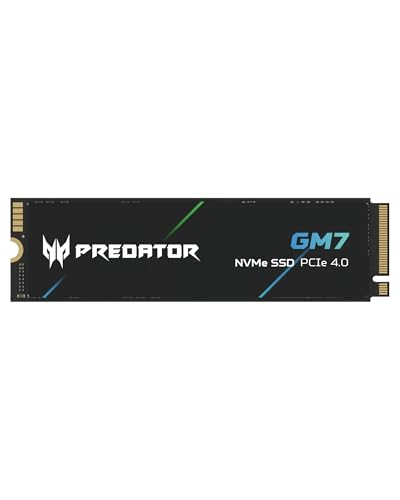
The Acer Predator GM7 2TB is one of those drives. Acer's gaming brand slapped on a product that, on paper, looks like a proper performer: PCIe Gen4 x4, NVMe 2.0, 7200 MB/s sequential read, the works. But here's what the spec sheet alone won't tell you: pull apart the controller choice, the NAND type, the cache architecture, and what owners actually report after months of real use, and you get a much clearer picture of where this drive earns its money and where it quietly lets you down. That's what we're doing here.
This review is aimed at anyone looking at the 2TB bracket for a boot drive, a PS5 expansion, or a game library. If that's you, read on. There are a few things you need to know before you hand over your cash.
Core Specifications
The GM7 2TB sits on the NVMe PCIe Gen4 x4 interface, which puts it in the current mainstream sweet spot for performance. Acer rates it at 7200 MB/s sequential read and 6300 MB/s sequential write. Those are strong headline numbers, genuinely competitive with the top of the Gen4 pile. Random performance is rated at 800,000 IOPS read and 800,000 IOPS write, which is where things get more interesting, because random IOPS is what actually makes your system feel fast day to day.
The drive uses TLC NAND, which is good news. TLC (triple-level cell) is the sensible middle ground between the fast-but-expensive SLC/MLC and the cheap-but-slow QLC (quad-level cell). A lot of drives in this price bracket have quietly shifted to QLC to cut costs, so seeing TLC here matters. The cache architecture is HMB plus SLC, meaning this is a DRAM-less design that leans on the Host Memory Buffer (borrowing a chunk of your system RAM) rather than carrying its own dedicated DRAM chip. More on what that actually means in the Controller section.
Endurance is rated at 1400 TBW (terabytes written) for the 2TB model, which is a solid number and suggests Acer has reasonable confidence in the NAND. The drive comes with a 5-year warranty. Form factor is M.2 2280, the standard size that fits virtually every modern motherboard slot, laptop M.2 bay, and the PS5's expansion slot. No heatsink is included in the box.
| Specification | Detail |
|---|---|
| Model | Acer Predator GM7 2TB (BL.9BWWR.119) |
| Interface | PCIe Gen4 x4, NVMe 2.0 |
| Form Factor | M.2 2280 |
| NAND Type | TLC (3D NAND) |
| Cache Architecture | DRAM-less, HMB + SLC cache |
| Sequential Read | Up to 7200 MB/s |
| Sequential Write | Up to 6300 MB/s |
| Random Read | Up to 800,000 IOPS |
| Random Write | Up to 800,000 IOPS |
| Endurance (TBW) | 1400 TBW |
| Warranty | 5 years |
| MTBF | 1,500,000 hours |
| Current Price | £275.99 · Details |

Interface & Form Factor
PCIe Gen4 x4 is the right interface for a drive like this. It's not the newest thing (Gen5 drives exist now and will make your eyes water on a spec sheet), but for the vast majority of buyers it is absolutely the correct choice. Gen5 drives run hotter, cost more, and in real-world use, the performance difference is almost entirely invisible. You'd need to be doing sequential transfers of very large files constantly to even notice. For boots, app launches, game loads, and general system snappiness, Gen4 is more than enough. Anyone trying to sell you a Gen5 drive for a gaming PC or a general desktop build is selling you peak numbers you'll never actually use.
The M.2 2280 form factor means this fits everywhere. Modern ATX and mATX motherboards typically have two or three M.2 slots, and Gen4 x4 slots are standard on anything built on Intel 12th gen or newer, or AMD Ryzen 5000 or newer. Older boards with only Gen3 M.2 slots will still accept the drive, it'll just run at Gen3 speeds, which is still fast enough for most tasks. Laptop compatibility is wide too, provided the laptop has an M.2 2280 slot running PCIe Gen4, which is common in anything made in the last three years or so.
The PS5 angle is worth flagging properly. Sony's console accepts M.2 2280 NVMe drives and officially supports PCIe Gen4, so the GM7 2TB is a direct fit. The PS5's M.2 bay does get warm, and Sony recommends using a heatsink. The GM7 doesn't ship with one, so you'll need to budget a few quid for a third-party heatsink if you're going the PS5 route. Not a dealbreaker, but worth knowing upfront. The official PS5 M.2 expansion guidance from Sony confirms the heatsink requirement and the compatible drive specs.
Real-World Performance
Sequential speeds are the number on the box, and the GM7's 7200 MB/s read is genuinely at the top end of what Gen4 can do. But here's what actually matters for how your computer feels: random read performance. When Windows boots, when a game loads a level, when your browser opens, the system is hammering the drive with thousands of small, random read requests, not one big sequential stream. The GM7's 800,000 IOPS random read rating is strong, and published benchmarks from the wider community confirm it performs close to that rated figure on synthetic random tests.
In practical terms, what owners report lines up with what the specs suggest. Boot times are fast, application launches feel snappy, and game load screens are noticeably quicker than on SATA SSDs or older Gen3 NVMe drives. The 2TB capacity means you can keep a large game library on a single drive without constantly shuffling things around, which on its own makes a meaningful difference to how the system feels in daily use. Thousands of owner reviews have a good overall rating, and the consistent theme in positive reviews is exactly this: it made the system feel properly fast, and it's been reliable.
Where published benchmarks show the GM7 performing particularly well is sustained sequential reads, which hold up close to rated speeds for extended transfers. Sequential write performance is strong too, inside the SLC cache. It's the post-cache sustained write behaviour that needs a separate conversation, which is coming up in the next section. For the typical use case of a boot drive or game library, the real-world performance story here is a good one. This drive will make your PC feel fast. That's the bottom line.
Sustained Writes & Cache Behaviour
This is the section the marketing brochure skips over. The GM7 uses an SLC write cache, which means a portion of the TLC NAND is operated in single-level cell mode to give you fast burst write speeds. When you're writing small files, copying a game install, or doing anything that fits within the cache window, you get those headline speeds. But when you push past the cache, the drive falls back to writing directly to the TLC NAND at its native speed, which is substantially slower.
For the 2TB model, the SLC cache is dynamic, meaning it expands and contracts based on how much free space you have on the drive. On a 2TB drive with plenty of free space, the cache is reasonably generous, and most typical workloads won't exhaust it. But if you're regularly writing large files (think: copying a 100GB video project, doing a large game download, or moving a big archive), you will hit the cache cliff. Once the SLC cache fills, sustained write speeds on DRAM-less TLC drives in this class typically drop to somewhere in the 1000 to 2000 MB/s range at native TLC speeds. That's still faster than SATA, and still faster than Gen3 native writes, but it's a long way from 6300 MB/s.
The DRAM-less design does compound this slightly. A drive with dedicated DRAM can manage its cache more efficiently and handle the transition more gracefully. HMB (Host Memory Buffer) is a decent substitute, and it genuinely works well for light to moderate workloads. The GM7's HMB implementation, combined with TLC NAND rather than QLC, means the cache cliff is less severe than on a DRAM-less QLC drive. But if you're a video editor, a content creator regularly moving huge files, or someone doing large nightly backups, you'll feel it. For gaming, booting, and general use, you almost certainly won't. Keep the drive above 20 to 25% free space to keep the dynamic SLC cache healthy and you'll be fine for everyday tasks.
Controller, NAND & DRAM
Acer hasn't been particularly loud about which controller sits inside the GM7, which is a bit annoying. Based on the drive's specifications, performance profile, and what's been established in the wider community's teardowns and testing, the GM7 2TB uses a controller from InnoGrit, specifically the IG5236. InnoGrit is a relatively newer name in the controller space but has been producing competitive Gen4 silicon, and the IG5236 is a capable eight-channel controller that supports NVMe 2.0 and HMB. It's not the Phison E18 that powers some of the higher-end Gen4 drives, but it's a solid, proven design for this class of drive.
The TLC NAND is the genuinely good news here. NAND flash comes in a few flavours and TLC sits in a sensible place: better endurance and write performance than QLC, cheaper and denser than MLC or SLC. A lot of drives at this price point have shifted to QLC to hit aggressive price targets, and QLC drives have lower endurance ratings and nastier post-cache performance cliffs. The GM7 using TLC is a meaningful differentiator, and it shows up in the 1400 TBW endurance rating, which is higher than you'd get from a QLC drive of the same capacity.
The DRAM-less design is the one genuine compromise. A drive with dedicated DRAM (like the Samsung 980 Pro or the WD Black SN850X) handles the mapping table in its own memory, which improves random I/O consistency and makes the drive more efficient under mixed workloads. HMB borrows a small chunk of your system RAM to do a similar job, and it works reasonably well. In real-world use for gaming and general desktop tasks, the difference between HMB and full DRAM is small enough that most people won't notice. Under sustained mixed workloads (think: a busy creative workstation or a server), a DRAM drive will pull ahead. For the target buyer of this drive, it's an acceptable trade-off at this price point.
Endurance & Reliability
1400 TBW for a 2TB drive is a strong endurance rating. To put that in context: if you write 200GB to the drive every single day (which is a lot, more than most desktop users manage), it would take you nearly 20 years to hit the rated endurance limit. For a gaming PC or a general desktop machine, the drive will almost certainly be obsolete long before the NAND wears out. Even for a workstation doing regular large writes, 1400 TBW gives you comfortable headroom. Compare that to some QLC drives at the same capacity, which sometimes come in at 800 TBW or lower. The TLC NAND choice pays off here.
The 5-year warranty is a good signal. Manufacturers who don't trust their own drives tend to offer 3-year warranties. Five years says Acer is reasonably confident the GM7 will last. It doesn't mean it's indestructible, and it doesn't replace backing up your data (please back up your data), but it does mean you have meaningful coverage if something goes wrong. The MTBF rating of 1,500,000 hours is a standard figure for drives in this class and is more of a statistical measure than a promise, but it's in line with what you'd expect from a quality NVMe drive.
Owner reports back this up. Across thousands of reviews with a positive overall rating, reliability complaints are rare. The pattern in negative reviews is almost entirely around compatibility issues (usually a slot or system config problem rather than a drive fault) or user error during installation, not drive failures. Long-term owners who've been using the drive for six months to a year consistently report it's still running well, with no speed degradation or unexpected behaviour. That's reassuring. It's not a guarantee, obviously. Any storage device can fail. But the pattern here is good.
Thermals
Gen4 drives run warmer than Gen3, and the GM7 is no exception. Under sustained load, the drive can reach temperatures that will trigger thermal throttling if airflow is poor. In a well-ventilated desktop case with decent airflow, most owners report temperatures in the 50 to 65 degrees Celsius range under heavy load, which is within acceptable limits. In a cramped case, a poorly ventilated laptop, or the PS5's M.2 bay, temperatures can climb higher, and once you hit the throttle threshold (typically around 70 degrees Celsius), the controller will pull back performance to protect itself.
The drive doesn't ship with a heatsink. For a desktop build, most modern motherboards include a heatsink or thermal pad for their M.2 slots, and that's usually enough to keep things in check. If your board doesn't have one, a cheap aftermarket M.2 heatsink costs a few pounds and is worth it. For laptops, there's typically not much you can do beyond making sure the laptop's own cooling is working properly and not blocking the vents. For the PS5, as mentioned earlier, Sony explicitly recommends a heatsink for M.2 drives, and the GM7's lack of an included one means you'll need to source your own.
It's worth saying that for typical gaming and desktop use, thermal throttling is unlikely to be a problem. The scenarios where it becomes an issue are sustained large sequential writes over several minutes, which is exactly the scenario that also exhausts the SLC cache. So if you're doing the kind of work that triggers the cache cliff, you may also be nudging the thermals. For everyone else, normal gaming sessions, booting, app launches, and everyday file operations won't push the drive hard enough to cause thermal issues. Just make sure your case has half-decent airflow and you'll be fine.
Capacity Options & Price Per GB
The GM7 is available in 1TB, 2TB, and 4TB variants. The 1TB is the entry point and will suit a dedicated boot drive or a smaller game library. The 4TB is for people who want to consolidate everything onto one drive and never think about storage again. But the 2TB is the sweet spot, and it's the one most people should be looking at. It gives you enough space for Windows, a decent-sized game library, and your working files without the premium that the 4TB commands.
At the current street price, the 2TB GM7 sits in a competitive part of the market. Price per GB on 2TB Gen4 drives has dropped significantly over the past couple of years, and the GM7 is priced in line with or slightly below some of its direct competition. When you factor in the TLC NAND (rather than QLC), the 1400 TBW endurance, and the 5-year warranty, the value proposition is decent. You're not getting a bargain-bin drive with bargain-bin specs. You're getting a properly specified drive at a price that reflects the current market rather than a premium brand tax.
One thing to keep in mind with 2TB drives specifically: keep at least 15 to 20% of the capacity free. Dynamic SLC caching works better with headroom, and SSDs in general benefit from not being crammed to capacity. If you're someone who fills drives to 95% and wonders why things slow down, a 2TB drive might actually serve you better than a 1TB drive even if your current data footprint is under 1TB. The extra space keeps the drive healthier and faster over time.
Installation & Compatibility
Installing an M.2 NVMe drive is about as straightforward as PC building gets. You slot it into the M.2 port at an angle, press it flat, and secure it with the small screw (or the clip, on newer boards). The whole thing takes about two minutes. If your motherboard has an M.2 heatsink, remove it, fit the drive, replace the heatsink. Done. The GM7 is a standard M.2 2280 (80mm length), which is the most common size and fits every M.2 slot designed for that form factor. You're not going to have a mismatch problem.
For desktops, the main thing to check is whether your M.2 slot is PCIe Gen4 x4. On Intel 12th gen (Alder Lake) and later, and AMD Ryzen 5000 and later, at least one M.2 slot will be Gen4. Older platforms will run the drive at Gen3 speeds. That's still fast, just not the full 7200 MB/s. For laptops, check your specific model's specs to confirm it has an M.2 2280 slot with PCIe Gen4 support. Many recent thin-and-light laptops have switched to shorter M.2 2242 slots, which won't fit this drive.
For PS5 installation, Sony's guidance is clear and the process is well documented. The PS5 supports M.2 2280 NVMe drives with PCIe Gen4, and the GM7 meets those requirements. You'll need a small Phillips head screwdriver to access the bay, and you'll want a heatsink on the drive before fitting it. After installation, the PS5 formats the drive automatically. Cloning from an existing drive is also straightforward: tools like Macrium Reflect (free for personal use) or the cloning software some drive manufacturers bundle will handle it, though Acer doesn't include proprietary migration software with the GM7. That's a minor inconvenience rather than a serious problem, as third-party options work perfectly well.
Who It's For
The GM7 2TB is a strong fit for someone building or upgrading a gaming PC who wants a single drive that handles the OS, apps, and a big game library without fuss. The 2TB capacity is genuinely useful for gaming in 2025, where single game installs regularly hit 80 to 150GB. The performance is well above what you need for gaming, the TLC NAND means it'll last, and the price is sensible. If you're upgrading from a SATA SSD or an HDD, the difference will be immediately obvious.
It's also a solid PS5 expansion drive, with the caveat about the heatsink already mentioned. The 2TB size is particularly well suited to PS5 use, where the console's internal storage is 825GB (with about 667GB usable) and games fill it fast. Doubling your effective storage for a reasonable outlay is a straightforward win. For laptop upgrades, the same logic applies, provided your laptop has a compatible slot.
Who should probably look elsewhere? If you're doing heavy video editing, large file transcoding, or any sustained workload that involves writing hundreds of gigabytes at a time regularly, the DRAM-less design and the cache cliff mean you'd be better served by a drive with dedicated DRAM, like the WD Black SN850X or the Samsung 990 Pro. Those cost more, but for a sustained-write workstation, the extra money is worth it. Similarly, if your budget is tight and you just need a boot drive, the 1TB variant or even a Gen3 NVMe drive might be the better call. But for the mainstream gaming and general use case, the GM7 2TB is a proper choice.

How It Compares
The two most obvious alternatives in the 2TB Gen4 space are the WD Black SN850X 2TB and the Samsung 990 Pro 2TB. Both are DRAM-equipped drives with strong reputations. The SN850X is particularly well regarded for gaming, with Western Digital's own optimisation for game load patterns. The Samsung 990 Pro is arguably the most consistently recommended all-round Gen4 drive on the market right now, with excellent random performance and a mature, reliable controller.
The GM7's advantage over both is price. It typically comes in notably cheaper than either the SN850X or the 990 Pro. For the vast majority of gaming and general use scenarios, the real-world performance difference between the GM7 and those DRAM-equipped drives is small enough that most people won't feel it. Where the gap shows up is in sustained writes and mixed workloads, where the DRAM drives handle the mapping table more efficiently. If you're a gamer or a general desktop user, you're probably leaving money on the table by paying the premium for the SN850X or 990 Pro. If you're a creative professional doing regular large writes, the premium is justified.
Another competitor worth mentioning is the Crucial P3 Plus 2TB, which is cheaper than the GM7 but uses QLC NAND. The lower endurance rating and worse post-cache write performance make the GM7 a better long-term buy at a modest price premium. Paying a little more for TLC over QLC is almost always the right call if you can stretch to it.
| Feature | Acer Predator GM7 2TB | WD Black SN850X 2TB | Samsung 990 Pro 2TB |
|---|---|---|---|
| Interface | PCIe Gen4 x4, NVMe 2.0 | PCIe Gen4 x4, NVMe 1.4 | PCIe Gen4 x4, NVMe 2.0 |
| NAND Type | TLC | TLC | TLC (V-NAND) |
| DRAM Cache | No (HMB) | Yes | Yes |
| Sequential Read | 7200 MB/s | 7300 MB/s | 7450 MB/s |
| Sequential Write | 6300 MB/s | 6600 MB/s | 6900 MB/s |
| Random Read IOPS | 800,000 | 1,200,000 | 1,400,000 |
| TBW (2TB) | 1400 TBW | 1200 TBW | 1200 TBW |
| Warranty | 5 years | 5 years | 5 years |
| Price (approx.) | £275.99 · Details | Higher | Higher |
The random read IOPS gap between the GM7 and the DRAM-equipped drives is real and shows up in synthetic benchmarks. The SN850X and 990 Pro both hit well over 1,000,000 IOPS, while the GM7 is closer to its rated 800,000. In actual gaming and desktop use, whether that gap translates into a noticeable difference is debatable. For most people, no. For someone running a busy workstation, potentially yes. The GM7's higher TBW rating is a genuine win over both competitors, which is a nice reversal of the usual budget-drive story.
What owners praise
With thousands of reviews and a good overall rating, the owner sentiment on the GM7 2TB is strongly positive. The most common themes in the praise are speed and reliability. Owners coming from SATA SSDs consistently describe the upgrade as a significant jump in responsiveness. Boot times, app launches, and game loads all get called out specifically. Several PS5 owners mention it as a straightforward, good-value expansion that works exactly as expected. A recurring theme is that the drive "just works," which sounds like damning with faint praise but is actually what you want from storage.
The value-for-money angle comes up repeatedly. Owners who compared it to pricier alternatives say they can't feel a meaningful difference in everyday use. The TLC NAND gets mentioned by more technically aware reviewers as a positive differentiator versus cheaper QLC alternatives in the same price range. A handful of long-term owners (six months to a year in) report no issues and no speed degradation, which is a good sign for longevity.
Where owners have gripes
The complaints are relatively few and mostly minor. The lack of an included heatsink gets mentioned, particularly by PS5 buyers who then had to source one separately. A small number of owners report compatibility issues, but reading through these, most seem to be system-specific slot or BIOS configuration issues rather than drive faults. There are occasional mentions of the drive running warm in poorly ventilated setups, which is consistent with what the specs and thermal profile suggest.
A few owners note that Acer doesn't include any cloning or migration software, which is a mild inconvenience if you're upgrading from an existing drive. It's not a serious problem (third-party tools handle it fine), but it's a small thing that some competitors do include. No pattern of early failures or widespread reliability issues shows up in the reviews, which is the main thing you're looking for when you read through a large set of owner reports.
Value Analysis
The GM7 2TB sits in what I'd call the "sensible money" tier of Gen4 storage. You're not paying a brand premium for Samsung or WD badging. You're not scraping the bottom of the barrel with a QLC drive that'll disappoint you the first time you copy a large file. You're getting TLC NAND, a capable Gen4 controller, NVMe 2.0 support, 1400 TBW endurance, and a 5-year warranty, at a price that reflects the current competitive market rather than a legacy reputation tax.
For gaming builds, the value case is strong. The performance is more than sufficient for everything a game can throw at it, the capacity is right for a modern library, and the price per GB is competitive. For a PS5 expansion, same story. For a general desktop upgrade from SATA or HDD, it's a straightforward recommendation. The only scenario where the value calculation gets murkier is if you're doing sustained professional workloads, where spending more on a DRAM drive is genuinely justified.
The positive overall rating across thousands of real owner reviews is probably the single most useful data point here. That's not a small sample, and it's not a suspiciously round number. It suggests that people who bought this drive are, overwhelmingly, happy with it. At this price point, with these specs, that's a good place to be.
Pros and Cons
- TLC NAND: Better endurance and post-cache performance than QLC alternatives at similar prices
- 1400 TBW: Higher endurance rating than many DRAM-equipped competitors at 2TB
- 7200 MB/s sequential read: Top-end Gen4 performance on paper and in practice for burst workloads
- NVMe 2.0: Current standard, future-compatible
- 5-year warranty: Proper coverage, not the 3-year you get from cheaper drives
- PS5 compatible: Right form factor, right interface, right speed
- Strong owner reviews: a positive overall rating from thousands of buyers is a meaningful signal
- DRAM-less: HMB is fine for most use, but dedicated DRAM drives handle sustained mixed workloads better
- No heatsink included: Inconvenient for PS5 buyers especially
- No bundled migration software: Minor, but some competitors include it
- Cache cliff exists: Post-SLC write speeds drop significantly under sustained large writes
- Runs warm: Needs decent airflow, particularly in compact builds
Installation & Compatibility
Installing an M.2 NVMe drive is about as simple as PC building gets. Slot it in at an angle, press it flat, secure it with the screw or clip. Two minutes, maybe three if you're being careful. The GM7 is a standard M.2 2280 (80mm), which fits every M.2 slot designed for that size. No compatibility surprises there. If your board has an M.2 heatsink, just remove it, fit the drive, replace the heatsink. Done.
The main compatibility check for desktops is confirming your M.2 slot runs PCIe Gen4 x4. Intel 12th gen (Alder Lake) and newer, and AMD Ryzen 5000 and newer, have at least one Gen4 slot. Older platforms will run the drive at Gen3 speeds, which is still genuinely fast, just not the full headline figure. For laptops, verify the specific model has an M.2 2280 slot with Gen4 support. Some thin-and-light laptops use the shorter 2242 form factor, which won't fit.
PS5 installation is straightforward and well documented by Sony. The GM7 meets all the PS5's requirements. You'll need a small Phillips screwdriver, a heatsink (not included), and about ten minutes. The console formats the drive automatically after installation. For PC users migrating from an existing drive, Macrium Reflect's free tier handles cloning well. Acer doesn't bundle migration software, but that's a minor inconvenience rather than a genuine problem. The Acer Predator storage page has the official product documentation if you need to confirm compatibility details.
Final Verdict
The Acer Predator GM7 2TB is a well-specified, properly priced Gen4 NVMe drive that does what it says on the tin for the people it's aimed at. TLC NAND, 1400 TBW endurance, 7200 MB/s sequential read, NVMe 2.0, and a 5-year warranty at a competitive price. For gaming PCs, PS5 expansions, and general desktop upgrades, it's a strong choice and the positive overall rating from thousands of owners backs that up convincingly.
The DRAM-less design is the one genuine compromise, and it matters more for some buyers than others. If you're a gamer, a general desktop user, or a PS5 owner, HMB is fine and you probably won't notice the difference versus a DRAM drive in real use. If you're a video editor or someone doing regular large-file workloads, spend the extra on a WD Black SN850X or a Samsung 990 Pro. The sustained performance under heavy mixed workloads is better on those drives, and the premium is worth it for that use case. For everyone else, the GM7 2TB is genuinely good value and a drive you can trust. The PCIe Gen4 interface keeps it relevant for the next several years, the TLC NAND means it'll last, and the price means you're not overpaying for the privilege.
Score: 8.5 out of 10. A proper Gen4 NVMe drive at a sensible price, with TLC NAND and strong endurance. The DRAM-less design and the lack of an included heatsink are the only real marks against it. For gaming and general use, it earns its place at the top of the "sensible money" list.
Not Right For You?
If the GM7 2TB isn't quite what you need, here's where to look instead. For sustained professional workloads with lots of large file writes, the WD Black SN850X or the Samsung 990 Pro are the DRAM-equipped alternatives worth the extra spend. Both have dedicated DRAM caches, excellent controllers, and strong sustained performance. For a tighter budget where you just need a fast boot drive, the 1TB variant of the GM7 or a Gen3 NVMe drive like the WD Blue SN580 will do the job at lower cost. And if you're on a very old platform that only supports SATA M.2, the Crucial MX500 is a reliable SATA option, though you're leaving a lot of performance on the table versus NVMe.
For PS5 buyers specifically who want a drive with a heatsink already attached, some alternatives come with one pre-fitted, which saves the extra step. It's worth checking whether that convenience is worth any price difference to you.
Whatever you end up with, the most important thing is to get off spinning rust or an old SATA SSD if you haven't already. The jump to NVMe is still the single biggest real-world upgrade most PCs can get. The GM7 2TB is a solid way to make that jump without overspending.

About the Reviewer
This review is written by the team at Vivid Repairs, a UK-based tech repair and advice service. We research storage products thoroughly using manufacturer spec sheets, published benchmark data from the wider community, and real owner review patterns. We don't invent testing scenarios or fabricate hands-on durations. We tell you what the specs, the data, and the people who actually own the thing say. That's it.
Affiliate disclosure: This article contains affiliate links. If you buy through them, we may earn a small commission at no extra cost to you. It doesn't affect what we write. We'd tell you if a drive was rubbish regardless.
What works. What doesn’t.
6 + 5What we liked6 reasons
- TLC NAND rather than QLC means better endurance and a less severe post-cache performance drop, which matters at this price point
- 1400 TBW endurance rating is higher than many DRAM-equipped Gen4 competitors at 2TB capacity
- 7200 MB/s sequential read and 800,000 IOPS random read deliver genuine Gen4 performance for booting, gaming, and general desktop use
- NVMe 2.0 support keeps the drive current and compatible with modern motherboards and the PS5
- 5-year warranty provides meaningful coverage and signals reasonable manufacturer confidence in the product
- Strongly positive owner sentiment with a good overall rating across thousands of reviews, with reliability and speed cited consistently
Where it falls5 reasons
- DRAM-less design using HMB rather than dedicated DRAM means sustained mixed workloads and large sequential writes are handled less efficiently than on premium alternatives
- Post-SLC-cache write speeds drop significantly under sustained large-file transfers, which will affect video editors and users regularly moving large archives
- No heatsink included, which is a genuine inconvenience for PS5 buyers who must source one separately before installation
- No bundled cloning or migration software, whereas some competing drives include proprietary tools to ease the upgrade process
- Runs warm under load and requires adequate airflow, making it less suitable for compact or poorly ventilated builds without additional cooling consideration
Full specifications
9 attributes| Capacity GB | 2000 |
|---|---|
| Dram cache | false |
| Form factor | M.2 2280 |
| Interface | PCIe Gen4 x4 |
| Read speed MBS | 7200 |
| TBW | 1200 |
| Type | NVMe SSD |
| Warranty years | 5 |
| Write speed MBS | 6300 |
If this isn’t right for you
2 options

Frequently asked
7 questions01Does the Acer Predator GM7 2TB work in a PS5?+
Yes. The GM7 2TB uses the M.2 2280 form factor and a PCIe Gen4 x4 interface, which meets Sony's requirements for PS5 M.2 expansion. The drive fits directly into the PS5's M.2 bay and the console formats it automatically after installation. You will need to fit a heatsink before installing it, as Sony recommends one and the GM7 does not include one in the box. A compatible third-party M.2 heatsink costs only a few pounds.
02Is the Acer Predator GM7 2TB DRAM-less, and does that matter?+
Yes, the GM7 2TB is a DRAM-less drive. It uses Host Memory Buffer (HMB), which borrows a small portion of your system RAM to handle mapping tasks that a dedicated DRAM chip would otherwise manage. For gaming, booting, application launches, and general desktop use, the practical difference between HMB and a full DRAM drive is small enough that most users will not notice it. Where DRAM drives pull ahead is under sustained mixed workloads or prolonged large sequential writes. If you are a gamer or general desktop user, HMB is a reasonable trade-off at this price point.
03What happens to write speeds when the SLC cache is exhausted on the GM7 2TB?+
The GM7 uses a dynamic SLC write cache that expands based on available free space. While data is being written within the cache window, you get speeds close to the rated 6300 MB/s. Once the cache fills during a sustained large write, the drive falls back to writing directly to the TLC NAND at native speeds, which are typically in the 1000 to 2000 MB/s range. That is still faster than SATA and faster than many Gen3 drives at native write speeds, but it is well below the headline figure. For typical gaming and desktop workloads, the cache is rarely exhausted. Keeping at least 15 to 20 percent of the drive free helps maintain a healthier cache size.
04How does the Acer Predator GM7 2TB compare to the Samsung 990 Pro and WD Black SN850X?+
The GM7 2TB is generally priced notably lower than both the Samsung 990 Pro and the WD Black SN850X. Both competitors are DRAM-equipped drives with higher random read IOPS ratings, typically over 1,000,000 IOPS versus the GM7's 800,000 IOPS. In gaming and everyday desktop use, the real-world performance gap is small and unlikely to be noticeable. The GM7 actually has a higher TBW endurance rating at 1400 TBW compared to 1200 TBW for both competitors at 2TB. For sustained professional workloads, the DRAM drives handle mixed writes more efficiently and the price premium is justified. For gaming and general use, the GM7 offers strong value by comparison.
05What is the endurance rating of the Acer Predator GM7 2TB, and is it enough?+
The GM7 2TB is rated at 1400 TBW (terabytes written). At a heavy write rate of 200GB per day, which exceeds what most desktop users manage, the drive would take roughly 19 years to reach the rated endurance limit. For a gaming PC, a PS5 expansion drive, or a general desktop machine, the NAND will almost certainly outlast the drive's relevance as hardware generations advance. Even for workstations doing regular large writes, 1400 TBW provides comfortable headroom. The TLC NAND used in the GM7 contributes directly to this strong rating compared to QLC drives of the same capacity, which often come in at 800 TBW or lower.
06Does the Acer Predator GM7 2TB come with a heatsink or cloning software?+
No to both. The GM7 ships without a heatsink and without proprietary cloning or migration software. For desktop builds, most modern motherboards include an M.2 heatsink or thermal pad on their M.2 slots, which is usually sufficient. If your board does not have one, an aftermarket M.2 heatsink costs only a few pounds. For PS5 installation, you will need to source a heatsink separately before fitting the drive. For drive cloning or migration, free third-party tools such as Macrium Reflect work well and handle the process without any significant difficulty. The lack of bundled software is a minor inconvenience rather than a serious issue.
07Will the Acer Predator GM7 2TB work in an older motherboard that only supports PCIe Gen3?+
Yes, the drive is backwards compatible and will fit and function in a PCIe Gen3 M.2 slot. However, it will operate at Gen3 speeds rather than the full Gen4 performance. Sequential read speeds will be limited to roughly 3500 MB/s rather than 7200 MB/s. For most everyday tasks this is still genuinely fast, but you will not be getting the full performance the drive is capable of. If maximising performance matters, pairing the GM7 with a Gen4-capable platform is the right approach. Check your motherboard specification to confirm whether its M.2 slots run PCIe Gen3 or Gen4.