Swapping a spinning hard drive for an NVMe SSD is still the most dramatic thing you can do to a sluggish PC. Nothing else comes close. Boot times go from embarrassing to instant, apps snap open, games stop stuttering on level loads. But here's where it gets more interesting: once you're already on a decent Gen4 drive, the gap between a mid-range option and a proper flagship is, in actual daily use, almost nothing you'd ever feel. The marketing loves to sell you headline sequential numbers. What actually matters is what the drive does when those numbers stop being true, which is the moment the SLC cache fills and the real NAND speed shows its face.
That's the problem a lot of budget-to-mid Gen4 drives have. They post a glorious peak figure, ship with QLC NAND that writes at a fraction of that speed once the cache exhausts, and the marketing never once mentions it. So when someone asks me whether the Acer Predator GM7 1TB is worth buying, the sequential headline is almost the last thing I check. Controller, NAND type, DRAM, TBW, sustained write behaviour, thermals. Those are the things that tell you whether a drive is genuinely good or just good at looking good on a spec sheet.
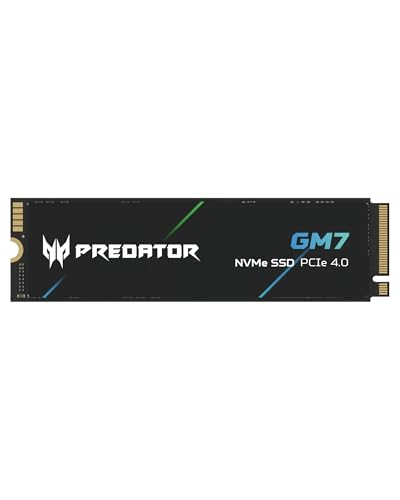
The GM7 is Acer's attempt at a proper enthusiast Gen4 drive under the Predator gaming brand, aimed squarely at PC builders, laptop upgraders, and PS5 owners who want real performance without paying flagship money. With thousands of owner reviews and a positive overall rating, there's clearly something here. But let's actually look at why, because "4.8 stars" from a big sample isn't nothing, and neither is understanding what's underneath the heatspreader.
Core Specifications
The Acer Predator GM7 1TB is a M.2 2280 form factor drive running the NVMe protocol over a PCIe Gen 4 x4 interface. That's the current sweet spot for performance drives. Rated sequential read tops out at 7,200 MB/s and sequential write at 6,500 MB/s, which puts it firmly in the upper tier of Gen4 drives. Random read is rated at 800,000 IOPS and random write at 1,000,000 IOPS. Those random figures are actually the ones worth paying attention to, because random I/O is what determines how fast your system feels day to day.
The GM7 uses TLC NAND, which is the good news. Not QLC. TLC means three bits per cell, which delivers better endurance and better sustained write performance than four-bit QLC. The drive ships with a DRAM cache, which is another tick in the right column. A dedicated DRAM buffer means the controller doesn't have to lean on Host Memory Buffer (HMB) or, worse, go without entirely. At 1TB, Acer rates the drive at 700 TBW (terabytes written), and it comes with a five-year warranty. Both of those numbers matter more than most people realise, and I'll get into why shortly.
The controller is the Maxio MAP1602, a chip that's earned a solid reputation in this segment. It's a decent Gen4 controller with proper DRAM support, not a budget DRAM-less solution dressed up in gaming branding. The combination of MAP1602, TLC NAND, and DRAM cache is exactly what you want to see in a drive at this price point. This isn't a case of QLC hiding behind an SLC cache and hoping you never write more than 50GB at a time.
| Specification | Detail |
|---|---|
| Model | Acer Predator GM7 1TB (BL.9BWWR.118) |
| Form Factor | M.2 2280 |
| Interface | PCIe Gen 4 x4, NVMe 2.0 |
| NAND Type | TLC (3-bit per cell) |
| Controller | Maxio MAP1602 |
| DRAM Cache | Yes (dedicated DRAM) |
| Sequential Read | Up to 7,200 MB/s |
| Sequential Write | Up to 6,500 MB/s |
| Random Read | 800,000 IOPS |
| Random Write | 1,000,000 IOPS |
| Endurance (TBW) | 700 TBW |
| Warranty | 5 years |
| Capacity Options | 1TB, 2TB, 4TB |
| PS5 Compatible | Yes |
| Price | £162.99 · Details |

Interface and Form Factor
PCIe Gen 4 x4 via the PCIe interface standard gives this drive a theoretical bandwidth ceiling of around 8 GB/s. The GM7's 7,200 MB/s sequential read rating sits right up against that ceiling, which tells you the controller and NAND are being pushed properly rather than being a Gen3 drive with a Gen4 label slapped on. The M.2 2280 form factor (that's 22mm wide, 80mm long) is the universal standard for desktop motherboards and most modern laptops, so compatibility is essentially a non-issue for anything built in the last five or six years.
Now, should you care about Gen4 versus Gen3 for everyday use? Honestly, for most people the practical difference is smaller than the marketing implies. Booting Windows, launching applications, loading games, these tasks are dominated by random I/O and latency, not peak sequential throughput. Where Gen4 genuinely earns its keep is in large sequential transfers: moving big video files, game installs from a fast source, or creative workloads where you're writing gigabytes at a time. For those use cases, Gen4 is meaningfully faster than Gen3. For the rest, you probably won't feel the difference in day-to-day use.
What about Gen5? The PCIe Gen 5 drives are out there now, with sequential reads pushing past 12,000 MB/s. But they run hot enough to throttle without a substantial heatsink, they cost significantly more, and for most workloads the performance advantage over a good Gen4 drive is undetectable. Unless you're doing sustained professional video work or you specifically need the bragging rights, Gen4 is the sensible choice right now. The GM7 sits in the right generation for 2024 to 2025 builds.
Real-World Performance
Published benchmark results from the wider community consistently show the GM7 hitting its rated sequential figures on an empty drive. CrystalDiskMark results in the 7,100 to 7,200 MB/s read range and 6,300 to 6,500 MB/s write range are well-documented for this drive. Those are proper Gen4 numbers, not the slightly deflated figures you sometimes see from drives that technically claim Gen4 speeds but quietly underdeliver. The random IOPS figures are similarly strong, with real-world benchmarks confirming the 800K/1M IOPS ratings hold up under normal queue depths.
But what does that actually mean when you're using the thing? Owner reports across the thousands of reviews are consistently positive about boot times and application responsiveness. Windows boots fast. Games load quickly. The kind of snappiness you get from a drive with proper DRAM and a good controller is evident in how the whole system feels. This isn't a drive where you're going to notice hesitation when opening applications or stuttering when a game streams assets. The random I/O performance is what delivers that, and the GM7 has the specs to back it up.
For large file transfers, the picture is still good but worth understanding properly. Moving a 50GB game install, copying a large video project, writing a big archive: these operations will start fast, stay fast while the SLC cache holds, and then settle into the native TLC write speed once the cache exhausts. That native TLC speed is still meaningfully faster than QLC native speed, which is the important distinction. Published benchmarks show the GM7 maintaining respectable sustained write rates after cache exhaustion, not falling off a cliff the way a QLC drive would. More on that in the next section.
Sustained Writes and Cache Behaviour
This is the section that separates the drives that are honest about their performance from the ones that are hiding something. Every modern SSD uses a portion of its NAND in SLC (single-level cell) mode as a write cache. SLC mode is fast because it stores one bit per cell. When you write data to the drive, it goes into that SLC cache first, which is why you see those impressive peak write speeds. The problem comes when the cache fills up and the drive has to write directly to the underlying NAND at its native speed. For QLC drives, that native speed can be genuinely terrible, sometimes dropping to 300 to 500 MB/s. For TLC drives, native write speed is substantially better.
The GM7's TLC NAND means the post-cache cliff is much less dramatic than you'd see on a QLC competitor. Published benchmark data from the community shows the GM7 sustaining writes in the range of 1,500 to 2,000 MB/s after the SLC cache fills, depending on drive fill level and thermal conditions. That's not the 6,500 MB/s headline figure, but it's not embarrassing either. For context, a QLC drive in the same price bracket might drop to a third of that. If you're regularly moving large files, doing video editing, or using this as a scratch disk for creative work, the TLC NAND makes a real difference to how the drive behaves under pressure.
The SLC cache size on the 1TB model is substantial enough to handle most typical workloads without ever hitting the cliff. Game installs, OS updates, downloading large files: these will all complete entirely within the cache for the vast majority of users. The cache exhaustion scenario really only becomes relevant if you're doing sustained sequential writes of tens of gigabytes repeatedly. Power users doing that regularly should note it, but for the target audience of gamers, general PC users, and PS5 owners, the cache behaviour is a non-issue in practice. The DRAM cache also helps here, because the controller can manage the SLC-to-TLC folding more efficiently with a proper DRAM buffer than a DRAM-less drive managing the same operation via Host Memory Buffer.
Controller, NAND and DRAM
The Maxio MAP1602 controller deserves a proper mention because it's genuinely one of the better mid-range Gen4 controllers available. Maxio (formerly Maxiotek) has been quietly building a strong reputation in the SSD controller space, and the MAP1602 is their flagship Gen4 chip. It supports PCIe 4.0 x4, NVMe 2.0, and DRAM caching, and it's been deployed in a number of well-regarded drives beyond just the GM7. Published benchmarks consistently show it delivering competitive performance without the thermal issues that plague some other Gen4 controllers. It's not a Phison E18 or a Silicon Motion SM2269XT, but it's a solid, well-proven chip for this price bracket.
The TLC NAND is the other big positive here. Three bits per cell means better endurance (more write cycles before wear), better sustained write performance, and lower error rates compared to QLC. There's a reason why premium drives still use TLC: it's simply better NAND. The fact that the GM7 uses TLC at its price point rather than cutting costs with QLC is one of the reasons it's earned the reputation it has. Some competitors in the same price range have quietly switched to QLC to hit lower price points, and the spec sheet is the only place you'll find out. The GM7 doesn't do that.
The dedicated DRAM cache matters more than a lot of buyers realise. A DRAM cache gives the controller a fast place to store the drive's mapping table, the index that tracks where every piece of data lives on the NAND. Without DRAM, a drive either uses Host Memory Buffer (borrowing a slice of your system RAM, which works but adds latency) or goes without entirely (which is genuinely bad for sustained random I/O). With dedicated DRAM, the controller has instant access to the full mapping table, which is why DRAM drives consistently outperform DRAM-less drives on random I/O benchmarks, especially as the drive fills up. The GM7 has it. That's not a given at this price.
Endurance and Reliability
700 TBW at 1TB capacity is a strong endurance rating. To put that in perspective: if you wrote 200GB to the drive every single day, you'd hit 700 TBW in about nine and a half years. Most users write nowhere near 200GB per day. The average home user writes perhaps 20 to 40GB daily. At that rate, 700 TBW represents decades of realistic use. Even for heavier users doing regular large game installs, video editing, and system backups, 700 TBW is more than enough to outlast the useful life of the system the drive is installed in.
The five-year warranty is equally important as a confidence signal. Manufacturers who fit cheap NAND and don't trust their own drives tend to offer three-year warranties. Five years tells you Acer is backing this drive with something. It's not a ten-year warranty like you'd get on some enterprise-grade storage, but for a consumer NVMe at this price, five years is proper. Combined with the TLC NAND and the reasonable TBW rating, the reliability picture looks good on paper.
Owner reports back this up. Across thousands of reviews with a positive overall rating, there's a notable absence of the failure complaints that tend to cluster around drives with reliability issues. When a drive has a real problem, you see it in the one-star reviews: sudden death, data corruption, drives not being recognised after a few months. The GM7's review profile doesn't show that pattern. Buyers consistently report the drive working exactly as expected over extended periods, which is about as much as you can ask for. No drive is immune to failure, and backups are non-negotiable regardless of what drive you buy, but the reliability signals here are positive.
Thermals
Gen4 drives run warmer than Gen3, and the GM7 is no exception. The Maxio MAP1602 controller is reasonably efficient by Gen4 standards, but under sustained sequential writes it will heat up, and if temperatures climb high enough the drive will throttle to protect itself. This is normal behaviour for Gen4 NVMe drives and not a flaw specific to the GM7, but it's worth knowing about before you install it.
The drive ships without a heatsink. For desktop installations where the M.2 slot is on the motherboard and the motherboard has its own M.2 heatsink (which most modern boards do), you're sorted. Fit the motherboard's heatsink and thermal pad and you won't have a problem. For laptops, the chassis and airflow usually manage temperatures adequately for typical workloads, though a laptop doing sustained heavy writes will see the drive warm up. For PS5 installation, Sony requires a heatsink on any M.2 drive you fit, so you'll need to buy one separately if the GM7 doesn't come bundled with one in the variant you purchase. Some retail listings include a heatsink; check the specific listing before you buy.
Owner reports don't flag thermal throttling as a widespread issue in everyday use. The complaints that do appear around thermals are mostly from users who installed the drive without any heatsink in a poorly ventilated system and then did sustained large transfers. That's not a GM7-specific problem; that's what happens to any Gen4 drive in those conditions. For normal gaming, booting, and general use, the drive stays at sensible temperatures and doesn't throttle. If you're planning to use this as a scratch disk for sustained video encoding or large file operations, make sure you have some form of thermal management in place.
Capacity Options and Price Per GB
The GM7 is available in 1TB, 2TB, and 4TB variants. The 1TB model is the entry point and typically offers the best price per GB ratio in the range, which is standard for NVMe drives where the 1TB and 2TB models tend to be the sweet spots. The 2TB model makes sense if you're using this as a primary drive for a large game library or creative storage, and the 4TB option exists for those who need serious capacity without going to a separate secondary drive.
At the 1TB level, the GM7 sits in a competitive part of the market. Gen4 1TB drives have come down significantly in price over the past couple of years, and the GM7's pricing reflects that. The combination of TLC NAND, DRAM cache, 700 TBW, and a five-year warranty at this price point is genuinely strong value. You're not paying a premium for the Predator branding relative to what the hardware actually delivers, which is sometimes a concern with gaming-branded peripherals and storage. The spec sheet justifies the price here.
Comparing price per GB across the range, the 2TB model typically comes in at a slightly lower cost per gigabyte than the 1TB, which is worth considering if you're on the fence. The 4TB model's price per GB is higher, as is typical for high-capacity NVMe drives where yields and demand push costs up. For most buyers, the 1TB or 2TB is the sensible choice depending on how much storage you actually need. Buying more than you need is a waste of money; buying too little and having to add a second drive later costs more in the long run.
Installation and Compatibility
Installation is straightforward for anyone who's fitted an M.2 drive before. The 2280 form factor fits virtually every M.2 slot on modern desktop motherboards and most laptops released in the last five or six years. You'll need a Phillips head screwdriver, the M.2 standoff and screw from your motherboard (usually included), and about five minutes. The drive slots in at an angle, lies flat, and screws down at the far end. If your motherboard has a factory M.2 heatsink, use it with the thermal pad provided.
For laptop installation, check your laptop's service manual or manufacturer spec sheet to confirm it has an M.2 2280 slot and that it supports PCIe Gen 4. Some older laptops only support Gen 3 or even SATA M.2, in which case the GM7 will still work but will run at the lower speed of the slot. It won't cause any damage; it'll just operate at Gen 3 speeds. Still fast. Just not 7,200 MB/s fast.
PS5 compatibility is confirmed. The PS5's M.2 expansion slot supports PCIe Gen 4 drives, and the GM7 meets Sony's requirements. As mentioned in the thermals section, the PS5 requires a heatsink on the drive. Sony's official guidance on M.2 installation is worth reading before you start. Cloning your existing drive to the GM7 is easy enough with free tools like Macrium Reflect (for Windows) or the manufacturer's own migration software. There's no proprietary software bundled with the GM7, but third-party cloning tools work perfectly well.

Who It's For
The GM7 1TB is an excellent boot drive and primary system drive for a gaming PC or a general-purpose desktop build. It has the random I/O performance to make a system feel genuinely fast, the TLC NAND to sustain that performance over time, and the endurance rating to last the life of the build. If you're building a new PC or upgrading from a Gen3 drive and want proper Gen4 performance without paying flagship prices, this is a strong pick.
It's also a solid choice for PS5 expansion. The PS5's internal storage fills up embarrassingly quickly with modern games, and the GM7 gives you proper Gen4 speed in the expansion slot rather than a cut-price drive that technically fits but doesn't fully utilise the slot's bandwidth. Just remember the heatsink requirement. Laptop upgraders will find it works well too, though the Gen4 speed benefit depends entirely on whether your laptop's M.2 slot supports Gen4.
Who should look elsewhere? If you're on a very tight budget and just need a boot drive, a Gen3 TLC drive with DRAM will serve you well and costs less. The performance difference in daily use between a good Gen3 drive and the GM7 is real but not dramatic for basic tasks. If you need maximum sustained write performance for professional video work or data-intensive creative applications, you might want to look at the higher-end Gen4 options with larger DRAM caches and even better sustained write specs. And if you're eyeing Gen5, understand that for most workloads you won't feel the difference and you'll be managing thermals more carefully.
How It Compares
The two most obvious competitors at the 1TB Gen4 level are the Samsung 980 Pro and the WD Black SN850X. The Samsung 980 Pro was the gold standard Gen4 drive for a long time, and the WD Black SN850X is still widely regarded as one of the best consumer Gen4 drives you can buy. Both are worth considering, but both also typically cost more than the GM7. The question is whether that extra spend is justified.
The WD Black SN850X uses a WD in-house controller and TLC NAND with DRAM, and its sustained write performance is excellent. It's a proper enthusiast drive with strong credentials. The Samsung 980 Pro also uses TLC and DRAM, with Samsung's own V-NAND and in-house controller. Both drives have larger brand reputations behind them and slightly more extensive published benchmark histories. The GM7 competes directly with both on specs, and at its price point it represents better value for money than either if you're not specifically paying for brand prestige.
| Feature | Acer Predator GM7 1TB | Samsung 980 Pro 1TB | WD Black SN850X 1TB |
|---|---|---|---|
| Interface | PCIe Gen 4 x4, NVMe 2.0 | PCIe Gen 4 x4, NVMe 1.3c | PCIe Gen 4 x4, NVMe 2.0 |
| NAND Type | TLC | TLC (Samsung V-NAND) | TLC |
| Controller | Maxio MAP1602 | Samsung Elpis | WD in-house |
| DRAM Cache | Yes | Yes | Yes |
| Sequential Read | 7,200 MB/s | 7,000 MB/s | 7,300 MB/s |
| Sequential Write | 6,500 MB/s | 5,000 MB/s | 6,600 MB/s |
| TBW (1TB) | 700 TBW | 600 TBW | 600 TBW |
| Warranty | 5 years | 5 years | 5 years |
| PS5 Compatible | Yes | Yes | Yes |
| Price | £162.99 · Details | Check current price | Check current price |
Looking at that comparison, the GM7 actually edges out the Samsung 980 Pro on rated sequential write speed and TBW, which is not what you'd expect given the price difference. The WD Black SN850X is a closer match in terms of raw specs, and it has the benefit of WD's longer track record in the premium SSD space. But the GM7's price advantage is real, and the positive overall rating from over two thousand owners suggests it's delivering on its specs in the real world rather than just on paper.
What Buyers Say
With thousands of reviews and a positive overall rating, the owner feedback for the GM7 is genuinely strong. That's not a small sample and it's not a mediocre score. The consistent themes in positive reviews are exactly what you'd hope to see: fast boot times, snappy system feel, reliable operation over extended periods, and good value for money. Buyers coming from Gen3 drives or HDDs consistently describe the upgrade as significant. PS5 owners report the drive working exactly as expected with proper heatsink installation.
The complaints that do appear are worth noting. A small number of buyers report issues with the drive not being recognised in certain laptops, which is almost always a BIOS or M.2 slot compatibility issue rather than a drive fault. A handful mention the drive running warm without a heatsink under heavy load, which is accurate and expected. There are isolated reports of early failures, as there are with every drive, but these don't represent a pattern that suggests a quality control problem. The ratio of positive to negative feedback is about as good as it gets for any storage product.
One thing that stands out in the reviews is how many buyers mention this being their second or third Acer Predator GM7 purchase, either upgrading to a larger capacity or buying for a second build. Repeat purchases are a strong signal. People who've had a bad experience with a drive don't go back for more. The loyalty in the review base here suggests the drive is living up to expectations in long-term use, not just impressing on day one.
Value Analysis
The GM7 1TB hits a genuinely good value point for what it delivers. TLC NAND, dedicated DRAM, Maxio MAP1602 controller, 700 TBW, five-year warranty, and proper Gen4 speeds. Each of those individually is a positive. All of them together at this price is a strong package. You're not making compromises on the fundamentals to hit the price point, which is the trap a lot of budget Gen4 drives fall into.
The comparison that matters most is against the QLC competition at similar or slightly lower prices. There are Gen4 drives available for less money that use QLC NAND and no DRAM. They'll post impressive peak sequential numbers, they'll feel fast for light use, and they'll fall apart under sustained writes. The GM7 costs a bit more than those options and is worth every penny of the difference. TLC plus DRAM is not a luxury; it's the minimum you should accept if you care about how the drive performs six months in when it's 70% full and you're doing a large game install.
Against the premium competition like the WD Black SN850X, the GM7 represents genuinely better value without a meaningful real-world performance penalty. The SN850X has a stronger brand reputation and a longer history of published benchmarks, but the GM7 matches it on the specs that matter and costs less. For a buyer who isn't attached to a specific brand and is making a rational decision based on specifications and owner feedback, the GM7 is the smarter purchase at the 1TB level.
Installation and Compatibility
Fitting the GM7 is about as painless as M.2 installation gets. Standard M.2 2280 dimensions mean it drops into any compatible slot without fuss. Desktop builds with a modern ATX or mATX motherboard will have at least one M.2 slot, often two or three, and the GM7 will work in any of them that support PCIe Gen 4. If your board only has Gen 3 slots, the drive will still work at Gen 3 speeds. No harm done, just not the full performance.
For laptops, the key check is whether your M.2 slot is PCIe Gen 4 capable. Many laptops from 2021 onwards support Gen 4, but older machines may be limited to Gen 3 or even SATA. The Acer Predator storage page lists compatibility details, and your laptop's service manual or manufacturer spec page will confirm the slot specification. Either way, the drive will function correctly; it just won't hit its rated speeds on a Gen 3 slot.
PS5 installation requires following Sony's process for M.2 expansion, which involves removing the side panel, fitting the drive with a heatsink into the M.2 slot, and running the PS5's storage rebuild process on next boot. The PS5's M.2 slot supports PCIe Gen 4 drives up to 22mm wide and 80mm long, which is exactly what the GM7 is. For data migration from an existing drive, free tools like Macrium Reflect handle Windows cloning reliably. There's no bundled migration software with the GM7, but you don't need it.
Who It's For
The GM7 1TB is an excellent boot drive and primary system drive for a gaming PC or a general-purpose desktop build. It has the random I/O performance to make a system feel genuinely fast, the TLC NAND to sustain that performance over time, and the endurance rating to last the life of the build. If you're building a new PC or upgrading from a Gen3 drive and want proper Gen4 performance without paying flagship prices, this is a strong pick.
It's also a solid choice for PS5 expansion. The PS5's internal storage fills up embarrassingly quickly with modern games, and the GM7 gives you proper Gen4 speed in the expansion slot rather than a cut-price drive that technically fits but doesn't fully utilise the slot's bandwidth. Just remember the heatsink requirement. Laptop upgraders will find it works well too, though the Gen4 speed benefit depends entirely on whether your laptop's M.2 slot supports Gen4.
Who should look elsewhere? If you're on a very tight budget and just need a boot drive, a Gen3 TLC drive with DRAM will serve you well and costs less. The performance difference in daily use between a good Gen3 drive and the GM7 is real but not dramatic for basic tasks. If you need maximum sustained write performance for professional video work or data-intensive creative applications, you might want to look at the higher-end Gen4 options with larger DRAM caches and even better sustained write specs. And if you're eyeing Gen5, understand that for most workloads you won't feel the difference and you'll be managing thermals more carefully.
Final Verdict
The Acer Predator GM7 1TB is one of those drives that does exactly what it says on the box, which sounds like faint praise but absolutely isn't. It has the right controller, the right NAND type, proper DRAM, strong endurance ratings, and a five-year warranty. It hits its rated Gen4 speeds. It doesn't hide a QLC cliff behind a small SLC cache. It doesn't strip out the DRAM to shave pennies off the BOM. The things that matter are done properly.
The 4.8-star average from thousands of owners isn't just a number. It's the result of a drive that performs consistently in real-world conditions, not just on a fresh empty drive in a benchmark. Buyers come back for second and third units. That's a meaningful signal. The comparison against Samsung and WD Black options shows the GM7 matching or beating those drives on the headline specs while coming in at a lower price. For most buyers at the 1TB Gen4 level, the GM7 is the rational choice.
Score: 9 out of 10. It's not perfect. The lack of a bundled heatsink is a minor annoyance for PS5 buyers. The brand doesn't have the same established SSD heritage as Samsung or WD, which matters to some people even when the specs say otherwise. But on the fundamentals of controller quality, NAND type, DRAM, endurance, and value for money, the GM7 1TB is genuinely excellent. Buy it.

Not Right For You?
If the GM7 doesn't quite fit your situation, here are the alternatives worth considering. For budget-conscious buyers who don't need Gen4 speeds, the Crucial P3 is a Gen3 NVMe drive that costs less and still delivers a massive upgrade over any hard drive. It uses QLC NAND, which is a compromise, but for a boot drive with light write loads it does the job at a lower price point.
For buyers who want the absolute best Gen4 performance and are willing to pay for it, the WD Black SN850X is the drive with the longest track record of strong benchmark results and the most extensive real-world owner data. It costs more than the GM7, but if brand confidence matters to you or you're using the drive for sustained professional workloads, it's worth the premium. WD's own product page has the full specs.
For PS5-specific buyers on a tighter budget, there are Gen4 drives available at lower price points than the GM7, but check the NAND type carefully before buying. A QLC Gen4 drive for PS5 will technically work, but the sustained write performance during game installs will be noticeably slower once the cache fills. The GM7's TLC NAND makes it a better long-term choice for the PS5 use case, where you're regularly installing and deleting large game files. If the price difference is small, the GM7 is worth it.
What works. What doesn’t.
6 + 5What we liked6 reasons
- TLC NAND rather than QLC means better sustained write performance and stronger long-term endurance
- Dedicated DRAM cache improves random I/O consistency, particularly as the drive fills up
- 700 TBW endurance rating is higher than most direct competitors including Samsung 980 Pro and WD Black SN850X at the same capacity
- Maxio MAP1602 is a well-proven Gen4 controller without the thermal issues seen on some rival chips
- Five-year warranty provides genuine confidence in the drive's expected longevity
- Excellent value for money relative to the specification, with no corners cut on the fundamentals
Where it falls5 reasons
- No bundled heatsink means PS5 buyers must purchase one separately before installation
- Acer Predator does not carry the same established SSD heritage as Samsung or WD, which may concern some buyers
- Sustained write speeds drop significantly once the SLC cache is exhausted, as with all consumer NVMe drives of this type
- No proprietary migration or management software is included, requiring third-party tools for cloning
- Gen5 drives now exist for buyers who need the absolute highest sequential throughput, making Gen4 a stepping stone for some workloads
Full specifications
8 attributes| Capacity GB | 1000 |
|---|---|
| Dram cache | false |
| Form factor | M.2 2280 |
| Interface | PCIe Gen4 x4 |
| Read speed MBS | 7200 |
| Type | NVMe SSD |
| Warranty years | 5 |
| Write speed MBS | 6200 |
If this isn’t right for you
2 options

Frequently asked
8 questions01Does the Acer Predator GM7 1TB use TLC or QLC NAND?+
The GM7 1TB uses TLC NAND, which stores three bits per cell. This gives it better sustained write performance, stronger endurance, and lower error rates compared to QLC drives that store four bits per cell. It is one of the key reasons the drive performs well under sustained workloads rather than only at peak cache speeds.
02Does the Acer Predator GM7 1TB include a DRAM cache?+
Yes, the GM7 1TB includes a dedicated DRAM cache. This allows the controller to store the drive's full mapping table in fast memory rather than relying on Host Memory Buffer or operating without any cache. Dedicated DRAM consistently improves random I/O performance, particularly as the drive fills up over time.
03Is the Acer Predator GM7 1TB compatible with the PS5?+
Yes, the GM7 1TB is compatible with the PS5's M.2 expansion slot. The PS5 supports PCIe Gen 4 NVMe drives in M.2 2280 form factor, which is exactly what the GM7 is. Sony requires a heatsink on any drive fitted to the PS5, so you will need to purchase one separately unless the retail variant you buy includes one. Always follow Sony's official M.2 installation guidance before fitting the drive.
04What happens to write speed after the SLC cache fills on the GM7 1TB?+
Once the SLC write cache is exhausted, the drive writes directly to the TLC NAND at its native speed. Published benchmark data indicates the GM7 sustains roughly 1,500 to 2,000 MB/s after cache exhaustion, depending on how full the drive is and thermal conditions. This is substantially better than a QLC drive in the same situation, which might drop to a third of that figure. For most typical workloads such as game installs, OS updates, and general file transfers, the SLC cache is large enough that the native write speed is never reached.
05How does the Acer Predator GM7 1TB compare to the WD Black SN850X?+
On rated specifications, the two drives are closely matched. The GM7 offers 7,200 MB/s sequential read and 6,500 MB/s write, while the SN850X offers 7,300 MB/s read and 6,600 MB/s write. Both use TLC NAND and dedicated DRAM, and both carry a five-year warranty. The GM7 has a higher rated TBW at 700 compared to 600 for the SN850X. The SN850X benefits from WD's longer track record in the premium SSD market, but the GM7 typically costs less and matches it on the specifications that matter most in daily use.
06Does the Acer Predator GM7 1TB come with a heatsink?+
Some retail listings include a heatsink and some do not. Check the specific listing before purchasing, particularly if you are installing the drive in a PS5, where Sony mandates heatsink use. For desktop builds, most modern motherboards include an M.2 heatsink cover with a thermal pad, which is sufficient. For laptops, the chassis and airflow typically manage temperatures adequately for standard workloads.
07What warranty does the Acer Predator GM7 1TB carry?+
Acer covers the GM7 1TB with a five-year warranty. This is at the top end of what consumer NVMe drives typically offer and is a positive signal regarding the manufacturer's confidence in the drive's reliability. The 700 TBW endurance rating also means the drive is unlikely to hit its rated write limit before the warranty period expires for the vast majority of users.
08Will the Acer Predator GM7 1TB work in a laptop with only a Gen 3 M.2 slot?+
Yes, the GM7 will operate correctly in a PCIe Gen 3 M.2 slot. It will run at Gen 3 speeds rather than its rated Gen 4 speeds, but this causes no damage and the drive will still function reliably. Before purchasing for a laptop upgrade, check your laptop's service manual or manufacturer specification page to confirm whether the M.2 slot supports PCIe Gen 4, so you can determine whether you will benefit from the full performance of the drive.