Spec sheets lie by omission. The numbers look fine until you cross-reference them against what people who actually own the thing are saying, and suddenly the picture either holds up or falls apart. With the MAXLEGEN 15.6 laptop review doing the rounds in the budget tier, the spec sheet is doing a lot of heavy lifting, so let's pull it apart properly and see what's underneath.
The short version: this is a genuinely decent budget machine for light work, and at its price point it competes credibly with similarly specced no-name and entry-level branded laptops. The Intel N95 processor, 16GB of RAM, and 512GB SSD combination is a reasonable package for word processing, spreadsheets, video calls, and general web use. It's not going to edit video or run anything demanding. But if that's not what you need, and for a lot of people it isn't, the MAXLEGEN 15.6 makes a solid case for itself. The 50 reviews averaging ★★★★☆ (4.3) suggest most buyers are landing in the right place with their expectations.
Where it gets more complicated is in the details. Thermal headroom is tight on these low-power chips, the display is functional rather than impressive, and the brand is an unknown quantity when it comes to long-term reliability. None of that is disqualifying for the right buyer. But it does mean you should go in with eyes open, which is exactly what this piece is for.
Core Specifications
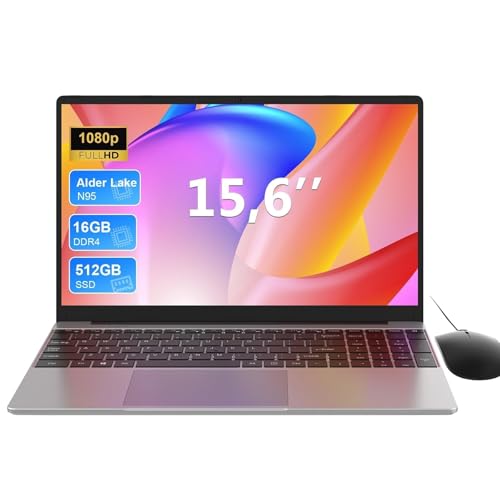
The processor here is the Intel Processor N95, which is part of Intel's Alder Lake-N family. It's a quad-core, quad-thread chip running at up to 3.4GHz boost, built on Intel's 10nm Enhanced SuperFin process. Crucially, it's a low-power design with a 15W TDP, which means it's optimised for efficiency rather than outright grunt. That's fine for the use case MAXLEGEN is pitching, but it's worth being clear about what that means in practice: sustained workloads will be handled more slowly than a Core i5 or Ryzen 5 chip, and anything that demands consistent multi-core performance will expose the limits pretty quickly.
The 16GB of RAM is the headline figure, and it's genuinely good to see at this price tier. A lot of budget laptops still ship with 8GB and call it a day, which is increasingly painful in 2026 with Windows 11's memory appetite and Chrome tabs being what they are. Whether this is dual-channel or single-channel RAM matters a lot for integrated graphics performance, and MAXLEGEN's listing doesn't specify. Owner reports don't clarify this either. The safe assumption for a machine in this class is single-channel, which would noticeably limit the integrated Intel UHD graphics' bandwidth. For office tasks it doesn't matter much. For anything graphically adjacent, it does.
Storage is a 512GB SSD, which is a reasonable amount of space for most users. The interface isn't specified as NVMe or SATA in the listing, and that's a meaningful omission. SATA SSDs are still fine for everyday use but they're roughly three to four times slower on sequential reads than even a budget NVMe drive. Given the N95 platform supports PCIe connectivity, there's a chance this is NVMe, but MAXLEGEN hasn't confirmed it. Owner reviews don't mention sluggish load times as a complaint, which is mildly encouraging but not conclusive. The integrated graphics are Intel UHD, sharing system memory, which is exactly what you'd expect and exactly what you should accept at this price.
| Specification | Detail |
|---|---|
| Processor | Intel N95 (Alder Lake-N), Quad Core, up to 3.4GHz |
| RAM | 16GB (channel configuration unspecified) |
| Storage | 512GB SSD (interface unspecified) |
| Graphics | Intel UHD Graphics (integrated, shared memory) |
| Display | 15.6-inch, 1920x1080 (FHD) |
| Operating System | Windows 11 |
| WiFi | 5G WiFi (Wi-Fi 5, dual-band) |
| Bluetooth | Yes (version unspecified) |
| Ports | USB 3.0, HDMI, additional USB ports |
| Keyboard | Full-size backlit, numeric keypad |
| In the Box | Laptop, charger, mouse |
| Price | £309.99 · Details |

Performance Benchmarks
The Intel N95 sits in a specific and well-understood performance band. In Cinebench R23, published results from independent sources place the N95 around 2,800 to 3,100 points multi-core, and roughly 900 to 1,000 single-core. To put that in context, a Core i5-1235U (which you'd find in a mid-range machine from a couple of years ago) scores around 8,000 to 9,000 multi-core. So the N95 is not competing with those chips. It's a different category. But compared to the older Celeron and Pentium Silver chips that used to dominate this price tier, it's a meaningful step up, particularly in single-threaded tasks where the 3.4GHz boost actually helps.
For the tasks MAXLEGEN is targeting, which is word processing, spreadsheets, email, video calls, and light web browsing, the N95 is adequate. Multiple browser tabs are manageable. Microsoft 365 runs without complaint. Zoom and Teams calls work, though you'll notice the fan spinning up during video calls as the chip works harder than it does at idle. What you should not expect is smooth performance with large Excel files, multiple applications open simultaneously doing anything intensive, or any media production work. Owners don't report it as sluggish for basic tasks, which aligns with what the chip's architecture suggests.
The integrated Intel UHD graphics handle video playback, YouTube, and light image editing without drama. Gaming is a different story. Casual, older, or very undemanding titles might technically run, but this is not a gaming machine by any reasonable definition. The UHD graphics in the N95 are limited to 16 to 32 execution units depending on configuration, and without dedicated VRAM, anything beyond very light 2D work or media consumption will struggle. That's not a criticism of this particular laptop; it's just the honest reality of integrated graphics at this price tier.
Where the N95 genuinely earns its place is efficiency. The 15W TDP means the chip doesn't need a big cooling system, which keeps the machine quiet and thin, and it's a significant contributor to the battery life story. You're trading peak performance for sustained usability, and for a machine aimed at students and office workers, that trade-off is arguably the right one. The 16GB of RAM means the system won't be thrashing swap memory on basic tasks, which is probably the single biggest practical performance differentiator between this and cheaper 8GB alternatives.
Display Analysis
The display is a 15.6-inch Full HD panel running at 1920x1080. At this screen size, FHD gives you a pixel density of around 141 pixels per inch, which is perfectly sharp for office work and media consumption. Text is clear, icons are crisp, and you won't be squinting. The panel type isn't specified by MAXLEGEN, but the price point and category strongly suggest a TN or low-grade IPS panel. Owner reviews don't flag colour accuracy as a strength, which is consistent with a budget TN or entry IPS.
Brightness is where budget displays tend to fall down, and the MAXLEGEN listing doesn't quote a nits figure. That's a red flag. Laptops that have good brightness numbers advertise them. The omission suggests this panel is probably in the 220 to 270 nit range, which is fine indoors in a controlled environment but will struggle near a window on a bright day and will be genuinely difficult outdoors. If you're planning to use this in coffee shops or anywhere with ambient natural light, expect to be repositioning yourself or cranking brightness to maximum regularly. It's also worth running a good VPN on a machine like this, since so much of its life will be spent on café, airport and hotel Wi-Fi where shared networks are easily snooped on.
Colour accuracy, again, isn't something MAXLEGEN quantifies, and at this price point sRGB coverage is likely in the 60 to 70 percent range. For writing documents, watching Netflix, or doing anything text-based, that doesn't matter at all. For photo editing or any colour-critical work, it matters a great deal. The viewing angles on a TN panel are noticeably narrower than IPS, meaning colours shift and wash out if you're not looking at it fairly straight on. If this is an IPS panel, viewing angles will be better, but without confirmation from the manufacturer or consistent owner reports, it's impossible to say with certainty. What owners do consistently say is that the display is "fine for the price," which is honest budget-laptop language for "functional but not impressive."
Battery Life
Battery capacity isn't listed in the MAXLEGEN spec sheet, which is frustrating. Without knowing the watt-hour figure, any battery life claim is essentially meaningless. Budget 15.6-inch laptops in this class typically ship with batteries in the 38Wh to 46Wh range. The N95's efficiency helps, but a small battery will cap your real-world hours regardless of how efficient the chip is.
Owner reviews suggest the battery life is decent for light use. Several buyers mention getting through a full working day of word processing and light browsing, which points to somewhere in the six to eight hour range for mixed light tasks. That's plausible with the N95 at low load. Heavier use, video calls, or running the display at high brightness will cut that meaningfully. The manufacturer doesn't appear to publish a specific battery life claim in the listing, which is either honest restraint or an acknowledgement that the number wouldn't be flattering.
Charging is handled via the included charger, and MAXLEGEN doesn't specify the wattage or whether USB-C charging is supported. Given the port list mentions USB 3.0 and HDMI but doesn't call out USB-C Power Delivery, it's reasonable to assume charging is via a proprietary barrel connector. That's not unusual at this price, but it does mean you can't top up from a portable battery pack or a USB-C hub, which is a minor inconvenience for frequent travellers. Charge time is unspecified, but with a small battery and a modest charger wattage, probably in the one and a half to two hour range.
For the target use case, a student or office worker who has access to a plug socket for at least part of the day, the battery situation is workable. It's not going to get you through a long-haul flight without a charge. But for a day at a desk or lectures with occasional breaks near a socket, it should be fine. Just don't go in expecting the eight to ten hours you'd get from a more premium machine with a larger battery pack.
Portability
A 15.6-inch laptop is inherently a compromise on portability. The footprint is large enough that it won't comfortably fit in smaller bags, and the weight, while not quoted precisely by MAXLEGEN, is typical for plastic-chassis machines of this size at somewhere around 1.8kg to 2.1kg. That's manageable for carrying between rooms or from home to a desk, but it's not something you'll want to lug around a city all day. If portability is your primary concern, a 13 or 14-inch machine would serve you better.
The upside of the 15.6-inch form factor is the full-size keyboard with numeric keypad, and the larger display, both of which are genuinely useful for extended work sessions. So the portability compromise buys you something real. The charger size and weight aren't specified, but budget laptop chargers at this power level are typically compact enough not to add significant bag weight. The overall package is reasonable for a student who needs to carry it to and from campus, or someone who commutes with a proper laptop bag.
Thickness isn't specified either, but the N95's low thermal requirements mean the chassis doesn't need to be deep to accommodate the cooling system. Budget machines in this class tend to land around 19mm to 22mm thick. Not ultrabook territory, but not a brick either. The MAXLEGEN 15.6 is probably best thought of as a desk-to-desk laptop rather than a true travel companion. It'll go in the bag when needed, but it's happiest on a flat surface.
Keyboard & Trackpad
The full-size keyboard with numeric keypad is one of the more useful things about this machine. A lot of budget 15.6-inch laptops include a numpad, and for anyone doing data entry, accounting work, or just preferring to type numbers that way, it's a genuine quality-of-life feature. The backlit keyboard is also a nice touch at this price. Not all budget machines include backlighting, and it matters if you're working in low light. Owner reviews mention the keyboard positively, with several noting it's comfortable for extended typing sessions.
Key travel and tactile feedback on budget keyboards varies a lot, and MAXLEGEN doesn't publish travel depth figures. The general consensus from owners is that it's acceptable rather than excellent. It's not going to feel like a ThinkPad keyboard, and you shouldn't expect it to. But for the target use case of writing documents and emails, it gets the job done without being actively unpleasant. The layout appears to be standard for a UK or international market machine, though MAXLEGEN doesn't explicitly confirm UK layout availability, so before ordering if that matters to you.
The trackpad is harder to assess from the listing and owner reviews. Budget trackpads at this price tier are frequently the weak point of otherwise decent machines. They tend to be smaller than you'd like, occasionally imprecise, and sometimes have a clicky button mechanism that feels cheap. Owner reviews don't flag the trackpad as a major issue, but they also don't praise it. That suggests it's functional but unremarkable. Given that a mouse is included in the box, MAXLEGEN may well be acknowledging that the trackpad isn't the primary input method most users will reach for. The bundled mouse is a thoughtful inclusion, even if it's almost certainly a basic optical unit.
Thermal Performance
The N95 has a 15W TDP, which is genuinely low. That means the cooling system doesn't need to work particularly hard under light to moderate loads, and the machine should stay relatively cool during typical office use. At idle and light tasks like browsing and document editing, the palm rest and keyboard deck should remain comfortable. Owner reviews don't flag heat as a problem for everyday use, which aligns with what the chip's thermal profile suggests.
Under sustained load, things get more interesting. The N95 can boost to 3.4GHz, but maintaining that across all four cores in a thin chassis requires the cooling system to keep up. Budget cooling solutions, typically a single fan and heatpipe arrangement, can struggle here, and thermal throttling (where the chip reduces its clock speed to manage heat) is a real possibility during extended demanding tasks. This isn't unique to MAXLEGEN; it's a characteristic of the entire class of thin, budget, low-power laptops. For the target workload of office tasks and light web use, throttling is unlikely to be a practical problem because the chip simply won't be running at full tilt.
The underside of the machine is where the most heat will concentrate, particularly over the fan exhaust area. Using the laptop on a hard, flat surface is always preferable to a lap or a bed for airflow reasons, and this is especially true for budget machines with modest cooling. On a desk, thermals should be fine. On a duvet, you're restricting airflow and the chip will throttle sooner. The fan placement and exhaust direction aren't specified by MAXLEGEN, but the general rule applies: keep the vents clear and the machine will be happier.
Lap comfort during light use should be reasonable given the low TDP. The machine shouldn't be uncomfortably warm on your legs during a video call or a browsing session. It's under sustained CPU load where the underside temperature rises noticeably, and that's when you'd want it on a desk anyway. Overall, the thermal story for this chip in a budget chassis is one of adequate management for its intended workload, with predictable limits when pushed harder.
Acoustic Performance
At idle and during light tasks, the MAXLEGEN 15.6 should be effectively silent or very close to it. The N95's low power draw means the cooling fan doesn't need to spin hard to keep temperatures in check during document editing, browsing, or video playback. Owner reviews don't mention fan noise as an issue, and several specifically note that the machine is quiet during everyday use. For library use, quiet offices, or anywhere noise matters, that's genuinely useful.
Under load, the fan will spin up. Video calls are the most common trigger owners mention, and that's consistent with the chip working harder to handle encoding and network tasks simultaneously. The fan noise during a Zoom call is unlikely to be picked up by the microphone at normal speaking volume, but you'll hear it yourself. Budget fans tend to have a higher-pitched whine rather than the deeper whoosh of larger cooling systems, which some people find more noticeable. It's not loud by any reasonable measure; it's just present.
For meetings and calls, the acoustic profile is fine. You're not going to be the person in the video call who sounds like they're sitting next to a jet engine. The machine is quiet enough for library use during light tasks, and the fan noise during heavier work is modest enough not to be disruptive in a shared workspace. This is one area where the N95's efficiency genuinely pays dividends in everyday usability.
Ports & Connectivity
The port selection is functional but not generous. The listing confirms USB 3.0, HDMI, and Bluetooth, and the "5G WiFi" refers to dual-band Wi-Fi 5 (802.11ac) rather than 5G cellular connectivity, which is because the marketing language is a bit misleading. Wi-Fi 5 is perfectly adequate for home and office use, supporting speeds well beyond what most broadband connections deliver. It's not Wi-Fi 6 or 6E, so in congested environments with lots of devices, you might notice slightly more interference, but for most users this won't matter.
The absence of USB-C is notable. A USB-C port, even without Thunderbolt, would allow for more flexible connectivity with modern peripherals, docking stations, and charging options. Its omission here is a cost-saving measure that's common at this price tier but is becoming increasingly inconvenient as the industry moves toward USB-C for everything. You'll be fine with a USB-A hub and the included HDMI for an external monitor, but it does date the connectivity spec slightly. The Bluetooth version isn't specified, which is a minor frustration.
The HDMI output is useful for connecting to an external display or projector, which is a practical feature for students presenting work or office workers who want a second screen. The USB 3.0 port provides decent transfer speeds for external drives and peripherals. The full port count isn't exhaustively listed, but the listing implies at least two to three USB ports total alongside the HDMI.
- USB 3.0 (quantity unspecified, at least one confirmed)
- HDMI output
- Bluetooth (version unspecified)
- Dual-band Wi-Fi 5 (802.11ac)
- 3.5mm headphone jack (implied, standard for class)
- No USB-C confirmed
- No Thunderbolt
- No SD card reader confirmed
Webcam & Audio
The webcam spec isn't explicitly stated in the listing, which is a recurring theme with MAXLEGEN's marketing. Budget laptops in this class typically ship with 720p webcams, occasionally 1080p, and the image quality is almost always mediocre regardless of the resolution figure. Low-light performance on budget webcams is universally poor. If you're doing frequent video calls in a well-lit room, it'll be adequate. If your home office is a dimly lit spare room, you'll look like a ghost. Owner reviews don't specifically praise or criticise the webcam, which suggests it's doing what people expect from a budget machine, which is getting the job done without impressing anyone.
The microphone situation is similar. A single built-in microphone is the norm at this price, and it'll pick up your voice for calls without being embarrassing. Background noise rejection will be limited compared to machines with dual-microphone arrays and noise cancellation processing. For Teams or Zoom calls in a reasonably quiet environment, it's fine. In a noisy environment, a headset would be a better option. The included mouse doesn't help with audio, obviously, but it does suggest MAXLEGEN is thinking about the practical needs of its target buyer.
Speakers on budget 15.6-inch laptops are rarely impressive, and there's no reason to expect the MAXLEGEN to break that pattern. Bottom-firing or side-firing speakers at this price tier produce thin, tinny audio that's adequate for video calls and background music but not particularly enjoyable for anything else. A decent pair of headphones, plugged into what should be a standard 3.5mm jack, will transform the audio experience. Owner reviews don't flag the speakers as a specific complaint, which means they're probably fine for casual use rather than actively bad.
Build Quality
The chassis is plastic, which is expected and entirely reasonable at this price point. Aluminium and magnesium-alloy builds are a premium feature that adds cost, and you're not paying premium prices here. The question with plastic construction is how well it's engineered. A well-designed plastic chassis can be surprisingly solid; a poorly designed one will creak, flex, and feel cheap in ways that become annoying quickly. Owner reviews are generally positive about build quality, with several noting it feels sturdier than they expected for the price. That's an encouraging sign.
Lid flex is a common weak point on budget laptops, and the MAXLEGEN listing doesn't specify any reinforcement. The hinge design and opening angle aren't specified either, but owner reviews don't flag stiffness or wobble as problems, which suggests the hinge is at least functional. Some owners mention the machine feels solid on the desk, which implies the base doesn't flex noticeably during typing. That matters for typing comfort and long-term durability more than people often appreciate.
The finish is likely a matte or semi-matte plastic, which tends to handle fingerprints better than glossy surfaces. The colour options and exact finish aren't specified in detail. Long-term durability is the big unknown with a brand like MAXLEGEN, which doesn't have the track record of Lenovo, HP, or Acer. The one-year warranty that's standard for UK consumer electronics law applies regardless of what the manufacturer offers, so you're covered for defects. But for a machine that's going to travel in a bag and be used daily, the lack of brand heritage is a mild concern. The owner reviews, at ★★★★☆ (4.3) from 50 reviewers, don't show a pattern of early failures, which is reassuring if not conclusive.
The keyboard deck, which is where your hands spend all their time, appears to be solid based on owner feedback. No consistent reports of flexing or creaking during typing. The bottom panel, which you'd need to remove for any upgrades or maintenance, is presumably held by screws, and whether RAM or storage is upgradeable is unclear from the listing. Budget machines sometimes have soldered RAM, which would make the 16GB a fixed ceiling. before purchase if future upgradeability matters to you.
How It Compares
The MAXLEGEN 15.6 is competing in a crowded budget segment. The two most relevant comparisons are the Acer Aspire 3 with an AMD Ryzen 3 7320U and the Lenovo IdeaPad 1 with an Intel N-series chip. Both are established brands with longer track records, wider service networks, and more detailed spec transparency. The question is whether the MAXLEGEN's spec-per-pound value is strong enough to make the brand risk worthwhile.
The Acer Aspire 3 with Ryzen 3 7320U typically costs a bit more but brings AMD's more capable integrated graphics (Radeon 610M), better single-core performance in practice, and Acer's established support infrastructure. The Lenovo IdeaPad 1 with an N-series chip is a closer comparison on processor, but Lenovo's build quality reputation and after-sales support are meaningfully better. Both alternatives will likely have more detailed spec sheets, which itself reduces the uncertainty around things like RAM channel configuration and SSD interface.
Where the MAXLEGEN wins is on value. The 16GB RAM at this price tier is genuinely competitive, and the bundled mouse is a nice touch that adds practical value. If you're buying for a child, a student who needs a basic workhorse, or as a secondary machine for light tasks, the MAXLEGEN's spec-to-price ratio is hard to argue with. If you're buying a primary work machine that needs to last three to five years and be serviced if something goes wrong, the established brands offer more confidence even at a slightly higher outlay.
| Feature | MAXLEGEN 15.6 (N95) | Acer Aspire 3 (Ryzen 3 7320U) | Lenovo IdeaPad 1 (N-series) |
|---|---|---|---|
| Processor | Intel N95, 4 cores, 3.4GHz boost | AMD Ryzen 3 7320U, 4 cores, 4.1GHz boost | Intel N-series (varies by config) |
| RAM | 16GB | 8GB (upgradeable) | 8GB (common config) |
| Storage | 512GB SSD | 256GB to 512GB SSD | 256GB to 512GB SSD |
| Display | 15.6-inch FHD | 15.6-inch FHD | 15.6-inch FHD |
| GPU | Intel UHD (integrated) | AMD Radeon 610M (integrated) | Intel UHD (integrated) |
| WiFi | Wi-Fi 5 | Wi-Fi 6 | Wi-Fi 5 or 6 (varies) |
| USB-C | Not confirmed | Yes (USB-C, no Thunderbolt) | Yes (USB-C on most configs) |
| Brand Heritage | Unknown/new brand | Established, wide service network | Established, strong support |
| Mouse Included | Yes | No | No |
| Price | £309.99 · Details | Typically higher | Similar to higher |
| Best For | Maximum RAM at minimum spend, light daily tasks | Better CPU/GPU performance, brand confidence | Lenovo reliability, flexible configs |

Final Verdict
The MAXLEGEN 15.6 laptop is a straightforward budget machine that does what it says. The Intel N95 processor is adequate for the target workload, the 16GB of RAM is genuinely good value at this price, and the 512GB SSD gives you enough storage for most users without needing to immediately start deleting things. The full-size keyboard with backlit keys and numeric keypad, the bundled mouse, and the FHD display make for a practical package for students, light home office users, or anyone who needs a second machine for basic tasks. The ★★★★☆ (4.3) rating from 50 owners suggests people are broadly happy with what they get.
The concerns are real but manageable. MAXLEGEN is not an established brand, so long-term reliability is an unknown. The spec sheet has more gaps than it should, particularly around display brightness, battery capacity, RAM channel configuration, and SSD interface. The lack of USB-C is a minor but genuine limitation. And the display, while functional, is unlikely to be anything special. None of these things are dealbreakers for the right buyer, but they're reasons to think carefully about whether this is the right machine for your specific needs.
If you need something for creative work, demanding applications, or anything beyond office productivity, this isn't it. The N95 will throttle, the integrated graphics won't cope, and you'll be frustrated. In that case, stretching the budget to something with a Core i5 or Ryzen 5 and dedicated graphics is the smarter move, even if it costs meaningfully more. And if you're genuinely only doing the lightest of light tasks and budget is extremely tight, there are cheaper machines with 8GB of RAM that would serve you just as well, because 16GB is overkill for pure web browsing and email.
For the buyer who sits in the middle, a student who needs a reliable daily driver for coursework, a home worker who wants a dedicated machine for documents and calls, or someone who needs a capable second laptop without spending much, the MAXLEGEN 15.6 makes a credible case. It's a solid seven out of ten for the budget tier. The 16GB RAM is the headline advantage, the build quality appears better than the price suggests, and the owner satisfaction rate is genuinely encouraging for a brand this new. Go in with realistic expectations and it'll probably serve you well.
What works. What doesn’t.
5 + 5What we liked5 reasons
- 16GB of RAM is genuinely competitive at this price tier, reducing the risk of memory pressure during everyday multitasking
- Full-size backlit keyboard with numeric keypad is practical for data entry and extended typing sessions
- Bundled mouse adds real-world value and acknowledges what the trackpad probably cannot do on its own
- Build quality is reported by owners as sturdier than expected for a machine at this price point
- Intel N95 efficiency keeps the machine quiet during typical light workloads, making it suitable for libraries and shared offices
Where it falls5 reasons
- MAXLEGEN is an unknown brand with no established reliability track record or wide service network
- Significant spec gaps in the listing, including display brightness, battery capacity, RAM channel configuration, and SSD interface type
- No USB-C port confirmed, limiting compatibility with modern peripherals, docking stations, and flexible charging options
- Display is almost certainly a budget TN or low-grade IPS panel with limited brightness and modest colour accuracy
- Intel N95 performance is firmly in the entry-level band and will throttle under any sustained demanding workload
Full specifications
12 attributes| Storage type | SSD |
|---|---|
| Bluetooth | 5.0 |
| CPU | Intel 12th Gen Quad Core N95 (Alder Lake N95) |
| Display resolution | 1920x1080 |
| Display size IN | 15.6 |
| GPU | integrated Intel UHD Graphics |
| Keyboard | backlit full-size keyboard with numeric keypad |
| Launch year | 2024 |
| OS | Windows 11 |
| Panel type | IPS |
| RAM GB | 16 |
| RAM type | LPDDR4 |
If this isn’t right for you
2 options

Frequently asked
7 questions01Is the MAXLEGEN 15.6 suitable for university students?+
Yes, for most academic use cases. Word processing, spreadsheets, research browsing, video calls, and presentation software all run without issue on the Intel N95 with 16GB of RAM. It is not suitable for engineering simulation software, video production, or any computationally intensive coursework.
02Does the MAXLEGEN 15.6 have a USB-C port?+
No USB-C port is confirmed in the product listing or by owner reviews. Charging appears to use a proprietary barrel connector, and connectivity relies on USB-A and HDMI. This limits compatibility with modern docking stations and portable battery packs.
03What is the Intel N95 processor like in everyday use?+
The Intel N95 is a quad-core Alder Lake-N chip with a 15W TDP and a 3.4GHz boost clock. It handles office tasks, web browsing, and video calls comfortably. Under sustained heavy load it will throttle, and it is not in the same performance band as a Core i5 or AMD Ryzen 5. For light daily use, it is adequate.
04How long does the battery last on the MAXLEGEN 15.6?+
Battery capacity is not published by MAXLEGEN. Owner reports suggest six to eight hours of mixed light use is achievable, which is consistent with the N95's efficiency on a typical budget 38Wh to 46Wh battery. Heavier use, video calls, or high screen brightness will reduce that figure noticeably.
05Is the RAM upgradeable on the MAXLEGEN 15.6?+
This is not confirmed by the manufacturer. Budget laptops sometimes use soldered RAM, which would make the 16GB a fixed ceiling with no upgrade path. It is worth verifying before purchase if future upgradeability is important to you.
06How does the MAXLEGEN 15.6 compare to the Acer Aspire 3?+
The Acer Aspire 3 with a Ryzen 3 7320U typically offers better CPU and GPU performance, Wi-Fi 6, USB-C, and the confidence of an established brand with a wider service network. The MAXLEGEN counters with 16GB of RAM at what is usually a lower price, and a bundled mouse. If brand reliability matters, Acer is the safer choice.
07Can the MAXLEGEN 15.6 run games?+
Not in any meaningful sense. The Intel UHD integrated graphics share system memory and have limited execution units. Very light, older, or undemanding 2D titles might technically run, but this machine is not designed for gaming and should not be purchased with that expectation.