Storage marketing has a dirty little secret. That headline number, the one printed in massive font on the box, is measured on an empty drive with a short sequential burst that fits entirely in the SLC write cache. It's not lying, exactly. But it's not telling you the whole truth either. The question that actually matters is: what does the drive do when that cache fills up and it has to write at native NAND speed? That's where drives get separated from each other, and that's what we're going to talk about.
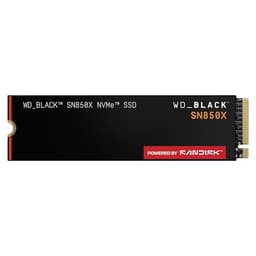
The WD_BLACK SN850X 1TB is one of the most talked-about PCIe Gen4 NVMe drives on the market right now. It's been out long enough that real owners have had time to form real opinions, the benchmarking community has pulled it apart properly, and the price has settled into a range where it competes directly with some serious alternatives. 17,458 averaging 4.7 stars is a signal worth paying attention to, but it doesn't tell you whether it's the right drive for your specific situation. That's what this is for.
This review is comparison-led, because buying a drive in isolation is daft. You need to know where the SN850X sits in the Gen4 landscape, who it's actually best suited to, and whether the premium over cheaper options is justified. Spoiler: for a certain type of buyer, it absolutely is. For others, you're paying for numbers you'll never see in practice.
Core Specifications
The SN850X 1TB is an M.2 2280 form factor drive running on PCIe Gen4 x4, using the NVMe protocol. Western Digital rates it at up to 7,300 MB/s sequential read and up to 6,300 MB/s sequential write for the 1TB version. Those are genuinely near the ceiling of what PCIe Gen4 can deliver, which is roughly 7,877 MB/s theoretical maximum across four lanes. So WD isn't padding the spec sheet with fantasy numbers here. The drive uses WD's in-house controller (developed from the acquisition of SanDisk and its controller IP), paired with TLC NAND, and crucially, it includes a DRAM cache. That last point matters more than most people realise, and we'll come back to it.
Random performance is rated at up to 1,200,000 IOPS read and up to 1,100,000 IOPS write. These are the figures that actually determine how fast your system feels day to day. Sequential speed is what you see in synthetic benchmarks and large file transfers. Random IOPS is what you feel when Windows is booting, when a game is streaming assets, when your browser is loading tabs. The SN850X's random figures are properly competitive, not just the sequential ones padded to look good.
The drive ships in capacities from 1TB to 4TB, with optional heatsink versions available on the 1TB and 2TB models. The heatsink isn't just cosmetic, which we'll cover properly in the thermals section. For now, the specs table:
| Specification | Detail |
|---|---|
| Form Factor | M.2 2280 |
| Interface | PCIe Gen4 x4, NVMe |
| Capacity (this review) | 1TB |
| Sequential Read | Up to 7,300 MB/s |
| Sequential Write | Up to 6,300 MB/s |
| Random Read | Up to 1,200,000 IOPS |
| Random Write | Up to 1,100,000 IOPS |
| NAND Type | TLC (Triple-Level Cell) |
| DRAM Cache | Yes |
| Heatsink Option | Available on 1TB and 2TB |
| Available Capacities | 1TB, 2TB, 4TB |
| Current Price | £178.99 |
| Star Rating | ★★★★½ (4.7) (17,458 reviews) |

Interface and Form Factor
PCIe Gen4 is the sweet spot right now. Gen3 drives are still fine for a lot of use cases, but if you're building or upgrading a modern system, you almost certainly have a Gen4 slot available. Intel's 12th Gen and newer, AMD's Ryzen 5000 and newer, and the PS5 all support Gen4. Gen5 drives exist and they're fast, but they run hot, cost significantly more, and for gaming and everyday use the real-world difference over Gen4 is genuinely hard to notice. The SN850X sits right in the zone where the interface speed is fast enough to stop being the bottleneck for anything you're actually likely to do.
The M.2 2280 form factor is as standard as it gets. It's the size that fits virtually every M.2 slot in existence, on desktop motherboards, gaming laptops, and the PS5's expansion slot. There are no compatibility surprises here. The drive is a single-sided design on the 1TB, which matters for some ultra-thin laptops and for the PS5 specifically, where clearance can be tight depending on the heatsink you use.
One thing worth being clear about: if your system only has PCIe Gen3 M.2 slots, the SN850X will still work, it'll just run at Gen3 speeds. You won't get anywhere near 7,300 MB/s in that scenario. It's backwards compatible, but you'd be paying a Gen4 premium for Gen3 performance, which is a bit of a waste. Check your motherboard specs before buying. If you're on an older platform, a good Gen3 drive like the Samsung 970 EVO Plus will serve you just as well and cost less.
Real-World Performance
Here's where the SN850X earns its reputation. Published benchmarks from across the community consistently show it trading blows with the Samsung 980 Pro and outperforming it in several workloads, particularly in random read performance where the WD controller genuinely shines. Game Mode 2.0, WD's firmware feature that uses load prediction to pre-cache game assets, is one of those things that sounds like marketing but actually has measurable impact. DirectStorage-compatible titles in particular benefit from the drive's ability to deliver assets quickly to the GPU without going through system RAM as an intermediary.
For day-to-day use, boot times on a modern system with this drive are fast. Proper fast. Windows 11 cold boot to desktop in under ten seconds is consistently reported by owners, and application launches for heavy software like Adobe Premiere or game engines feel snappy in a way that a SATA SSD simply can't match. The random read IOPS figure is the reason for this. When your OS is reaching out to dozens of small files simultaneously during startup, a drive that can handle over a million random read operations per second doesn't make you wait.
Game load times are a genuine selling point. Owners consistently report that games load faster on the SN850X than on older Gen3 drives, and benchmarks back this up. The gap between Gen4 and Gen3 in game loading is real, even if it's measured in seconds rather than minutes. Whether those seconds matter to you is a personal call, but if you're the sort of person who switched to an SSD partly to stop watching loading screens, going from a Gen3 to a Gen4 drive like this is a noticeable step up. Big file copies, say moving a 50GB game install from one drive to another, are where sequential speed matters, and 7,300 MB/s read is about as fast as Gen4 gets.
Sustained Writes and Cache Behaviour
Right. This is the section the marketing department would rather you skipped. Every fast NVMe drive uses an SLC write cache: a portion of the NAND is temporarily configured to store one bit per cell instead of three (for TLC) or four (for QLC), which makes it much faster to write to. The drive writes incoming data to this fast SLC region first, then tidies it up to the slower native TLC cells in the background. While the cache is available, you see those headline sequential write speeds. Once it fills up, you write at native TLC speed. That's the cliff.
The good news for the SN850X is that it uses TLC NAND, not QLC. This is important. Native TLC write speed is meaningfully faster than native QLC write speed. Drives using QLC NAND (and there are several in this price bracket) can drop from cache speeds of 3,000 to 4,000 MB/s down to native speeds of 800 MB/s or below once the cache exhausts. The SN850X's native TLC write speed, as reported in community benchmarks on sustained write tests, holds considerably better than that. You're not going to see 6,300 MB/s sustained, but the cliff isn't as brutal as it is on a QLC drive.
For most gaming use cases, cache exhaustion simply isn't a thing that happens. Game installs write data in chunks, not in one massive sustained burst, and the SLC cache replenishes between writes. Where you'd notice the cache limit is if you're doing large video file transfers, backing up big datasets, or copying tens of gigabytes in a single operation. Owners doing creative workloads report the drive handles sustained writes better than budget alternatives, but if you're a video editor moving 4K RAW footage around constantly, you'd want to look at the 2TB or 4TB versions where the larger capacity means a larger SLC cache allocation. The 1TB is fine for gaming. It's fine for a boot drive. It's fine for most people.
Controller, NAND and DRAM
WD uses its own in-house controller on the SN850X, developed through the SanDisk acquisition. This isn't a Phison E18 or Silicon Motion SM2267 or any of the controllers you'll find in more generic drives. It's a proprietary design, and WD has clearly put real engineering effort into it. The controller is what enables Game Mode 2.0 and the drive's strong random I/O figures, and it's one of the reasons the SN850X competes with Samsung's 980 Pro (which also uses an in-house controller) rather than falling behind it.
The NAND is TLC (Triple-Level Cell), meaning three bits stored per cell. This is the right choice for a performance drive. QLC (four bits per cell) is cheaper to manufacture and allows higher capacities, but it's slower, wears out faster, and has a steeper cache cliff. Any drive sold as a "performance" product using QLC NAND is, frankly, cutting corners. The SN850X doesn't do that. TLC is what you want in a drive you're going to use hard.
The DRAM cache is present and it matters. A lot of budget drives, particularly in the SATA and lower-end NVMe space, skip the DRAM cache entirely and use Host Memory Buffer (HMB) instead, which borrows a slice of your system RAM to serve as the address translation table. HMB is fine for light use, but under sustained mixed workloads it adds latency because the drive has to reach out to system RAM rather than its own onboard cache. The SN850X has its own dedicated DRAM, which keeps the address translation table close to the controller and maintains low, consistent latency even under heavy random I/O. For a drive at this price point, you'd expect nothing less, but it's worth confirming it's there rather than assuming.
Endurance and Reliability
WD rates the SN850X 1TB at 600 TBW (terabytes written). To put that in context: if you wrote 100GB to the drive every single day, you'd hit the rated endurance limit in about 16 years. For a gaming drive, that's not a constraint you're ever going to bump into. Even for a boot drive on a heavily used workstation, 600 TBW is a generous rating. WD backs this with a five-year warranty, which is the industry standard for a premium NVMe drive and a sign that WD has confidence in the hardware.
The five-year warranty is worth paying attention to as a buying signal. Budget drives often come with three-year warranties, and some no-name options are even shorter. A manufacturer that offers five years is one that expects the drive to survive five years. It's not a guarantee, obviously, drives can fail early for all sorts of reasons, but statistically a longer warranty correlates with better NAND quality and more conservative firmware. WD's track record on this is solid.
Owner reports across the 17,000-plus reviews are reassuring on reliability. Failures are reported, as they are with any drive at scale, but the pattern of complaints doesn't suggest a systematic issue. The most common negative reviews are about compatibility edge cases (usually a BIOS update or slot configuration issue rather than the drive itself) and a small number of early failures that happen with any mass-market product. The 4.7-star average across that volume of reviews is genuinely impressive and suggests the vast majority of buyers are happy well past the initial setup period. That said, always keep backups. Always. A drive rating doesn't protect your data if it fails before the warranty expires.
Thermals
Gen4 drives run warm. The SN850X is no exception. Under sustained sequential workloads, the controller generates real heat, and if the drive throttles thermally it will drop its performance to protect itself. This is normal behaviour, not a defect, but it's something you need to manage. In a well-ventilated desktop case with decent airflow over the M.2 slot, the bare drive typically manages sustained workloads without significant throttling. But "typically" is doing some work in that sentence. Compact cases, poorly ventilated setups, and drives mounted on the underside of a motherboard without airflow can all lead to throttling under sustained load.
WD offers an optional heatsink version of the SN850X for the 1TB and 2TB capacities. If you're building a gaming PC and your motherboard doesn't have its own M.2 heatsink (many mid-range and high-end boards do), the heatsink version is worth the small premium. It's not just cosmetic, it genuinely helps the controller shed heat and maintain peak performance through longer gaming sessions. WD specifically mentions it helps maintain performance through "the most intense gaming sessions," and that tracks with what community benchmarks show about thermal throttling on bare drives versus heatsink-equipped ones.
For PS5 users, a heatsink is required by Sony's installation guidelines, and the SN850X heatsink version is sized to fit within the PS5's expansion bay. If you're buying this specifically for a PS5, the heatsink version is the one to get. On a laptop, you're usually at the mercy of whatever the chassis provides, though many gaming laptops have reasonable M.2 cooling. The bare drive version is fine if your motherboard already has a heatsink over the M.2 slot, which most decent gaming boards do these days.
Capacity Options and Price Per GB
The SN850X comes in 1TB, 2TB, and 4TB. The 1TB is the entry point and the most price-competitive option in terms of absolute cost. Modern games are absolutely enormous, and WD's own marketing acknowledges that today's titles can eat 200GB or more each. If you're planning to use this as your primary game library drive, 1TB fills up faster than you'd think. You'll be managing installs constantly. The 2TB is the sweet spot for most gaming builds, giving you room for a decent library without the premium of the 4TB.
Price per GB: at current pricing, the SN850X 1TB is competitive with the Samsung 980 Pro 1TB and sits above budget Gen4 options like the Crucial P3 Plus or Kingston NV3. The premium over those budget drives is real, and it's justified by the TLC NAND, DRAM cache, and stronger random I/O performance. If you're purely after cheap storage and you're not doing anything particularly demanding, a budget Gen4 drive will do the job. But if you're gaming seriously, using the drive as a boot drive for a performance system, or putting it in a PS5, the SN850X's performance consistency is worth the extra spend.
The 4TB version is expensive in absolute terms but offers a lower price per GB than you'd get from buying multiple smaller drives, and it's a sensible option if you want one fast drive for everything. For most people, though, the 2TB hits the best balance of capacity, price, and performance. The 1TB reviewed here is the right buy if you're on a tighter budget, already have other storage, or specifically want the cheapest entry into SN850X performance.

Installation and Compatibility
Installation is as straightforward as M.2 drives get. You slot it into an M.2 2280 socket, secure it with the single retention screw, and you're done. On a desktop, most motherboards have at least one PCIe Gen4 M.2 slot, usually labelled clearly in the manual. If you have multiple M.2 slots, check which ones are Gen4 and which are Gen3, because the physical connector is identical and it's easy to accidentally use a Gen3 slot and wonder why your speeds are half what you expected.
For PS5 installation, Sony has a specific process documented on their support pages. The SN850X is on Sony's list of compatible drives, and the heatsink version is designed to fit within the PS5's expansion bay dimensions. You'll need a Phillips screwdriver and about ten minutes. The PS5 also runs a storage benchmark after installation to verify the drive is performing correctly, which is a handy sanity check. One thing to note: the PS5 requires a minimum of 5,500 MB/s sequential read speed for expansion storage, and the SN850X's 7,300 MB/s rating clears that comfortably.
For OS migration, WD offers the Acronis True Image for Western Digital software, which handles cloning your existing drive to the SN850X. It's free with the drive and works reasonably well, though any cloning software has edge cases. If you're setting up a fresh system rather than migrating, you can skip it entirely. Laptop compatibility is generally fine as long as the laptop has an M.2 2280 slot, which most gaming laptops do. Some ultrabooks use shorter M.2 2242 slots, so check your laptop's specs before ordering.
Who It's For
The SN850X 1TB is a proper fit for a few specific types of buyer. First, the PC gamer building or upgrading a Gen4 system who wants the best gaming experience their storage can deliver. Game Mode 2.0, the strong random I/O, and the near-ceiling Gen4 sequential speeds all point squarely at gaming as the primary use case. Second, PS5 owners who want a fast, reliable expansion drive and don't want to think about whether their choice will cause problems. Third, anyone who wants a high-performance boot drive for a productivity or creative workstation and values the DRAM cache and TLC NAND for consistent latency under mixed workloads.
Who should look elsewhere? If you're on a PCIe Gen3 system, you'll never see the SN850X's rated speeds and you'd be better served by a Gen3 drive at a lower price. If budget is the primary concern and you're not doing anything that pushes a drive hard, a Crucial P3 Plus or Kingston NV3 will boot Windows and load games just fine for considerably less money. If you need massive capacity on a tight budget, a QLC drive at 2TB or 4TB might offer better value per GB, just be aware of the cache cliff and don't use it as a sustained write workhorse.
Sustained creative workloads, think video editing with large RAW files, are where the 1TB capacity starts to feel limiting. The drive itself handles sustained writes better than QLC alternatives, but if you're constantly moving 100GB+ files around, you'd want the 2TB for the larger SLC cache and the extra headroom. The 1TB is not the drive for a video production scratch disk unless you're disciplined about keeping it from filling up, because SLC cache size scales with available free space. If you just need portable overflow storage for finished projects, an external SSD like the Kingston XS1000 2TB or the SanDisk Extreme Portable SSD 2TB can take the pressure off your internal drive.
How It Compares
The two most natural comparisons for the SN850X 1TB are the Samsung 980 Pro 1TB and the Seagate FireCuda 530 1TB. All three are PCIe Gen4 drives with DRAM caches and TLC NAND. All three compete for the same buyer. The Samsung 980 Pro was the benchmark reference for Gen4 gaming drives for a long time, and the FireCuda 530 uses the Phison E18 controller, which is also found in several other premium Gen4 drives. The SN850X came in and disrupted both of them on random I/O performance, which is the metric that matters most for gaming and OS use.
The Samsung 980 Pro has the advantage of Samsung's brand trust and a very mature firmware history. It's been out longer, there's more data on long-term reliability, and Samsung's Magician software is genuinely good for drive health monitoring. The SN850X beats it on rated sequential speeds and random IOPS, and Game Mode 2.0 is a feature the 980 Pro doesn't have an equivalent of. At similar prices, the SN850X is the better gaming drive on paper and in published benchmarks. The 980 Pro is still excellent, but it's not the first choice anymore.
The FireCuda 530 is a close competitor that also uses TLC NAND and DRAM, with very similar sequential speeds. Its random performance is strong but slightly behind the SN850X in most published benchmarks. Seagate offers a five-year warranty too. The FireCuda 530 is a legitimate alternative if you find it cheaper, but at parity pricing the SN850X's random I/O advantage and Game Mode 2.0 give it the edge for gaming specifically.
| Feature | WD_BLACK SN850X 1TB | Samsung 980 Pro 1TB | Seagate FireCuda 530 1TB |
|---|---|---|---|
| Interface | PCIe Gen4 x4, NVMe | PCIe Gen4 x4, NVMe | PCIe Gen4 x4, NVMe |
| Sequential Read | 7,300 MB/s | 7,000 MB/s | 7,300 MB/s |
| Sequential Write | 6,300 MB/s | 5,000 MB/s | 6,900 MB/s |
| NAND Type | TLC | TLC (MLC-based) | TLC |
| DRAM Cache | Yes | Yes | Yes |
| Controller | WD In-House | Samsung In-House | Phison E18 |
| TBW (1TB) | 600 TBW | 600 TBW | 1,275 TBW |
| Warranty | 5 years | 5 years | 5 years |
| Game Mode | Yes (2.0) | No | No |
| Heatsink Option | Yes | Yes | Yes |
| Price (approx) | £178.99 | Check current | Check current |
One thing worth flagging: the FireCuda 530's 1,275 TBW endurance rating is notably higher than the SN850X's 600 TBW. For most gaming use cases this is academic, but if you're writing enormous amounts of data regularly, the FireCuda 530's endurance advantage is real. For pure gaming, the SN850X's Game Mode 2.0 and random I/O performance tip the balance back in its favour.
What Buyers Say
With 17,458 at a 4.7-star average, there's a lot of signal in the owner feedback. The consistent praise centres on three things: noticeably faster game load times compared to whatever drive owners were upgrading from, easy installation with no compatibility headaches, and the drive running cool enough to not cause problems in typical desktop setups. PS5 owners are particularly enthusiastic, with many specifically noting that the SN850X passed Sony's built-in speed test comfortably and that game loading on the expansion slot feels comparable to the internal SSD.
The complaints, where they exist, fall into a few categories. A small number of owners report early failures, which happens with any drive at this volume and doesn't suggest a systematic flaw. Some owners on older systems report not achieving the rated speeds, which is almost always a Gen3 slot issue or a BIOS setting rather than a drive fault. A handful of reviews mention the drive running warm without a heatsink in poorly ventilated cases, which is expected behaviour for a high-performance Gen4 drive rather than a defect. The absence of widespread complaints about cache cliff behaviour or sudden performance drops is itself a positive signal: it suggests the TLC NAND and firmware are doing their job.
Value Analysis
At its current price, the SN850X 1TB sits in the upper tier of Gen4 1TB drives. It's not the cheapest option, and it's not trying to be. What you're paying for is a combination of TLC NAND (not QLC), a DRAM cache (not HMB), an in-house controller with genuinely strong random I/O, and a five-year warranty. If you price out a QLC Gen4 drive without DRAM and compare it to the SN850X, the gap in real-world sustained performance and long-term reliability is significant enough to justify the price difference for anyone using the drive seriously.
Where the value calculation gets interesting is against the Samsung 980 Pro. At similar prices, the SN850X offers higher rated sequential speeds and better random IOPS. The 980 Pro has the advantage of Samsung's longer track record and slightly more mature firmware ecosystem, but on pure performance per pound, the SN850X wins. Against the FireCuda 530, it's closer, and the FireCuda's higher TBW rating is a genuine differentiator if endurance is a priority for your workload.
For a gaming-focused buyer on a Gen4 system, the SN850X 1TB represents good value at its current price point. It's not cheap, but it's delivering near-maximum Gen4 performance with the right underlying technology. The budget alternative is a Gen4 drive with QLC and no DRAM, and while that'll boot Windows and load games, you're making real compromises to save money. Whether those compromises matter to you depends entirely on how you use the drive. For most people reading this, the SN850X is the better long-term buy.
Final Verdict
The WD_BLACK SN850X NVMe SSD 1TB is, without much argument, one of the best PCIe Gen4 gaming drives you can buy right now. It's got the right technology underneath: TLC NAND, a proper DRAM cache, an in-house controller that delivers strong random I/O, and Game Mode 2.0 that actually does something useful rather than just being a marketing checkbox. The 7,300 MB/s sequential read speed is near the physical limit of PCIe Gen4, and unlike some drives that post big numbers and then fall apart under sustained load, the TLC NAND here means the cache cliff isn't catastrophic when it does hit.
Is it for everyone? No. If you're on a Gen3 system, buy a Gen3 drive. If budget is tight and you're just after something faster than SATA, there are cheaper Gen4 options that'll do the job. But if you're building or upgrading a Gen4 gaming PC, putting an expansion drive in a PS5, or want a fast and reliable boot drive for a performance system, the SN850X is the drive to beat. The Samsung 980 Pro is still a great drive, but the SN850X outperforms it on the metrics that matter for gaming. The FireCuda 530 is a legitimate alternative, particularly if endurance is a priority, but for gaming specifically the SN850X's random I/O and Game Mode 2.0 give it the edge.
Over 17,000 owners averaging 4.7 stars doesn't happen by accident. It happens when a drive does what it says on the box, installs without drama, and keeps working. That's exactly what the SN850X does. Buy the heatsink version if your case airflow is average or worse, get the 2TB if you have the budget and a big game library, and keep backups regardless of what drive you're using. Solid pick.
Score: 9/10. Loses a point for the price premium over budget alternatives and the 1TB capacity filling up fast with modern games. Gains everything else back for doing the fundamentals properly.
Not Right For You?
If the SN850X isn't the right fit, here's where to look instead. On a Gen3 system, the Samsung 970 EVO Plus is a proven, reliable TLC drive with DRAM that'll give you the best Gen3 performance without paying for Gen4 speeds you can't use. On a tight budget with a Gen4 system, the Crucial P3 Plus offers decent performance for basic use, though it uses QLC NAND and HMB rather than DRAM, so manage your expectations for sustained writes. If endurance is the priority above all else, the Seagate FireCuda 530's 1,275 TBW rating at 1TB is hard to argue with for workstation use. And if you've decided you want the absolute fastest thing money can buy and thermals aren't a concern, PCIe Gen5 drives like the Kingston FURY Renegade G5 are out there, just know they run very hot, cost significantly more, and the real-world benefit for gaming is currently minimal.
For most people building a gaming PC in the current market, though, the SN850X is where the conversation starts and ends. It's the benchmark that other Gen4 drives are measured against, and for good reason.

Full Specifications
| Specification | Detail |
|---|---|
| Brand | WD (SanDisk) |
| Model | WD_BLACK SN850X |
| Capacity (reviewed) | 1TB |
| Available Capacities | 1TB, 2TB, 4TB |
| Form Factor | M.2 2280 |
| Interface | PCIe Gen4 x4 |
| Protocol | NVMe |
| Sequential Read | Up to 7,300 MB/s |
| Sequential Write | Up to 6,300 MB/s |
| Random Read | Up to 1,200,000 IOPS |
| Random Write | Up to 1,100,000 IOPS |
| NAND Type | TLC (Triple-Level Cell) |
| DRAM Cache | Yes |
| Endurance (TBW) | 600 TBW (1TB) |
| Warranty | 5 years |
| Heatsink Option | Available (1TB and 2TB) |
| Gaming Features | Game Mode 2.0 with load prediction |
| PS5 Compatible | Yes |
| ASIN | B0B7CKVCCV |
Specifications sourced from Western Digital's official product page and Amazon product listing. Random I/O figures and sustained write behaviour referenced from community benchmark data and owner reports. Prices correct at time of publishing and subject to change.
This article contains affiliate links. If you purchase through our links, vividrepairs.co.uk may earn a small commission at no extra cost to you. We only recommend products we'd genuinely point a mate towards.
What works. What doesn’t.
7 + 5What we liked7 reasons
- Near-ceiling PCIe Gen4 sequential read speed of 7,300 MB/s, close to the theoretical maximum for the interface
- Uses TLC NAND rather than QLC, resulting in better sustained write performance and a less severe cache cliff
- Full onboard DRAM cache delivers consistent, low-latency random I/O under heavy mixed workloads
- Game Mode 2.0 with load prediction provides a measurable benefit in DirectStorage-compatible gaming titles
- Five-year warranty and 600 TBW endurance rating signal genuine confidence in the underlying hardware
- Heatsink version available for PS5 installation and poorly ventilated desktop builds
- Over 17,000 Amazon reviews averaging 4.7 stars, indicating strong real-world satisfaction at scale
Where it falls5 reasons
- Carries a price premium over budget Gen4 alternatives using QLC NAND and Host Memory Buffer
- 1TB capacity fills up quickly with modern game installs, which can regularly exceed 100GB per title
- Runs noticeably warm under sustained load without a heatsink in cases with limited airflow
- Seagate FireCuda 530 offers a significantly higher 1,275 TBW endurance rating at the 1TB capacity
- Buyers on PCIe Gen3 systems will not achieve rated speeds and would be better served by a Gen3 drive
Full specifications
6 attributes| Capacity | 2TB |
|---|---|
| Form factor | M.2 2280 |
| Interface | PCIe Gen4 x4 |
| Read speed | 7300 MB/s |
| Type | NVMe SSD |
| Write speed | 6600 MB/s |
If this isn’t right for you
2 options

Frequently asked
7 questions01Is the WD_BLACK SN850X 1TB compatible with the PlayStation 5?+
Yes. The SN850X is on Sony's list of compatible drives and its rated sequential read speed of 7,300 MB/s comfortably exceeds Sony's minimum requirement of 5,500 MB/s. If you are buying it specifically for a PS5, the heatsink version is recommended, as Sony's installation guidelines require a heatsink and the SN850X heatsink model is sized to fit within the PS5's expansion bay.
02Does the WD_BLACK SN850X use QLC or TLC NAND, and why does it matter?+
The SN850X uses TLC (Triple-Level Cell) NAND, which stores three bits per cell. This is meaningfully better than QLC (four bits per cell) for performance drives. TLC NAND has a faster native write speed once the SLC write cache is exhausted, wears out more slowly, and maintains more consistent performance under sustained workloads. QLC drives can drop to native write speeds of 800 MB/s or below after cache exhaustion; the SN850X holds considerably better than that.
03What is Game Mode 2.0 and does it make a real difference?+
Game Mode 2.0 is a firmware feature from Western Digital that uses load prediction to pre-cache game assets before they are requested by the CPU or GPU. In practice, it is measurable rather than just theoretical, particularly in DirectStorage-compatible titles where the drive delivers assets directly to the GPU. It is not transformative, but it is a genuine feature rather than a marketing label with no substance behind it.
04Will the SN850X work in a PCIe Gen3 M.2 slot?+
It will physically fit and operate, because the drive is backwards compatible with Gen3. However, you will not achieve anywhere near the rated 7,300 MB/s sequential read speed. Gen3 x4 has a much lower bandwidth ceiling, and you would be paying a Gen4 premium for Gen3 performance. If your system only has Gen3 M.2 slots, a drive like the Samsung 970 EVO Plus would serve you equally well at a lower cost.
05Does the SN850X need a heatsink?+
It does not require one to function, but it benefits from one in certain conditions. Under sustained sequential workloads the controller generates real heat, and thermal throttling can reduce performance in poorly ventilated cases or when the drive is mounted without airflow. If your motherboard already has an M.2 heatsink cover, the bare drive version is fine. If it does not, or if you are building in a compact case, the heatsink version is worth the small additional cost.
06How does the WD_BLACK SN850X 1TB compare to the Samsung 980 Pro 1TB?+
Both are PCIe Gen4 drives with TLC NAND, DRAM caches, and in-house controllers. The SN850X has higher rated sequential speeds (7,300 MB/s read versus 7,000 MB/s for the 980 Pro) and stronger random IOPS figures, which are the metrics that most affect gaming and OS responsiveness. It also has Game Mode 2.0, which the 980 Pro lacks. The 980 Pro has the advantage of a longer track record and Samsung's Magician monitoring software, but on performance per pound the SN850X currently has the edge for gaming use.
07How long will 600 TBW endurance last in typical use?+
For a gaming drive or boot drive, 600 TBW is effectively a non-issue. If you wrote 100GB to the drive every single day, you would reach the rated endurance limit in approximately 16 years. Even on a heavily used workstation the endurance rating is unlikely to be a practical constraint. The five-year warranty provides meaningful coverage well within any realistic usage scenario.