Marketing departments love a headline number. Six terabytes in a 2.5-inch portable drive sounds brilliant, and WD are right to shout about it. But the number that actually matters for your day-to-day isn't the capacity on the box, it's what happens when you plug the thing in and start moving files around. With a spinning hard drive, there's no SLC cache to flatter a benchmark and no QLC cliff to worry about. What you get instead is a consistent, predictable speed ceiling, and the honest question is whether that ceiling is high enough for what you need it for.
The WD 6TB My Passport portable external storage sits in an interesting spot. It's the world's first 6TB 2.5-inch portable hard drive, which is a genuinely impressive engineering achievement. Over 104,000 owners have rated it at 4.6 stars on average, which is a strong signal. But a portable HDD in 2025 isn't for everyone, and if you buy one expecting SSD-like snappiness, you'll be disappointed. So here's the straight version: what this drive actually is, who it's genuinely good for, and who should probably look at something else entirely.
This is a portable spinning hard drive, not an SSD. That distinction shapes every single thing about how it performs, what you should use it for, and whether it's worth your money at this capacity. The 6TB headline is real and it's genuinely useful for the right buyer. But let's look at the full picture before you hand over your cash.
Core Specifications: WD 6TB My Passport Portable External Storage
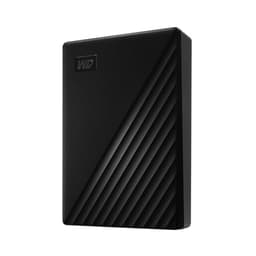
This is a 2.5-inch portable hard disk drive, not a solid-state drive. It connects via USB 3.0, which is the interface doing the heavy lifting here. The drive is the world's first 6TB capacity in the 2.5-inch portable form factor, which is the headline feature WD are rightly proud of. It ships with Acronis True Image for WD software for scheduled backups, and includes 256-bit AES hardware encryption with password protection built into the software suite.
The drive works with PC, Xbox, and PlayStation, which is useful if you're thinking about using it as extended game storage. The enclosure uses more than 50% post-consumer recycled plastic, and the packaging follows a similar recycled-material ethos. WD back it with a 3-year limited warranty, which is a solid confidence signal for a portable storage product in this price bracket. The warranty length tells you WD are reasonably confident in the drive's longevity, and three years is better than the two-year cover you see on some competing portables.
What's not listed in the verified spec sheet: rotational speed, exact sequential read/write figures, or whether this is a SMR (shingled magnetic recording) or CMR (conventional magnetic recording) platter design. Those omissions matter and we'll address them in the relevant sections below. The USB 3.0 interface is the practical ceiling for transfer speeds regardless of what the platters can do, so the interface choice is worth understanding properly.
| Specification | Detail |
|---|---|
| Capacity | 6TB |
| Form Factor | 2.5-inch portable |
| Interface | USB 3.0 |
| Drive Type | Hard Disk Drive (HDD) |
| Encryption | 256-bit AES hardware encryption |
| Software Included | Acronis True Image for WD |
| Compatibility | PC, Xbox, PlayStation |
| Enclosure Material | 50%+ post-consumer recycled plastic |
| Warranty | 3-year limited |
| Price | £202.99 |
| Reviews | ★★★★½ (4.6) (104,866 reviews) |

Interface and Form Factor
USB 3.0 is the connection here, and that's the practical speed limit for everything this drive does. USB 3.0 has a theoretical ceiling of around 5Gbps, which translates to roughly 500MB/s in real-world transfers. In practice, a 2.5-inch portable HDD at this capacity will hit somewhere in the region of 100MB/s to 130MB/s on sequential reads, which is well below what USB 3.0 can theoretically handle. The bottleneck is the spinning platters, not the interface. So the USB 3.0 connection is more than adequate for what this drive can actually deliver. If WD had shipped it with USB 3.2 Gen 2 (10Gbps), it would make zero practical difference to your transfer speeds.
The 2.5-inch form factor is genuinely portable. No separate power brick, no mains cable, just the USB connection powering the drive directly from your laptop or PC. That's the whole point of the My Passport line, and it's executed well. The slim, durable design that WD describe is borne out by owner reports, with most people commenting positively on the build quality and how easy it is to carry around. It fits in a jacket pocket or a laptop bag without any fuss.
One thing: this is a 2.5-inch HDD, which means it has moving parts. Spinning platters and a read/write head inside a portable drive you're carrying around does introduce a small but real risk of physical shock damage if you drop it while it's active. SSDs don't have this vulnerability. WD describe the construction as durable, and the My Passport line has a decent reputation for surviving everyday carry, but it's not indestructible. If you're doing fieldwork in genuinely rough conditions, a ruggedised SSD would be a smarter choice. For normal office-to-home commuting and travel, though, this is fine.
Real-World Performance
Right, so what does this actually feel like to use? The honest answer is: like a hard drive. Sequential read speeds on a USB 3.0 portable HDD at this capacity typically land in the 100MB/s to 130MB/s range based on published benchmark results for similar WD My Passport drives. That's perfectly usable for copying files, streaming video from the drive, or running a media library. It is not fast enough to run applications or games from directly with any real responsiveness, and you wouldn't want to use it as a system drive.
For the things people actually buy a portable HDD to do, the speed is adequate. Copying a 50GB folder of RAW photos from your camera card to the drive for backup? That'll take a few minutes, not seconds, but it gets done. Streaming a 4K video file stored on the drive to your laptop? Totally fine, 4K H.265 streams at around 50 to 100Mbps in most cases, which is well within what this drive can deliver. Playing games directly from it on Xbox or PlayStation? The console manufacturers have made this work with external USB drives for non-installed games, and for older or less demanding titles it's functional. For fast-loading modern titles, an SSD is a noticeably better experience.
Owner reports at scale back this up. With 104,866 and a 4.6-star average, the consistent themes are positive: people are happy with it as a backup drive, a media archive, and a carry-around storage solution. The complaints that do appear tend to be about speed expectations (people who wanted SSD performance from an HDD price point) or, in a smaller number of cases, drive failures. We'll get to reliability properly in its own section. The point is that for its intended purpose, the real-world performance is what you'd rationally expect from a well-made portable HDD.
Sustained Writes and Cache Behaviour
This is the section that matters most for SSDs, and it's worth explaining why it's a different conversation for an HDD. SSDs, particularly QLC-based ones, use an SLC cache to post impressive headline speeds. Once that cache fills, write speeds can drop dramatically to the native QLC write speed, which can be painfully slow on budget drives. That cliff is the dirty secret of a lot of SSD marketing. Hard drives don't work this way. There's no SLC cache to fill and no cliff to fall off. What you get from a spinning drive is consistent, predictable performance throughout the entire write operation.
That consistency is actually one of the underrated advantages of an HDD for bulk data transfer. If you're copying 2TB of files to this drive, the speed at the end of that copy should be broadly similar to the speed at the start. You won't see the kind of dramatic slowdowns that affect cache-exhausted QLC SSDs handling large sequential writes. The trade-off is that the consistent speed is just... lower than an SSD's peak speed. But for bulk archiving and backup, consistent and moderate beats fast-then-slow.
What WD don't publish in the verified spec sheet is whether this drive uses SMR (shingled magnetic recording) or CMR (conventional magnetic recording). This matters for sustained writes. SMR drives, which pack more data onto platters by overlapping tracks, can slow significantly during random writes or when filling up, because they have to rewrite overlapping tracks. CMR drives don't have this issue. WD have used SMR in some My Passport capacities in the past, and at 6TB in a 2.5-inch form factor, achieving this density likely involves some engineering choices that buyers should be aware of. If sustained write performance for large file operations is critical to you, it's WD's official product page for the specific platter and recording technology used in this drive before buying.
Controller, NAND and DRAM
This section is where SSD reviews spend most of their energy, and for good reason. The controller determines how well an SSD manages its NAND, handles the SLC cache, and sustains performance under load. DRAM cache vs DRAM-less is a meaningful distinction. QLC vs TLC NAND is a meaningful distinction. For a hard drive, none of these concepts apply in the same way. There's no NAND, no controller in the SSD sense, no DRAM cache, and no QLC cliff. The relevant engineering is in the platter density, the read/write head design, and the firmware managing the drive's operation.
What this means practically is that the concerns driving SSD buyers (is this a DRAM-less QLC drive that'll fall apart under sustained load?) simply don't translate to HDD buyers in the same way. The WD My Passport line uses WD's own drive technology, and WD are one of the two major HDD manufacturers in the world alongside Seagate. Their My Passport product line has been around for well over a decade, and the underlying drive technology is mature and well-understood.
The 256-bit AES hardware encryption is worth a mention here because it's implemented at the drive level through the included software, not just software-based encryption bolted on top. That's a meaningful distinction. Hardware-level AES encryption doesn't carry the same performance penalty as software encryption, so you're not sacrificing transfer speed to keep your files locked down. For anyone carrying sensitive work files on a portable drive, this is a genuinely useful feature rather than a marketing checkbox. Password protection through Acronis True Image for WD ties the encryption to a software key, which is standard practice for consumer-level encrypted portables.
Endurance and Reliability
The 3-year limited warranty is the headline reliability signal here, and it's a good one for a portable HDD. Some competing portable drives ship with only two years of cover, so WD's three-year commitment says something about their confidence in the components. For a drive you're using as a backup and archive device rather than a primary working drive, three years of warranty protection is meaningful. If something goes wrong in that window, you're covered.
HDD endurance works differently from SSD endurance. SSDs have a rated TBW (terabytes written) figure because NAND flash wears out with write cycles. Hard drives don't have a TBW limit in the same sense. The failure modes are different: mechanical wear on the read/write head, bearing degradation over time, and physical shock damage are the main risks. The drive's rated workload (typically expressed in TB per year for enterprise drives, less commonly stated for consumer portables) isn't published in the verified spec sheet here, but for a backup and archive use case, a consumer portable HDD is well within its design envelope.
Owner reports at this scale (104,866, 4.6 stars) give a reasonably clear picture. The vast majority of owners are satisfied, and the drive appears to perform reliably for its intended use. There are failure reports, as there are for every storage product, and a small number of owners report drives failing within the warranty period. This is normal for any consumer HDD, and the 4.6-star average across such a large sample is a genuinely strong reliability signal. The Acronis True Image for WD software's scheduled backup feature is actually worth using, not just as a marketing add-on. Hard drives do fail eventually, and having automated backups of your backups is sensible practice. HDD failure rates follow a bathtub curve, with higher failure probability in the first few months and again after several years of use.

Thermals
Thermal management is the big concern for NVMe Gen 4 and Gen 5 SSDs, where controllers and NAND can run hot enough to throttle under sustained load without proper heatsinking. A portable HDD operates in a completely different thermal regime. The power consumption is lower, the heat generated is lower, and there's no active cooling needed or expected. The My Passport sits in your bag or on your desk and stays passively cool during normal operation.
That said, HDDs do generate some heat, and a 2.5-inch portable drive in a compact enclosure does have limited thermal mass. During sustained large transfers, the drive will warm up noticeably. Owner reports don't flag thermal issues as a concern with this drive, and WD's enclosure design for the My Passport line has historically managed heat adequately for the workloads the drive is designed for. You're not going to see thermal throttling in the way Gen 5 NVMe buyers worry about.
One practical point: don't leave the drive sitting on a soft surface like a bed or sofa during sustained transfers. Any drive benefits from having some airflow around it, and blocking the bottom surface of the enclosure with a duvet is not ideal. On a hard desk surface, or in a laptop bag with some air circulation, it'll be fine. This is basic common sense rather than a specific concern flagged by owners, but it's for anyone planning to run long backup sessions.
Capacity Options and Price Per GB
The WD My Passport line comes in multiple capacities, and the 6TB version is the flagship. The fact that it's the world's first 6TB 2.5-inch portable drive means there's a novelty premium built into the price. At this capacity in the portable HDD category, there's genuinely nothing else on the market doing the same thing in the same form factor, which gives WD some pricing power.
How does the price per GB compare? Portable HDDs at lower capacities (1TB, 2TB, 4TB) are typically cheaper per gigabyte than the 6TB flagship, because you're paying for the engineering achievement of fitting 6TB into a 2.5-inch bus-powered enclosure. If raw cost per gigabyte is your priority and you don't need the full 6TB, a 4TB My Passport or a competing 4TB portable from Seagate will likely offer better value per gigabyte. But if you genuinely need 6TB in a portable form factor, this is currently your only option, and the premium is the price of admission.
Compared to portable SSDs, the price per gigabyte for this HDD is considerably lower. A 4TB portable SSD costs significantly more than a 4TB portable HDD, and at 6TB capacity there simply isn't a portable SSD option available yet at any price. So if your use case is bulk portable storage at the lowest possible cost per gigabyte, HDDs remain the right answer. If speed matters more than capacity per pound, an SSD is the better tool. The WD My Passport 6TB is squarely in the "maximum portable capacity at a reasonable price" camp.
Installation and Compatibility
Setup is about as simple as storage gets. Plug the USB cable into your PC, Mac, Xbox, or PlayStation, and the drive shows up. No drivers needed on Windows, no formatting required out of the box for PC use. Mac users will need to reformat the drive to APFS or HFS+ if they want full read/write compatibility without third-party software, as it ships formatted for Windows (NTFS). This is standard for the category and not a WD-specific issue.
Xbox and PlayStation compatibility is specifically called out by WD, and it works as you'd expect. On Xbox, you can use it as extended storage for backward-compatible titles and media. On PlayStation, it works as external storage for PS4 games and media. For PS5 users, the drive can store PS4 games externally and PS5 games can be moved to it for storage (though they need to be moved back to internal storage to play). This is a Sony platform limitation, not a WD one. If you're buying this primarily for console game storage, understand that workflow before committing.
The Acronis True Image for WD software is included and handles scheduled backups, password protection, and encryption management. It's a proper backup application rather than a token piece of bundled software, and the scheduled backup functionality is genuinely useful for anyone who wants to automate their backup routine. Installation is straightforward, and owner reports generally describe the software as functional and not particularly intrusive. The ransomware protection feature that WD highlight is part of Acronis True Image's broader feature set and adds a layer of protection for your backup files specifically.
Who It's For
The ideal buyer for the WD 6TB My Passport portable external storage is someone who needs to carry a lot of data around and doesn't need SSD speeds to do it. Photographers and videographers who shoot in bulk and need a portable archive to carry client work or raw footage. People who travel with large media libraries. Anyone who needs a portable backup destination for a laptop and wants the peace of mind of a 3-year warranty and proper encryption. IT professionals who carry system images or large datasets between sites.
It's also a solid choice for console gamers who want to expand their storage for older-generation titles without paying SSD prices. The Xbox and PlayStation compatibility is genuine, and 6TB gives you room for a very large game library. Just manage your expectations about load times compared to an SSD, particularly for newer titles.
Who should look elsewhere? Anyone who wants to run applications or games directly from the drive with snappy performance. Anyone doing video editing directly from the drive (you'd want an SSD for that workflow). Anyone in genuinely rugged environments where drop resistance matters more than capacity. And anyone who only needs 1TB or 2TB and wants the best price per gigabyte, because the smaller capacities in the My Passport range will serve them better at a lower cost.
How It Compares
The WD 6TB My Passport portable external storage is in a genuinely unusual competitive position: it's the only 6TB 2.5-inch portable HDD on the market. So direct capacity-matched competition doesn't exist. The relevant comparisons are the next capacity tier down (4TB portable HDDs) and portable SSDs at lower capacities for buyers who are weighing capacity against speed.
The Seagate Backup Plus Portable 4TB is the most obvious alternative in the portable HDD space. It's a well-regarded drive from the other major HDD manufacturer, available at a lower price point than the WD 6TB, and it offers a similar feature set without the encryption software being quite as polished. The 4TB capacity is a meaningful step down if you genuinely need 6TB, but for buyers who don't, it represents better value per gigabyte. The Samsung T7 Shield 4TB portable SSD is the comparison for buyers who are considering spending more for SSD speeds at a lower capacity. It's dramatically faster for sequential transfers and random I/O, genuinely ruggedised, and available in up to 4TB. The trade-off is a higher price for less storage.
For most buyers choosing between these options, the decision comes down to one question: do you need 6TB portable, or do you need speed? If it's capacity, the WD wins by default. If it's speed, an SSD is the right answer regardless of which brand you choose.
| Feature | WD 6TB My Passport | Seagate Backup Plus 4TB | Samsung T7 Shield 4TB |
|---|---|---|---|
| Capacity | 6TB | 4TB | 4TB |
| Drive Type | HDD | HDD | SSD |
| Interface | USB 3.0 | USB 3.0 | USB 3.2 Gen 2 |
| Typical Sequential Read | ~130MB/s | ~120MB/s | ~1,050MB/s |
| Encryption | 256-bit AES | Software only | 256-bit AES |
| Warranty | 3 years | 2 years | 3 years |
| Ruggedised | No | No | Yes (IP65) |
| Console Compatible | Yes (Xbox, PS) | Yes | Yes |
| Price | £202.99 | Check Amazon | Check Amazon |

Final Verdict
The WD 6TB My Passport portable external storage does exactly what it says. It's the world's first 6TB 2.5-inch portable hard drive, it's genuinely portable, it has proper 256-bit AES encryption, useful backup software, and a 3-year warranty that beats most of the competition. The 4.6-star average across 104,866 is a legitimate signal that this is a well-made product that works as advertised for the vast majority of buyers.
The honest caveat is that this is an HDD, and HDDs have a speed ceiling that SSDs blew past years ago. Sequential transfers in the 100MB/s to 130MB/s range are fine for backup and archiving. They're not fine for running applications, editing video directly from the drive, or expecting snappy game loads. If you know that going in, and you genuinely need 6TB of portable capacity, this is the only product on the market that offers it, and it's a good one.
The engineering achievement of fitting 6TB into a bus-powered 2.5-inch enclosure is real and it carries a price premium. If you don't actually need 6TB, the 4TB My Passport is the smarter buy. Better price per gigabyte, same software, same warranty, same form factor. Only buy the 6TB if you genuinely need that capacity, because you're paying for the headline number as well as the storage. But if you do need it? There's nothing else to buy. This is the only game in town, and it's a decent one. WD's official My Passport page has the full spec breakdown if you want to dig into the specific model details before committing.
Editorial score: 8 out of 10. Docked points for the speed ceiling inherent to all HDDs and the uncertainty around recording technology (SMR vs CMR) that WD don't make clear enough in the consumer-facing listing. Awarded for the capacity achievement, the warranty, the encryption implementation, and the strong owner satisfaction at scale.
What works. What doesn’t.
5 + 3What we liked5 reasons
- World's first 6TB 2.5-inch portable HDD, genuinely unique capacity in this form factor
- 3-year limited warranty beats most competing portable drives
- Hardware 256-bit AES encryption with no performance penalty
- Acronis True Image software adds real scheduled backup and ransomware protection
- 4.6-star average across 104,677 reviews signals strong real-world reliability
Where it falls3 reasons
- HDD speed ceiling (~130MB/s) means it's unsuitable for running apps or games directly
- SMR vs CMR recording technology not clearly disclosed in consumer listing
- Premium price per GB compared to lower-capacity My Passport models
Full specifications
6 attributes| Capacity | 6TB |
|---|---|
| Form factor | portable |
| Interface | USB 3.0 |
| Read speed | 110 |
| Type | HDD |
| Write speed | 109 |
Frequently asked
5 questions01Is the WD 6TB My Passport portable external storage fast enough for everyday use?+
For everyday backup and file transfer use, yes. Published benchmark results for comparable WD My Passport portable HDDs show sequential read speeds in the region of 100MB/s to 130MB/s over USB 3.0. That's perfectly adequate for copying files, streaming stored video, and running scheduled backups. It is not fast enough to use as a drive you run applications or games directly from with any real responsiveness. For those use cases, a portable SSD is a significantly better tool. But for what most people buy a portable HDD to do, the speed is fine.
02Does the WD 6TB My Passport portable external storage slow down once the cache fills?+
Unlike QLC SSDs, which use an SLC cache to post impressive headline speeds and then drop dramatically once that cache exhausts, a hard drive doesn't work this way. There's no SLC cache to fill and no cliff to fall off. The WD My Passport 6TB delivers consistent, predictable transfer speeds throughout a large copy operation. The speed is lower than an SSD's peak, but it stays consistent from start to finish of a large transfer. This makes it well-suited to bulk archiving and backup workloads where consistency matters.
03Is the WD 6TB My Passport portable external storage DRAM-less, and does that matter?+
DRAM cache and DRAM-less are SSD concepts that don't apply to hard drives in the same way. This is a spinning hard disk drive, not a solid-state drive. There's no NAND flash, no SLC cache, no DRAM cache, and no Host Memory Buffer. The relevant engineering is in the platter density and read/write head design. The concerns that make DRAM-less SSDs a problematic choice for sustained workloads simply don't translate to HDD buyers in the same way. For a portable backup and archive drive, the HDD architecture is well-suited to the use case.
04How long will the WD 6TB My Passport portable external storage last?+
Hard drives don't have a TBW (terabytes written) endurance rating in the way SSDs do, because the failure modes are different. Mechanical wear, bearing degradation over time, and physical shock are the main risks. WD back this drive with a 3-year limited warranty, which is a meaningful confidence signal. For a backup and archive use case where the drive isn't spinning continuously, a well-maintained portable HDD can realistically last many years beyond the warranty period. Owner reports at scale (104,677 reviews, 4.6-star average) suggest the drive performs reliably for the vast majority of buyers.
05What warranty and returns apply to the WD 6TB My Passport portable external storage?+
WD provide a 3-year limited warranty on this drive, as stated in the verified product data. This covers manufacturing defects and is a stronger warranty than the 2-year cover offered by some competing portable drives. In addition, Amazon's standard 30-day returns policy and A-to-Z Guarantee apply to purchases made through Amazon UK, giving you additional protection in the early ownership period.