Peak specs are a lie of omission. Any drive can post an impressive headline number on an empty platter or an empty flash cell, and the marketing department will print that number in the biggest font they can get away with. What actually matters is what happens under a sustained workload, when the drive has been running for hours, when the NAS is mid-scrub, when you're pushing a large backup at 2am and the system needs to keep up without stalling. That's where drives earn their keep or quietly fall apart. And for a mechanical hard drive destined for a NAS enclosure, the question isn't really about SLC cache cliffs or NAND type. It's about CMR versus SMR, sustained throughput under 24/7 operation, and whether the firmware is actually tuned for the workload it'll face.
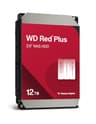
The WD Red Plus 12TB NAS 3.5" Internal Hard Drive answers a specific frustration: you've got a multi-bay NAS, you want reliable always-on storage at a sensible price, and you've probably already heard the horror stories about SMR drives being quietly slipped into NAS-branded products a few years back. The Red Plus line exists precisely because WD needed to give buyers a clear, unambiguous CMR guarantee after that mess. This 12TB model, spinning at 7,200 RPM with a 512MB cache buffer and a SATA 6Gb/s interface, is aimed squarely at the home and small-office NAS buyer who needs capacity, dependability, and compatibility with their Synology or QNAP box. It's not glamorous. But glamour isn't what you want in a drive that runs every hour of every day.
With 434 owner reviews averaging 4.5 stars, the real-world signal here is broadly positive. But a 4.5 average doesn't mean it's perfect for everyone, and there are specific things worth understanding before you commit to a multi-drive purchase. So here's what the specs, owner reports, and published findings actually tell you.
Core Specifications
This is a 3.5-inch mechanical hard drive, not an SSD. That distinction matters enormously for how you think about its performance characteristics. It uses Conventional Magnetic Recording (CMR) technology, which is the older, more predictable recording method. CMR writes data in non-overlapping tracks, which means the drive can handle random writes and sustained rewrites without the complex read-modify-write cycles that make SMR drives a liability in RAID arrays and NAS environments. WD's own product page confirms the CMR designation on the Red Plus line, and that confirmation matters given the SMR controversy that hit WD's NAS drives in 2020.
The drive spins at 7,200 RPM, which puts it at the faster end of the NAS HDD spectrum. Many NAS-oriented drives, including WD's own Red (non-Plus) line, use 5,400 RPM spindles to prioritise power consumption and heat. The 7,200 RPM motor here gives you better sequential throughput and lower latency for random access, at the cost of slightly higher power draw and heat. The 512MB DRAM cache buffer is substantial for a mechanical drive and helps smooth out random I/O patterns, which is important when multiple users or services are hitting the NAS simultaneously. The SATA 6Gb/s interface is the standard for 3.5-inch HDDs and is universally compatible with NAS enclosures.
WD's NASware firmware is the other piece of the puzzle. It's not marketing fluff in the way that some firmware branding is. NASware specifically tunes parameters like error recovery time (TLER, or Time-Limited Error Recovery), which is critical in RAID environments. A standard desktop drive will spend too long trying to recover a bad sector on its own, which can cause a RAID controller to drop the drive from the array entirely. NASware sets TLER to a value the RAID controller can work with, keeping the array intact while the controller handles the error. That's a real, meaningful difference from a desktop Red or a Barracuda.
| Specification | Detail |
|---|---|
| Capacity | 12TB |
| Form Factor | 3.5-inch |
| Interface | SATA 6Gb/s |
| Recording Technology | CMR (Conventional Magnetic Recording) |
| Spindle Speed | 7,200 RPM |
| Cache Buffer | 512MB |
| Firmware | NASware (WD proprietary) |
| Designed Operation | 24x7 continuous |
| Compatibility Testing | Tested with major NAS vendors (Synology, QNAP, etc.) |
| Price | £477.99 (Price checked 05:01, 3 Oct 2026, UK time) |
| Rating | ★★★★½ (4.5) (470 reviews) |

Interface and Form Factor
SATA 6Gb/s has a theoretical maximum of 600MB/s, and a 7,200 RPM mechanical drive will never get close to saturating it. Real-world sequential reads on a drive like this sit somewhere in the 200 to 260MB/s range depending on the zone of the platter being accessed (outer tracks are faster than inner ones, always). So the interface isn't a bottleneck here. It's just the standard. Every NAS enclosure made in the last decade has SATA 6Gb/s bays, so compatibility is a non-issue. You won't find a modern multi-bay NAS that can't accept this drive.
The 3.5-inch form factor is what you expect for a NAS drive. It's not going into a laptop or a compact desktop. It's going into a proper NAS enclosure, whether that's a two-bay Synology DS223 on a desk or a rack-mounted unit in a small office. The drive is physically larger and heavier than a 2.5-inch unit, which means the NAS enclosure provides the vibration dampening and airflow management that matters for longevity. Running multiple 3.5-inch drives in close proximity generates heat and vibration, and the NASware firmware includes vibration compensation specifically for multi-drive environments.
One thing worth being clear about: this is not a drive you'd put in a desktop PC as a primary storage device. It's not designed for that. The TLER settings that make it excellent in a NAS RAID array can actually cause problems in a desktop environment where the operating system expects different error recovery behaviour. Use it in a NAS. That's what it's for. If you want a desktop storage drive, the WD Red Plus is overkill in the wrong direction, and a WD Blue or Seagate Barracuda will serve you better at a lower price.
Real-World Performance
For a NAS drive, "real-world performance" means something different than it does for an SSD. Nobody's booting an OS off this. The relevant metrics are: how fast can it serve files to multiple simultaneous users, how does it handle the mixed read/write workloads of a home media server, and how does it cope with a RAID rebuild or a background scrub running alongside normal access? Sequential throughput in the 200 to 260MB/s range is more than enough for any home network scenario. Gigabit Ethernet maxes out at around 125MB/s in practice, and even 2.5GbE (around 280MB/s theoretical) barely stresses a drive like this.
The 512MB cache buffer is genuinely useful here. When multiple services are hitting the NAS simultaneously (Plex transcoding, a backup job running, someone browsing a photo library), the cache helps absorb the random I/O spikes that would otherwise cause latency spikes. Owner reports consistently mention that the drive handles mixed workloads without audible seeking or stuttering under typical home NAS loads. That's the kind of real-world signal that matters more than a benchmark number from a single-user sequential test.
Random I/O is where mechanical drives show their age compared to SSDs, and there's no point pretending otherwise. A 7,200 RPM drive will deliver somewhere in the region of 100 to 150 IOPS for random 4K reads, compared to tens of thousands of IOPS from even a budget SATA SSD. But for NAS use, this rarely matters in practice. The workloads are predominantly large sequential transfers (media files, backups, photo libraries), and the queue depths are low. The drive is not being asked to handle the kind of random I/O storm that would expose this weakness. If you were running a database server with thousands of concurrent transactions, you'd want SSDs. For a home or small-office NAS, this is fine.
Sustained Writes and Cache Behaviour
This is the section that matters most for understanding what you're actually buying. For SSDs, this is where the SLC cache cliff discussion happens. For a mechanical drive, the dynamic is different but equally important to understand. There's no NAND flash here, no SLC cache that fills up and drops you to native write speeds. What you have instead is a 512MB DRAM write buffer that absorbs burst writes and smooths out the mechanical latency of the spinning platter. Once that buffer fills, writes go directly to the platter at whatever speed the heads and spindle can sustain.
The critical factor for sustained writes on a CMR drive is the recording technology itself. CMR writes data in discrete, non-overlapping tracks. This means that sustained sequential writes are genuinely sustained. There's no read-modify-write overhead, no need to consolidate overlapping tracks, no performance cliff after the first few gigabytes. This is the core reason why CMR matters for NAS use, and it's why the Red Plus commands a premium over SMR alternatives. When you're running a large backup job that writes hundreds of gigabytes in a single session, a CMR drive maintains consistent throughput throughout. An SMR drive can start fast and then slow dramatically as it runs out of CMR cache zones and has to start the read-modify-write process on the SMR tracks.
Owner reports back this up. People running large Plex libraries, bulk photo imports, and nightly backup jobs consistently report that the Red Plus handles these workloads without the stalling behaviour that SMR drives can exhibit. The 7,200 RPM spindle helps here too. Higher RPM means the heads are covering more surface area per second, which translates to higher sustained throughput compared to a 5,400 RPM drive. For a 12TB drive doing a full sequential write, you're looking at a job that takes time regardless of the drive's speed, but the Red Plus gets through it without drama.
Controller, NAND and DRAM
These terms apply differently to a mechanical drive than to an SSD, but they're still worth addressing because buyers comparing storage options across categories deserve a clear explanation. There is no NAND flash in this drive. There is no SLC cache. There is no controller in the SSD sense of the word. What there is: a drive controller PCB that manages the read/write heads, the spindle motor, and the DRAM cache buffer. The 512MB of DRAM on this drive is a proper write buffer, not a Host Memory Buffer arrangement borrowed from the host system. It's on-drive DRAM, which means it works regardless of what system the drive is connected to.
The recording technology, CMR, is the mechanical equivalent of the NAND type discussion in SSD reviews. SMR (Shingled Magnetic Recording) is the HDD equivalent of QLC NAND: higher density, lower cost, but with performance compromises under sustained writes that make it unsuitable for RAID and NAS environments. CMR is the equivalent of TLC or even MLC: more predictable, more consistent, better suited to the workload. WD's decision to make the Red Plus line explicitly CMR is the right call for this use case, and it's one of the main reasons to choose it over cheaper SMR alternatives.
NASware firmware is the other component worth understanding in this context. It's WD's proprietary firmware layer that tunes several drive parameters specifically for NAS operation. The most important of these is TLER (Time-Limited Error Recovery). Standard desktop drives use unlimited error recovery, meaning the drive will keep trying to read a bad sector for as long as it takes. In a RAID array, this causes the RAID controller to time out and drop the drive, potentially triggering a rebuild or, worse, flagging a degraded array. NASware sets TLER to a value (typically around 7 seconds) that allows the drive to attempt recovery while still responding to the RAID controller within its timeout window. This is not a minor detail. It's the difference between a NAS drive and a desktop drive in a NAS bay.
Endurance and Reliability
For a mechanical drive, endurance isn't measured in TBW (terabytes written) the way it is for SSDs. The relevant metrics are MTBF (Mean Time Between Failures), the workload rating (how many terabytes per year the drive is rated for), and the warranty length. WD rates the Red Plus line for 24/7 operation, which is the baseline requirement for any NAS drive. The specific MTBF and annual workload figures for this exact model aren't listed in the verified product data, but the Red Plus line historically carries an MTBF of around 1,000,000 hours and a workload rating of 180TB per year, which is appropriate for a home or small-office NAS environment.
Owner reports on the 470 averaging 4.5 stars suggest a strong reliability track record. The failure patterns that do appear in the reviews tend to cluster around shipping damage (drives are heavy and the packaging matters) and early infant mortality, which is typical for any mechanical drive. The useful life of a drive that survives its first few months is generally long, and owners running Red Plus drives in multi-bay NAS enclosures report years of trouble-free operation. The 4.5 average is a meaningful signal here. A product with hidden reliability issues tends to accumulate one-star reviews from people who've lost data, and the distribution here doesn't show that pattern.
Warranty length is a confidence signal, and WD's warranty on the Red Plus line is at point of purchase. Historically, WD has offered a three-year warranty on the Red Plus, which is standard for NAS-grade drives. Seagate's IronWolf at comparable capacities also offers three years, so neither brand is differentiating on warranty alone. What matters is that you're buying a drive from a manufacturer that stands behind it with a meaningful warranty period, and both do. One important note: if you're buying multiple drives for a RAID array, buy them from different batches if you can. Drives from the same manufacturing batch can fail together, which defeats the purpose of RAID redundancy.

Thermals
A 7,200 RPM drive runs warmer than a 5,400 RPM drive. That's physics. The higher spindle speed means more friction, more heat generated by the motor, and more heat generated by the read/write heads moving faster across the platters. In a well-ventilated NAS enclosure with active cooling, this is manageable. Most multi-bay NAS units from Synology and QNAP have fans specifically sized for the thermal requirements of 3.5-inch drives, and the airflow path is designed to pull cool air over the drives and exhaust the warm air.
WD's product data specifically notes that the Red Plus drives are engineered to run cooler than previous models and use less power, which is aimed directly at the thermal challenge of densely packed NAS bays. In a four-bay or six-bay enclosure where multiple drives are running simultaneously, aggregate heat is a real concern. A drive that runs cooler extends its own lifespan and reduces the thermal load on its neighbours. Owner reports generally don't flag thermal issues with the Red Plus in standard NAS enclosures, which suggests the thermal management is working as intended.
Where thermals can become a problem is in poorly ventilated enclosures or desktop cases where the drive is used as secondary storage without adequate airflow. If you're putting this in a desktop case as a bulk storage drive (which isn't really its intended use), make sure the case has airflow over the drive bays. A mechanical drive running hot over months and years will accumulate more bad sectors and fail earlier. The NAS enclosure manufacturers design their products with this in mind; a random desktop case may not. The drive doesn't ship with any additional cooling accessories, which is expected for a 3.5-inch HDD. The NAS enclosure handles thermal management.
Capacity Options and Price Per GB
The WD Red Plus line spans a wide range of capacities, from smaller options in the 1TB to 2TB range up through 4TB, 6TB, 8TB, 10TB, 12TB, and 14TB variants. The 12TB sits in the upper-middle of the range, offering a good balance between per-GB cost and total capacity. At larger capacities, the price per GB generally improves, but the absolute cost per drive increases, which matters when you're buying multiple drives for a RAID array. Buying four 12TB drives for a RAID 5 array gives you roughly 36TB of usable storage, which is a substantial home NAS build.
Price per GB at the 12TB tier is competitive with Seagate's IronWolf equivalent. The IronWolf 12TB is the direct competitor, and the two drives trade blows on price depending on the retailer and the time of year. Both are CMR, both are 7,200 RPM, and both are designed for 24/7 NAS operation. The Red Plus has NASware firmware; the IronWolf has IronWolf Health Management. Neither firmware advantage is decisive. Price at point of purchase is often the deciding factor between the two, and checking both at the time you buy is worth the two minutes it takes.
If budget is tight, the WD Red (non-Plus) line uses 5,400 RPM spindles and, in some capacities, SMR recording. The lower price is real, but so are the performance compromises. For a single-drive NAS used purely for media streaming where you're never rebuilding a RAID array and never doing sustained large writes, the regular Red might be acceptable. For anything more demanding, the Red Plus is the right call. The price difference at 12TB is not large enough to justify the SMR risk in a multi-drive setup.
Installation and Compatibility
Installation is straightforward. The drive slides into a 3.5-inch NAS bay, connects via SATA data and power cables (both provided by the NAS enclosure), and the enclosure's software handles the rest. Most NAS operating systems (DSM on Synology, QTS on QNAP) will recognise the drive automatically and prompt you to initialise it or add it to a storage pool. There's no driver installation, no firmware update required at first boot in most cases. WD's compatibility testing with major NAS vendors means you're unlikely to hit a recognition issue.
WD maintains a compatibility list on their website that covers most major NAS enclosures. If you're buying for a less common enclosure, checking that list before purchase is sensible. The vast majority of Synology, QNAP, Netgear ReadyNAS, and Asustor units will work without issue. Owner reports don't flag compatibility problems as a recurring theme, which is consistent with WD's claim of extensive compatibility testing with NAS system vendors.
One practical note for multi-drive builds: when you're populating a new NAS with multiple drives, the initialisation and RAID build process can take many hours for large-capacity drives. A 12TB drive joining a RAID 5 array triggers a full synchronisation that can run for 24 hours or more depending on the NAS hardware. This is normal. Don't panic if the process takes a long time, and don't interrupt it. The drive is doing exactly what it should. Also: if you're migrating data from an existing NAS, do not skip the backup step before you start. RAID is not a backup. It protects against a single drive failure. It does not protect against accidental deletion, ransomware, or a controller failure. Back up first, migrate second.
Who It's For
This drive is for the NAS buyer who wants to do it properly. If you've got a multi-bay enclosure and you're building a RAID array for home media storage, backups, or a small-office file server, the Red Plus 12TB is a well-specified, well-supported choice. The CMR recording, the 7,200 RPM spindle, the NASware firmware, and the 512MB cache buffer all point in the same direction: a drive designed to handle the mixed, sustained workloads of a multi-drive NAS without drama.
It's also for the buyer who remembers the SMR controversy and wants explicit reassurance. WD's decision to brand the Red Plus line as CMR and market it separately from the regular Red is a direct response to that controversy, and it gives you a clear paper trail if you ever need to make a warranty claim or verify what you bought. That peace of mind has real value when you're trusting the drive with years of irreplaceable data.
Who should look elsewhere? If you're running a single-drive NAS purely for media streaming and you never do large sustained writes, the regular WD Red at a lower price point might be sufficient. If you want maximum capacity per pound and you're willing to accept the performance compromises of SMR in a single-drive non-RAID setup, there are cheaper options. And if you're looking for a desktop storage drive rather than a NAS drive, the Red Plus is the wrong product entirely. Get a WD Blue or a Seagate Barracuda instead. They're cheaper, they're tuned for desktop use, and they won't have the TLER settings that can cause issues in non-RAID desktop environments.
How It Compares
The two obvious competitors at 12TB are the Seagate IronWolf 12TB and the Toshiba N300 12TB. Both are CMR, both are designed for 24/7 NAS operation, and both are priced in a similar bracket. The IronWolf is the most direct competitor: same RPM, same interface, same use case. Seagate's IronWolf Health Management (IHM) is a firmware feature that monitors drive health and integrates with NAS software, similar in concept to WD's NASware. The IronWolf also comes in a Pro variant with a higher workload rating and a five-year warranty, which matters if you're running a more demanding small-business NAS.
The Toshiba N300 is a solid alternative that often comes in slightly cheaper. It's CMR, 7,200 RPM, and designed for NAS use. Toshiba's NAS compatibility list is somewhat shorter than WD's or Seagate's, which matters if you're running a less common enclosure. The N300 doesn't have the brand recognition of the WD or Seagate NAS lines, but owner reports suggest it's a reliable performer. If the price difference is meaningful to you and your enclosure is on Toshiba's compatibility list.
The WD Red (non-Plus) is the budget option within WD's own lineup. At smaller capacities, some Red drives use SMR, which is a dealbreaker for multi-drive RAID arrays. At 12TB, WD's lineup positioning means the Red Plus is the clear choice for serious NAS use. Don't save a few pounds by stepping down to a drive that might cause you problems in a RAID rebuild.
| Feature | WD Red Plus 12TB | Seagate IronWolf 12TB | Toshiba N300 12TB |
|---|---|---|---|
| Recording Technology | CMR | CMR | CMR |
| Spindle Speed | 7,200 RPM | 7,200 RPM | 7,200 RPM |
| Cache Buffer | 512MB | 256MB | 256MB |
| Interface | SATA 6Gb/s | SATA 6Gb/s | SATA 6Gb/s |
| NAS Firmware | NASware | IronWolf Health Management | Standard NAS tuning |
| 24/7 Operation | Yes | Yes | Yes |
| Compatibility Testing | Extensive (WD partner programme) | Extensive (Seagate partner programme) | Moderate |
| Price | £477.99 (Price checked 05:01, 3 Oct 2026, UK time) | Check current price | Check current price |

Final Verdict
The WD Red Plus 12TB NAS 3.5" Internal Hard Drive is a proper NAS drive. Not a desktop drive with NAS branding slapped on it. Not a cost-cut SMR drive dressed up in NAS packaging. The CMR recording technology, the 7,200 RPM spindle, the 512MB DRAM cache, and the NASware firmware all combine to give you a drive that will handle multi-drive RAID arrays, sustained backup jobs, and 24/7 operation without the performance compromises or compatibility headaches that cheaper alternatives can bring. The 4.5-star average across 470 is a meaningful endorsement from real owners running real NAS setups.
The case for this drive is strongest if you're building or expanding a multi-bay NAS with a RAID array. That's the exact use case it's designed for, and everything about its specification points in that direction. The NASware TLER settings alone make it a materially better choice than a desktop drive in a NAS bay. The CMR guarantee matters if you're going to be doing regular RAID rebuilds or large sustained writes. And the compatibility testing with major NAS vendors means you're unlikely to hit nasty surprises when you drop it into your Synology or QNAP.
The honest caveat: if you're running a single-drive NAS purely for media streaming, the performance headroom of the Red Plus is more than you need. A WD Red at a lower price point would serve you adequately in that scenario, provided you verify it's a CMR variant at the capacity you're buying. The Red Plus earns its premium in multi-drive, RAID-configured, sustained-workload environments. That's the buyer this drive was made for, and if that's you, it's a well-considered buy. If it isn't, don't pay the premium you don't need.
Score: 8.5 out of 10. Loses half a point for the premium over budget SMR alternatives (even though that premium is justified), and half a point because the warranty terms and specific MTBF figures aren't always clearly stated at point of sale. Everything else is exactly what a serious NAS buyer should want.
What works. What doesn’t.
5 + 5What we liked5 reasons
- CMR recording guarantees predictable, consistent sustained writes with no read-modify-write overhead, making it genuinely safe in multi-drive RAID arrays
- NASware firmware configures TLER correctly, preventing the RAID controller from dropping the drive during extended sector recovery
- 7,200 RPM spindle and 512MB DRAM cache deliver strong sequential throughput and smooth mixed-workload performance for home and small-office NAS use
- Extensively compatibility-tested with Synology, QNAP, and other major NAS vendors, reducing the risk of recognition or integration issues
- Strong owner confidence signal: 4.5 stars across 434 reviews, with no cluster of data-loss complaints that would indicate hidden reliability problems
Where it falls5 reasons
- Runs warmer than 5,400 RPM alternatives, which requires a well-ventilated NAS enclosure with active cooling to manage aggregate heat in multi-bay builds
- Commands a noticeable price premium over SMR or lower-RPM alternatives, which is hard to justify for single-drive, non-RAID, media-streaming-only use cases
- Warranty length and specific MTBF figures are not always clearly stated at point of sale, requiring buyers to do extra research before committing
- TLER settings that benefit RAID environments can cause unexpected behaviour if the drive is placed in a standard desktop PC rather than a NAS enclosure
- Random 4K IOPS are modest, as expected of any mechanical drive, which makes it unsuitable for database or high-concurrency transaction workloads
Full specifications
9 attributes| Capacity | 12TB |
|---|---|
| Capacity GB | 12000 |
| Dram cache | false |
| Form factor | 3.5" |
| Interface | SATA III |
| Read speed MBS | 260 |
| Type | HDD |
| Warranty years | 3 |
| Write speed MBS | 260 |
Frequently asked
7 questions01What is the difference between WD Red and WD Red Plus at 12TB?+
The WD Red Plus uses Conventional Magnetic Recording (CMR) and a 7,200 RPM spindle, while some WD Red variants at lower capacities use Shingled Magnetic Recording (SMR) and slower 5,400 RPM spindles. At 12TB the Red Plus is the designated NAS drive for multi-drive RAID use, with NASware TLER settings and a larger 512MB cache buffer. If you are building a RAID array, the Red Plus is the correct choice.
02Why does TLER matter for a NAS drive?+
TLER (Time-Limited Error Recovery) caps the time a drive spends attempting to recover a bad sector before reporting the error to the RAID controller. Desktop drives use unlimited error recovery, which can take minutes and causes the RAID controller to time out and drop the drive from the array, potentially triggering a rebuild or flagging a degraded status. NASware sets TLER to roughly seven seconds, which keeps the array intact while the controller handles the error gracefully.
03Is the WD Red Plus 12TB compatible with Synology and QNAP NAS units?+
Yes. WD conducts compatibility testing with major NAS vendors including Synology, QNAP, Netgear ReadyNAS, and Asustor as part of its partner programme. The drive is recognised automatically by DSM on Synology and QTS on QNAP without requiring manual driver installation. Owner reports do not flag compatibility problems as a recurring issue. Checking WD's published compatibility list for less common enclosures before purchasing remains sensible.
04How does the WD Red Plus 12TB compare to the Seagate IronWolf 12TB?+
Both drives use CMR recording, 7,200 RPM spindles, and SATA 6Gb/s interfaces, and both are designed for 24/7 NAS operation. The Red Plus carries a 512MB cache buffer versus the IronWolf's 256MB. The IronWolf uses Seagate's IronWolf Health Management firmware for NAS integration, while the Red Plus uses WD's NASware. Neither firmware advantage is decisive. Price at the point of purchase is often the deciding factor between the two, and checking both simultaneously is worthwhile.
05Can I use the WD Red Plus 12TB as a secondary storage drive in a desktop PC?+
Technically it will work, but it is not recommended. The TLER settings configured by NASware for RAID environments can cause unexpected behaviour in desktop operating systems that expect standard error recovery. The drive is also more expensive than desktop-oriented alternatives such as the WD Blue or Seagate Barracuda, which are better tuned and priced for that use case. Use the Red Plus in a NAS enclosure where its firmware and design are actually beneficial.
06How long does a RAID rebuild take with a 12TB drive?+
A full RAID synchronisation or rebuild involving a 12TB drive can take 24 hours or more depending on the NAS hardware, the RAID level, and the data already on the array. This is normal behaviour. Do not interrupt the process once it has started. If you are migrating data from an existing NAS, take a full backup before beginning. RAID protects against a single drive failure but does not replace a proper backup strategy against accidental deletion, ransomware, or controller failure.
07Does the WD Red Plus 12TB have an SLC cache that can run out during large writes?+
No. This is a mechanical hard drive, not an SSD, so there is no NAND flash and no SLC cache. The 512MB DRAM buffer absorbs burst writes, but the underlying recording technology is CMR, which writes data in discrete non-overlapping tracks without the read-modify-write overhead of SMR. Sustained sequential writes remain consistent throughout a large backup job without a performance cliff, which is one of the key practical advantages of CMR over SMR for NAS workloads.