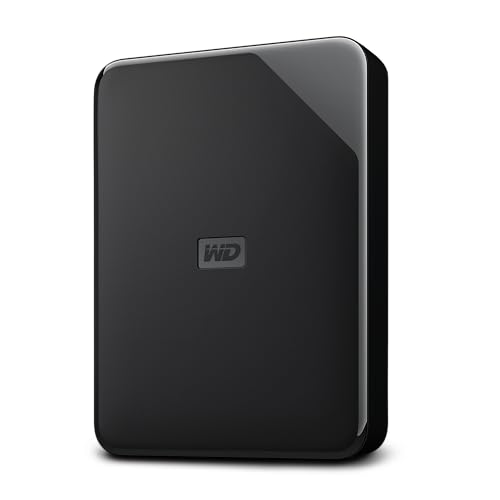
Storage is a promise. Speed is the headline, but what actually matters is whether your drive keeps your files safe, moves data without choking, and doesn't let you down six months in when you've got 3TB of irreplaceable photos sitting on it. The WD 4 TB Elements Portable External Hard Drive is one of the most popular portable drives on Amazon, with tens of thousands of ratings and a positive overall rating. That's not marketing fluff. That's a lot of real people who bought it, used it, and came back to say it worked. So is it any good? Mostly yes. But there are some things before you hand over your money.
The verdict up front: the WD 4 TB Elements Portable is a solid, no-drama external hard drive for anyone who needs a big chunk of portable storage without paying a premium for flash speeds they don't actually need. It's not an SSD. It's not trying to be. It's a spinning hard drive in a pocket-friendly enclosure, and for backing up files, archiving photos, or carrying your media library around, it does the job well. The competition at this capacity is mostly other portable HDDs from Seagate and Samsung, and the WD holds its own on reliability reputation and price per GB. If you need genuine SSD speeds for working on files directly from the drive, you want something else. But if you need 4TB of reliable portable storage at a sensible price, this is one of the easiest recommendations in this category.
Core Specifications: WD 4 TB Elements Portable External Hard Drive
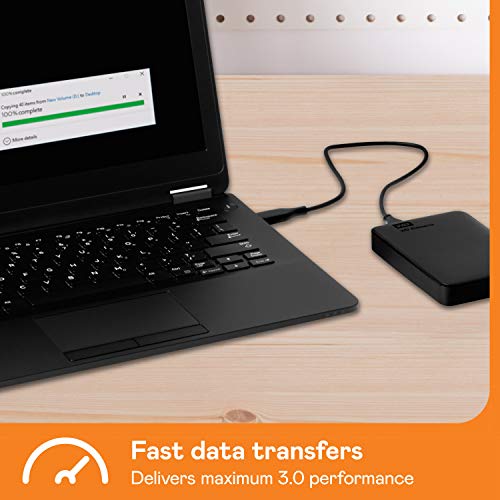
This is a 2.5-inch portable hard drive, bus-powered over USB, which means no separate power brick needed. The interface is USB 3.2 Gen 1 (marketed on the listing as USB 3.0, which is the same standard under an older name), delivering theoretical transfer speeds up to 5Gbps. In practice, you won't hit anywhere near that ceiling with a spinning platter drive, but the interface is fast enough that it's never the bottleneck. The drive itself is formatted for Windows out of the box, though it can be reformatted for Mac or used with both via exFAT without much hassle.
The capacity tops out at 6TB in this product family, with the 4TB being one of the more popular sweet spots for price versus storage. The enclosure uses more than 50% post-consumer recycled plastic, which is a nice touch from an environmental standpoint and doesn't affect performance one way or the other. WD includes backup software that you download separately, with scheduling options for hourly, daily, or monthly backups. That's genuinely useful for anyone who wants set-and-forget protection without paying for a cloud subscription.
Worth being clear about what's inside: this is a mechanical hard drive, not a solid-state drive. There's no NAND, no controller in the SSD sense, no DRAM cache for flash management, no TBW endurance rating in the way SSDs have one. The performance characteristics are completely different from an NVMe or SATA SSD. Sequential reads will be in the region of 100 to 130MB/s under real conditions, which is typical for a 2.5-inch portable HDD. Random I/O is where mechanical drives fall behind flash storage significantly, and that matters if you're doing anything beyond sequential file transfers.
| Specification | Detail |
|---|---|
| Capacity | 4TB (also available up to 6TB) |
| Drive Type | Portable HDD (2.5-inch mechanical) |
| Interface | USB 3.2 Gen 1 (USB 3.0) |
| Bus Powered | Yes, via USB (no separate power adapter) |
| Form Factor | 2.5-inch portable enclosure |
| File System (default) | NTFS (formatted for Windows) |
| Backup Software | Yes, downloadable, hourly/daily/monthly scheduling |
| Enclosure Material | Over 50% post-consumer recycled plastic |
| Plug-and-Play | Yes |
| Star Rating | ★★★★½ (4.6) (287,162 reviews) |

Interface and Form Factor
USB 3.2 Gen 1 at 5Gbps is more than adequate for a spinning hard drive. The mechanical platters inside a 2.5-inch portable HDD physically cannot push data fast enough to saturate even USB 3.0, so the interface is never the limiting factor here. You'll see sequential read speeds somewhere in the 100 to 130MB/s range under typical conditions, which is the ceiling of what the spinning platters can deliver, not the cable. If WD had put a USB 2.0 connection on this, that would be a problem. USB 3.2 Gen 1 is perfectly matched to the drive's actual capability.
The 2.5-inch form factor means it's genuinely portable. No external power supply, no bulky enclosure, just the drive and a USB cable. It'll fit in a jacket pocket, a camera bag, a laptop sleeve. That bus-powered convenience is one of the main reasons people choose portable HDDs over desktop external drives, and the Elements Portable delivers on it. The cable situation is before you buy: the drive uses a Micro-USB connector on the drive end, which is older than USB-C. Some owners in the review pool mention this as a minor annoyance, particularly if they've moved to an all-USB-C setup. You may need an adapter or a replacement cable if your laptop only has USB-C ports, though a standard USB-A to Micro-USB cable works fine with a USB-A port or a USB-C hub.
Compatibility is broad. It's plug-and-play on Windows without any driver installation, which is exactly what you want. Mac users will need to reformat it (or use a third-party driver like Paragon NTFS for Mac if they want to avoid reformatting and keep Windows compatibility). Linux works fine. The drive shows up as a standard mass storage device, no proprietary software required just to access your files. The backup software is optional, downloaded separately, and you don't need it running to use the drive as plain storage.
Real-World Performance
Managing expectations here is important. This is a mechanical hard drive, and mechanical hard drives have a well-understood performance profile. Sequential transfers, meaning copying one big file or a folder of large video files, will run at roughly 100 to 130MB/s. That's not slow for what this is. A 10GB file copies in under two minutes. A 100GB video project moves across in around 15 minutes. For backup and archive use, that's perfectly liveable.
Where things get uncomfortable is random I/O. If you're trying to run applications directly from this drive, load games off it, or work with a database or photo editing catalogue stored on it, the random read and write performance of a spinning platter drive will frustrate you. We're talking single-digit MB/s for small random reads in some scenarios, which is a completely different world from even a budget SATA SSD doing 40,000 IOPS or more. Published benchmarks and owner feedback consistently confirm this: fine for sequential file transfers and backups, genuinely painful for anything that requires fast random access. That's not a criticism of this specific drive, it's just the physics of spinning platters versus flash storage.
Owner reviews across the 276,000-plus rating pool are telling. The overwhelming pattern is positive: people using it for what it's designed for (backup, media storage, file archiving, carrying large video or photo libraries) are happy. The complaints that do appear tend to fall into two categories: people who expected SSD-like performance and didn't get it, or people who had a drive fail. The former is a mismatch of expectations; the latter is worth discussing in the reliability section. For straightforward plug-in-and-transfer use, the real-world experience is exactly what you'd expect from a well-regarded portable HDD.
Sustained Writes and Cache Behaviour
This section is usually where we talk about SLC cache exhaustion on SSDs, the point where a flash drive burns through its fast cache and drops to native QLC or TLC write speeds. The WD Elements Portable is a mechanical hard drive, so the cache conversation is different but still relevant. HDDs have a small DRAM buffer (typically 8MB to 16MB on a 2.5-inch portable drive) that helps manage write operations, but it's nothing like the large SLC cache on a modern SSD. What this means practically is that the drive's write speed is relatively consistent: you won't see a dramatic cliff where performance suddenly drops by 80%. Instead, you get a steady, predictable transfer rate throughout a large copy operation.
That consistency is actually one of the underrated advantages of an HDD for certain workloads. If you're copying 2TB of video footage to this drive, the speed you see at the start of the transfer is roughly the speed you'll see at the end. There's no SLC cache that fills up and then throttles. The drive just trundles along at its mechanical maximum. For large sequential writes, this predictability is genuinely useful. You can estimate how long a backup will take and trust that estimate.
Where the lack of a large cache hurts is in mixed workload scenarios, writing lots of small files simultaneously, for example. A folder full of thousands of small documents or RAW photos will transfer noticeably slower than a single large video file of the same total size, because the drive's read/write heads have to physically seek to different locations on the platters for each file. This is mechanical drive behaviour, not a flaw specific to this product. It's just how HDDs work, and it's worth understanding before you buy. If your workload is mostly large sequential files, you'll be fine. If it's thousands of tiny files, expect it to take a while.
Controller, NAND and DRAM
To be clear: there is no NAND in this drive, no SSD controller, and no DRAM cache in the flash-storage sense. Those concepts don't apply to a mechanical hard drive. The internal drive is a WD Blue or WD Elements series 2.5-inch HDD (WD tends to use their own drives inside these enclosures, which is a good thing for reliability consistency). The "controller" here is the HDD's own firmware and read/write head assembly, not a silicon chip managing flash cells.
So the DRAM-less versus DRAM debate that matters so much for SSDs simply doesn't apply. You don't need to worry about Host Memory Buffer, SLC cache sizing, or QLC versus TLC NAND. What you do need to think about is the mechanical reliability of the drive inside the enclosure, which is a different set of considerations entirely. WD's 2.5-inch drives have a generally good reputation for longevity in light-to-moderate use, and the Elements Portable's review volume and rating suggest the internal drive is performing well for the vast majority of buyers.
If you're coming from an SSD background and you're used to thinking about controllers and NAND types, the mental model for an HDD is simpler in some ways and more fragile in others. There's no NAND wear to worry about, no TBW endurance rating to track. But there are spinning platters and read/write heads that can fail from physical shock, and that's a vulnerability SSDs don't have. Drop an SSD from a desk and it'll probably be fine. Drop a spinning HDD while it's writing data and you might have a bad day. That's the trade-off you're accepting with a portable mechanical drive, and it's worth being honest about.
Endurance and Reliability
HDDs don't have a TBW rating in the way SSDs do. There's no finite number of write cycles for magnetic platters. In theory, you could write to an HDD indefinitely, and the limiting factor is mechanical wear on the motor, bearings, and read/write heads rather than NAND cell exhaustion. In practice, portable 2.5-inch drives are rated for a certain number of operating hours and a certain load/unload cycle count, and WD publishes these specs for their internal drives. The Elements Portable is designed for light to moderate use, not 24/7 operation like a NAS drive.
The warranty situation is something to check at purchase. WD's Elements Portable drives have historically come with a two-year limited warranty, which is reasonable for a portable HDD in this price bracket. That's a decent signal of manufacturer confidence. For comparison, WD's higher-end My Passport drives have sometimes carried a three-year warranty, so the Elements line is positioned as the more budget-friendly option. Always verify the warranty terms on the product listing at the time of purchase, as these can vary by region and retailer.
The reliability picture from 276,000-plus owner reviews is broadly positive, but no drive of any type has a zero failure rate, and that's true here too. The negative reviews in this pool follow a pattern: a small percentage of drives arrive DOA or fail within the first year. That's not unusual for any mass-market HDD. The important thing is that WD's warranty process and Amazon's returns policy provide a reasonable safety net. The bigger message from the review volume is that the vast majority of buyers are satisfied, which for a storage device is the most meaningful reliability signal available at this scale. And regardless of what drive you buy, this is the point where the backup lecture is unavoidable: a portable HDD is a great place to store a backup, but it should not be your only copy of important data. Drives fail. All of them, eventually.
Thermals
Thermals on a portable HDD are a much simpler conversation than on a Gen 4 or Gen 5 NVMe SSD. There's no silicon controller running hot enough to throttle, no need for a heatsink, no thermal throttling cliff to worry about. The WD Elements Portable runs warm during sustained transfers but not hot. The 2.5-inch form factor and the recycled plastic enclosure are adequate for the heat generated by a spinning platter drive at these speeds.
Owner feedback doesn't flag heat as a concern with this drive. You might notice the enclosure getting slightly warm after a long transfer, which is normal and expected. The drive's internal temperature is managed by the HDD firmware, which will park the heads and spin down if temperatures become problematic, but in real-world use with a portable 2.5-inch drive doing normal backup and file transfer tasks, you're unlikely to ever push it to that point.
Where thermals do matter with portable HDDs is in extreme environments. Leaving the drive in a hot car, using it in direct sunlight, or operating it in an environment above its rated temperature range can shorten its life. That's true of any storage device. For normal indoor use at a desk or in a bag, the Elements Portable's thermal management is a non-issue. No heatsink, no fan, no thermal paste, no drama. It's one of the things that makes portable HDDs simpler to live with than high-performance NVMe drives.
Capacity Options and Price Per GB
The WD Elements Portable comes in multiple capacities, from 1TB up to 6TB. The 4TB sits in a good spot for anyone who needs serious storage without going to the absolute maximum. At 4TB, you've got room for a large photo library, a substantial video archive, a full system backup, or a combination of all three. The 6TB option exists if you genuinely need more, but the price per GB tends to be slightly less favourable at the top of the range.
Compared to portable SSDs at the same capacity, the price difference is significant. A 4TB portable SSD (from Samsung, Crucial, or similar) will cost considerably more than a 4TB portable HDD. If you need the speed of flash storage for working directly from the drive, that premium is worth it. If you're using this for backup, archive, or media transport where you copy files to it and then access them from your main machine, the HDD's lower price per GB makes much more sense. You're paying for capacity, not for speed, and that's the right trade-off for a lot of buyers.
The sweet spot in this product line for most people is probably the 2TB or 4TB version. The 1TB feels a bit small for a dedicated backup drive given how quickly modern photo and video libraries grow. The 4TB gives you genuine headroom. And the 6TB is there if you're archiving 4K footage or running a large media library. Price per GB at 4TB is competitive with Seagate's equivalent portable HDDs, and WD's reliability reputation is generally considered slightly stronger, which is worth something when you're trusting a drive with your data.
Installation and Compatibility
Setup is genuinely simple. Plug it in, Windows recognises it, you're done. There's no driver to install, no software required just to access the drive. It shows up as a standard external drive in Windows Explorer. The plug-and-play claim on the listing is accurate. For a non-technical user who just wants to plug in a drive and drag files to it, this is about as straightforward as external storage gets.
Mac compatibility requires a bit more thought. The drive ships formatted as NTFS, which Macs can read but not write to natively. Your options are: reformat it to exFAT (works on both Windows and Mac, no size limits on modern systems), reformat it to APFS or HFS+ (Mac-only), or use a third-party driver like Paragon NTFS for Mac to enable full read/write on Mac while keeping NTFS. If you're only using it with Windows, ignore all of that. If you're cross-platform, exFAT is usually the easiest answer.
Linux compatibility is fine. The drive mounts as a standard NTFS volume, and most modern Linux distributions handle NTFS read/write without any additional setup. Chromebook compatibility depends on the specific device and ChromeOS version, but generally works for basic file access. This is not a drive you'd use as a PS5 expansion (that requires a proper M.2 NVMe SSD in the PS5's internal slot), but it works as external storage for PS4 games or for backing up PS5 screenshots and media. The backup software that WD provides is Windows-specific, but as noted, you don't need it to use the drive. It's just a convenient extra if you want scheduled automatic backups on a Windows machine.
Who It's For
The WD 4 TB Elements Portable External Hard Drive is for people who need a lot of portable storage at a reasonable price and don't need SSD speeds. That's a big category. Photographers who want to back up memory cards in the field. Videographers who need a portable archive for footage. Students who want a backup drive for their laptop. Anyone who's been putting off backing up their computer because they don't have anywhere to put it. People who want to carry a media library between home and work. This drive handles all of those use cases well.
It's also a decent option for anyone building a simple home backup strategy. The included backup software with hourly, daily, or monthly scheduling means you can set it up once and forget it, which is exactly the kind of backup that actually gets done versus the kind people intend to do manually and never quite get around to. Plug it in, schedule your backups, leave it on your desk. Job done.
Who should look elsewhere? Anyone who needs to run software, games, or working files directly from the external drive. If you're editing video from the drive, running a game library off it, or using it as a scratch disk for creative applications, the random I/O performance of a spinning HDD will frustrate you. For those use cases, a portable SSD is the right tool. Similarly, if you need the drive to be shock-resistant (for travel in rough conditions, for example), a solid-state portable drive has no moving parts and is inherently more durable. The Elements Portable is not designed for abuse.
How It Compares
The obvious competitors at 4TB in the portable HDD space are the Seagate Backup Plus Portable and the Seagate Expansion Portable. Both offer similar capacities and similar price points. The Seagate Expansion is often slightly cheaper at equivalent capacities, while the Backup Plus has historically offered a three-year warranty versus WD's two-year. In terms of raw performance, all three are mechanically similar: 2.5-inch portable HDDs over USB 3.0, doing roughly 100 to 130MB/s sequential transfers.
The WD Elements Portable's main advantages over the Seagate alternatives are brand perception and the review volume. WD's reliability reputation in the consumer HDD space is generally considered strong, and having tens of thousands of ratings with a positive overall rating is a meaningful signal that the vast majority of buyers are not having problems. Seagate's portable drives are also well-reviewed, but WD's score at this volume is impressive. The environmental credentials of the recycled plastic enclosure are a small but genuine differentiator if that matters to you.
If you're considering a portable SSD instead, the Samsung T7 or the Crucial X9 are the go-to recommendations at smaller capacities. At 4TB, portable SSDs are significantly more expensive, which is why the HDD still makes sense for pure storage and backup use. The speed difference is real and substantial, but if you're not working directly from the drive, you often won't notice it in practice.
| Feature | WD 4TB Elements Portable | Seagate Expansion 4TB Portable | Samsung T7 Shield 4TB Portable SSD |
|---|---|---|---|
| Drive Type | HDD (mechanical) | HDD (mechanical) | SSD (flash) |
| Interface | USB 3.2 Gen 1 | USB 3.0 | USB 3.2 Gen 2 |
| Sequential Read (approx) | ~120MB/s | ~120MB/s | Up to 1,050MB/s |
| Bus Powered | Yes | Yes | Yes |
| Shock Resistance | Standard | Standard | IP65 rated, drop-resistant |
| Backup Software | Yes (included) | Yes (included) | Yes (included) |
| Eco Credentials | 50%+ recycled plastic enclosure | Not specified | Not specified |
| Review Score | 4.7 stars | 4.6 stars | 4.7 stars |

Final Verdict
The WD 4 TB Elements Portable External Hard Drive is exactly what it says it is: a big, affordable, portable hard drive that works without fuss. The positive overall rating across more than a quarter of a million reviews is not a fluke. It's a well-made, reliable portable HDD that does the job of storing and moving large amounts of data without drama. The USB 3.2 Gen 1 connection is properly matched to what the mechanical drive inside can actually deliver. The plug-and-play setup is genuinely painless. The backup software is a useful bonus. And the recycled plastic enclosure is a small but honest nod to sustainability.
The honest limitations are these: it's a spinning hard drive, so random I/O performance is nowhere near flash storage, and you should not be running applications or games directly from it. It uses a Micro-USB connector rather than USB-C, which is increasingly inconvenient as the world moves to USB-C. And like any portable HDD, it's more vulnerable to physical shock than an SSD. None of these are reasons to avoid it if you understand what you're buying. They're just the reality of a mechanical portable drive in 2026.
Score: 8 out of 10. Loses a couple of points for the Micro-USB connector and the inherent limitations of spinning platter storage, but gains them back for reliability, value, and sheer owner satisfaction at scale. If you're looking for a straightforward, trustworthy portable drive for backup and storage, this is one of the easiest yes answers in the category.
One honest caveat: if 4TB is more than you need, the 2TB version of the Elements Portable offers an even better price per GB and is a smarter buy for anyone whose backup needs are more modest. Don't pay for capacity you won't use. And if you do need SSD speeds for working directly from the drive, look at the WD My Passport SSD or a Samsung T7 instead. This drive is brilliant at what it does. Just make sure what it does is what you need.
What works. What doesn’t.
5 + 3What we liked5 reasons
- Massive 4TB capacity at a competitive price per GB
- Genuinely plug-and-play on Windows with no driver faff
- USB 3.2 Gen 1 is properly matched to the drive's actual mechanical speed
- Useful backup software with flexible scheduling included
- Outstanding owner satisfaction across tens of thousands of real-world reviews
Where it falls3 reasons
- Micro-USB connector rather than the more modern USB-C
- Random I/O performance is typical HDD territory, not suitable for running apps or games directly
- More vulnerable to physical shock than a portable SSD
Full specifications
5 attributes| Capacity GB | 4000 |
|---|---|
| Form factor | 2.5" |
| Interface | USB 3.0 |
| Type | External HDD |
| Warranty years | 1 |
Frequently asked
5 questions01Is the WD 4 TB Elements Portable External Hard Drive fast enough for everyday use?+
For its intended use cases, yes. Sequential file transfers run at roughly 100 to 130MB/s, which is typical for a 2.5-inch portable HDD over USB 3.2 Gen 1. Copying large files, backing up your computer, or moving a media library is perfectly quick. Where it struggles is random I/O: running applications, loading games, or working with photo catalogues directly from the drive will feel slow compared to any SSD. For backup and archive use, it's absolutely fast enough.
02Does the WD 4 TB Elements Portable slow down during large transfers?+
Unlike SSDs with SLC cache that can drop dramatically once the cache fills, a mechanical HDD like the Elements Portable delivers relatively consistent transfer speeds throughout a large copy operation. You won't see a dramatic performance cliff. Speed stays roughly constant at its mechanical ceiling. The trade-off is that this ceiling is lower than flash storage to begin with, and copying thousands of small files will be noticeably slower than copying a single large file of the same total size, because the read/write heads have to physically seek to different platter locations for each file.
03Is the WD 4 TB Elements Portable DRAM-less, and does that matter?+
DRAM cache and DRAM-less are concepts that apply to SSDs, not mechanical hard drives. The Elements Portable is an HDD, so those terms don't apply here. It has a small internal buffer (typical for HDDs) to help manage operations, but there's no NAND, no SSD controller, and no Host Memory Buffer. The performance characteristics are entirely different from an SSD. For the backup and storage tasks this drive is designed for, the absence of SSD-style DRAM cache is irrelevant.
04How long will the WD 4 TB Elements Portable last?+
Mechanical HDDs don't have a TBW endurance rating like SSDs. The limiting factors are mechanical wear on the motor, bearings, and read/write heads, plus the number of load/unload cycles. For light to moderate use (backup, archive, occasional file transfer), a quality 2.5-inch portable HDD like this should last several years. WD's Elements Portable has historically come with a two-year limited warranty, which is a reasonable signal of manufacturer confidence. The positive overall rating across tens of thousands of reviews suggests the vast majority of drives are performing well in real-world use. As always, never rely on a single drive as your only copy of important data.
05What warranty and returns apply to the WD 4 TB Elements Portable?+
The warranty terms are not specified in the verified product data for this listing, so check the current Amazon listing for the exact warranty at the time of purchase. WD's Elements Portable drives have historically offered a two-year limited warranty, but this can vary by region and retailer. Regardless of warranty, Amazon's standard 30-day return policy and the Amazon A-to-Z Guarantee apply to purchases made through Amazon UK, giving you a safety net if the drive arrives faulty or fails quickly.