Pull apart the spec sheet on the Kingston NV3, cross-reference it against what over thirteen thousand owners are saying, and stack it next to the published benchmark results the wider community has already produced, and a pretty clear picture forms. This is a budget PCIe 4.0 drive that does exactly what it says on the tin for most people, and cuts a few corners that only matter if you push it hard. Whether those corners matter to you depends entirely on what you're doing with it.
The short version: for a boot drive, a game library, or a secondary storage drive in a mainstream desktop or laptop, the Kingston NV3 1TB is a genuinely decent shout at the price. It's DRAM-less, it's almost certainly QLC NAND under the hood, and it will hit a cache cliff if you throw large sustained writes at it. But for the vast majority of buyers who want their PC to stop feeling like it's loading through treacle? It'll sort that out without drama. The 4.6-star average across 14,082 isn't a fluke.
Core Specifications
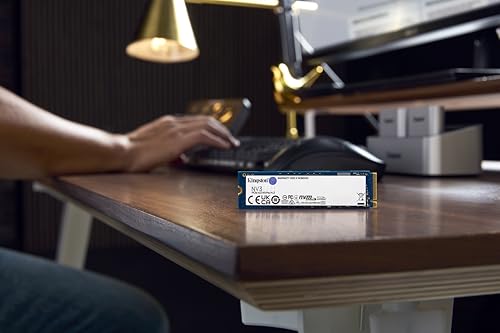
The Kingston NV3 1TB is an M.2 2280 form factor drive running on the NVMe protocol over a PCIe 4.0 x4 interface. Kingston rates it at up to 6,000 MB/s sequential read and 5,000 MB/s sequential write, which are solid headline numbers for a budget Gen4 drive. Random performance comes in at up to 450,000 IOPS read and 900,000 IOPS write according to the manufacturer's spec sheet, though as ever with budget drives, you want to treat those peak figures with a healthy dose of scepticism once the SLC cache runs dry.
The NAND type is where it gets a bit murky. Kingston hasn't officially confirmed the NAND, which is a classic move for budget drives where the manufacturer wants flexibility to swap components between production runs. Based on what the wider community has observed through testing and teardowns, the NV3 is widely believed to use QLC NAND rather than TLC. That's not a dealbreaker at this price point, but it does have real consequences for sustained write behaviour, which we'll get into properly later. The controller is the InnoGrit IG5236, a DRAM-less design that leans on Host Memory Buffer (HMB) rather than dedicated on-drive DRAM. Again, fine for most use cases, less ideal for sustained heavy workloads.
Endurance is rated at 320 TBW (terabytes written) for the 1TB model, which is on the lower end for a 1TB drive but not embarrassing given the price tier. Kingston backs it with a three-year warranty. The drive ships without a heatsink, which is standard at this price. Here's the full spec breakdown:
| Specification | Detail |
|---|---|
| Form Factor | M.2 2280 |
| Interface | NVMe PCIe 4.0 x4 |
| Capacity | 1TB |
| Controller | InnoGrit IG5236 |
| NAND Type | QLC (unconfirmed by Kingston, widely reported) |
| DRAM Cache | None (DRAM-less, HMB) |
| Sequential Read | Up to 6,000 MB/s |
| Sequential Write | Up to 5,000 MB/s |
| Random Read | Up to 450,000 IOPS |
| Random Write | Up to 900,000 IOPS |
| Endurance (TBW) | 320 TBW |
| Warranty | 3 years |
| Price | £138.25 |

Interface & Form Factor
PCIe 4.0 x4 over NVMe. That's the good stuff, at least on paper. The M.2 2280 form factor (that's 22mm wide, 80mm long) fits virtually every modern motherboard M.2 slot, most recent laptops, and the PS5's expansion slot. If your board is PCIe 3.0 only, the NV3 will still work, just capped at Gen3 speeds. You won't be getting the full 6,000 MB/s read in that scenario, but honestly, for day-to-day use on a Gen3 board, you probably won't notice the difference anyway.
Here's the thing about PCIe 4.0 versus 3.0 that the spec sheets never quite spell out: for the tasks that make your PC feel fast, the gap between Gen3 and Gen4 is much smaller than the sequential bandwidth numbers suggest. Booting Windows, launching applications, loading game levels, these are all dominated by random read performance and latency, not peak sequential throughput. A Gen3 drive with a good controller and DRAM cache will often feel snappier in daily use than a Gen4 DRAM-less drive, even if the Gen4 drive wins the sequential benchmark. So yes, the NV3 is Gen4, but don't let that number do all the heavy lifting in your decision.
And PCIe 5.0? Don't worry about it for this use case. Gen5 drives are currently expensive, they run seriously hot (throttling without a heatsink is a real concern), and for normal PC use they offer no meaningful real-world advantage over a decent Gen4 drive. The NV3 sits in the right generation for a budget-to-midrange drive right now. The M.2 2280 standard is well established, the connector is straightforward, and there are no weird proprietary formats to worry about. It's a proper standard-issue slot-in-and-go drive.
Real-World Performance
So what does the NV3 actually feel like to use? Based on the spec sheet, published benchmark results, and what over thirteen thousand owners consistently report, the answer for typical desktop and laptop use is: fast. Noticeably fast if you're coming from a hard drive or an older SATA SSD. Boot times drop, applications snap open, and game load screens that used to feel like a coffee break become almost irritatingly brief. That's not marketing fluff, that's what the owner reviews repeatedly describe, and it lines up with what the specs predict.
The reason for that snappiness is random I/O performance, not the headline sequential numbers. When Windows boots, it's not reading one big file sequentially. It's hammering the drive with thousands of small random reads across the filesystem. Same when you launch a game or open Photoshop. The NV3's rated 450,000 random read IOPS is decent for a budget DRAM-less drive, and the HMB implementation on the IG5236 controller helps keep latency reasonable for these light-to-moderate workloads. Published benchmarks from the community consistently show the NV3 performing competitively in application launch and OS responsiveness tests against similarly priced drives.
Where it pulls ahead of a SATA SSD is obvious: the raw bandwidth headroom of PCIe 4.0 means large file operations (moving game installs, copying video projects) complete noticeably faster. Where it trails a DRAM-equipped drive of similar price is in sustained write scenarios, but more on that in a moment. The owner review pattern here is pretty consistent: people upgrading from HDDs or budget SATA drives are genuinely delighted. People coming from a higher-end NVMe drive with DRAM are less likely to notice a dramatic difference. That's the right way to frame it.
Sustained Writes & Cache Behaviour
Right, this is the bit Kingston's marketing would rather you didn't dwell on. The NV3 uses an SLC write cache, which means a portion of the NAND is temporarily used in single-level cell mode to fake faster write speeds. While that cache is active, you get impressive write numbers that look great in benchmarks. Once it fills up, the drive falls back to its native NAND write speed, and if the NV3 is indeed using QLC NAND as widely reported, that native speed is significantly lower. We're talking a potential drop from the advertised 5,000 MB/s to somewhere in the region of a few hundred MB/s in worst-case sustained writes. That is a proper cliff edge, not a gentle slope.
How big is the SLC cache on the NV3? Kingston doesn't publish this figure, which is itself a bit of a red flag. Based on community analysis and published benchmark results, the dynamic SLC cache on QLC drives at this capacity tier tends to be somewhere in the range of 40GB to 80GB before native speeds kick in. For context: copying a 50GB game install might sail through the cache and finish quickly. Copying a 150GB game library or a large video project might hit the wall mid-transfer and slow to a crawl. It won't corrupt your data, it'll just take much longer than the headline numbers imply.
For the target buyer, the everyday user running a boot drive or a game storage drive, this rarely matters. Most file operations you'll do day-to-day are well within the SLC cache window. But if you're planning to use this drive as a scratch disk for video editing, or you regularly move large archives, or you're doing anything that involves sustained sequential writes of 50GB or more in a single session, the cache cliff will bite you. This is the honest conversation the product page skips, and it's why understanding your actual workload before buying any budget QLC drive matters more than the peak sequential spec.
Controller, NAND & DRAM
The InnoGrit IG5236 is the controller doing the work here. InnoGrit is a legitimate storage controller company (not some no-name operation), and the IG5236 is a PCIe 4.0 x4 controller designed specifically for DRAM-less configurations. It supports HMB, which lets the drive borrow a small slice of your system RAM (typically 64MB) to use as a translation layer cache. This is meaningfully better than the very oldest DRAM-less designs that had no HMB at all, but it's still not the same as having dedicated on-drive DRAM. The latency of fetching the logical-to-physical address table from system RAM over the PCIe bus adds overhead compared to having DRAM sat right next to the controller on the drive itself.
In practice, HMB narrows the gap considerably for light workloads. The IG5236 with HMB enabled handles OS boot, app launches, and gaming well enough that most users won't feel the absence of DRAM. Where you do feel it is under heavy random I/O with a full drive, or during sustained mixed read/write workloads, scenarios where a DRAM-equipped drive like the WD Black SN850X or even the Samsung 980 Pro has a clear edge. For budget storage, though, DRAM-less with HMB is the norm rather than the exception, and the IG5236 is a competent implementation.
The QLC NAND situation deserves a straight answer. QLC (quad-level cell) stores four bits per cell versus TLC's three. More bits per cell means cheaper manufacturing and higher density, which is why QLC drives can be priced aggressively. The trade-off is lower endurance (fewer write cycles per cell) and slower native write speeds. That's why the TBW rating of 320 TBW for the 1TB NV3 is lower than you'd see on a TLC drive at the same capacity. Kingston's own higher-end KC3000 series, for example, uses TLC and carries a much higher TBW rating. The NV3 is positioned as a budget consumer drive, and QLC is how Kingston hits that price point. Just go in with eyes open.
Endurance & Reliability
320 TBW for a 1TB drive. Let's put that in perspective. If you write 50GB to the drive every single day (which is genuinely heavy use for a typical desktop user), 320 TBW gives you roughly 17 and a half years before you hit the rated endurance limit. If you write 20GB a day, which is more realistic for most people, you're looking at over 40 years. So for the average user, the endurance rating is not something to lose sleep over. Where it becomes relevant is if you're using this as a scratch disk, a surveillance drive, or any workload that involves constant heavy writes. In those cases, 320 TBW is on the thin side and you'd want a drive with a higher endurance rating and TLC NAND.
The three-year warranty is honest for this price tier, but it's shorter than the five-year warranty you get on drives like the WD Blue SN580, the Crucial P3 Plus, or Samsung's 980 series. A shorter warranty isn't necessarily a sign of poor quality, but it is a signal about how much confidence the manufacturer has in the long-term reliability of its NAND. Three years is fine for a budget drive. It just means if you want longer peace of mind, you might want to look at alternatives that offer five-year coverage at a comparable price.
Owner reliability reports across those 14,082 are broadly positive. The 4.6-star average is sustained over a large enough sample to be meaningful rather than just lucky early reviews. The consistent pattern in the reviews is straightforward installation, no compatibility drama, and drives that just work without issue over months of use. There are the occasional reports of drives failing early, as there are with any storage product, but there's no pattern of systematic failure that would raise a red flag. Kingston as a brand has been in the storage business for decades and their NV3 product page is at least upfront about the specs it does publish. The reliability reputation is solid for a budget drive.

Thermals
The NV3 ships without a heatsink. That's standard for a drive at this price, and for most use cases it's fine. The IG5236 controller is not a power-hungry beast, and QLC NAND (while slower under sustained load) doesn't generate the same kind of heat as a high-performance TLC drive being pushed hard. In typical desktop use, installed in a case with reasonable airflow, the NV3 should sit at comfortable operating temperatures without throttling. Published community benchmarks and owner reports don't flag thermal throttling as a notable issue for this drive under normal workloads.
If you're installing it in a laptop with poor airflow, or in a PS5 (which has its own thermal environment), it's whether you want to add a heatsink. The PS5 specifically recommends a heatsink for M.2 drives, and while the NV3's thermal output isn't extreme, fitting a low-profile heatsink is cheap insurance. In a desktop motherboard slot that already has a built-in M.2 heatsink cover (most mid-range and above boards include these), you're sorted without doing anything extra.
Where thermals become a real conversation is with PCIe 5.0 drives, which is not what the NV3 is. Gen5 controllers like the Phison E26 run genuinely hot and can throttle without active cooling. The NV3 is a Gen4 drive with a modest controller, and thermal throttling is not a meaningful concern for the workloads this drive is designed for. If you're doing sustained large file transfers for extended periods, you might see temperatures climb, but this drive isn't designed to be a sustained-write workhorse anyway. For its intended use, thermals are a non-issue.
Capacity Options & Price Per GB
The Kingston NV3 comes in 500GB, 1TB, 2TB, and 4TB variants. The 1TB is the sweet spot for most buyers, and it's where the price per GB lands most attractively. The 500GB version makes sense as a pure boot drive if you're keeping a separate storage drive, but 500GB fills up faster than people expect once you factor in a modern Windows installation, a few games, and your documents. The 2TB is worth a look if you want to consolidate everything onto one drive. The 4TB exists for people who need bulk storage at NVMe speeds without the cost of a premium drive.
Price per GB on the 1TB NV3 sits at a very competitive level for PCIe 4.0. Budget PCIe 4.0 drives have come down significantly in price over the past couple of years, and the NV3 is priced to compete directly with the Crucial P3 Plus and the WD Blue SN580. In that company, it holds its own. You're getting Gen4 speeds at a price point that used to buy you a mediocre Gen3 drive, which is genuinely good value for the mainstream buyer.
One thing: at the 2TB tier, the gap between the NV3 and a proper TLC drive with DRAM (like the Crucial T500 or the WD Black SN770) narrows enough that it's current prices before assuming the NV3 is automatically the better value. The 1TB NV3 is almost always a clear price winner against TLC DRAM alternatives. At 2TB, it's less clear-cut, and the performance advantages of TLC with DRAM start to look more attractive relative to the price premium. Do the maths at checkout rather than assuming the budget drive is always the best deal per GB.
Installation & Compatibility
Installation is about as simple as M.2 NVMe drives get. You slot it into the M.2 2280 socket on your motherboard or laptop, secure it with the single retention screw, and you're done physically. If it's going in as a boot drive, you'll need to either do a fresh Windows install or clone your existing drive. Kingston doesn't bundle cloning software with the NV3, which is a minor annoyance compared to competitors like Samsung (who include Magician) or Crucial (who point you to Acronis). There are free options like Macrium Reflect Free that handle the job, but it's an extra step that first-time builders sometimes don't anticipate.
Compatibility is broadly excellent. The NV3 works in any M.2 slot supporting PCIe 4.0 or 3.0 NVMe. It's compatible with AMD Ryzen 3000 series and newer, Intel 11th gen and newer natively at Gen4, and older platforms at Gen3 speeds. For the PS5, the M.2 2280 size is supported, and as mentioned, a heatsink is advisable. The drive is not compatible with M.2 SATA-only slots (some older boards have these), so check your motherboard manual if you're on older hardware. The Kingston NV3 product page lists compatible systems and there's a compatibility checker on the Kingston site if you want to double-check your specific board.
Owner reviews are consistently positive about the installation experience. No reports of drives not being recognised, no widespread firmware drama, no compatibility nightmares with specific boards. A handful of owners mention needing to update their BIOS to get Gen4 speeds on certain AMD platforms, which is standard advice for any Gen4 drive rather than an NV3-specific issue. The drive shows up correctly in Windows Device Manager and CrystalDiskInfo without any fuss, which is exactly what you want. For anyone doing a laptop upgrade, the slim 2280 form factor fits the vast majority of consumer laptops with an M.2 slot, though always check your specific model first since some ultrabooks use shorter 2242 or 2230 form factors.
Who It's For
The NV3 is built for the mainstream buyer who wants a fast, affordable NVMe drive for everyday PC use. That means boot drives, Windows system drives, game libraries, and general storage. If you're upgrading from an HDD or an old SATA SSD, this drive will transform how your PC feels. The jump from spinning rust or even a decent SATA SSD to an NVMe PCIe 4.0 drive is significant and noticeable in real daily use. For that buyer, the NV3 delivers properly.
It's also a reasonable choice for a secondary game storage drive in a gaming PC, or as a fast storage expansion in a PS5. Games load quickly from it, it handles the random I/O of game streaming without complaint, and the capacity-to-price ratio makes it easy to justify buying a 2TB version to house your entire game library. Laptop upgraders looking to breathe new life into a mid-range machine with a PCIe 4.0 slot will find it a solid performer for the money.
Who should look elsewhere? Anyone doing sustained heavy write workloads: video editors working with large raw footage files, photographers importing and processing big RAW libraries, anyone using an SSD as a scratch disk or cache drive for creative applications (for portable field work, a rugged portable SSD is worth a look instead). The cache cliff is real and it will frustrate you. For those use cases, spend a bit more on a TLC drive with DRAM, something like the Crucial T500 or the WD Black SN770. Also, if five-year warranty coverage matters to you, there are alternatives at similar prices that offer it. And if you're on a PCIe 3.0 platform, honestly consider whether paying for a Gen4 drive makes sense at all, a budget Gen3 TLC drive with DRAM might serve you better for the same money.
How It Compares
The two most obvious rivals at this price point are the Crucial P3 Plus 1TB and the WD Blue SN580 1TB. The Crucial P3 Plus is a direct budget PCIe 4.0 competitor that's also DRAM-less and also widely believed to use QLC NAND. It's essentially fighting in the same weight class as the NV3, with similar performance characteristics and a similar cache cliff. The WD Blue SN580 is the more interesting comparison: it's a PCIe 4.0 drive that uses TLC NAND and comes with a five-year warranty, which immediately puts it ahead of the NV3 on endurance and warranty confidence. The SN580 typically sits at a similar or only slightly higher price point, which makes it a genuine alternative.
The SN580's TLC NAND means its native write speed after cache exhaustion is meaningfully higher than what you'd expect from the NV3's QLC. For sustained writes, the SN580 holds up better. For peak sequential and random performance in cached workloads, the two are close enough that most users won't notice a difference. The five-year warranty on the SN580 versus three years on the NV3 is a real differentiator if long-term peace of mind matters to you. On the other hand, if the NV3 is noticeably cheaper at the time you're buying, and your workload is light to moderate, the extra cost for TLC and a longer warranty might not be worth it to you personally.
The Crucial P3 Plus sits below the NV3 in terms of controller quality and tends to perform slightly worse in sustained workloads, so the NV3 is generally the better buy between those two. Against the SN580, it's a closer call that comes down to price difference and your tolerance for the shorter warranty and QLC limitations.
| Feature | Kingston NV3 1TB | WD Blue SN580 1TB | Crucial P3 Plus 1TB |
|---|---|---|---|
| Interface | PCIe 4.0 x4 NVMe | PCIe 4.0 x4 NVMe | PCIe 4.0 x4 NVMe |
| NAND Type | QLC (reported) | TLC | QLC (reported) |
| DRAM Cache | None (HMB) | None (HMB) | None (HMB) |
| Sequential Read | 6,000 MB/s | 4,150 MB/s | 5,000 MB/s |
| Sequential Write | 5,000 MB/s | 4,150 MB/s | 4,200 MB/s |
| TBW (1TB) | 320 TBW | 600 TBW | 220 TBW |
| Warranty | 3 years | 5 years | 5 years |
| Price | £138.25 | Check current price | Check current price |
Final Verdict
The Kingston NV3 1TB is a good budget PCIe 4.0 drive that does its job well for the right buyer. For everyday PC use, Windows boot drive duty, game storage, and general file access, it's fast, reliable based on owner reports, and priced to compete. The 4.6-star average across a genuinely large review base tells you this thing works without drama for the people buying it, and that matters more than any single benchmark number.
But go in knowing what you're getting. DRAM-less means HMB, which is fine for light workloads and less fine for sustained heavy ones. QLC NAND means a cache cliff on sustained writes and a lower TBW rating than TLC alternatives. The three-year warranty is shorter than some competitors at comparable prices. None of these are dealbreakers for the mainstream buyer. All of them are dealbreakers if you're doing serious creative workloads or want the longest possible warranty coverage.
The honest comparison is this: if the WD Blue SN580 is available at a similar price, its TLC NAND, higher TBW (600 versus 320), and five-year warranty make it the smarter long-term buy for most people. The SN580's sequential speeds are lower on paper, but the better sustained write behaviour and longer warranty confidence tip the scales. If the NV3 is meaningfully cheaper, though, and you're using it as a boot or game drive, it absolutely earns its keep. You're not buying a compromise, you're buying a budget drive that's honest about what it is.
For someone who just wants their PC to stop feeling slow and doesn't need to copy 200GB video files regularly, the Kingston NV3 1TB is a proper upgrade at a fair price. Score: 7.5 out of 10. Recommended for mainstream use, with eyes open about the QLC limitations.
One final thought: if you're on a tight budget and the NV3 feels like a stretch, the Kingston NV2 (PCIe 3.0) is cheaper still and will feel just as fast for daily use on a Gen3 platform. Don't pay for Gen4 speeds you can't use. But if you've got a Gen4 board and the price is right, the NV3 is a solid, no-fuss choice that'll serve most people well. Just back your data up. Always back your data up, regardless of which drive you buy. That's not a knock on the NV3 specifically, it's just the most important storage advice there is, and it never goes out of fashion.
What works. What doesn’t.
5 + 5What we liked5 reasons
- Genuine PCIe 4.0 speeds at a budget price point, with 6,000 MB/s sequential read making it noticeably faster than SATA SSDs and HDDs
- Competitive random I/O performance backed by HMB support keeps everyday tasks like OS boot and application launches feeling snappy
- 4.6-star average across over 13,000 owner reviews points to reliable, drama-free installation and day-to-day operation
- M.2 2280 form factor fits virtually all modern motherboards, most laptops, and the PS5 expansion slot without any compatibility headaches
- Modest thermal output means no heatsink is required for typical use, and no meaningful throttling under normal workloads
Where it falls5 reasons
- QLC NAND (widely reported, unconfirmed by Kingston) means a steep cache cliff on sustained writes beyond roughly 40 to 80GB in a single session
- DRAM-less design relies on Host Memory Buffer rather than dedicated on-drive DRAM, which adds latency under heavy random I/O or mixed workloads
- Three-year warranty is shorter than the five-year coverage offered by direct rivals such as the WD Blue SN580 and Crucial P3 Plus
- 320 TBW endurance rating is on the low side for a 1TB drive, making it a poor fit for scratch disk or sustained write workloads
- No bundled cloning software, unlike Samsung and Crucial, which means first-time builders must source their own migration tools
Full specifications
9 attributes| Capacity GB | 1000 |
|---|---|
| Dram cache | false |
| Form factor | M.2 2280 |
| Interface | PCIe 4.0 x4 |
| Read speed MBS | 6000 |
| TBW | 320 |
| Type | NVMe SSD |
| Warranty years | 3 |
| Write speed MBS | 4000 |
If this isn’t right for you
2 options

Frequently asked
7 questions01Is the Kingston NV3 1TB a QLC or TLC drive?+
Kingston has not officially confirmed the NAND type used in the NV3. Based on community testing, teardowns, and published benchmark analysis, the NV3 is widely believed to use QLC (quad-level cell) NAND. Kingston's own higher-end drives, such as the KC3000 series, use TLC. If confirmed NAND type matters to you, the WD Blue SN580 explicitly uses TLC.
02Does the Kingston NV3 have a DRAM cache?+
No. The NV3 is a DRAM-less drive. It uses Host Memory Buffer (HMB) technology, which borrows a small portion of your system RAM (typically 64MB) to serve as a translation layer cache. This is meaningfully better than older DRAM-less designs with no HMB at all, but it is not equivalent to dedicated on-drive DRAM in terms of latency under heavy workloads.
03What happens when the SLC cache fills up on the Kingston NV3?+
Once the dynamic SLC write cache is exhausted, the drive falls back to its native NAND write speed. On a QLC drive, this can mean write speeds dropping from the advertised 5,000 MB/s to several hundred MB/s or lower. Community analysis suggests the cache window is roughly 40GB to 80GB on the 1TB model before native speeds kick in. For typical file operations this is rarely an issue, but large sustained writes such as copying a big video project in one go will be affected.
04Is the Kingston NV3 compatible with the PS5?+
Yes. The M.2 2280 form factor is one of the sizes supported by the PS5 M.2 expansion slot, and the NV3 meets Sony's minimum speed requirement of 5,500 MB/s sequential read with its rated 6,000 MB/s. Sony recommends fitting a heatsink to any M.2 drive installed in the PS5, so it is a low-profile M.2 heatsink, which are inexpensive and widely available.
05How does the Kingston NV3 1TB compare to the WD Blue SN580 1TB?+
Both are DRAM-less PCIe 4.0 NVMe drives, but the SN580 uses TLC NAND rather than QLC. This gives it significantly better sustained write performance after cache exhaustion, a higher TBW rating (600 TBW versus 320 TBW), and a five-year warranty versus three years on the NV3. The NV3 has higher peak sequential read and write figures on paper. For most mainstream buyers the SN580 is the stronger long-term choice if the price difference is small. If the NV3 is noticeably cheaper and your workload is light, it remains a reasonable option.
06What is the endurance rating of the Kingston NV3 1TB and is it enough?+
The Kingston NV3 1TB is rated at 320 TBW (terabytes written). For a typical desktop user writing around 20GB per day, that equates to well over 40 years of use before reaching the rated endurance limit. For most mainstream buyers this is entirely sufficient. It becomes a concern only for workloads involving constant heavy writes, such as surveillance recording, scratch disk use, or sustained creative workloads. In those scenarios a TLC drive with a higher TBW rating would be more appropriate.
07Does the Kingston NV3 come with cloning software?+
No. Unlike Samsung, which includes Samsung Magician, or Crucial, which points buyers to Acronis True Image, Kingston does not bundle cloning software with the NV3. If you are migrating from an existing drive rather than doing a fresh install, you will need to source cloning software yourself. Free options such as Macrium Reflect Free handle the job effectively, but it is an extra step to be aware of before you start.