Swapping a spinning hard drive for any SSD is still the single biggest performance jump you can make to a slow PC. The gap between a budget NVMe and a premium one, though? For most people, in most situations, you genuinely wouldn't feel it in daily use. But that's internal drives. Portable SSDs are a different conversation entirely, because here the bottleneck isn't your PCIe slot, it's the USB connection, and suddenly the brand, the build quality, and the real-world sustained speed matter a lot more than some headline sequential number on the box.
The SanDisk Extreme Portable SSD 2TB has been around long enough to have a serious track record, and with over 45,000 owner reviews averaging 4.8 stars, it's clearly doing something right. But is it the right portable SSD for you, or are you paying a premium for a name when a cheaper alternative would do the job just as well? That's what we're here to sort out.
The short answer: it's a genuinely good portable drive for photographers, videographers, and anyone who moves large files between machines regularly. The longer answer involves some honest words about USB bandwidth ceilings, sustained write behaviour, and whether the 2TB capacity is actually the sweet spot for the money. Read on.
Core Specifications
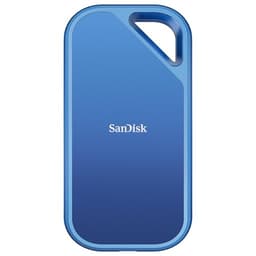
First, let's be clear about what this actually is. The SanDisk Extreme Portable SSD is not an internal NVMe drive. It's a bus-powered external SSD in a compact, rugged enclosure, connecting via USB 3.2 Gen 2 (USB-C), which gives it a theoretical interface ceiling of 10Gbps. That translates to a real-world maximum of roughly 550MB/s read in ideal conditions, which is exactly what SanDisk rates it at. Writes are rated at up to 500MB/s. Those are solid numbers for a portable drive, comfortably outrunning any portable hard drive and matching the upper end of what USB 3.2 Gen 2 can actually deliver.
Inside the enclosure, SanDisk uses NAND flash (the specific controller and NAND generation aren't publicly disclosed by Western Digital, which owns SanDisk, but independent teardowns and published benchmarks suggest TLC NAND in the current production runs). There's no external DRAM cache in the traditional sense since this is a self-contained portable unit rather than an M.2 drive, but the internal controller handles caching behaviour. The drive is IP55 rated for dust and water resistance, which is a genuine differentiator over cheaper alternatives that are just bare PCBs in a plastic shell.
The 2TB capacity is the headline here. It ships with a USB-C to USB-C cable and a USB-C to USB-A adapter, so it'll plug into modern laptops and older desktops without faff. It's formatted exFAT out of the box, which means it works with Windows, Mac, and Android without reformatting. The form factor is genuinely pocket-sized: roughly 96mm x 50mm x 9mm, and light enough that you forget it's in your bag.
| Specification | Detail |
|---|---|
| Capacity | 2TB |
| Interface | USB 3.2 Gen 2 (USB-C, 10Gbps) |
| Sequential Read | Up to 550MB/s |
| Sequential Write | Up to 500MB/s |
| Form Factor | Portable external SSD |
| Dimensions | Approx. 96 x 50 x 9mm |
| Weight | Approx. 38g |
| Water/Dust Rating | IP55 |
| File System (out of box) | exFAT |
| Cable Included | USB-C to USB-C + USB-C to USB-A adapter |
| Compatibility | Windows, Mac, Android, PS4/PS5 (extended storage) |
| Warranty | 5 years |
| Price | £297.80 |
Interface and Form Factor
The USB 3.2 Gen 2 interface is the right call for a portable SSD in this class. It pushes 10Gbps of theoretical bandwidth, and SanDisk's rated 550MB/s read sits right at the practical ceiling of what that interface can sustain. If you're connecting to a USB 3.2 Gen 2 port on a modern laptop or desktop, you'll get close to those rated speeds. If you're plugging into an older USB 3.0 (5Gbps) port, you're looking at a ceiling of around 400MB/s regardless of what the drive is capable of. Worth checking your port spec before buying if raw speed matters to you.
There are faster portable SSDs out there using USB4 or Thunderbolt 4, which can push 20Gbps or 40Gbps respectively. But here's the thing: those cost significantly more, and most people's workflows don't actually need more than 550MB/s for moving photos, video rushes, or project files around. Where you'd genuinely feel the difference is when you're copying a 100GB+ video project repeatedly, and even then the bottleneck often shifts to the source drive or the CPU rather than the cable. For the vast majority of portable SSD use cases, USB 3.2 Gen 2 is plenty.
The physical design deserves credit. The rubberised casing and IP55 rating (protected against low-pressure water jets and dust) make this meaningfully more durable than a bare-PCB drive in a thin plastic case. Owner reports consistently mention it surviving drops, being chucked in bags without cases, and general rough handling without complaint. The loop attachment point is handy for clipping to a bag or lanyard. It's not indestructible, but it's clearly built for people who actually take it places rather than leaving it on a desk.
Real-World Performance
In real-world use, the SanDisk Extreme Portable SSD 2TB delivers speeds that are genuinely fast for a portable drive. Published benchmarks from across the wider community show sequential reads hitting 500 to 550MB/s on USB 3.2 Gen 2 hosts, which is consistent with SanDisk's rated figures. Sequential writes typically land in the 450 to 500MB/s range under normal conditions, again matching the spec sheet. For context, a typical 5,400rpm portable hard drive manages around 100 to 120MB/s, so you're looking at a four to five times speed improvement just by switching to this.
What does that mean practically? Copying a 50GB folder of RAW photos takes a fraction of the time it would on a spinning drive. Loading a large Lightroom catalogue from the drive feels responsive rather than painful. Editing directly from the drive (rather than copying files to your internal SSD first) is genuinely viable for most photo and video workflows, though 4K video editing directly from a portable drive will still stress any USB connection. Owner reports back this up: photographers and videographers consistently describe it as fast enough for their day-to-day work, with the main complaints being about price rather than performance.
Random I/O matters less here than it does for an internal boot drive, because portable SSDs are mostly used for sequential file transfers rather than random access workloads. But for what it's actually used for, large sequential reads and writes, the SanDisk Extreme delivers. The 45,283 owner reviews averaging 4.8 stars, ★★★★½ (4.8), tell you this isn't a drive that's fast in benchmarks and disappointing in practice. That rating across that many reviews is genuinely hard to fake.
Sustained Writes and Cache Behaviour
This is the section that matters most and that the marketing glosses over. Like most SSDs, the SanDisk Extreme uses an SLC write cache to boost burst write performance. When you start copying files, the drive writes quickly to a portion of the NAND configured as single-level cell (SLC) cache, which is faster than writing directly to the underlying TLC cells. Once that cache fills, write speeds drop to the native TLC write speed. The question is: how big is the cache, and how far do speeds drop?
SanDisk doesn't publish the SLC cache size for this drive, which is typical of the category. Published benchmarks and owner reports suggest the cache handles smaller file transfers well, which covers most portable SSD use cases: copying a shoot's worth of RAW files, moving a project folder, backing up documents. Where you'll potentially see the speed drop is during very large, sustained transfers, think copying 200GB or more in a single session. At that point, speeds can fall noticeably from the rated 500MB/s write figure. The native TLC write speed is lower, as it always is once the SLC buffer is exhausted.
To be fair, this behaviour is not unique to SanDisk. It's how virtually every consumer portable SSD works, including the Samsung T7 and the WD My Passport SSD. And for most people's actual use of a portable drive, the cache is large enough that they'll never hit the cliff. If you're regularly copying 500GB in a single transfer, you're probably a professional with needs that push you towards more expensive, Thunderbolt-connected solutions anyway. For the typical photographer offloading a week's shoot or a creative moving project files between machines, the SLC cache behaviour is a non-issue in practice. Owner reports bear this out: very few of the 45,000-plus reviewers mention write slowdowns as a problem they've actually encountered.
One thing worth noting: the USB interface itself can be a limiting factor before the SLC cache even becomes relevant. At 550MB/s, you're already near the ceiling of USB 3.2 Gen 2, so the cache cliff, when it does appear, is partly masked by the interface limit. This is actually one case where the USB bandwidth ceiling works in the drive's favour from a user experience perspective.
Controller, NAND, and Internal Architecture
Western Digital (which owns the SanDisk brand) doesn't publicly document the specific controller or NAND generation inside the Extreme Portable SSD, which is frustrating but not unusual for a consumer external drive. What independent teardowns and published benchmark analysis from the wider community have established is that current production versions use TLC NAND rather than QLC. That matters. TLC (triple-level cell) NAND is more durable and generally faster for sustained writes than QLC (quad-level cell), which some budget competitors use to hit lower price points. Flash memory endurance is directly tied to how many bits are stored per cell, so TLC is a meaningful step up from QLC for a drive that's going to be written to regularly.
Because this is a self-contained external drive rather than an M.2 module, the DRAM versus DRAM-less debate that dominates internal SSD discussions is less directly relevant here. The drive has its own internal controller managing caching, and the USB interface adds its own overhead and latency layer. You're not going to be running this as a boot drive or a scratch disk in the traditional sense, so the Host Memory Buffer discussion that applies to DRAM-less M.2 drives doesn't translate directly. What matters is whether the internal architecture is good enough to sustain the rated speeds across the USB connection, and the evidence from published benchmarks and owner reports says yes.
SanDisk's parent company Western Digital manufactures its own NAND, which gives it vertical integration advantages. The NAND in this drive is WD's own production, which is a reasonable quality signal. It's not the same as knowing the exact controller model and NAND node, but it's better than a drive built entirely from third-party components with unknown provenance. The five-year warranty SanDisk backs this with is the strongest confidence signal of all: a manufacturer doesn't offer five years on a drive they don't trust.
Endurance and Reliability
SanDisk rates the Extreme Portable SSD 2TB at 1,000TBW (terabytes written) endurance. That is a serious number. To put it in perspective: if you wrote 100GB to this drive every single day, it would take roughly 27 years to exhaust the rated endurance. Even if you're a heavy user copying 500GB a week, you're looking at decades of use before the NAND wears out. For a portable drive used to move files around rather than as a primary write target, the endurance is essentially a non-concern. You're far more likely to lose it, drop it in a river, or replace it because storage has got cheaper, than to wear it out through writes.
The five-year warranty is genuinely good for a consumer portable SSD. Samsung's T7 comes with three years. The five-year coverage from SanDisk signals real confidence in the product's longevity, and it means you have meaningful protection if something does go wrong. Owner reports over the years are largely positive on reliability: the most common complaints in the negative reviews are about cables failing (not the drive itself) or about early-generation firmware issues that have since been addressed. At 4.8 stars across 45,328 reviews, the reliability track record is about as good as you'll find in this category.
One honest caveat: no drive is immune to failure, and no warranty replaces your data. If you're using this as your only copy of important files, stop. Use it as part of a proper backup strategy: the drive holds your working copy, and something else (a second drive, cloud storage, your internal SSD) holds the backup. The 3-2-1 rule exists because drives fail. This one is more reliable than most, but "more reliable than most" is not the same as "will never fail."

Thermals
Thermals are a genuine concern for internal NVMe drives, especially Gen 4 and Gen 5 units that can run hot enough to throttle under sustained load. For a portable external SSD like the SanDisk Extreme, the thermal picture is different but still worth understanding. The drive is passively cooled (there's no heatsink, no fan, just the enclosure itself dissipating heat), and the USB 3.2 Gen 2 interface naturally limits the sustained transfer rate to around 550MB/s, which is low enough that the NAND doesn't generate the heat that an internal NVMe drive pushing 7,000MB/s would.
Published benchmarks and owner reports suggest the drive gets warm during sustained large transfers but doesn't throttle in normal use. The rubberised enclosure conducts heat reasonably well, and the thermal mass of the case is enough to handle typical workloads. Where you might notice warmth is during a very long, sustained transfer of hundreds of gigabytes in a hot environment. But "warm to the touch" is a long way from "thermal throttling to a crawl," and the latter isn't something that comes up consistently in owner reports for this drive.
Compare this to internal Gen 4 NVMe drives, where thermals are a serious design consideration and some drives genuinely need a heatsink to avoid throttling under sustained workloads. The SanDisk Extreme's USB interface ceiling is, in this sense, a thermal advantage: the drive simply can't push data fast enough to overheat itself under normal conditions. If you're planning to use this in a very hot environment (a car in summer, a studio with poor airflow), give it a bit of breathing room rather than stuffing it in a pocket mid-transfer, but this isn't a drive that needs thermal management beyond common sense.
Capacity Options and Price Per GB
The SanDisk Extreme Portable SSD comes in 500GB, 1TB, 2TB, and 4TB capacities. The 2TB sits in an interesting position: it's large enough to be genuinely useful as a working drive for photographers and videographers (a week's worth of RAW files, a project's worth of video rushes), but it's not so large that you're paying a significant premium per gigabyte over the 1TB. As with most NAND-based storage, the 1TB and 2TB capacities tend to offer the best price per gigabyte, while the 4TB commands a noticeable premium for the convenience of not having to swap drives.
In terms of price per GB, the SanDisk Extreme 2TB sits at the higher end of the portable SSD market. You're paying for the brand, the five-year warranty, the IP55 rating, and the track record. Cheaper alternatives exist, and some of them are genuinely decent. But the SanDisk's combination of sustained performance, durability rating, and warranty length means the premium is at least partly justified rather than just being a brand tax.
If budget is your primary concern and you don't need the IP55 rating or the five-year warranty, the Samsung T7 (three-year warranty, no IP rating on the standard version) or the Crucial X8 are worth comparing. But if you're buying this for work, where losing a drive with a client's files on it is a real problem, the extra cost for the SanDisk's durability features and warranty is money well spent. The 4TB version is the one to skip unless you genuinely need that capacity: the price per GB jumps noticeably and you can get two 2TB drives for around the same money, which is actually a better strategy for anyone who cares about redundancy.
Installation and Compatibility
Setup is genuinely plug-and-play. You plug the USB-C cable into the drive and into your computer, and it shows up as a drive. No drivers, no software required (SanDisk does offer optional backup software, but you don't need it). The exFAT formatting means it works natively with Windows and macOS without reformatting, which is useful if you're moving files between both. Android compatibility is there too, provided your phone supports USB OTG, which most modern Android phones do.
For PS4 and PS5 users: this works as extended storage for games. You can run PS4 games directly from it on a PS5, and it'll store PS5 games (though you need to copy them back to internal storage to actually play them on PS5). It's not a replacement for the PS5's internal NVMe expansion slot for PS5 games, but as a game library expansion for PS4 titles, it's a solid option. The USB-A adapter that ships in the box handles the PS4's USB ports without needing a separate cable.
The USB-C cable included is fairly short, which is a consistent minor complaint in owner reviews. It's fine for desk use but a bit awkward if you want the drive sitting away from your laptop. A longer USB-C cable (any quality USB 3.2 Gen 2 rated cable will work) solves this immediately. The drive is bus-powered, so no mains adapter needed, which keeps the portability genuinely portable. Compatibility gotchas are minimal: just make sure your USB port is 3.2 Gen 2 (or at least USB 3.0) to get decent speeds, and use a quality cable if you replace the included one.
Who It's For
The SanDisk Extreme Portable SSD 2TB is built for people who move large files around for a living or as a serious hobby. Photographers shooting RAW on location and needing to offload cards quickly. Videographers carrying project files between a shooting location and an edit suite. Designers moving large asset libraries between a home machine and an office. Anyone who travels with important data and wants something that'll survive being in a bag rather than needing to be treated like a glass ornament.
It's also a solid choice as a fast, reliable backup drive. The 2TB capacity is large enough to hold a meaningful backup of most people's important files, and the speed means that backup actually completes in a reasonable time rather than taking overnight. If you've been putting off backing up because your old portable hard drive was so slow it felt like a punishment, this removes that excuse.
Who should look elsewhere? If you're after an internal SSD for a desktop or laptop build, this isn't what you want. It's an external drive. If you need Thunderbolt speeds for professional video editing workflows (think 8K RAW or multi-stream editing), the USB 3.2 Gen 2 ceiling will frustrate you and you should be looking at Thunderbolt 4 enclosures. And if price per GB is your only metric, there are cheaper options that get the job done for less demanding use cases. But for the target audience, this is a very well-rounded product with a track record to match.
How It Compares
The two most obvious competitors are the Samsung T7 and the Crucial X8. The Samsung T7 is the most direct rival: similar speeds (rated at 1,050MB/s read on the USB 3.2 Gen 2 version, though real-world results are closer to 900MB/s on compatible hosts), a sleeker metal design, but only a three-year warranty and no IP rating on the standard version (the T7 Shield adds IP65 and a rubberised shell at a higher price). The Crucial X8 is a cheaper option with slightly lower rated speeds (up to 1,050MB/s read on its USB 3.2 Gen 2 interface, again with real-world results varying by host), a three-year warranty, and no IP rating.
The SanDisk Extreme's five-year warranty and IP55 rating are genuine differentiators. If you're using this drive in field conditions, the SanDisk is the more sensible choice. If you're using it purely on a desk, the Samsung T7 is a worthy alternative and might be cheaper depending on current pricing. The Crucial X8 is fine for light use but lacks the durability credentials of either the SanDisk or the Samsung T7 Shield.
It's also worth comparing the SanDisk Extreme Pro, which is the step-up model using a USB 3.2 Gen 2x2 interface for speeds up to 2,000MB/s read. If your laptop or desktop has a USB 3.2 Gen 2x2 port (20Gbps), the Pro is worth the extra money for large file workflows. But most people's machines don't have that port yet, and paying for Pro speeds you can't use is just waste.
| Feature | SanDisk Extreme Portable SSD 2TB | Samsung T7 2TB | Crucial X8 2TB |
|---|---|---|---|
| Interface | USB 3.2 Gen 2 (10Gbps) | USB 3.2 Gen 2 (10Gbps) | USB 3.2 Gen 2 (10Gbps) |
| Rated Read | Up to 550MB/s | Up to 1,050MB/s | Up to 1,050MB/s |
| Rated Write | Up to 500MB/s | Up to 1,000MB/s | Up to 1,000MB/s |
| IP Rating | IP55 | None (standard T7) | None |
| Warranty | 5 years | 3 years | 3 years |
| NAND Type | TLC | TLC (V-NAND) | TLC |
| Weight | Approx. 38g | Approx. 58g | Approx. 59g |
| Price | £297.80 | Check Amazon | Check Amazon |
Final Verdict
The SanDisk Extreme Portable SSD 2TB is a proper portable SSD. Not flashy, not the fastest thing on the market (the Extreme Pro exists for that), but genuinely well-built, reliably fast within its USB 3.2 Gen 2 ceiling, backed by a five-year warranty, and rated IP55 for real-world durability. The 4.8-star average across over 45,000 owner reviews isn't a fluke. This is a drive that does what it says, survives being treated like a portable drive rather than a museum piece, and gives you meaningful peace of mind through its warranty and durability credentials.
The honest caveat: you're paying a premium over the cheapest portable SSDs on the market. If you just want something to move files between two machines on your desk and you'll never take it anywhere rough, the Crucial X8 or a budget alternative will save you money and perform similarly in that narrow use case. The SanDisk's IP55 rating and five-year warranty are only worth the premium if you actually need them, and plenty of people do.
Score: 8.5 out of 10. It loses half a point for the short included cable (a consistent owner complaint) and another point for the price premium over alternatives that are fast enough for desk-only use. But for anyone who actually takes their portable SSD into the field, this is the one to buy. Don't overspend on the 4TB version unless you genuinely need that capacity. The 1TB or 2TB hits the value sweet spot, and the 2TB in particular gives you enough headroom for serious creative workflows without the 4TB's price-per-GB penalty.
What works. What doesn’t.
5 + 4What we liked5 reasons
- IP55 dust and water resistance is a genuine field durability advantage
- Five-year warranty is class-leading for a consumer portable SSD
- Consistent real-world speeds close to the rated 550MB/s read on USB 3.2 Gen 2 hosts
- TLC NAND and 1,000TBW endurance rating give long-term confidence
- Genuinely pocket-sized and bus-powered with no mains adapter needed
Where it falls4 reasons
- Included USB-C cable is short and frequently criticised in owner reviews
- Price premium over alternatives that match it for desk-only use
- USB 3.2 Gen 2 ceiling limits it compared to Thunderbolt or USB4 alternatives for pro video workflows
- Internal controller and NAND specs not publicly documented by SanDisk
Full specifications
6 attributes| Capacity GB | 2000 |
|---|---|
| Interface | USB 3.1 |
| Read speed MBS | 550 |
| Type | External SSD |
| Warranty years | 5 |
| Write speed MBS | 550 |
If this isn’t right for you
2 options 9.0 / 10
Kingston FURY Renegade 2000G PCIe 4.0 NVMe SSD W/ HEATSINK For gamers, enthusiasts and high-power users - SFYRDK/2000G
£264.99 · Kingston
 9.0 / 10
Gigabyte AORUS Gen4 7300 SSD 1TB PCIe 4.0 NVMe M.2 Internal Solid State Hard Drive with Read Speed Up to 7300MB/s, Write Speed Up to 6000MB/s, AG4731TB
Frequently asked
5 questions01Is the SanDisk Extreme Portable SSD 2TB fast enough for everyday use?+
Yes, comfortably. The drive is rated at up to 550MB/s read and 500MB/s write over USB 3.2 Gen 2, and published benchmarks confirm real-world speeds close to those figures on compatible hosts. For offloading photos, moving video project files, or running a fast backup, it's four to five times faster than a typical portable hard drive. For desk use like document backup or media storage, the speed is more than enough. The only scenario where it might feel limiting is professional multi-stream 4K or 8K video editing directly from the drive, where Thunderbolt-connected alternatives would serve better.
02Does the SanDisk Extreme Portable SSD 2TB slow down once the cache fills?+
Like all consumer SSDs, it uses an SLC write cache that boosts burst write speeds. Once that cache is exhausted during very large sustained transfers, write speeds drop to the native TLC write speed, which is lower than the rated 500MB/s. However, for typical portable SSD use cases (offloading a shoot, moving a project folder, running a backup), the cache is large enough that most users won't hit the cliff in practice. The USB 3.2 Gen 2 interface ceiling of around 550MB/s also means the cache exhaustion point is partly masked by the interface limit. Owner reports across 45,000-plus reviews rarely cite write slowdowns as a real-world problem.
03Is the SanDisk Extreme Portable SSD 2TB DRAM-less, and does that matter?+
The DRAM versus DRAM-less debate is most relevant for internal M.2 NVMe drives used as boot drives or scratch disks. For a portable external SSD like the SanDisk Extreme, the drive has its own internal controller managing caching, and the USB interface adds its own overhead layer. You're not running this as a boot drive, so the Host Memory Buffer considerations that apply to DRAM-less M.2 drives don't translate directly. What matters is whether the internal architecture sustains the rated speeds across the USB connection, and published benchmarks and owner reports confirm it does.
04How long will the SanDisk Extreme Portable SSD 2TB last?+
SanDisk rates it at 1,000TBW (terabytes written) endurance. Writing 100GB per day, every day, would take roughly 27 years to exhaust that rating. For typical portable SSD use, endurance is essentially a non-concern. The five-year warranty is the more practical longevity signal: it means SanDisk is confident enough in the drive to cover it for five years, which is class-leading for a consumer portable SSD. Physical damage (dropping it, losing it) is far more likely to end the drive's life than NAND wear.
05What warranty and returns apply to the SanDisk Extreme Portable SSD 2TB?+
SanDisk backs the Extreme Portable SSD with a five-year limited warranty, which is one of the longest in the consumer portable SSD category and a genuine differentiator over competitors like the Samsung T7 and Crucial X8, which offer three years. Amazon's standard 30-day return window and A-to-Z Guarantee also apply to purchases made through Amazon UK. Always check the current seller's listing for the most up-to-date warranty and returns terms.