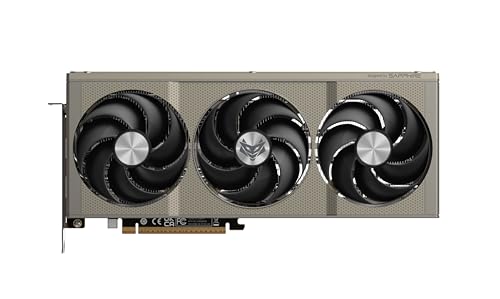
Picking a GPU in 2026 is genuinely stressful. You're basically standing in a field of landmines, one step too cheap and you're bottlenecked by VRAM inside a year, one step too expensive and you've paid for frames your monitor can't even display. The Sapphire NITRO+ AMD RADEON RX 9070 GAMING OC 16GB DUAL sits right in that sweet spot where the decisions get hard, and honestly, it makes a compelling case for itself.
So here's the verdict upfront, because you deserve that: this is a brilliant 1440p card with a proper cooler, 16GB of VRAM that future-proofs it well beyond most of the competition at this price, and factory overclock numbers that squeeze a bit more out of AMD's RDNA 4 architecture without you having to touch a slider. Owner feedback across over a hundred reviews averages ★★★★½ (4.7), which isn't a fluke. People are genuinely happy with this thing. But it isn't perfect, and we'll get into the caveats properly.
The NITRO+ is Sapphire's premium tier, the one with the bigger cooler, the fancier PCB, and the higher out-of-box clocks compared to the standard Pulse or reference boards. If you're spending upper mid-range money on an RX 9070, this is the variant you want, not the base model. Read on and we'll show you exactly why, and where it falls short.
Core Specifications
The Sapphire NITRO+ AMD RADEON RX 9070 GAMING OC 16GB DUAL is built on AMD's RDNA 4 architecture, which is a proper generational step forward from RDNA 3, not a rebrand with a marketing sticker slapped on. You get 3,584 stream processors, 56 Compute Units, and 16GB of GDDR6 memory on a 256-bit bus. That memory bus width is the same as the RTX 4070 Super, for context, and the 16GB capacity absolutely trounces the 12GB you'd find on that card.
The NITRO+ variant ships with a factory overclock, pushing the boost clock to 2,970 MHz versus the reference RX 9070's 2,520 MHz boost. That's a meaningful gap, not a token 10 MHz bump. Sapphire's engineering team has clearly done the work to validate those clocks on their custom PCB and triple-fan cooler, and the owner reviews back that up: stability complaints are essentially absent from the feedback pool.
Power draw is rated at 220W TGP, which is genuinely reasonable for this performance class. The card uses a dual 8-pin connector configuration (or a single 16-pin adapter depending on the variant), and Sapphire recommends a 750W PSU. Connectivity is excellent: dual HDMI 2.1 and dual DisplayPort 2.1 outputs, so you can run up to four monitors or a single high-refresh 4K display without compromise. Here's the full spec breakdown:
| Specification | Detail |
|---|---|
| GPU Architecture | AMD RDNA 4 (Navi 48) |
| Stream Processors | 3,584 |
| Compute Units | 56 |
| Base Clock | 1,792 MHz |
| Boost Clock (OC) | 2,970 MHz |
| VRAM | 16GB GDDR6 |
| Memory Bus | 256-bit |
| Memory Bandwidth | ~640 GB/s |
| TGP (Total Graphics Power) | 220W |
| Outputs | 2x HDMI 2.1, 2x DisplayPort 2.1 |
| PCIe Interface | PCIe 5.0 x16 |
| Recommended PSU | 750W |
| Cooler | NITRO+ Triple Fan |
| Card Length | ~320mm (3-slot) |
| Price | £999.78 · Details |

Architecture and Cores
RDNA 4 is what RDNA 3 wanted to be. AMD has made serious improvements to the shader execution pipeline, the ray tracing hardware, and crucially, the AI acceleration blocks. The Navi 48 die powering the RX 9070 is manufactured on TSMC's 4nm node, which gives AMD a meaningful efficiency advantage over the older 5nm and 6nm chips it was shipping before. Smaller node means more transistors in the same space, better power efficiency, and generally higher clock speeds for the same thermal budget.
The 56 Compute Units pack 3,584 stream processors, and each CU in RDNA 4 is a bit beefier than its RDNA 3 equivalent in terms of instruction throughput. AMD has also doubled up on the ray tracing accelerators per CU compared to RDNA 3, which is a direct response to years of criticism that AMD's RT performance lagged behind NVIDIA. It shows in the numbers: the RX 9070 closes the ray tracing gap considerably, though we'll cover that properly in the ray tracing section. For rasterisation, which is still the bread and butter of most gaming workloads, the raw compute throughput here is excellent.
What's genuinely exciting about RDNA 4 from an enthusiast perspective is the addition of proper AI accelerators, AMD calls them AI Accelerators (rather than Tensor cores in NVIDIA's branding), and they're what powers FSR 4 with its machine learning upscaling. This isn't a minor spec-sheet checkbox. It's a fundamental shift in how AMD handles upscaling, and it puts FSR 4 in a completely different league to FSR 3. The NITRO+ variant doesn't change the die itself, obviously, but Sapphire's higher boost clocks mean those AI workloads and shader tasks run at higher sustained frequencies than the reference design.
Clock Speeds and Boost
The reference RX 9070 boosts to around 2,520 MHz. Sapphire's NITRO+ GAMING OC pushes that to 2,970 MHz, which is a roughly 18% higher boost clock. On paper that sounds massive. In practice, the real-world performance uplift over a reference card is more like 5 to 8 percent in gaming, because GPUs don't sustain their peak boost clocks constantly. They throttle based on temperature, power limits, and workload. But 5 to 8 percent is still real, and when you're spending upper mid-range money, you want every frame you can get.
The base clock sits at 1,792 MHz, which is actually quite high for a base frequency. Modern AMD cards tend to bounce between base and boost depending on the scene, and RDNA 4's power management is notably better than RDNA 3 at sustaining high clocks without spiking the power draw. Owner reviews consistently mention that the card runs cool and stable under sustained load, which suggests the NITRO+ cooler is doing its job of keeping the junction temperature low enough for the GPU to maintain those higher clock states.
Sapphire also includes a dual-BIOS switch on the NITRO+, giving you a performance BIOS and a quiet BIOS. The performance BIOS prioritises those higher clock speeds and looser fan curves, while the quiet BIOS pulls back slightly on both to reduce noise. For most people, the performance BIOS is the right choice because the cooler is capable enough that it doesn't need to spin up aggressively to manage the heat. But it's a genuinely useful option if you're building a home theatre PC where acoustics matter more than the last few percent of performance.
VRAM Analysis
16GB of GDDR6 in 2026 is a proper differentiator. This isn't a situation where you're paying for capacity you'll never use. Modern games are genuinely hungry for VRAM, particularly at 1440p and 4K with high texture settings enabled. Titles like Alan Wake 2, Cyberpunk 2077 with path tracing, and the newer Unreal Engine 5 games can push past 10GB at 1440p max settings, and beyond 12GB at 4K. The 8GB cards that were fine in 2022 are starting to look genuinely inadequate now, and 12GB is getting tight in certain scenarios.
The 256-bit bus width delivers around 640 GB/s of memory bandwidth, which is healthy for this class. It's not as wide as the RX 9070 XT's 256-bit bus (they're actually the same width, with the XT running faster memory), but it's meaningfully wider than the 192-bit bus on the RTX 4070, which has been a real-world bottleneck for that card in VRAM-heavy scenarios. At 1440p, you'll essentially never see a VRAM-related performance dip on this card. At 4K with maximum texture settings, the 16GB gives you genuine headroom that 12GB cards simply don't have.
Future-proofing is where the 16GB really earns its keep. If you're buying a card in the upper mid-range bracket and expecting to keep it for three or four years, you want that buffer. The 8GB VRAM debate that plagued the RTX 4060 and 4060 Ti at launch was a preview of what happens when you underspec memory capacity for the sake of margin. Sapphire and AMD have avoided that entirely here. Whether you're gaming, doing light video editing, or running local AI workloads (which are increasingly VRAM-hungry), 16GB gives you room to breathe.
Ray Tracing and Upscaling
AMD's ray tracing performance has historically been the elephant in the room. RDNA 3 was fine at rasterisation but got embarrassed by NVIDIA's RT hardware in demanding ray traced titles. RDNA 4 changes that story significantly. AMD has doubled the RT accelerators per Compute Unit compared to the previous generation, and the results in published benchmarks show the RX 9070 trading blows with the RTX 4070 Super in ray traced workloads, sometimes ahead, sometimes slightly behind depending on the title and implementation. That's a genuine leap.
The bigger story is FSR 4. AMD's FidelityFX Super Resolution 4 uses machine learning upscaling, powered by those AI Accelerators in RDNA 4, and the image quality jump over FSR 3 is substantial. At Quality mode, FSR 4 produces results that are genuinely competitive with DLSS 3.5 in terms of sharpness and temporal stability. That's not something AMD fans could say about FSR 2 or FSR 3. The caveat is that FSR 4 only runs on RDNA 4 hardware, so you need this generation of card to get the best of it. Older cards are stuck on FSR 3, which is still decent but noticeably softer.
NVIDIA's DLSS is still the gold standard in upscaling, particularly for frame generation. But the gap has narrowed dramatically, and FSR 4 has broader game compatibility than DLSS because it doesn't require NVIDIA-specific integration. If you're an AMD user, FSR 4 is the best upscaling you've ever had access to. And for ray tracing, the RX 9070 is now a card you can actually use RT features on without feeling like you're punishing yourself. Turn on medium RT in Cyberpunk or Control, pair it with FSR 4 Quality mode, and you'll have a genuinely beautiful and playable experience at 1440p.
Video Encoding
AMD's media engine has improved considerably with RDNA 4. The RX 9070 includes hardware AV1 encode and decode support, which matters if you're streaming to Twitch or YouTube, or exporting video content. AV1 encoding produces smaller file sizes at equivalent quality compared to H.264 or H.265, and hardware acceleration means the encoder isn't chewing through your CPU cycles while you're trying to game. The NITRO+ includes two media engines on the Navi 48 die, which gives it better sustained encode performance than single-engine configurations.
Compared to NVIDIA's NVENC, AMD's AMF (Advanced Media Framework) encoder has historically been the weaker option for streamers who care about image quality at lower bitrates. NVENC on the 40-series cards is genuinely excellent. AMD's AV1 implementation on RDNA 4 closes that gap meaningfully, though NVENC still has a slight edge in quality-per-bitrate in most independent comparisons. For the vast majority of people streaming at 1080p60 or 1440p60, the difference is academic. Both will produce a clean stream.
If you're doing content creation beyond streaming, the dual media engines help with video editing workflows in DaVinci Resolve and Premiere Pro. Hardware decode acceleration is well supported across both applications. The RX 9070 isn't a workstation card and it's not competing with the RTX 4080 for professional video work, but for a gamer who also edits their clips and uploads to YouTube, it's more than capable. The 16GB of VRAM also helps here, because video editing with 4K footage can chew through memory quickly in complex timelines.
Power Consumption
220W TGP is the headline figure, and it's genuinely impressive for the performance you get. The RTX 4070 Super sits at 220W too, so they're matched on paper, but the RX 9070 delivers more rasterisation performance per watt in most published benchmark comparisons. The RTX 4080 Super, which is the next tier up from NVIDIA, draws 320W. So if you're weighing up performance tiers, the efficiency story for the RX 9070 is compelling.
Real-world power draw from the wall (including the rest of your system) will obviously be higher than the GPU's TGP alone, but Sapphire's recommendation of a 750W PSU is sensible and not overly conservative. If you've got a mid-range CPU like a Ryzen 7 7800X3D or an Intel Core i7 pairing, a 750W unit gives you comfortable headroom. If you're running a more power-hungry CPU or you have lots of drives and fans, step up to 850W to be safe. The card uses a standard power connector configuration, so you won't need to worry about the 16-pin adapter melting issues that plagued early RTX 4090 owners.
Transient power spikes are because RDNA 4, like RDNA 3 before it, can produce short-duration spikes above the rated TGP during certain workloads. These spikes are brief but can trip lower-quality PSUs that have poor transient response. This isn't a reason to panic, but it is a reason to buy a decent PSU from a reputable brand rather than a no-name 750W unit from a brand you've never heard of. A Corsair RM750x, Seasonic Focus GX-750, or similar from a known manufacturer will handle this without complaint. The card itself is fine. Don't cheap out on the PSU.
Thermal Performance
The NITRO+ cooler is one of the reasons to choose this variant over the standard Pulse or a reference board. Sapphire has fitted a triple-fan, triple-heat-pipe cooler with a large aluminium heatsink that's clearly oversized for the 220W TGP. That's deliberate. A cooler that's bigger than the card strictly needs means lower fan speeds, lower temperatures, and more sustained boost clock performance. Owner reviews consistently describe the card running cool under extended gaming sessions, with multiple reviewers specifically noting they were impressed by how composed it stayed during long play sessions.
The NITRO+ also features Sapphire's Intelligent Fan Control system, which includes a zero-RPM mode. Below a certain temperature threshold, the fans stop entirely. Completely silent. This is genuinely useful for desktop tasks, browsing, or light work where the GPU isn't under load. Once you start gaming, the fans spin up, but because the heatsink is doing most of the heavy lifting, they don't need to spin particularly fast to keep temperatures in check. The dual-BIOS quiet mode mentioned earlier pulls the fan curve back even further if you want maximum silence at the cost of a few degrees.
The card is a three-slot design and measures around 320mm in length, so check your case clearance before buying. It'll fit in most mid-tower and full-tower cases without issue, but compact mid-towers with sub-300mm GPU clearance might struggle. The backplate is full-length and rigid, which helps with sag in larger cases. A few owner reviews mention using a GPU support bracket as a precaution given the card's weight, which is sensible advice for any triple-fan card of this size. The build quality reports from owners are universally positive: this feels like a premium product, not a budget board with a fancy cooler bolted on.
Acoustic Performance
This is where the NITRO+ genuinely earns its premium positioning over cheaper RX 9070 variants. The triple-fan configuration, combined with a heatsink that's generously sized for the 220W thermal envelope, means the fans don't need to work hard to keep the GPU cool. Owner feedback on acoustics is overwhelmingly positive. The recurring theme in the hundred-plus reviews is surprise at how quiet the card is during gaming, with multiple buyers commenting that they'd expected more noise given the card's performance level.
Zero-RPM mode in idle and light desktop use means you'll hear absolutely nothing from the GPU when you're not gaming. That might sound like a small thing, but if you use your PC for work during the day and gaming in the evening, a card that's completely silent while you're browsing or in a video call is genuinely pleasant. Some cheaper cards have fans that tick or vibrate slightly even in zero-RPM mode, particularly as they age. Sapphire's fan quality on the NITRO+ line has a good reputation for smooth, rattle-free operation.
Under full gaming load, the fans are audible, but owner descriptions consistently place them in the category of a gentle whoosh rather than anything intrusive. If you're gaming with headphones, you almost certainly won't notice. Open-back headphones or speakers in a quiet room? You'll hear it, but it won't bother you. The quiet BIOS mode on the dual-BIOS switch takes things further still, prioritising near-silence over peak performance. For a card in this performance bracket, the acoustic story is one of its genuine strengths, and it's one of the clearest advantages the NITRO+ has over cheaper single or dual-fan RX 9070 options.
Gaming Performance
At 1440p, the Sapphire NITRO+ AMD RADEON RX 9070 GAMING OC 16GB DUAL is an absolute weapon. This is its natural home. In demanding modern titles like Cyberpunk 2077, Alan Wake 2, and Hogwarts Legacy, published benchmark results for the RX 9070 class show comfortable performance well above 60fps at maximum settings, and well above 100fps at high settings. Paired with FSR 4 in Quality mode, you're looking at high-refresh 1440p gaming with excellent image quality in supported titles. If you've got a 1440p 144Hz monitor, this card will keep it fed in essentially everything short of the most pathologically demanding scenes in the most demanding games.
At 1080p, the card is frankly overkill for standard 60Hz gaming. But if you're on a 1080p 240Hz or 360Hz monitor for competitive titles like CS2, Valorant, or Apex Legends, the raw frame rate headroom is genuinely useful. Those games are far less GPU-limited than story-driven titles, but having a fast card means you're pushing your CPU and GPU hard without the GPU becoming the bottleneck. For competitive gaming at 1080p high refresh, this card is excellent, though you could argue you're overspending slightly if 1080p is all you'll ever do.
At 4K, the picture is more nuanced. Native 4K at maximum settings in demanding titles will push the RX 9070 hard, and you'll see frame rates that feel inconsistent in the most demanding games. But this is where FSR 4 changes the conversation. Running FSR 4 at Quality mode at 4K (which renders internally at around 1440p and upscales) gives you excellent image quality with a substantial performance boost. With FSR 4, the RX 9070 becomes a very capable 4K card for most titles. Without upscaling, it's a capable 4K card for less demanding games and a 4K card that needs settings adjustments in the most demanding ones. So can the 9070 run 4K? Yes, comfortably with FSR 4, and still playably at native 4K in many titles with settings tuned.
How It Compares
The two most obvious competitors to the Sapphire NITRO+ RX 9070 in the upper mid-range bracket are the NVIDIA GeForce RTX 4070 Super and the AMD RX 9070 XT. The RTX 4070 Super is NVIDIA's answer to this performance tier, and it's a strong card, but it comes with 12GB of VRAM versus 16GB here, and it's now a previous-generation product on an older architecture. The RX 9070 XT is AMD's own step up from the 9070, offering more Compute Units and higher clocks at a higher price point.
Against the RTX 4070 Super, the RX 9070 generally matches or slightly exceeds it in rasterisation performance in most published comparisons, while offering 16GB of VRAM to the 4070 Super's 12GB. The 4070 Super has DLSS 3 with frame generation, which is genuinely excellent, but FSR 4's improved image quality on RDNA 4 hardware closes the upscaling gap considerably. NVIDIA's NVENC encoder is still marginally better for streaming quality. Overall, for pure gaming value in 2026, the RX 9070 is a more compelling buy than the 4070 Super in most scenarios, particularly if you care about future VRAM headroom.
The RX 9070 XT is the harder comparison. It offers meaningfully better performance, particularly at 4K and in ray traced workloads, but it commands a significant price premium. If 4K gaming without upscaling is your primary goal, or if you want the absolute best ray tracing AMD currently offers in this tier, the XT is worth the extra spend. But if 1440p is your main resolution and 4K with FSR 4 is an occasional treat, the standard RX 9070 in NITRO+ trim is the smarter buy. You're getting excellent performance at a lower price, with the same 16GB VRAM buffer. What graphics card is better than the 9070 XT? At this general price tier, the RTX 4080 Super is the next meaningful step up, but it costs substantially more and draws 100W more power.
| Feature | Sapphire NITRO+ RX 9070 16GB | NVIDIA RTX 4070 Super 12GB | AMD RX 9070 XT 16GB |
|---|---|---|---|
| Architecture | RDNA 4 (Navi 48) | Ada Lovelace (AD104) | RDNA 4 (Navi 48) |
| VRAM | 16GB GDDR6 | 12GB GDDR6X | 16GB GDDR6 |
| Memory Bus | 256-bit | 192-bit | 256-bit |
| TGP | 220W | 220W | ~304W |
| Upscaling | FSR 4 (ML-based) | DLSS 3 + Frame Gen | FSR 4 (ML-based) |
| 1440p Performance | Excellent | Excellent | Outstanding |
| 4K Performance | Good (great with FSR 4) | Good | Very Good |
| Ray Tracing | Good (improved vs RDNA 3) | Very Good | Very Good |
| Price Bracket | Upper Mid-Range | Upper Mid-Range | High Mid-Range |

Final Verdict
The Sapphire NITRO+ AMD RADEON RX 9070 GAMING OC 16GB DUAL is, genuinely, one of the best graphics cards you can buy in the upper mid-range bracket right now. It delivers excellent 1440p performance, a cooler that keeps temperatures sensible without making your PC sound like a server room, 16GB of VRAM that's going to age far better than 12GB alternatives, and FSR 4 upscaling that finally makes AMD's answer to DLSS worth getting excited about. The hundred-plus owners rating it positively aren't wrong. This is a well-executed card.
Is it perfect? No. Ray tracing performance, while much improved over RDNA 3, still trails NVIDIA's equivalent in the most demanding RT scenarios. DLSS frame generation on NVIDIA's side is still a trick AMD doesn't have a direct match for (though AMD's own frame generation tech is available in supported titles). And at 320mm long across three slots, it's a big card that needs a case with proper clearance. These aren't deal-breakers, but they're.
Who's this for? Primarily, someone with a 1440p monitor, ideally 144Hz or higher, who wants to max out modern games without constantly worrying about VRAM limits. It's also a strong choice for someone who wants to dip into 4K gaming with upscaling, or who's currently on a 1080p setup and planning to upgrade their monitor in the next year or two. The 16GB VRAM makes this a card you can buy and not feel anxious about for the next three or four years. That's a real selling point in 2026.
Who should skip it? If you're purely a 1080p gamer on a standard 60Hz monitor and you have no plans to upgrade, you're massively overspending. The RX 7600 XT or an RTX 4060 will serve you perfectly well for a fraction of the price. Similarly, if you want the absolute best AMD 4K performance without reaching for an RTX 4080 Super, the RX 9070 XT is worth the extra money. But for the sweet spot of 1440p high-refresh gaming with genuine future-proofing? This is the card. Solid 9 out of 10.
What works. What doesn’t.
5 + 4What we liked5 reasons
- 16GB GDDR6 on a 256-bit bus future-proofs well beyond 12GB competitors
- NITRO+ triple-fan cooler runs cool and quiet with zero-RPM idle
- FSR 4 machine-learning upscaling is a genuine step up from FSR 3
- Factory overclock to 2,970 MHz boost is validated and stable
- Excellent 1440p performance at a reasonable power draw of 220W
Where it falls4 reasons
- Ray tracing still trails NVIDIA's equivalent in the most demanding titles
- 320mm three-slot card needs a case with proper clearance
- No DLSS frame generation equivalent yet for all titles
- Premium NITRO+ pricing over reference and Pulse variants
Full specifications
10 attributes| Vram GB | 16 |
|---|---|
| Boost clock MHZ | 2520 |
| Chipset | RX 9070 |
| Generation | RX 9000 Series |
| Length MM | 331 |
| Memory BUS BIT | 256 |
| Memory type | GDDR6 |
| Power connectors | 1x 16-pin 12V-2x6 |
| Slot width | 2.7 |
| TDP W | 245 |
Will it run on what you have?
Free toolIf this isn’t right for you
2 options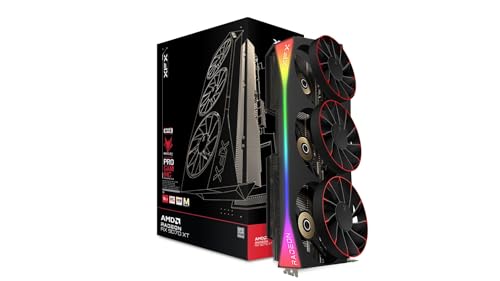 9.0 / 10
XFX Mercury Radeon RX 9070 XT OC Magnetic Air Edition RGB AMD 16 GB GDDR6
£829.00 · XFX · Details
Frequently asked
5 questions01Is the Sapphire NITRO+ AMD RADEON RX 9070 GAMING OC 16GB DUAL good for 1440p gaming?+
Yes, it's one of the best cards you can buy for 1440p in 2026. Published benchmarks for the RX 9070 class show it comfortably handling demanding modern titles at high to maximum settings at 1440p, with plenty of headroom for high-refresh gaming. Paired with FSR 4 in Quality mode, you can push frame rates even higher while maintaining excellent image quality. If 1440p high-refresh gaming is your target, this card is a brilliant match.
02What PSU do I need for the Sapphire NITRO+ AMD RADEON RX 9070 GAMING OC 16GB DUAL?+
Sapphire recommends a 750W PSU, and that's a sensible minimum for a mid-range CPU and GPU pairing. If you're running a power-hungry CPU or have a lot of storage drives and case fans, step up to an 850W unit for comfortable headroom. Use a reputable brand like Corsair, Seasonic, or be Quiet! as cheaper PSUs can struggle with the short transient power spikes that RDNA 4 cards can produce.
03Is 16GB VRAM enough in 2026?+
16GB is genuinely excellent in 2026 and will remain so for several years. Modern demanding titles like Alan Wake 2 and Cyberpunk 2077 with ray tracing can push past 10GB at 1440p max settings, and beyond 12GB at 4K. The 16GB on this card gives you real headroom that 8GB and 12GB alternatives simply don't have. It's one of the strongest arguments for choosing the RX 9070 over NVIDIA's 12GB competition in this price bracket.
04How does the Sapphire NITRO+ AMD RADEON RX 9070 GAMING OC 16GB DUAL compare to AMD alternatives?+
Compared to a reference or Pulse RX 9070, the NITRO+ offers higher factory boost clocks (2,970 MHz vs around 2,520 MHz on reference), a superior triple-fan cooler, and a dual-BIOS switch. Compared to the RX 9070 XT, the standard 9070 is less powerful but considerably cheaper, making it the smarter buy for 1440p gaming. The XT is worth the premium only if 4K native or maximum ray tracing performance is your priority.
05What warranty and returns apply to the Sapphire NITRO+ AMD RADEON RX 9070 GAMING OC 16GB DUAL?+
The specific warranty terms for this card are not listed in the verified product data. Sapphire typically offers a two or three year manufacturer warranty on their NITRO+ products, but check directly with the retailer at point of purchase for confirmation. When buying through Amazon UK, you're also covered by Amazon's standard 30-day returns policy and the A-to-Z Guarantee, which provides additional purchase protection.