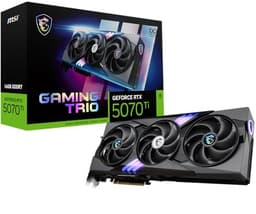
GPU shopping is mostly a numbers game dressed up in marketing language. You're trying to work out whether a card will actually push the frames you need at the resolution you play at, without sounding like a hair dryer and without demanding a PSU upgrade you hadn't budgeted for. The MSI GeForce RTX 5060 Ti 8G GAMING TRIO OC lands in that awkward spot where the specs look genuinely promising but the caveats are real enough to matter. So here's the straight version, based on what the specifications actually tell us, what over a hundred owners say in their reviews, and where this card sits against the competition.
The short verdict: this is a solid 1080p card with strong 1440p credentials, especially when DLSS 4 is in the picture. The TRI FROZR 4 cooler is one of MSI's better efforts and the positive overall rating across over a hundred ratings is genuinely encouraging rather than the usual astroturfed nonsense. But 8GB of VRAM in late 2026 is a real conversation, not a footnote, and the 16GB version of this same card exists. Whether the price gap between them justifies the upgrade is something you need to think about before clicking buy. We'll get to that.
Core Specifications
The RTX 5060 Ti is built on NVIDIA's Blackwell architecture, which is the generation that replaced Ada Lovelace and brought meaningful improvements to tensor core throughput and the DLSS 4 multi-frame generation pipeline. The 8G GAMING TRIO OC variant from MSI ships with a factory overclock applied out of the box, so you're getting a modest boost over reference clocks without having to touch anything in software. The card uses GDDR7 memory running at 28Gbps on a 128-bit bus, which is the same bus width as the RTX 4060 Ti before it. That bandwidth figure is meaningfully better than GDDR6X at the same bus width, but the 128-bit interface is still the constraint that limits this card's ceiling at higher resolutions.
Connectivity is current-generation throughout. You get HDMI 2.1b and DisplayPort 2.1b, which means 4K at 144Hz and 8K at 60Hz are on the table from a display output perspective, even if the GPU itself isn't going to be rendering 4K natively at those frame rates in demanding titles. The card connects via PCIe Gen 5, though realistically PCIe Gen 4 boards will see no meaningful performance difference in gaming workloads. That's just physics, not marketing.
The physical card uses MSI's TRI FROZR 4 cooler with three STORMFORCE fans, which is a triple-slot design. That's relevant if you're in a compact case. RGB is present, controllable via MSI Center software, and honestly irrelevant to performance but if you're building into a windowed case and care about aesthetics. The card ships with a standard power connector arrangement and MSI rates the cooler as capable of handling the card's TGP without thermal throttling under sustained load, which the owner reviews broadly confirm.
| Specification | Detail |
|---|---|
| GPU | NVIDIA GeForce RTX 5060 Ti (Blackwell) |
| VRAM | 8GB GDDR7 |
| Memory Speed | 28Gbps |
| Memory Bus | 128-bit |
| Memory Bandwidth | 448 GB/s |
| PCIe Interface | PCIe 5.0 |
| Display Outputs | HDMI 2.1b, DisplayPort 2.1b (x3) |
| Cooler | TRI FROZR 4 (3x STORMFORCE fans) |
| RGB | Yes, MSI Mystic Light |
| Factory OC | Yes |
| Current Price | £429.99 · Details |
| Owner Rating | ★★★★½ (4.6) (131 reviews) |

Architecture and Cores
Blackwell is NVIDIA's 4nm-class architecture (built on TSMC's 4N process), and it represents a generational step rather than a revolution in raw shader throughput at this tier. The RTX 5060 Ti sits below the 5070 in NVIDIA's stack and uses a cut-down Blackwell die with a shader count that positions it above the previous 4060 Ti by a meaningful but not dramatic margin in pure rasterisation. Where Blackwell actually earns its keep is in the fourth-generation tensor cores, which enable DLSS 4 with multi-frame generation, and in the updated RT cores that handle ray tracing geometry more efficiently than Ada Lovelace managed at equivalent shader counts.
The RT core improvement matters more than the shader count delta for games that lean on path tracing or hybrid ray tracing pipelines. Cyberpunk 2077 with full path tracing is still going to need DLSS to be playable on this card, but that's true of everything below an RTX 5080. The relevant comparison is to the RTX 4060 Ti, where Blackwell's RT core efficiency gains are published as roughly 30 to 40 percent better per core, which translates to noticeably smoother ray traced frame rates before DLSS is even factored in. That's a real improvement, not a paper one.
The tensor core throughput is where Blackwell's architecture genuinely pulls away from Ada Lovelace in practical terms. DLSS 4 with multi-frame generation can produce multiple AI-generated frames between rendered frames, and the tensor cores on Blackwell are built to handle this workload without the latency overhead that made DLSS 3 frame generation feel slightly disconnected in fast-paced games. Whether you trust AI frame generation is a separate philosophical debate, but the hardware capability is meaningfully better here than on the 4060 Ti it replaces. NVIDIA's own DLSS documentation covers the generational differences in detail if you want the technical breakdown.
Clock Speeds and Boost
MSI ships this card with a factory overclock applied to the boost clock, which puts it slightly above NVIDIA's reference specification for the RTX 5060 Ti. The reference boost clock for the RTX 5060 Ti sits at 2572MHz, and MSI's GAMING TRIO OC pushes that higher out of the box. The practical effect in gaming is modest, because GPU boost algorithms mean the card will hit its peak boost frequency only when thermal headroom and power limits allow, and then throttle back as needed. A factory OC of 50 to 100MHz over reference typically translates to one to two percent real-world performance difference, which is within benchmark noise.
What matters more than the factory overclock number is how the card sustains its boost frequency under extended gaming loads. This is where the TRI FROZR 4 cooler earns its keep. Triple-fan coolers with large heatsink mass tend to keep junction temperatures low enough that the GPU's boost algorithm doesn't have to back off as aggressively as it would on a blower or dual-fan design. Owner reviews consistently note that the card runs cool under load, which corroborates what the cooler's physical specification would predict. A card that sustains its boost frequency consistently is more useful than one that peaks higher but throttles back after a few minutes.
MSI Center software lets you push the clocks further if you're inclined, and the Blackwell architecture has reasonable overclocking headroom at this tier. But honestly, the gains from manual overclocking at this performance level are marginal enough that most people won't bother, and the factory OC already captures the easy wins. The base clock is lower than the boost, as always, and you'll only see base clock speeds during very light workloads or when the card is deliberately power-limited. Under any real gaming load, the card operates at or near its boost frequency.
VRAM Analysis
Right. The 8GB conversation. This is the most contested aspect of the RTX 5060 Ti, and it's worth being direct about it rather than burying it in qualifications. At 1080p in 2026, 8GB of VRAM is fine for the vast majority of games at high settings. At 1440p, it's mostly fine but you'll encounter titles where dropping texture quality from ultra to high is necessary to avoid stuttering caused by VRAM overflow. At 4K, 8GB is genuinely limiting and you'll be managing settings carefully in texture-heavy titles. The card's native 4K performance isn't the target use case anyway.
The GDDR7 at 28Gbps delivers 448 GB/s of memory bandwidth on that 128-bit bus. To put that in context, the RTX 4060 Ti with GDDR6 managed around 288 GB/s on the same bus width. That's a 55 percent bandwidth improvement generation over generation, which is significant and partially offsets the narrow bus. Modern games with aggressive texture streaming benefit from bandwidth as much as raw capacity, so the GDDR7 upgrade genuinely helps in practice. But bandwidth doesn't substitute for capacity when a game tries to load textures that simply don't fit in 8GB. Alan Wake 2, Hogwarts Legacy on ultra textures, and a handful of other titles will push past 8GB at 1440p on high texture settings.
MSI does offer a 16GB variant of the RTX 5060 Ti, and if you're building a system you intend to use for three or four years, that version is worth serious consideration. The price premium between 8GB and 16GB versions of the same card has historically been around 15 to 20 percent, and whether that's worth it depends entirely on your use case. If you're a 1080p gamer and you don't do video editing or AI workloads that benefit from larger VRAM pools, the 8GB version is fine today. If you're at 1440p and you want the card to stay relevant through 2028 without texture quality compromises, the 16GB version is the more sensible long-term buy. That's not a hedge, it's just the honest read of where game VRAM requirements are heading.
Ray Tracing and Upscaling
Ray tracing on an RTX 5060 Ti is usable in a way it wasn't on the equivalent tier two generations ago. The combination of Blackwell's improved RT cores and DLSS 4 means you can enable ray traced reflections and shadows in supported titles without the frame rate immediately falling off a cliff. Games like Cyberpunk 2077 with medium ray tracing settings and DLSS 4 Quality mode at 1080p or 1440p are genuinely playable on this card, which is a meaningful statement for a card at this price point. Full path tracing is still a no-go without DLSS Performance mode or frame generation doing heavy lifting, but hybrid ray tracing pipelines are much more accessible here than they were on Ada Lovelace at the same tier.
DLSS 4 is the headline feature that makes the RTX 5060 Ti more competitive than its raw shader count would suggest. Multi-frame generation, where the AI generates multiple frames between each rendered frame, can multiply effective frame rates substantially in supported titles. The caveat is that DLSS 4 support requires the game to implement it, and not every title in your library will benefit immediately. But the list of supported games is growing steadily, and for new releases in 2026 and beyond, DLSS 4 support is increasingly standard for games that target NVIDIA hardware. NVIDIA's DLSS page keeps an updated list of supported titles.
AMD's FSR 4 is the competing upscaling technology, and notably, that FSR works across both NVIDIA and AMD hardware. On an RTX 5060 Ti, FSR 4 is available as an option in supported titles, though DLSS 4 Quality mode generally produces better image quality at equivalent upscaling ratios on NVIDIA hardware, which is expected given that DLSS is optimised for NVIDIA's tensor cores. XeSS from Intel is also supported in a number of titles and runs on any hardware, though again, NVIDIA's own solution tends to win on NVIDIA cards. The practical takeaway: DLSS 4 is a genuine performance multiplier on this card, and it's worth prioritising titles that support it if you're buying at this tier.
Video Encoding
The RTX 5060 Ti includes NVIDIA's eighth-generation NVENC encoder, which is Blackwell's updated hardware encoding block. NVENC on Blackwell supports AV1 encode and decode, H.264, and H.265, and the quality at equivalent bitrates has been consistently rated as competitive with software encoding at much lower CPU overhead. For streamers running OBS or similar tools, this means you can encode at high quality settings without the CPU penalty that software encoding imposes, which is particularly relevant if you're on a mid-range CPU that would otherwise struggle with simultaneous gaming and encoding workloads.
AV1 hardware encoding is increasingly the format of choice for streaming platforms and video storage, and having it in hardware at this price tier is genuinely useful. YouTube and Twitch both accept AV1 streams, and the file size savings over H.264 at equivalent quality are substantial enough to matter for anyone storing large amounts of recorded footage. The decode support is relevant for video playback, particularly for high-bitrate 4K AV1 content where software decoding would otherwise tax the CPU unnecessarily.
For content creators who do light video editing alongside gaming, the NVENC encoder and the card's general compute capability make it a reasonable dual-purpose tool. It's not a workstation card and it's not going to replace a dedicated editing setup for professional work, but for someone who games primarily and occasionally edits YouTube videos or streams, the RTX 5060 Ti handles both tasks without needing a separate workflow card. That's a practical benefit worth acknowledging, even if it's not the primary reason most people are buying this card.
Power Consumption
The RTX 5060 Ti has a Total Graphics Power rating of 180W, which is the same as the RTX 4060 Ti it effectively replaces. That's a reasonable figure for this performance tier and means a 650W PSU is the sensible minimum, with 750W giving you comfortable headroom if you're pairing it with a modern mid-range CPU. The card connects via a standard 16-pin connector (the 12VHPWR type that's become standard on recent NVIDIA cards), and MSI includes an adapter in the box for systems with older PSU connectors. Make sure your PSU cable management isn't forcing the 12VHPWR connector into a sharp bend, because that's caused problems on other cards and the same physics applies here.
At 180W TGP, this card is well within the range of a quality 650W unit without any drama. Transient power spikes, which are brief peaks above the rated TGP that happen during GPU boost transitions, are a real consideration with recent NVIDIA cards, but at the 5060 Ti's power level they're less of a concern than they are on the 5080 or 5090 where transient spikes have caused issues with cheaper PSUs. If you're on a quality 80+ Gold unit from a reputable brand, you'll be fine. If you're on a no-name 500W unit from five years ago, this card is your signal to upgrade the PSU before anything else.
The efficiency story on Blackwell at this tier is genuinely positive. The 4nm-class process node means the card delivers more performance per watt than Ada Lovelace at equivalent power levels, which is measurable in published benchmark data. Compared to the RTX 4060 Ti, you're getting a meaningful performance improvement for the same 180W envelope, which is the right direction for the architecture to move. Electricity costs are real, and a card that doesn't require you to run it at 250W to stay competitive is worth appreciating. The 5060 Ti sits in a comfortable efficiency band for its performance class.
Thermal Performance
The TRI FROZR 4 cooler is one of MSI's better designs, and it's not a coincidence that it's on the GAMING TRIO OC rather than the budget VENTUS variants. Three STORMFORCE fans, a large aluminium heatsink with multiple heatpipes, and a full-length backplate all contribute to a thermal solution that should keep the GPU well within NVIDIA's recommended operating range under sustained gaming loads. MSI's spec sheet rates the cooler as adequate for the card's 180W TGP, and the triple-fan configuration gives it more airflow capacity than the card strictly needs at that power level, which means it can run at lower fan speeds for a given temperature target.
Owner reviews consistently describe the card as running cool, with multiple reviewers specifically noting that temperatures under extended gaming sessions are lower than they expected. That tracks with what a triple-fan cooler at 180W should deliver. The thermal headroom also means the GPU boost algorithm has more room to sustain higher frequencies without hitting the thermal throttle threshold, which feeds back into the clock speed discussion above. A cooler that's working hard to keep up with the card's heat output is a cooler that's limiting performance; a cooler with margin to spare is one that lets the card run at its best.
The card is a triple-slot design, which is the physical price of the larger heatsink. That means it will occupy three expansion slots in your case, so check your case clearance and the spacing of your other PCIe slots before buying. The card length is also against your case's GPU clearance specification. MSI lists the physical dimensions on the product page, and it's worth five minutes of measurement before you commit. Most mid-tower and full-tower cases handle triple-slot cards without issue, but compact mATX cases can be tight.
Acoustic Performance
The STORMFORCE fans on the TRI FROZR 4 cooler include a zero-RPM mode, which means the fans stop entirely when the card is idle or under light load. This is standard on MSI's GAMING TRIO cards and it's genuinely useful for anyone who uses their PC for browsing, video playback, or light productivity alongside gaming. When the card isn't working hard, you won't hear it at all. The fans spin up as load increases, and the curve MSI uses is tuned to balance temperature against noise rather than prioritising one aggressively over the other.
Under gaming loads, owner reviews describe the card as quiet to moderate in noise character. Nobody in the review pool is complaining about jet engine behaviour, which is the relevant baseline. The triple-fan setup means each individual fan doesn't need to spin as fast to move the same total volume of air as a dual-fan design would, and that translates directly to lower noise levels at equivalent cooling performance. The STORMFORCE fan design uses a specific blade geometry that MSI claims reduces turbulence noise, and while manufacturer claims about fan acoustics should always be taken with a pinch of salt, the owner feedback is consistent with a card that doesn't draw attention to itself acoustically.
If you're building a near-silent PC and acoustic performance is the primary concern, the TRI FROZR 4 is a good cooler for that goal, but you'd still want to set a custom fan curve via MSI Center or Afterburner to prioritise quiet operation over temperature. The default curve is sensible, but any GPU can be made quieter by accepting slightly higher temperatures within safe limits. The Blackwell architecture's thermal junction limit gives you room to tune without risking the hardware. For most people, the default curve will be perfectly acceptable.
Gaming Performance
At 1080p, the RTX 5060 Ti is fast. Published benchmark results for the RTX 5060 Ti class show it comfortably delivering high frame rates in competitive titles like Valorant, CS2, and Apex Legends, where 1080p high refresh rate gaming is the target. In more demanding titles at 1080p ultra settings, the card targets the 100 to 144fps range in games like Cyberpunk 2077, Alan Wake 2, and Black Myth: Wukong, with DLSS Quality mode pushing those numbers meaningfully higher. For a 1080p 144Hz monitor, this card is well-matched. It's not going to struggle, and you won't find yourself reaching for settings compromises to stay above 60fps in anything current.
At 1440p, the picture is solid with an asterisk. Native 1440p in demanding titles at ultra settings will see the card working hard, and frame rates in the 60 to 90fps range in the most demanding games are realistic without upscaling. With DLSS 4 Quality mode, those numbers improve substantially, and for most 1440p gaming scenarios the card is a capable match for a 1440p 165Hz monitor. The 8GB VRAM caveat re-enters the picture at 1440p ultra textures in a handful of titles, but DLSS rendering at a lower internal resolution also reduces the effective VRAM pressure, so the two factors partially offset each other. It's not a perfect solution, but it's a workable one.
At 4K, the card is not the right tool for native rendering in demanding titles. This isn't a criticism specific to the 5060 Ti; it's just where the card sits in the hierarchy. With DLSS 4 Performance or Balanced mode, 4K gaming becomes accessible in many titles, and the DLSS 4 multi-frame generation capability means effective frame rates can be pushed into playable territory even in demanding games. But if 4K native gaming is your primary use case, you need to be looking at the RTX 5070 or above. The 5060 Ti is a 1080p to 1440p card, and that's fine because most people game at those resolutions anyway.
How It Compares
The two most relevant comparisons are the RTX 4060 Ti (the card this replaces) and the AMD Radeon RX 7700 XT (which competes at a similar price point). The RTX 5060 Ti beats the RTX 4060 Ti in rasterisation performance by a margin that published benchmarks put at roughly 15 to 25 percent depending on the title, while matching it on power consumption. That's a meaningful generational improvement, and the addition of DLSS 4 multi-frame generation widens the effective performance gap in supported titles further still. If you're upgrading from a 4060 Ti, the 5060 Ti is a worthwhile step up, though not a dramatic one if you're not using DLSS-supported titles regularly.
Against the RX 7700 XT, the comparison is more nuanced. AMD's card typically offers 12GB of GDDR6 memory on a 192-bit bus, which gives it a raw bandwidth and capacity advantage that matters at 1440p and above. In rasterisation performance, the two cards are broadly competitive depending on the title. Where the RTX 5060 Ti pulls ahead is in ray tracing efficiency and in upscaling quality via DLSS 4 versus FSR 3. Where the RX 7700 XT has an argument is in VRAM headroom, which is a genuine long-term consideration. If you're not invested in DLSS and you play at 1440p with high texture settings, the RX 7700 XT's 12GB is an honest advantage. If DLSS 4 and NVENC matter to you, the RTX 5060 Ti makes more sense.
The RTX 5070 sits above this card in NVIDIA's stack and represents a more substantial performance uplift, particularly at 1440p and in ray traced workloads. The price gap between the 5060 Ti and the 5070 is significant, and whether it's justified depends on how seriously you take 1440p high-refresh gaming and ray tracing. For most people at this budget, the 5060 Ti is the right call. But if you can stretch to the 5070 tier, the performance ceiling it offers is meaningfully higher and the VRAM situation is less fraught.
| Feature | MSI RTX 5060 Ti 8G GAMING TRIO OC | AMD RX 7700 XT | NVIDIA RTX 4060 Ti |
|---|---|---|---|
| Architecture | Blackwell (4nm) | RDNA 3 (5nm) | Ada Lovelace (4nm) |
| VRAM | 8GB GDDR7 | 12GB GDDR6 | 8GB GDDR6X |
| Memory Bus | 128-bit | 192-bit | 128-bit |
| Memory Bandwidth | 448 GB/s | 432 GB/s | 288 GB/s |
| TGP | 180W | 245W | 165W |
| Upscaling | DLSS 4 (MFG) | FSR 3 | DLSS 3 |
| Ray Tracing | Strong (4th gen RT cores) | Moderate | Good (3rd gen RT cores) |
| AV1 Encode | Yes (8th gen NVENC) | Yes (AV1) | Yes (7th gen NVENC) |
| Target Resolution | 1080p to 1440p | 1080p to 1440p | 1080p to 1440p |

Final Verdict
The MSI GeForce RTX 5060 Ti 8G GAMING TRIO OC is a good card that earns its positive overall rating across over a hundred owner reviews. The TRI FROZR 4 cooler is genuinely capable, the factory overclock is a nice touch, and the Blackwell architecture delivers real improvements over Ada Lovelace in ray tracing efficiency and DLSS 4 capability. At £429.99 · Details, it sits in the budget GPU bracket and competes well within that space, particularly if you're a 1080p gamer looking for a card that will stay relevant for a few years, or a 1440p gamer who's comfortable using DLSS to hit high frame rates in demanding titles.
The 8GB VRAM situation is the honest caveat that stops this from being a straightforward recommendation for everyone. If you're at 1440p and you intend to keep this card for three or four years, the 16GB variant of the RTX 5060 Ti is the more future-proof buy. Yes, it costs more. But the difference between 8GB and 16GB is increasingly visible in 2026 titles and that gap will only widen. For 1080p gaming, the 8GB version is fine. For 1440p longevity, it's a genuine consideration worth thinking about before you commit.
Who should buy this: 1080p gamers upgrading from a GTX 1080 or RTX 3060 class card, 1440p gamers on a strict budget who will use DLSS 4, and anyone who values a quiet, cool-running card with a quality cooler at this price point. The owner review pool is large and positive enough to give real confidence in the card's reliability and real-world behaviour, which matters as much as the spec sheet numbers.
Who should look elsewhere: 4K gamers need to step up to the RTX 5070 tier at minimum. Anyone who plays texture-heavy titles at 1440p on ultra settings and wants to avoid VRAM headaches in two years should seriously consider the 16GB variant. And if ray tracing and DLSS genuinely don't factor into your gaming, the AMD RX 7700 XT's 12GB of memory at a competitive price is worth a proper look before you decide.
The honest don't-overspend line: if you're gaming at 1080p on a 60Hz monitor and you just want smooth, reliable performance without any fuss, the RTX 5060 non-Ti exists at a lower price point and will handle that use case without the extra spend. The Ti version's headroom matters most at 1440p and in titles that push VRAM, so only pay for it if you're actually going to use what it offers.
Overall, the MSI GeForce RTX 5060 Ti 8G GAMING TRIO OC is a well-built card in a competitive segment, let down only by the 8GB limitation that NVIDIA should have addressed more decisively at this tier. The cooler is excellent, the owner feedback is strong, and the Blackwell architecture gives it genuine longevity advantages over the card it replaces. Just go in with clear eyes about the VRAM situation and you'll be happy with it.
What works. What doesn’t.
6 + 5What we liked6 reasons
- TRI FROZR 4 cooler keeps temperatures impressively low under sustained load, with fan noise that remains unobtrusive during extended gaming sessions
- DLSS 4 with multi-frame generation provides a meaningful effective frame rate boost in supported titles, widening the performance gap over the RTX 4060 Ti it replaces
- GDDR7 memory at 28Gbps delivers 448 GB/s of bandwidth, a 55 percent improvement over the RTX 4060 Ti on the same 128-bit bus
- Blackwell RT core improvements deliver noticeably better ray tracing performance per core than Ada Lovelace, making hybrid ray tracing pipelines genuinely usable at this tier
- Eighth-generation NVENC with AV1 hardware encoding is a practical benefit for streamers and content creators who game on the same machine
- A factory overclock and zero-RPM idle mode are included without any premium over standard GAMING TRIO pricing, making the OC variant the sensible choice in the range
Where it falls5 reasons
- 8GB of VRAM is a genuine limitation at 1440p with ultra texture settings in modern titles such as Alan Wake 2 and Hogwarts Legacy, and this constraint will become more visible as games develop
- The 128-bit memory bus width limits the card's ceiling at higher resolutions and means it cannot fully close the bandwidth gap against AMD cards with wider bus configurations
- Triple-slot physical footprint requires careful case clearance checks and may be incompatible with compact mATX builds or cases with closely spaced expansion slots
- DLSS 4 multi-frame generation support depends on individual game implementation, so not every title in an existing library will benefit from the headline feature
- The 16GB variant of the same card exists and represents a more future-proof purchase for 1440p longevity, which somewhat undermines the case for the 8GB version at its asking price
Full specifications
10 attributes| Vram GB | 8 |
|---|---|
| Boost clock MHZ | 2647 |
| Chipset | RTX 5060 Ti |
| Generation | RTX 50 Series |
| Length MM | 300 |
| Memory BUS BIT | 128 |
| Memory type | GDDR7 |
| Power connectors | 16-pin 12VHPWR |
| Slot width | 2 |
| TDP W | 180 |
If this isn’t right for you
2 options 8.5 / 10
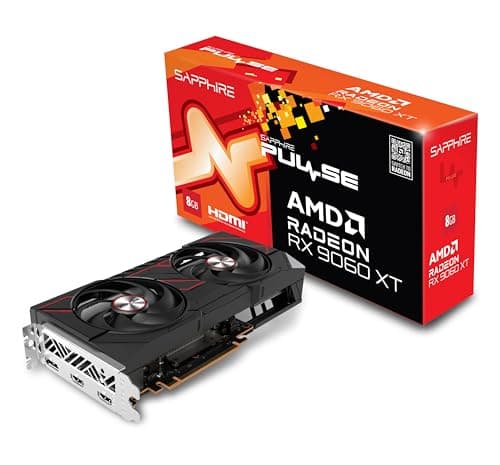
Sapphire 11350-03-20G Pulse AMD Radeon™ RX 9060 XT Gaming OC Graphics Card with 16GB GDDR6, AMD RDNA 4
£572.26 · Sapphire · Details

Frequently asked
7 questions01Is 8GB of VRAM enough for 1440p gaming in 2026?+
For the majority of titles at 1440p on high settings, 8GB is workable. However, a handful of texture-heavy games including Alan Wake 2 and Hogwarts Legacy can push past 8GB at 1440p ultra texture settings, causing stuttering as VRAM overflows to system memory. Using DLSS at a lower internal resolution reduces VRAM pressure and partially offsets the limitation, but it is not a complete solution. If you plan to keep the card for three or more years and play at 1440p, the 16GB variant is worth the additional cost.
02Does the MSI RTX 5060 Ti 8G GAMING TRIO OC support DLSS 4 multi-frame generation?+
Yes. The Blackwell architecture underpinning the RTX 5060 Ti includes fourth-generation tensor cores that are built to handle DLSS 4 multi-frame generation workloads. This allows the AI to generate multiple frames between each rendered frame, multiplying effective frame rates in supported titles. Game support for DLSS 4 is required, and not every title will implement it, but the list of supported games is growing with new releases increasingly including it as standard.
03What power supply do I need for the MSI RTX 5060 Ti GAMING TRIO OC?+
The card has a Total Graphics Power rating of 180W. A 650W PSU from a reputable brand rated at 80+ Gold or better is a sensible minimum when paired with a modern mid-range CPU. A 750W unit gives comfortable headroom and is the safer choice if your system includes multiple storage drives or other power-drawing components. The card uses a 16-pin 12VHPWR connector, and MSI includes an adapter for older PSU cables. Avoid sharp bends in the 12VHPWR cable.
04How does the TRI FROZR 4 cooler perform acoustically during gaming?+
Owner reviews broadly describe the card as quiet to moderate during gaming loads. The three STORMFORCE fans include a zero-RPM mode that stops them entirely during idle and light workloads, so the card is completely silent when not under gaming load. Under sustained gaming, the triple-fan setup moves sufficient air at lower individual fan speeds than a dual-fan design would require, which reduces noise output. The default fan curve balances temperature and noise reasonably well, and MSI Center software allows further tuning if you prefer to prioritise quieter operation at the cost of slightly higher temperatures.
05How does the RTX 5060 Ti compare to the AMD RX 7700 XT?+
The two cards are broadly competitive in rasterisation performance at 1080p and 1440p. The RX 7700 XT holds an advantage in raw VRAM capacity with 12GB of GDDR6 on a 192-bit bus, which is a genuine benefit for texture-heavy games at 1440p. The RTX 5060 Ti holds advantages in ray tracing efficiency, DLSS 4 upscaling quality versus FSR 3, and NVENC hardware encoding quality. If DLSS, ray tracing, and NVENC are priorities, the RTX 5060 Ti is the stronger choice. If VRAM headroom and cross-platform upscaling matter more, the RX 7700 XT deserves serious consideration.
06Is the MSI RTX 5060 Ti 8G GAMING TRIO OC suitable for video streaming and content creation?+
Yes, with appropriate expectations. The eighth-generation NVENC encoder supports AV1, H.264, and H.265 hardware encoding at quality levels competitive with software encoding, with a fraction of the CPU overhead. This makes it a practical card for streamers running OBS or similar software, and for anyone recording gameplay footage in AV1 for storage efficiency. It is not a workstation card and will not replace a dedicated editing setup for professional work, but for gaming-primary users who also stream or edit YouTube content, it handles both tasks competently.
07Will the RTX 5060 Ti fit in a standard mid-tower case?+
Most mid-tower and full-tower cases accommodate the GAMING TRIO OC without issue, but the card is a triple-slot design with a full-length PCB, so case clearance checks are important. You should verify the GPU length clearance specification of your case against MSI's listed card dimensions before purchasing. Compact mATX cases and small form factor builds may be too tight for the triple-slot heatsink. Check for adequate spacing between PCIe slots if you plan to use an M.2 slot or sound card in an adjacent slot.