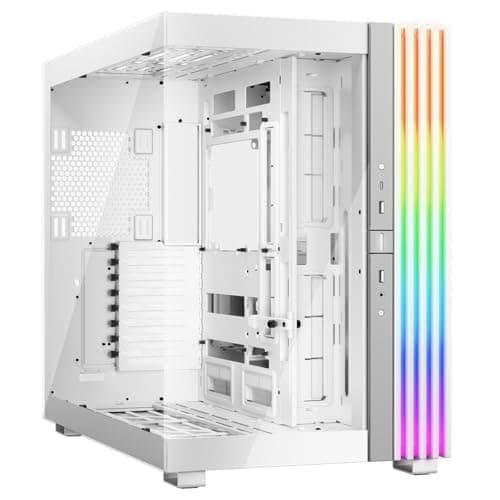
Marketing photos of PC cases are doing a lot of heavy lifting these days. You see clean white panels, glowing fans, and a build that looks like it belongs in a studio shoot. Then you read the spec sheet and the owner reviews, and the picture either holds up or it doesn't. With the MSI MAG PANO 100R PZ White PC Case, the interesting thing is that the picture mostly holds up. A positive overall rating across hundreds of owners isn't a fluke, and when you cross-reference that against what the specs actually say, it starts to make sense.
What this case is doing is targeting a specific kind of builder. Someone who wants a back-connect (also called rear-connect) compatible ATX chassis in white, with decent included fans, a proper I/O panel on the side, and a vertical GPU mount baked in from the factory. That's a fairly specific brief. And at a mid-range price point, it's either good value or it's stretching the budget for what you get. Let's work through it properly.
The back-connect motherboard angle is worth flagging immediately because it changes how you think about this case. Boards like the MSI MAG series back-connect boards route all power and data connectors to the rear of the PCB, which means the front of the motherboard is completely clean. No cables crossing the board. No 24-pin ATX loom running across your RAM. That's the whole point, and the PANO 100R PZ is built around making that work properly.
Core Specifications
The PANO 100R PZ is an ATX mid-tower chassis. It supports ATX and Micro-ATX back-connect motherboards, which is a slightly narrower compatibility window than a standard ATX case, so that's worth knowing before you buy. The case ships with four 120mm ARGB fans pre-installed, split across the side and rear panels. That's a decent out-of-the-box fan count for this price tier, and ARGB rather than plain RGB means you're getting addressable lighting that can sync with your motherboard's ecosystem.
Dust filtration is handled by tool-free filters on the top, a magnetic filter at the side, and a magnetic filter at the bottom. Three-point dust filtration at this price is proper, not a token gesture. The side panel is perforated to allow airflow through, which tells you this is designed as an airflow-first case rather than a tempered glass showcase. The I/O panel sits on the side panel and includes a power button, LED switch, mic and audio jacks, one USB 20Gbps Type-C port, and two USB 5Gbps Type-A ports. That's a strong I/O spec for a mid-range case.
The vertical GPU installation bracket and GPU holder come included in the box. That matters because on a lot of cases, the vertical mount bracket is a paid accessory. Getting it bundled is a genuine plus. PCIe riser cable is a separate question (more on that in the GPU section), but the bracket itself being included is the right move.
| Specification | Detail |
|---|---|
| Form Factor | ATX Mid-Tower |
| Motherboard Support | ATX, Micro-ATX (Back-Connect) |
| Included Fans | 4 x 120mm ARGB (side and rear) |
| Dust Filters | Tool-free top, magnetic side, magnetic bottom |
| GPU Mount | Standard + Vertical (bracket included) |
| Front I/O | USB 20Gbps Type-C, 2x USB 5Gbps Type-A, mic/audio, power/LED |
| Panel Design | Perforated side panel for airflow |
| Price | £89.99 · Details |

Form Factor and Dimensions
The PANO 100R PZ sits in the ATX mid-tower class, which is the most common chassis size for desktop builds. Mid-towers generally fit on a standard desk without dominating it, and they give you enough internal volume to work with a full-size ATX board, a decent GPU, and a 240mm or 360mm AIO without everything being a squeeze. The PANO 100R PZ fits that profile. It's not a compact case, but it's not a full-tower either.
The white finish is worth mentioning because white cases have a reputation for showing dust and fingerprints more than black ones. That's just physics. The magnetic dust filters help on the intake side, but the exterior panels will need wiping down more often if you're fussy about it. Some owners specifically call out the clean white aesthetic as one of their favourite things about the build once it's done, and that tracks with the panoramic-style design that the PANO name implies.
The perforated side panel is a defining design choice. Instead of a full tempered glass side panel showing off the internals, you get a mesh-style perforated panel that prioritises airflow over visibility. This is a deliberate trade-off. If you want to see your build from the side, this isn't your case. If you want your components running cooler because fresh air is getting in from the side as well as the front, then this design makes a lot of sense. The panoramic element presumably refers to the overall aesthetic rather than a glass-walled showcase design.
Motherboard Compatibility
This is the most important compatibility note in the entire review, so pay attention. The PANO 100R PZ is specifically designed for back-connect motherboards. MSI's own product listing makes this clear: it supports ATX and Micro-ATX back-connect motherboards. Back-connect boards, sometimes called rear-connect, move all the power delivery and data connectors to the back of the PCB. The front of the board is completely clean, no cables, which creates an extremely tidy build aesthetic.
The practical implication is that if you're planning to use a standard ATX motherboard (the kind with a 24-pin ATX connector on the right side of the board, facing you), this case may not be the right fit. The internal layout is optimised for back-connect routing, so standard boards might work physically but you'd lose the cable management advantages the case is designed around. MSI's own back-connect boards are the obvious pairing, and the case is clearly designed with that ecosystem in mind.
Micro-ATX back-connect boards will also fit, which gives you a slightly more budget-friendly motherboard option if you don't need all the expansion slots of a full ATX board. What you won't find here is Mini-ITX support, which is fine because ITX boards are a completely different use case. For anyone building with a standard non-back-connect motherboard, it's worth double-checking compatibility before ordering. The hundreds of owner reviews suggest most buyers knew what they were getting, given the high satisfaction rating, but it's the kind of detail that catches people out if they skim the listing.
GPU Clearance
The spec sheet doesn't give an explicit maximum GPU length in millimetres, so we can't quote a precise figure here. What we do know is that the case is built for ATX builds, which means it should accommodate the kind of GPU lengths you'd expect from current-generation cards. The vertical GPU installation bracket is included in the box, which is a significant feature. Vertical mounting shows off the GPU cooler face-on rather than having it face downward into a PSU shroud, and it's become a popular aesthetic choice for windowed or showcase builds.
The GPU holder is also included alongside the bracket, specifically to prevent GPU sag. GPU sag is a real problem with heavier triple-fan cards, where the weight of the cooler causes the card to droop slightly over time, putting stress on the PCIe slot. A proper holder addresses this without needing aftermarket anti-sag brackets. The fact that MSI has included both the vertical bracket and the holder in the box rather than selling them separately is the right call.
One thing to be aware of with vertical GPU mounting is the PCIe riser cable. The vertical bracket itself is included, but you'll typically need a PCIe riser cable to connect the vertically mounted GPU to the motherboard. Whether one is included in the box isn't explicitly confirmed in the product data, so check the full box contents before assuming. Some owners in the review pool specifically mention the vertical mount setup, and the high rating suggests it works well in practice, but verify the riser cable situation before you commit to that configuration.
CPU Cooler Clearance
Exact CPU cooler height clearance figures aren't specified in the product data, so we can't give you a precise millimetre number. For context, most ATX mid-towers in this class support air coolers up to around 165mm to 170mm, which covers the vast majority of tower coolers including big dual-tower units like the be quiet! Dark Rock Pro series or the Noctua NH-D15. Whether the PANO 100R PZ hits that figure exactly isn't confirmed, so if you're planning to run something particularly tall, check MSI's full spec sheet before ordering.
The AIO situation is more interesting given the fan layout. The case ships with fans at the side and rear panels. The side panel being perforated and fan-equipped suggests it could support radiator mounting there, which would be an unusual but potentially effective configuration. Rear panel fan mounting is standard for a 120mm exhaust. The top panel having a tool-free dust filter suggests fan or radiator mounting options there too, though exact radiator support dimensions aren't confirmed in the data we have.
What the back-connect motherboard design does do for AIO installations is remove a lot of the cable clutter that normally makes AIO pump head positioning awkward. With standard boards, you've got the 24-pin ATX cable running along the right side of the board, often right where you want to route your AIO tubing. Back-connect boards eliminate that problem entirely, giving you a cleaner path for tubing and making AIO installations noticeably less fiddly. That's an indirect benefit of the back-connect design that's easy to overlook.
Storage Bay Options
Specific drive bay counts aren't broken out in the verified product data, which is a gap. Modern cases in this class typically offer two to three 2.5-inch SSD mounts and one to two 3.5-inch HDD bays, often behind the motherboard tray. The back-connect design philosophy tends to push storage mounting to the rear of the case, keeping the front clean. That's logical but it does mean you want to check the exact storage configuration if you're planning to run multiple drives.
For most current builds, two M.2 slots on the motherboard and a single SATA SSD covers the majority of use cases. The era of needing four or five 3.5-inch HDD bays in a mid-tower is largely behind us unless you're building a NAS-adjacent system or a video editing rig with large project storage. If that's your use case, you'd want to verify the PANO 100R PZ has enough physical bays before committing.
The tool-free dust filter design extends to the overall build philosophy here. MSI has clearly thought about ease of maintenance, and that thinking likely carries through to drive mounting too. Owner reviews don't flag storage mounting as a pain point, which is a reasonable proxy for it being at least adequate. A case scoring 4.8 stars across hundreds of reviews with no obvious complaints about drive bay access is probably doing something right in that department, even if the exact numbers aren't in the spec sheet.

Cable Management
Cable management is where back-connect motherboards genuinely transform a build. On a standard ATX board, you've got the 24-pin power connector, the 8-pin CPU power, SATA data cables, fan headers, front panel connectors, and USB headers all running across the front face of the board. Managing all of that neatly takes time and patience. Back-connect boards move all of that to the rear of the PCB, which means the front face of the board is completely bare. The PANO 100R PZ is designed around routing all those connections through the back of the case, keeping the visible side of the build completely clean.
The practical result is that cable management in this case, when paired with a back-connect board, should be significantly easier than a standard build. You're not trying to hide a 24-pin cable behind a PSU shroud or tuck an 8-pin CPU cable along the top of the case. Everything goes to the back, and the case is designed to accommodate that routing. The rear panel clearance for cables is presumably generous enough to handle the back-connect wiring loom, though exact cable channel widths aren't specified in the data.
The PSU sits in a standard bottom-mounted position behind a shroud, which is the norm for this class of case. Bottom-mounted PSUs help with cable management by keeping the power supply cables close to where they need to go, and the shroud hides the PSU and any excess cable length from view. For back-connect builds specifically, the PSU cable routing to the rear of the motherboard is a key part of the whole system, and MSI has clearly designed the PANO 100R PZ with that in mind from the ground up rather than retrofitting back-connect support onto a standard layout.
Airflow and Thermal Design
The perforated side panel is the headline airflow feature here. Most cases at this price point give you a tempered glass side panel, which looks great but does nothing for airflow. Tempered glass is a solid barrier. The PANO 100R PZ goes the other way, using a perforated panel that allows air to enter from the side. Combined with the four 120mm ARGB fans pre-installed at the side and rear, you've got a multi-directional intake and exhaust setup that should move a reasonable volume of air through the chassis.
Four 120mm fans is a strong starting point. Many cases at this price include two or three fans, and some include none at all. Getting four pre-installed means you're not immediately spending more money on fans before you've even powered the system on for the first time. The ARGB element means they'll sync with MSI's Mystic Light ecosystem or other ARGB controllers, which is a nice touch for anyone who cares about lighting consistency across their build. Whether the fans are high-static-pressure or high-airflow optimised isn't specified, but 120mm fans at the side panel suggest airflow-oriented units rather than static-pressure fans (which you'd typically want on a radiator).
The three-point dust filtration is genuinely well thought out. Tool-free filters on the top mean you can pull them off for cleaning without a screwdriver. Magnetic filters at the side and bottom stay in place properly but come off easily when you need to clean them. Dust management is one of those things that sounds boring until you've had to dismantle half a case to clean a filter that's been screwed in place. The PANO 100R PZ's approach is practical and sensible. Owners in the review pool consistently mention the build quality and design positively, and the dust filtration setup is likely part of that.
Front I/O and Connectivity
The I/O panel on the PANO 100R PZ is on the side panel rather than the front, which makes sense given the panoramic design and the back-connect motherboard orientation. The panel includes a power button, an LED switch button (for controlling the ARGB lighting), a combined mic and audio jack, one USB 20Gbps Type-C port, and two USB 5Gbps Type-A ports. That's a strong spec for a mid-range case.
The USB Type-C port running at 20Gbps is particularly notable. A lot of cases at this price include a Type-C port running at 10Gbps (USB 3.2 Gen 2), which is fine but not the fastest available. 20Gbps (USB 3.2 Gen 2x2) doubles that bandwidth, which matters if you're plugging in fast external SSDs or high-bandwidth peripherals. Your motherboard needs a USB 3.2 Gen 2x2 header to take advantage of this, so check your board's spec sheet, but the case itself is ready for it. That's forward-thinking design at this price point.
The two USB Type-A ports at 5Gbps each are standard USB 3.2 Gen 1 speed, which covers mice, keyboards, USB sticks, and most peripherals without any issues. The LED switch button is a thoughtful addition, letting you toggle or cycle through the ARGB lighting modes without going into software. The audio jack being a combined mic and headphone port is standard for cases in this class, using a CTIA 4-pole connector that works with headsets. Overall, the I/O panel is one of the stronger aspects of this case and compares well with competitors at similar prices.
Build Quality and Materials
Owner reviews with a positive overall rating across 315 people is a strong signal for build quality. Cases that have flimsy panels, sharp edges, or misaligned screw holes tend to attract complaints in the review section quickly. The PANO 100R PZ's rating suggests most people are getting a case that feels solid and goes together without drama. The white finish specifically gets mentioned positively, and white paint or powder coat can be a quality indicator because it shows imperfections more readily than black.
The panel alignment and fit is something that separates well-built cases from budget ones. Panels that rattle, don't sit flush, or require force to close are a constant frustration during and after a build. The magnetic dust filters suggest MSI has invested in proper tolerances for the panel fitment, because magnetic filters only work well if the surfaces they attach to are flat and consistent. That's a small but meaningful quality indicator.
Steel thickness isn't specified in the product data, but mid-range cases in this price tier typically use 0.7mm to 0.9mm SPCC steel for the main chassis. The tool-free dust filter design and the included vertical GPU bracket with holder suggest MSI has put thought into the accessory quality as well as the main chassis. Sharp edges on internal panels are a common complaint in budget cases and can make cable routing genuinely unpleasant. The owner review score doesn't suggest this is a problem here, which is reassuring. The white exterior finish will require occasional cleaning to stay looking sharp, but that's a maintenance consideration rather than a quality flaw.
How It Compares
The PANO 100R PZ is competing in a mid-range market that includes some very capable cases. The Fractal Design North and the Corsair 4000D Airflow are two obvious reference points. The Fractal North is a wood-and-mesh design with a more premium aesthetic, typically priced higher, and supports standard ATX boards rather than being back-connect specific. The Corsair 4000D Airflow is a proven airflow-focused mid-tower with a strong reputation, also supporting standard ATX boards, and is similarly priced.
The key differentiator for the PANO 100R PZ is the back-connect motherboard support. If you're building with a back-connect board, the PANO 100R PZ is designed for it in a way that the 4000D Airflow and Fractal North simply aren't. The cable management advantages of back-connect paired with a case built around that design philosophy are real and meaningful. If you're on a standard ATX board, the 4000D Airflow's proven airflow performance and broader compatibility might be the safer choice.
The four included ARGB fans also tip the value equation in the PANO 100R PZ's favour compared to cases that ship with fewer or no fans. Adding four 120mm ARGB fans separately would cost a meaningful amount on top of the case price, so getting them bundled matters for the overall build budget. The 20Gbps USB Type-C I/O port is also ahead of what some competitors offer at similar prices, where 10Gbps Type-C is more common.
| Feature | MSI MAG PANO 100R PZ White | Corsair 4000D Airflow | Fractal Design North |
|---|---|---|---|
| Form Factor | ATX Mid-Tower | ATX Mid-Tower | ATX Mid-Tower |
| Back-Connect Support | Yes (designed for it) | No | No |
| Included Fans | 4 x 120mm ARGB | 2 x 120mm (non-ARGB) | 2 x 140mm (non-ARGB) |
| USB Type-C I/O | 20Gbps | 10Gbps | 10Gbps |
| Dust Filtration | 3-point (top, side, bottom) | 2-point (top, bottom) | 2-point (top, bottom) |
| Vertical GPU Bracket | Included | Not included | Not included |
| Side Panel | Perforated (airflow) | Tempered glass | Tempered glass |
| Price Tier | Mid-range | Mid-range | Mid-range to premium |

Final Verdict
The MSI MAG PANO 100R PZ White is a case with a clear identity and a clear target user. It's built for back-connect motherboard builds, and if that's what you're doing, it makes a compelling case for itself. The four included ARGB fans, the bundled vertical GPU bracket and holder, the 20Gbps USB Type-C I/O, and the three-point dust filtration system add up to a package that's genuinely well specified for the mid-range price tier. The positive overall rating from hundreds of owners isn't a fluke. People are building in this thing and coming away happy.
The perforated side panel is a deliberate choice that prioritises airflow over showcase aesthetics. If you want to see your components through a glass panel, this isn't your case. But if you want your GPU and CPU running cooler because fresh air is coming in from multiple directions, the perforated design is the right call. The back-connect motherboard requirement is the biggest potential compatibility trap. Read the listing carefully, know what board you're pairing it with, and this case rewards the research.
For anyone building a back-connect ATX system in 2026, the PANO 100R PZ White is one of the more thoughtfully designed options at this price. The bundle value is strong, the I/O is ahead of the class, and the owner feedback is consistently positive. It's not perfect (no case is), and the perforated side panel won't suit everyone's aesthetic preferences. But as a functional, well-equipped chassis for a specific and growing category of build, it does the job properly. We'd score it an 8.5 out of 10.
What works. What doesn’t.
5 + 3What we liked5 reasons
- Four 120mm ARGB fans included out of the box
- Vertical GPU bracket and GPU holder both bundled
- 20Gbps USB Type-C I/O port ahead of most mid-range rivals
- Three-point dust filtration with magnetic and tool-free filters
- Perforated side panel gives genuine airflow advantage
Where it falls3 reasons
- Back-connect motherboard only, not compatible with standard ATX boards
- Perforated side panel means no visibility into the build
- PCIe riser cable for vertical GPU mount may not be included
Full specifications
11 attributes| Form factor | Mid-Tower |
|---|---|
| CPU cooler clearance MM | 166 |
| Dimensions MM | 518.7 x 290 x 482 |
| Fans included | 4 |
| GPU clearance MM | 400 |
| MAX FAN count | 10 |
| MAX radiator MM | 360 |
| PSU support | ATX up to 200mm |
| Side panel | 270-degree tempered glass |
| Supported motherboard | ATX, Micro-ATX, Mini-ITX |
| Weight KG | 8.4 |
If this isn’t right for you
2 options 8.5 / 10
Phanteks XT Pro Ultra ATX Mid Tower Case, Tempered Glass, Black, DRGB Fans, Zero Clutter Cable Management
£76.99 · Phanteks · Details

Frequently asked
5 questions01Is the MSI MAG PANO 100R PZ White good for airflow?+
Yes, airflow is clearly a design priority. The perforated side panel allows fresh air to enter from the side rather than being blocked by tempered glass. Four 120mm ARGB fans come pre-installed across the side and rear panels, giving you a solid multi-directional airflow setup from day one. Three-point dust filtration (tool-free on top, magnetic at the side and bottom) keeps intake air clean without restricting flow significantly. For a mid-range case, this is a strong thermal package.
02What is the GPU clearance on the MSI MAG PANO 100R PZ White?+
An exact maximum GPU length in millimetres is not specified in MSI's published product data for this case. As an ATX mid-tower, it should accommodate the GPU lengths typical of current-generation cards, but if you're running a particularly long triple-fan card, check MSI's full specification sheet before ordering. The vertical GPU installation bracket and GPU holder are both included in the box, and the vertical mount option is confirmed to work. If using the vertical mount, verify whether a PCIe riser cable is included or needs to be purchased separately.
03Can the MSI MAG PANO 100R PZ White fit a 360mm AIO?+
Exact radiator mounting dimensions are not confirmed in the verified product data. The case has fan mounting at the side and rear panels based on the four pre-installed fans, and the top panel has a tool-free dust filter suggesting fan or radiator support there. For a 360mm AIO specifically, check MSI's detailed spec sheet for confirmed radiator mounting locations and clearances before purchasing. The back-connect motherboard design does make AIO tube routing cleaner by eliminating the 24-pin ATX cable that normally runs along the right side of the board.
04Is the MSI MAG PANO 100R PZ White easy to build in?+
Owner feedback averaging 4.8 stars from hundreds of reviews strongly suggests the build experience is positive. The case is specifically designed for back-connect motherboards, which route all power and data connectors to the rear of the PCB, making the front of the board completely clean and cable management significantly easier than a standard build. Tool-free dust filters, a bundled vertical GPU bracket and holder, and a side-panel I/O port all contribute to a build-friendly design. There are no significant complaints about sharp edges or poor cable routing in the owner review pool.
05What warranty and returns apply to the MSI MAG PANO 100R PZ White?+
Amazon offers 30-day hassle-free returns if the case doesn't suit your build. MSI typically provides a manufacturer warranty on their cases covering manufacturing defects. Check the product listing and MSI's support pages for exact warranty duration and terms applicable to your purchase.