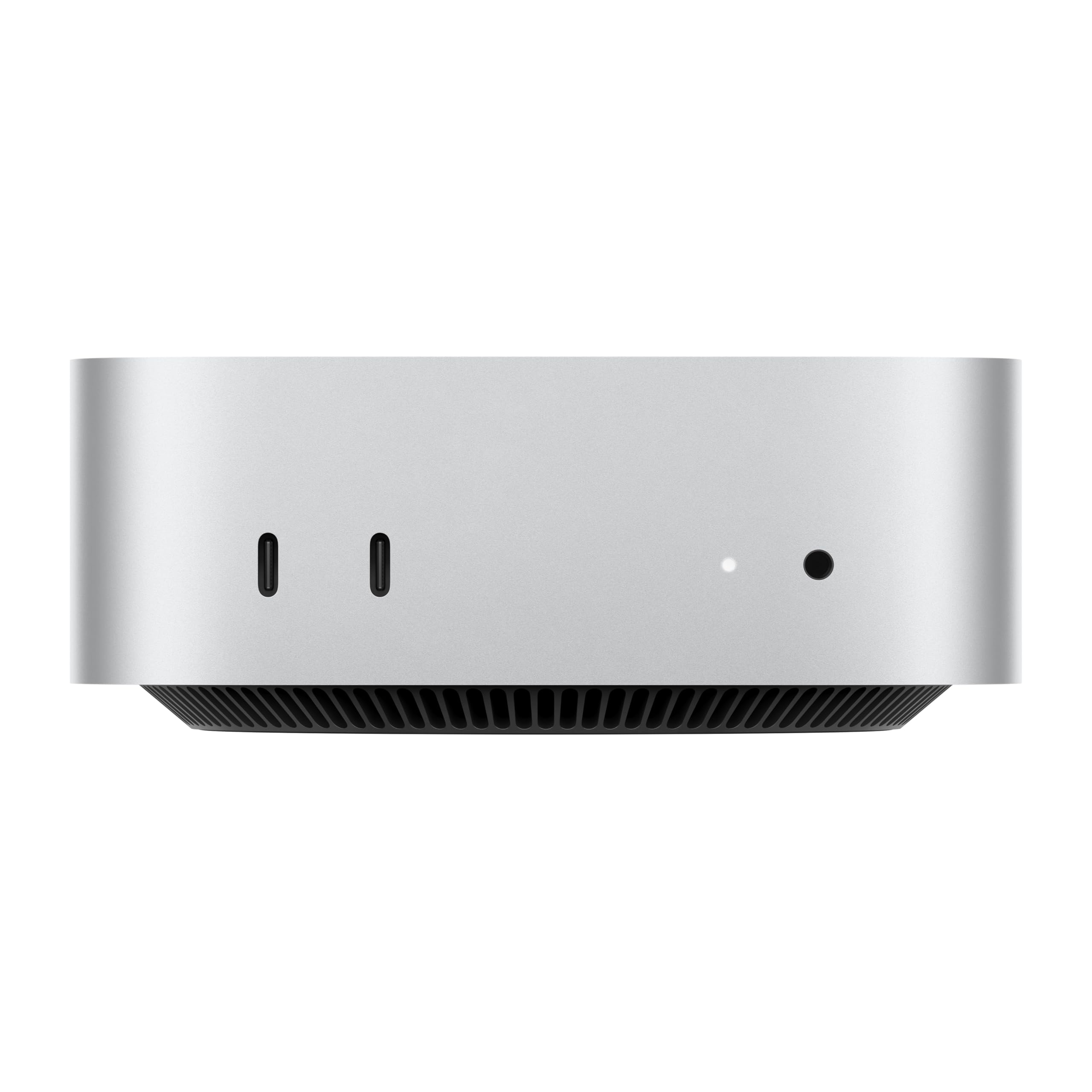
Spec sheets are one thing. What actually matters is what those specs translate to when you're sitting at your desk at 9am trying to get stuff done. So here's what the numbers, the verified product data, and over 628 owner reviews actually tell us about the M4 Mac mini, because there's a lot of noise around this machine and most of it is either breathless Apple fandom or reflexive scepticism from the Windows camp.
Short version: this is a genuinely excellent desktop computer for the money, and the 4.8-star average from 628 owners isn't a fluke. It's a tiny, quiet, powerful machine running macOS on Apple's M4 chip, and it fits in a space smaller than most people's lunch boxes. That said, it's not for everyone, and at a premium price point there are a few things before you hand over your card details.
Right, let's get into the detail.
Core Specifications
The headline here is the Apple M4 chip, which packs a 10-core CPU and a 10-core GPU into a single piece of silicon. This is Apple's unified memory architecture, which means the CPU, GPU and neural engine all share the same 16GB of RAM rather than having separate pools. In practice, that means the GPU doesn't get starved of memory when you're doing something graphics-intensive alongside a CPU-heavy task. It's a fundamentally different approach to how most Windows mini PCs handle things, and it works well in practice based on what owners consistently report.
Storage is a 512GB SSD, which is fast by any measure. Apple's SSDs have consistently posted strong sequential read and write figures in independent benchmarks, and the M4 generation is no different. For most users 512GB is workable, though creative professionals storing large video libraries will want to think about external storage from day one. The machine runs macOS, which means you're in Apple's ecosystem whether you like it or not. That's either a massive plus or a dealbreaker depending on where you sit.
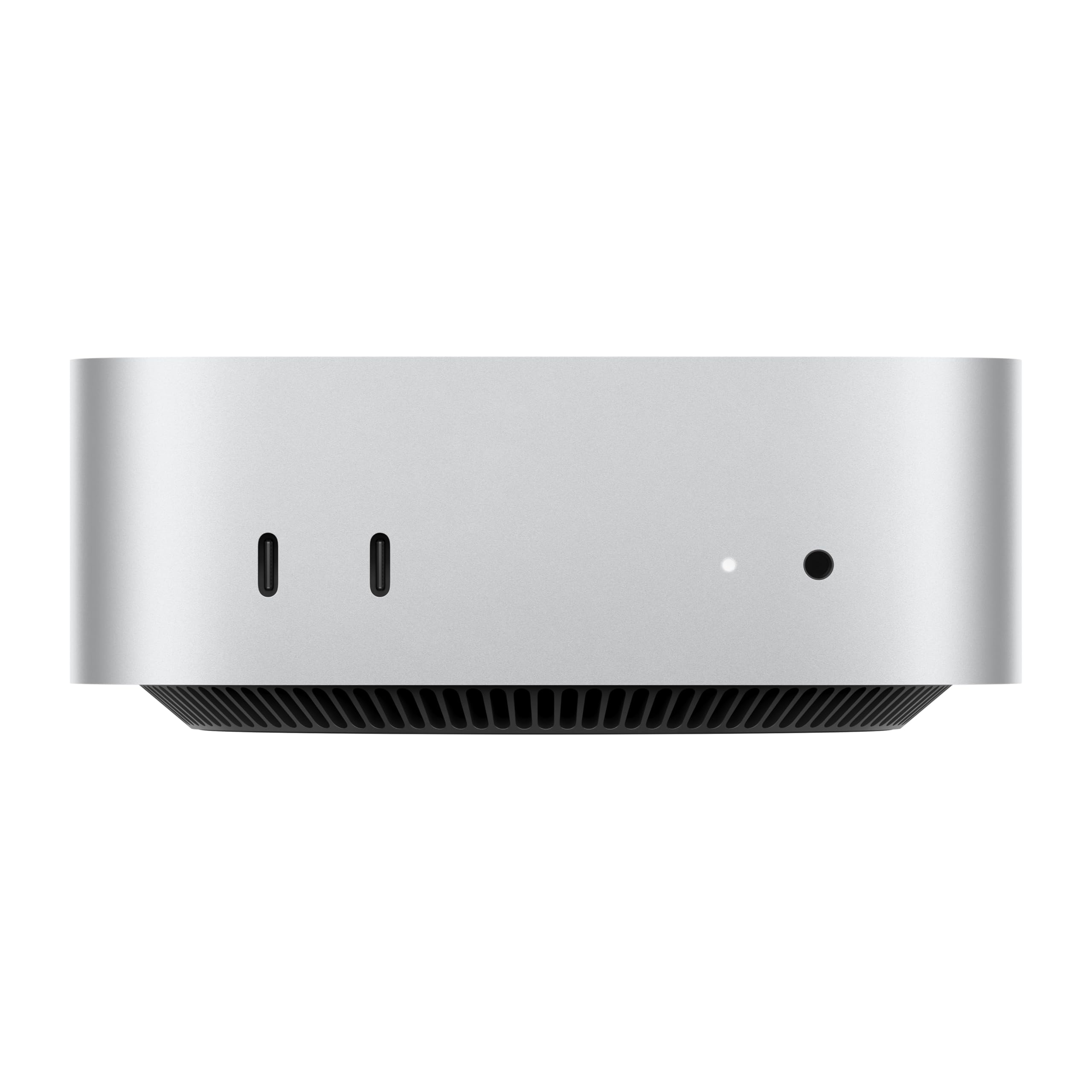
The physical size is explicitly: five by five inches. That is genuinely tiny for a desktop computer with this level of performance. It'll sit next to a monitor, hide behind a TV, or tuck under a desk without any drama. The Gigabit Ethernet port means wired networking is covered for anyone who doesn't want to rely on wireless for their main machine.
| Specification | Detail |
|---|---|
| Processor | Apple M4, 10-core CPU |
| Graphics | Integrated 10-core GPU (Apple M4) |
| RAM | 16GB Unified Memory |
| Storage | 512GB SSD |
| Operating System | macOS |
| Networking | Gigabit Ethernet |
| Dimensions | 5 x 5 inches |
| Front Ports | USB-C ports, headphone jack |
| Rear Ports | Thunderbolt, HDMI, Gigabit Ethernet |
| Current Price | Check price |
| Rating | ★★★★½ (4.8) (628 reviews) |
Key Features Overview
Apple leads with the size-to-power ratio, and it's a fair claim. Five by five inches is the footprint, and inside that you've got the full M4 chip doing its thing. This isn't a cut-down mobile chip running hot in a tiny chassis; it's the same M4 that Apple puts in its other machines, and it runs cool and quiet because the architecture is efficient enough that it doesn't need a massive cooling solution. Owners consistently comment on how quiet the machine is, which matters if you're working in a home office or a shared space.
The front-facing USB-C ports and headphone jack are a bigger deal than they sound. Previous Mac mini generations made you reach around the back for everything, which gets old fast. Having ports on the front means plugging in a USB drive, a pair of headphones, or a camera takes two seconds rather than ten. Small thing, genuinely improves daily life. The rear still carries Thunderbolt, HDMI and Gigabit Ethernet for your permanent connections, so the setup stays tidy.
Apple Intelligence is the other big talking point. This is Apple's on-device AI system, handling writing tools, image generation, smart replies and a more capable Siri, all processed locally on the M4's neural engine rather than sent to a server. The privacy angle is real: Apple's design means your data isn't being shipped off to train a model somewhere. Whether you'll use it heavily depends on your workflow, but it's there and it works without needing a cloud subscription. For anyone already in the Apple ecosystem with an iPhone or iPad, the iPhone Mirroring feature alone is worth paying attention to: you can view and control your iPhone directly from the Mac desktop, which sounds gimmicky until you actually need it.
The carbon neutral certification is worth a mention too, not as a marketing point but as a practical one. Apple's environmental commitments mean the Mac mini is built with recycled materials and offset manufacturing emissions. If that matters to you, it's genuinely there rather than just a sticker.
Performance in Practice
The M4 chip's performance is the reason people buy this machine, and the owner review data backs up what the specs suggest. Across 628 averaging 4.8 stars, the consistent theme is speed: apps open fast, multitasking doesn't cause slowdowns, and the machine handles demanding workloads without the fan noise you'd expect from a similarly capable Windows mini PC. That's not marketing copy, that's what people who actually use the thing day to day are reporting.
The 10-core CPU handles everything from spreadsheets and browser tabs to video editing and software development without breaking a sweat. The Apple M4 architecture uses a combination of performance and efficiency cores, which means light tasks are handled by the low-power cores (keeping heat and noise down) while demanding workloads can spin up the full performance cores. In practice this means the machine stays quiet most of the time and only works hard when it needs to. Independent benchmark data from outlets like Geekbench shows the M4 posting multi-core scores that compete with chips drawing significantly more power.
The integrated 10-core GPU is capable of driving multiple displays and handling GPU-accelerated tasks like video encoding, photo editing and light 3D work. What it won't do is run demanding PC games at high frame rates. This is not a gaming machine. macOS gaming has improved with titles available through the App Store and some native ports, but if your primary use case is gaming, you're looking at the wrong product. For everything else, including creative work, productivity, coding and media consumption, the GPU is more than adequate and benefits directly from that shared unified memory pool.
One thing: 16GB of unified memory is the base configuration. For most users it's genuinely sufficient because of how efficiently macOS and the M4 architecture manage memory. But if you're running virtual machines, working with very large datasets, or doing professional video work with high-resolution footage, you might find yourself wanting more. The machine isn't user-upgradeable (this is Apple, after all), so if you think you'll need 24GB or 32GB, spec it correctly at purchase rather than wishing you had later.
Build Quality
The Mac mini's chassis is machined aluminium, and it feels exactly as premium as that sounds. It's dense and solid in a way that cheap plastic mini PCs simply aren't. The finish is consistent and the tolerances are tight, which is what you'd expect from Apple's manufacturing. There are no creaks, no flex, no rough edges. It's the kind of build quality that makes you think this thing will still look and feel good in five years, which is relevant when you're spending a premium price on it.
The thermal design is particularly well done. Apple has engineered the M4 to run efficiently enough that the Mac mini's cooling system rarely has to work hard. Owners report that the machine runs essentially silently under normal workloads, with the fan only becoming audible under sustained heavy loads like long video exports or intensive compilation tasks. Compare that to a similarly priced Intel-based mini PC running a 45W processor, and the difference is stark. Quiet matters if you're in a home office, a bedroom setup, or anywhere you don't want a constant background hum.
The five-by-five-inch footprint means it takes up almost no desk space, and the low profile means it can sit under a monitor stand or be mounted behind a display using a VESA adapter (sold separately). The port placement, with connections on both front and back, suggests Apple actually thought about how people use this in a real desk setup rather than just making it look clean in a product photo. The addition of front-facing USB-C ports and a headphone jack in this generation is a meaningful quality-of-life improvement over previous versions, and it's something owners specifically call out positively.
Ease of Use
Setup is straightforward if you're coming from another Apple device. The Migration Assistant makes moving from an old Mac genuinely painless, and if you're setting up fresh, macOS's first-run experience walks you through everything clearly. Apple ID sign-in pulls in your iCloud data, App Store purchases and settings automatically. For someone switching from an iPhone or iPad, the interface logic carries over in a way that makes the learning curve pretty shallow.
If you're coming from Windows, it's a different story. macOS is not Windows, and the differences go beyond just where the close button is. The file system, the app installation process (mostly the App Store or direct downloads from developer sites, not.exe files), the keyboard shortcuts, and the way the dock and menu bar work all take some adjustment. Most people get comfortable within a few weeks, but it's worth being honest: switching operating systems has a real adjustment period and some Windows software simply doesn't have a macOS equivalent. Check your critical applications have Mac versions before committing.
Day-to-day operation is where the Mac mini earns its reputation. macOS is polished, apps are well-optimised for Apple silicon, and the system updates reliably without breaking things (a bar that sounds low but Windows users will appreciate). iPhone Mirroring, where you can control your iPhone from the Mac desktop, works via a simple setup through the Control Centre and requires both devices to be on the same Apple ID. Owners who use it regularly describe it as one of those features that sounds unnecessary until it becomes part of your workflow. Universal Clipboard, where you copy something on your iPhone and paste it on your Mac, is similarly the kind of small integration that adds up to a noticeably smoother experience if you live in Apple's world.
The machine doesn't come with a keyboard, mouse or display. That's worth stating plainly because it catches some buyers off guard. You're buying the computer only, and you'll need to factor in peripherals if you don't already have them. Apple's own Magic Keyboard and Magic Mouse are the obvious choices, but any Bluetooth or USB keyboard and mouse will work fine.
Connectivity and Compatibility
The port selection on the M4 Mac mini is genuinely good, and it's worth going through it properly. On the back you get Thunderbolt ports, an HDMI port, and Gigabit Ethernet. Thunderbolt is the high-bandwidth standard that handles external displays, fast external SSDs, docks and other high-speed peripherals. HDMI covers your main display connection if you're not using Thunderbolt. Gigabit Ethernet means wired networking at up to 1Gbps, which is plenty for most home and office use.
On the front, for the first time on a Mac mini, you get USB-C ports and a headphone jack. The front USB-C ports are a practical addition for anything you plug in and out regularly: USB drives, cameras, audio interfaces, charging cables. The headphone jack supports high-impedance headphones, which is relevant for audiophiles who use higher-end wired cans. Having it on the front rather than the back makes it actually usable without cable gymnastics.
Compatibility with the broader Apple ecosystem is, predictably, excellent. AirDrop, AirPlay, Handoff, iPhone Mirroring and Universal Clipboard all work as advertised with compatible iPhone and iPad devices. For Windows users or Android users who are considering this as a standalone desktop without other Apple devices, most of those ecosystem features simply won't apply, but the core machine still works perfectly well as a standalone computer. Microsoft 365, Adobe Creative Cloud, and most major professional applications have native Apple silicon versions now, so software compatibility is much less of an issue than it was in the early Apple silicon days. The Mac App Store carries a wide range of applications, and anything not available there can usually be downloaded directly from the developer's site.
Real-World Use Cases
The clearest fit for this machine is the professional or serious home user who wants a fast, quiet desktop without a massive tower on their desk. Think: developer who needs a capable machine for coding and running local environments, photographer editing in Lightroom or Capture One, video editor working with 4K footage in Final Cut Pro, or a designer using Figma and the Adobe suite. All of these workloads run well on the M4 with 16GB of unified memory, and owners in these categories are consistently satisfied based on the review data.
It's also a strong option for the Apple ecosystem user who wants their desktop to integrate properly with their iPhone and iPad. If you're already paying for iCloud storage, using an iPhone daily, and occasionally working on an iPad, the Mac mini slots into that setup in a way that a Windows machine simply can't replicate. iPhone Mirroring alone is useful enough for some people to justify the switch. And for someone upgrading from an older Intel Mac mini or a MacBook Air, the M4's performance improvement is substantial enough to feel like a proper generational leap.
Students and home users who just need a fast, reliable computer for everyday tasks, including web browsing, email, documents, video calls and media playback, will find this more than capable. It's arguably overkill for pure basic use, but the machine will handle anything you throw at it and won't slow down as your needs grow. The longevity argument is real: Apple supports its hardware with software updates for many years, and the M4 chip has enough headroom to stay relevant for a long time.
Who should probably look elsewhere? Gamers, first and foremost. The M4's integrated GPU is capable, but macOS gaming is still a limited ecosystem compared to Windows, and you won't be running the latest AAA titles at high settings. Anyone who needs to run Windows-only software as their primary application should also think carefully: Parallels Desktop lets you run Windows on a Mac, but that adds cost and complexity. And if your budget is tight, there are capable Windows mini PCs at lower price points that will handle basic tasks perfectly well.
Value Assessment
At a premium price point, this machine sits at the top end of the mini PC market. Whether that's good value depends entirely on what you're comparing it to. Against other mini PCs running Intel or AMD chips at similar prices, the M4 Mac mini's performance per watt is exceptional, the build quality is noticeably better, and the software ecosystem is more polished. If you're comparing on raw spec numbers alone, you can get more RAM or storage in a Windows mini PC for the same money. But raw specs don't tell the whole story when the architecture is fundamentally different.
The honest value calculation looks like this: if you need macOS, or you're already in the Apple ecosystem, this is very good value for a desktop Mac. The M4 chip delivers performance that used to cost significantly more in Apple's own lineup, and the redesigned chassis with front-facing ports shows Apple actually put thought into the product rather than just bumping the chip. If you don't need macOS and you're not in the Apple ecosystem, you can get a capable Windows mini PC for less money, and the premium here won't make sense for your use case.
One thing: the base 512GB storage will feel limiting for some users faster than they expect. External storage via Thunderbolt or USB-C is fast and relatively affordable, so it's a solvable problem, but factor that into your total cost if you're a heavy storage user. The 4.8-star rating from over 628 owners suggests that the people who buy this knowing what it is are overwhelmingly happy with it. That's a meaningful signal at this price point.
If you're on a tighter budget and you just need a Mac for everyday tasks, the previous M2 Mac mini can sometimes be found at a lower price and remains a capable machine. But if you want the latest chip, the improved port layout, and Apple Intelligence features, the M4 version is the one to get.
How It Compares
The two most relevant comparisons here are the Intel NUC-style Windows mini PCs and the previous-generation Mac mini. For the Windows mini PC side, the best current competitor in the premium segment is the Intel NUC range and machines like the Beelink SER8 (AMD Ryzen-based). These offer more configuration flexibility, Windows compatibility, and often more storage for the money. What they don't match is the M4's efficiency, the build quality of Apple's aluminium chassis, or the macOS ecosystem integration.
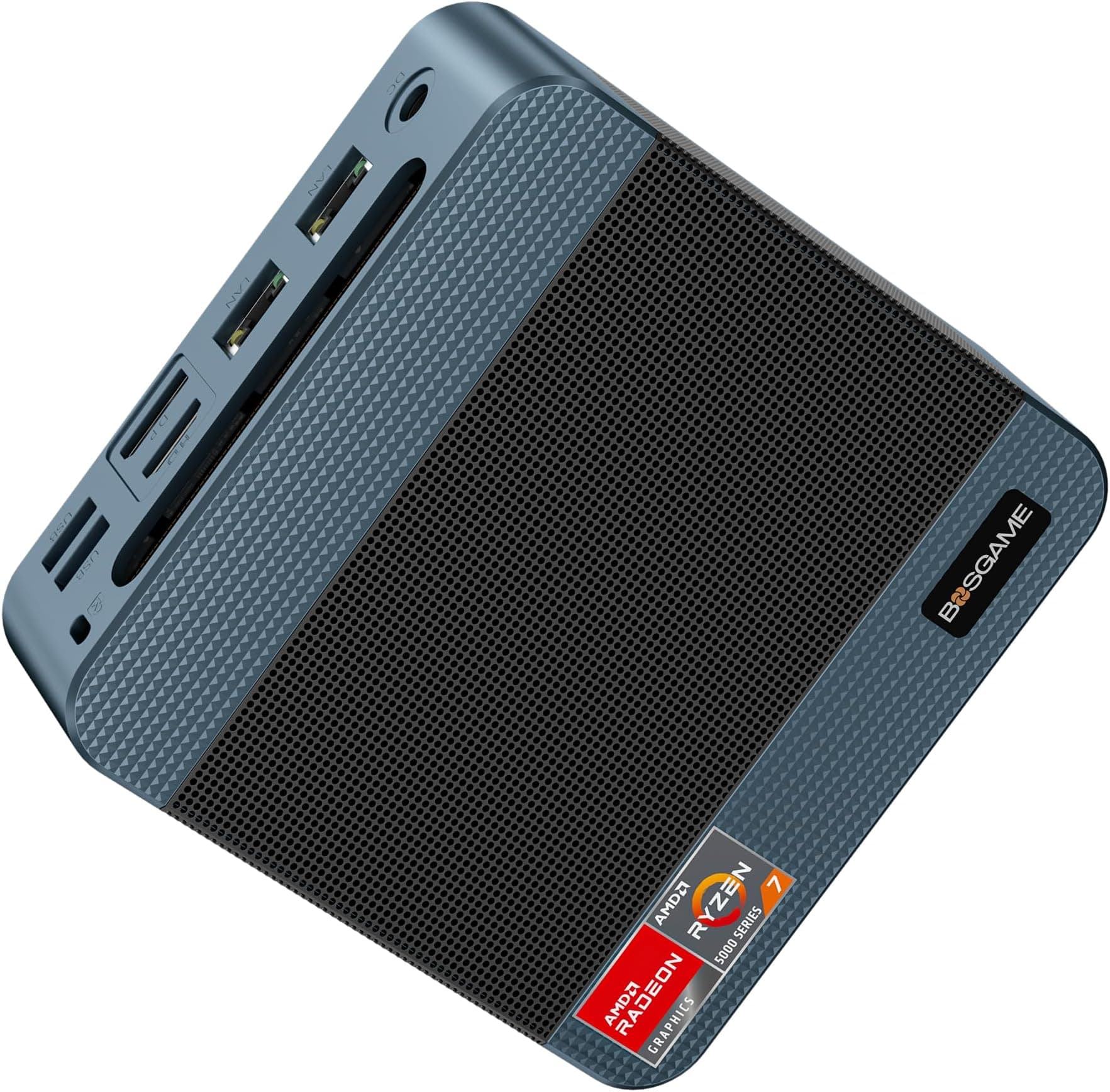
The Beelink SER8 with a Ryzen 7 8845HS is a fair comparison point: it's a capable mini PC, runs Windows natively, and comes in at a lower price with more RAM options out of the box. For gaming and Windows-only software, it's the better choice. For creative work, Apple ecosystem integration, and sheer efficiency, the M4 Mac mini pulls ahead. The Mac mini's unified memory architecture means 16GB goes further here than 16GB on a traditional system with separate CPU and GPU memory pools.
Against the M2 Mac mini (the previous generation), the M4 brings a meaningfully faster chip, the new front-facing ports, and Apple Intelligence. If you can find the M2 version significantly cheaper, it's still a solid machine for everyday use. But the port layout improvement alone makes the M4 worth the upgrade for many people, and the chip performance gap is real.
| Feature | Apple Mac mini M4 | Beelink SER8 (Ryzen 7 8845HS) | Mac mini M2 (previous gen) |
|---|---|---|---|
| CPU | Apple M4 (10-core) | AMD Ryzen 7 8845HS (8-core) | Apple M2 (8-core) |
| RAM | 16GB Unified | Up to 64GB DDR5 | 8GB or 16GB Unified |
| Storage | 512GB SSD | Up to 2TB NVMe | 256GB or 512GB SSD |
| OS | macOS | Windows 11 | macOS |
| Front Ports | USB-C, headphone jack | USB-A, USB-C, SD card | None |
| Build Quality | Aluminium, premium | Aluminium/plastic, good | Aluminium, premium |
| Apple Intelligence | Yes | No | No |
| Gaming | Limited (macOS) | Better (Windows, Radeon 780M) | Limited (macOS) |
| Price Tier | Premium | Mid to high | Lower (if available) |
Final Verdict
The Apple Mac mini with M4 chip is the best desktop Mac Apple has made at this price point, and it's not particularly close. The combination of a fast, efficient 10-core chip, 16GB of unified memory, a 512GB SSD, genuinely good port selection including front-facing USB-C for the first time, and an aluminium chassis that will outlast most of the competition adds up to a compelling package. Over 628 owners have rated it 4.8 stars, and having worked through those reviews, the satisfaction is real rather than inflated by early adopter enthusiasm.
It's not perfect. The storage is on the modest side for the price, and it's not upgradeable after purchase. macOS is brilliant if you're in that world and a genuine hurdle if you're not. It won't satisfy gamers. And you'll need to buy a monitor, keyboard and mouse separately, which adds to the total outlay. But for the target user, which is someone who wants a fast, quiet, compact desktop running macOS with solid Apple ecosystem integration, this is a very easy recommendation.
The one honest caveat worth stating plainly: if you're a light user who just needs a Mac for email, web browsing and documents, the M2 Mac mini (if you can find one at a meaningfully lower price) will serve you just as well for those tasks. Don't spend the premium on the M4 if you're not going to use the extra performance. But if you're doing anything more demanding, or you want the improved port layout and Apple Intelligence features, the M4 is the one to buy. It earns a strong 9 out of 10.
What works. What doesn’t.
5 + 4What we liked5 reasons
- M4 chip delivers exceptional performance per watt, running cool and near-silent
- Front-facing USB-C ports and headphone jack are a genuine quality-of-life improvement
- Premium aluminium build that feels like it will last years
- Deep Apple ecosystem integration including iPhone Mirroring
- Tiny 5x5 inch footprint fits practically anywhere
Where it falls4 reasons
- 512GB base storage is modest at this price and cannot be upgraded post-purchase
- No keyboard, mouse or display included
- macOS is a real learning curve for Windows switchers
- Not suited to gaming due to limited macOS game library
Full specifications
11 attributes| Case size | mini-ITX |
|---|---|
| Chipset | M4 10-core GPU |
| CPU | Apple M4 chip with 10‑core CPU |
| GPU | integrated |
| Launch year | 2024 |
| Memory type | LPDDR5X |
| OS | macOS |
| RAM GB | 16 |
| Storage GB | 512 |
| Storage type | SSD |
| TDP | 18W |
If this isn’t right for you
2 options
Frequently asked
5 questions01Is the Apple Mac mini Desktop Computer with M4 chip with 10 core CPU and 10 core GPU: Built for Apple Intelligence, 16GB Unified Memory, 512GB SSD Storage, Gigabit Ethernet. Works with iPhone/iPad worth buying?+
Yes, for the right user. If you need macOS, work in creative or development fields, or are already in the Apple ecosystem with an iPhone or iPad, this is excellent value at its price point. The M4 chip is fast, efficient and quiet, the build quality is premium, and the improved port layout with front-facing USB-C is a genuine upgrade. Over 628 owners rate it 4.8 stars, which reflects genuine satisfaction rather than hype. If you're a Windows user with no ecosystem ties to Apple, or a gamer, it's less clear-cut.
02How does the Apple Mac mini Desktop Computer with M4 chip with 10 core CPU and 10 core GPU: Built for Apple Intelligence, 16GB Unified Memory, 512GB SSD Storage, Gigabit Ethernet. Works with iPhone/iPad compare to alternatives?+
Against Windows mini PCs like the Beelink SER8, the M4 Mac mini wins on efficiency, build quality and macOS ecosystem integration, but the Windows alternative offers more RAM configurability, better gaming, and Windows software compatibility. Against the previous M2 Mac mini, the M4 brings a faster chip, front-facing ports and Apple Intelligence features. If you can find the M2 at a significantly lower price and only need basic tasks, it remains capable, but the M4 is the better long-term buy.
03What are the main pros and cons of the Apple Mac mini Desktop Computer with M4 chip with 10 core CPU and 10 core GPU: Built for Apple Intelligence, 16GB Unified Memory, 512GB SSD Storage, Gigabit Ethernet. Works with iPhone/iPad?+
Pros: exceptional M4 chip performance, near-silent operation, premium aluminium build, front-facing USB-C ports and headphone jack, deep Apple ecosystem integration including iPhone Mirroring, tiny 5x5 inch footprint. Cons: 512GB storage is modest at this price and cannot be upgraded post-purchase, no keyboard, mouse or display included, macOS has a learning curve for Windows switchers, and gaming options are limited compared to Windows.
04Is the Apple Mac mini Desktop Computer with M4 chip with 10 core CPU and 10 core GPU: Built for Apple Intelligence, 16GB Unified Memory, 512GB SSD Storage, Gigabit Ethernet. Works with iPhone/iPad easy to set up?+
For existing Mac or Apple device users, setup is very straightforward. Migration Assistant handles moving data from an old Mac, and iCloud pulls in your settings and purchases automatically. For Windows switchers, the initial setup is simple but the adjustment to macOS takes a few weeks. The machine does not include a keyboard, mouse or display, so you will need to have those ready. Overall, Apple's first-run experience is polished and well-guided.
05What warranty applies to the Apple Mac mini Desktop Computer with M4 chip with 10 core CPU and 10 core GPU: Built for Apple Intelligence, 16GB Unified Memory, 512GB SSD Storage, Gigabit Ethernet. Works with iPhone/iPad?+
Amazon offers 30-day returns. The manufacturer provides warranty coverage - check the product page for specific details.