VIVID·REPAIRS/THE FIELD GUIDE/LAPTOPUpdated 27 September 2026Prices live from Amazon UK
Best of · UK · Field of 5
Best Laptops Money Can Buy
Best laptops for every budget and need. Compare premium models, ultrabooks and budget options with full specs and honest verdicts.
By the Vivid Repairs deskUpdated 27 September 20265 ranked picks1,265 owner ratings read
As an Amazon Associate we may earn from qualifying purchases. We have not handled these products. Everything below is judged on published specifications, the owner ratings on the UK listings and our own product reviews, and the ranking stays independent of what any of them pay.
As an Amazon Associate, we may earn from qualifying purchases. Our ranking is independent.
Apple 2023 MacBook Pro laptop M3 Pro chip with 11‑core CPU, 14‑core GPU: 14.2-inch Liquid Retina XDR display, 18GB unified memory, 512GB SSD storage. Works with iPhone/iPad; Silver
The Apple 2023 MacBook Pro laptop M3 Pro chip with 11‑core CPU is out of stock right now. Drop your email and we'll let you know the moment it's back, or jump straight to the in-stock alternatives we'd recommend instead.
Amazon confirms the live price, seller, stock and delivery. Prices here are read from the live listing through the day; a pick Amazon cannot supply is marked as such, and where the list has one in stock it is offered.
vividrepairs.co.uk / best-laptops-money-can-buyUpdated 27 September 2026 · Prices from the live Amazon UK listing
§ The field
Five picks, on one page
Ranked on fit for the job in the title, not on raw specification. Tap any one to jump to the argument for it. Prices are the live Amazon UK figure, read today; a pick with no figure is out of stock and says so in its entry.
Long battery life: Apple rates it at up to 12 hours of wireless web browsing and up to 18 hours of film playback
Mini-LED Liquid Retina XDR display is accurate, bright, and genuinely reliable for professional colour work straight out of the box
M3 Pro chip sustains high performance under extended workloads with minimal throttling and manageable thermals
Where it gives up
Base storage of 512GB feels inadequate for the asking price, particularly for video editors and heavy media users. No dedicated Nvidia GPU means it is unsuitable for serious gaming or GPU-compute workloads that require a discrete graphics card.
Rated 4.6 by 185 owners. Our review scores it 9.0.
Apple claims up to 18 hours of video streaming and 15 hours of web browsing from a 53.8Wh battery
Fanless design means the M5 chip runs completely silently
16GB unified memory as the base configuration handles modern multitasking comfortably
Where it gives up
Only two Thunderbolt 4 ports, so a USB-C hub becomes a practical necessity for desk use. No HDMI, no SD card slot, and no USB-A means switching from a well-ported Windows laptop requires an adjustment and extra spend.
RTX 5060 Laptop Blackwell GPU delivers strong 1080p and 1440p performance with DLSS 4 Multi Frame Generation support
165Hz FHD+ 16:10 IPS panel offers wide viewing angles, good colour accuracy and smooth motion clarity
Keyboard has genuinely good key travel and tactile feel, comfortable for extended productivity sessions
Where it gives up
16GB DDR5 RAM is light for the enthusiast price tier in 2025, with some modern titles pushing past this limit. 720p webcam is behind the standard expected at this price point in 2025.
Rated 4.4 by 614 owners. Our review scores it 8.0.
The rules this ranking ran under, in plain sight: what we read, what we weighed and what no merchant can move.
How we picked
Our editors evaluated 5 Laptop options against the criteria readers actually weigh up: price, real-world performance, build quality, warranty, and UK availability. Picks lean toward what we'd recommend to a friend buying today, not specs-on-paper winners.
Editorial contextEditor notes from individual reviews, not press releases.
Live UK pricingRefreshed from Amazon UK twice daily.
No paid placementsAffiliate commission doesn't change what wins.
The full guideEverything behind the shortlist above: the spec sheet, the write-ups in full, our method and the verdict.
§ Editorial · The full guide · five proofs, nothing hidden
The Doubt Index.
The shortlist told you what we picked; this zone shows the working. Come in through whichever doubt you’re carrying, or read straight down; we’d rather you checked us than trusted us.
Here’s the sheet the desk works from, kept deliberately factual. Every row is written to be checked against the retailer’s current listing, and you should check. The table scrolls sideways inside its own frame; the page underneath stays still.
Scroll sideways →6 rows · 5 columns · Prices swap to the live figure at render
You can, and you should. What follows is the part a sheet can’t do: the working between what these products have and what your desk actually needs, kept word for word.
Spend enough and every laptop claims to be premium. The trick is telling genuine quality apart from a marketing markup, and that's the whole point of this list. The Best Laptops Money Can Buy earn their price on things a spec sheet half-tells you: a Mini-LED or AMOLED panel instead of a flat IPS, a chassis with no flex, battery that lasts a full working day, speakers and a webcam you'd actually use. We've compared six machines here, from a 1TB MacBook Pro M5 down to a Snapdragon-powered Surface Pro, and ranked them on what the money actually buys. Some justify every pound. One or two ask you to pay premium prices for a compromise. We'll tell you which is which.
Buying Guide: What to Look For
Premium laptops all cost real money, so the question isn't whether they're good, it's whether the premium buys something you'll use. Here's how to read the specs.
The panel is where the money shows first. A Mini-LED display like the MacBook Pros' hits 1,600 nits peak with deep contrast, and an AMOLED like the Samsung's gives the same inky blacks. A flat IPS or LCD, as on the Air and the Surface Pro, is still sharp but won't match either for HDR or vibrancy. If you edit photos or video, spend here. If you write emails, you can save the money.
Memory can't be added later on most of these. Every Apple machine solders its RAM, so the figure you buy is permanent. 16GB is the comfortable floor for 2026; 8GB, as on the Samsung, is a real bottleneck under heavy multitasking. Only the ASUS lets you upgrade memory down the line via SO-DIMM slots.
Storage fills faster than you think. 256GB vanishes once the operating system takes its share, which hits the Surface Pro and Samsung. 512GB is workable; 1TB, as on the MacBook Pro M5 and the ASUS, means you stop deleting things to make room. Video work wants 1TB minimum.
Ports decide whether you carry a hub. The MacBook Pro M5 has HDMI, an SD reader and three Thunderbolt ports on-board. The Air, the Surface and to a lesser extent the others need a USB-C hub for a full desk setup. Factor that cost and hassle in.
Common mistake: buying a gaming laptop for portability. The ASUS ROG Strix G16 with its 240W brick tops 3kg to carry and lasts one to two hours off the mains under load. Brilliant on a desk, painful on a train. Match the machine to where you'll actually use it.
Five write-ups, none folded away. We don’t lab-test, so every line below sticks to what can be defended: the published sheet, the owner ratings on the UK listings and our own reviews.
The reason to look at this over the newer M5 above comes down to two numbers: 18GB and 14. The M3 Pro chip carries an 11-core CPU and a 14-core GPU, and it pairs with 18GB of unified memory rather than 16. For anyone whose day is a heavy project timeline, several large apps open at once or gigapixel work, that extra memory headroom and the wider GPU count for more than the raw M5 speed. Our review lists the M3 Pro sustaining high performance under extended workloads with minimal throttling.
What really sells it to video editors is the media engine. Our review notes hardware acceleration for ProRes, H.264 and HEVC that speeds up exports in Final Cut Pro and DaVinci Resolve, which is the kind of job that eats an afternoon on a lesser chip. The same 14.2-inch Mini-LED XDR panel is here, accurate and bright enough for colour work straight out of the box per our review, and the port set matches the M5: Thunderbolt 4, HDMI, SDXC slot and MagSafe 3. No dongle farm.
The sting is the drive. 512GB is the base, and our review calls it the most frustrating limitation at the price, particularly for the video editors this machine is otherwise built for. Fill that quickly and, like every Mac here, you can't add more later. Battery is strong at ten to fourteen hours in mixed use per our review, if a touch behind the M5. At 1.6kg it's the heaviest MacBook on this list.
So who buys which? If your work leans on GPU cores and large in-memory projects, the 18GB M3 Pro is the smarter buy. If you want the newest chip, 1TB out of the box and slightly better battery, the M5 wins. This holds the strongest score set on the page, 4.6 stars from 186 Amazon UK ratings. We covered the detail in our MacBook Pro 14 M3 Pro review.
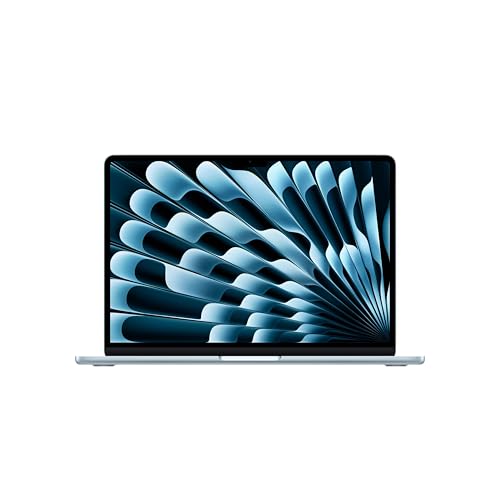
Fanless is the whole pitch. The M5 Air runs completely silent because there's no fan to spin, and at 1.23kg it's the lightest clamshell on this list by a clear margin. Our review calls it the most capable fanless laptop available right now, and the reason is that the M5 here gets a higher thermal ceiling than the M4 it replaces, so it holds performance longer before it eases off.
The base config finally makes sense. 16GB of unified memory as standard, LPDDR5x at that, plus Wi-Fi 7 and Bluetooth 5.3. Our review rates the trackpad the best on any laptop at this price and the 12MP Centre Stage webcam good enough for calls without a peripheral. For students, writers and anyone who wants a premium machine that disappears into a bag, this covers it.
Two problems keep it out of the top spot. The ports: two Thunderbolt 4 sockets, both on the left side, so a hub is a practical necessity on a desk and there's no HDMI, SD or USB-A at all. The MacBook Pro M5 above solves every one of those. And the fanless design still throttles under sustained heavy GPU or CPU loads, which is exactly why the Pro exists. The 13.6-inch IPS panel runs at 60Hz with no ProMotion, so it looks less fluid than the 120Hz Mini-LED on both Pros.
Choose this over the MacBook Pro M5 if silence and weight matter more than ports and sustained grunt, and if your work is light rather than heavy creative. It sits on 4.6 stars from 69 Amazon UK ratings. Full detail is in our MacBook Air M5 13-inch review.
Pros
Wi-Fi 7 support, ahead of the Wi-Fi 6E on both MacBook Pros here
Silent operation with no fan to hear, ever
1.23kg, the lightest clamshell on this page
16GB base memory handles modern multitasking without compromise
Cons
Both USB-C ports sit on the left, awkward for desk cabling
No HDMI, SD or USB-A, so switching from a ported Windows laptop means extra spend
None of the MacBooks here can game seriously, which is where this comes in. The RTX 5060 Laptop GPU rides Nvidia's Blackwell architecture with DLSS 4 Multi Frame Generation, and our review lists strong 1080p and 1440p performance on the 165Hz 16:10 IPS panel. The i7-14650HX and 1TB Gen 4 SSD round out a proper enthusiast build, and there's an extra M.2 slot plus SO-DIMM RAM slots, so unlike every Apple machine here you can upgrade storage and memory later.
Two things temper it. Battery drops to one to two hours under gaming load per our review, so the 240W brick lives near a socket, and total carry weight tops 3kg with that charger. This is a machine you set down, not one you commute with like the Air. The 720p webcam also trails the class, and there's no Thunderbolt 4, so high-bandwidth docks are off the table. 16GB DDR5 is also on the light side for the tier.
Buy this if you game and the MacBooks simply can't. Skip it if portability or all-day battery is the priority. It holds 4.5 stars from 569 Amazon UK ratings, the largest count on this page. See our full ASUS ROG Strix G16 review.
Pros
SO-DIMM RAM slots and a spare M.2, both upgradeable later
HDMI 2.1 for high-refresh external displays
RGB backlit keyboard with genuine key travel per our review
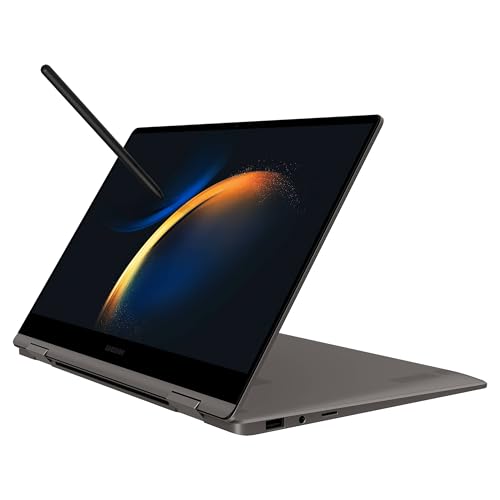
The pitch is a 15.6-inch AMOLED at 120Hz that folds flat, and an S Pen in the box. Our review rates the panel's contrast, colour accuracy and fluidity ahead of IPS rivals at this price, and the stylus needs no charging, so note-taking and sketching come free where most convertibles charge extra. At 1.46kg with a 12.8mm chassis, it's genuinely light for a 15-inch 2-in-1, and the aluminium build has no flex per our review.
But the price hides two real compromises. 8GB of soldered LPDDR4x is the tightest memory here and our review calls it a noticeable bottleneck under heavy multitasking, with no upgrade path. 256GB of storage fills quickly. The HDMI port is version 1.4, capped at 4K 30Hz, and outdoor brightness sits around 400 nits, so direct sun is uncomfortable.
Against the MacBook Air M5, the Samsung wins on screen tech and the flip-and-draw form factor, but loses badly on memory and longevity. Buy it for the AMOLED panel and pen if you work light. It holds 4.4 stars from 91 Amazon UK ratings. Our Samsung Galaxy Book3 360 review has the full picture.
Pros
S Pen included, no charging required
Thunderbolt 4 on one USB-C port plus a USB-A
AKG-tuned stereo speakers, above average for the class per our review
Cons
8GB soldered RAM caps heavy multitasking with no upgrade route
At 0.686kg for the tablet, this is the lightest thing here by a mile, and that's the point. The Snapdragon X Plus ARM chip gives it all-day battery, and our review lists genuine all-day use with cool, near-silent running through typical knowledge-worker loads. The 12-inch PixelSense 3:2 touchscreen is sharp and its tall ratio suits documents. It's a tablet that becomes a laptop with the kickstand.
The traps are the extras. The keyboard cover is sold separately, so the true cost is higher than the sticker, and Microsoft's listing confirms the power supply isn't in the box either. 256GB of storage is tight once Windows 11 takes its cut. And the Snapdragon ARM architecture can cause friction with older x86 or specialist software, which the Intel-based ASUS and Samsung here avoid.
Against the MacBook Air M5, the Surface wins on weight and tablet flexibility but trails on the LCD panel (no OLED contrast) and on software certainty. Buy it if you want Windows in a tablet body with long battery and don't lean on legacy apps. It holds 4.3 stars from 244 Amazon UK ratings. Full detail is in our Microsoft Surface Pro Copilot+ PC review.
Pros
16GB LPDDR5x memory, generous for the entry point
USB-C Power Delivery charging with any PD brick you own
This page carries affiliate links; they never set the order. We don’t lab-test: rankings come from published specifications, the owner ratings on the UK listings and our own reviews.
How We Compared These
We ranked these six on published manufacturer specifications, our own research-led reviews and verified Amazon UK owner ratings, weighing each machine against what its price is meant to buy at the premium tier. We compared panels, memory and storage, port selection, battery figures as our reviews list them and build quality, then settled each product against its nearest rival here so the ranking reflects genuine quality rather than marketing. Nobody at Vivid Repairs has handled these units. Prices shown are live and update automatically, so we describe value by bracket rather than quoting a figure that would date the moment it changed.
A crown that can’t be argued with isn’t proof of quality; it’s proof nobody checked. So rather than restate the winner’s virtues, we defend the crown against the strongest cases to take it.
Apple 2023 MacBook Pro laptop M3 Pro chip with 11‑core CPU
Cross-examination · Three challengers, taken seriously
The owners’ argumentApple MacBook Air 13-inch Laptop M5 chip with 10-core CPU
It’s £1178.97 on the live listing today. Owners rate it 4.6 from 98 ratings. Our review scores it 9.0 against the winner’s 9.0. The crown holds on the ranking rules: the order above was set before any link was attached, and its case is argued in full in the write-up above.
The owners’ argumentASUS ROG Strix G16 (2025) Gaming Laptop
It’s £1499.00 on the live listing today. Owners rate it 4.4 from 614 ratings. Our review scores it 8.0 against the winner’s 9.0. The crown holds on the ranking rules: the order above was set before any link was attached, and its case is argued in full in the write-up above.
The owners’ argumentSamsung Galaxy Book3 360 Wi-Fi Laptop
Owners rate it 4.3 from 89 ratings. Our review scores it 8.0 against the winner’s 9.0. The crown holds on the ranking rules: the order above was set before any link was attached, and its case is argued in full in the write-up above.
The original verdict, preserved in full
Final Verdict: Best Laptops Money Can Buy
The Apple MacBook Pro 14 M5 takes the top spot because it's the rare premium machine where the price maps cleanly onto what you get: a Mini-LED display, a hub-free port set and battery that outlasts every Windows rival here, all backed by a 9/10 review score. If your budget is tighter, the Microsoft Surface Pro Copilot+ PC is the value entry, delivering all-day battery and genuine tablet flexibility, provided you factor in the separate keyboard and charger. Gamers should ignore both and take the ASUS ROG Strix G16. For most creative professionals with the money to spend, the MacBook Pro M5 is the one to buy.
Only if you will use what it adds. The MacBook Pro 14 M5 has a 120Hz Mini-LED display, HDMI, an SD card reader and three Thunderbolt ports, plus 1TB of storage as standard, and it holds its performance under sustained load. The MacBook Air M5 is lighter and completely silent, but it has two USB-C ports on one side, a 60Hz panel, and it eases off under long heavy workloads. For writing, study and everyday work the Air covers it; for editing and development, the Pro is the one that earns its price.
More than you think, because on most of these it cannot be added later. 256GB, as on the Surface Pro and the Samsung Galaxy Book3 360, fills quickly once the operating system takes its share. 512GB is workable. 1TB, as on the MacBook Pro M5 and the ASUS ROG Strix G16, is where you stop deleting things to make room, and video work wants that as a minimum.
Only one. The ASUS ROG Strix G16 has SO-DIMM memory slots and a spare M.2 slot, so both memory and storage can grow. Every Apple machine here has its memory and storage soldered, and the Samsung Galaxy Book3 360 has 8GB of soldered memory with no upgrade route, so on those the configuration you buy is the one you keep.
No, but the premium tier buys you things a mid-range machine skips: a Mini-LED or AMOLED panel, a metal chassis with no flex, longer battery life and better speakers and webcams. The MacBook Air M5 and Surface Pro sit at the lower end of this lineup and still cover most people. Spend up only if you edit video, compile code or want the display and build to last five years.
For most work, yes. All the Apple machines here start at 16GB of unified memory, which stretches further than the same figure on Windows. The Samsung Galaxy Book3 360 ships with 8GB soldered, which is the tightest here and a real bottleneck under heavy multitasking. Heavy multitaskers running large apps side by side will feel 16GB eventually, and none of the Apple models can be upgraded later.
That’s the field: five laptops money can buy, ranked for the job in the title and nothing else. We read the published specifications, the owner ratings and our own reviews; we haven’t handled these products, and no maker moves the order. Figures checked against the live Amazon UK listings, page updated 27 September 2026.
The Vivid Repairs desk
2Next ranked pickApple MacBook Air 13-inch Laptop M5 chip with 10-core CPU and 8-core GPU: Built for AI, 13.6-inch Liquid Retina Display, 16GB Unified Memory, 512GB SSD, 12MP Center Stage, Touch ID, Wi-Fi 7; Sky BlueScored 9.0/10Compare all →Buy on Amazon →