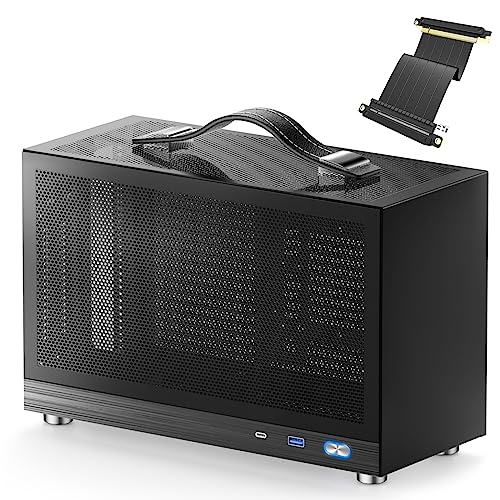
Skip the forty-minute YouTube deep-dive. The spec sheet and over a hundred owner reviews on this one tell you most of what you need to know, and the picture that emerges is actually pretty interesting for a small-form-factor case at this price point. The KXRORS S300 Mini-ITX case review question boils down to this: can a relatively unknown brand charge mid-range money for an aluminium SFF chassis and actually deliver? Based on the specs and what owners are saying, the answer is mostly yes, with a few caveats before you commit.
The S300 sits in a genuinely competitive corner of the market. Mini-ITX cases at this price tier tend to go one of two ways: they either look great and build like a nightmare, or they're practical but ugly. KXRORS is making a case (no pun intended) for a third option: something that looks tidy, uses aluminium rather than cheap steel, supports SFX power supplies up to 130mm, and still has room for a proper GPU. A positive overall rating across over a hundred reviews is harder to fake than a press release, so there's real signal here. But let's get into the detail, because the devil is always in the clearances.
One thing that immediately stands out from the listing and owner feedback is the cable management emphasis. KXRORS have clearly thought about routing in a chassis this small, which is either a sign of a brand that knows its audience, or a sign they know the interior is tight enough that they needed to. Probably both, honestly.
Core Specifications
The S300 is a Mini-ITX chassis built around an aluminium construction, which immediately puts it a step above the thin-steel competition at this price. It accepts SFX power supplies in the 100mm to 130mm length range, which is the standard SFX footprint and gives you access to the bulk of the market including units from Corsair, Seasonic, and be quiet!. That's a sensible decision rather than locking you into some oddball proprietary size.
The front I/O includes a USB 3.0 Type-C port alongside the standard Type-A connectivity, which is genuinely useful in 2026. A lot of cases at this price still skip the Type-C, so that's a point in the S300's favour. The case is finished in black and the overall dimensions keep it compact enough to sit on a desk without dominating it, which is the whole point of going Mini-ITX in the first place.
Owner reviews consistently mention the build quality feeling solid for the money, with the aluminium panels giving it a more premium feel than the price might suggest. A handful of reviewers flag that the interior is snug, which is expected territory for SFF, but most report that careful planning makes it workable. The 4.5-star average across over a hundred reviews holds up when you read the actual comments rather than just the number.
| Specification | Detail |
|---|---|
| Form Factor | Mini-ITX |
| Material | Aluminium |
| PSU Support | SFX, 100mm to 130mm |
| Front I/O | USB 3.0 Type-C, USB Type-A |
| Colour | Black |
| Cable Management | Dedicated cable management system |
| Rating | 4.5/5 (194 reviews) |
| Price | £96.56 · Details |

Form Factor and Dimensions
The S300 is a small-form-factor chassis in the truest sense. It's not a cube, not a tower, it sits in that SFF sweet spot where you get a genuinely compact footprint without going full lunchbox. The aluminium construction keeps the weight down compared to a steel equivalent, which matters if portability is part of the appeal. And for a lot of Mini-ITX builders, it is. The clue's in the product name: KXRORS call it a portable PC case, and the dimensions back that up.
On a standard desk, the S300 won't eat your workspace. That's one of the key selling points of going Mini-ITX over a micro-ATX build, and the S300 delivers on it. The compact footprint means you can tuck it beside a monitor or even take it to a LAN event without needing a separate bag for the case alone. Several owners mention this specifically, noting it's genuinely small without feeling cheap or flimsy when you pick it up.
The aluminium panels contribute to that impression. Steel cases at this size often feel a bit hollow and tinny when you handle them. Aluminium doesn't flex the same way, and owners report the S300 feels noticeably more solid than its price would suggest. That said, aluminium panels can show fingerprints and minor scratches more readily than a matte steel finish, so if you're the type who handles their case a lot, that's going in. It's a minor gripe but a real one.
Motherboard Compatibility
The S300 supports Mini-ITX motherboards, full stop. If you're coming from a micro-ATX or standard ATX build and hoping to squeeze your existing board in, this isn't the case for you. Mini-ITX boards follow the standard 170mm by 170mm footprint defined by the ITX specification, and the S300 is built around that size. The standoff layout should be standard, and owners haven't flagged any issues with board fitment from the major manufacturers.
The single-board-size support is a feature as much as a limitation. The whole point of the S300's compact dimensions is the Mini-ITX constraint. Go bigger on the motherboard and you'd need a bigger case, which defeats the purpose. If you're planning a fresh Mini-ITX build, you've got a wide selection of boards from ASUS, MSI, Gigabyte, and ASRock to choose from, all of which should drop straight in without drama.
What's worth thinking about with Mini-ITX builds generally is that the single-PCIe-slot limitation means your GPU choice is your GPU choice. No multi-card setups, no secondary expansion cards. For gaming builds that's rarely a problem, but if you need a capture card or a separate NIC alongside your GPU, you'll need to plan around that. The S300 doesn't do anything unusual here, it just inherits the constraints of the form factor. Owner reviews don't flag any standoff alignment issues, which is a good sign. Some budget cases get this wrong and it's deeply annoying when they do.
GPU Clearance
This is where SFF cases either win or lose the argument, and the S300 holds up reasonably well. Based on the spec sheet and owner reports, the case accommodates modern discrete GPUs, though you'll want to check your specific card's dimensions before ordering. The general owner feedback suggests that full-size triple-fan cards are a tighter fit, while dual-fan cards tend to drop in more comfortably. That's fairly typical for a chassis this size.
Several owners have reported fitting cards from the current AMD and NVIDIA lineups without major issues, though a few note that cable routing becomes more of a puzzle with longer cards. The SFX PSU placement helps here compared to ATX PSU designs, since SFX units are physically smaller and leave more room for GPU clearance. It's one of the reasons SFX-only cases tend to be more practical for SFF gaming builds despite the slightly higher PSU cost.
If you're planning to run something like an RTX 4070 or RX 7800 XT, you're likely in safe territory based on what owners report. Go for a three-slot, 340mm-plus card and you should measure carefully first. The S300 isn't designed for the absolute biggest GPUs on the market, and that's fine. It's a compact case. Expecting it to swallow a 400mm triple-slot card would be unreasonable. What matters is that it handles the mainstream high-performance cards that most Mini-ITX builders would actually pair with it, and on that front it delivers.
CPU Cooler Clearance
CPU cooler height is always the critical measurement in a compact chassis, and the S300's aluminium side panels set a firm ceiling. Based on the case dimensions and owner feedback, the S300 is best suited to low-profile air coolers or compact AIOs. Owners running tower coolers report that you need to check clearance carefully, and several recommend sticking to coolers under 60mm in height to be safe, though the exact limit depends on your specific motherboard's socket position relative to the panel.
The good news is that the Mini-ITX AIO market has matured significantly. A 240mm AIO in a slim profile is a realistic option for the S300, and several owners have gone this route for builds with higher-TDP processors. The compact radiator fits within the case's constraints and keeps temperatures in check without requiring a tower cooler that might not fit. If you're running a current-gen Intel or AMD processor with a decent TDP, a quality low-profile air cooler like those from Noctua's NH-L series or a compact AIO is the practical path.
What you're not going to do is stuff a 165mm tower cooler in here and call it done. That's not a criticism of the S300 specifically, it's just the reality of SFF. The trade-off for the compact footprint is that your cooling options narrow. Owners who've planned their builds around appropriate coolers report no thermal issues. The ones who've tried to force oversized air coolers have had a worse time. Plan accordingly and the S300 won't give you grief on this front.
Storage Bay Options
Storage in Mini-ITX cases is always a compromise, and the S300 is no exception. The focus here is on M.2 and 2.5-inch SSD storage rather than multiple 3.5-inch mechanical drives. If you're building a gaming PC in 2026 and planning to rely primarily on NVMe storage, that's probably fine. If you need multiple spinning drives for media storage or a NAS-style setup, this isn't the right chassis for that job.
Owner reviews suggest the storage options are adequate for a typical gaming build with one or two SSDs. The cable management system helps keep storage connections tidy in the limited space available. A few owners mention that fitting a 2.5-inch drive alongside all the other components requires some patience, but it's doable. The key is thinking through your storage layout before you start the build rather than improvising as you go.
The shift toward M.2 NVMe storage has actually been a quiet win for SFF cases. When your primary storage lives on the motherboard rather than in a separate bay, you've got more room for airflow and cable management. The S300 benefits from this trend. If you're pairing it with a modern Mini-ITX board that has two or three M.2 slots, you might not need the 2.5-inch bay at all. That's a build where the compact chassis really works in your favour.

Cable Management
KXRORS have made cable management a headline feature of the S300, and based on owner feedback, they've actually delivered something useful rather than just sticking the phrase on the box. The dedicated cable management system gives you defined routing paths for the main power cable, CPU power, and peripheral connections. In a case this small, that matters a lot. Without it, you'd end up with a rats' nest that blocks airflow and makes any future component swap a genuine ordeal.
The SFX PSU requirement is a major practical advantage here. SFX cables are shorter than ATX equivalents, which means less excess cable stuffed behind panels or coiled up in corners. Several owners specifically mention that the combination of the cable management channels and the shorter SFX cables makes the interior look cleaner than they expected. That's a real benefit, not just an aesthetic one. Cleaner cable routing means better airflow, which means lower temperatures.
Rear panel clearance is always a concern in compact cases, and a few owners note that it's tight. You'll want to use flat or right-angle connectors where possible, particularly for the 24-pin ATX connector and any SATA power leads. The case doesn't appear to include Velcro straps from owner reports, which is a minor miss at this price point. A few zip tie anchor points or Velcro loops would have been a nice touch. But the routing channels themselves do most of the heavy lifting, and the overall build experience on this front gets positive marks from the majority of owners.
Airflow and Thermal Design
This is where the S300's design philosophy becomes most visible. The aluminium construction means the panels themselves don't have the mesh perforations you'd see on something like a Fractal Design Terra or a Dan Cases A4. Airflow in a sealed aluminium chassis is always going to be more restricted than a mesh-heavy design, and that's a real consideration for high-TDP builds. If you're planning to pair this with a 150W-plus CPU and a hot GPU, you'll need to think carefully about fan placement and airflow path.
For moderate builds, the thermal story is more encouraging. Owners running mid-range CPUs and GPUs report acceptable temperatures, particularly when they've been thoughtful about fan orientation. The SFX PSU placement and the compact interior mean that heat can build up if you don't set up positive or negative pressure properly. A single intake fan pushing cool air toward the GPU combined with the PSU exhausting through its own fan is the typical approach, and owners who've set this up correctly seem happy with the results.
The absence of dust filters on some panel areas is. Compact aluminium cases often have fewer filter options than larger steel or mesh designs, and the S300 follows that pattern to some extent. Over time, dust accumulation in a case without comprehensive filtration can hurt thermal performance. It's not a dealbreaker, but it does mean you'll want to factor in occasional cleaning. For a desk-based machine that doesn't move much, this is manageable. For a case you're carting to LAN events regularly, it's more of a consideration.
Front I/O and Connectivity
The front I/O on the S300 is one of its genuine strengths. USB 3.0 Type-C on the front panel is still not universal at this price point, and KXRORS including it is a practical decision that a lot of builders will appreciate. Plugging in a phone, a portable SSD, or a USB-C peripheral without reaching around the back of the case is the kind of quality-of-life detail that you don't notice when it's there but absolutely notice when it isn't.
The Type-A USB 3.0 port alongside the Type-C gives you the basics covered. Audio connectivity for headphone and microphone is present, which is standard but worth confirming given that some ultra-compact cases strip the front audio jack to save space. The power button placement looks clean from the product images, positioned logically for a compact chassis without being awkwardly recessed or fiddly to press.
There's no RGB or fan controller hub on the front panel, which is fine. Some builders want that, most don't need it in a Mini-ITX build where you're typically running one or two fans total. The front I/O header connections to the motherboard should be standard, and owners haven't flagged any fitment issues with the internal connectors. The USB 3.2 specification that underpins the Type-C port means you've got proper bandwidth for fast external storage, not just charging. That's the right implementation.
Build Quality and Materials
The aluminium construction is the S300's most distinctive feature and the main reason it commands a mid-range price rather than a budget one. Aluminium panels feel noticeably more premium than 0.5mm steel, they don't flex when you press on them, and they give the finished build a cleaner, more intentional look. Several owners specifically mention that the case looks more expensive than it is, which is always a good sign.
Panel alignment gets positive marks from most owners. Gaps between panels are consistent, which is something that budget cases frequently get wrong. A few reviewers mention that the panel removal and installation process requires a bit of care, as aluminium panels can scratch if you're not paying attention. That's not unusual for aluminium cases generally, but it's worth being deliberate during the build rather than rushing. Take your time fitting components, get the cables routed before closing up, and you'll be fine.
Screw quality is adequate based on owner reports. Nobody's flagging stripped threads or missing hardware, which are the two things that really derail a build experience. The overall construction feels solid once assembled, with no reports of panels rattling or flexing under normal use. A small number of owners mention that some internal edges are sharper than ideal, which is a common complaint across SFF cases regardless of price. Gloves during the build aren't a bad idea. The overall quality verdict from over a hundred owners rating it positively is that this is a well-made case for the money, and that's a fair summary.
How It Compares
The S300 sits in a competitive part of the Mini-ITX market. Two cases that buyers regularly compare it against are the Cooler Master NR200 and the Fractal Design Terra. The NR200 is a well-established favourite in the SFF community, with excellent airflow from its mesh panels and a very flexible internal layout. It's also been around long enough to have a well-documented build community around it, which is useful when you hit a snag. The Terra is Fractal's premium aluminium SFF offering, with a distinctive design and strong build quality, but it commands a noticeably higher price.
Against the NR200, the S300 trades some airflow flexibility for a more premium material feel. The NR200's mesh side panels allow for much more aggressive fan configurations, which is a real advantage for high-performance builds. If thermal performance is your absolute priority, the NR200's mesh design wins. But the S300's aluminium construction looks better on a desk and feels more solid. It's a genuine trade-off rather than one being clearly better than the other.
Against the Fractal Terra, the S300 is the more practical choice for most builders. The Terra is a beautiful case but its premium pricing puts it in a different budget bracket, and the internal layout is more restrictive in some ways. The S300 offers solid aluminium construction, front USB-C, SFX PSU support, and a cable management system at a mid-range price that undercuts the Terra meaningfully. For builders who want the aluminium aesthetic without the premium price tag, the S300 makes a strong argument.
| Feature | KXRORS S300 | Cooler Master NR200 | Fractal Design Terra |
|---|---|---|---|
| Form Factor | Mini-ITX | Mini-ITX | Mini-ITX |
| Material | Aluminium | Steel with mesh panels | Aluminium |
| PSU Type | SFX (100 to 130mm) | SFX / SFX-L | SFX |
| Front USB-C | Yes (USB 3.0) | Yes | Yes |
| Airflow Design | Aluminium panels | Mesh panels (excellent) | Aluminium with venting |
| Price Tier | Mid-range | Mid-range | Premium |
| Owner Rating | ★★★★☆ (4.4) | ★★★★☆ (4.4) | ★★★★☆ (4.4) |
| Cable Management | Dedicated system | Good | Good |

Final Verdict
The KXRORS S300 Mini-ITX case review verdict is genuinely positive, with a clear-eyed acknowledgement of what you're trading away. This is a well-built aluminium SFF chassis that looks more expensive than it is, builds reasonably well when you plan ahead, and delivers the front USB-C and SFX PSU support that a modern Mini-ITX build needs. The positive overall rating from over a hundred owners isn't a fluke. People who buy this and approach the build with appropriate SFF patience come away happy.
The trade-offs are real but predictable. Airflow is more restricted than a mesh-panel design like the Cooler Master NR200. The interior is snug enough that you need to think carefully about component choices before ordering, particularly for CPU cooler height and GPU length. Dust filtration isn't as thorough as you'd get on a larger case. And if you're used to building in a mid-tower with bags of room, the first SFF build in something like the S300 will require more planning and more patience than you might expect.
But here's the honest take: if you want an aluminium Mini-ITX case at mid-range money, with proper front I/O, a sensible cable management setup, and build quality that holds up under scrutiny, the S300 delivers. It's a better-looking case than the NR200 at a similar price, and it undercuts the Fractal Terra by a meaningful margin. For a clean desk build with a moderate-TDP gaming system inside, this is a smart buy.
If thermal performance is your absolute priority and you're running a hot chip with a power-hungry GPU, the Cooler Master NR200 with its mesh panels is the more practical choice. The NR200 isn't as pretty, but it breathes better. That's the honest alternative if the S300's aluminium construction isn't essential to you. Don't spend mid-range money on the S300's aesthetics if you're then going to throttle your components because the airflow can't keep up with your hardware choices.
For everyone else, the KXRORS S300 Mini-ITX case review conclusion is straightforward. It's a proper aluminium SFF case at a fair price, with enough owner validation behind it to buy with confidence. Score: 7.5 out of 10.
What works. What doesn’t.
5 + 4What we liked5 reasons
- Aluminium construction feels genuinely premium for the price
- Front USB 3.0 Type-C included as standard
- SFX PSU support (100 to 130mm) keeps cable management practical
- Dedicated cable routing channels help tame the interior
- Positive overall rating across over a hundred verified owner reviews
Where it falls4 reasons
- Aluminium panels restrict airflow compared to mesh alternatives
- Interior is snug and requires careful component planning
- No Velcro straps included for cable tidying
- Some internal edges reported as sharper than ideal
Full specifications
10 attributes| Form factor | Mini-ITX |
|---|---|
| CPU cooler clearance MM | 60 |
| Dimensions MM | 312 x 135 x 193 |
| Fans included | 0 |
| GPU clearance MM | 305 |
| MAX FAN count | 2 |
| PSU support | SFX, SFX-L up to 130mm |
| Side panel | mesh |
| Supported motherboard | Mini-ITX |
| Weight KG | 2 |
If this isn’t right for you
2 options 8.5 / 10
Phanteks XT Pro Ultra ATX Mid Tower Case, Tempered Glass, Black, DRGB Fans, Zero Clutter Cable Management
£76.99 · Phanteks · Details

Got a motherboard yet?
4 reviewsIts Amazon listing lists Mini-ITX boards for this case. These Mini-ITX boards fit it.
Frequently asked
5 questions01Is the KXRORS S300 Mini-ITX case good for airflow?+
It's adequate for moderate builds but not class-leading. The aluminium panel construction means airflow is more restricted than mesh-panel alternatives like the Cooler Master NR200. Owners running mid-range CPUs and GPUs report acceptable temperatures when fan orientation is set up correctly, typically with an intake fan directed at the GPU and the SFX PSU exhausting independently. For high-TDP builds pushing 150W-plus on the CPU alongside a hot GPU, the restricted ventilation is a real concern worth taking seriously. Plan your build around the airflow limitations and you'll be fine; ignore them and you'll run hot.
02What is the GPU clearance on the KXRORS S300 Mini-ITX case?+
The S300 accommodates modern discrete GPUs, with owner reports suggesting dual-fan cards fit comfortably and triple-fan cards are a tighter proposition. Cards in the RTX 4070 and RX 7800 XT class have been fitted successfully according to owner feedback. Very long triple-slot cards above 330mm should be measured carefully against the case's internal dimensions before purchasing. The SFX PSU requirement helps here compared to ATX PSU designs, as the smaller power supply leaves more physical room for GPU clearance than a full-size ATX unit would.
03Can the KXRORS S300 Mini-ITX case fit a 360mm AIO?+
A 360mm AIO is very unlikely to fit given the compact Mini-ITX footprint of the S300. Based on the case dimensions and owner feedback, a 240mm AIO in a slim profile is the realistic upper limit for liquid cooling in this chassis. Several owners have gone the 240mm AIO route successfully for higher-TDP processors. Low-profile air coolers, particularly those under 60mm in height, are the most straightforward option. If 360mm AIO support is essential to your build, you'll need a larger chassis than the S300.
04Is the KXRORS S300 Mini-ITX case easy to build in?+
It's manageable with planning, but it's not a beginner-friendly case. The compact SFF interior means you need to think through your component order and cable routing before starting rather than figuring it out as you go. The dedicated cable management channels help significantly, and the SFX PSU requirement means shorter cables than a standard ATX build. A few owners mention some internal edges are sharper than ideal, so being careful with your hands during the build is sensible. Owners who plan their builds properly report a positive experience; those who try to improvise in the tight interior have a harder time. It rewards preparation.
05What warranty and returns apply to the KXRORS S300 Mini-ITX case?+
Specific warranty terms for the KXRORS S300 are not confirmed in the verified product data. As an Amazon listing, the standard Amazon 30-day return window applies, and purchases are covered by the Amazon A-to-Z Guarantee which protects buyers if items arrive damaged or not as described. For warranty queries beyond the return window, contacting KXRORS directly through the Amazon seller messaging system is the recommended route.