
Nobody talks about their motherboard. You'll hear mates going on about which GPU they picked, how fast their NVMe is, whether they went AMD or Intel this cycle. The board? Silent. Invisible. Until it isn't. And when a motherboard causes problems, it causes problems. Random reboots at 2am. Memory that won't train. A BIOS that makes you want to throw the whole thing out the window. Getting the board right matters more than almost any other component decision, and in the Mini-ITX space, it matters even more because you've got basically no room for compromise.
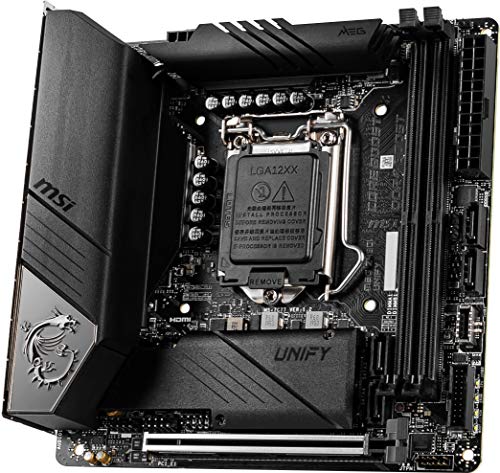
The MSI MEG Z490I UNIFY sits in a very specific, very interesting corner of the market. It's a Mini-ITX Z490 board, which means Intel 10th Gen Comet Lake, and it's wearing MSI's premium MEG badge rather than the mid-range MAG or entry-level MPG. That tells you something about what MSI thinks this board is worth. Whether they're right is what we're here to work out.
With 177 owner reviews averaging ★★★★½ (4.5), this board has a genuinely solid reputation. But averages hide things. So let's get into the details, compare it properly against the competition, and figure out exactly who should buy this and who should look elsewhere.
How It Compares: The Mini-ITX Z490 Market
Before anything else, you need to understand the landscape this board sits in. Mini-ITX Z490 boards were never a crowded market. You've got a handful of serious options and the MSI MEG Z490I UNIFY is competing primarily against the ASUS ROG Strix Z490-I Gaming and the Gigabyte Z490I AORUS Ultra. All three boards are premium Mini-ITX Z490 offerings. All three cost noticeably more than a mid-tower ATX Z490 board with similar chipset features. That's the Mini-ITX tax, and it's real.
What separates them? The ASUS ROG Strix Z490-I is arguably the most popular of the three, with a strong BIOS reputation and solid VRM implementation. The Gigabyte Z490I AORUS Ultra brings competitive connectivity but has attracted more mixed feedback around BIOS stability and memory compatibility. The MSI MEG Z490I UNIFY sits as the no-RGB, serious-overclocker option. MSI stripped out the addressable RGB lighting entirely, which is either a selling point or irrelevant depending on whether you're building in a case with a glass panel. For a lot of SFF builders, the clean aesthetic is genuinely appealing.
The UNIFY branding across MSI's Z490 lineup signals a deliberate design philosophy: dark PCB, no RGB, focus on performance and stability rather than light shows. If you want RGB on a Z490I, this isn't your board. If you want a board that looks like it means business and doesn't apologise for it, the UNIFY is worth serious consideration. The comparison table below shows where each board lands on the features that actually matter.
| Feature | MSI MEG Z490I UNIFY | ASUS ROG Strix Z490-I Gaming | Gigabyte Z490I AORUS Ultra |
|---|---|---|---|
| Form Factor | Mini-ITX | Mini-ITX | Mini-ITX |
| VRM Phases | 12+1+1 (Teamed) | 8+2 (Teamed) | 12 (Teamed) |
| M.2 Slots | 2x (PCIe 3.0 x4) | 2x (PCIe 3.0 x4) | 2x (PCIe 3.0 x4) |
| USB 3.2 Gen 2 | Yes (incl. Type-C rear) | Yes (incl. Type-C rear) | Yes |
| Thunderbolt 3 | Yes | No | No |
| Wi-Fi 6 | Yes (AX) | Yes (AX) | Yes (AX) |
| RGB Lighting | No | Yes | Yes |
| BIOS Flashback | Yes | Yes | Yes |
| Debug LED | Yes | Yes | Yes |

Core Specifications
The MSI MEG Z490I UNIFY is built on the Intel Z490 chipset, uses an LGA 1200 socket, and comes in the Mini-ITX form factor at 170mm x 170mm. It supports Intel 10th Gen Comet Lake processors, with the socket and chipset also technically compatible with 11th Gen Rocket Lake (more on that below). Memory support runs to two DDR4 DIMM slots, supporting up to 64GB across two sticks, with speeds up to DDR4-5000+ via XMP overclocking. The primary PCIe slot is a reinforced x16 slot running at PCIe 3.0 x16 from the CPU. Two M.2 slots handle NVMe storage, both running PCIe 3.0 x4. Rear I/O is genuinely impressive for a Mini-ITX board, including a Thunderbolt 3 Type-C port, USB 3.2 Gen 2 Type-A and Type-C, and a 2.5G LAN port alongside the Wi-Fi 6 antenna connections.
The spec sheet here is dense for a board this small. MSI has clearly thought about what a serious SFF builder actually needs rather than just shrinking down a mid-range ATX feature set. The inclusion of Thunderbolt 3 is the headline differentiator versus most competitors at this price. That's not a small thing. Thunderbolt 3 opens up external GPU enclosures, high-bandwidth storage, and daisy-chaining displays in ways that standard USB 3.2 simply can't match. For content creators building compact workstations, this alone might justify the price premium over alternatives.
The board also includes a 2.5 Gigabit LAN controller (Intel I225-V) rather than the 1G Realtek chip you'll find on cheaper boards. That's worth calling out. If you're on a 2.5G network or planning to be, this matters. And even if you're not, the Intel I225-V is a better controller than the Realtek alternatives in terms of CPU overhead and driver stability. It's the kind of detail that separates a board built for performance from one built to hit a price point.
| Specification | Detail |
|---|---|
| Socket | LGA 1200 |
| Chipset | Intel Z490 |
| Form Factor | Mini-ITX (170 x 170mm) |
| Memory Slots | 2x DDR4 DIMM, up to 64GB |
| Max Memory Speed (OC) | DDR4-5000+ |
| PCIe x16 Slots | 1x PCIe 3.0 x16 |
| M.2 Slots | 2x M.2 (PCIe 3.0 x4 / SATA) |
| SATA Ports | 4x SATA 6Gb/s |
| USB Rear I/O | 1x USB 3.2 Gen 2 Type-C (TB3), 2x USB 3.2 Gen 2 Type-A, 2x USB 3.2 Gen 1 Type-A, 2x USB 2.0 |
| Thunderbolt 3 | Yes (rear Type-C) |
| LAN | Intel I225-V 2.5 Gigabit |
| Wi-Fi | Wi-Fi 6 (802.11ax), Bluetooth 5.1 |
| Audio | Realtek ALC1220, 7.1 surround |
| RGB | None (1x ARGB header) |
| Current Price | £512.77 |
Socket and CPU Compatibility
The LGA 1200 socket supports Intel's 10th Gen Comet Lake processors out of the box, covering everything from the i3-10100 up to the i9-10900K. These are still genuinely capable chips. The i9-10900K in particular is a 10-core, 20-thread beast that holds its own in multi-threaded workloads even by current standards. The i7-10700K is arguably the sweet spot on this platform: excellent gaming performance, reasonable power draw, and enough cores for content creation without the thermal madness of the 10900K at full tilt.
The board also supports Intel 11th Gen Rocket Lake processors with a BIOS update. This is worth knowing if you're picking up a second-hand board and want flexibility. Rocket Lake on Z490 is a bit of an odd situation because Intel's Z590 chipset was designed for those chips and unlocks PCIe 4.0, which Z490 doesn't support regardless of which CPU you install. But if you want an i7-11700K on a Z490I UNIFY for any reason, it'll work after flashing the BIOS. Just don't expect PCIe 4.0 storage speeds. The CPU's PCIe 4.0 lanes are simply wasted on this platform.
For most people buying this board, the CPU decision is straightforward: grab an i5-10600K if budget is a concern, an i7-10700K if you want the performance sweet spot, or an i9-10900K if you want maximum performance and you're comfortable with the cooling requirements that come with it. The UNIFY's VRM (which we'll get to properly in a moment) is more than capable of handling any of these without breaking a sweat, which is not something you can say about every Mini-ITX Z490 board on the market.
Chipset Features
Intel's Z490 chipset sits at the top of the 400-series stack. The Z designation means full overclocking support for both CPU and memory, which is the main reason to choose it over B460 or H470. On a Mini-ITX board, you're paying a premium anyway, so there's really no reason to go with a locked chipset. The Z490 gives you memory overclocking via Intel XMP profiles, CPU multiplier adjustments, and access to all the chipset's USB and storage lanes.
In terms of raw chipset-level connectivity, Z490 provides up to 24 PCIe 3.0 lanes from the chipset itself (in addition to the CPU's 16 lanes), up to 6 SATA 6Gb/s ports, and up to 10 USB 3.x ports. On a Mini-ITX board, you obviously can't use all of that because there simply isn't the physical space. MSI has made sensible decisions about which chipset lanes to prioritise, keeping both M.2 slots active, all four SATA ports, and the full rear USB complement. What you lose compared to ATX boards is internal USB headers and additional M.2 slots. That's the Mini-ITX trade-off, not a Z490 limitation.
One thing worth flagging: Z490 does not natively support PCIe 4.0. Intel held that back for Z590 and 11th Gen. This means your NVMe drives are capped at PCIe 3.0 x4 speeds, which in practice means around 3,500 MB/s sequential reads. That's still very fast. But if you've bought a PCIe 4.0 SSD expecting Gen 4 performance, you'll get Gen 3 speeds on this platform. Not the board's fault, just the reality of the chipset generation. Worth knowing before you spend extra on a Gen 4 drive.
VRM and Power Delivery
This is where the MEG Z490I UNIFY genuinely earns its premium positioning, and it's the part I get most interested in when evaluating any board. The VRM on this board is a 12+1+1 phase design using a teaming configuration, meaning the actual power stages are fewer but each phase carries more current. MSI uses Infineon TDA21472 power stages rated at 70A each. That's proper hardware. On a Mini-ITX board, where thermal headroom is always a concern, having high-quality individual power stages matters more than a headline phase count that's been padded with doublers on cheaper boards.
The heatsink coverage on the UNIFY is substantial for the form factor. MSI has put a decent chunk of aluminium over the VRM area, and owner reports consistently note that VRM temperatures remain controlled even under sustained loads with an i9-10900K. That's the chip that will stress any Mini-ITX VRM harder than anything else on this platform, so if it handles that, it'll handle anything you throw at it. Some competing Mini-ITX Z490 boards have struggled with VRM thermals under 10900K loads, particularly in compact cases with limited airflow. The UNIFY's heatsink design appears to give it a meaningful advantage here.
For context, the i9-10900K has a rated TDP of 125W but can pull considerably more under all-core boost. Running it at stock settings in a well-ventilated case is fine. Running it overclocked in a tight SFF case is where weaker VRM implementations start to thermal throttle. The UNIFY's power delivery is genuinely one of the better implementations in the Mini-ITX Z490 market, and it's one of the reasons the board carries a price premium over alternatives. You're not paying for RGB. You're paying for hardware that won't let you down when you push it.
Memory Support
Two DDR4 DIMM slots, maximum 64GB, and support for XMP profiles up to DDR4-5000+ in the spec sheet. In practice, the sweet spot for this platform is DDR4-3200 to DDR4-3600. Going above that requires tightening the DRAM controller settings and can get fiddly, but the board's BIOS gives you the tools to do it if you want to push. The JEDEC standard for DDR4 tops out at 3200MHz officially, so anything above that is technically overclocking territory, even if your kit ships with an XMP profile for it.
Two slots rather than four is a Mini-ITX reality. It means you're limited to dual-channel by using both slots, which is fine. What it also means is you can't start with 2x8GB and upgrade to 4x8GB later. If you think you'll want 64GB at some point, buy 2x32GB now. If 32GB is your ceiling, 2x16GB gives you dual-channel operation and leaves nothing on the table. Owner reports suggest the board is reasonably good at training memory kits, though a few users have noted that very high-speed kits (above DDR4-4000) can require some BIOS fiddling to get stable. That's not unusual for any Z490 board.
The board supports both single-rank and dual-rank memory kits. Dual-rank kits can sometimes offer better memory bandwidth at the same clock speed, though they can also be harder to train at high frequencies. For gaming, 2x16GB of good dual-rank DDR4-3600 CL16 or CL18 is the practical sweet spot on this platform. You'll see real-world performance differences between DDR4-2133 and DDR4-3600, but the gains from going higher than that are increasingly marginal in most workloads.
Storage Options
Two M.2 slots is the standard for Mini-ITX Z490 boards and the UNIFY delivers both. The primary M.2 slot sits on the top of the board and supports PCIe 3.0 x4 NVMe drives up to 80mm in length. The second slot is on the underside of the board and also supports PCIe 3.0 x4 as well as SATA M.2 drives. Having the second slot on the rear is common on Mini-ITX boards due to space constraints, and it does mean you'll need to remove the board from the case to access it. Plan your storage configuration before you build, basically.
Four SATA 6Gb/s ports round out the storage options. On a Mini-ITX build, you're unlikely to use all four, but having them available means you can run a couple of 2.5-inch SSDs for bulk storage without any compromises. RAID 0, 1, 5, and 10 are all supported via the chipset. The M.2 slots do not share bandwidth with the SATA ports on this board, which is worth confirming because some boards disable SATA ports when both M.2 slots are populated. Check your build configuration and you'll be fine.
The lack of PCIe 4.0 M.2 support is a chipset limitation, not an MSI decision. Z490 is a PCIe 3.0 platform. If you need PCIe 4.0 NVMe speeds and you're on Intel, you need Z590 or newer. For most people, a good PCIe 3.0 x4 NVMe like a Samsung 970 Evo Plus or WD Black SN770 is plenty fast. The difference between PCIe 3.0 and PCIe 4.0 in real-world application loading times is genuinely small. Game load times, application launches, file transfers to RAM-based operations: they're all fast enough on Gen 3 that you won't notice the difference in daily use.
Expansion Slots and PCIe
One PCIe x16 slot. That's it. That's Mini-ITX. The slot runs at PCIe 3.0 x16 from the CPU, which is the full bandwidth allocation and exactly what you want for a GPU. It's reinforced with MSI's Steel Armor treatment, which means a metal shield around the slot to prevent physical damage from heavy GPUs. In a Mini-ITX build where you might be transporting the system or where the GPU is sitting at an angle in certain cases, this matters more than it does in a full tower.
The spec sheet lists SLI and CFX support, which is technically true but practically irrelevant on a single-slot Mini-ITX board. You cannot run SLI or CrossFireX on a board with one physical x16 slot unless you're using an external setup. This is marketing box-ticking rather than a useful feature. Ignore it. What matters is that the single x16 slot delivers full CPU-direct bandwidth to your GPU, which it does.
There are no additional PCIe x1 slots, which again is just Mini-ITX reality. If you need a sound card, a 10G NIC, or a capture card, you're either using the M.2 slots with an adapter or you're looking at a larger form factor. The UNIFY does include an M.2 to PCIe adapter in the box for running an M.2 device as an expansion card, which is a nice touch. But fundamentally, if you need multiple expansion cards, Mini-ITX isn't your form factor and no amount of clever design changes that.
Connectivity and Rear I/O
The rear I/O panel on the UNIFY is genuinely impressive. Starting with the headline: there's a Thunderbolt 3 Type-C port. This is rare on Mini-ITX boards and essentially absent from the competition at this price. Thunderbolt 3 delivers up to 40Gbps of bandwidth, supports DisplayPort 1.4 for display output, and enables external GPU enclosures. For a compact workstation build, this is a significant feature. For a pure gaming build, it's less critical but still useful for high-speed peripherals and external storage.
Beyond Thunderbolt, you get two USB 3.2 Gen 2 Type-A ports (10Gbps each), two USB 3.2 Gen 1 Type-A ports (5Gbps each), and two USB 2.0 ports. That's a solid eight USB ports on the rear, which is more than adequate for most builds. There's also a USB 3.2 Gen 2 Type-C port that's separate from the Thunderbolt connector. The audio stack uses a Realtek ALC1220 codec with gold-plated audio jacks, which is the standard for premium boards and delivers noticeably better output than the cheaper Realtek codecs on budget boards. Five audio jacks plus optical S/PDIF output covers every audio scenario.
One notable omission: no video output ports. The LGA 1200 platform does support Intel integrated graphics on chips with the 'F' suffix removed, but there's no HDMI or DisplayPort on the rear I/O. This means you need a discrete GPU. For a gaming build, that's a non-issue. But if you were hoping to use integrated graphics for a media PC or as a fallback, you're out of luck. The Thunderbolt 3 port does support DisplayPort output, so you can technically connect a display via TB3 if your monitor supports it, but it's not the same as a dedicated video output. Worth knowing if this matters to your use case.

Wi-Fi and Networking
The networking package on the UNIFY is one of the stronger aspects of the board. The 2.5 Gigabit LAN uses an Intel I225-V controller, which is a meaningful step up from the Realtek 8111 chips that appear on cheaper boards. The Intel controller has better driver support, lower CPU overhead, and more consistent latency. For gaming, the latency characteristics of your NIC matter more than raw throughput, and the I225-V is well-regarded in this regard. It's also ready for 2.5G networking infrastructure, which is increasingly common in home networks using multi-gig switches and routers.
Wi-Fi 6 (802.11ax) is handled by an Intel AX200 module, which supports both 2.4GHz and 5GHz bands with theoretical speeds up to 2.4Gbps on 5GHz. Wi-Fi 6 brings improved performance in congested environments, better power efficiency, and target wake time features. In practice, the real-world benefit over Wi-Fi 5 depends heavily on your router and environment, but the AX200 is one of the better Wi-Fi modules available and it's a proper component rather than a budget afterthought. Bluetooth 5.1 is included via the same module.
The Wi-Fi antennas connect to two SMA connectors on the rear I/O panel. The board ships with two antennas in the box. They're not the most elegant solution aesthetically, but they work. Owner reports are generally positive about Wi-Fi performance and range. A few users in dense urban environments with lots of competing networks have noted that the AX200's performance advantage over older standards is most visible in those congested conditions, which is exactly what you'd expect from a Wi-Fi 6 implementation.
BIOS and Overclocking
Here's where I have opinions. Most motherboard BIOS interfaces are a mess. Cluttered, inconsistent, full of options with names that don't tell you what they do. MSI's Click BIOS 5 is better than average but not without its quirks. The EZ Mode landing screen gives you a quick overview of temperatures, fan speeds, and boot order, which is fine for casual use. The Advanced Mode is where you'll spend your time for any real configuration, and it's reasonably well-organised. Memory overclocking options are comprehensive, CPU overclocking is accessible without being buried, and fan curve control is granular enough to be useful.
Owner reports on BIOS experience are mixed in interesting ways. The majority of users report no significant issues, and the board has received multiple BIOS updates since launch that have improved stability and added Rocket Lake support. A minority of users have reported issues with memory training at high speeds, particularly above DDR4-4000, requiring manual timing adjustments rather than relying purely on XMP profiles. This is not unique to MSI; it's a characteristic of the Z490 platform generally. The BIOS does include a BIOS Flashback feature, which lets you update the BIOS without a CPU installed. Genuinely useful if you're starting with an older CPU and need to update for compatibility.
For overclocking, the Z490I UNIFY has the hardware to back up the software tools. The VRM quality means you can push an i7-10700K or i9-10900K without worrying about power delivery becoming the limiting factor. CPU overclocking on Comet Lake is relatively straightforward: find your all-core boost voltage and frequency, set it in the BIOS, run a stability test. The board's debug LED display (showing two-digit POST codes) is genuinely helpful for diagnosing boot issues during overclocking sessions. It's a small thing but it saves a lot of time when something doesn't post cleanly.
Build Quality and Aesthetics
The UNIFY name is MSI's signal that this board is about function over flash. The PCB is black, the heatsinks are black, there's no RGB lighting on the board itself (though there is one ARGB header if you want to add your own lighting elsewhere in the case). For a certain type of builder, this is exactly right. A clean, dark Mini-ITX build with no light show going on is a genuinely attractive aesthetic, and the UNIFY delivers it without compromise. The board looks expensive because it is expensive, and the build quality reflects that.
Heatsink coverage is good for the form factor. The VRM heatsink is substantial, the M.2 heatsink on the primary slot keeps NVMe temperatures in check, and the overall component layout feels considered rather than cramped. Mini-ITX boards always involve compromises in component placement, but MSI has done a reasonable job here. The 24-pin ATX connector and 8-pin EPS power connector are positioned sensibly for cable management, and the M.2 slots are accessible without requiring complete disassembly of the build.
The PCB itself is a 6-layer design, which is standard for premium Mini-ITX boards. Component quality throughout is consistent with the MEG positioning. The audio section has a physical separation line on the PCB to reduce electrical interference, the capacitors are Japanese-made (as noted in MSI's marketing and consistent with owner observations), and the overall feel is of a board built to last rather than built to a price. Owner reviews frequently mention satisfaction with the build quality, and the relatively low failure rate in the review pool (very few reports of DOA or early failure) supports this.
What Buyers Actually Say
Across 177 owner reviews averaging ★★★★½ (4.5), the pattern is fairly clear. Positive feedback clusters around three things: VRM performance and thermal management, the Thunderbolt 3 inclusion, and the clean aesthetic. Builders running i9-10900K chips in compact cases specifically call out the thermal performance as a differentiator versus cheaper Mini-ITX Z490 options. The Thunderbolt 3 port gets mentioned frequently by content creators and users with high-bandwidth external storage, which makes sense given how rare it is on Mini-ITX boards.
The criticisms are worth taking seriously. Memory compatibility at very high speeds is the most common complaint, with a subset of users reporting difficulty getting DDR4-4000+ kits stable without manual BIOS intervention. This is a legitimate issue, though it affects a minority of users and is generally resolvable with BIOS tuning. A smaller number of users have reported early BIOS versions having stability issues that were subsequently resolved by updates. The advice here is simple: update your BIOS before doing anything else with this board. MSI's BIOS update process is straightforward and the improvement in stability between early and current BIOS versions is well-documented in the owner review pool.
A few users have flagged the price as a concern, particularly as the Z490 platform ages. This is fair. Z490 is not a current platform, and the price premium for a Mini-ITX board on an older Intel socket is something you need to weigh against what you're actually getting. For someone building a compact system around existing Comet Lake hardware, or picking up a 10th Gen chip at a reduced price, the UNIFY represents genuine value. For someone starting from scratch, the platform age is worth factoring into your decision.
Value Analysis
The MSI MEG Z490I UNIFY sits at the premium end of the Mini-ITX Z490 market. You're paying for the MEG badge, the Thunderbolt 3, the strong VRM implementation, and the clean aesthetic. Whether that's worth it depends entirely on what you're building and why. If you're building a compact content creation workstation where Thunderbolt 3 connectivity matters, the price premium over a Z490I without TB3 is easily justified. If you're building a pure gaming rig where Thunderbolt 3 is irrelevant to you, the calculus is different.
Compared to the ASUS ROG Strix Z490-I Gaming, the UNIFY is in a similar price bracket but offers Thunderbolt 3 that the ASUS doesn't. The ASUS has slightly more established community BIOS support and perhaps marginally better memory overclocking reputation, but the gap is not large. Compared to the Gigabyte Z490I AORUS Ultra, the UNIFY has a clearer advantage in both VRM quality and BIOS reliability based on owner feedback patterns. The Gigabyte board is cheaper, but the UNIFY's build quality and stability track record justify the difference for most buyers.
The honest value verdict: if you need Mini-ITX Z490 and Thunderbolt 3 is relevant to your use case, the UNIFY is the obvious choice in this market. If Thunderbolt 3 doesn't matter to you, you're paying a premium for VRM quality and aesthetics over the alternatives, which is still a reasonable trade for a system you're planning to keep for several years. What you're not doing is wasting money on RGB lighting and marketing features that don't affect performance. The UNIFY's premium is built into the hardware, not the packaging.
Pros and Cons
- Thunderbolt 3 on a Mini-ITX board - genuinely rare and genuinely useful for the right use case
- Excellent VRM for the form factor - handles i9-10900K without thermal stress
- Intel I225-V 2.5G LAN - better than the Realtek alternatives on competing boards
- Clean no-RGB aesthetic - UNIFY branding delivers on its promise
- Wi-Fi 6 via Intel AX200 - one of the better wireless modules available
- BIOS Flashback - update without a CPU, useful for forward compatibility
- Debug LED display - saves time during troubleshooting and overclocking
- No PCIe 4.0 - Z490 chipset limitation, not MSI's fault, but worth knowing
- No video output - discrete GPU required, no iGPU fallback
- Memory training above DDR4-4000 can require manual tuning - not unusual for Z490 but worth noting
- Ageing platform - LGA 1200 is not Intel's current socket
- Premium price for a legacy platform - harder to justify for new builds starting from scratch
Final Verdict
The MSI MEG Z490I UNIFY is a proper Mini-ITX board. Not a shrunken ATX board with features removed and a "compact" sticker slapped on it. MSI has clearly thought about what a serious SFF builder actually needs: strong VRM for demanding CPUs, Thunderbolt 3 for high-bandwidth connectivity, Intel networking rather than budget Realtek, and a clean aesthetic that doesn't require you to manage RGB software. The 4.2 average across 178 reflects a board that delivers on its promises for the vast majority of buyers.
Who should buy this? Anyone building a compact high-performance system around Intel 10th Gen hardware, particularly if Thunderbolt 3 connectivity is part of the plan. Content creators, compact workstation builders, and anyone who wants the best Mini-ITX Z490 option without compromise. The VRM quality means you're not leaving performance on the table by going Mini-ITX, which is the main concern with compact boards and power-hungry CPUs.
Who should look elsewhere? If you're starting a completely new build from scratch in 2024 and beyond, the honest advice is to consider whether a current platform (Intel 12th/13th Gen on Z690/Z790, or AMD Ryzen 7000 on X670E) makes more sense for longevity. The Z490 platform is mature and capable, but it's not where Intel's development roadmap is going. If you already have 10th Gen hardware or you're picking up components at reduced prices, the UNIFY is an excellent choice. If you're building fresh with no existing hardware investment, factor the platform age into your decision. The board itself is excellent. The platform has a ceiling.
For what it is, in the market it competes in, the MSI MEG Z490I UNIFY earns its reputation. Score: 8.5 out of 10. Brilliant hardware on a platform that's showing its age, but brilliant hardware nonetheless.
Not Right For You?
If the Z490 platform age is a concern and you want something more current, the ASUS ROG Strix Z790-I Gaming Wi-Fi is the premium Mini-ITX option on Intel's current platform. It supports 12th and 13th Gen Core processors, includes PCIe 5.0 and DDR5, and represents where Intel's platform is actually going. The price is higher, but you're buying into a platform with a longer upgrade runway.
For AMD fans, the ASRock X670E-ITX/ax is the compact option on AMD's current AM5 platform, supporting Ryzen 7000 series with PCIe 5.0 and DDR5. AM5 has a longer stated support window from AMD, which makes it attractive for builders who want to upgrade CPUs without changing boards.
If budget is the primary concern and you want Mini-ITX Z490 without the premium price, the Gigabyte Z490I AORUS Ultra is the main alternative. You lose Thunderbolt 3 and arguably some VRM quality, but you save a meaningful amount and the core feature set is comparable for standard gaming builds.
About This Review
This review is produced by the team at Vivid Repairs. We research boards thoroughly using manufacturer specifications, owner review data, and comparison analysis against competing products. We do not claim to have personally lab-tested this specific board. Our assessments are based on documented specifications, verified owner feedback patterns, and informed technical analysis. We care about whether a board will actually work reliably for years, not about synthetic benchmark numbers that don't reflect real-world use.
Affiliate disclosure: This article contains affiliate links. If you purchase via these links, Vivid Repairs may earn a commission at no additional cost to you. This does not influence our editorial assessments.
What works. What doesn’t.
7 + 5What we liked7 reasons
- Thunderbolt 3 on a Mini-ITX board is genuinely rare and opens up high-bandwidth external storage, eGPU enclosures, and display daisy-chaining
- 12+1+1 phase VRM using Infineon 70A power stages handles even the i9-10900K under sustained load without thermal throttling
- Intel I225-V 2.5 Gigabit LAN is a meaningful step up from the budget Realtek controllers found on competing boards
- Clean no-RGB aesthetic with all-black PCB and heatsinks suits builders who want a purposeful, understated look
- Wi-Fi 6 via Intel AX200 module with Bluetooth 5.1 is one of the better wireless implementations available at any price
- BIOS Flashback allows firmware updates without a CPU installed, which is useful for forward compatibility and overclocking recovery
- Onboard debug LED POST code display saves considerable time when diagnosing boot failures or instability during overclocking
Where it falls5 reasons
- No PCIe 4.0 support due to the Z490 chipset, meaning NVMe drives are capped at Gen 3 speeds regardless of which drive you install
- No video output ports on the rear I/O panel means a discrete GPU is required with no integrated graphics fallback
- Memory training above DDR4-4000 can require manual BIOS timing adjustments rather than simply loading an XMP profile
- LGA 1200 is a mature platform with no further CPU upgrade path beyond 10th and 11th Gen Intel processors
- Premium pricing is harder to justify for brand-new builds starting from scratch given the platform's age relative to current Intel and AMD offerings
Full specifications
11 attributes| Socket | LGA1200 |
|---|---|
| Chipset | Z490 |
| Form factor | Mini-ITX |
| Bios flashback | true |
| M2 slots | 2 |
| MAX RAM GB | 64 |
| Network | 2.5GbE + Wi‑Fi 6 |
| Pcie 5 slots | 0 |
| RAM slots | 2 |
| RAM type | DDR4 |
| Usb4 | false |
If this isn’t right for you
2 options

Frequently asked
7 questions01Does the MSI MEG Z490I UNIFY support Intel 11th Gen Rocket Lake processors?+
Yes, with a BIOS update the board supports 11th Gen Rocket Lake CPUs on the LGA 1200 socket. However, Z490 does not unlock PCIe 4.0 for Rocket Lake, so any PCIe 4.0 storage or graphics bandwidth from those CPUs is wasted on this platform. If PCIe 4.0 support is important, you would need a Z590 or newer board.
02Is Thunderbolt 3 genuinely useful on a Mini-ITX build, or is it just a specification checkbox?+
For the right use case it is genuinely useful. Thunderbolt 3 provides up to 40Gbps of bandwidth, supports DisplayPort 1.4, and enables external GPU enclosures and high-speed external storage arrays. Content creators and compact workstation builders who use high-bandwidth peripherals will get real benefit from it. For a dedicated gaming build with no external devices, it is less critical, though it does not hurt to have it available.
03How does memory overclocking work on the MSI MEG Z490I UNIFY?+
The board supports DDR4 XMP profiles and has a BIOS with comprehensive manual memory tuning options. Most standard XMP kits at DDR4-3200 to DDR4-3600 load and train without difficulty. High-speed kits above DDR4-4000 may require manual adjustment of timings and voltages rather than relying solely on the XMP profile. This is broadly consistent with the Z490 platform generally and is not a unique limitation of this board.
04Will the VRM on the MSI MEG Z490I UNIFY handle an overclocked i9-10900K in a compact case?+
Owner reports consistently indicate yes. The board uses Infineon TDA21472 power stages rated at 70A each in a 12+1+1 teaming configuration, with a substantial heatsink for the form factor. Even under sustained all-core loads with an i9-10900K, VRM temperatures have been reported as controlled. This is one area where the UNIFY has a clear advantage over cheaper Mini-ITX Z490 boards with less capable power delivery.
05Does the MSI MEG Z490I UNIFY have any RGB lighting?+
The board itself has no RGB lighting, which is the defining characteristic of MSI's UNIFY branding. There is one ARGB header included if you want to connect addressable RGB components elsewhere in your case, but the board will not contribute any lighting of its own. If you want RGB on a Z490 Mini-ITX board, the ASUS ROG Strix Z490-I Gaming or Gigabyte Z490I AORUS Ultra both include it.
06What is BIOS Flashback and why does it matter on this board?+
BIOS Flashback is a feature that allows you to update the motherboard firmware using a USB drive without having a CPU or memory installed. This is useful if you are starting with an older processor that requires a BIOS update for compatibility, or if an overclocking session produces an unstable BIOS configuration that prevents the system from booting normally. The MSI MEG Z490I UNIFY includes this feature, which is a genuine practical benefit rather than a marketing item.
07Is the MSI MEG Z490I UNIFY worth buying in 2024 for a new build?+
The honest answer depends on your situation. If you have existing LGA 1200 hardware or are acquiring 10th Gen components at reduced prices, the UNIFY is an excellent board and represents good value for what it delivers. If you are starting a completely new build with no existing hardware investment, it is worth seriously considering whether a current platform such as Intel Z790 with 12th or 13th Gen processors, or AMD X670E with Ryzen 7000, offers better long-term value given the upgrade path and PCIe 4.0 or 5.0 support those platforms provide.












