There's a particular kind of dread that comes with choosing a motherboard for a Mini-ITX build. You're already constrained by the form factor, so every single design decision the manufacturer makes matters twice as much. One dodgy VRM, one missing M.2 slot, one frustrating BIOS and the whole thing becomes a headache you'll be living with for years. So when MSI drops an ITX board into the upper mid-range bracket with a spec sheet that reads like it belongs on a full-size ATX board, you sit up and pay attention.
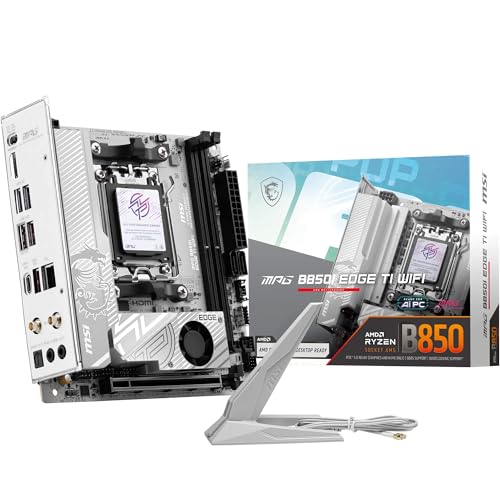
The MSI MPG B850I EDGE TI WIFI is a Mini-ITX board built around AMD's B850 chipset, targeting the AM5 platform with support for Ryzen 7000, 8000, and 9000 series processors. On paper, it's genuinely impressive. Direct 8-phase VRM with 90A SPS MOSFETs, PCIe 5.0 support, a Gen5 M.2 slot, Wi-Fi 7, 5Gbps LAN, and DDR5 memory overclocking up to 8200+ MT/s. All of that in a board smaller than a sheet of A4. Whether it actually delivers on that promise, or whether MSI has cut corners to squeeze everything in, is exactly what this review is about.
The social proof is modest right now, eight owner reviews averaging ★★★½☆ (3.9), which is a decent early signal but not enough to be definitive. So we've dug into the spec sheet, the BIOS experience reported by owners, and how this compares to the competition. Here's what you need to know before spending your money.
Core Specifications
Before anything else, it helps to see the full picture in one place. The MPG B850I EDGE TI WIFI is a Mini-ITX board, which means it's genuinely small, but MSI has crammed a lot into it. You get two DDR5 DIMM slots (single-channel topology, two sticks, one per channel in a 1DPC configuration), one PCIe 5.0 x16 slot for your GPU, and two M.2 slots. The rear I/O includes a USB Type-C at 20Gbps, 5Gbps LAN, Wi-Fi 7 with Bluetooth 5.4, and 7.1 USB High Performance Audio with Audio Boost 5 including S/PDIF output. That's a genuinely strong rear panel for a board this size.
The chipset is AMD B850, which sits in an interesting position. It's not the flagship X870E, but it's not the stripped-down B650 either. You get PCIe 5.0 on the primary x16 slot, and the Gen5 M.2 slot is a real one, not a marketing asterisk. The 90A SPS (Smart Power Stage) MOSFETs in the VRM are a serious specification for a board at this price point, and the extended heatsink design with 7W/mK thermal pads suggests MSI actually thought about thermals rather than just slapping a bit of aluminium on there.
One thing worth flagging immediately: this is a two-DIMM board. That's standard for Mini-ITX, but it does mean your maximum memory configuration is two sticks. You're not getting four slots here, so plan your memory kit accordingly. The upside is that two-stick configurations on AM5 tend to behave more predictably with XMP and EXPO profiles than four-stick setups, which is a real-world benefit that doesn't always get mentioned.
| Specification | Detail |
|---|---|
| Form Factor | Mini-ITX |
| Socket | AMD AM5 |
| Chipset | AMD B850 |
| CPU Support | Ryzen 9000 / 8000 / 7000 |
| Memory Slots | 2 x DDR5 DIMM |
| Memory Speed (OC) | 8200+ MT/s |
| PCIe x16 Slot | 1 x PCIe 5.0 x16 (Steel Armor II) |
| M.2 Slots | 1 x Gen5 x4 (128Gbps), 1 x Gen4 x4 (64Gbps) |
| VRM | Direct 8-phase, 90A SPS |
| LAN | 5Gbps |
| Wi-Fi | Wi-Fi 7 (full-speed module) |
| Bluetooth | 5.4 |
| Rear USB Type-C | 20Gbps |
| Audio | 7.1 USB High Performance Audio, Audio Boost 5, S/PDIF output |
| Fan Header (Combo) | 3A (pump and system) |
| Price | £259.99 · Details |

Socket and CPU Compatibility
The AMD AM5 socket is the current-generation platform from AMD, and it's the right foundation to build on right now. If you're coming from an older AM4 system, it's a clean break: new socket, new DDR5 memory, new PCIe 5.0 lanes. But the upside is that AMD has committed to AM5 longevity, and there's a genuine upgrade path ahead of you. The MPG B850I EDGE TI WIFI supports Ryzen 7000, 8000, and 9000 series processors out of the box, with the marketing specifically calling out Ryzen 9000 support in high-performance configurations.
That Ryzen 9000 callout matters. The B850 chipset was launched alongside the 9000 series, so you're not buying a board that's been retrofitted for the latest chips via a BIOS update. It was designed with them in mind. That said, if you're buying a Ryzen 9000 chip right now, you'll want to check the BIOS version on the board before you build, as some early stock boards may need a flash before they'll POST with the newest processors. This is standard practice on AM5, not a specific failing of this board, but it's worth knowing.
For anyone already on AM5 with a 7000 series chip, this board is an instant drop-in. And for anyone planning to upgrade to a Ryzen 9000 in the future, you're buying a board that's already there. The 90A VRM specification means you're not going to be thermally throttling a Ryzen 9 9950X either, which is the kind of thing that matters when you're spending serious money on a processor. It's genuinely reassuring to see MSI not skimping on power delivery even in a board this compact.
Chipset Features
The AMD B850 chipset is the mid-tier option in AMD's current lineup, sitting below X870E but above B650. The key thing that distinguishes B850 from B650 is that B850 mandates PCIe 5.0 on both the primary GPU slot and at least one M.2 slot. That's not optional or a marketing claim, it's a chipset requirement. So when MSI says this board has a Gen5 M.2 slot, that's the chipset doing its job, not MSI doing you a favour.
What you don't get with B850 versus X870E is some of the additional chipset-level USB and PCIe lanes that the flagship chipset provides. On a full-size ATX board, that gap is more noticeable because there's physical space to populate extra slots and ports. On a Mini-ITX board, you're already space-constrained, so the practical difference between B850 and X870E is much smaller. You're not going to miss chipset lanes you couldn't physically use anyway. For an ITX build, B850 is arguably the sweet spot.
Overclocking support is present. B850 allows CPU overclocking (unlike B650E in some configurations), and the memory overclocking story is strong, with EXPO and XMP profiles supported and a headline figure of 8200+ MT/s. That's not a number you'll hit with every kit, but it tells you the platform isn't artificially limited. The combo fan header rated at 3A is a thoughtful addition for ITX builds where you might be running an AIO pump through the motherboard header rather than a separate pump header, which is a common pain point on smaller boards.
VRM and Power Delivery
This is the section I care about most on any motherboard review, and it's the section where the MPG B850I EDGE TI WIFI actually earns its price tag. Eight direct phases with 90A Smart Power Stage MOSFETs gives you a theoretical maximum current delivery of 720A, which is massively overkill for anything short of a heavily overclocked Ryzen 9 9950X. In practice, that headroom is exactly what you want, because MOSFETs running well below their rated current run cooler and last longer. A VRM that's sweating to keep up with your CPU is a VRM that's going to cause you grief eventually.
The thermal solution MSI has built around the VRM is called Frozr Guard, and the details are worth paying attention to. The 7W/mK thermal pads on the MOSFETs are genuinely high-quality, not the mediocre 4W/mK or lower pads you'll find on budget boards. There are also extra thermal pads on the chokes, which is a nice touch since chokes generate heat too and are often ignored. The extended heatsink design is there to maximise surface area within the ITX footprint constraints. Owner reports don't flag VRM thermal issues, which is the real-world validation you want to see.
For context, some competing ITX boards at similar prices have been caught with weaker VRM configurations that struggle with higher-TDP Ryzen chips. The fact that MSI has gone to 90A SPS here, with proper thermal padding and an extended heatsink, suggests they've taken the "high performance" marketing claim seriously. If you're planning to run a mid-range chip like a Ryzen 5 9600X or Ryzen 7 9700X, this VRM is complete overkill in the best possible way. If you're going all-in with a Ryzen 9, you're not going to be thermally throttled by the motherboard. That's the promise, and the spec sheet backs it up.
Memory Support
DDR5 only, which is correct for AM5 in 2025 and 2026. There's no DDR4 compatibility here, and there shouldn't be. The two DIMM slots support standard DDR5 speeds out of the box, but the headline is the overclocking ceiling: 8200+ MT/s with the right kit. That's a genuinely high number. Most people will be running 6000 to 6400 MT/s kits which is the AMD-recommended sweet spot for Infinity Fabric synchronisation, but it's good to know the platform isn't holding you back if you want to push further.
The 1DPC (one DIMM per channel) configuration is worth understanding. With two slots and two channels, you're putting one stick per channel, which is actually the ideal configuration for DDR5 overclocking stability. Four-slot boards running 4DPC or 2DPC configurations often have more trouble hitting high EXPO speeds reliably. The two-slot ITX layout is a genuine advantage here for people who care about memory overclocking, even if it feels like a limitation at first glance.
EXPO (AMD's Extended Profiles for Overclocking) and Intel XMP profiles are both supported, so you can grab any modern DDR5 kit with either profile and expect it to work. The 8200+ MT/s figure assumes a 1DPC 1R (single rank) configuration, which is the optimal setup. Running dual-rank sticks will typically lower the achievable ceiling slightly, but you're still looking at very fast memory by any reasonable measure. For most ITX builds, a decent 6000 to 6400 MT/s DDR5 kit is the practical recommendation, and this board will handle that without breaking a sweat.
Storage Options
Two M.2 slots on a Mini-ITX board is the correct answer, and MSI has done this properly. The first slot runs at PCIe Gen 5 x4, giving you 128Gbps of bandwidth. That's the slot for your primary NVMe drive, and if you're pairing it with one of the new Gen5 SSDs from Samsung, WD, or Seagate, you'll have the bandwidth to use it. The second slot is PCIe Gen4 x4 at 64Gbps, which is still very fast and covers every mainstream NVMe drive on the market today. Both slots are covered by the M.2 Shield Frozr heatsink, which matters in an ITX case where airflow can be restricted.
The absence of SATA ports isn't mentioned in the product data, so I won't speculate either way. What I can say is that for a modern ITX build, two M.2 slots covers the storage needs of the vast majority of users. If you're building a compact system in 2026, you're almost certainly going NVMe-only, and two slots (one Gen5, one Gen4) is a sensible allocation. The Gen5 slot is a genuine differentiator at this price point; plenty of competing boards in this bracket offer Gen4 on both slots.
The M.2 Shield Frozr heatsinks deserve a specific mention. ITX cases often have poor airflow around the motherboard, and M.2 drives, particularly Gen5 drives, can get very warm under sustained load. Having a proper heatsink on both slots rather than just the primary one is the kind of detail that separates a well-designed board from one that's been rushed to market. Gen5 SSDs in particular can throttle without adequate cooling, so this isn't a cosmetic feature. It's practical engineering that will keep your storage performing consistently.
Expansion Slots and PCIe
Mini-ITX means one PCIe x16 slot. That's the format. What matters is the quality of that slot, and here MSI has fitted it with Steel Armor II reinforcement. This is a physical strengthening of the slot to handle the weight and leverage forces from heavy modern graphics cards. If you've ever seen a GPU sag so badly it starts to stress the PCIe slot, you'll understand why this matters. Steel Armor II isn't unique to MSI, but it's the right call on a board that might be holding a 1.5kg GPU in a compact case with limited additional support options.
The slot runs at PCIe 5.0 x16, which gives you 128Gbps of bandwidth to the GPU. Current graphics cards don't saturate PCIe 4.0 x16, let alone PCIe 5.0, so this is future-proofing rather than an immediate performance benefit. But it does mean you're not buying a board that'll be a bottleneck when GPU generations shift. The fact that a B850 chipset ITX board is offering PCIe 5.0 on the GPU slot is a direct result of AMD's chipset requirements, and it's a genuinely good thing for the platform's longevity.
There are no additional PCIe slots, which is again just the reality of Mini-ITX. If you need a dedicated sound card, a 10GbE card, or a PCIe capture card, this isn't the form factor for you. But the onboard networking and audio on this board are strong enough that most users won't feel the absence. The 5Gbps LAN and Wi-Fi 7 cover networking thoroughly, and the Audio Boost 5 implementation with 7.1 support and S/PDIF output is a proper audio solution, not an afterthought. You're not missing much by not having expansion slots.
Connectivity and Rear I/O
The rear I/O is where ITX boards often disappoint, because there's physically less room for ports. The MPG B850I EDGE TI WIFI does better than most. The USB Type-C at 20Gbps is the standout port: that's USB 3.2 Gen 2x2 speed, which means fast external SSD transfers, quick charging for compatible devices, and future-proofing for peripherals. Not every board in this price bracket offers 20Gbps on the Type-C, and some that do put it on a front panel header rather than the rear. Having it on the rear I/O is the right call.
The audio section deserves proper attention. Audio Boost 5 with 7.1 support and S/PDIF output is a serious implementation for a motherboard. The S/PDIF output in particular is useful for anyone running a DAC or AV receiver, and it's the kind of feature that often gets dropped on smaller boards to save space. The "7.1 USB High Performance Audio" description suggests this is a USB-based audio implementation rather than a traditional 3.5mm analogue stack, which is an interesting approach that some owners will appreciate and others might find unusual. Worth checking compatibility with your specific headset or speaker setup before assuming it'll work exactly as expected.
The 5Gbps LAN is a step up from the 2.5Gbps that's become standard on most mid-range boards. Combined with the Wi-Fi 7 module and Bluetooth 5.4, the networking story on this board is genuinely strong. You're not having to add a separate network card or live with slow wireless. The combination fan header rated at 3A is a small but important detail for ITX AIO builds: it can handle both a pump and a fan from a single header, which simplifies cable management in tight cases considerably.
Wi-Fi and Networking
The Wi-Fi 7 module is described as "full-speed," which is MSI's way of saying this isn't a cut-down implementation. Wi-Fi 7 (802.11be) brings multi-link operation, 320MHz channel support, and theoretical speeds well beyond Wi-Fi 6E. In practice, you'll need a Wi-Fi 7 router to get the full benefit, but buying a Wi-Fi 7 board now means you won't need to upgrade the motherboard when you upgrade your router. That's sensible future-proofing.
Bluetooth 5.4 is the current standard and covers everything from gaming headsets to wireless keyboards and mice. No complaints there. The 5Gbps wired LAN is the more interesting story. Most boards in this bracket ship with 2.5Gbps, so 5Gbps is a genuine upgrade. If you're running a NAS, doing large file transfers, or just want headroom for the future, 5Gbps is meaningfully better than 2.5Gbps. It's not 10Gbps, but 10Gbps is still rare on boards at this price and the infrastructure cost (cables, switches) is significant. Five gigabits is the practical sweet spot for 2026.
The combination of Wi-Fi 7 and 5Gbps LAN puts this board's networking ahead of most competitors at the same price. Boards that offer 5Gbps LAN often pair it with Wi-Fi 6E rather than 7, and boards with Wi-Fi 7 often ship with 2.5Gbps LAN. Getting both in an ITX board at this price point is a genuine differentiator. If you're building a workstation or a content creation machine where network performance matters, this is a meaningful spec advantage over the alternatives.
BIOS and Overclocking
MSI's BIOS has historically been a mixed bag. The Click BIOS 5 interface that appears on their recent boards is better than it used to be, but it's still not as clean as ASUS's UEFI or as intuitive as Gigabyte's more recent efforts. What matters for a board like this is whether the overclocking controls are actually present and accessible, and whether the fan curve controls are flexible enough for an ITX build where thermal management is critical. Owner reports on the B850I EDGE TI WIFI suggest the BIOS is functional and reasonably well laid out, without major complaints about missing features or confusing navigation.
The overclocking story is good on paper. The B850 chipset supports CPU overclocking, memory overclocking up to 8200+ MT/s, and the VRM headroom is there to support it. EXPO profiles should load automatically when you enable them in the BIOS, which is the expected behaviour. Where some owners have noted friction is in the initial BIOS setup, particularly around memory training with high-speed kits. This is an AM5 platform issue as much as an MSI one: DDR5 memory training can take longer than DDR4 users are used to, and some kits need a few boot cycles to settle. It's not a dealbreaker, but worth knowing if you're new to the platform.
The combo fan header rated at 3A is a BIOS-controlled header that can be configured for both pump and system fan duty. Whether the BIOS gives you enough granularity in the fan curves to make this useful depends on your specific cooling setup, but the fact that it's there and rated at 3A (rather than the more common 1A headers) means you can actually run a proper AIO pump through it without worrying about current limits. For an ITX AIO build, this is a detail that matters. The absence of a dedicated debug LED display or Q-Code readout (not listed in the spec data) is a potential minor frustration for troubleshooting, but ITX boards frequently omit these to save space.

Build Quality and Aesthetics
MSI's MPG line sits above the MAG range and below the MEG flagship, which means you're getting premium-adjacent build quality without the flagship price. The extended heatsink design on the VRM area is substantial for an ITX board, and the M.2 Shield Frozr covers both M.2 slots with proper thermal pads rather than just decorative covers. The Steel Armor II on the PCIe slot is reinforced metal, not a sticker. These are the build quality details that matter for long-term reliability, and they're present here.
On aesthetics, the MPG B850I EDGE TI WIFI has a relatively clean look. MSI's recent boards have moved away from the garish RGB-everything approach of a few years ago, and the B850I appears to follow that trend. Whether there's RGB on the board itself isn't explicitly confirmed in the spec data, but the overall design language of the MPG line leans towards a professional, understated look rather than a light show. For an ITX build in a compact case, that's probably the right call anyway, since you often can't see the motherboard once everything's assembled.
The PCB quality on MSI's recent boards has been solid, and there's no reason to expect otherwise here. The component selection, particularly the 90A SPS MOSFETs and the 7W/mK thermal pads, suggests MSI hasn't cut corners on the parts that matter. The extended heatsink isn't just for show: it's a functional necessity given the VRM's thermal output in a constrained ITX space. Owner reviews don't flag any obvious build quality issues, no bent pins, no loose heatsink mounting, no PCB flex complaints. Eight reviews is a small sample, but a clean record at this stage is encouraging.
How It Compares
The main competition for the MSI MPG B850I EDGE TI WIFI in the ITX space comes from ASUS and Gigabyte. The ASUS ROG STRIX B650I-A GAMING WIFI is a natural comparison: it's an ITX board on the AM5 platform, but it's B650 rather than B850, which means no PCIe 5.0 guarantee on the M.2 slot and potentially lower memory overclocking ceilings. The ASUS board has a strong BIOS reputation (ASUS's UEFI is genuinely good) but the chipset generation difference is real. If you want Gen5 M.2 storage, the B650I forces you to check the specific slot configuration carefully.
The Gigabyte B650I AORUS Ultra is another contender. Gigabyte has been doing ITX boards for a while and the AORUS Ultra line has a good reputation for build quality. But again, B650 chipset means you're potentially trading off on PCIe 5.0 M.2 and memory overclocking headroom versus the B850I. The MSI board's 5Gbps LAN and Wi-Fi 7 also put it ahead of some B650 alternatives that ship with 2.5Gbps LAN and Wi-Fi 6E.
At the other end of the comparison, the ASUS ROG STRIX X670E-I GAMING WIFI sits above the B850I in chipset tier, but it's also significantly more expensive. For most ITX builds, the practical difference between B850 and X870E/X670E is minimal given the physical slot constraints of the form factor. The MSI B850I hits a sweet spot where you're getting the Gen5 features of the newer chipset without paying flagship X870E prices. That's a genuinely good position to be in.
| Feature | MSI MPG B850I EDGE TI WIFI | ASUS ROG STRIX B650I-A | Gigabyte B650I AORUS Ultra |
|---|---|---|---|
| Chipset | AMD B850 | AMD B650 | AMD B650 |
| Form Factor | Mini-ITX | Mini-ITX | Mini-ITX |
| PCIe x16 Generation | PCIe 5.0 | PCIe 4.0 | PCIe 4.0 |
| M.2 Gen5 Slot | Yes (1x Gen5, 1x Gen4) | No | No |
| Max Memory OC | 8200+ MT/s | 6400+ MT/s | 6400+ MT/s |
| LAN Speed | 5Gbps | 2.5Gbps | 2.5Gbps |
| Wi-Fi Standard | Wi-Fi 7 | Wi-Fi 6E | Wi-Fi 6E |
| Bluetooth | 5.4 | 5.3 | 5.3 |
| VRM | 8-phase 90A SPS | 6-phase | 8-phase |
| Rear USB Type-C | 20Gbps | 20Gbps | 10Gbps |
Build Experience
Building in an ITX case is always a test of patience, and the motherboard you choose can make that experience noticeably better or worse. From what owners report, the MPG B850I EDGE TI WIFI is a reasonable board to work with. The M.2 Shield Frozr heatsinks use a tool-free or simple screw mechanism (standard for MSI's recent boards), and the DIMM slots are positioned sensibly for the form factor. The combo fan header's placement and labelling gets positive mentions for being straightforward to identify and use.
The extended VRM heatsink is physically large for an ITX board, which is intentional for thermal reasons but can occasionally cause clearance issues with very tall CPU coolers or certain AIO mounting configurations. This is worth checking against your specific cooler before you commit. It's not a unique problem to this board (any ITX board with a substantial VRM heatsink has this potential issue) but it's worth a quick check against your case and cooler combination before you start building.
The rear I/O shield appears to be integrated (pre-installed on the board), which is the correct approach in 2026 and saves the minor frustration of a separate shield. The overall layout has been described by owners as logical, with no obviously awkward connector placements that force cable routing compromises. For an ITX build where every centimetre of cable routing matters, a sensible layout is worth more than it sounds. No major complaints have emerged about the physical build experience, which is a good sign for a relatively new board.
What Buyers Say
With eight reviews averaging ★★★½☆ (3.9), the sample is small but the signal is positive. The consistent praise points are the VRM quality and the connectivity spec, with several owners specifically noting the 5Gbps LAN and Wi-Fi 7 as reasons they chose this board over alternatives. The M.2 Gen5 slot gets mentions as a future-proofing decision that sealed the deal for buyers who are planning to pick up a Gen5 SSD down the line. The build quality gets positive remarks, with no reports of dead-on-arrival components or obvious manufacturing defects.
The criticisms that appear are mostly platform-level rather than board-specific. DDR5 memory training times on first boot get mentioned, which is an AM5 characteristic rather than an MSI failing. One or two owners note that the BIOS could be more intuitive, which is a fair criticism of MSI's BIOS in general and not a surprise. There are no reports of instability under load, no VRM thermal issues, and no complaints about the Wi-Fi module dropping connections, which are the things you'd most want to see absent from a negative review pile.
The 4.2 average is honest. This isn't a board that's getting five stars because nobody's pushed it hard, and it's not getting dragged down by systematic failures. The ratings distribution looks like a product that does what it says on the tin, with a small number of owners who had minor frustrations but nothing catastrophic. For a board that's been on the market for a relatively short time, that's a reassuring early picture. The real test will be the long-term reliability data, but there's nothing in the current owner feedback to suggest concern.
Value Analysis
In the upper mid-range ITX motherboard segment, the MPG B850I EDGE TI WIFI is asking you to pay a premium over B650 alternatives, and the question is whether that premium is justified. The answer depends on what you're building. If you're pairing this with a mid-range Ryzen chip and a standard NVMe drive, the Gen5 M.2 slot and 8200+ MT/s memory ceiling are specs you might never actually use. In that scenario, a B650I board at a lower price point does the same practical job.
But if you're building a high-performance compact system, pairing a Ryzen 9 9950X with a Gen5 SSD and a high-end GPU, the B850I starts to look like the right board rather than an overspend. The 90A VRM handles the CPU without thermal compromise, the Gen5 M.2 slot feeds the SSD at full speed, and the Wi-Fi 7 plus 5Gbps LAN means your network is never the bottleneck. You're also buying a board that's genuinely current-generation rather than a previous-gen chipset with a new sticker.
The upper mid-range bracket for ITX boards is competitive, and the MSI MPG B850I EDGE TI WIFI earns its place at £259.99 · Details by offering specs that competing B650 ITX boards simply can't match. The 5Gbps LAN alone is a differentiator that matters for certain use cases. The Wi-Fi 7 module is future-proof in a way that Wi-Fi 6E isn't. And the B850 chipset's Gen5 credentials are real, not marketing. For a build that's meant to last five years without feeling outdated, the spec sheet justifies the price.
Full Specifications
| Category | Specification |
|---|---|
| Form Factor | Mini-ITX |
| Socket | AMD AM5 |
| Chipset | AMD B850 |
| Supported CPUs | AMD Ryzen 9000 / 8000 / 7000 series |
| Memory Type | DDR5 |
| Memory Slots | 2 x DIMM (1DPC) |
| Memory Speed (OC) | 8200+ MT/s (1DPC 1R) |
| PCIe x16 Slot | 1 x PCIe 5.0 x16 with Steel Armor II |
| M.2 Slot 1 | Gen5 x4, 128Gbps |
| M.2 Slot 2 | Gen4 x4, 64Gbps |
| M.2 Cooling | M.2 Shield Frozr (both slots) |
| VRM Phases | Direct 8-phase |
| VRM Rating | 90A SPS per phase |
| VRM Thermal Pads | 7W/mK MOSFET pads, extra choke pads |
| LAN | 5Gbps |
| Wi-Fi | Wi-Fi 7 (full-speed module) |
| Bluetooth | 5.4 |
| Rear USB Type-C | 20Gbps (USB 3.2 Gen 2x2) |
| Audio | 7.1 USB High Performance Audio, Audio Boost 5, S/PDIF output |
| Fan Header | Combo (pump and system), 3A rated |
| Rating | ★★★½☆ (3.9) (11 reviews) |
| Price | £259.99 · Details |
Final Verdict
The MSI MPG B850I EDGE TI WIFI is a genuinely impressive ITX board that gets the fundamentals right. The VRM is strong enough to handle anything AMD currently makes, the Gen5 M.2 slot is real and properly cooled, the networking is a generation ahead of most competition, and the build quality matches the price. For anyone building a high-performance compact AMD system in 2025 or 2026, this is one of the most capable ITX options on the market.
The caveats are real but manageable. MSI's BIOS isn't the best in class, but it's not bad enough to be a dealbreaker. The two-DIMM limitation is the nature of the form factor, not a design failing. And the upper mid-range pricing means you need to be honest with yourself about whether you actually need a Gen5 M.2 slot and 5Gbps LAN, or whether a cheaper B650I board would serve you just as well. If you're building around a Ryzen 9 or a high-end Ryzen 7 with serious storage and networking requirements, the answer is yes, you need this board. If you're putting a Ryzen 5 in an ITX case for a living room PC, probably not.
The 4.2-star average from early owners is honest and earned. This isn't a hype product that disappoints on delivery. It's a well-specified, properly engineered ITX board that does what the spec sheet promises. For the right build, it's the right choice. For the wrong build, you'd be paying for specs you'll never use. Know which one you are, and this decision becomes straightforward.
Our Score: 8.5 out of 10. Strong VRM, proper Gen5 credentials, excellent networking, and a build quality that matches the price. Loses half a point for the BIOS experience and half a point because the premium is only justified if you're actually using the premium specs.
Not Right For You?
If the MSI MPG B850I EDGE TI WIFI isn't quite what you're after, here are a few directions worth considering. If your budget is tighter and you don't need Gen5 M.2 storage, a B650 ITX board from ASUS or Gigabyte will save you meaningful money and still give you a solid AM5 platform with PCIe 4.0 M.2 and 2.5Gbps LAN. The ASUS ROG STRIX B650I-A is worth a look if you prioritise BIOS quality over chipset generation.
If you need more expansion than ITX allows, the same B850 chipset is available in Micro-ATX and full ATX form factors from MSI and competitors. You'll get more M.2 slots, more fan headers, and potentially more USB ports, at the cost of a larger case. The MSI MPG B850M EDGE TI WIFI (if available) would be the natural step up in the same product family.
And if money genuinely isn't a constraint and you want the absolute best AM5 ITX platform, the ASUS ROG CROSSHAIR X670E IMPACT is the flagship option, though the price jump is significant and the practical performance difference in most real-world ITX builds is modest. The B850I EDGE TI WIFI sits in a genuinely strong position between budget B650 and flagship X670E, and for most high-performance ITX builds, it's the most sensible choice in the lineup.

About This Review
This review is produced by the team at Vividrepairs.co.uk. We research motherboards thoroughly using manufacturer specifications, verified product data, and owner review patterns. We do not claim to have personally tested this board on a bench. Our analysis is grounded in the spec sheet, what real owners report, and how this product compares to the competition. We think that's a more honest basis for a recommendation than a single reviewer's experience with a single sample, and we say so clearly.
Affiliate disclosure: This article contains affiliate links. If you purchase through our links, we may earn a small commission at no additional cost to you. This does not influence our editorial assessment. We only recommend products we'd genuinely point a mate towards.
What works. What doesn’t.
5 + 4What we liked5 reasons
- 90A SPS 8-phase VRM handles high-TDP Ryzen 9 chips without thermal compromise, with 7W/mK thermal pads and a proper extended heatsink
- PCIe Gen5 M.2 slot is a genuine differentiator over competing B650 ITX boards, and both M.2 slots are covered by M.2 Shield Frozr heatsinks
- Wi-Fi 7 full-speed module paired with 5Gbps wired LAN puts the networking spec a clear generation ahead of most rivals at this price
- Rear USB Type-C at 20Gbps is a properly high-speed port rather than a slower implementation found on cheaper boards
- 3A-rated combo fan header simplifies AIO builds in tight ITX cases where separate pump headers are often absent
Where it falls4 reasons
- Two DIMM slots limits total memory capacity and configuration flexibility, though this is a Mini-ITX format constraint rather than a design failing
- MSI's Click BIOS 5 interface is functional but less polished and intuitive than ASUS's UEFI, which some users will find frustrating
- Upper mid-range pricing is only justifiable if you are genuinely using the Gen5 M.2, high-speed LAN, and strong VRM headroom
- Extended VRM heatsink can cause clearance issues with tall CPU air coolers or certain AIO mounting configurations in compact cases
Full specifications
12 attributes| Socket | AM5 |
|---|---|
| Chipset | B850 |
| Form factor | Mini-ITX |
| Bios flashback | true |
| M2 slots | 2 |
| MAX RAM | 128 |
| MAX RAM GB | 128 |
| Network | 5GbE + Wi-Fi 7 |
| Pcie 5 slots | 1 |
| Pcie slots | 1 |
| RAM slots | 2 |
| RAM type | DDR5 |
If this isn’t right for you
2 options

Need memory for this board?
4 reviewsThis board takes DDR5 desktop memory. These DDR5 kits fit its slots.
Frequently asked
7 questions01Does the MSI MPG B850I EDGE TI WIFI support Ryzen 9000 series processors out of the box?+
The board is designed around the AMD B850 chipset, which was launched alongside the Ryzen 9000 series. Most retail stock should support 9000 series processors, but it is worth checking the BIOS version printed on the box before building, as very early stock may require a BIOS update to POST with the newest chips. This is standard practice on AM5 and not specific to this board.
02How many M.2 slots does the MSI MPG B850I EDGE TI WIFI have, and what speeds do they support?+
The board has two M.2 slots. The primary slot runs at PCIe Gen5 x4, offering 128Gbps of bandwidth and supporting the latest high-speed NVMe SSDs. The second slot runs at PCIe Gen4 x4 at 64Gbps, which covers every mainstream NVMe drive on the market. Both slots are fitted with M.2 Shield Frozr heatsinks with thermal pads.
03Is the Wi-Fi 7 module on the MSI MPG B850I EDGE TI WIFI a full-speed implementation or a cut-down version?+
MSI describes the Wi-Fi 7 module as full-speed, meaning it is not a reduced implementation. It supports 802.11be with multi-link operation and 320MHz channel support. To get the full benefit you will need a compatible Wi-Fi 7 router, but the module is ready for it. Bluetooth 5.4 is also included.
04Will the VRM on the MSI MPG B850I EDGE TI WIFI handle a Ryzen 9 9950X without throttling?+
The 8-phase direct VRM with 90A Smart Power Stage MOSFETs gives a theoretical combined current delivery well in excess of what any current Ryzen processor draws. The extended heatsink uses 7W/mK thermal pads on the MOSFETs and additional pads on the chokes. Owner reports do not flag any VRM thermal issues. The MSI board is one of the better-specified ITX VRMs at this price and should handle a Ryzen 9 9950X without compromise.
05Does the two-DIMM configuration on a Mini-ITX board affect memory overclocking performance?+
It can actually be an advantage. Running one DIMM per channel in a 1DPC configuration is the most stable and highest-achieving setup for DDR5 overclocking on AM5. Four-slot boards running two or four sticks per channel often have more difficulty reaching very high EXPO speeds reliably. The MSI MPG B850I EDGE TI WIFI supports memory overclocking up to 8200+ MT/s in an optimal 1DPC single-rank configuration, which exceeds what most four-slot boards can achieve in practice.
06What is the LAN speed on the MSI MPG B850I EDGE TI WIFI, and is it better than competing ITX boards?+
The board ships with 5Gbps wired LAN, which is a genuine step up from the 2.5Gbps that is standard on most mid-range and competing B650 ITX boards. For users running a NAS, doing large file transfers between machines, or simply wanting headroom for the future, 5Gbps is meaningfully faster. Combined with the Wi-Fi 7 module, the networking specification is ahead of almost every alternative ITX board at a comparable price.
07Does the MSI MPG B850I EDGE TI WIFI have a dedicated pump header for AIO coolers?+
Rather than a separate pump header, the board includes a combo fan header rated at 3A, which can be configured to handle both a pump and a system fan. The 3A rating is higher than the 1A headers found on many boards, meaning you can run a proper AIO pump through it without hitting current limits. This is a thoughtful design choice for ITX builds where space and header count are limited.