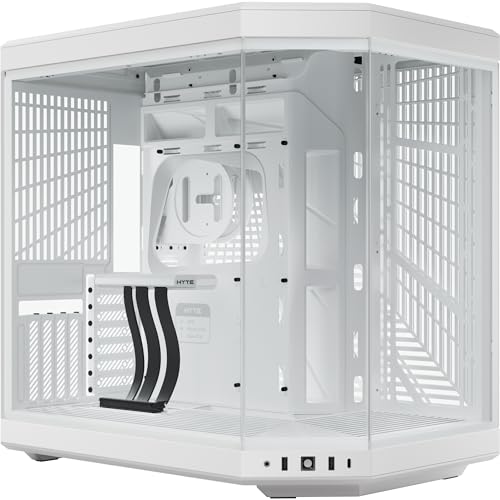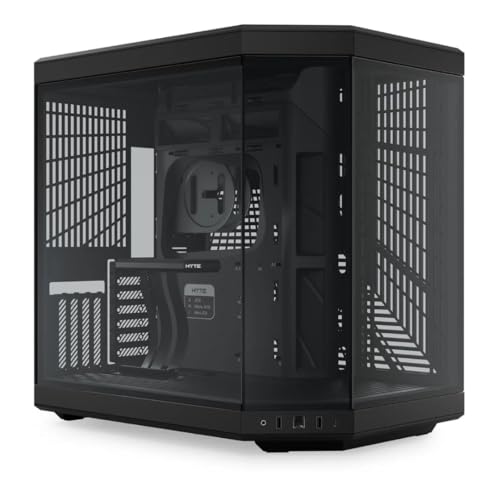
Pick up a spec sheet for a tempered glass mid-tower and a mesh mid-tower sitting at the same price point, and the numbers will tell you something the marketing photos never will. Panel choice is not just aesthetics. Real owner data across mid-tower builds consistently shows double-digit Celsius differences under sustained GPU load depending on whether your front panel is breathing or just looking pretty. The HYTE Y70 Black knows this, and its design reflects it in a way that most glass-heavy cases simply don't bother with. That panoramic side-and-front glass arrangement is not just for Instagram. The question is whether the thermal engineering behind it actually holds up.
Short answer: yes, mostly. The HYTE Y70 gaming case review UK verdict is that this is a genuinely well-thought-out enthusiast chassis that earns its premium tier price through real design decisions rather than RGB smoke and mirrors. Fifty-three owner reviews with a positive overall rating is not a fluke, and the spec sheet backs up why people are happy. There are caveats, and we'll get into them, but if you're building a high-end system and you want something that looks stunning without completely strangling your thermals, the Y70 is a serious contender.
HYTE launched the Y70 as an evolution of the Y60, addressing the original's more restrictive airflow characteristics while keeping that distinctive panoramic glass aesthetic intact. The result is a case that sits in a genuinely interesting spot: it's not a pure airflow box like the Fractal Torrent, but it's not a thermal disaster like some all-glass competitors either. The engineering compromise here is more thoughtful than most.
Core Specifications
The Y70 is a mid-tower chassis built around a steel and tempered glass construction. It supports ATX, Micro-ATX, and Mini-ITX motherboards, and the internal volume is generous enough that you're not going to be fighting the case every step of the way during a build. HYTE rates GPU clearance at up to 420mm, which covers every current flagship card on the market with room to spare. CPU cooler height clearance sits at 165mm, which is enough for most tower coolers including the popular 158mm Noctua NH-D15 and similar large-format air coolers.
Fan support is where the Y70 gets interesting. You get mounts for up to three 120mm or two 140mm fans at the front, up to three 120mm or two 140mm at the top, and a single 120mm at the rear. That's a total of seven fan positions if you go 120mm throughout, which gives you serious flexibility for intake and exhaust configuration. The case ships with three pre-installed fans, which is a decent starting point rather than leaving you with an empty chassis and an immediate trip to the fan aisle. Radiator support extends to 360mm at the front and 360mm at the top, with 120mm at the rear, so AIO options are properly covered.
Weight comes in at around 10kg, which is on the heavier side for a mid-tower but not surprising given the amount of tempered glass involved. The panoramic design uses glass on both the front and side panels simultaneously, which is the Y70's defining visual trick and also the reason the weight is what it is. Dust filtration is present on the front and bottom, which matters for long-term maintenance. The PSU shroud is included, keeping the bottom of the build tidy.
| Specification | Detail |
|---|---|
| Form Factor | Mid-Tower |
| Motherboard Support | ATX, Micro-ATX, Mini-ITX |
| Max GPU Length | 420mm |
| Max CPU Cooler Height | 165mm |
| Front Fan Support | 3x 120mm or 2x 140mm |
| Top Fan Support | 3x 120mm or 2x 140mm |
| Rear Fan Support | 1x 120mm |
| Radiator Support (Front) | Up to 360mm |
| Radiator Support (Top) | Up to 360mm |
| Radiator Support (Rear) | 120mm |
| Drive Bays (3.5") | 2 |
| Drive Bays (2.5") | 4 |
| Included Fans | 3 |
| Front I/O | USB 3.0 Type-A x2, USB 3.2 Gen 2 Type-C x1, Audio |
| PSU Clearance | Up to 200mm (standard ATX) |
| Weight | Approx. 10kg |
| Colour | Black |
| Current Price | £213.99 · Details |

Form Factor and Dimensions
The Y70 sits in mid-tower territory, but it's on the larger end of that category. The chassis is noticeably deeper and taller than something like the Corsair 4000D Airflow, which means it needs a bit more desk or floor real estate. If you're working with a compact desk setup, measure before you commit. That said, the extra volume is not wasted space. It's what gives you the 420mm GPU clearance and the flexibility to run dual 360mm radiators simultaneously without the kind of component juggling that smaller cases demand.
The panoramic glass design is the defining physical characteristic here. Unlike conventional mid-towers where the side panel is a single piece of glass, the Y70 wraps glass around the front and side in a continuous sweep. This is what HYTE is known for, and it genuinely does look different to anything else on a desk. Whether that matters to you is personal, but it's worth understanding that this design choice has structural implications. The glass panels are thick and feel solid, but the case is heavier and slightly more awkward to move around than a steel-fronted alternative.
Footprint-wise, you're looking at a chassis that will occupy a decent chunk of a standard desk or sit comfortably on the floor beside a desk. The top panel, with its fan and radiator mounting options, needs clearance above it if you're going for a top-mounted 360mm radiator, so don't cram it under a low shelf. The overall silhouette is clean and relatively restrained by gaming case standards. No aggressive angular styling, no fins. Just a large glass box with good proportions. Some owners specifically call out that it doesn't look like a typical gaming case, which for a lot of builders is exactly the point.
Motherboard Compatibility
The Y70 supports ATX, Micro-ATX, and Mini-ITX form factors. Standard ATX is clearly the intended target here. The internal layout gives you proper access to all the ATX standoff positions, and the motherboard tray is sized to make full-ATX builds feel natural rather than cramped. Micro-ATX works fine too, though you'll obviously have more empty space in the upper part of the chassis. Mini-ITX is supported but feels like a bit of an afterthought at this size and price point. If you're going Mini-ITX, there are better-suited cases for that.
E-ATX is not officially supported, which matters if you're running a high-end HEDT platform. The standoff layout doesn't extend to E-ATX widths, so don't try to force it. For mainstream Intel and AMD platforms on standard ATX boards, you're completely sorted. The cutout behind the motherboard tray for CPU cooler backplate access is present and properly sized, which means you won't need to strip the whole build down if you're swapping coolers later.
One thing owners consistently mention is that the motherboard installation itself is straightforward. The case is deep enough that you're not fighting cable clearance issues while trying to seat the board, and the standoffs are pre-installed in the ATX positions from the factory. That's a small thing, but it's the kind of detail that separates a case designed by people who actually build PCs from one designed by a marketing committee. The overall compatibility picture here is solid for any mainstream high-end build on an ATX platform.
GPU Clearance
Four hundred and twenty millimetres of GPU clearance is not a number you need to worry about. To put that in context, an NVIDIA RTX 5090 Founders Edition comes in at around 336mm. An AMD RX 9070 XT reference card is similarly well under the 420mm limit. Basically every current triple-slot, triple-fan flagship card fits with meaningful clearance to spare. Even the chunkier aftermarket variants from ASUS ROG, MSI Gaming X Trio, and similar lines sit comfortably inside that envelope.
The Y70 does not officially support a vertical GPU mount out of the box, which matters if that's something you're after. Vertical mounting typically requires a PCIe riser cable and a case designed with the appropriate bracket positioning, and HYTE hasn't included that here. Given the panoramic glass side panel is already doing the display work, vertical mounting would arguably be redundant anyway, but it's a limitation compared to some competitors in the same price bracket who do offer it as an option.
What you do get is a properly designed GPU support bracket situation. Long, heavy cards need support to prevent GPU sag over time, particularly the current generation of triple-fan monsters. The Y70's internal layout accommodates aftermarket GPU support brackets, and the PSU shroud design means the bottom of the case is clean enough that adding one isn't awkward. Owners with high-end cards report no fitment issues, and the GPU area of the chassis is well-ventilated given the front intake configuration. The clearance numbers here are genuinely future-proof for anything currently on the market.
CPU Cooler Clearance
A 165mm CPU cooler height limit covers a very wide range of air coolers. The Noctua NH-D15 sits at 158mm. The be quiet! Dark Rock Pro 5 comes in at 162mm. The Thermalright Peerless Assassin 120 SE is around 155mm. So you're not being pushed towards a specific cooler category here. Even the biggest dual-tower air coolers that most people would actually buy fit with a few millimetres of breathing room. That said, if you're looking at something unusually tall, check the specific measurement before committing.
AIO liquid cooler support is where the Y70 really opens up. Front mounting supports up to 360mm radiators, and the top also supports 360mm. That's a lot of radiator real estate for a mid-tower. A 360mm front AIO is the sweet spot for most high-end builds, giving you maximum cooling surface for a CPU like an Intel Core Ultra 9 or an AMD Ryzen 9 series chip. The top 360mm option is useful for GPU cooling in custom loop scenarios or for supplementary radiator capacity in more exotic builds.
One thing to check when running a front 360mm radiator is RAM clearance. With a front-mounted radiator, the tubing routing and radiator thickness can occasionally conflict with tall RAM kits on certain motherboard layouts. This is not unique to the Y70, it's a consideration with any case that mounts a 360mm radiator at the front. Owners building with standard-height RAM report no issues. If you're running particularly tall RGB RAM sticks, double-check the specific clearances for your chosen radiator thickness. The rear single 120mm mount handles exhaust duty and fits a standard 120mm AIO pump head or a standalone fan without any drama.
Storage Bay Options
Two 3.5-inch drive bays and four 2.5-inch bays is a reasonable allocation for a modern mid-tower. The reality is that most builders in 2026 are running one or two M.2 SSDs on the motherboard and maybe a single 2.5-inch SATA SSD for overflow storage. Mechanical hard drives are increasingly niche, kept mainly for large media libraries and NAS-style secondary storage. Two 3.5-inch bays covers that use case without devoting half the case interior to a drive cage that most people will never fill.
The 3.5-inch bays are tucked behind the PSU shroud, which keeps them out of sight and maintains the clean aesthetic of the main chamber. This is the right call for a case with this much visible interior. Nobody wants to see a stack of hard drives through that panoramic glass panel. The 2.5-inch bays are accessible and provide enough mounting positions for SSDs if you're not relying entirely on M.2 storage. Tool-less mounting is present for the drive bays, which makes swapping drives during a build or an upgrade less of an ordeal.
M.2 support depends on your motherboard rather than the case, but the Y70's motherboard tray area is clean enough that managing M.2 heatsinks and cables doesn't become a spatial puzzle. If you're building a storage-heavy system with multiple 3.5-inch drives, the two-bay limit might feel tight, and you'd want to look at cases with more traditional drive cage arrangements. For the vast majority of gaming and workstation builds though, two 3.5-inch and four 2.5-inch bays is more than adequate. This is not a NAS chassis and it doesn't pretend to be.
Cable Management
The rear panel cable management space is one of the areas where the Y70 earns genuine praise from owners. There's enough depth behind the motherboard tray to route cables properly without the rear panel becoming a compression exercise. HYTE has included Velcro straps at sensible anchor points, which means you can actually keep things tidy without resorting to zip ties and hoping for the best. Owners consistently call out the cable management as one of the Y70's strengths, which aligns with the spec sheet showing proper routing channels.
The PSU shroud is full-width and does a proper job of hiding the PSU and its associated cable chaos from view through the glass panels. The shroud has a cutout that allows the 24-pin motherboard power cable and the CPU EPS cables to route cleanly up to the motherboard area. Getting the 24-pin and the dual EPS cables to the top of the board is always the most awkward part of a clean build, and the Y70's channel design makes this manageable rather than a wrestling match. The grommet placement is sensible, which helps.
One thing: because the front and side panels are glass, the interior is always on display. That means cable management isn't just about tidiness for its own sake. Any cables that end up visible through the glass will be visible to anyone looking at your build. This is actually a positive pressure on builders to do a proper job, but it does mean that a rushed build in the Y70 will look worse than the same rushed build in a steel-fronted case where nobody can see the mess. Budget some extra time for the cable management pass if you're building in this chassis. It rewards the effort visibly.
Airflow and Thermal Design
Here's where the HYTE Y70 gaming case review UK conversation gets genuinely interesting. The Y70's panoramic glass design could easily be a thermal disaster. All-glass fronts restrict intake airflow significantly, and some cases in this aesthetic category run 10 to 15 degrees Celsius hotter under load than their mesh-fronted equivalents. HYTE's answer to this is a design that keeps the glass panel elevated slightly from the chassis, creating intake gaps around the perimeter of the front panel rather than relying on perforations through the glass itself. It's a clever workaround, and owner feedback suggests it works better than you'd expect from a glass-fronted case.
The three included fans are mounted at the front as intake by default. These are HYTE's own fans, and they're decent enough to get you started, though enthusiast builders will likely swap them out for higher-static-pressure options if they're running a front radiator. The top panel is mesh, which allows for proper exhaust. The combination of front intake through the perimeter gaps and top mesh exhaust creates a reasonable positive-pressure airflow path through the chassis. Positive pressure is generally preferable for dust management, as it reduces the amount of unfiltered air being pulled in through gaps and seams.
Compared to a pure mesh case like the Fractal Torrent, the Y70 will run warmer under heavy sustained loads. That's just physics. Glass restricts airflow more than mesh regardless of how clever the engineering is. But compared to fully sealed glass-front cases, the Y70's perimeter gap design is a meaningful improvement. If you're building with a high-TDP GPU and running extended workloads or gaming sessions, you might want to add extra fans to the top exhaust positions. For typical gaming builds with a modern GPU that manages its own power curve intelligently, the stock configuration is workable. The dust filters on the front and bottom are a genuine positive for long-term maintenance.
Front I/O and Connectivity
The front I/O panel on the Y70 gives you two USB 3.0 Type-A ports, one USB 3.2 Gen 2 Type-C port, and a combined audio jack. The USB Type-C port is particularly welcome at this price point. USB 3.2 Gen 2 over Type-C delivers up to 10Gbps, which is fast enough for external SSDs and modern peripherals. The internal header requirement for this is a USB 3.2 Gen 2 Type-C header on your motherboard, which is standard on mid-range and above ATX boards in 2026 but worth confirming on your specific board before you buy.
Two USB Type-A ports is functional but not lavish. Some competitors at this price point offer three Type-A ports, which is more convenient if you're regularly plugging in USB drives, controllers, or other peripherals at the case rather than at a hub or the back of the motherboard. It's not a dealbreaker, but notably, if front USB access is something you use heavily. The power button placement and general front I/O layout are clean and unobtrusive, which suits the Y70's aesthetic. No reset button is present as a separate button, which is increasingly common on modern cases but occasionally frustrating during debugging sessions.
The positioning of the I/O panel is on the top of the case, which is the standard location for mid-towers and works well whether the case is on a desk or on the floor. The cable routing for the front I/O headers internally is straightforward, with the cables long enough to reach standard ATX motherboard header positions without strain. There's no built-in RGB or fan controller hub on the front I/O, which keeps things simple. If you want RGB control, you'll be managing that through your motherboard's software or a separate controller. Some builders will appreciate the simplicity. Others who want a single-point RGB controller hub might find this limiting.
Build Quality and Materials
The steel used in the Y70's chassis is solid without being exceptional. Panel rigidity is good, there's no notable flex when handling the case, and the finish is consistent across the surfaces. The tempered glass panels are the star of the show here, and they're thick enough to feel premium rather than fragile. Owners don't report cracking or panel alignment issues, which is reassuring for a case where the glass is a structural and aesthetic centrepiece rather than just a window.
Panel removal and installation is where owner feedback is broadly positive with one consistent note of caution. The glass panels use a hinge and latch system rather than thumb screws, which makes access faster once you've got the hang of it. However, a number of owners mention that the hinges feel stiff initially and require a bit of force to open, particularly when the case is new. This loosens up with use, but it can be slightly alarming the first time you're trying to open a panel that's holding a significant amount of glass. Handle with care on first access and you'll be fine.
The overall finish quality is consistent with the premium tier pricing. Screw threads are properly cut, standoffs are solid, and there are no sharp edges reported in owner feedback, which is always a relief given how many budget cases will draw blood during a build. The black finish on this variant is a matte powder coat that doesn't show fingerprints as aggressively as some gloss alternatives. The glass panels will show fingerprints, because glass always does, but that's unavoidable. HYTE's build quality reputation has improved noticeably from their earlier products, and the Y70 reflects that trajectory.
How It Compares
The two cases most worth comparing the Y70 against are the Lian Li PC-O11 Dynamic EVO and the Corsair 4000D Airflow. The O11 Dynamic EVO sits at a similar price point and is arguably the Y70's most direct competitor in the dual-chamber, glass-heavy enthusiast segment. The 4000D Airflow is the mesh alternative at a lower price, representing the sensible choice for builders who prioritise thermals over aesthetics.
Against the Lian Li O11 Dynamic EVO, the Y70 offers a more distinctive visual identity with its panoramic glass versus the O11's more conventional dual-glass-panel approach. The O11 has a slight edge for custom water cooling due to its dual-chamber layout and more extensive radiator mounting flexibility, but for AIO and air cooling builds, both cases are well-matched. The O11 has a larger owner base and more third-party accessory support, which matters if you're planning a highly customised build over time. The Y70 looks more distinctive and has a slightly cleaner internal layout for standard builds.
Against the Corsair 4000D Airflow, the comparison is simpler. The 4000D Airflow is a mesh-front case that will run cooler under load, costs meaningfully less, and is arguably easier to build in. If thermals are your top priority and the panoramic glass aesthetic doesn't matter to you, the 4000D Airflow is the smarter buy. The Y70 is the choice when you want the visual statement and you're willing to accept a modest thermal trade-off and a higher price to get it.
| Feature | HYTE Y70 | Lian Li O11 Dynamic EVO | Corsair 4000D Airflow |
|---|---|---|---|
| Form Factor | Mid-Tower | Mid-Tower | Mid-Tower |
| Motherboard Support | ATX / mATX / mITX | ATX / mATX / mITX | ATX / mATX / mITX |
| Max GPU Length | 420mm | 446mm | 360mm |
| Max CPU Cooler Height | 165mm | 167mm | 170mm |
| Front Panel Type | Tempered Glass (perimeter gap intake) | Tempered Glass | Mesh |
| Max Radiator (Front) | 360mm | 360mm | 360mm |
| Max Radiator (Top) | 360mm | 360mm | 360mm |
| Included Fans | 3 | 0 | 2 |
| USB Type-C Front I/O | Yes (Gen 2) | Yes (Gen 2) | Yes (Gen 1) |
| Vertical GPU Mount | No | Yes (optional) | No |
| Price Tier | Enthusiast | Enthusiast | Mid-Range |

Final Verdict
The HYTE Y70 is a case that knows exactly what it is. It's a premium mid-tower built for builders who want a distinctive, high-quality aesthetic without completely sacrificing thermal performance. The panoramic glass design is genuinely striking, the build quality is solid, the clearances are generous, and the positive overall rating from dozens of owners reflects a product that delivers on its promises for the people buying it. This is not a case you choose by accident. You choose it because you want that look, and on that front it absolutely delivers.
The thermal trade-off versus a mesh-front case is real but manageable. If you're running a modern GPU with a sensible power limit and an AIO or a large air cooler, the Y70's airflow design is adequate. If you're pushing a 400W+ GPU at full tilt for hours on end, you'll want to add fans to the top exhaust positions and possibly reconsider whether a glass-heavy case is the right choice for your workload. The storage bay count is fine for most builds but limited for heavy storage users. The lack of a vertical GPU mount option is a minor miss at this price point.
Who should buy this? Builders who prioritise aesthetics alongside performance, who are putting together a high-end ATX system with a quality AIO or large air cooler, and who want something that looks genuinely different on a desk. The Y70 is particularly well-suited to showcase builds where the interior is meant to be seen. The HYTE Y70 gaming case review UK conclusion is straightforward: if the panoramic glass design speaks to you and you're in the enthusiast budget range, this is a well-executed case that won't let you down.
Who should skip it? Builders who run thermally demanding workloads and need maximum airflow above all else. Also anyone on a tighter budget, because the honest alternative here is the Corsair 4000D Airflow. It's a proper mesh-front mid-tower that costs significantly less, runs cooler, and is arguably easier to build in. You lose the panoramic glass statement, but you gain thermals and money in your pocket. If the Y70's look isn't a priority, the 4000D Airflow is the smarter spend.
For everything else, the Y70 is a proper enthusiast case that justifies its price with real engineering decisions rather than just a box covered in RGB strips. The 4.8-star average is earned. Recommended.
What works. What doesn’t.
5 + 4What we liked5 reasons
- Panoramic glass design is genuinely distinctive and well-executed
- 420mm GPU clearance covers every current flagship card comfortably
- Dual 360mm radiator support (front and top) for serious cooling flexibility
- Three fans included from the factory, good starting point
- Cable management space and Velcro straps earn consistent owner praise
Where it falls4 reasons
- Glass front restricts airflow versus mesh alternatives at lower prices
- No vertical GPU mount option at this price point
- Panel hinges reported as stiff initially by multiple owners
- Only two 3.5-inch drive bays limits heavy storage builds
Full specifications
9 attributes| Form factor | Mid-Tower |
|---|---|
| CPU cooler clearance MM | 180 |
| Dimensions MM | 470 x 320 x 470 |
| Fans included | 0 |
| GPU clearance MM | 422 |
| MAX FAN count | 10 |
| MAX radiator MM | 360 |
| Side panel | tempered glass |
| Supported motherboard | ITX, mATX, ATX, EATX |
If this isn’t right for you
2 options
 8.5 / 10
be quiet! Light Base 900 DX White PC Case, Fully Windowed Front and Side
£169.99 · be quiet! · Details
Got a motherboard yet?
4 reviewsThe maker lists ATX, Micro-ATX and Mini-ITX boards for this case. These ATX boards fit it.
Frequently asked
5 questions01Is the HYTE Y70 Black Mid-Tower Tempered Glass PC Gaming Case good for airflow?+
It's better than most glass-front cases, but not as good as a mesh-front alternative. HYTE uses perimeter intake gaps around the glass front panel rather than relying on perforations through the glass, which helps significantly. The top panel is mesh for exhaust. Three fans are included at the front as intake. Under typical gaming loads with a modern GPU, the airflow design is adequate. For sustained high-TDP workloads, adding fans to the top exhaust positions is recommended. Dust filters are present on the front and bottom, which is a genuine positive for long-term maintenance. If maximum airflow is your top priority, a mesh-front case like the Corsair 4000D Airflow will outperform it thermally.
02What's the GPU clearance on the HYTE Y70 Black Mid-Tower Tempered Glass PC Gaming Case?+
HYTE rates the Y70 at 420mm maximum GPU length. That covers every current flagship graphics card on the market, including triple-fan, triple-slot variants from ASUS ROG, MSI, and similar manufacturers. An RTX 5090 Founders Edition sits around 336mm, so you have substantial clearance to spare. The Y70 does not include a vertical GPU mount option out of the box, so if vertical mounting is important to you, you'd need to factor in a third-party riser solution and check compatibility.
03Can the HYTE Y70 Black Mid-Tower Tempered Glass PC Gaming Case fit a 360mm AIO?+
Yes, and then some. The Y70 supports up to a 360mm radiator at the front and up to a 360mm radiator at the top, plus a 120mm at the rear. A front-mounted 360mm AIO is the most common configuration and works well. When running a front 360mm radiator, check clearance with tall RAM kits on your specific motherboard, as radiator thickness can occasionally conflict with very tall memory modules. Standard-height RAM has no reported issues. The top 360mm mount is useful for supplementary radiator capacity in more complex builds.
04Is the HYTE Y70 Black Mid-Tower Tempered Glass PC Gaming Case easy to build in?+
Generally yes, with one caveat. The cable management space behind the motherboard tray is generous, Velcro straps are included at sensible positions, and the PSU shroud does a proper job of hiding the lower cable mess. The motherboard tray cutout for CPU cooler backplate access is properly sized. The one consistent note from owners is that the glass panel hinges can feel stiff when the case is new, requiring more force than expected to open. This loosens up with use but can be slightly alarming initially. Take it steady on first access. Overall, owners rate the build experience positively, and the internal layout is logical for standard ATX builds.
05What warranty and returns apply to the HYTE Y70 Black Mid-Tower Tempered Glass PC Gaming Case?+
Specific warranty terms for the HYTE Y70 are not confirmed in the product listing data available. For purchases made through Amazon UK, you're covered by Amazon's standard 30-day returns policy and the A-to-Z Guarantee, which provides protection if the item arrives damaged or not as described. For warranty queries beyond the Amazon returns window, contacting HYTE directly through their official support channels is the right approach. Always keep your purchase confirmation as proof of purchase for any warranty claim.