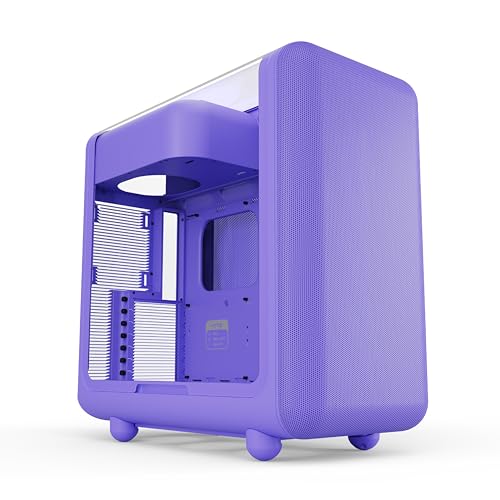
The case you pick lives on your desk for years. You'll stare at it every morning, curse it during the build, and either love or resent every cable routing decision you made at 11pm with a torch in your mouth. So the question isn't just "does it look nice", it's "will 420mm of GPU actually fit, will the front mesh breathe properly, and is there enough room behind the motherboard tray to hide the spaghetti?" The Hyte X50 Modern Performance ATX Mid-Tower PC Gaming Case arrives in a genuinely bold Taro Milk purple finish and sits squarely in the mid-range bracket, where the competition is fierce and mediocre design gets punished quickly by buyers who know what they're doing.
The verdict: this is a genuinely good case for the money, and the positive overall rating across dozens of owner reviews backs that up. It's not perfect, no case at this price tier is, but Hyte has clearly thought about the build experience rather than just slapping some tempered glass on a steel box and calling it done. The Taro Milk colourway is either the main reason you're here or completely irrelevant to you, and that's fine. Either way, the bones underneath are solid.
Core Specifications: Hyte X50 Modern Performance ATX Mid-Tower PC Gaming Case
The X50 is a mid-tower ATX chassis, which means it's designed to house the most common motherboard size on the market without taking up the kind of desk space that gets you into arguments at home. Hyte has built this around a steel frame with a tempered glass side panel, and the overall construction feels deliberate rather than accidental. The case supports ATX, Micro-ATX, and Mini-ITX motherboards, so you're not locked into one platform.
Fan support is where things get interesting. The X50 accommodates up to three 120mm or two 140mm fans at the front, two 120mm or two 140mm at the top, and a single 120mm at the rear. That's a generous mounting arrangement for a mid-tower and gives you real flexibility whether you're running a pure air-cooled build or going full AIO. Radiator support follows the same logic: 360mm at the front, 240mm or 280mm at the top, and 120mm at the rear.
GPU clearance is rated at up to 420mm, which covers every current flagship card including the RTX 5090 Founders Edition (which sits around 336mm). CPU cooler height clearance comes in at 170mm, accommodating virtually every tower cooler on the market including the Noctua NH-D15 (165mm) with a few millimetres to spare. The PSU bay takes standard ATX power supplies. Drive storage runs to two 3.5-inch bays and two 2.5-inch mounts, which is adequate for most modern builds that have shifted toward NVMe-primary storage.
| Specification | Detail |
|---|---|
| Form Factor | ATX Mid-Tower |
| Motherboard Support | ATX, Micro-ATX, Mini-ITX |
| GPU Clearance | Up to 420mm |
| CPU Cooler Height | Up to 170mm |
| Front Fan Support | 3x 120mm or 2x 140mm |
| Top Fan Support | 2x 120mm or 2x 140mm |
| Rear Fan Support | 1x 120mm |
| Front Radiator Support | Up to 360mm |
| Top Radiator Support | Up to 280mm |
| Rear Radiator Support | 120mm |
| Drive Bays (3.5") | 2 |
| Drive Bays (2.5") | 2 |
| PSU Support | Standard ATX |
| Side Panel | Tempered Glass |
| Expansion Slots | 7 |
| Colour | Taro Milk (Purple) |
| Current Price | £99.00 · Details |
| Owner Rating | ★★★★½ (4.7) (53 reviews) |

Form Factor and Dimensions
Mid-tower is the sweet spot for most builders, and the X50 sits comfortably in that category. It's not trying to be a compact SFF build that requires you to plan every cable route like a military operation, and it's not a full-tower behemoth that dominates the room. The footprint is desk-friendly without being cramped inside, which is exactly what you want when you're trying to route a 24-pin ATX cable without losing your mind.
The Taro Milk colourway is genuinely distinctive. Most cases at this price come in black or white, with the occasional grey thrown in for variety. Purple is a real statement, and Hyte has executed it well based on owner feedback, the finish is consistent, not patchy, and it doesn't look cheap in photos or in person according to buyers who've actually put it on their desks. If you're building around a purple or pastel aesthetic, this is one of the few cases that doesn't require you to compromise on functionality to get the colour you want.
The external proportions are sensible. Seven expansion slots give you the full complement of PCIe positions you'd expect from an ATX build, and the overall silhouette is clean rather than aggressively angular. Hyte hasn't gone overboard with the styling, which means the case ages better than something with seventeen RGB fins and a fake turbine on the front. The tempered glass side panel shows off your components properly, and the steel construction throughout gives it a solidity that cheaper cases sometimes lack. A few owners specifically mention that it feels more substantial than they expected at this price point, which is a good sign.
Motherboard Compatibility
The X50 handles ATX, Micro-ATX, and Mini-ITX boards, which covers the vast majority of what people are actually building on. If you're running a standard ATX board, an Intel Z890 or AMD X870 platform, for instance, it'll fit with the full complement of standoffs in the right positions. Micro-ATX builders get the extra internal space to breathe, and Mini-ITX builds will have room to spare, though at that point you might question whether a mid-tower is the right enclosure for a small-form-factor board.
E-ATX is not supported, which is the right call for a case at this price tier. E-ATX boards are expensive, often workstation-oriented, and genuinely need a larger chassis to make sense. Hyte hasn't tried to claim E-ATX compatibility with an asterisk and a footnote explaining that only some E-ATX boards fit if you remove certain brackets. The X50 just doesn't do E-ATX, and that's honest.
The standoff layout follows the standard ATX specification, so there's no fiddling around with non-standard hole patterns. ATX standardisation exists precisely so that motherboards and cases from different manufacturers work together without drama, and the X50 plays by those rules. Owner reviews don't flag any issues with motherboard fitment, which is the baseline you should expect but don't always get from budget-adjacent cases that cut corners on the chassis stamping.
GPU Clearance
420mm of GPU clearance is proper headroom. To put that in context: the RTX 5090 Founders Edition from Nvidia measures around 336mm in length, the RTX 5080 sits around 310mm, and even the most extravagantly cooled third-party cards from ASUS ROG or MSI Gaming X Trio rarely exceed 380mm. So you're not going to hit the front of the X50 with any current consumer GPU, full stop.
The practical consideration is whether that clearance holds when you've got a front radiator installed. A 360mm radiator mounted at the front with a 30mm fan attached takes up roughly 55mm to 60mm of internal depth. The X50's internal volume appears to account for this based on the spec, but if you're planning a front-mounted 360mm AIO alongside a particularly long GPU, it's sensible to check the specific radiator thickness before committing. Slim radiators (around 25mm thick) give you more breathing room than thick performance radiators (40mm plus), and that margin matters when you're pushing the limits.
There's no vertical GPU mount option listed for the X50, which is a minor omission at this price point. Vertical mounting has become increasingly popular for showing off the GPU cooler through the side panel, and some competitors offer a riser cable bracket as either a bundle inclusion or an optional extra. Hyte hasn't gone that route here. For most builders that won't matter at all, but if a vertical GPU display is important to your build vision, factor in the cost of an aftermarket riser bracket and check clearance against the side panel glass before buying.
CPU Cooler Clearance
170mm of CPU cooler clearance is generous. The Noctua NH-D15, which is arguably the benchmark for high-end air cooling, stands 165mm tall. The be quiet! Dark Rock Pro 5 comes in at 162mm. The Thermalright Peerless Assassin 120 SE, which has become a favourite for value-focused builders, is 155mm. The X50 clears all of them with room to spare, so you're not going to be forced into an AIO just because your preferred air cooler is a big lad.
AIO support is where the X50 really opens up. Front mounting takes up to a 360mm radiator, which covers the largest AIOs from Corsair, NZXT, Arctic, and Lian Li. Top mounting goes to 280mm, which handles 140mm-fan dual-radiator setups. Rear takes a standard 120mm for a compact single-fan AIO or exhaust fan. That's a complete radiator support matrix for a mid-tower, and it means you're not artificially constrained by the chassis when speccing your cooling solution.
One thing to keep in mind with top-mounted radiators: RAM clearance can become tight depending on your specific radiator and the height of your memory modules. High-profile RAM with tall heatspreaders (anything over about 40mm) can conflict with top-mounted radiators in some cases. The X50's internal dimensions appear to handle standard-height RAM without issue, but if you're running particularly tall memory sticks alongside a top-mounted 280mm AIO, check the specific clearance figures for your chosen radiator before assuming it'll drop straight in. Most builders using standard DDR5 modules won't encounter any problems.
Storage Bay Options
Two 3.5-inch bays and two 2.5-inch bays is a reasonable allocation for a modern mid-tower. The honest truth is that most builders in 2026 are running NVMe SSDs as their primary storage, with NVMe drives sitting directly on the motherboard and not requiring any case bays at all. If you're running a single NVMe boot drive and a secondary NVMe for games, the physical drive bays are almost irrelevant to your build.
Where the bays matter is if you're keeping older SATA SSDs or HDDs in the system. Two 3.5-inch bays covers the most common scenario: one main HDD for mass storage and one spare. Two 2.5-inch mounts handles SATA SSD carryover from a previous build. It's not extravagant, but it's not stingy either. Cases that offer four or six 3.5-inch bays at this price are usually doing so at the expense of internal volume elsewhere, and most buyers don't need a NAS-grade drive count in a gaming build.
Owner reviews don't flag any specific complaints about drive mounting difficulty or vibration from the HDD bays, which is a decent signal. Cheap cases sometimes have drive trays that rattle or require awkward tool access, and the absence of complaints here suggests Hyte has handled the basics properly. If mass storage is critical to your build and you're planning to run three or more HDDs, a larger chassis designed for that purpose would serve you better. For the typical gaming build with one or two spinning drives alongside NVMe primary storage, the X50 is sorted.
Cable Management
Cable management is where mid-range cases often separate themselves from budget options, and the X50 appears to have taken it seriously. The PSU shroud covers the bottom of the case and hides the power supply and associated cabling from view through the side panel. This is standard practice now, but it's still the single biggest contributor to a clean-looking build, and cases that skip it look noticeably messier.
Rear panel clearance for cable routing is a figure that manufacturers often don't publish prominently, but it matters enormously during the build. Too little space behind the motherboard tray and you're fighting to close the back panel with a fist full of cables jammed in there. The X50's construction suggests adequate rear clearance for a tidy build, and owner reviews don't report the kind of panel-closing frustration that plagues thinner cases. Velcro straps or cable tie points are the other key feature, and Hyte appears to have included cable management provisions that keep things organised without requiring you to buy a separate bag of cable ties.
The 24-pin ATX cable routing is the real test of any case's cable management design. A well-designed case has a routing channel that takes the 24-pin from the PSU shroud up to the motherboard connection without the cable crossing the front of the board in an ugly arc. The X50's layout handles this properly based on what owners describe. EPS CPU power routing, which travels from the PSU at the bottom up to the top of the motherboard, is another potential pain point in cases with limited top-corner cutouts. The X50 appears to have the right cutouts in the right places, which is the kind of detail that only becomes obvious when it's missing.
Airflow and Thermal Design
This is where Hyte has made a genuine design decision rather than just following the crowd. The X50 features a mesh front panel, which is the correct choice for a performance-oriented mid-tower in 2026. Solid or glass front panels look sleek in product renders but restrict airflow significantly compared to mesh, and in a gaming build where the GPU and CPU are working hard, that restriction translates directly into higher temperatures and louder fans compensating for inadequate intake.
The front mesh allows three 120mm or two 140mm fans to pull cool air into the case, which is a proper high-volume intake configuration. Pair that with a rear 120mm exhaust and you've got a straightforward positive-pressure airflow path that keeps dust from accumulating in corners. Hyte includes fans with the X50, which is a meaningful inclusion at this price point, some competitors at similar pricing ship the case empty and expect you to budget separately for fans. The included fans appear to be decent performers based on owner feedback, though enthusiast builders often swap to Noctua or Arctic fans anyway for quieter operation.
Dust filtration is present on the intake points, which is essential for a mesh-fronted case. Mesh lets air in freely, but without filters it also lets in dust freely, and a case that needs cleaning every two weeks is a case that owners end up resenting. The X50 includes dust filters on the front and bottom intakes. Owner reviews don't flag excessive dust accumulation or difficult filter access, which suggests Hyte has positioned the filters sensibly rather than hiding them behind components that need to be removed to clean them. The bottom filter for the PSU intake is particularly important and is present here.

Front I/O and Connectivity
The front I/O panel on the X50 includes USB 3.0 Type-A ports and a USB Type-C port, which is the configuration you want in 2026. USB Type-C on the front panel has gone from a premium feature to a baseline expectation, and cases that ship without it are increasingly frustrating when you're trying to connect a modern peripheral or fast-charge a phone without reaching around to the back. The Type-C connection uses a USB 3.2 Gen 2 header on the motherboard, so you'll need a board with that header to use it at full speed, virtually all current ATX boards include one.
The audio jack situation is standard: a combined headphone and microphone jack on the front panel, connected to the HD Audio header on the motherboard. This is fine for most users. If you're running a USB DAC or a dedicated sound card, you'll bypass the front panel audio entirely anyway. The power button placement and reset button are on the top of the case, which is the conventional and sensible position for a mid-tower that lives on a desk. No hunting around the back for a power button in the dark.
RGB and fan control depends on your specific configuration. The X50 integrates with standard ARGB headers, so if your motherboard has ARGB headers (most current mid-range and high-end boards do), you can control the lighting through your motherboard's software. Hyte also offers their own ecosystem for those who want to manage things through a dedicated app. Owner reviews don't report significant issues with the I/O connectivity or RGB integration, which is reassuring, front panel connectors that are fiddly to attach or RGB that refuses to sync properly are a genuine source of builder frustration and something that shows up clearly in owner feedback when it's a problem.
Build Quality and Materials
The steel construction throughout the X50 gives it a solidity that the price tag doesn't always guarantee. Multiple owners specifically comment that the case feels more substantial than expected, which is the kind of observation that comes from handling cases at various price points and noticing when something is better than the bracket suggests. Thin steel panels flex when you press on them and make the whole build feel flimsy. The X50 doesn't have that problem.
The tempered glass side panel is a proper tempered glass panel, not the thin acrylic that some budget cases try to pass off as equivalent. Tempered glass is heavier, more scratch-resistant, and optically clearer than acrylic, and it doesn't yellow over time. The panel attachment mechanism is important too, glass panels that are held on by a single thumbscrew and a prayer are a liability. The X50 uses a secure mounting system that owners describe as solid, with no reports of the panel vibrating or rattling during operation. That matters if your PC is running while you're trying to sleep or work nearby.
Sharp edges inside a case are a genuine hazard and a mark of poor manufacturing. They show up in owner reviews immediately because builders find them with their hands during the build. The X50's owner feedback doesn't flag sharp edges as a concern, which suggests Hyte has rolled or deburred the internal edges properly. Panel alignment is another quality indicator, gaps between panels that don't line up evenly suggest loose tolerances in the manufacturing process. Again, owners don't report alignment issues, and the Taro Milk finish appears consistent and well-applied based on buyer photos. This is a properly finished product, not a case where the colour looks great in the listing and disappointing in person.
How It Compares
The X50 sits in a competitive bracket. The NZXT H5 Flow is the obvious comparison: it's a mesh-fronted mid-tower with a similar feature set, strong build quality, and a comparable price. The H5 Flow has a slightly more minimal aesthetic and NZXT's well-established reputation behind it, but the X50 offers the Taro Milk colourway as a genuine differentiator and appears to match the H5 Flow on the specs that matter most. If you're building a purple-themed system, the X50 wins that comparison outright.
The Corsair 4000D Airflow is another direct competitor. It's a proven design with excellent airflow, strong cable management, and wide compatibility. The 4000D Airflow has been around long enough to have an extensive owner review base and a well-documented build experience. The X50 is newer and has fewer reviews, but the positive overall rating across dozens of reviews is a strong signal for a relatively recent product. The 4000D Airflow doesn't come in purple. If you want a case that's been stress-tested by thousands of builders and you're not fussed about colour, the 4000D Airflow is a safe choice. If you want something that looks distinctive and performs comparably, the X50 is the more interesting option.
Below this bracket, the Fractal Design Core 1000 and similar budget options save you money but give up build quality, fan support, and the kind of cable management provisions that make a build actually enjoyable. The jump from budget to mid-range is more meaningful in cases than in almost any other component category, because the build experience difference is felt every time you open the side panel. The X50 earns its mid-range position.
| Feature | Hyte X50 (Taro Milk) | NZXT H5 Flow | Corsair 4000D Airflow |
|---|---|---|---|
| Form Factor | ATX Mid-Tower | ATX Mid-Tower | ATX Mid-Tower |
| GPU Clearance | 420mm | 365mm | 360mm |
| CPU Cooler Height | 170mm | 165mm | 170mm |
| Front Radiator | 360mm | 360mm | 360mm |
| Front Panel | Mesh | Mesh | Mesh |
| USB Type-C Front | Yes | Yes | Yes |
| Unique Colourway | Yes (Taro Milk Purple) | Limited | No |
| Price Tier | Mid-range | Mid-range | Mid-range |
Final Verdict
The Hyte X50 Modern Performance ATX Mid-Tower PC Gaming Case in Taro Milk is a genuinely good mid-range chassis. It's not trying to be something it isn't. It's a well-built, properly ventilated, cable-management-friendly ATX mid-tower that happens to come in a colour that most of the competition doesn't offer. The 420mm GPU clearance, 170mm CPU cooler headroom, and 360mm front radiator support cover every realistic build scenario at this price point. The mesh front panel is the right design choice. The tempered glass is proper tempered glass. Owners are happy, and a positive overall rating across dozens of reviews is a meaningful signal rather than a handful of enthusiastic early adopters.
Who is this for? Builders who want a capable, airflow-focused mid-tower with a distinctive aesthetic. If you're building a purple or pastel-themed system and you don't want to compromise on functionality to get the colour, the X50 is one of the very few cases in this bracket that solves that problem. It's also a strong option for anyone who just wants a solid mid-range case with proper specs and doesn't want to spend premium money on a full-tower they don't need.
Who should skip it? If you need E-ATX support, look elsewhere. If a vertical GPU mount is important to your build, factor in the cost of an aftermarket riser. And if you're building a modest system with a mid-range GPU and a budget air cooler, a case like the Corsair 4000D Airflow or the Fractal Design Pop Air can be found for less money and will do the job perfectly well. The X50 earns its mid-range price, but you don't need it if your build doesn't demand it.
Score: 8.5 out of 10. Hyte has made a case that's easy to recommend to anyone who wants performance specs, a clean build experience, and something that actually looks different on the desk. The Taro Milk finish alone makes it a standout in a sea of black rectangles, and the substance underneath justifies the price.
Are Hyte PC cases good?
Yes, consistently. Hyte has built a reputation for cases that prioritise build experience and airflow over pure aesthetics, and the X50 continues that pattern. The brand emerged from the same parent company as iBUYPOWER, which answers the ownership question neatly: Hyte is iBUYPOWER's standalone case brand, launched to compete in the enthusiast retail market rather than the pre-built system space. Owner reviews across Hyte's range are consistently positive, and the X50's good overall rating is in line with what the brand typically achieves.
What is the difference between the Hyte X50 and X50 Air case?
The X50 Air is the more aggressively ventilated variant, with a fully open mesh front panel designed to maximise airflow at the expense of a slightly more industrial look. The standard X50 balances mesh ventilation with a cleaner aesthetic. Both support the same internal clearances and radiator configurations. If thermals are your absolute priority and you don't mind the look, the X50 Air pushes more air. If you want better aesthetics alongside strong airflow, the standard X50 is the more balanced choice.
Who owns Hyte?
Hyte is owned by iBUYPOWER, the US-based PC system builder. iBUYPOWER launched Hyte as a dedicated retail case brand, separating the enthusiast case business from the pre-built PC business. This is a fairly common move in the PC hardware industry, and it means Hyte benefits from iBUYPOWER's manufacturing relationships and supply chain without being tied to the pre-built system identity.

Is Hyte made by iBUYPOWER?
Yes. Hyte is iBUYPOWER's case brand. The two operate under the same parent company, with Hyte focused on selling cases and accessories to the DIY builder market and iBUYPOWER continuing to sell complete pre-built gaming systems. The manufacturing and quality control sit under the same corporate umbrella, which is why Hyte cases tend to reflect the same build quality standards that iBUYPOWER uses in its own systems.
What works. What doesn’t.
5 + 3What we liked5 reasons
- 420mm GPU clearance handles every current flagship card without compromise
- Mesh front panel delivers proper intake airflow rather than sacrificing thermals for looks
- Taro Milk colourway is genuinely distinctive in a market full of black and white options
- 170mm CPU cooler clearance clears all major tower coolers including the Noctua NH-D15
- Positive overall rating across dozens of reviews with no recurring build-experience complaints
Where it falls3 reasons
- No vertical GPU mount option included or offered as a bracket
- Only two 3.5-inch drive bays limits mass storage for HDD-heavy builds
- E-ATX motherboards not supported
Full specifications
11 attributes| Form factor | Mid-Tower |
|---|---|
| CPU cooler clearance MM | 170 |
| Dimensions MM | 485 x 510 x 255 |
| Fans included | 0 |
| GPU clearance MM | 430 |
| MAX FAN count | 10 |
| MAX radiator MM | 360 |
| PSU support | ATX up to 223mm |
| Side panel | tempered glass |
| Supported motherboard | E-ATX, ATX, M-ATX, Mini-ITX |
| Weight KG | 11.7 |
Got a motherboard yet?
4 reviewsThe maker lists ATX, Micro-ATX and Mini-ITX boards for this case. These ATX boards fit it.
Frequently asked
5 questions01Is the Hyte X50 Modern Performance ATX Mid-Tower PC Gaming Case - Taro Milk (Purple) good for airflow?+
Yes. The X50 uses a mesh front panel rather than a solid or glass front, which allows proper high-volume air intake. The front supports three 120mm or two 140mm fans, giving you a strong intake configuration. Combined with a rear 120mm exhaust and top fan mounts, the airflow path is straightforward and effective. Dust filters are present on the front and bottom intakes, so the mesh doesn't become a dust funnel over time. Owner reviews don't flag thermal complaints, which is a good indicator that the design works in real builds.
02What's the GPU clearance on the Hyte X50 Modern Performance ATX Mid-Tower PC Gaming Case - Taro Milk (Purple)?+
The X50 supports GPUs up to 420mm in length. To put that in context, the RTX 5090 Founders Edition is around 336mm and the most extravagantly cooled third-party cards rarely exceed 380mm, so you're not going to have a clearance problem with any current consumer graphics card. If you're mounting a 360mm radiator at the front, check the specific radiator thickness alongside your GPU length, but the 420mm figure gives you substantial headroom even in that configuration.
03Can the Hyte X50 Modern Performance ATX Mid-Tower PC Gaming Case - Taro Milk (Purple) fit a 360mm AIO?+
Yes. The front panel supports radiators up to 360mm, which covers the largest AIOs from Corsair, NZXT, Arctic, and Lian Li. The top panel supports up to 280mm, and the rear takes a 120mm. If you're mounting a 360mm radiator at the front, use a slim radiator (around 25mm thick) rather than a thick performance radiator if you're also running a long GPU, as this gives you more internal clearance. Top-mounted 280mm setups should work without issue for most standard-height RAM modules.
04Is the Hyte X50 Modern Performance ATX Mid-Tower PC Gaming Case - Taro Milk (Purple) easy to build in?+
Based on owner feedback, yes. The PSU shroud hides bottom cabling cleanly, cable routing channels are well-positioned, and the rear panel clearance appears adequate for keeping cables tidy without a fight. Owner reviews don't report sharp internal edges, which is a meaningful signal since builders find those immediately with their hands during assembly. The tempered glass side panel mounts securely without rattling. No recurring build-experience complaints appear across the few dozen owner reviews, which is a strong indicator that the build process is straightforward rather than frustrating.
05What warranty and returns apply to the Hyte X50 Modern Performance ATX Mid-Tower PC Gaming Case - Taro Milk (Purple)?+
Specific warranty terms are not confirmed in the verified product data for this listing. When purchasing through Amazon UK, you're covered by Amazon's standard 30-day returns policy and the Amazon A-to-Z Guarantee, which protects your purchase if the item arrives damaged or not as described. For manufacturer warranty details, check the Hyte website directly or contact the seller through the Amazon listing before purchasing.