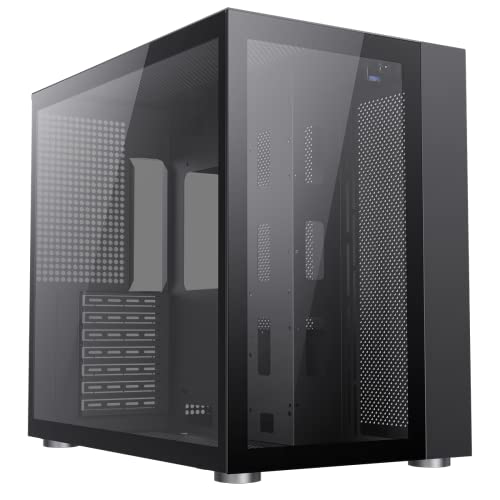
Budget PC cases have a habit of looking the part in product photos and then making you regret every penny once you're actually trying to build in them. Sharp steel edges that draw blood. Cable routing holes positioned by someone who's clearly never routed a cable. Side panels that need a firm slap to align. So when a budget mid-tower like the GameMax Infinity shows up with a positive overall rating from dozens of owners, that's worth paying attention to. Not because dozens of reviews is a massive sample, but because budget cases at this price tier usually attract complaints like moths to a flame, and this one isn't doing that.
This GameMax Infinity mid-tower case review UK is based on the published spec sheet and what real owners are actually saying, not a press release. The verdict? For the budget tier, this is a genuinely decent shout. It won't embarrass you. The tempered glass side panel looks proper, the clearances are workable for most mainstream builds, and owners broadly report a positive build experience. But there are real compromises here, and you need to know what they are before you hand over your money. So let's get into it properly.
The price sits firmly in the budget bracket, which means you're making trade-offs. The question is whether GameMax has made the right ones. From everything the spec sheet and owner reports tell us, mostly yes. But "mostly" is doing some work in that sentence, and we'll get to why.
Core Specifications
The Infinity is a mid-tower ATX chassis. It supports ATX, Micro-ATX, and Mini-ITX motherboards, which covers the vast majority of what people are actually buying. The case measures approximately 390mm tall, 200mm wide, and 410mm deep, so it's on the slimmer side for a mid-tower. Not tiny, but not a desk-dominator either. Steel construction throughout the main chassis, with a tempered glass side panel on the left and a steel panel on the right.
Fan support is decent for the price. You're looking at up to three 120mm fans at the front, two 120mm at the top, and one 120mm at the rear. The case ships with fans pre-installed, which is a nice touch at this tier. Radiator support extends to a 360mm unit at the front and a 240mm at the top, which is genuinely useful if you're planning an AIO cooler. GPU clearance is rated at 370mm maximum length. CPU cooler clearance sits at 165mm. PSU is bottom-mounted, which is the correct answer in 2025.
Storage options are modest but functional: two 3.5-inch drive bays and two 2.5-inch SSD mounts. There's a front I/O panel on the top of the case with USB 3.0 ports and a USB Type-C, which is a big tick at this price. The weight comes in around 5.5kg without components, which feels about right for the steel gauge being used. Nothing about these specs is class-leading, but nothing is embarrassingly deficient either. That's actually a harder target to hit at this price than it sounds.
| Specification | Detail |
|---|---|
| Form Factor | Mid-Tower ATX |
| Motherboard Support | ATX, Micro-ATX, Mini-ITX |
| Dimensions (approx.) | 390mm (H) x 200mm (W) x 410mm (D) |
| Side Panel | Tempered Glass (left), Steel (right) |
| Max GPU Length | 370mm |
| Max CPU Cooler Height | 165mm |
| Front Fan Support | 3x 120mm or 2x 140mm |
| Top Fan Support | 2x 120mm or 2x 140mm |
| Rear Fan Support | 1x 120mm |
| Radiator Support (Front) | Up to 360mm |
| Radiator Support (Top) | Up to 240mm |
| Drive Bays (3.5") | 2 |
| Drive Bays (2.5") | 2 |
| PSU Mount | Bottom-mounted |
| Front I/O | 2x USB 3.0, 1x USB Type-C, HD Audio |
| Weight (approx.) | 5.5kg |
| Current Price | £49.61 · Details |

Form Factor and Dimensions
At roughly 390mm tall and 200mm wide, the Infinity is what you'd call a slim mid-tower. It'll sit on a desk without completely swallowing it, and it'll fit under most desks without drama. The 410mm depth is against your desk situation if space is tight, but honestly, most mid-towers are in this ballpark. This isn't one of those cases that suddenly reveals itself to be the size of a small fridge once it arrives.
The footprint is genuinely sensible for a mainstream gaming build. If you're coming from a full tower or a chunky older case, this will feel compact. If you're coming from a genuine SFF build, obviously it's bigger. But for the target audience, someone building a first or second gaming PC on a budget, this hits the right size. It'll sit neatly on a desk, the tempered glass side faces outward properly, and it doesn't look out of place next to a monitor.
One thing: the 200mm width is on the narrower end for a mid-tower. That has knock-on effects for cable management space behind the motherboard tray, which we'll get into later. It's not a dealbreaker, but it's a constraint you should know about. Slimmer cases always make you work a bit harder to get the rear panel to close cleanly. Owners don't report major issues here, but a couple do mention it takes a bit of effort to tuck everything away neatly.
Motherboard Compatibility
The Infinity supports ATX, Micro-ATX, and Mini-ITX motherboards. That's the full mainstream range. E-ATX isn't supported, which is fine at this price tier. Anyone buying an E-ATX board isn't shopping in the budget mid-tower category anyway. The standoff layout follows the standard ATX spec, so you shouldn't have any surprises fitting a regular ATX board in here.
For most people, ATX compatibility is all they need. A standard ATX motherboard, whether it's a budget B650 or an older B550, will fit without any fuss. The motherboard tray cutout behind the CPU socket area is present, which means you can access the CPU cooler backplate without pulling the motherboard out entirely. That's not guaranteed at this price, so it's a genuine plus. Owners don't report any standoff alignment issues, which is reassuring because misaligned standoffs are one of those budget-case sins that can cause real damage.
Micro-ATX builders will find the Infinity a perfectly comfortable home. The smaller board leaves more room for cable management and airflow, and the case doesn't feel oversized for it. Mini-ITX is technically supported but you'd be buying a mid-tower for a small board, which is a bit wasteful. Nothing wrong with it, just a slightly odd combination unless you have specific expansion needs. Stick to ATX or Micro-ATX and this case makes complete sense.
GPU Clearance
370mm maximum GPU length. That's the headline number and it's a good one for a budget case. To put it in context: an RTX 4070 Super runs around 336mm in most AIB configurations. An RTX 4080 Super from most manufacturers comes in under 360mm. So you're covered for pretty much anything that makes sense to pair with a budget case. You'd only start hitting the ceiling with triple-slot, triple-fan flagship cards, and if you're buying one of those, you're probably not pairing it with a budget chassis anyway.
There's no vertical GPU mount option on the Infinity, which isn't a surprise at this price. Vertical mounts require either a riser cable (usually sold separately at around £30 to £50) or a built-in mechanism, and budget cases rarely include either. If showing off your GPU through the tempered glass is important to you, the standard horizontal mount still looks decent enough. The GPU will be visible through the side panel, just not in the vertical "look at me" orientation.
Owner reports don't flag any GPU clearance issues, which tracks with the 370mm spec being genuinely generous. The PSU shroud doesn't eat into usable GPU space in any way that owners have flagged as problematic. And the bottom clearance for GPU power connectors, which is something that catches people out in tighter cases, seems fine based on what builders report. A modern 16-pin PCIe power connector needs a bit of vertical room below the GPU, and this case appears to handle that without drama.
CPU Cooler Clearance
165mm CPU cooler height clearance. That's enough for the majority of popular air coolers. A Noctua NH-D15 pushes 165mm itself, so you're right at the limit with that particular unit. A be quiet! Dark Rock 4 is 162.8mm, a DeepCool AK620 is 160mm, and a Cooler Master Hyper 212 Evo is 158.5mm. So realistically, most mainstream tower coolers fit with a few millimetres to spare. Just measure your specific cooler before assuming, especially if you're going for a tall dual-tower.
AIO support is where this case is actually quite impressive for the price. Front support for up to a 360mm radiator means you can fit a proper triple-fan AIO without compromise. Top support for 240mm means a 240mm AIO fits neatly up there if you prefer top-mounted cooling. Rear support for a 120mm unit covers the basic single-fan AIO option. That's a solid radiator support matrix for a budget case, and it means the Infinity can genuinely serve a mid-range build with an AIO cooler rather than being limited to air cooling only.
One thing to watch with top-mounted radiators: the 200mm case width means you need to check your specific radiator's fan configuration doesn't foul the motherboard's VRM heatsinks or RAM slots. Tall RAM with large heatspreaders can cause clearance issues with top-mounted 240mm radiators in narrower cases. It's not a problem unique to the Infinity, it's a mid-tower physics problem, but it's your RAM height against the radiator fan position before committing. Standard-height DDR4 or DDR5 should be fine.
Storage Bay Options
Two 3.5-inch bays and two 2.5-inch bays. Honest answer: that's fine for most modern builds. If you're running an NVMe SSD as your primary drive (and you should be, at this point), the 2.5-inch bays are for secondary SSDs or older SATA drives you're migrating from a previous build. The two 3.5-inch bays cover anyone who still uses mechanical hard drives for bulk storage, which is still a legitimate choice for large media libraries and game archives.
The 3.5-inch bays sit in a cage behind the PSU shroud, which keeps them out of the main airflow path and out of sight. That's the right call aesthetically, and it doesn't meaningfully hurt drive temperatures for mechanical drives running at typical workloads. The 2.5-inch mounts are on the back of the motherboard tray, which is standard practice. It keeps them hidden and frees up the main chamber for a cleaner look through the tempered glass panel.
What the Infinity doesn't offer is a modular drive cage system. Some mid-range cases let you remove the HDD cage entirely to improve front intake airflow or create space for a longer radiator. Here, the cage is fixed. That's a budget case compromise and a reasonable one, but if you're planning a pure SSD build with a 360mm front radiator, the fixed cage position is. Owner reports don't suggest it causes major airflow problems in practice, but it's a constraint that more expensive cases don't impose on you.
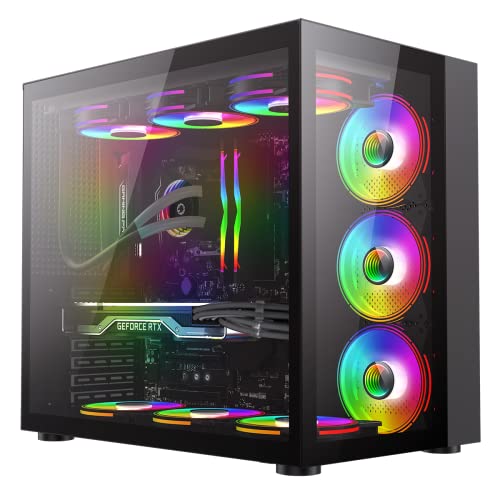
Cable Management
This is where the 200mm case width starts to matter. Rear cable management space, the gap between the motherboard tray and the right side panel, looks to be around 20 to 25mm based on the dimensions and owner reports. That's workable but not generous. You can route cables through it, you can use the tie-down points, but you're not going to have a lot of room to spare, especially if you're dealing with a thick 24-pin ATX power cable that doesn't want to bend neatly.
The PSU shroud covers the bottom of the case and hides the PSU and the lower cable chaos, which is standard on modern cases and very welcome. It makes the interior look much cleaner through the tempered glass than cases without one. Cable routing holes are present with rubber grommets on some of them, which is a detail you don't always get at this price. Owners generally report being able to achieve a reasonably tidy build, though a few mention the rear panel needs a firm push to close once cables are routed. That's the 20 to 25mm clearance making itself known.
Velcro straps or pre-installed cable ties are a nice-to-have that budget cases sometimes skip. The Infinity doesn't appear to include a generous supply of these, so grab a pack of cable ties or Velcro straps before you build. It's a minor thing but it makes a real difference to the final result. The routing holes are positioned sensibly for the 24-pin, the CPU EPS cable run to the top of the board, and the GPU power cables, which are the three runs that matter most. Getting those three tidy covers 80% of the visual work.
Airflow and Thermal Design
Here's the honest tension in the Infinity's design: it has a tempered glass front panel rather than a mesh front. That's a deliberate aesthetic choice and it's what a lot of buyers want, but it does restrict intake airflow compared to a mesh-fronted case. Tempered glass doesn't breathe. Air has to find its way in through gaps at the sides and bottom of the front panel, which limits how much cool air reaches your intake fans. If you're building a high-TDP system with a hot GPU and a power-hungry CPU, this matters.
For a mainstream gaming build, say a Ryzen 5 or Core i5 paired with an RTX 4060 or RX 7600, the restricted intake is manageable. These aren't components that generate extreme heat, and the three front fan positions plus rear exhaust give you a reasonable positive pressure setup. The included fans, typically 120mm units, aren't going to win any awards for airflow or noise, but they're adequate for getting started. Swapping them for better fans later is always an option, and the case supports up to six fans total across front, top, and rear positions.
The top panel has ventilation for exhaust fans or a radiator, which helps. Hot air rises, top exhaust is efficient, and the Infinity's top panel design accommodates this properly. Dust filters are present, which is something budget cases sometimes skip to save pennies. A bottom dust filter for the PSU intake is particularly important for long-term maintenance, and owners confirm it's there and removable for cleaning. That's a proper design choice. The front panel filter is also present, which matters more than people realise until they're cleaning out a filterless case after six months.
Front I/O and Connectivity
Two USB 3.0 Type-A ports, one USB Type-C, and a combined headphone/microphone jack. That's a genuinely good front I/O spec for a budget case. The USB Type-C inclusion is the headline here. A lot of cases at this price tier still ship with USB 3.0 Type-A only, and Type-C is increasingly what people reach for when plugging in phones, headsets, and peripherals. Having it on the front panel rather than having to reach around to the back of the motherboard is a quality-of-life win that owners specifically mention positively.
The USB 3.0 ports connect to your motherboard's internal USB 3.0 header, and the Type-C connects to the internal USB 3.2 Gen 1 Type-C header (or Gen 2, depending on the motherboard). Check your motherboard has the relevant header before assuming everything will connect. Most modern ATX boards do, but it's worth a quick look at your board's spec sheet. The audio jack is a standard 3.5mm combo port connecting to the HD Audio header, which is universal.
The power button and reset button are on the top panel alongside the I/O ports, which is the sensible placement for a case that'll sit on a desk. No RGB fan controller button on the front I/O, which might disappoint RGB enthusiasts, but the included fans appear to have their own lighting that connects to the motherboard's ARGB header. So fan lighting control goes through your motherboard's software rather than a dedicated button, which is actually more flexible if your board supports it. If it doesn't, you're limited to whatever default mode the fans run in.
Build Quality and Materials
The steel gauge on budget cases is always a question mark, and the Infinity is no exception. It's not going to feel like a Fractal Design Define or a be quiet! Silent Base. The chassis uses standard SPCC steel, which is the norm at this price, and the panel rigidity is adequate rather than impressive. Owners don't report panels flexing alarmingly or the chassis racking when you pick it up, which is the baseline you need. But if you press the side panels, they'll give a bit. That's just what budget steel does.
The tempered glass side panel is the premium touch that justifies the "gaming case" positioning. Tempered glass is safer than acrylic (it doesn't yellow or scratch as easily) and it looks significantly better. The panel attaches with screws rather than a tool-free latch system on most configurations of this case, which is slightly less convenient than a hinged design but more secure. Owners don't report the glass panel being difficult to remove or reinstall, which is good. A poorly designed glass panel attachment is one of those things that starts to grind on you after the tenth time you open the case.
Sharp edges are the classic budget case complaint, and a handful of owners do mention being careful around certain internal edges during the build. It's not described as a bloodbath, but it's worth wearing gloves or at least being aware that the steel edges inside aren't all perfectly deburred. GameMax has clearly put more effort into the visible exterior finish than the interior metalwork, which is a reasonable priority call but. The finish on the exterior panels is decent for the price. The black powder coat is consistent and doesn't look cheap from the outside. It's the inside where the budget shows.
How It Compares
The natural competition for the GameMax Infinity in the UK budget mid-tower market sits around the same price bracket. The Kolink Citadel Mesh and the Aerocool Cylon are both in similar territory. The Kolink Citadel Mesh is the airflow-first alternative: mesh front panel, decent fan support, but a more utilitarian look without the tempered glass emphasis. The Aerocool Cylon is another glass-and-RGB budget option that competes directly on aesthetics but has a more limited expansion spec.
Against the Kolink Citadel Mesh, the Infinity loses on raw airflow because of the glass front, but wins on front I/O (that USB Type-C matters) and arguably on aesthetics. If you're building a thermally demanding system, the Kolink's mesh front is the smarter thermal choice. If you're building a mainstream gaming rig and you want it to look good on a desk, the Infinity's glass front is a reasonable trade-off. Against the Aerocool Cylon, the Infinity's 370mm GPU clearance and 360mm front radiator support are clear advantages. The Cylon's specs are more restrictive, and the Infinity's front I/O is better.
The Fractal Design Core 1000 and similar entry-level Fractal options are as the "spend a bit more and get proper build quality" alternative. Fractal's budget cases have better steel, better panel alignment, and a more considered interior layout. But they also cost noticeably more and often lack the tempered glass aesthetic the Infinity delivers. For someone prioritising looks and value over premium build quality, the Infinity makes a coherent argument. For someone who wants to build in something that feels solid and well-engineered, saving up for a Fractal or a be quiet! Pure Base 500 is worth it.
| Feature | GameMax Infinity | Kolink Citadel Mesh | Aerocool Cylon |
|---|---|---|---|
| Front Panel | Tempered Glass | Mesh | Tempered Glass |
| Max GPU Length | 370mm | 360mm | 330mm |
| Max CPU Cooler Height | 165mm | 160mm | 155mm |
| Front Radiator Support | 360mm | 360mm | 240mm |
| USB Type-C Front I/O | Yes | No | No |
| Included Fans | Yes (multiple) | Yes (1-2) | Yes (1) |
| PSU Shroud | Yes | Yes | Yes |
| Dust Filters | Yes | Yes | Partial |
| Price Tier | Budget | Budget | Budget |
| Owner Rating | ★★★★☆ (4.2) | Varies | Varies |

Final Verdict
The GameMax Infinity is a budget mid-tower that gets more right than wrong. That's genuinely not a low bar at this price. The 370mm GPU clearance is generous. The 360mm front radiator support is impressive for the money. The USB Type-C front I/O is a proper modern touch that competitors at the same price skip. The tempered glass panel looks good. The dust filters are present. The owner feedback is positive. For a first build or a budget gaming rig, this case earns its 4.1 rating.
The compromises are real though, and you should go in clear-eyed. The glass front panel restricts airflow compared to a mesh alternative, so if you're pairing this with a high-TDP GPU like an RTX 4080 or RX 7900 XT, think carefully. The rear cable management space is tight, and a couple of owners confirm the rear panel takes some persuasion to close. The interior steel edges aren't perfectly finished. And the included fans are adequate, not good. These are all budget case problems, not GameMax-specific disasters, but they're real.
Who should buy this? Anyone building a mainstream gaming PC on a tight budget who wants tempered glass aesthetics, decent clearances, and modern front I/O. A Ryzen 5 or Core i5 system with an RTX 4060 or RX 7600 will live happily in here without thermal drama. It looks the part on a desk. It's a genuinely solid value proposition at the current price.
Who should skip it? If you're building something thermally demanding, go mesh-fronted. The Kolink Citadel Mesh is the better call for a hot system. And if you care deeply about build quality, the tactile satisfaction of well-engineered panels and properly deburred steel, save up for a Fractal Design or a be quiet! Pure Base 500. The jump in build quality is noticeable and worth it if your budget stretches. The GameMax Infinity is a case that punches at its price rather than above it, and at this price, that's exactly what you need it to do.
Overall score: 7.5 out of 10 for the budget tier. Recommended for mainstream builds where value and aesthetics matter more than airflow headroom and premium finish.
What works. What doesn’t.
6 + 6What we liked6 reasons
- Generous 370mm GPU clearance suits most mainstream and mid-range graphics cards
- 360mm front radiator support is impressive at this price tier, enabling proper AIO builds
- USB Type-C front I/O is a meaningful modern addition that most direct competitors omit
- Tempered glass side panel looks genuinely smart and does not yellow or scratch like acrylic
- Dust filters present at both front and bottom, aiding long-term maintenance
- Multiple fans included in the box, which is a welcome bonus at the budget price point
Where it falls6 reasons
- Tempered glass front panel restricts intake airflow compared to mesh-fronted alternatives
- Rear cable management space is tight at approximately 20 to 25mm, making a clean build fiddly
- Internal steel edges are not consistently deburred and require care during the build process
- Included fans are adequate rather than good, and are worth replacing for any noise-sensitive build
- Fixed HDD cage cannot be removed to improve front intake airflow or accommodate longer radiators
- No vertical GPU mount option, which some buyers at this price point may expect
Full specifications
11 attributes| Form factor | Mid-Tower |
|---|---|
| CPU cooler clearance MM | 170 |
| Dimensions MM | 420 x 273 x 399 |
| Fans included | 0 |
| GPU clearance MM | 360 |
| MAX FAN count | 10 |
| MAX radiator MM | 360 |
| PSU support | ATX |
| Side panel | tempered glass |
| Supported motherboard | ATX, Micro-ATX, Mini-ITX |
| Weight KG | 7.5 |
If this isn’t right for you
2 options 7.5 / 10
CiT Silent Office PC Case ATX Mid Tower, Computer Case with 2 Fans, Black
£40.47 · CiT · Details

Frequently asked
7 questions01Does the GameMax Infinity support a 360mm AIO radiator?+
Yes. The front panel supports up to a 360mm radiator, which accommodates a triple-fan AIO cooler. The top panel supports up to a 240mm radiator, and the rear supports a single 120mm unit. This is a strong radiator support specification for a budget mid-tower.
02Will an RTX 4070 Super fit in the GameMax Infinity?+
Yes. The Infinity supports GPUs up to 370mm in length. Most AIB RTX 4070 Super cards measure around 336mm, leaving comfortable clearance. Even the majority of RTX 4080 Super designs fit within the 370mm limit. Only triple-slot flagship cards at the extreme end of the market are likely to cause issues.
03Is the GameMax Infinity good for airflow?+
It is adequate for mainstream builds but not optimal for thermally demanding systems. The tempered glass front panel restricts intake airflow compared to a mesh-fronted alternative. For a Ryzen 5 or Core i5 paired with an RTX 4060 or similar, this is not a significant problem. For high-TDP builds, a mesh-fronted case such as the Kolink Citadel Mesh is a better thermal choice.
04How is the cable management in the GameMax Infinity?+
Workable but not generous. The gap behind the motherboard tray is approximately 20 to 25mm, which is enough to route cables but leaves little slack. The PSU shroud keeps the lower chamber tidy, and rubber grommets are present on some routing holes. A handful of owners report the rear panel requires a firm push to close once cables are routed. Having a supply of Velcro straps or cable ties to hand before building is advisable.
05Does the GameMax Infinity come with fans already installed?+
Yes, the Infinity ships with fans pre-installed, which is a genuine bonus at the budget price tier. The included fans are adequate for getting a build up and running but are not particularly quiet or high-performance. Replacing them with better 120mm fans later is a straightforward upgrade if noise levels or airflow become a priority.
06What CPU coolers fit in the GameMax Infinity?+
The maximum supported CPU cooler height is 165mm. This accommodates most popular tower air coolers including the DeepCool AK620 at 160mm, the be quiet! Dark Rock 4 at 162.8mm, and the Cooler Master Hyper 212 Evo at 158.5mm. The Noctua NH-D15 at 165mm is right at the limit and should be checked carefully against your specific build configuration. Always verify the height of your chosen cooler against the 165mm limit before purchasing.
07How does the GameMax Infinity compare to the Kolink Citadel Mesh?+
The Infinity has better front I/O including USB Type-C, higher maximum GPU clearance at 370mm versus 360mm, and a tempered glass aesthetic that many buyers prefer. The Kolink Citadel Mesh counters with a mesh front panel that allows significantly better intake airflow, making it the stronger choice for thermally demanding systems. For mainstream gaming builds where aesthetics and modern connectivity matter more than peak airflow, the Infinity is competitive. For hot systems, the Kolink's mesh front is the smarter call.