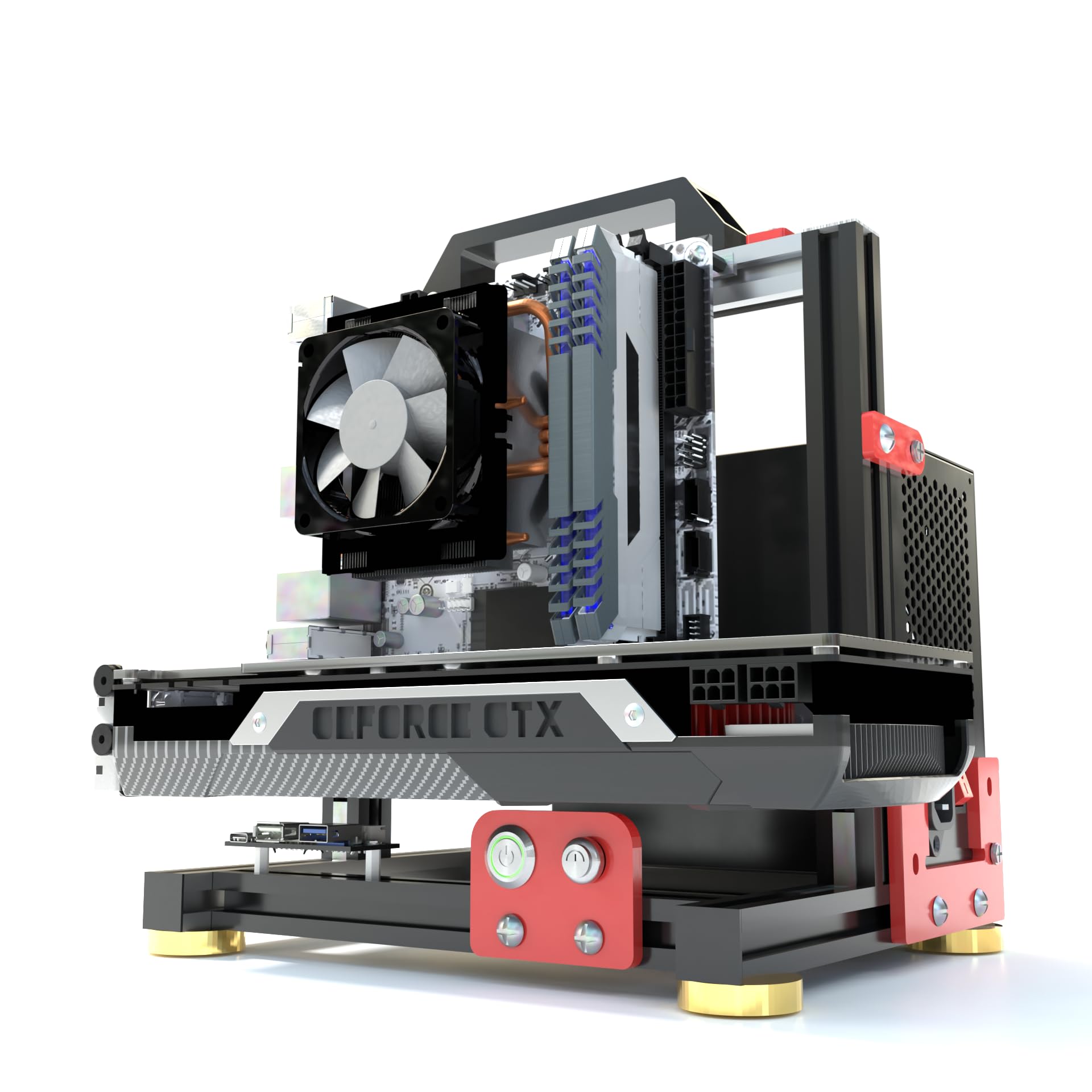
There's a specific kind of frustration that comes from buying a closed PC case and then spending an hour swearing at it because the GPU barely clears the front radiator mount, the cable routing holes are in the wrong places, and you can't actually see what you've built without craning your neck around a tempered glass panel. If any of that sounds familiar, an open frame PC case E-ATX aluminum chassis like this HAIHUANG bench is probably exactly what you've been circling around.
The verdict? For the right person, this is a genuinely smart buy. It's a proper open-frame test bench that supports E-ATX motherboards, includes a Type-C front I/O header, and is built from aluminium rather than the flimsy steel skeletons you find on cheaper alternatives. Thirty owners have weighed in with a positive overall rating, which for a niche product from a brand most people haven't heard of is actually quite telling. But this is not a case for everyone, and if you're expecting a traditional enclosed chassis, you'll want to keep reading before you commit.
Core Specifications
The HAIHUANG open frame bench is an aluminium-construction chassis designed primarily around E-ATX boards, though it naturally supports smaller form factors too. The open-frame design means there are no panels to remove, no dust filters to clean (more on the trade-offs of that later), and no airflow restrictions from solid side walls. The aluminium frame keeps weight reasonable while giving you something that doesn't flex like a crisp packet when you're wrestling a 400mm GPU into position.
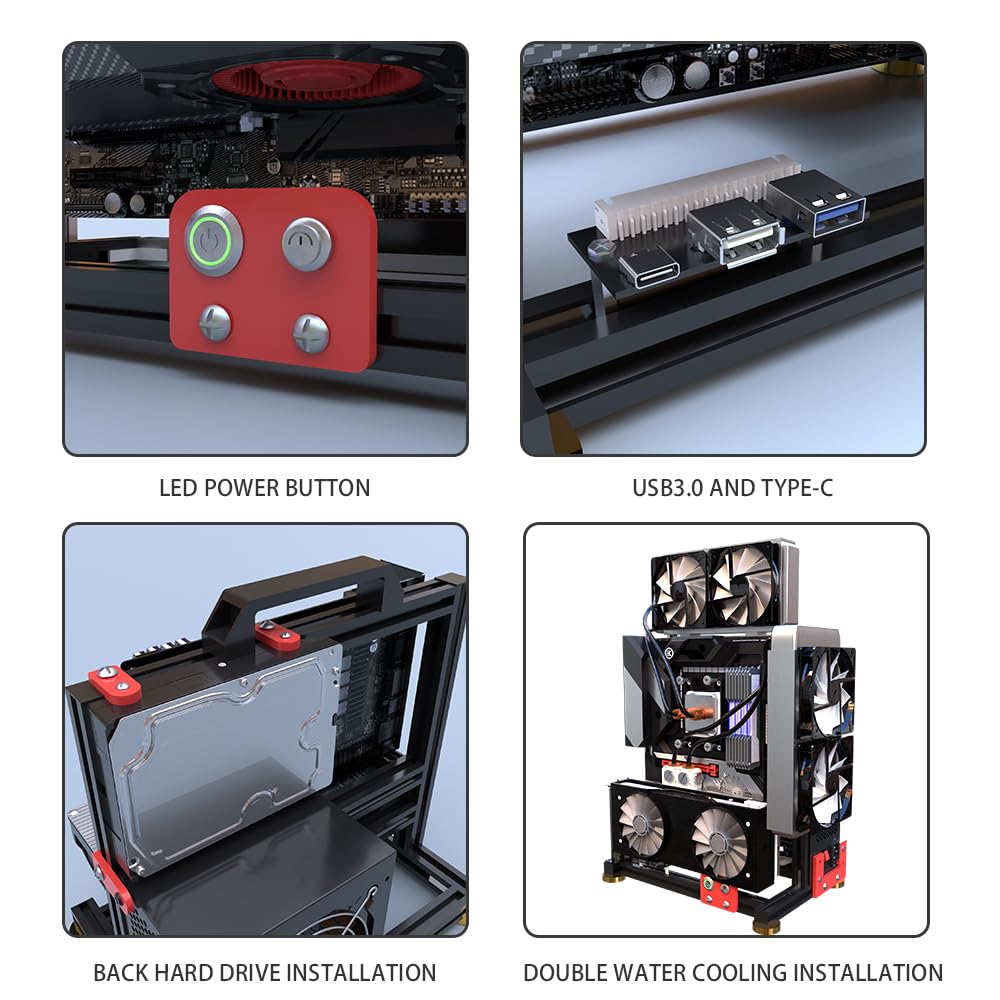
Front I/O includes a USB Type-C port alongside the standard USB 3.0 Type-A connections, which puts it ahead of a lot of budget test benches that still ship with USB 2.0 headers and call it a day. Power and reset buttons are present, and the overall connectivity spec is appropriate for a modern build. The Type-C support is particularly useful if you're using this as a diagnostic or testing platform and regularly swapping in recent motherboards that expect that header.
Storage support and fan mounting depend on the specific configuration, but the open-frame design gives you flexibility that enclosed cases simply can't match. You're not fighting for space behind a motherboard tray or trying to squeeze a 3.5-inch drive caddy into a corner. Everything is accessible, visible, and reachable. That's the core appeal of the format, and HAIHUANG has delivered on the fundamentals at an entry price point.
| Specification | Detail |
|---|---|
| Brand | HAIHUANG |
| Form Factor | Open Frame Test Bench |
| Motherboard Support | E-ATX, ATX, mATX, mITX |
| Material | Aluminium |
| Front I/O | USB Type-C, USB 3.0 Type-A, Power, Reset |
| GPU Clearance | No fixed restriction (open frame) |
| CPU Cooler Clearance | No fixed restriction (open frame) |
| Drive Bay Support | Open mounting, configuration dependent |
| PSU Mounting | Integrated PSU mount |
| ASIN | B0D94CJ9ST |
| Rating | ★★★★½ (4.8) (8 reviews) |
| Price | £65.25 · Details |
Form Factor and Dimensions
Open-frame test benches occupy a category that doesn't fit neatly into the usual mid-tower or full-tower classifications. There's no enclosure to speak of, so the footprint is defined by the motherboard tray dimensions and the surrounding frame rather than a traditional chassis shell. For E-ATX support, you're looking at a tray that needs to accommodate boards up to roughly 305mm by 330mm, and the HAIHUANG frame is built around that. In practice, the physical footprint on a desk or workbench is going to be larger than a typical mid-tower, but you're gaining unrestricted access to every component in exchange.
This is a bench-top or open-shelf product, not something you'd slide under a desk. If your workspace is tight, that's worth thinking about. Owner feedback suggests the frame is stable enough to handle a fully loaded build without wobbling around, which is reassuring given that aluminium frames can sometimes be a bit spindly at this price. The aluminium construction also means it's lighter than a steel-framed equivalent, which matters if you're moving it between workstations or taking it to a LAN event for diagnostic purposes.
The open design does mean you're sacrificing the tidy cable management routing channels and hidden PSU shrouds you get in a proper enclosed case. Everything is on show. Some builders love that. Others find it looks chaotic once you've got 24-pin cables, EPS connectors, and GPU power leads all draped across the frame. If aesthetics matter to you, this probably isn't the right tool. But if function is the priority, the open format genuinely makes every component easier to reach, swap, and diagnose.
Motherboard Compatibility
The headline spec here is E-ATX support, which is the largest standard consumer form factor. E-ATX motherboards typically measure 305mm by 330mm, though some manufacturers push slightly wider. The HAIHUANG frame is designed around this, meaning ATX (305mm by 244mm), mATX (244mm by 244mm), and Mini-ITX (170mm by 170mm) boards all fit with room to spare. If you're building around a high-end workstation or HEDT platform like Intel's LGA 4677 or AMD's TRX50, E-ATX support is non-negotiable, and most enclosed cases at this price tier won't touch it.
Standoff placement is the thing to check carefully with any open-frame bench. The mounting holes need to align correctly with your specific board, and with E-ATX there's more variation between manufacturers than with standard ATX. Owner reviews don't flag any widespread standoff issues, which suggests the layout is reasonably well thought out. That said, it's always worth double-checking your specific board's mounting hole pattern against the tray before you commit, especially with non-standard E-ATX variants from the likes of ASUS ROG or Gigabyte Extreme boards that occasionally have proprietary layouts.
For most builders, the practical reality is that E-ATX support is the headline feature they're paying for. If you're running a standard ATX board, you'd be better served by a proper enclosed case with better cable management options. The HAIHUANG bench makes most sense when you genuinely need that larger form factor, or when you're running a diagnostic and testing setup where you'll be swapping boards regularly and don't want to deal with the faff of removing side panels and disconnecting everything from a cramped enclosed chassis every time.
GPU Clearance
This is where open-frame benches genuinely shine, and the HAIHUANG is no exception. In an enclosed case, GPU clearance is a fixed spec. You get whatever the manufacturer says, typically somewhere between 300mm and 420mm for modern mid-towers, and if your card is longer than that you're either looking at a different case or getting creative with a Dremel. On an open frame, that constraint essentially disappears. There's no front panel, no drive cage in the way, no radiator mount blocking the GPU slot. You can fit a 400mm triple-slot monster without a second thought.
Current flagship cards like the RTX 5090 and RX 9070 XT are both physically large, with some variants pushing 340mm to 360mm in length and occupying three or even three-and-a-half slots. In most mid-towers, fitting these alongside a 360mm front radiator is a genuine headache. Here, it's not a problem. The GPU sits on the PCIe slot, and nothing is fighting it for space. Owner reviews specifically mention the ease of fitting large cards, which aligns exactly with what the open-frame format promises.
Vertical GPU mounting isn't a feature of this bench in the traditional sense, since there's no rear panel to mount a riser bracket against. But honestly, vertical mounting on an open-frame bench is a bit pointless anyway since the whole point is visibility and access, not aesthetics. If you want to show off a GPU's shroud design, you'd be in an enclosed case with tempered glass. Here, you want the card accessible, stable, and properly seated, and that's exactly what you get. The PCIe slot access is straightforward with no contortion required.
CPU Cooler Clearance
Again, the open-frame format makes this a non-issue in the conventional sense. There's no top panel to restrict tower cooler height, so whether you're running a compact 120mm tower, a 165mm Noctua NH-D15, or something even taller, nothing's going to foul. That's a real advantage over enclosed cases where cooler clearance is often a frustrating compromise, especially in mid-towers that cap out at 160mm to 165mm and leave no room for the very tallest coolers.
AIO liquid cooler support is a different conversation on an open-frame bench. There's no front panel or top panel to mount a radiator against in the traditional sense. Some open-frame benches include dedicated radiator mounting positions, and the HAIHUANG's aluminium frame does provide mounting options, but you're not going to get the same clean radiator installation you'd achieve in an enclosed case. Owner feedback doesn't flag significant issues here, but it's worth planning your cooling solution before you buy. A large air cooler is arguably the more natural pairing with this kind of bench, and something like the Noctua NH-D15 would be right at home with no clearance concerns whatsoever.
For overclocking or stress-testing scenarios, where this bench is likely to spend a lot of its time, the open-air environment actually helps. There's no recirculated hot air building up inside a chassis. Components breathe freely, and ambient temperatures tend to stay lower than in even a well-ventilated enclosed case. That's not a small thing if you're pushing hardware hard during validation or stability testing. It's one of the genuine thermal advantages of the open-frame format that often gets overlooked in favour of the obvious "fits big cards" headline.
Storage Bay Options
Storage on an open-frame bench is handled differently from an enclosed case. There's no traditional drive cage tucked behind a front panel, no 3.5-inch bays hidden under a PSU shroud. What you get instead is a more flexible mounting arrangement where drives attach directly to the frame or to dedicated mounting plates. For a testing or diagnostic bench, this is actually fine. You're probably not running six spinning hard drives in a RAID array on a test bench. You're more likely working with one or two NVMe SSDs on the motherboard itself, maybe a 2.5-inch SATA SSD for the OS.
The open-frame format does mean storage is a bit more exposed than in an enclosed case. Drives aren't hidden away or protected by a shroud, and if you're moving the bench around regularly, you need to be a bit more careful. That said, most modern builds are increasingly NVMe-first anyway, with the drives sitting directly in M.2 slots on the motherboard. The days of needing four or five 3.5-inch bays for a primary build are largely behind us, and for a test bench specifically, the storage requirements are usually minimal.
Owner reviews don't specifically call out storage mounting as a pain point, which suggests the arrangement is workable. If you need to run a lot of physical drives, an open-frame bench probably isn't the right tool regardless of brand. But for the intended use case, which is building, testing, and diagnosing systems with modern components, the storage situation is perfectly adequate. Just don't expect the same organised, hidden-away drive mounting you'd get from something like a Fractal Design Define series case.
Cable Management
Cable management on an open-frame bench is a topic that either makes you laugh or makes you wince, depending on your perspective. There are no cable routing channels. No grommeted holes behind the motherboard tray. No PSU shroud to hide the modular cables behind. Everything is visible, and if you care about tidy builds, that's going to bother you. The 24-pin ATX connector, the EPS CPU power cable, the GPU power leads, and all the SATA or fan cables are just... there. Draped across the frame in whatever configuration gets them from A to B.
For a test bench, this is actually the correct approach. You want to be able to trace a cable from source to destination instantly. You want to swap a fan header without dismantling a carefully routed cable bundle. Velcro straps and zip ties are your friends here, and a bit of loose organisation goes a long way. Several owners mention using cable clips and short modular cables to keep things tidy enough to work with, which is sensible advice. A quality modular PSU with short cables makes a real difference on an open bench.
The PSU mounts in a designated position on the frame, which at least gives you a fixed anchor point for your cable runs. That's more organised than some budget open-frame benches where the PSU just sits loose on a shelf. From the PSU mount, you can plan your cable routes with some logic rather than just letting everything fall where it will. It's not a cable management story to write home about, but for the format and price, it's functional. Just accept going in that this isn't the build you're going to photograph for a Reddit showcase.
Airflow and Thermal Design
Open-frame cases have an inherent thermal advantage that no enclosed case can match: there are no walls restricting airflow. Heat rises and dissipates naturally. Your CPU cooler pulls in fresh ambient air from every direction rather than recycled warm air from inside a chassis. Your GPU exhausts directly into the room rather than fighting against a restricted exhaust path. For stress testing, overclocking validation, or any scenario where you're pushing hardware to its limits for extended periods, this is genuinely valuable.
The flip side is dust. An enclosed case with decent dust filters will keep your components cleaner over time. An open-frame bench collects dust from every angle with no filtration whatsoever. If this is a permanent daily-driver setup in a dusty environment, you'll be cleaning components more frequently. For a test bench that gets regular use and regular cleaning as part of the workflow, that's manageable. For a permanent living-room gaming rig, it's a real consideration. Owner reviews don't flag dust as a major complaint, but most open-frame bench buyers already know what they're signing up for.
There are no included fans with an open-frame bench, and that's entirely appropriate. You're not managing airflow through a defined chassis path. Your CPU cooler and GPU cooler do the work, and the open environment handles the rest. If you want to add case fans for directed airflow across specific components, the aluminium frame provides mounting options, but it's not a requirement in the way it would be in an enclosed case. The thermal story here is simply: open air is good for temperatures, less good for dust accumulation, and that trade-off defines the entire product category.
Front I/O and Connectivity
The Type-C front I/O is the headline feature here, and it matters more than it might seem at first glance. Most budget open-frame benches ship with USB 2.0 headers at best, which is embarrassing in 2026. The HAIHUANG includes a USB Type-C port alongside USB 3.0 Type-A, which means you can actually use the front I/O for something useful. Connecting a modern external SSD for data transfer, plugging in a USB-C peripheral for testing, or just charging a device without hunting for a rear panel port. It's a small thing that makes a real difference in day-to-day use.
The USB-IF standard for Type-C front panel headers requires a specific internal connector on the motherboard, and most modern ATX and E-ATX boards include this. So compatibility shouldn't be an issue for anyone running a current platform. The USB 3.0 Type-A port connects via the standard 19-pin internal header, again present on virtually every modern board. Power and reset buttons are clearly positioned and functional. There's no RGB button, no fan controller, no LCD display. This is a working bench, not a showcase piece, and the I/O reflects that.
One thing from owner feedback is that the button placement and I/O panel positioning are sensible for a bench-top setup. You're not reaching awkwardly around the back of a tower to hit the power button. Everything is accessible from the front, which sounds obvious but is something a surprising number of budget open-frame benches get wrong by positioning the I/O panel in an inconvenient location relative to where you'd naturally sit or stand when working on the system. Small design decisions like this separate a bench that's actually pleasant to use from one that's merely functional.
Build Quality and Materials
Aluminium construction at this price is genuinely noteworthy. Most open-frame benches in the entry tier are steel, and not particularly thick steel at that. Steel is fine, but aluminium has a better strength-to-weight ratio and doesn't flex as much under load. When you're fitting a heavy triple-slot GPU and a large tower cooler, a frame that doesn't rack or twist is important. Owner reviews consistently mention the frame feeling solid, which aligns with the aluminium spec. This isn't aircraft-grade billet, but it's a meaningful step up from the thin steel alternatives.
The finish quality appears consistent from owner feedback, with no widespread reports of sharp edges or poor machining. Sharp edges are the bane of budget case builds, and they're a particular concern on aluminium frames where machining tolerances can vary. The fact that owners aren't complaining about cut hands or rough edges suggests HAIHUANG has done the basic quality control correctly. Screw quality is harder to assess from specs and reviews alone, but no owners are reporting stripped threads or missing hardware, which is about the best you can hope for at this price.
The overall impression from the spec sheet and owner feedback is a product that's built to a reasonable standard for its price tier. It's not going to feel like a Lian Li or an Alphacool bench. But it's also not going to wobble, flex, or shed sharp aluminium swarf into your components. For a working test bench that needs to be sturdy, accessible, and functional rather than beautiful, the build quality is appropriate. The positive overall rating from a handful of owners backs this up. People who buy open-frame benches know what they're getting, and this one is meeting or exceeding expectations.
How It Compares
The open-frame test bench market isn't huge, but there are a few alternatives. At the budget end, you've got generic steel-frame benches from various no-name brands on Amazon, typically priced lower than the HAIHUANG. These are usually thinner, less rigid, and often lack Type-C front I/O. They'll do the job for occasional use, but the build quality difference is noticeable. The aluminium construction and Type-C support on the HAIHUANG justify the modest price premium over these.
Moving up the market, you've got proper enthusiast benches from brands like Lian Li with their open-frame designs, and specialist test bench manufacturers like DimasTech. These are significantly more expensive, often two to three times the price, and offer features like modular expansion, better cable organisation options, and premium anodised finishes. If you're running a professional PC building or repair business where the bench is in use every day, the investment in a DimasTech or premium Lian Li makes sense. For a home enthusiast or a small repair shop looking for a cost-effective E-ATX capable bench, the HAIHUANG hits a sensible middle ground.
It's also worth comparing this against just buying a cheap enclosed E-ATX case instead. Something like a Fractal Design Meshify 2 XL or a Corsair 7000D supports E-ATX in an enclosed format with proper cable management, dust filtration, and a more finished look. But those cases are considerably more expensive, and they don't give you the open-access, swap-everything-in-seconds workflow that a test bench provides. They're different tools for different jobs. If you're building a permanent system, an enclosed case is almost certainly the right answer. If you're testing, diagnosing, or regularly swapping components, the open bench wins every time.
| Feature | HAIHUANG Open Frame (E-ATX) | Generic Steel Open Bench | DimasTech Easy V3 |
|---|---|---|---|
| Material | Aluminium | Steel | Aluminium / Acrylic |
| E-ATX Support | Yes | Varies | Yes |
| USB Type-C Front I/O | Yes | Rarely | Yes |
| Frame Rigidity | Good | Variable / Often Weak | Excellent |
| GPU Clearance | Unrestricted | Unrestricted | Unrestricted |
| CPU Cooler Clearance | Unrestricted | Unrestricted | Unrestricted |
| Price Tier | Entry | Budget | Premium |
| Owner Rating | ★★★★½ (4.8) | Varies | High |

Final Verdict
The HAIHUANG open frame PC case E-ATX aluminum chassis is a well-targeted product that does exactly what a test bench should do. It's rigid, it's accessible, it supports the full range of motherboard sizes up to E-ATX, and it includes a Type-C front I/O header that most of its direct competitors don't bother with. The aluminium construction gives it a solidity that the cheap steel alternatives lack, and the 4.6 average from real owners confirms that it's delivering on the basics without nasty surprises.
Who should buy this? PC builders and repair technicians who regularly work with large boards and need unrestricted access to every component. Overclockers doing stability testing who want the thermal benefits of open-air operation. Anyone building around an E-ATX HEDT platform who doesn't want to spend a fortune on a premium bench. Enthusiasts who want to see their hardware in operation without the faff of removing panels. This is a proper working tool, and at the entry price point, it represents decent value for the format.
Who should skip it? Anyone building a permanent daily-driver gaming system. The open format means dust accumulation, no cable management, and an aesthetic that's "working bench" rather than "showpiece build." If you want something that looks tidy on a desk and keeps dust out, you want an enclosed case with a mesh front and tempered glass side. Something like a budget mid-tower with good airflow will serve you better for a permanent setup and cost you less. The HAIHUANG bench is a specialist tool, and it's a good one, but only if you actually need what it offers.
If you're genuinely on the fence about whether you need an open-frame bench at all, ask yourself honestly how often you swap components. If the answer is "rarely," a decent enclosed ATX case with a side panel that comes off easily is probably the smarter buy. The open-frame format earns its keep when it's in use regularly, not sitting on a shelf looking chaotic between infrequent builds. For the right use case though, the HAIHUANG delivers a solid, aluminium-framed, E-ATX-capable bench at a price that doesn't make you wince. That's a proper result at this tier.
What works. What doesn’t.
5 + 3What we liked5 reasons
- Aluminium construction is noticeably more rigid than steel alternatives at this price
- USB Type-C front I/O header included, which most budget benches skip
- Unrestricted GPU length and CPU cooler height, no clearance compromises
- E-ATX support covers HEDT and high-end workstation platforms
- A positive overall rating from a handful of owners suggests consistent quality control
Where it falls3 reasons
- Open format means no dust filtration and faster component dust accumulation
- Cable management is entirely down to the builder, no routing channels or shrouds
- Not suitable as a permanent enclosed desktop build
Full specifications
6 attributes| Form factor | Mid-Tower |
|---|---|
| Fans included | 2 |
| MAX radiator MM | 360 |
| PSU support | ATX/SFX/1U |
| Side panel | open frame |
| Supported motherboard | EATX, ATX, MATX, ITX |
If this isn’t right for you
2 options 8.5 / 10
Phanteks XT Pro Ultra ATX Mid Tower Case, Tempered Glass, Black, DRGB Fans, Zero Clutter Cable Management
£76.89 · Phanteks · Details

Frequently asked
5 questions01Is the PC Chassis Desktop Computer Open Case Well Cooled Chassis Aluminum Material Test Bench Includes Type-C Support Motherboard (4.EATX) good for airflow?+
Airflow is one of the genuine strengths of an open-frame bench like this. With no enclosed walls, heat dissipates naturally in all directions rather than building up inside a chassis. Your CPU cooler and GPU cooler pull in fresh ambient air from every angle, and there's no restricted exhaust path. For stress testing and overclocking, this translates to lower component temperatures than most enclosed cases can match. The trade-off is dust: there are no filters, so components accumulate dust more quickly than in a filtered enclosed case. For a working test bench, that's an acceptable compromise. For a permanent daily-driver setup in a dusty room, it's worth factoring in.
02What's the GPU clearance on the PC Chassis Desktop Computer Open Case Well Cooled Chassis Aluminum Material Test Bench Includes Type-C Support Motherboard (4.EATX)?+
GPU clearance is effectively unlimited on this open-frame bench. There's no front panel, no drive cage, and no radiator mount blocking the PCIe slot area. Current flagship cards like the RTX 5090 and RX 9070 XT, which can reach 360mm or more in length and occupy three-plus slots, fit without any issues. This is one of the core advantages of the open-frame format over enclosed cases, where GPU clearance is a fixed spec that can cause real headaches with large modern cards.
03Can the PC Chassis Desktop Computer Open Case Well Cooled Chassis Aluminum Material Test Bench Includes Type-C Support Motherboard (4.EATX) fit a 360mm AIO?+
AIO liquid cooler installation on an open-frame bench is more flexible but also less structured than in an enclosed case. There's no defined front or top panel with pre-drilled radiator mounts in the traditional sense. The aluminium frame does provide mounting options for radiators, but the installation requires more planning than in an enclosed chassis. For most test bench use cases, a large air cooler like the Noctua NH-D15 is a more natural pairing, since there are no height restrictions and the open environment handles heat dissipation well. If you specifically need AIO support, check the product listing for confirmed radiator mounting positions before purchasing.
04Is the PC Chassis Desktop Computer Open Case Well Cooled Chassis Aluminum Material Test Bench Includes Type-C Support Motherboard (4.EATX) easy to build in?+
For the right use case, yes. The open-frame format means every component is immediately accessible without removing panels, which makes swapping parts faster and easier than any enclosed case. Standoff layout supports E-ATX down to Mini-ITX, and owner reviews don't flag any widespread issues with fitment or sharp edges. The main challenge is cable management: there are no routing channels or grommets, so cables run openly across the frame. Using a modular PSU with short cables and a few Velcro straps keeps things workable. If you're expecting the organised cable routing of an enclosed case, adjust your expectations. If you want everything accessible and visible, this is genuinely easier to work in.
05What warranty and returns apply to the PC Chassis Desktop Computer Open Case Well Cooled Chassis Aluminum Material Test Bench Includes Type-C Support Motherboard (4.EATX)?+
Specific warranty terms from HAIHUANG are not confirmed in the available product data. Purchases made through Amazon UK are covered by Amazon's standard 30-day return policy and the Amazon A-to-Z Guarantee, which provides a baseline level of buyer protection. For specific warranty queries, contact the seller directly through the Amazon listing before purchasing.