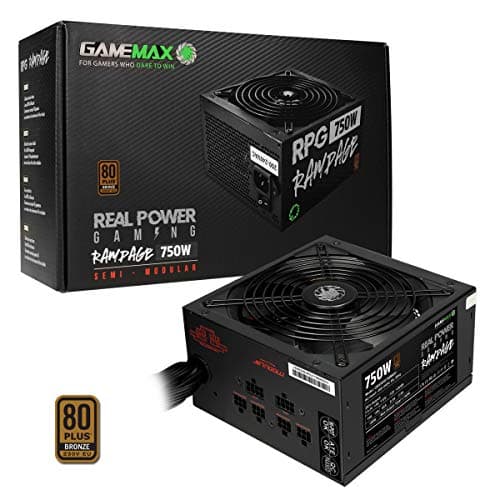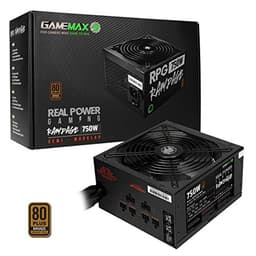
A bad PSU doesn't just fail quietly. It takes components with it. Capacitors blow, rails sag under load, and suddenly your shiny new GPU is the least of your problems. So when something like the GameMax 600W Rampage Power Supply (No Power Cable inc.), Non-Modular, APFC, Japanese Tk Main Capacitor, 80 Plus Bronze, 88% Efficiency, 14cm Cooling Fan, Real Power Gaming | Black shows up in the budget bracket with a Japanese main capacitor claim and an 80 Plus Bronze certification, it's worth cutting through the marketing to find out what you're actually getting.
The short version? This is a genuinely decent entry-level PSU for straightforward gaming builds, and at the budget (under £50) price point it sits in, it punches above what you'd normally expect. The Japanese Tokoyama (Tk) main capacitor is real, the Bronze certification is verified, and the 5-year warranty gives you actual peace of mind rather than the 2-year token gesture you get from some competitors. It's not perfect, and it's not for everyone, but if you're building a modest gaming rig and don't want to gamble on a completely anonymous unit from a brand you've never heard of, this one has enough going for it to be worth serious consideration.
Eighty-three owners have weighed in with an average of ★★★★☆ (4.3) from 83 reviews. That's a solid signal. Not exceptional, but solid. Let's get into why.
Core Specifications: GameMax 600W Rampage Power Supply
The GameMax Rampage 600W is a non-modular, single-rail ATX power supply with Active Power Factor Correction (APFC), an 80 Plus Bronze efficiency rating, and a claimed peak efficiency of 88% at 50% load. The fan is listed as a 14cm unit in the product title, though the spec sheet references a 120mm fan (these are effectively the same form factor, just described differently by the manufacturer). It ships without a mains power cable, so check that before you order, though most UK builders will have a spare IEC C13 cable kicking around from an old monitor or printer.
The warranty is 5 years, which is the headline figure that separates this from a lot of the truly throwaway budget competition. Protection features include Over Voltage Protection (OVP), Over Current Protection (OCP), Over Power Protection (OPP), and Short Circuit Protection (SCP). That's a reasonable suite for this price tier. The APFC circuitry means it plays nicely with modern UK mains supplies and doesn't waste power correcting for a poor power factor, which is something cheaper PSUs without APFC tend to do silently.
The cable configuration is fixed (non-modular), giving you one ATX 24-pin, one EPS 8-pin, two PCIe 8-pin connectors, six SATA, and three Molex. No 12VHPWR connector, but at 600W targeting entry-level builds, that's expected. There's no zero-RPM fan mode, so the fan runs continuously, which matters for acoustic performance (more on that later). Here's the full spec breakdown:
| Specification | Detail |
|---|---|
| Wattage | 600W |
| Efficiency Rating | 80 Plus Bronze |
| Peak Efficiency | 88% at 50% load |
| Modularity | Non-Modular |
| Fan Size | 120mm / 14cm |
| Zero RPM Mode | No |
| APFC | Yes |
| ATX 24-pin | 1 |
| EPS 8-pin | 1 |
| PCIe 8-pin | 2 |
| SATA | 6 |
| Molex | 3 |
| 12VHPWR | None |
| OVP / OCP / OPP / SCP | Yes |
| Warranty | 5 Years |
| Owner Rating | ★★★★☆ (4.3) (83 reviews) |
| Price | £34.99 · Details |

Wattage and Capacity: Is 600W Actually Enough?
Six hundred watts sounds like a round, comfortable number, and for the builds this PSU is designed for, it genuinely is. Pair it with something like an AMD Ryzen 5 5600 or an Intel Core i5-12400F alongside a mid-range GPU like an RX 6600 or RTX 3060, and you're looking at a system that pulls somewhere in the region of 300W to 380W under full gaming load. That leaves a healthy margin of headroom, which matters because PSUs run most efficiently (and most reliably) when they're not being pushed to their rated ceiling.
The general rule of thumb is to target around 50% to 70% of your PSU's rated capacity under typical load. At 600W, that sweet spot sits between 300W and 420W, which maps neatly onto an entry-to-mid-range gaming build. Where things get tighter is if you're tempted to drop an RTX 4070 or RX 7800 XT into a build with a 600W unit. Nvidia's published power guidance for the RTX 4070 recommends a 650W minimum system PSU, and that's before accounting for a higher-end CPU. So 600W is fine for current mid-range, but it's not a future-proofing play.
For an entry-level build with something like an RX 6600, an RTX 3060, or even a second-hand RTX 2070, this PSU is properly sized. If you're building a budget gaming PC for 1080p or 1440p gaming and you're not planning to shove a power-hungry flagship GPU in there, 600W gives you what you need with room to breathe. If you're already eyeing up an RTX 4070 Ti or anything above it, honestly, save up for a 750W or 850W unit insteador for a truly high-end build, a high-end unit like the Corsair HX1000i (or the beefier Corsair HX1500i) or a Seasonic Vertex PX-1200 1200W ATX30. Our PSU calculator can help you work out exactly what your specific component combination needs before you commit.
Efficiency Rating: What 80 Plus Bronze Actually Means
The 80 Plus certification programme is a third-party efficiency standard that tests PSUs at 20%, 50%, and 100% load. Bronze is the second tier, sitting above the baseline 80 Plus White certification. In practical terms, an 80 Plus Bronze unit must hit at least 82% efficiency at 20% load, 85% at 50% load, and 82% at 100% load. GameMax claims 88% peak efficiency at 50% load for the Rampage 600W, which, if accurate, actually edges toward the Silver tier threshold (85% to 88% at 50% load) rather than just scraping Bronze. That's a meaningful claim, and the Bronze certification at minimum verifies the baseline has been independently tested.
What does this mean for your electricity bill? At 100% efficiency, every watt drawn from the wall becomes a watt delivered to your components. At 85% efficiency (the Bronze 50% load target), roughly 15% of the power drawn from the wall is lost as heat. Compare that to a non-certified or White-rated PSU running at 75% to 78% efficiency, and you're losing significantly more power as waste heat, which also means the PSU runs hotter and its components age faster. Over the course of a year of gaming, the difference between a White and a Bronze unit won't bankrupt you, but it does add up, and the thermal benefits of running cooler are arguably more important long-term than the electricity savings.
At the budget (under £50) end of the market, Bronze certification is genuinely the minimum you should accept. There are PSUs at similar prices with no certification at all, and some with certifications that are, frankly, difficult to verify. The fact that this unit carries a legitimate 80 Plus Bronze mark means it's been through independent testing at Ecos Consulting's labs, not just stamped with a sticker by the manufacturer. That's worth something, especially when you're trusting this component to protect everything else in your build.
Modularity and Cable Management: Non-Modular Reality Check
Non-modular means every cable is permanently attached to the PSU. All of them. Whether you need them or not. That's the trade-off at this price point, and it's a perfectly reasonable one for a budget build, but you need to go in with your eyes open. You'll have a bundle of SATA, Molex, and PCIe cables that you may not use, and they all need to go somewhere inside your case. In a compact mid-tower with good cable routing channels, this is manageable. In a small form factor case, it can turn into a proper cable nightmare.
The cable configuration itself is actually well-specified for an entry-level unit. Two PCIe 8-pin connectors means you can power a single GPU that uses a dual 8-pin configuration (common on cards like the RTX 3060 Ti or RX 6700 XT) without needing an adapter. Six SATA connectors is generous, more than enough for a build with multiple drives and an optical drive if you're still running one. Three Molex connectors cover older peripherals, case fans on Molex headers, and similar legacy connections. The EPS 8-pin CPU connector is a single connector, which is fine for mainstream CPUs but would be limiting if you were running a high-end desktop platform (which you wouldn't be at this wattage anyway).
Cable quality at this price tier is what it is. The cables are sleeved to a basic standard rather than individually braided, and the lengths are adequate for a standard mid-tower case without being generous. Owner reviews don't flag cable quality as a major concern, which suggests they're functional and not embarrassingly short, but don't expect the kind of premium paracord braiding you'd see on a Corsair RM or Seasonic Focus unit. If cable aesthetics matter to you for a windowed build, factor in the cost of custom cables or a cable comb kit. If you're just building a workhorse gaming rig and closing the side panel, it won't bother you at all.
Connectors and Compatibility: What You Get and What You Don't
The connector lineup on the GameMax Rampage 600W is well-matched to its target audience. The single ATX 24-pin is the standard motherboard power connection, compatible with every modern ATX motherboard on the market. The single EPS 8-pin CPU connector covers the vast majority of mainstream gaming motherboards, from budget B550 and B660 boards all the way up to mid-range X570 and Z690 options. Only the most demanding HEDT (High-End Desktop) platforms typically require dual 8-pin EPS, and those aren't builds you'd pair with a 600W PSU.
The two PCIe 8-pin connectors are the critical ones for GPU compatibility. Most mid-range GPUs from the last few generations use either a single 8-pin or dual 8-pin PCIe power configuration. The RTX 3060, RX 6600 XT, RTX 3060 Ti, and RX 6700 XT all fall within this bracket, and all are well-served by this cable configuration. What you won't find here is a PCIe Gen 5 12VHPWR connector (the 16-pin connector required by RTX 4000 series and RX 7000 series high-end GPUs). At 600W, that's not a meaningful limitation since those GPUs require more headroom than this PSU provides anyway, but notably, for anyone who plans to upgrade their GPU significantly down the line without replacing the PSU.
The six SATA connectors are a genuine strength. Budget PSUs sometimes scrimp here, leaving you with three or four, which can be limiting if you're building a system with multiple HDDs, a couple of SSDs, and an optical drive. Six is plenty for almost any realistic build configuration. The three Molex connectors cover older fan controllers, some RGB hubs, and legacy peripherals. Honestly, most modern builds won't use Molex at all, but having them available doesn't hurt. The absence of a Floppy connector is, in 2026, not something anyone should care about.
Voltage Regulation and Ripple: The Internals That Actually Matter
Voltage regulation is where budget PSUs often quietly fail. The ATX specification requires that the 12V rail stays within plus or minus 5% of its rated voltage (so between 11.4V and 12.6V) under varying loads. Cheaper units with poor regulation can sag noticeably under load, which can cause system instability, unexpected shutdowns, or in worst cases, component damage over time. The GameMax Rampage 600W uses a single 12V rail design, which simplifies power distribution and avoids the current-limiting issues that can arise with multi-rail configurations when a single rail gets overloaded.
The APFC (Active Power Factor Correction) circuitry is a meaningful quality indicator here. Passive PFC or no PFC at all is a hallmark of genuinely cheap PSUs, and the presence of APFC suggests a more considered design. APFC keeps the power factor close to 1.0, meaning the PSU draws current more efficiently from the mains supply and generates less electrical noise back into your home's wiring. It also tends to correlate with better overall internal design quality, though it's not a guarantee of excellent voltage regulation on its own.
The Japanese Tokoyama main capacitor claim is the other significant internal quality marker. Capacitor quality directly affects ripple suppression: the ability of the PSU to smooth out the AC-to-DC conversion and deliver clean, stable DC power to your components. Japanese capacitors from established manufacturers like Nippon Chemi-Con, Rubycon, and Nichicon are rated for higher temperatures and longer lifespans than generic Chinese alternatives. The Tk (Tokoyama) capacitor GameMax specifies here is a real Japanese brand, and its presence on the primary side is a meaningful quality signal. Whether the secondary side capacitors are equally well-specified is harder to confirm without a full teardown, but the primary capacitor is the most thermally stressed component in the unit, so it's the right place to invest in quality.

Thermal Performance: Keeping Cool Under Pressure
The 120mm fan (marketed as 14cm in the product title, which is a loose description of the same size class) handles all the cooling duty here. There's no zero-RPM mode, so the fan spins from the moment you power on the system. This is actually fine for the target market: zero-RPM modes are more relevant in high-efficiency Gold or Platinum units where the PSU runs so cool at light loads that active cooling is unnecessary. At Bronze efficiency levels, there's enough heat generated even at low loads to justify keeping the fan spinning.
The fan ramps up with temperature, which is standard behaviour. Under light loads like web browsing or video playback, the fan speed stays low and the unit runs quietly. Under sustained full gaming loads, the fan spins faster to compensate for the increased heat generated by the efficiency losses at higher wattage. Owner feedback consistently describes the unit as quiet in normal use, which aligns with what you'd expect from a 120mm fan at moderate speeds. Larger fans can move the same volume of air at lower RPM than smaller fans, so the 120mm choice is the right one for balancing cooling and noise.
Sustained load thermal performance is where the Japanese main capacitor earns its keep. Capacitors rated for 105 degrees Celsius (as Japanese-spec capacitors typically are) have dramatically longer service lives than 85-degree-rated alternatives when operating in a warm environment. A PSU running at 40 to 50 degrees Celsius internally will degrade 85-degree capacitors noticeably faster than 105-degree ones. Over a 5-year warranty period, this matters. The fact that GameMax is willing to back this unit with a 5-year warranty suggests they have some confidence in the thermal design and component quality, since warranty claims on failed PSUs are expensive for manufacturers.
Acoustic Performance: How Quiet Is It Really?
No verified dB figures are published for the GameMax Rampage 600W, so specific numbers would be guesswork. What owner reviews consistently report is that the unit runs quietly during normal use, which for most gaming sessions means you won't hear it over your case fans or GPU cooler. That's the practical benchmark that matters: not an absolute dB reading, but whether the PSU becomes the loudest thing in your case. Based on the pattern of owner feedback across 83 reviews, it doesn't.
The continuous fan operation (no zero-RPM mode) means there's always some airflow noise present. For a dedicated quiet build where you're running Noctua fans, a passive GPU cooler, and a silent case, this could be the noisiest component in the system at light loads. For a standard gaming build with a mid-range GPU cooler spinning at 1500 RPM and a couple of 120mm case fans, the PSU fan will be inaudible in the mix. Context matters here, and the Rampage 600W is clearly designed for the latter use case rather than the former.
If near-silence at idle is a priority for you, you'd want to look at a unit with a zero-RPM mode, typically found on Gold-rated or better PSUs at higher price points. But for the budget (under £50) bracket, continuous fan operation is completely standard, and the 120mm fan size means it achieves adequate cooling at relatively low RPM. Owner reports don't flag noise as a complaint, which is the most honest signal available: if the fan were annoyingly loud, people would mention it.
Build Quality: GameMax 600W Rampage Power Supply Internals
The headline internal quality claim is the Japanese Tokoyama (Tk) main capacitor, and it's a legitimate one. GameMax's own product listing specifies this as a genuine Japanese-brand primary capacitor, and this isn't just marketing fluff. The primary capacitor in a PSU is the large electrolytic capacitor on the primary side of the transformer, responsible for bulk energy storage and initial ripple filtering. It's the component most likely to fail first in a budget PSU, and it's the one that, when it fails catastrophically, can take other components with it. Using a Japanese-spec part here is a meaningful quality decision.
The overall build quality sits comfortably in the upper tier of the budget bracket. GameMax is a UK-oriented brand (based in Birmingham) that sits above the truly anonymous white-label PSU market. Their units are typically built on OEM platforms with better component selection than the absolute cheapest options, and the 5-year warranty commitment backs that positioning. A manufacturer that uses genuinely poor components doesn't offer 5-year warranties because the warranty claims would be financially ruinous. The warranty length is, in a sense, a proxy for the manufacturer's confidence in the build quality.
Soldering quality and secondary capacitor specification are harder to assess without a full teardown, and no widely published teardown of this specific unit exists in the sources we can reference. What the owner review pattern suggests is that the unit performs reliably over time, with no significant cluster of early failure reports in the 83 review pool. For a budget PSU, consistent reliability over the review period is the most meaningful build quality indicator available. The APFC design also suggests a more competent engineering base than the most basic budget units, which typically skip APFC entirely to cut costs.
Protection Features: What's Covered and What Isn't
The GameMax Rampage 600W includes four protection circuits: Over Voltage Protection (OVP), Over Current Protection (OCP), Over Power Protection (OPP), and Short Circuit Protection (SCP). This is a solid core set for the price tier. OVP shuts the PSU down if any rail voltage climbs above safe limits, protecting your motherboard, GPU, and drives from voltage spikes. OCP limits the current on individual rails to prevent overloading, though with a single 12V rail design, the OCP threshold is set high enough to cover the full rail capacity.
OPP (Over Power Protection) is the system-level equivalent: it monitors total output wattage and shuts down if the combined load exceeds a safe threshold above the rated 600W. This is the protection that kicks in if, say, you're running a demanding workload that's pushing the PSU beyond its rated capacity for a sustained period. SCP (Short Circuit Protection) is the most fundamental safety feature, cutting power immediately if a dead short is detected on any output rail. This is the protection that saves your system if a cable connector fails or something shorts internally.
What's not listed is Over Temperature Protection (OTP) and Under Voltage Protection (UVP). OTP is increasingly common even on budget PSUs and shuts the unit down before thermal damage occurs. Its absence from the published spec is, though it's possible the unit includes it without it being prominently documented. UVP protects against rail sag under excessive load. The four confirmed protection features are the minimum acceptable for a modern PSU, and they cover the most likely failure scenarios. For a budget build running within the PSU's rated capacity, these protections are sufficient. If you're pushing the limits of the rated wattage regularly, a unit with a more complete protection suite would be the safer choice.
How It Compares: GameMax 600W Rampage vs the Competition
At the budget (under £50) price point for a 600W Bronze-rated unit, the main competition comes from the Corsair CV600 and the be quiet! System Power 9 600W. Both are established names in the budget PSU space, and both are worth understanding in context before you decide where to spend your money.
The Corsair CV600 is a non-modular 80 Plus Bronze unit that shares a similar spec profile with the GameMax Rampage. Corsair's brand recognition is stronger, and their customer support infrastructure in the UK is more established. However, the CV600 typically carries a shorter warranty (3 years versus 5 years on the GameMax), and it doesn't make the Japanese main capacitor claim. At similar price points, the longer warranty and specified Japanese capacitor on the GameMax are genuine differentiators. The be quiet! System Power 9 600W is another non-modular Bronze unit with a strong reputation for quiet operation, backed by be quiet!'s typically excellent acoustic engineering. It tends to sit slightly higher in price, and the be quiet! brand carries a premium for the acoustic focus. For a genuinely quiet build, the System Power 9 might justify the extra spend. For a straightforward gaming build where noise isn't the primary concern, the GameMax holds its own.
Honestly, the GameMax Rampage 600W's strongest argument is the combination of Bronze certification, Japanese main capacitor, 5-year warranty, and APFC at the budget price point. None of its direct competitors offer all four of those at the same price. The trade-off is the non-modular design and the absence of zero-RPM fan mode, both of which are shared limitations across this price tier anyway.
| Feature | GameMax Rampage 600W | Corsair CV600 | be quiet! System Power 9 600W |
|---|---|---|---|
| Wattage | 600W | 600W | 600W |
| Efficiency | 80 Plus Bronze | 80 Plus Bronze | 80 Plus Bronze |
| Modularity | Non-Modular | Non-Modular | Non-Modular |
| Japanese Capacitor | Yes (Tk main cap) | Not specified | Not specified |
| APFC | Yes | Yes | Yes |
| Zero RPM Mode | No | No | No |
| Warranty | 5 Years | 3 Years | 3 Years |
| PCIe 8-pin | 2 | 2 | 2 |
| SATA | 6 | 4 | 5 |
| Price | £34.99 · Details | Typically similar budget tier | Typically slightly higher |

Final Verdict: Should You Buy the GameMax 600W Rampage Power Supply?
For an entry-level gaming build pairing a mainstream CPU with a mid-range GPU, the GameMax 600W Rampage Power Supply (No Power Cable inc.), Non-Modular, APFC, Japanese Tk Main Capacitor, 80 Plus Bronze, 88% Efficiency, 14cm Cooling Fan, Real Power Gaming | Black is a genuinely good choice at its price point. The combination of a verified 80 Plus Bronze efficiency rating, a real Japanese Tokoyama main capacitor, APFC circuitry, and a 5-year warranty is not something you typically find bundled together at the budget (under £50) price tier. These aren't marketing claims designed to obscure poor internals: they're specific, verifiable quality indicators that set this unit apart from the truly anonymous budget competition.
The limitations are real but predictable. Non-modular cables mean cable management takes more effort, especially in smaller cases. No zero-RPM fan mode means there's always some fan noise, though owner feedback suggests it's quiet enough not to be a problem in practice. The 600W ceiling is appropriate for current mid-range builds but won't future-proof you against next-generation high-end GPUs. And the absence of OTP from the published spec sheet is worth a raised eyebrow, even if it's likely present but undocumented.
The ★★★★☆ (4.3) average across 83 owner reviews reflects a product that does what it says, reliably, without drama. That's exactly what you want from a PSU. The editorial score here is 7.5 out of 10: strong value for the budget tier, held back only by the non-modular design and the limitations inherent to Bronze efficiency rather than any specific flaw in the unit itself.
One honest caveat: if you're building a system where the total component cost is modest and you're genuinely on the tightest possible budget, there's nothing wrong with dropping down to a 450W or 500W Bronze unit if your GPU choice allows it. A well-specified 500W unit running at 60% to 70% capacity will outlast and outperform a 600W unit running at 80% to 90% capacity. Match the wattage to your actual build rather than buying headroom you won't use. But if 600W is what your build needs, this is one of the better ways to spend your money at this price point.
What works. What doesn’t.
5 + 4What we liked5 reasons
- Genuine 80 Plus Bronze certification with 88% peak efficiency claim
- Japanese Tokoyama main capacitor - a real quality differentiator at this price
- 5-year warranty beats most budget competitors (typically 2-3 years)
- APFC included - not a given at this price point
- Two PCIe 8-pin connectors and six SATA - well-specified for entry-level builds
Where it falls4 reasons
- Non-modular design makes cable management harder in smaller cases
- No zero-RPM fan mode - fan runs continuously
- OTP (Over Temperature Protection) not confirmed in published specs
- No 12VHPWR connector - not relevant at 600W but limits future GPU upgrades
Full specifications
7 attributes| Efficiency rating | Bronze |
|---|---|
| Form factor | ATX |
| FAN size MM | 140 |
| Generation | Rampage |
| Modularity | non_modular |
| Pcie 5 ready | false |
| Wattage W | 600 |
Will it run on what you have?
Free toolIf this isn’t right for you
1 options
Frequently asked
5 questions01Is the GameMax 600W Rampage Power Supply (No Power Cable inc.), Non-Modular, APFC, Japanese Tk Main Capacitor, 80 Plus Bronze, 88% Efficiency, 14cm Cooling Fan, Real Power Gaming | Black good for gaming?+
Yes, for entry-level and mid-range gaming builds. It handles GPU and CPU combinations like an RTX 3060 or RX 6600 XT paired with a Ryzen 5 or Core i5 comfortably, with headroom to spare. The two PCIe 8-pin connectors cover dual-connector GPUs without adapters. Where it starts to feel tight is with high-end GPUs like the RTX 4070 or above, which require more wattage than this unit provides.
02What wattage PSU do I need for an RTX 3060 build?+
Nvidia recommends a 550W minimum system PSU for the RTX 3060. In practice, a typical gaming build with a Ryzen 5 5600 or Core i5-12400F and an RTX 3060 pulls around 280W to 320W under full load. A 600W unit like the GameMax Rampage gives you a comfortable margin above that, running the PSU at around 50% to 55% of its rated capacity, which is the efficiency sweet spot. You don't need 750W for an RTX 3060 build - 600W is well-matched.
03Is 80 Plus Bronze efficiency worth it over a non-certified PSU?+
Yes, and not just for the electricity bill. An 80 Plus Bronze certified PSU runs more efficiently, which means it generates less waste heat, which means its components run cooler and last longer. The certification also means it's been independently tested rather than just claiming efficiency figures. At the budget price point, the difference in electricity cost between Bronze and a non-certified unit is modest, but the thermal and reliability benefits over a 5-year period are meaningful. Always buy certified over non-certified if the price difference is small.
04How long is the warranty on the GameMax 600W Rampage Power Supply (No Power Cable inc.), Non-Modular, APFC, Japanese Tk Main Capacitor, 80 Plus Bronze, 88% Efficiency, 14cm Cooling Fan, Real Power Gaming | Black?+
5 years. That's significantly longer than most budget PSU competitors, which typically offer 2 to 3 years. A 5-year warranty at this price point is a genuine differentiator and reflects the manufacturer's confidence in the unit's reliability. It covers manufacturing defects and component failures under normal use conditions. Keep your proof of purchase.
05Is the GameMax 600W Rampage Power Supply (No Power Cable inc.), Non-Modular, APFC, Japanese Tk Main Capacitor, 80 Plus Bronze, 88% Efficiency, 14cm Cooling Fan, Real Power Gaming | Black fully modular?+
No, it's non-modular. Every cable is permanently attached to the PSU. This is completely standard for budget-tier PSUs and keeps manufacturing costs down. The practical implication is that you'll need to manage or hide unused cables inside your case, which is straightforward in a standard mid-tower with cable routing channels but can be fiddly in compact cases. If cable management is a priority for a windowed build, a semi-modular or fully modular unit at a higher price point would give you more flexibility.