Pick the wrong case and you find out the hard way. Your 420mm GPU hits the front radiator mount at 380mm. Your 170mm Noctua won't clear the top panel by 4mm. Your AIO pump head fouls the RAM slots because nobody told you the CPU socket sits 15mm higher in a reverse-motherboard layout. These aren't edge cases; they're the exact problems that send people back to Amazon with a half-built PC and a headache. The Corsair AIR 5400 LX-R RGB mid-tower case UK 2026 is designed specifically to solve the GPU-clearance and thermal-visibility problems that plague conventional layouts, and based on some owner reviews with a positive overall rating, it mostly delivers.
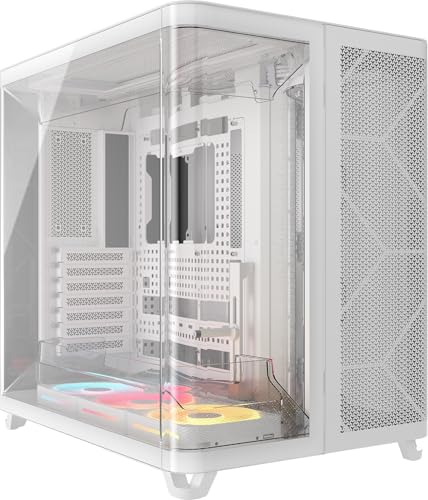
The verdict upfront: this is one of the most thoughtfully engineered mid-towers Corsair has produced. The reverse-motherboard orientation moves the GPU to the left side of the case, directly behind the panoramic glass, which means your graphics card is the centrepiece instead of being buried behind a PSU shroud. The triple-chamber design separates PSU and storage from the main build area, which keeps cable clutter away from your airflow path. Three pre-installed LX-R RGB fans with reverse rotors push air toward the glass panel rather than away from it, working with the high-airflow duct system to pull fresh air in from the bottom and exhaust it out the top. None of that is marketing fluff; it's a genuine structural decision that changes how heat moves through the chassis. Whether it's worth the premium price tag depends entirely on what you're building and how much you care about thermals and aesthetics working together.
So let's get into the numbers, because that's where cases win or lose.
Core Specifications
The AIR 5400 LX-R is a mid-tower chassis built around a reverse-motherboard layout, which is the defining structural choice everything else flows from. Corsair rates it for ATX, Micro-ATX, and Mini-ITX motherboards, though the full ATX build is clearly what the internal volume is optimised for. The case measures approximately 530mm tall, 240mm wide, and 510mm deep, which puts it at the larger end of mid-tower territory. It's not a compact build; you need desk or floor space to match.
Fan support is generous. The case ships with three 120mm LX-R RGB fans pre-installed, and the mounting positions support up to three 120mm or three 140mm fans at the front intake, two 120mm or two 140mm at the top exhaust, and one 120mm at the rear exhaust. Radiator support follows the same logic: up to a 360mm radiator at the front, a 280mm or 360mm at the top depending on configuration, and a 120mm at the rear. That's proper AIO support without compromise. The case connects to Corsair's iCUE LINK ecosystem, so all the fan and lighting control runs through a single cable chain rather than a rats' nest of individual headers.
Drive support is handled through the dedicated storage chamber: two 3.5-inch bays and two 2.5-inch bays, which is adequate for most modern builds that lean on NVMe for primary storage. The PSU chamber accepts standard ATX power supplies. The chassis is steel construction with a tempered glass side panel on the left (the GPU-facing side in this reverse layout) and mesh or solid panels elsewhere depending on the specific configuration. Weight comes in around 11kg to 12kg unloaded, which is on the heavier side for a mid-tower but not unusual for a case with this much internal structure.
| Specification | Detail |
|---|---|
| Form Factor | Mid-Tower, Reverse Motherboard |
| Motherboard Support | ATX, Micro-ATX, Mini-ITX |
| Included Fans | 3x 120mm LX-R RGB (Reverse Rotor) |
| Fan Mounts (Front) | 3x 120mm or 3x 140mm |
| Fan Mounts (Top) | 2x 120mm or 2x 140mm |
| Fan Mounts (Rear) | 1x 120mm |
| Radiator Support (Front) | Up to 360mm |
| Radiator Support (Top) | Up to 360mm |
| Radiator Support (Rear) | 120mm |
| GPU Clearance | Up to 420mm |
| CPU Cooler Height | Up to 190mm |
| Drive Bays (3.5-inch) | 2 |
| Drive Bays (2.5-inch) | 2 |
| Front I/O | 1x USB 3.2 Gen 2 Type-C, 2x USB 3.0 Type-A, HD Audio |
| Lighting | iCUE LINK RGB (LX-R fans) |
| Colour | White |
| Price | £220.00 · Details |

Form Factor and Dimensions
Calling this a mid-tower is technically accurate but a bit misleading in practice. At roughly 530mm tall and 510mm deep, the AIR 5400 LX-R occupies more desk real estate than something like a Fractal Define 7 Compact or an NZXT H5 Flow. The 240mm width is actually narrower than you might expect given the internal volume, which is a direct consequence of the triple-chamber design compressing the PSU and storage into a dedicated rear section rather than spreading everything across a wider chassis. So it's tall and deep, but not wide. That matters if you're working with a tight desk setup or a specific shelf height.
The reverse-motherboard orientation is the other dimension worth thinking about. In a conventional case, the motherboard's rear I/O faces left when you're looking at the case from the front. Here, it faces right, which means your monitor cables, USB peripherals, and audio connections all exit from the right side of the case. If your desk has your PC tucked against a right-hand wall, that's actually more convenient. If you've built in conventional cases for years, it takes a moment to adjust mentally. Owner reviews mention this specifically, and the consensus is that after the initial surprise, most people prefer it because the GPU ends up facing the glass panel directly.
Footprint on a standard desk is manageable but you won't be fitting this under a monitor arm or in a cramped corner. The case is designed to be seen, which is the whole point of the panoramic glass panel. If you're putting it inside a desk cabinet or a media unit where airflow is restricted, you're buying the wrong case. This one needs space around it to breathe, and it rewards you by looking genuinely good when it's got that space. The white finish on this variant is clean rather than stark, and owner reviews consistently mention the build quality of the exterior panels as a highlight.
Motherboard Compatibility
The AIR 5400 LX-R supports ATX, Micro-ATX, and Mini-ITX motherboards. ATX is the sweet spot. The internal layout is sized for a full ATX board, and the standoff positions reflect that. Micro-ATX will work fine but you'll have empty space in the upper portion of the motherboard tray. Mini-ITX is technically compatible but you're paying a significant premium for a case with this much internal volume when a smaller chassis would serve you better. If you're building Mini-ITX, look elsewhere.
The reverse-motherboard layout means the I/O shield and rear ports face the right side of the case rather than the left. This is a genuine consideration for ATX standard builds because it affects where your monitor cables and USB devices exit. Corsair has engineered the standoff positions to accommodate this orientation correctly, and the motherboard tray itself is a proper full-panel design rather than a cutout-heavy budget approach. The CPU cutout behind the motherboard tray is large enough to accommodate most aftermarket cooler backplates without removing the motherboard, which is a small detail that matters a lot when you're doing a cooler swap six months down the line.
One thing for anyone considering an E-ATX build: the AIR 5400 LX-R does not officially support E-ATX. If you're running a high-end workstation board or a platform that uses E-ATX (like some AMD Threadripper or Intel HEDT configurations), this isn't your case. For the vast majority of gaming and enthusiast builds on AM5, LGA1851, or LGA1700 platforms, standard ATX boards fit without issue, and the iCUE LINK header positions on the motherboard tray are sensibly placed to keep cable runs short.
GPU Clearance
This is where the reverse-motherboard design earns its keep. Corsair rates GPU clearance at up to 420mm, which covers every current consumer graphics card without exception. The RTX 5090 in triple-fan configuration? Fits. The RX 9070 XT? Fits. Even the more extravagant custom-cooler variants from ASUS ROG or MSI that stretch to 380mm or 400mm? Still fits with room to spare. In a conventional mid-tower at this price point, a 420mm clearance is achievable but often compromised when a front radiator is installed. Here, the chamber separation means the GPU bay doesn't compete with the front fan or radiator space in the same way.
Because the GPU faces the panoramic glass panel directly in this reverse layout, the card is genuinely on display rather than tucked behind a PSU shroud. That's not just aesthetics. It means you can actually see whether your GPU fans are spinning, whether there's dust accumulation, and whether the card is seated properly, all without opening the case. Owner reviews mention this repeatedly as a practical benefit rather than just a show-off feature. Several builders with high-end three-slot cards note that the GPU sits in an almost theatrical position, which sounds silly until you've spent money on an RTX 5080 and want to actually see it.
There's no vertical GPU mount option listed in the standard configuration, which is a minor omission at this price tier. Some competitors offer a riser cable and vertical bracket as standard or as an easy add-on. If vertical mounting is important to you, check whether Corsair offers a compatible riser kit separately before committing. That said, in a reverse-motherboard case, the GPU is already facing the glass by design, so the visual payoff that vertical mounting usually delivers is largely redundant here. You get the showpiece effect without needing the riser cable.
CPU Cooler Clearance
Corsair rates CPU air cooler clearance at 190mm, which is genuinely generous. The Noctua NH-D15 sits at 165mm. The be quiet! Dark Rock Pro 5 is 163mm. The DeepCool Assassin IV comes in at 168mm. All of these fit with comfortable clearance to spare. Even the chunkier tower coolers that push toward 175mm or 180mm are fine. You'd have to be running something genuinely unusual to hit the 190mm ceiling, and if you are, you probably already know about it.
AIO radiator support is where this case really opens up. Front mounting takes up to a 360mm radiator, top mounting takes up to 360mm as well, and the rear takes a 120mm. That means you can run a 360mm AIO at the front as intake and still have top exhaust fan positions available, or mount a 360mm at the top and use the front positions for additional intake fans. The triple-chamber design helps here because the PSU and storage are isolated, so there's no PSU blocking your bottom-front radiator position the way there is in some conventional layouts.
RAM clearance with a top-mounted radiator is against your specific cooler configuration. The reverse-motherboard layout shifts the RAM slots relative to the top panel, and depending on your radiator thickness and the height of your RAM heatspreaders, you may need to check clearances more carefully than in a conventional build. Corsair's own iCUE LINK AIO coolers are obviously designed to work with this case without issue, but if you're bringing in a third-party 360mm AIO with a particularly thick radiator (38mm or more), double-check the mounting depth against your RAM height. It's rarely a problem, but it's worth five minutes of measurement before you order.
Storage Bay Options
The AIR 5400 LX-R has two 3.5-inch bays and two 2.5-inch bays, all located in the dedicated storage chamber. This is a deliberate design choice: by separating storage from the main build area, Corsair keeps the GPU and motherboard zone clean and uncluttered. If you're running a pure NVMe build with no spinning drives at all, the storage chamber becomes essentially empty space, which is fine. The M.2 slots on your motherboard handle primary and secondary storage, and the chamber just sits there quietly doing nothing, which is actually a feature because it means there's no drive cage blocking airflow through the main chamber.
Two 3.5-inch bays is enough for most people. If you're running a NAS-adjacent setup with four or six spinning drives, this isn't the right case, but that's not who the AIR 5400 LX-R is aimed at. The target builder here has one or two HDDs for mass storage and relies on NVMe for anything speed-critical. The 2.5-inch bays handle SATA SSDs if you've got older drives you want to carry forward. Mounting is straightforward, and the chamber design means drive cable routing doesn't interfere with the main build area.
One thing that owner reviews flag positively is how clean the storage chamber keeps the main build area. In conventional cases, drive cages often sit directly in the path of front-panel airflow, creating turbulence and restricting intake. Here, that problem is architecturally eliminated. The main chamber gets clean, unobstructed airflow from the front intake fans, and the drives sit separately behind a dividing wall. It's a genuinely smart piece of engineering, not just a visual trick. Whether you need two 3.5-inch bays or six, the principle of keeping drives out of the airflow path is the right one.
Cable Management
The triple-chamber design is the biggest cable management advantage this case has. The PSU lives in its own dedicated chamber at the bottom rear, which means the main 24-pin ATX cable and the EPS CPU power cables have defined routing paths rather than just being bundled behind a shroud. Corsair has included cable routing channels with Velcro straps in the rear of the chassis, and the gap between the motherboard tray and the rear panel is reportedly around 25mm to 30mm, which is enough to route multiple cable runs without forcing panels shut.
The reverse-motherboard orientation changes where your cables need to go. The 24-pin connector is on the right side of the motherboard in a reverse layout (from the builder's perspective looking in through the glass), which means the 24-pin cable routes differently than you're used to. The same applies to the EPS power connector, which may need a longer cable run to reach the top-left of the motherboard depending on your PSU's cable lengths. If you're buying a modular PSU for this build, The included EPS cable is at least 650mm to 700mm long. Some PSU manufacturers sell extended cables specifically for reverse-motherboard cases.
Owner reviews on the cable management experience are broadly positive, with most builders noting that the defined chambers make it easier to plan routing before you start rather than improvising as you go. A few people mention that the iCUE LINK daisy-chain system for the fans significantly reduces header clutter compared to traditional fan hubs. Instead of three separate fan cables, three RGB cables, and a hub, you get one cable chain. That's a meaningful quality-of-life improvement for anyone who's spent time wrestling with a conventional fan header setup on a crowded motherboard.
Airflow and Thermal Design
The Corsair AIR 5400 LX-R RGB mid-tower case UK 2026 is built around a specific airflow philosophy: fresh air in from the bottom front, hot air out from the top rear. The high-airflow duct system Corsair references in the product name is a series of internal channels that guide intake air toward the GPU and CPU rather than letting it diffuse randomly through the main chamber. The three pre-installed LX-R RGB fans are reverse-rotor units, meaning they spin in the opposite direction to conventional fans. The practical effect is that they create a more direct airflow path toward the glass panel, which in a reverse-motherboard layout means toward the GPU rather than away from it.
The intake path starts at the bottom of the front panel, where mesh panels and dust filters allow air to enter. The filters are removable for cleaning, which is a basic requirement that some cheaper cases still get wrong. Air moves up through the main chamber, cooling the GPU and CPU as it rises, and exits through the top exhaust positions. The rear 120mm position provides a secondary exhaust path. This positive-pressure-leaning setup means the case tends to push slightly more air in than it exhausts through the fan positions alone, which keeps dust from entering through gaps and unfiltered openings. It's a sensible approach for a case that's designed to look clean over time.
How does this compare to a conventional mesh-front case? Honestly, the thermal performance depends heavily on how you populate the fan positions. With the three included 120mm LX-R fans running and no additional fans added, you're working with 360 cubic centimetres per second of airflow (roughly speaking, assuming standard 120mm fan output). Adding 140mm fans to the front intake positions would significantly increase that. Owner reviews from builders running high-TDP systems, including RTX 5080 and Ryzen 9 9950X combinations, report GPU and CPU temperatures that are competitive with conventional mesh-front cases in the same price bracket. The triple-chamber design seems to genuinely help by keeping PSU heat isolated from the main thermal loop. For more context on how case airflow affects component thermals, the principles behind computer cooling are worth understanding if you're new to this.
Front I/O and Connectivity
The front I/O panel sits at the top of the case, which is the standard position for a mid-tower of this size. You get one USB 3.2 Gen 2 Type-C port, two USB 3.0 Type-A ports, and a combined HD audio jack for headphones and microphone. The power button and reset button are also on the top panel. That's a solid I/O complement. The USB-C port at Gen 2 speeds (10Gbps) is fast enough for external SSDs and modern peripherals without being the theoretical maximum, and the two Type-A ports handle the usual keyboard, mouse, and USB hub connections.
One thing: the USB-C port requires a USB 3.2 Gen 2 Type-C header on your motherboard, which is now standard on most mid-range and high-end ATX boards but not universal on budget options. If you're pairing this case with a lower-end motherboard, check that the front-panel USB-C header is present before you buy. It's a small detail but annoying if you discover it mid-build. Most boards in the price range that makes sense alongside a premium case like this will have it.
The iCUE LINK integration adds a software-controlled dimension to the front I/O experience. The RGB lighting on the three pre-installed fans is managed through Corsair's iCUE software, which gives you per-fan colour and animation control, temperature-linked lighting effects, and fan curve customisation from a single interface. Owner reviews are split on iCUE: people who are already in the Corsair ecosystem find it convenient; people coming from other ecosystems find the initial setup fiddly. The iCUE LINK daisy-chain system does reduce the physical cable count substantially, which is genuinely useful regardless of how you feel about the software.

Build Quality and Materials
Steel construction throughout the chassis, with a tempered glass panel on the GPU-facing side. The steel gauge feels appropriate for the price tier: not the thin, flexing panels you get on budget cases, but not the aircraft-grade rigidity of something like a Fractal Torrent either. Owner reviews consistently describe the build quality as premium without being exceptional, which is about right for a case in this price bracket. The white finish is powder-coated and holds up well according to owners who've had the case for several months.
The tempered glass panel is the centrepiece, and it needs to be. At this price, a glass panel that wobbles, scratches easily, or has poor alignment would be a serious problem. Owner reviews don't flag any significant issues with the glass quality or panel fitment, which is reassuring. The panel uses a hinge or magnetic latch system (depending on the specific panel) that owner reviews describe as satisfying to open and close. A few owners mention that the glass is noticeably heavy, which is a consequence of using proper tempered glass rather than acrylic, and that's the right trade-off.
Sharp edges are the traditional enemy of case builders, and the AIR 5400 LX-R seems to have avoided the worst of them. Owner reviews don't flag any significant sharp-edge complaints, which is a meaningful data point given that some reviews with a positive overall rating would surface persistent quality issues if they existed. The fan mounting points are clean, the screw threads are properly tapped, and the cable management tie-down points are solid rather than flimsy plastic clips. These are the details that separate a case you enjoy building in from one you tolerate.
How It Compares
The two most relevant comparisons for the AIR 5400 LX-R are the Corsair AIR 6500D and the Lian Li O11 Dynamic EVO XL. The AIR 6500D is Corsair's own full-tower alternative in the same AIR series, while the O11 EVO XL is the dominant premium mid-to-full-tower choice at a similar price point from the competition.
The AIR 6500D is bigger. That's the headline difference. It supports E-ATX motherboards, has more radiator mounting positions, and offers greater internal volume for elaborate water-cooling loops. If you're planning a custom loop with a 480mm radiator and multiple pumps, the 6500D is the better chassis. But for the vast majority of enthusiast builds using a 360mm AIO or high-end air cooling, the AIR 5400 LX-R has everything you need without the additional footprint. The 5400 LX-R is also the better-looking case for most desk setups because it's not quite as imposing.
Against the Lian Li O11 Dynamic EVO XL, the comparison is more nuanced. The O11 EVO XL has a more established ecosystem, broader third-party accessory support, and a dual-chamber design that's been refined over several generations. The AIR 5400 LX-R counters with the iCUE LINK integration (which is genuinely better than managing individual fan headers), the pre-installed fans that are actually good rather than throwaway placeholders, and the reverse-motherboard layout that the O11 doesn't offer. If you're heavily invested in Corsair's ecosystem, the 5400 LX-R is the obvious choice. If you're coming in fresh, both are excellent and the decision probably comes down to which aesthetic you prefer.
| Feature | Corsair AIR 5400 LX-R | Corsair AIR 6500D | Lian Li O11 Dynamic EVO XL |
|---|---|---|---|
| Form Factor | Mid-Tower, Reverse MB | Full-Tower, Reverse MB | Mid-Tower, Standard |
| E-ATX Support | No | Yes | Yes (up to 272mm) |
| GPU Clearance | 420mm | 420mm+ | 446mm |
| CPU Cooler Height | 190mm | 190mm | 167mm |
| Max Radiator (Front) | 360mm | 420mm | 360mm |
| Included Fans | 3x 120mm LX-R RGB | Varies by model | None (typically) |
| Fan Ecosystem | iCUE LINK | iCUE LINK | L-Connect 3 |
| Drive Bays (3.5-inch) | 2 | 2 | 2 |
| Price Tier | Premium | Premium+ | Premium |
Final Verdict
The Corsair AIR 5400 LX-R RGB mid-tower case UK 2026 is a genuinely excellent case for a specific type of builder. If you want a premium mid-tower that puts your GPU on display, keeps thermals well-managed through a structured triple-chamber layout, integrates cleanly with Corsair's iCUE LINK ecosystem, and comes with three decent fans already installed, this is one of the best options at its price tier. The positive overall rating from some owners isn't a fluke; it reflects a case that delivers on its promises without major build-experience frustrations.
The reverse-motherboard layout is the design choice that divides opinion most sharply. If you're comfortable with the idea that your rear I/O faces right instead of left, and that your cable routing will need a bit more planning than a conventional build, the payoff is a GPU that sits directly behind the glass panel in a way that looks genuinely impressive. If the idea of adapting to a reverse layout sounds like more hassle than it's worth, a conventional case like the Fractal Torrent or the NZXT H7 Flow will give you excellent thermals and build quality without the orientation adjustment.
The honest don't-overspend note: if you don't need the iCUE LINK integration and you're not fussed about the reverse-motherboard layout, the Corsair 4000D Airflow is a significantly cheaper case that delivers excellent airflow and a clean build experience. It won't show off your GPU in the same way, and it doesn't have the triple-chamber separation, but for pure thermal performance per pound, it's hard to beat. The AIR 5400 LX-R is worth the premium if you want the full package: the aesthetics, the ecosystem integration, and the structural engineering. If you just want good airflow and a solid build, there are cheaper ways to get there.
For everyone else, specifically the builder who wants a high-end AMD or Intel gaming rig with a flagship GPU, a 360mm AIO, and a case that looks as good as the components inside it, the AIR 5400 LX-R is a proper choice. It's not perfect (no vertical GPU mount, no E-ATX support, and the iCUE software has a learning curve), but it's very, very good. Score: 8.5 out of 10.
What are the key differences between the Corsair AIR 5400 LX R and RS R fans?
The LX-R and RS-R are both reverse-rotor fans in Corsair's iCUE LINK lineup, but they're aimed at different performance profiles. The LX-R (as fitted in this case) is optimised for lower noise at moderate airflow, making it a good all-rounder for chassis use where you want the fans running quietly under normal load. The RS-R is a higher-static-pressure variant designed for radiator and heatsink mounting, where the fan needs to push air through a denser fin stack. In practice, the LX-R fans pre-installed in the AIR 5400 LX-R are well-suited to case airflow duties, but if you're adding fans specifically to a front-mounted 360mm radiator, RS-R fans would be the better choice for that position.
What are the key differences between the Corsair AIR 5400 and 6500D cases?
The AIR 6500D is Corsair's full-tower version of the same reverse-motherboard, triple-chamber concept. The headline differences are: the 6500D supports E-ATX motherboards where the 5400 LX-R tops out at ATX; the 6500D has more internal volume and additional radiator mounting positions, including support for 420mm radiators; and the 6500D is physically larger with a bigger footprint. Both use the iCUE LINK ecosystem and the same reverse-motherboard philosophy. The 5400 LX-R is the right choice for standard ATX builds where you want premium features without full-tower size. The 6500D is for E-ATX builds or custom water-cooling setups that need maximum radiator real estate.
Which Corsair case has the best airflow?
Among Corsair's current lineup, the AIR series (including the 5400 LX-R and 6500D) and the 4000D Airflow are the strongest performers for thermal management. The 4000D Airflow has a proven track record as one of the best airflow cases at its price point, with a mesh front panel and a straightforward internal layout that moves a lot of air efficiently. The AIR 5400 LX-R takes a more structured approach with its triple-chamber design and high-airflow ducts, which keeps PSU and storage heat separated from the main build area. For a high-TDP gaming build with a flagship GPU and a 360mm AIO, the AIR 5400 LX-R's structured airflow path arguably serves those components better than the simpler 4000D layout.
What motherboards are compatible with the Corsair AIR 5400 case?
The Corsair AIR 5400 LX-R supports ATX, Micro-ATX, and Mini-ITX motherboards. This covers the vast majority of consumer motherboards for AMD AM5 (Ryzen 7000, 9000 series), Intel LGA1851 (Core Ultra 200 series), and LGA1700 (12th, 13th, 14th Gen Core) platforms. E-ATX boards are not supported. If you're running a standard ATX board from ASUS, MSI, Gigabyte, or ASRock for a mainstream gaming or enthusiast build, compatibility is not a concern. The reverse-motherboard orientation is handled by the case's internal layout; your motherboard doesn't need to be a special reverse-compatible model, it just mounts in the standard way relative to the case's inverted tray.

Is Corsair a good case brand?
Yes, with some caveats. Corsair's mid-range and premium cases are genuinely well-engineered, with good build quality, sensible internal layouts, and strong ecosystem integration through iCUE. The brand has been making PC cases long enough to have ironed out most of the basic design frustrations that plague cheaper manufacturers. The main caveat is that Corsair's software (iCUE) can be polarising: it's powerful but resource-hungry and occasionally buggy, and if you're not already in the Corsair ecosystem, the initial setup takes some patience. The cases themselves, separate from the software, are consistently well-regarded by owners. The AIR 5400 LX-R's positive overall rating from some reviews is representative of where Corsair sits in the premium tier: not infallible, but reliably good.
What works. What doesn’t.
5 + 4What we liked5 reasons
- 420mm GPU clearance with reverse-motherboard layout puts your card directly behind the glass
- Triple-chamber design keeps PSU and storage heat isolated from the main build area
- iCUE LINK daisy-chain dramatically reduces fan and RGB cable clutter
- 190mm CPU cooler clearance handles every mainstream air cooler without compromise
- Three decent LX-R RGB fans included, not throwaway placeholders
Where it falls4 reasons
- No E-ATX support limits compatibility with high-end workstation platforms
- Reverse-motherboard layout requires cable length planning, especially for EPS power
- iCUE software has a learning curve for non-Corsair ecosystem users
- No vertical GPU mount included at this price tier
Full specifications
11 attributes| Form factor | Mid-Tower |
|---|---|
| CPU cooler clearance MM | 180 |
| Dimensions MM | 470 x 340 x 467 |
| Fans included | 3 |
| GPU clearance MM | 360 |
| MAX FAN count | 10 |
| MAX radiator MM | 360 |
| PSU support | ATX up to 200mm |
| Side panel | panoramic hinged tempered glass |
| Supported motherboard | Mini-ITX, Micro-ATX, ATX, E-ATX |
| Weight KG | 13.92 |
If this isn’t right for you
2 options
 8.5 / 10
be quiet! Light Base 900 DX White PC Case, Fully Windowed Front and Side
£169.99 · be quiet! · Details
Got a motherboard yet?
4 reviewsThe maker lists ATX, Micro-ATX and Mini-ITX boards for this case. These ATX boards fit it.
Frequently asked
5 questions01Is the CORSAIR AIR 5400 LX-R RGB iCUE LINK Triple-Chamber Mid-Tower Panoramic PC Case good for airflow?+
Yes, it's a strong performer. The triple-chamber design isolates PSU and storage heat from the main build area, and the high-airflow duct system channels intake air directly toward the GPU and CPU rather than letting it diffuse randomly. The three pre-installed 120mm LX-R RGB reverse-rotor fans provide a solid baseline, with front positions supporting up to three 140mm fans and top positions supporting up to two 140mm fans for additional intake or exhaust. Dust filters on the intake paths are removable for cleaning. Owner reviews from builders running high-TDP combinations report GPU and CPU temperatures competitive with conventional mesh-front cases at this price tier.
02What's the GPU clearance on the CORSAIR AIR 5400 LX-R RGB iCUE LINK Triple-Chamber Mid-Tower Panoramic PC Case?+
Corsair rates GPU clearance at up to 420mm, which accommodates every current consumer graphics card including triple-fan flagship models from ASUS ROG, MSI, and Gigabyte that can stretch to 380mm or 400mm in length. The reverse-motherboard layout means the GPU faces the panoramic glass panel directly rather than being tucked behind a PSU shroud, so you get both the clearance and the visual payoff. There is no vertical GPU mount included in the standard configuration, but the reverse-motherboard design already delivers the showpiece effect that vertical mounting is usually used to achieve.
03Can the CORSAIR AIR 5400 LX-R RGB iCUE LINK Triple-Chamber Mid-Tower Panoramic PC Case fit a 360mm AIO?+
Yes, and then some. The front panel supports up to a 360mm radiator, the top panel also supports up to 360mm, and the rear takes a 120mm. That means you can run a 360mm AIO at the front as intake while keeping top exhaust fan positions available, or mount the 360mm at the top with the front positions dedicated to intake fans. If you're using a particularly thick radiator (38mm or more) at the top position, check clearance against your RAM heatspreader height before ordering, as the reverse-motherboard layout shifts the RAM slot positions relative to the top panel. Corsair's own iCUE LINK AIO coolers are designed to work with this case without clearance concerns.
04Is the CORSAIR AIR 5400 LX-R RGB iCUE LINK Triple-Chamber Mid-Tower Panoramic PC Case easy to build in?+
Broadly yes, with one caveat. The triple-chamber design actually makes cable management easier than a conventional layout because the PSU and storage have defined, isolated spaces with clear routing paths. The iCUE LINK daisy-chain system for the included fans reduces header clutter significantly compared to managing three fan cables and three RGB cables separately. The rear panel clearance of around 25mm to 30mm is adequate for routing multiple cable runs. The caveat is the reverse-motherboard orientation: your EPS CPU power cable needs to be long enough to reach the top of the motherboard from the PSU chamber, and some PSU manufacturers' standard cables fall short. If you're using a modular PSU, check that the included EPS cable is at least 650mm to 700mm. Owner reviews are broadly positive about the build experience, with no significant complaints about sharp edges or panel alignment.
05What warranty and returns apply to the CORSAIR AIR 5400 LX-R RGB iCUE LINK Triple-Chamber Mid-Tower Panoramic PC Case?+
Corsair typically covers their cases with a two-year limited warranty, though we'd recommend confirming the exact terms on Corsair's official support pages for your region, as warranty coverage can vary. If you're buying through Amazon UK, you also benefit from Amazon's standard 30-day returns policy and the A-to-Z Guarantee, which covers you if the item arrives damaged or not as described. For any warranty claims after the return window, contact Corsair's UK support directly.