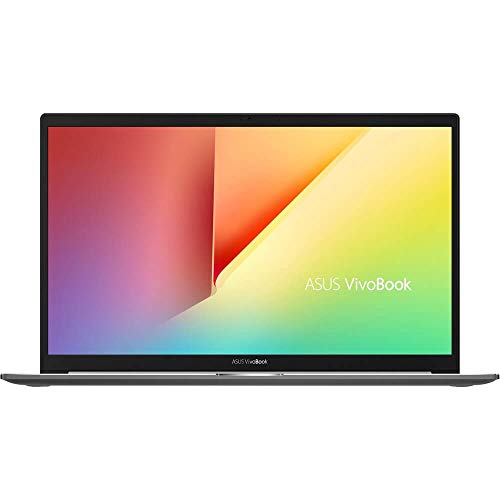
Getting a laptop wrong is an expensive mistake. You're locked in. No swapping the CPU when it turns out to be a bit weedy, no upgrading the RAM when 8GB starts to feel tight, no replacing the display when you realise it's terrible outdoors. Whatever you pick, you're living with it. So when a machine sits in the upper mid-range price bracket, it had better earn that spot with something more than a nice-looking spec sheet and a pretty chassis.
The ASUS VivoBook S15 S533 is a genuinely interesting case study in how a laptop can look great on paper and still leave you with questions. The Core i5-10210U, 8GB RAM, 512GB PCIe SSD combination was a solid setup when this machine launched. But we're now well past that era, and the price hasn't exactly followed the hardware down. At £973.33 · Details, this is competing against machines with newer silicon, better displays, and stronger battery credentials. The 80 owners who've rated it give it ★★★★½ (4.7) on average, which is genuinely impressive. But high owner satisfaction and strong value at the current asking price are two very different things, and that's exactly what this ASUS VivoBook S15 S533 review is going to untangle.
The short version: if you can find this at a significant discount, it's a lovely everyday laptop with a great keyboard, a decent screen, and a build quality that punches above its original price point. At full upper mid-range money in 2026? That's a harder sell, and I'll explain exactly why below.
Core Specifications
The processor here is Intel's Core i5-10210U, a 10th-generation Comet Lake-U chip with four cores, eight threads, and a boost clock of 4.2GHz. When this launched in 2019 and 2020, it was a perfectly respectable mid-range mobile processor. Snappy for office work, capable enough for light photo editing, and efficient enough to keep a thin laptop's thermals manageable. The problem is that Intel's 12th and 13th generation chips made a genuinely big leap in both performance and efficiency, and AMD's Ryzen 5000 and 7000 series did the same. The 10210U isn't embarrassing, but it's a generation behind what you'd expect at this price in 2026.
RAM is 8GB of DDR4, and this is where things get a bit frustrating. Windows 11 (which this will likely be running now, regardless of the Windows 10 Home it shipped with) is noticeably more memory-hungry than Windows 10. Chrome with a handful of tabs, a couple of Office documents, and Spotify running in the background will push 8GB pretty hard. The question owners consistently raise is whether the RAM is soldered or upgradeable. On the S533, one slot is soldered and one is accessible, meaning you can add another stick to reach 16GB. That's a meaningful saving grace, but it does mean spending more money after you've already spent a lot of money.
Storage is a 512GB PCIe SSD, which is genuinely good news. PCIe NVMe drives are fast. Boot times are quick, application launches feel instant, and large file transfers don't make you want to make a cup of tea while you wait. 512GB is adequate for most users, though anyone storing a large photo or video library will feel the squeeze. The graphics are handled by Intel's integrated UHD 620, which is fine for everything except gaming. Anything beyond casual titles or older games is going to struggle. If you need a GPU, this isn't your machine.
The display is a 15.6-inch Full HD IPS panel, which is the right choice for this kind of everyday laptop. The chassis uses what ASUS calls an ErgoLift hinge design, which slightly angles the keyboard when the lid is open. It's a detail that genuinely helps with both typing feel and airflow underneath. The battery is rated at 50Wh, which is on the smaller side for a 15.6-inch machine, and that has real implications for battery life that we'll get into properly later.
| Specification | Detail |
|---|---|
| CPU | Intel Core i5-10210U (4 cores, 8 threads, up to 4.2GHz) |
| RAM | 8GB DDR4 (one slot upgradeable) |
| Storage | 512GB PCIe NVMe SSD |
| Display | 15.6-inch Full HD (1920x1080) IPS |
| GPU | Intel UHD 620 (integrated) |
| Operating System | Windows 10 Home (ships with; likely updated) |
| Battery | 50Wh |
| Weight | 1.8kg (approx.) |
| Dimensions | 360.2 x 233.6 x 15.9mm |
| Colour | Indie Black |
| ASIN | B0852BTGGH |
| Price | £973.33 · Details |

Performance Benchmarks
The Core i5-10210U scores around 5,500 to 6,000 in Cinebench R20 multi-core, and somewhere in the 1,300 to 1,400 range single-core. To put that in context, a modern Intel Core i5-1235U (12th gen) scores roughly double in multi-core. That's not a small gap. For single-threaded tasks like web browsing, email, and word processing, the difference is less dramatic, but for anything that scales across cores (video exports, large spreadsheets, compiling, even some photo editing workflows) you'll notice the generational gap.
In Geekbench 5, the 10210U typically lands around 1,050 single-core and 3,500 to 3,800 multi-core. Again, these are numbers that were solid for 2020 and feel a bit dated now. The UHD 620 integrated graphics score around 4,500 to 5,000 in Geekbench's GPU compute tests, which is fine for accelerating video playback and handling the display output, but not fine for anything you'd call gaming. Minecraft at low settings? Probably. Anything released in the last five years at medium or above? No.
What the benchmarks don't fully capture is how the 10210U handles sustained loads. It's a 15W chip, and in a thin chassis with a modest cooling solution, it will throttle under extended heavy workloads. Light tasks, it's perfectly quick. Sustained rendering or export jobs, it'll slow down as the thermal budget gets used up. Owner reviews back this up, with several noting the laptop feels fast for everyday tasks but gets noticeably slower if you push it hard for extended periods. For office productivity, streaming, and light creative work, it's genuinely fine. Just don't expect it to edit 4K footage without a fight.
The PCIe SSD is the performance highlight here. Sequential read speeds on typical drives in this configuration run around 2,000 to 2,500 MB/s, which makes Windows feel properly snappy. This is one area where the S533 doesn't feel dated at all. A fast SSD does more for perceived day-to-day speed than almost any other component, and ASUS got this right.
Display Analysis
The 15.6-inch Full HD IPS panel is one of the more pleasant surprises on the S533. IPS was the right call at this price point. You get decent viewing angles, so colleagues looking over your shoulder at a presentation won't see a washed-out mess, and the colours stay consistent when you tilt the screen. The 1080p resolution on a 15.6-inch panel gives you a pixel density of around 141 PPI, which is sharp enough that individual pixels aren't visible during normal use. It's not Retina-sharp, but it's not soft either.
Brightness is rated at around 250 nits, which is where things get honest. 250 nits is adequate for indoor use in a normally lit room. Near a window on a bright day, you'll be squinting and repositioning yourself. Outdoors in direct sunlight, it's essentially unusable. This isn't unusual for a laptop at this price tier, but it matters if you work outside or in very bright environments. The matte finish does help with reflections, which partially compensates for the modest brightness ceiling.
Colour coverage is where the panel is a bit modest. The display covers the sRGB colour space reasonably well for an everyday IPS panel, but it's not the kind of screen you'd want to use for colour-critical photo or video work. If you're a photographer who needs accurate colour representation for client work, you'd want to calibrate it at minimum, and even then the gamut coverage might leave you wanting more. For everything else, word processing, spreadsheets, Netflix, video calls, it looks perfectly good. Colours are natural rather than oversaturated, which some people will actually prefer over the punchy but inaccurate screens you get on some budget machines.
Battery Life
The 50Wh battery is the number that gives me pause. ASUS quotes up to around 8 hours of battery life, and that figure comes from their own testing under ideal conditions, which typically means screen brightness turned down, minimal background tasks, and a workload that's closer to "document open on screen" than "actually working". Real-world use is different.
Owner reviews paint a more realistic picture. Light use, browsing and writing with brightness at around 60 to 70 percent, most people are reporting somewhere in the five to six hour range. That's a full working morning or afternoon, but not a full day without hunting for a plug. If you're on video calls, doing anything processor-intensive, or have brightness cranked up, expect closer to three to four hours. For a 15.6-inch laptop at this price, that's genuinely disappointing.
The charger is a 65W adapter, which is reasonably compact for a 15-inch machine. Charge times from near-empty to full are typically around an hour and a half to two hours, which is fine. The S533 does support USB-C charging, which is a genuinely useful feature for travel. Being able to top up from a USB-C power bank or a hotel room USB-C charger is the kind of real-world flexibility that matters when you're away from your desk. Not every laptop at this price offers it.
The honest summary on battery: this is a laptop you'll want to keep near a power source for serious work sessions. It's not a deal-breaker if you work in offices or cafes with easy plug access, but if you regularly need a full day away from the mains, the S533's 50Wh battery will let you down. Students going between lectures without a bag full of charger cables will feel this limitation most acutely.
Portability
At around 1.8kg, the S533 is on the lighter end for a 15.6-inch laptop. It's not ultrabook territory, but it's not a workout either. The 15.9mm thickness is impressively slim for a machine with a proper port selection and a full-size keyboard. ASUS has done a decent job of keeping the footprint reasonable without making the whole thing feel fragile or cramped internally.
The charger adds to the bag weight, as it always does. The 65W adapter is a relatively compact brick, not the massive power supply you'd get with a gaming laptop, but it's still something you'll notice in a backpack over a long commute. The USB-C charging support does mean you can sometimes leave the proprietary charger at home if you have a good USB-C PD charger already, which is a genuine quality-of-life win for frequent travellers.
Who suits this for travel? Honestly, someone who commutes to an office or works from a few fixed locations rather than someone who's constantly moving. The 15.6-inch screen is lovely for productivity, but it means a bigger bag and a heavier load than a 13 or 14-inch machine. If your priority is maximum portability, there are smaller ASUS VivoBook options. If you want a proper-sized screen and don't mind a bit of extra weight, the S533 is manageable.
Keyboard & Trackpad
This is genuinely one of the S533's strongest cards. The keyboard gets consistent praise in owner reviews, and looking at the design, it's easy to see why. The key travel is on the deeper side for a thin laptop, which makes a real difference for long typing sessions. There's a satisfying click to each keystroke without being noisy. For anyone who writes a lot, whether that's code, documents, or emails, this keyboard is a proper pleasure to use. The ErgoLift hinge angle, which tilts the keyboard slightly when the lid is open, adds to the comfort during extended sessions.
The layout is sensible. There's no number pad, which is the right call on a 15.6-inch machine if you want to keep the main key area properly sized and centred. The keys are well-spaced, and the backlight (single colour, but functional) means you can work in low light without squinting. A few owners have noted the backlight isn't the brightest available, but it does the job for dim environments. The function key row doubles up for media controls, which is standard and not a problem once you're used to it.
The trackpad is large and smooth, with good palm rejection so accidental cursor movements during typing aren't a constant annoyance. Windows precision drivers mean multi-finger gestures work properly: two-finger scrolling, three-finger app switching, pinch to zoom. It's not quite at the level of a MacBook trackpad (nothing on Windows is, if we're being straight), but it's above average for this price tier. Clicking feels positive rather than mushy. Overall, the input devices on the S533 are a genuine strength and a big part of why owner satisfaction is so high.
Thermal Performance
The ErgoLift hinge design does double duty here. By lifting the rear of the chassis slightly off the desk when the lid is open, it creates a gap underneath that improves airflow to the cooling system. It's a clever bit of industrial design that genuinely helps with thermals during light to moderate workloads. At idle and during browsing or document work, the chassis stays cool. The palm rest and keyboard area remain comfortable, which matters for long sessions.
Under sustained load, things get warmer, as they do on any thin laptop with a 15W processor. The underside gets noticeably hot during extended CPU-intensive tasks, and the area around the top of the keyboard near the hinge can get warm too. It's not burn-your-legs territory for casual lap use, but if you're running something demanding for an extended period, you'll want it on a desk rather than your actual lap. The fan does spin up under load, which we'll cover in the acoustic section, but the thermal management is broadly appropriate for this class of hardware.
Throttling is a real consideration under sustained heavy load. The i5-10210U has a 15W TDP, and in a chassis this slim, maintaining boost clocks for extended periods isn't always possible. Short bursts of demanding work are handled well. Long rendering jobs or sustained multitasking will see the CPU pull back to manage heat. This is a characteristic of the entire class of thin-and-light 15W laptops, not a specific failing of the S533, but it's worth understanding before you buy. Owner feedback suggests that for typical office and productivity use, throttling is rarely noticeable.

Acoustic Performance
At idle and during light work, the S533 is essentially silent. Browsing, writing, video streaming: the fans either don't spin or spin slowly enough that they're inaudible in a normal environment. This is genuinely good for office use and video calls, where fan noise in the background of a meeting is one of those small irritants that makes everyone quietly annoyed. For most of the working day, you won't hear this laptop at all.
Under load, the fan does spin up, and it has a relatively consistent whoosh character rather than an irritating whine or pulsing behaviour. It's not silent, but it's not aggressive either. Compared to gaming laptops or even some of the more enthusiastically cooled productivity machines, the S533 is restrained. The fan curve seems tuned to prioritise quiet operation over maximum cooling, which explains why the chip throttles under sustained load but stays quiet while doing it. That's a reasonable trade-off for a machine aimed at office and productivity use.
For library use or quiet shared workspaces, the S533 is a good citizen during normal tasks. If you're exporting a video or doing something similarly intensive, the fan will become audible but not intrusive. It's not a machine you'd be embarrassed to use in a quiet environment, which puts it ahead of plenty of competitors in this regard.
Ports & Connectivity
The port selection on the S533 is genuinely decent for a thin laptop. You get a USB-C (which supports charging), two USB-A 3.1 ports, a USB-A 2.0 port, a full-size HDMI output, a microSD card reader, and a 3.5mm headphone jack. That's a proper port selection that means most users won't need a hub for day-to-day use. The HDMI output is particularly welcome for anyone who regularly connects to external monitors or projectors, since USB-C to HDMI adapters are one of those things you always forget when you need them.
WiFi is handled by an 802.11ac (Wi-Fi 5) adapter, which is fine for current home and office networks but isn't the Wi-Fi 6 you'd want if you're buying new in 2026. Wi-Fi 5 is still fast enough for streaming, video calls, and general use, but on a congested network with lots of devices, Wi-Fi 6 does offer real-world advantages. Given that a machine like this spends much of its life on café, airport and hotel Wi-Fi, it's also worth running a good VPN to keep your connection private on those shared networks. Bluetooth 5.0 is included, which covers wireless headphones, mice, and keyboards without issue.
The USB-C port doesn't support Thunderbolt, which matters if you're planning to connect high-bandwidth peripherals or use a Thunderbolt dock. It does support USB-C charging and display output, which covers the most common use cases. The microSD slot rather than a full SD slot is a minor frustration for photographers, but it's a common compromise on slim laptops.
- USB-C 3.1 Gen 1 (charging + display)
- USB-A 3.1 Gen 1 (x2)
- USB-A 2.0 (x1)
- HDMI 1.4
- MicroSD card reader
- 3.5mm combo audio jack
- Wi-Fi 5 (802.11ac)
- Bluetooth 5.0
Webcam & Audio
The webcam is a 720p unit, which is what you'd expect at this price tier and from this era of laptop. In good light, it produces a perfectly acceptable image for video calls. In low light, it softens and grains up noticeably, as 720p webcams universally do. If you're regularly on video calls in a dimly lit home office, an external webcam would be a worthwhile investment. For standard office use with decent lighting, it's fine. Not great, just fine.
The speakers are positioned on the underside of the chassis, which is a common placement that's never ideal. Sound bounces off the desk surface and reaches your ears indirectly, which limits the perceived clarity and volume. They're adequate for the occasional YouTube video or background music, but for anything where audio quality matters, headphones are the answer. The 3.5mm jack is present and works well, and the audio output quality through headphones is perfectly good. The microphone is serviceable for video calls, with owners generally reporting no complaints from colleagues about call audio quality.
Build Quality
This is where the S533 genuinely earns some respect. ASUS has used a mix of aluminium and quality plastic here, and the result feels more premium than the spec sheet alone might suggest. The lid has a solid feel, with minimal flex when you pick the laptop up by a corner. The keyboard deck is similarly rigid, which matters because flex under typing is one of those things that makes a laptop feel cheap regardless of what's inside it.
The ErgoLift hinge is smooth and firm. It opens with one hand (just about, though it's not quite as effortless as some), holds its position without wobbling, and doesn't feel like it's going to wear loose over time. The hinge mechanism is one of the things that owners consistently mention positively in reviews, and it's a design detail that ASUS has refined across multiple VivoBook generations. The Indie Black finish looks smart without being flashy, and it resists fingerprints reasonably well compared to the glossy surfaces you get on some competing machines.
The overall build quality is genuinely good for this class of laptop. It's not a ThinkPad, and it hasn't been through MIL-SPEC drop testing, but it feels like a machine that'll survive the normal rigours of daily use without developing creaks and rattles in the first six months. Owner reviews consistently mention the build quality positively, which aligns with what the materials and construction suggest. For a machine you're going to carry around regularly, that reassurance matters.
One thing: the slim profile does mean the chassis runs warm under load, as covered in the thermal section. That's the trade-off for the slim build. ASUS has managed it reasonably well, but if you want a machine that stays cool under pressure, you'd need a thicker chassis with a bigger cooling system.
How It Compares
At the current asking price of £973.33 · Details, the S533 is competing in a bracket that's become significantly more competitive since this machine launched. The two most relevant comparisons are the Acer Swift 3 (with a 12th-gen Intel Core i5 or AMD Ryzen 5 7530U) and the Lenovo IdeaPad 5 in its current generation. Both of these are available in the same general price range and both bring newer silicon to the table.
The Acer Swift 3 with a Ryzen 5 7530U is a meaningful step up in CPU performance. AMD's Ryzen 7000 series mobile chips offer substantially better multi-core performance and improved efficiency compared to the Intel 10th-gen chips in the S533. The Swift 3 also typically offers a brighter display and comparable build quality. Where the S533 fights back is on keyboard feel and the overall design polish, which many users genuinely prefer.
The Lenovo IdeaPad 5 Gen 8 brings 12th-gen Intel Core processors, which again represent a significant generational leap. Lenovo's keyboard quality is also excellent, and the IdeaPad 5 typically offers a larger battery in the 57 to 60Wh range, which translates to meaningfully better real-world battery life than the S533's 50Wh pack. If battery life is a priority, the IdeaPad 5 is the more sensible choice at this price point. The S533 does win on aesthetics and the ErgoLift hinge design, which some users find genuinely useful.
| Feature | ASUS VivoBook S15 S533 | Acer Swift 3 (Ryzen 5 7530U) | Lenovo IdeaPad 5 Gen 8 |
|---|---|---|---|
| CPU | Intel Core i5-10210U (10th gen) | AMD Ryzen 5 7530U (7th gen) | Intel Core i5-1235U (12th gen) |
| RAM | 8GB DDR4 | 8GB DDR4 | 8GB DDR5 |
| Storage | 512GB PCIe SSD | 512GB PCIe SSD | 512GB PCIe SSD |
| Display | 15.6" FHD IPS, ~250 nits | 14" FHD IPS, ~300 nits | 15.6" FHD IPS, ~300 nits |
| Battery | 50Wh | 56Wh | 57Wh |
| Weight | ~1.8kg | ~1.25kg | ~1.7kg |
| Wi-Fi | Wi-Fi 5 | Wi-Fi 6 | Wi-Fi 6 |
| Price | £973.33 · Details | Similar bracket | Similar bracket |
| Best For | Keyboard lovers, everyday productivity, clean design | Portability, modern performance, battery life | Balanced all-rounder, better battery, newer platform |

Final Verdict
The ASUS VivoBook S15 S533 is a genuinely good laptop that launched at the right time and has aged reasonably well in some areas and less well in others. The keyboard is excellent. The build quality is above average for the class. The display is pleasant for everyday use. The ErgoLift hinge is a clever design touch that actually improves the experience rather than just looking good in marketing photos. And the 80 owners rating it ★★★★½ (4.7) aren't wrong to be happy with it. For the tasks most people actually use a laptop for, it delivers.
But the pricing is the problem. At £973.33 · Details in 2026, you're paying upper mid-range money for a 10th-gen Intel processor, a 50Wh battery that won't last a full working day, Wi-Fi 5, and no Thunderbolt. The competitors at this price have moved on. If you can find the S533 at a meaningful discount, perhaps £400 to £500 range where it sometimes appears on clearance, it's a solid buy. At full upper mid-range price, it's hard to recommend over a current-generation machine with newer silicon and better battery life. A score of 7 out of 10 feels right: genuinely good at what it does, but the price-to-generation equation doesn't add up in 2026.
Who should buy it? Someone who finds it discounted, values keyboard quality above almost everything else, and does primarily light productivity work. Who should skip it? Anyone who needs strong sustained performance, long battery life away from a plug, or the latest wireless standards. And if you're tempted purely by the ASUS VivoBook name, look at the current VivoBook 15 lineup with 12th or 13th-gen Intel chips. You'll get a more modern machine for similar or less money, and you won't be starting from a position of already being a generation behind.
The S533 is the kind of laptop you'd happily recommend to someone who's already bought it. Recommending it to someone who hasn't yet is a different conversation, one that ends with "but have you looked at what else is available right now?" The ASUS VivoBook range has moved on, and so should your shopping list unless the price has moved significantly in your favour.
What works. What doesn’t.
6 + 6What we liked6 reasons
- Excellent keyboard with good key travel and a comfortable ErgoLift typing angle
- Above-average build quality with minimal chassis flex and a premium feel for the class
- Fast PCIe NVMe SSD delivers snappy day-to-day performance and quick boot times
- Decent port selection including USB-C charging, two USB-A 3.1 ports, and full-size HDMI without needing a hub
- Quiet fan behaviour during typical office and productivity workloads
- One RAM slot is upgradeable, allowing expansion to 16GB
Where it falls6 reasons
- 10th-generation Intel Core i5-10210U is two or three generations behind current mid-range competitors
- 50Wh battery delivers only five to six hours of real-world use, falling short for a full working day
- Wi-Fi 5 rather than Wi-Fi 6, which competitors at the same price now offer as standard
- Display brightness of approximately 250 nits is inadequate near bright windows and unusable outdoors
- No Thunderbolt support on the USB-C port, limiting high-bandwidth peripheral compatibility
- Only a microSD slot rather than a full SD card reader, which inconveniences photographers
Full specifications
12 attributes| Storage type | M.2 NVMe PCIe 3.0 SSD |
|---|---|
| Battery WH | 50 |
| Bluetooth | 5.0 |
| CPU | Intel Core i5-10210U |
| Display refresh HZ | 60 |
| Display resolution | 1920x1080 |
| Display size IN | 15.6 |
| GPU | Intel UHD Graphics |
| Launch year | 2020 |
| OS | Windows 10 Home |
| Panel type | IPS |
| RAM GB | 8 |
If this isn’t right for you
2 options

Frequently asked
7 questions01Is the RAM on the ASUS VivoBook S15 S533 upgradeable?+
Partially. One of the two RAM slots is soldered to the motherboard and cannot be changed, but the second slot is accessible and accepts a standard DDR4 SO-DIMM module. This means you can add an additional stick to bring the total from 8GB to 16GB, which is a worthwhile upgrade given how memory-hungry Windows 11 can be with multiple applications open.
02Does the ASUS VivoBook S15 S533 support USB-C charging?+
Yes. The USB-C port on the S533 supports charging via USB-C Power Delivery. This means you can use a compatible USB-C charger or power bank to top up the laptop, which is useful when travelling and you would prefer to leave the proprietary 65W adapter at home. The same USB-C port also supports display output.
03How long does the battery last on the ASUS VivoBook S15 S533?+
Based on owner feedback and the 50Wh battery capacity, real-world battery life sits in the five to six hour range during typical light use such as browsing and document work at around 60 to 70 percent brightness. More demanding workloads, video calls, or higher brightness settings will reduce this to three to four hours. ASUS quotes up to eight hours, but this reflects ideal testing conditions rather than typical use.
04Can the ASUS VivoBook S15 S533 handle gaming?+
Only in a limited sense. The integrated Intel UHD 620 graphics are capable of running casual or older titles at low settings, and something like Minecraft at modest settings should be playable. Any modern game released in the last several years at medium settings or above will struggle significantly. This is not a gaming laptop and should not be considered as one.
05Is the ASUS VivoBook S15 S533 good for working from home and video calls?+
It is well suited to this use case in most respects. The keyboard is excellent for extended typing sessions, the fan is quiet during typical workloads, and the trackpad is above average. The 720p webcam is adequate in good lighting, and the microphone is serviceable for calls. The main limitation is battery life if you work away from a desk, and the display brightness if your workspace has strong natural light.
06How does the ASUS VivoBook S15 S533 compare to the Lenovo IdeaPad 5 Gen 8?+
The Lenovo IdeaPad 5 Gen 8 has a meaningful advantage in CPU performance thanks to its 12th-generation Intel Core processor, and it also offers a larger battery in the 57 to 60Wh range along with Wi-Fi 6. The S533 competes on keyboard feel, the ErgoLift hinge design, and aesthetics, but for users who prioritise battery life, modern performance, or current wireless standards, the IdeaPad 5 Gen 8 is the more sensible choice at a similar price point.
07What does the ErgoLift hinge on the ASUS VivoBook S15 S533 actually do?+
The ErgoLift hinge slightly lifts and angles the rear of the chassis when the lid is opened. This creates a gap underneath the laptop that improves airflow to the cooling system, helping to manage thermals during light to moderate use. It also tilts the keyboard deck slightly towards the user, which many people find more comfortable for extended typing. It is a genuine functional benefit rather than a purely cosmetic design detail.