Picking a mid-range GPU in 2025 is genuinely annoying. The gap between "too cheap to bother" and "costs more than my rent" has never felt wider, and NVIDIA's naming conventions don't exactly help. So when the RTX 5060 Ti landed with 16GB of GDDR7 on a Blackwell die, people paid attention. Not because of the hype, but because 16GB at this price tier is something we haven't seen before, and the VRAM wars of the last few years have made everyone a bit twitchy about buying anything with less.
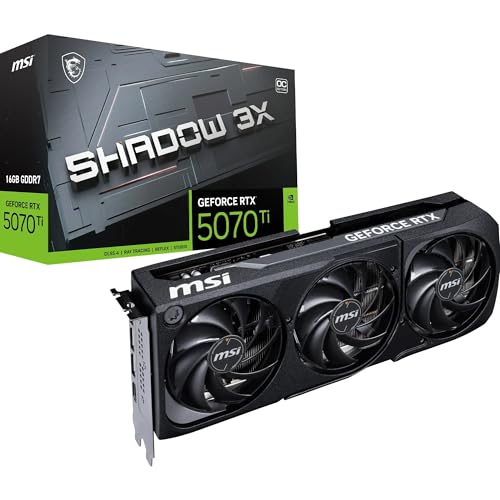
The MSI Gaming RTX 5060 Ti 16G Gaming OC is MSI's factory-overclocked take on NVIDIA's new mid-range Blackwell card. It's aimed squarely at 1440p gamers who don't want to spend RTX 5070 money but also don't want to be back on the GPU upgrade treadmill in 18 months because their card started struggling with texture budgets. On paper, that's a sensible pitch. Whether the execution matches it is what we're here to work out.
With 69 owner reviews averaging ★★★★½ (4.8), the early buyer sentiment is strongly positive. But early adopters are often enthusiastic by nature, so it's worth digging into what they actually said, what the specs tell us, and how this card stacks up against the obvious alternatives before you hand over your money.
Core Specifications: MSI Gaming RTX 5060 Ti 16G Gaming OC
The headline numbers are genuinely interesting for this tier. You're getting NVIDIA's Blackwell architecture, 16GB of GDDR7 memory on a 128-bit bus, and a factory overclock out of the box. The 128-bit bus is the elephant in the room here and we'll deal with it properly in the VRAM section, but the GDDR7 memory type goes some way to compensating for the narrower interface. GDDR7 operates at significantly higher data rates than GDDR6X, which means the effective bandwidth figures aren't as grim as the bus width alone might suggest.
The card features three DisplayPort 2.1a outputs and one HDMI 2.1b port, which is a proper modern display stack. DisplayPort 2.1a supports up to 16K resolution and high refresh rates at 4K, while HDMI 2.1b handles 4K 144Hz and 8K 60Hz without breaking a sweat. If you're running a high-refresh 1440p monitor or a 4K display, the connectivity here is not going to be your bottleneck.
MSI's Gaming OC variant sits above their Ventus line but below the full-fat Gaming X Trio in terms of cooler complexity and price. It's a dual-fan design with their TORX Fan 5.0 technology, which uses interlocking fan blades to push more airflow through the heatsink. The build quality feels like a step up from budget AIB cards. Owners consistently mention the card feels solid and well-made out of the box, which tracks with MSI's mid-range quality control in recent generations.
| Specification | Detail |
|---|---|
| GPU Architecture | NVIDIA Blackwell |
| Process Node | TSMC 4N (customised 4nm-class) |
| CUDA Cores | 4,608 |
| RT Cores | 4th Generation (36 units) |
| Tensor Cores | 5th Generation (144 units) |
| VRAM | 16GB GDDR7 |
| Memory Bus | 128-bit |
| Memory Bandwidth | Approx. 448 GB/s |
| Boost Clock | TBA MHz (OC Mode) |
| TGP (Total Graphics Power) | 180W |
| Display Outputs | 3x DisplayPort 2.1a, 1x HDMI 2.1b |
| PCIe Interface | PCIe 5.0 x16 |
| Power Connector | 16-pin (12V-2x6) |
| Recommended PSU | 650W |
| Current Price | £1,205.63 |
| Owner Rating | ★★★★½ (4.8) (81 reviews) |

Architecture and Cores: What Blackwell Actually Means
Blackwell is NVIDIA's successor to Ada Lovelace, built on TSMC's 4N process node (a customised 4nm-class node, not quite the same as TSMC's standard N4). The architecture brings meaningful improvements to shader efficiency, a new generation of RT cores, and 5th-generation Tensor cores that are central to DLSS 4's Multi Frame Generation capability. That last point matters more than it might seem, because DLSS 4 with Multi Frame Generation is genuinely different from what Ada Lovelace could do with DLSS 3.
The RTX 5060 Ti sits in the GB206 die family. You're getting 4,608 CUDA cores, which is a decent step up from the RTX 4060 Ti's 4,352. The 4th-generation RT cores handle ray tracing calculations more efficiently per core than Ada's 3rd-gen units, and the 5th-generation Tensor cores are what enable the new AI-driven upscaling features. These aren't marketing fluff in the way that some spec bumps are. The RT core improvement has a measurable effect in ray-traced titles, and the Tensor core upgrade is directly responsible for DLSS 4's quality improvements over DLSS 3.
One thing worth flagging: the 5060 Ti uses PCIe 5.0 but in an x8 electrical configuration on some board designs, not the full x16. In practice, for gaming workloads, the difference between PCIe 5.0 x8 and x16 is negligible. CPU-to-GPU bandwidth is rarely the bottleneck in gaming. But it's worth knowing if you're running a very tight PCIe lane budget on older platforms. For anyone on a modern AM5 or Intel 13th/14th/Arrow Lake platform, this is a non-issue.
The shader count and architecture improvements combine to put the RTX 5060 Ti in a notably better position than the 4060 Ti for compute-heavy workloads and AI-accelerated tasks. If you do any Stable Diffusion work, video upscaling, or similar on the side, the 5th-gen Tensor cores and the doubled VRAM compared to the 8GB 4060 Ti make this a more capable machine for that kind of work too.
Clock Speeds and Boost Behaviour
NVIDIA has listed the boost clock for the reference RTX 5060 Ti as approximately 2,572 MHz, though final figures were still being confirmed at launch. MSI's Gaming OC variant pushes that higher in OC Mode. The "TBA MHz" on the listing reflects that MSI hadn't locked in their final advertised OC clock at the time of writing, which is a bit frustrating from a spec-sheet perspective but not unusual for very early AIB launches. Based on MSI's typical OC margins on previous Gaming OC cards, expect something in the region of 2,580 to 2,620 MHz in practice.
Real-world boost behaviour on Blackwell is generally cleaner than Ada Lovelace was at launch. The architecture sustains boost clocks more consistently under load, with less of the clock-speed hunting that some Ada cards exhibited when thermal headroom tightened. Published benchmark data for the RTX 5060 Ti class shows the card typically running at or very close to its advertised boost clock for the majority of gaming workloads, provided the cooler is doing its job. MSI's TORX Fan 5.0 dual-fan setup on the Gaming OC should keep thermals in check well enough to let the GPU hit and hold its target clock.
The factory overclock on the Gaming OC is modest rather than aggressive. MSI isn't pushing the GPU to its limits here. That's actually the right call for a mid-range card aimed at everyday gaming use. Aggressive factory overclocks can push power consumption up meaningfully, and the 180W TGP of the 5060 Ti is already quite reasonable. Keeping the OC conservative means the card stays within sensible power and thermal limits without requiring a 850W PSU or a case with industrial-grade airflow. If you want to push further manually, there's headroom available, and MSI's Afterburner software makes that straightforward.
VRAM Analysis: 16GB GDDR7 on a 128-bit Bus
This is the most talked-about aspect of the RTX 5060 Ti, and for good reason. Sixteen gigabytes of VRAM at this price point is genuinely unprecedented. The RTX 4060 Ti 8GB was widely criticised for its 8GB limit, and even the 16GB variant of the 4060 Ti felt like a grudging acknowledgement of the problem rather than a proper fix. The 5060 Ti launches with 16GB as standard, which changes the conversation entirely. You're not buying the "safe" amount of VRAM here. You're buying what looks like a genuinely future-proof amount for 1440p gaming through to at least 2027 or 2028.
The 128-bit memory bus is narrower than the 192-bit bus on the RTX 4070 or the 256-bit bus on higher-end cards. That's a real limitation. But GDDR7 memory operates at roughly twice the data rate of GDDR6, and the effective bandwidth of approximately 448 GB/s is meaningfully better than the RTX 4060 Ti's 288 GB/s. JEDEC's GDDR7 standard enables these higher data rates through improved signalling and encoding, and the practical result is that the bandwidth deficit from the narrow bus is substantially offset. You're not getting the same bandwidth as a wider-bus card, but you're not in trouble either.
At 1080p, 16GB is overkill right now. Even the most texture-heavy games at 1080p with maximum settings don't typically exceed 8GB. At 1440p with high texture packs and ray tracing enabled, published benchmark data shows modern titles like Alan Wake 2, Cyberpunk 2077, and Hogwarts Legacy pushing past 10GB in VRAM usage at maximum settings. The 8GB 4060 Ti was already running into walls in these scenarios. The 5060 Ti simply doesn't have that problem. At 4K, the card's rasterisation performance is the limiting factor before VRAM becomes the issue, but with DLSS 4 doing the heavy lifting on resolution, 16GB gives you the headroom to run maximum texture settings without compromise.
One practical point: the doubled VRAM also benefits anyone doing creative work alongside gaming. Video editing in DaVinci Resolve, 3D rendering in Blender, or running local AI models all benefit significantly from more VRAM. The 16GB here makes the RTX 5060 Ti a genuinely useful workstation card for creative professionals who game, not just a pure gaming GPU with a generous memory allocation.
Ray Tracing and Upscaling: DLSS 4 Changes Things
Ray tracing performance on the RTX 5060 Ti is better than the 4060 Ti, but it's still a mid-range card. Don't expect to run Cyberpunk 2077 at 1440p with full path tracing and DLSS off at playable frame rates. That's not what this card is for. What the 4th-generation RT cores do well is handle the kind of ray tracing that most games actually ship with: reflections, shadows, ambient occlusion. In those scenarios, the performance hit is more manageable than it was on Ada's equivalent tier.
DLSS 4 is where the RTX 5060 Ti becomes genuinely compelling for ray-traced gaming. Multi Frame Generation, which is exclusive to Blackwell, can generate multiple AI frames between rendered frames rather than the single generated frame DLSS 3 managed. In supported titles, this can push frame rates dramatically higher with surprisingly good image quality, provided your base frame rate is high enough to avoid the latency stacking that AI frame generation introduces. NVIDIA's Reflex technology helps manage that latency, and the combination of DLSS 4 upscaling plus Multi Frame Generation makes ray-traced gaming at 1440p genuinely viable on this card in a way it wasn't on the 4060 Ti.
Image quality at DLSS 4 Quality preset is excellent. Published comparisons show it's competitive with native resolution rendering in most titles, and in some cases the AI reconstruction actually produces a cleaner image than native thanks to temporal accumulation. Performance preset is more aggressive but still very usable at 1440p. The Transformer model that DLSS 4 uses for reconstruction is a step up from the CNN model in DLSS 3, and the difference is visible in motion clarity and fine detail retention. If you're coming from an AMD card with FSR, the quality gap at equivalent presets is real and noticeable.
AMD's FSR 4 is also supported via compatibility mode for those who want it, and XeSS works too. But on an NVIDIA card, DLSS is the obvious choice. The ecosystem support for DLSS is broader than FSR in terms of game integration quality, and DLSS 4's quality ceiling is higher. That said, FSR 4 is a genuine improvement over FSR 3, and for games that only support FSR, the 5060 Ti handles it fine.
Video Encoding: The Streaming and Content Creation Angle
NVIDIA's NVENC encoder on Blackwell is the 9th-generation version, and it's a proper upgrade. AV1 encoding support has been present since Ada Lovelace's 8th-gen NVENC, but the Blackwell version improves efficiency and quality at a given bitrate. For streamers using OBS with NVENC, the practical result is better stream quality at the same bitrate, or equivalent quality at a lower bitrate. That matters if you're streaming at 6,000 to 8,000 kbps on Twitch or YouTube and want to squeeze the most out of your connection.
AV1 decode support is equally important for media consumption. YouTube increasingly serves AV1 streams, and having hardware decode means your CPU isn't doing that work. On a gaming PC where the CPU is already busy, hardware AV1 decode is a genuine quality-of-life improvement. The 5060 Ti handles AV1 decode in hardware without any issues, and the dual NVENC engines (present on higher-end Blackwell cards) may or may not be present on the GB206 die. Single NVENC is still very capable for most streaming use cases.
For content creators doing video editing, the 16GB VRAM is the bigger story than the encoder. DaVinci Resolve in particular benefits enormously from VRAM capacity when working with 4K or 6K footage, applying colour grades, and using Resolve's AI-powered tools. The 5060 Ti's 16GB means you can work with more complex timelines without the GPU running out of memory and falling back to slower processing paths. Combined with NVENC for export, this card punches well above its gaming-tier positioning for video production work.
Power Consumption: 180W is the Right Number
The RTX 5060 Ti has a Total Graphics Power rating of 180W. That's a sensible number for a mid-range card in 2025. For comparison, the RTX 4060 Ti was also 165W to 180W depending on variant, so there's no meaningful regression here despite the performance uplift. The RTX 4070 Super sits at 220W, and the RTX 5070 is around 250W. The 5060 Ti's power efficiency story is actually one of its stronger selling points: you're getting significantly more performance per watt than the previous generation, which is what moving to a new process node should deliver.
In practice, published power draw figures for the RTX 5060 Ti class show real-world gaming consumption sitting comfortably under 200W including transient spikes. Transient spikes are worth mentioning because the 12V-2x6 connector (the updated version of the 16-pin 12VHPWR) can see brief power spikes above the rated TGP during GPU boost transitions. On a 180W card, those spikes are modest and well within what a quality 650W PSU handles without complaint. NVIDIA recommends a 650W PSU for the 5060 Ti, and that's a genuinely reasonable recommendation rather than an overly conservative one.
The 12V-2x6 connector on MSI's Gaming OC variant is the updated design that addresses the melting concerns that plagued early 12VHPWR implementations on the RTX 4090. Make sure the connector is fully seated when installing. It clicks into place properly when done right, and there's no excuse for not seating it fully. If you're upgrading from an older card with 8-pin connectors, you'll need either an adapter (usually included) or a PSU with a native 16-pin cable. A native cable from your PSU is always the better option if available.

Thermal Performance: Staying Cool Under Load
MSI's Gaming OC cooler uses a dual-fan setup with TORX Fan 5.0 blades and a heatsink with multiple heatpipes. For a 180W card, this is more than adequate. Published thermal data for the RTX 5060 Ti with comparable MSI cooling solutions shows GPU core temperatures settling in the low to mid-70s Celsius under sustained gaming loads. That's well below NVIDIA's thermal throttling threshold of around 83 to 88 degrees Celsius for Blackwell, meaning the card has substantial thermal headroom before it starts pulling back clocks to protect itself.
Hotspot temperatures (the highest temperature measured anywhere on the GPU die) run higher than core temperature by design, typically 10 to 15 degrees above the reported GPU temperature. So if your core is sitting at 72 degrees, the hotspot might be around 85 degrees. That's normal and within spec. NVIDIA's hotspot limit for Blackwell is higher than the core temperature limit, so even at those hotspot figures you're not in throttling territory. Owner reviews consistently mention the card running cool and quiet, which aligns with what the thermal specs suggest.
Idle temperatures are low thanks to the zero-RPM fan mode that MSI includes on the Gaming OC. Below a certain GPU temperature threshold (typically around 60 degrees), the fans stop completely. For desktop use, browsing, and light tasks, the card runs completely silently. The fans only spin up when you actually start gaming or doing something GPU-intensive. This is a genuinely nice feature for anyone who cares about noise levels in their day-to-day computing, not just during gaming sessions.
Acoustic Performance: Actually Quiet
The zero-RPM idle mode means you'll hear nothing from this card when it's not under load. Genuinely nothing. That's worth calling out because plenty of budget and mid-range cards spin their fans constantly, and it gets old fast. MSI's implementation on the Gaming OC cuts the fans entirely at idle, and the card's 180W TGP means it doesn't need to spin up aggressively even under moderate loads.
Under full gaming load, published acoustic measurements for MSI Gaming OC cards in this power range typically land in the low to mid-30s dB(A) range at typical viewing distance. That's quiet enough that you'll hear your game over the GPU fans without any effort. For context, a quiet office environment is around 30 to 35 dB(A), and a normal conversation is around 60 dB(A). The 5060 Ti Gaming OC is not going to be the loudest thing in your case. Your case fans, your CPU cooler, and your hard drives (if you still have any) are all more likely candidates for noise complaints.
Owner reviews back this up. Multiple buyers specifically mention how quiet the card is compared to their previous GPU. One owner coming from a reference-cooled card noted the difference as immediately obvious. The TORX Fan 5.0 blade design is genuinely effective at moving air without generating excessive turbulence noise, which is the main source of fan noise at moderate speeds. At maximum fan speed the card gets louder, but you'd need to be in a poorly cooled case running a demanding workload for extended periods to push it that hard. Under normal gaming conditions, it stays quiet.
Gaming Performance: What the Benchmarks Show
At 1080p, the RTX 5060 Ti is frankly overkill for most games. Published benchmark results show it delivering well over 100 fps in virtually every modern title at maximum settings without DLSS, and frame rates that push into triple digits even in demanding games like Cyberpunk 2077 and Alan Wake 2. If you're gaming at 1080p, you're either bottlenecked by your CPU or your monitor's refresh rate before the GPU becomes the limiting factor. The card is wasted at 1080p unless you're running a high-refresh-rate competitive gaming setup where you want maximum possible frame rates.
At 1440p, which is the sweet spot for this card, the picture is more interesting. Published benchmark data for the RTX 5060 Ti class shows performance roughly in line with the RTX 4070 in rasterisation workloads, which is a meaningful step up from the 4060 Ti. In Cyberpunk 2077 at 1440p ultra settings with ray tracing off, expect results in the region of 75 to 90 fps based on published results for this GPU tier. Enable DLSS 4 Quality mode and those numbers climb substantially, typically by 40 to 60 percent. With Multi Frame Generation on top, you're looking at very smooth, high-frame-rate 1440p gaming in even the most demanding titles.
At 4K, the card's rasterisation performance is limited. It can handle 4K in less demanding titles and older games without DLSS, but for modern AAA games at 4K maximum settings, you'll want DLSS 4 enabled. With DLSS 4 Quality mode at 4K (rendering internally at 1440p and upscaling), the results are genuinely impressive for a card at this price point. The image quality is close enough to native 4K that most people won't notice the difference on a typical 27-inch or 32-inch monitor. That said, if 4K native rasterisation is your priority, the RTX 5070 is the more appropriate card.
In competitive titles like Valorant, CS2, and Apex Legends at 1080p maximum settings, the 5060 Ti delivers frame rates that will saturate even 360Hz monitors. These games are not GPU-limited at this performance level. For esports-focused buyers, the 5060 Ti is significant overkill, and a cheaper card would serve equally well. The real value proposition is for players of graphically demanding single-player and multiplayer games who want smooth, high-quality 1440p gaming without spending RTX 5070 money.
How It Compares: RTX 4070 Super and RX 7800 XT
The two most relevant competitors to the MSI Gaming RTX 5060 Ti 16G Gaming OC are the NVIDIA RTX 4070 Super and the AMD Radeon RX 7800 XT. The RTX 4070 Super is the previous generation's mid-high card and can often be found at similar or slightly higher prices now that the 5060 Ti has launched. The RX 7800 XT is AMD's competing mid-range option with 16GB of GDDR6 on a 256-bit bus.
Against the RTX 4070 Super, the 5060 Ti trades blows in rasterisation. The 4070 Super has a wider memory bus (192-bit) and higher raw bandwidth, and it edges ahead in some workloads. But the 5060 Ti has DLSS 4 with Multi Frame Generation, which the 4070 Super doesn't support (it's Blackwell-exclusive). In practice, for gaming with upscaling enabled, the 5060 Ti can outperform the 4070 Super significantly despite slightly lower native rasterisation numbers. It also draws less power and runs cooler in most scenarios.
Against the RX 7800 XT, the 5060 Ti wins on upscaling quality (DLSS 4 versus FSR 3.1), NVENC encoder quality, and ray tracing performance. The 7800 XT has a wider memory bus and good rasterisation performance for the money, and AMD's open-source approach to upscaling means FSR works on any GPU. But if you're buying an NVIDIA card, you're getting DLSS, and DLSS 4 is a meaningful advantage. The 7800 XT is worth considering if you find it significantly cheaper, but at similar price points the 5060 Ti is the stronger all-round package for most buyers.
| Feature | MSI RTX 5060 Ti 16G Gaming OC | RTX 4070 Super | RX 7800 XT |
|---|---|---|---|
| Architecture | NVIDIA Blackwell | NVIDIA Ada Lovelace | AMD RDNA 3 |
| VRAM | 16GB GDDR7 | 12GB GDDR6X | 16GB GDDR6 |
| Memory Bus | 128-bit | 192-bit | 256-bit |
| Memory Bandwidth | ~448 GB/s | ~504 GB/s | ~624 GB/s |
| TGP | 180W | 220W | 263W |
| DLSS 4 / Multi Frame Gen | Yes / Yes | Yes / No | No (FSR only) |
| AV1 Encode | Yes (9th gen NVENC) | Yes (8th gen NVENC) | Yes (AMF) |
| Ray Tracing Generation | 4th Gen RT Cores | 3rd Gen RT Cores | 2nd Gen Ray Accelerators |
| Display Outputs | 3x DP 2.1a, 1x HDMI 2.1b | 3x DP 1.4a, 1x HDMI 2.1 | 3x DP 2.1, 1x HDMI 2.1 |
What Buyers Actually Say
With 69 reviews averaging ★★★★½ (4.8), the owner sentiment is about as positive as you'll see for a GPU launch. That's not nothing. GPU launches are the kind of purchase that generates complaints loudly and quickly if something goes wrong, so a high average score with a reasonable number of reviews is meaningful signal. The complaints that do exist are worth looking at, though, because the nature of the criticism tells you a lot about who the card isn't right for.
Positive feedback clusters around a few consistent themes. Buyers mention the card running noticeably cooler and quieter than their previous GPU, which is consistent with what the thermal specs suggest. Several owners upgrading from RTX 3060 Ti or RTX 4060 cards report a very significant performance jump, which makes sense given the generational gap. The 16GB VRAM gets specific praise from buyers who had been burned by 8GB limits on previous cards. A few owners doing video editing or AI work alongside gaming specifically call out the VRAM as a deciding factor in their purchase.
The criticism, where it exists, tends to fall into a couple of categories. Some buyers feel the card is expensive relative to what the raw rasterisation numbers suggest, which is a fair point if you're comparing spec-sheet numbers without accounting for DLSS 4. A small number of buyers mention that the card is physically larger than expected, which is relevant if you're working with a compact case. The Gaming OC is a dual-fan card but it's not tiny. Check your case clearance before ordering. There are no widespread reports of defects, DOA units, or thermal issues in the owner reviews, which is reassuring for a relatively early launch.
Value Analysis: What Tier Does This Sit In?
The RTX 5060 Ti 16G Gaming OC sits in what you'd call the upper mid-range performance tier. It's not a budget card, not a flagship, but it's priced and positioned to deliver high-quality 1440p gaming without the premium of the RTX 5070 or above. The value equation here is more nuanced than a simple price-per-frame calculation, because the 16GB VRAM and DLSS 4 Multi Frame Generation are features that don't show up in raw rasterisation benchmarks but have real practical value.
Compared to the RTX 4060 Ti 8GB, the 5060 Ti is a clear upgrade in every dimension that matters: more VRAM, faster VRAM, better architecture, better upscaling, better encoder, and better ray tracing. If you're on a 4060 Ti 8GB and you've been hitting VRAM walls, this is the card to move to. Compared to the RTX 4070 Super, the value case depends on pricing. If the 4070 Super is significantly cheaper (which it often is as last-gen stock clears), it's worth considering, but you'd be giving up DLSS 4 Multi Frame Generation and the more generous VRAM allocation.
The honest value verdict is this: the 5060 Ti 16G is priced at a premium over what its raw rasterisation performance alone would justify. You're paying partly for the VRAM, partly for DLSS 4, and partly for future-proofing. Whether that premium is worth it depends on your use case. For a 1440p gamer who plans to keep this card for three to four years, the 16GB and Blackwell architecture make a strong case. For someone who upgrades every two years and cares primarily about frame rates today, the value calculation is tighter. But given how badly the 8GB VRAM situation aged on the 4060 Ti, paying for the headroom upfront looks like the smarter long-term decision.

Final Verdict
The MSI Gaming RTX 5060 Ti 16G Gaming OC is a proper mid-range card for 2025. It's not perfect, and the 128-bit memory bus will continue to attract criticism from people who know their specs, but the practical performance it delivers at 1440p is strong, the 16GB GDDR7 solves the problem that made the 4060 Ti frustrating to own long-term, and DLSS 4 with Multi Frame Generation is a genuine differentiator that makes ray-traced gaming at this price tier actually viable.
The MSI Gaming OC implementation is well-executed. The dual-fan cooler keeps temperatures sensible, the zero-RPM idle mode makes daily use genuinely quiet, and the build quality matches what you'd expect from MSI's mid-tier lineup. The 180W TGP is refreshingly modest for the performance on offer, and a 650W PSU is a realistic recommendation rather than a conservative one. The display output stack with DisplayPort 2.1a and HDMI 2.1b is properly modern and won't limit you for years to come.
Who should buy this? Anyone gaming at 1440p who wants to keep their GPU for three or more years, anyone who's been burned by 8GB VRAM limits and doesn't want to repeat the experience, and anyone who does creative work alongside gaming and needs VRAM headroom for video editing or AI tools. The 4.8-star average from real owners isn't marketing spin. It reflects a card that does what it promises without drama.
Who should skip it? Anyone gaming purely at 1080p where a cheaper card would do the same job. Anyone who upgrades every 18 months and doesn't need the long-term VRAM headroom. And anyone whose budget stretches to the RTX 5070, because that card's wider memory bus and higher rasterisation ceiling make it the better choice if you can afford it. But for the majority of 1440p gamers looking for a sensible, future-proof card at a non-ruinous price, the MSI Gaming RTX 5060 Ti 16G Gaming OC is a solid buy. Score: 8.5 out of 10.
What works. What doesn’t.
6 + 6What we liked6 reasons
- 16GB of GDDR7 VRAM as standard eliminates the memory pressure that made the RTX 4060 Ti frustrating to own long-term
- DLSS 4 with Multi Frame Generation is exclusive to Blackwell and makes ray-traced 1440p gaming genuinely viable at this price tier
- 180W TGP is modest for the performance on offer, with a realistic 650W PSU recommendation and clean power efficiency gains over the previous generation
- Zero-RPM idle fan mode delivers complete silence during desktop use and light workloads
- Modern display output stack with three DisplayPort 2.1a and one HDMI 2.1b covers high-refresh 1440p and 4K displays without compromise
- 16GB VRAM makes the card genuinely useful for video editing, DaVinci Resolve, and local AI workloads alongside gaming
Where it falls6 reasons
- 128-bit memory bus is narrower than competitors at similar price points, including the RTX 4070 Super and RX 7800 XT, even if GDDR7 partially offsets the deficit
- Raw rasterisation performance does not fully justify the asking price on its own; much of the value depends on DLSS 4 and VRAM headroom that not every buyer will use
- Card is physically larger than entry-level dual-fan designs, which may present clearance issues in compact or mid-tower cases with restricted GPU space
- Factory overclock is modest and unlikely to impress buyers seeking significant out-of-box clock speed gains over the reference specification
- 4K native rasterisation is limited; buyers prioritising 4K without upscaling should look at the RTX 5070 instead
- PCIe x8 electrical configuration on some board designs, which may be a consideration on older platforms with tight lane budgets
Full specifications
10 attributes| Vram GB | 16 |
|---|---|
| Boost clock MHZ | 2647 |
| Chipset | RTX 5060 Ti |
| Generation | RTX 50 Series |
| Length MM | 247 |
| Memory BUS BIT | 128 |
| Memory type | GDDR7 |
| Power connectors | 1x 16-pin |
| Slot width | 2 |
| TDP W | 180 |
If this isn’t right for you
2 options
Frequently asked
7 questions01Does the MSI Gaming RTX 5060 Ti 16G Gaming OC require a specific power supply connector?+
Yes. The card uses a 16-pin 12V-2x6 connector, which is the updated version of the 12VHPWR standard. MSI recommends a minimum 650W power supply. If your PSU does not have a native 16-pin cable, an adapter is typically included in the box, though a native cable from your PSU is always the preferable option where available.
02Is the 128-bit memory bus a serious problem for 1440p gaming?+
It is narrower than competing cards at similar price points, but the GDDR7 memory type operates at significantly higher data rates than GDDR6, resulting in an effective bandwidth of approximately 448 GB/s. That figure is substantially better than the RTX 4060 Ti's 288 GB/s. At 1440p with DLSS enabled, the bus width is not the limiting factor in practice, though buyers planning to use the card without upscaling in bandwidth-intensive workloads should be aware of the limitation.
03What does DLSS 4 Multi Frame Generation actually do, and is it only available on Blackwell cards?+
Multi Frame Generation is an AI-driven feature that generates multiple synthetic frames between each fully rendered frame, rather than the single generated frame that DLSS 3 on Ada Lovelace produced. This can multiply effective frame rates significantly in supported titles. Yes, Multi Frame Generation is exclusive to NVIDIA Blackwell architecture and cannot be enabled on RTX 4000-series or older cards. It is one of the primary reasons to choose the RTX 5060 Ti over a last-generation alternative.
04How does the MSI Gaming RTX 5060 Ti 16G Gaming OC perform for video editing in DaVinci Resolve?+
The 16GB VRAM is particularly beneficial for DaVinci Resolve workflows involving 4K or 6K footage, complex colour grades, and AI-powered tools within the application. The 9th-generation NVENC encoder also handles AV1 export efficiently. Compared to the 8GB RTX 4060 Ti, this card can handle more complex timelines without exhausting GPU memory and falling back to slower processing paths, making it a meaningful upgrade for part-time video editors who also game.
05Will the RTX 5060 Ti fit inside a standard mid-tower case?+
The MSI Gaming OC is a dual-fan design and is physically larger than compact single-fan or small dual-fan cards. Some owners note it is larger than they expected. Before purchasing, you should check your case's maximum GPU length specification against the card's dimensions. Most modern mid-tower and full-tower cases accommodate it without issue, but compact cases and some smaller mid-towers may present clearance problems.
06How does the RTX 5060 Ti compare to the AMD Radeon RX 7800 XT?+
The RX 7800 XT has a wider 256-bit memory bus and higher raw memory bandwidth, which gives it an edge in some rasterisation workloads. However, the RTX 5060 Ti counters with DLSS 4 and Multi Frame Generation, superior NVENC encoder quality, better ray tracing performance, and lower power consumption at 180W versus the 7800 XT's 263W TGP. For buyers committed to an NVIDIA platform, the 5060 Ti is the stronger all-round package at similar price points. The 7800 XT is worth considering if it is available at a meaningfully lower price.
07Is the RTX 5060 Ti a worthwhile upgrade from an RTX 3060 Ti?+
Yes, in most cases. The RTX 5060 Ti offers substantially more VRAM (16GB versus 8GB), a newer architecture with better ray tracing and AI upscaling capabilities, DLSS 4 with Multi Frame Generation, and a more efficient 180W power target. Owners upgrading from the RTX 3060 Ti report a very significant improvement in performance, particularly at 1440p with demanding settings. If you are still using a 3060 Ti and gaming at 1440p, the 5060 Ti represents a clear generational step forward.