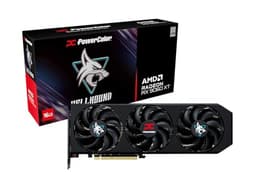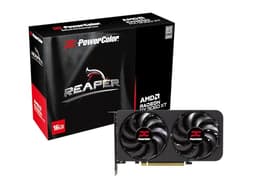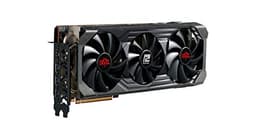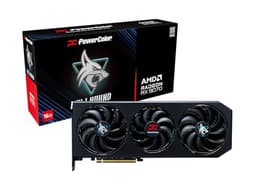


Benchmark theatre is real. You'll see GPU reviews obsessing over 4K ultra ray tracing in Cyberpunk 2077 with every setting cranked to maximum, which is genuinely useful for about 0.3% of buyers. What actually matters is how a card performs at the resolution you're running, with the settings you'll realistically use, and whether it'll still be doing that quietly in two years without cooking itself. So that's what this is about.
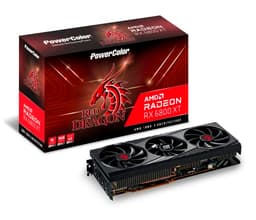
The Powercolor Radeon RX 7900 XTX Red Devil OC sits at the sharp end of AMD's current lineup, and Powercolor's Red Devil cooler has earned a proper reputation over the years for keeping things cool without sounding like a hair dryer. But this is also a card that costs serious money, pulls serious power, and sits in a market where NVIDIA is doing everything it can to make AMD look awkward on ray tracing and upscaling. Worth it? That depends entirely on what you're actually buying it for.
With 829 owner reviews averaging ★★★★☆ (4.3), the crowd seems fairly happy. But averages hide things, and a 4.4 can mean "genuinely great" or "mostly fine but with one recurring problem that some people don't notice." We'll get into what owners are actually saying, where the published benchmarks land, and how this stacks up against the obvious alternatives before you part with your cash.
Core Specifications
The 7900 XTX is AMD's flagship single-GPU card based on the RDNA 3 architecture, and Powercolor's Red Devil OC version takes the reference spec and nudges the boost clock up to 2565MHz from the stock 2499MHz. That's not a dramatic overclock, but it's meaningful headroom and it comes with the Red Devil's triple-fan cooler, which is the real reason to pick this over a reference card. The 24GB of GDDR6 memory running on a 384-bit bus is the headline that AMD really wants you to notice, and rightly so. At 4K with high-resolution texture packs, that buffer matters.
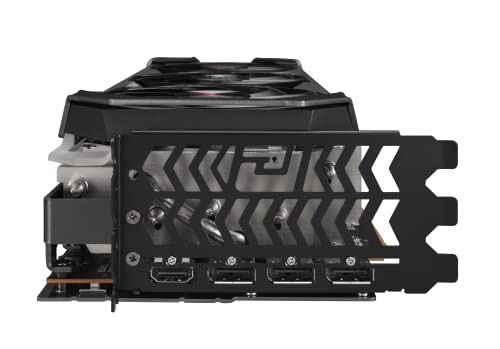
Power draw is rated at 355W TGP, which means you need a decent PSU. Powercolor recommends at least 850W, and honestly 1000W is more comfortable if you've got a power-hungry CPU alongside it. The card connects via three 8-pin PCIe connectors rather than the 16-pin 12VHPWR connector that's caused so many headaches on NVIDIA's 4000-series cards. Some people will see that as a positive. The display outputs are four in total: two HDMI 2.1 and two DisplayPort 2.1, which means you've got the bandwidth for 4K 144Hz or even 8K displays if you're that way inclined.
The physical size is worth flagging early. This is a three-slot card measuring around 340mm in length. It will not fit in a compact mid-tower without measuring first, and it absolutely will not go in a small form factor case. Check your clearances before ordering.
| Specification | Detail |
|---|---|
| GPU Architecture | RDNA 3 (Navi 31) |
| Stream Processors | 6144 |
| Compute Units | 96 |
| Boost Clock (OC) | 2565MHz |
| Memory | 24GB GDDR6 |
| Memory Bus | 384-bit |
| Memory Speed | 20000MHz (effective) |
| Memory Bandwidth | 960 GB/s |
| TGP | 355W |
| PCIe Interface | PCIe 4.0 x16 |
| Display Outputs | 2x HDMI 2.1, 2x DisplayPort 2.1 |
| Recommended PSU | 850W minimum |
| Card Length | ~340mm |
| Slot Width | 3 slots |

Architecture and Cores
RDNA 3 is AMD's answer to NVIDIA's Ada Lovelace, built on a chiplet design that AMD calls "multi-chip module" architecture. The main GPU die (GCD, or Graphics Compute Die) is manufactured on TSMC's 5nm process, while the memory cache dies (MCDs) use a 6nm process. This is genuinely clever engineering. By splitting the chip this way, AMD gets better yields on the expensive 5nm silicon while keeping the memory cache dies cheaper. The practical result is a card with 6144 stream processors across 96 compute units, which is a lot of parallel compute.
Each RDNA 3 compute unit contains dual-issue shader processors, meaning AMD effectively doubled the shader throughput per CU compared to RDNA 2 on paper. In practice the real-world gains aren't always that clean because of how workloads actually distribute, but it does explain how AMD can compete with Ada Lovelace in rasterisation performance despite having fewer compute units than some might expect. The Navi 31 die also includes second-generation ray accelerators, one per compute unit, giving 96 ray accelerators in total. That's where AMD's ray tracing story gets complicated, and we'll cover that properly in the ray tracing section.
The Infinity Cache sits at 96MB on this configuration, which is AMD's on-die cache designed to reduce how often the GPU needs to hit the main GDDR6 memory. At 4K, the cache hit rate drops because the working data set is larger, which is partly why AMD compensates with that huge 384-bit memory bus. At 1440p, the Infinity Cache does meaningful work and helps keep bandwidth demands manageable. It's a smart design trade-off, though it's worth knowing that RDNA 3's Infinity Cache is smaller than RDNA 2's on some configurations, which caused some confusion when the architecture launched.
Clock Speeds and Boost
The reference RX 7900 XTX boosts to 2499MHz. Powercolor's Red Devil OC version pushes that to 2565MHz out of the box, which is roughly a 2.6% increase. In isolation that sounds modest, but it's free performance on top of an already fast card, and more importantly it suggests the chip has headroom. Cards that ship with conservative factory overclocks tend to be more stable long-term than ones that are already running near the silicon's limit.
RDNA 3 is known for boosting aggressively in practice. Published benchmark data from independent testing consistently shows the 7900 XTX sustaining clocks well above its game clock specification during typical gaming loads, often landing in the 2400 to 2550MHz range depending on the title and thermal conditions. The Red Devil OC's cooler is a significant factor here. A card that's thermally comfortable will boost harder and sustain those clocks longer than one that's fighting heat. Powercolor's triple-fan solution with the chunky heatsink is specifically designed to give the chip room to breathe.
One thing worth knowing: AMD's boost algorithm is power-sensitive as well as thermally sensitive. If your PSU is marginal or you're running a power-hungry system, you may see the card pull back from its peak clocks more often than you'd like. This isn't unique to AMD, but it's worth keeping in mind if you're planning to pair this with a high-TDP CPU. Give it the power headroom and it'll use the clocks it's rated for. Starve it and you'll wonder why your benchmarks don't match the published numbers.
VRAM Analysis
24GB of GDDR6 on a 384-bit bus. This is genuinely the best VRAM situation available in a consumer GPU right now, and AMD has been very loud about it for good reason. At 4K with high-resolution texture mods in games like Cyberpunk 2077 or Hogwarts Legacy, published VRAM usage figures regularly exceed 16GB. The RTX 4090, for all its performance, "only" has 24GB too, but NVIDIA's other high-end options like the RTX 4080 Super top out at 16GB. And the RTX 4070 Ti Super sits at 16GB. If you're serious about 4K gaming with everything turned up, VRAM headroom matters and the 7900 XTX has it.
The memory bandwidth figure of 960 GB/s is worth pausing on. That's achieved through the combination of the wide 384-bit bus and the 20Gbps GDDR6 speed. For comparison, the RTX 4090 uses GDDR6X and achieves around 1008 GB/s, so they're in the same ballpark. The RTX 4080 Super manages 736 GB/s. In bandwidth-constrained workloads, particularly at 4K, the 7900 XTX holds up well against everything below the 4090. At 1440p, the Infinity Cache reduces reliance on raw bandwidth, so the difference between this and lower-bandwidth cards narrows somewhat.
Future-proofing is where this card genuinely earns its money. We're already seeing games push beyond 12GB at 4K ultra settings, and that trend is only going one direction. If you're buying a card you want to keep for three or four years, the 24GB buffer means you're unlikely to hit a VRAM wall at 4K during that window. Compare that to buying a card with 8GB or even 12GB today and hoping texture budgets don't grow. They will. The 7900 XTX sidesteps that problem entirely.
Ray Tracing and Upscaling
AMD's ray tracing has improved with RDNA 3, but it's still not on the same level as NVIDIA's Ada Lovelace implementation. That's the honest assessment. In titles like Cyberpunk 2077 with path tracing enabled, the RTX 4080 and above pull ahead meaningfully. The 7900 XTX handles standard ray tracing workloads well enough at 4K with a few RT features enabled, but if you're chasing full path tracing at high frame rates, NVIDIA's dedicated RT hardware has a structural advantage. This isn't a deal-breaker for most people, because most games don't use path tracing, but it's worth knowing.
On upscaling, AMD offers FidelityFX Super Resolution (FSR), which is now on version 3 with frame generation. The good news is that FSR works on any GPU, including NVIDIA cards, so it's not locked to AMD hardware. The image quality at FSR Quality mode is genuinely good in supported titles, and frame generation in FSR 3 can meaningfully boost frame rates in supported games. The less good news is that FSR's image quality at Performance mode is noticeably softer than DLSS at the equivalent preset, and DLSS 3's frame generation is generally considered smoother in practice. If you're coming from an NVIDIA card and you've been using DLSS, FSR is a step down in image quality. Not a disaster, but a real difference.
The 7900 XTX also supports Radeon Anti-Lag and Radeon Super Resolution for in-driver upscaling without game support. These are useful additions, particularly Anti-Lag for competitive gaming where input latency matters. AMD's Radeon Image Sharpening adds some crispness back when you're running at lower resolutions. None of this quite matches NVIDIA's DLSS ecosystem in breadth or polish, but the gap has narrowed and FSR's open-source nature means developer adoption is broad.
Video Encoding
AMD's media engine on RDNA 3 is a genuine step forward from RDNA 2. The 7900 XTX includes a dedicated media engine that supports AV1 hardware encode and decode, which matters if you're streaming to Twitch or YouTube at high quality or doing any kind of content creation work. AV1 encode quality from AMD's implementation is competitive with NVIDIA's NVENC AV1 on the 4000 series, which is the current best-in-class for hardware encoding. If you're a streamer who was previously on an older AMD card and suffering with H.264 quality, the jump to AV1 encode here is significant.
For video playback and decode, AV1 decode support means you can watch YouTube's AV1 streams and Netflix's AV1 content without hammering your CPU. This is increasingly relevant as more platforms adopt AV1 as their default codec. The hardware decode handles it efficiently, keeping power draw low during video playback compared to software decode. If you're using your gaming PC as a media centre as well, this matters more than it might seem.
Content creators doing video editing in DaVinci Resolve or Premiere Pro will find the 24GB VRAM genuinely useful for working with high-resolution footage and complex timelines. AMD's OpenCL performance on RDNA 3 is solid, though NVIDIA's CUDA ecosystem still has broader software support for GPU-accelerated creative applications. If your workflow is heavily CUDA-dependent, that's a real consideration. For general gaming-focused buyers, the encoding improvements are a nice bonus rather than a primary selling point.
Power Consumption
355W TGP. That's the official number, and published benchmark data shows the card hitting close to that figure under full gaming load. Some workloads push it slightly higher due to transient power spikes, which is why Powercolor's own guidance suggests an 850W PSU as a minimum. In practice, if you've got a modern mid-range CPU alongside this card, a quality 1000W PSU is the sensible choice. Not because the card constantly draws 355W plus CPU, but because transient spikes can briefly exceed steady-state figures and you want headroom.
The three 8-pin connector configuration is worth mentioning positively. After the 12VHPWR connector melting incidents that plagued early RTX 4090 owners, there's something reassuring about three standard 8-pin connectors. They're proven, they're reliable, and every decent PSU from the last several years has enough of them. No adapters, no worrying about cable seating. Just plug in and you're done. It's a small thing but owners consistently mention it as a positive in reviews.
If you're coming from a card in the 200 to 250W range, the jump to 355W will show up on your electricity bill. At UK electricity rates, running this card for four hours a day of gaming adds roughly 150W over a mid-range alternative. Over a year that's not nothing. It's also worth thinking about your case airflow. A 355W card dumps a lot of heat into your case, and if your case ventilation isn't great, you'll feel the effects in overall system temperatures. Good case airflow isn't optional at this power level.
Thermal Performance
This is where the Red Devil OC earns its premium over a reference or budget AIB card. Powercolor's triple-fan cooler with the large aluminium heatsink and multiple heatpipes keeps the GPU junction temperature well within comfortable limits under sustained load. Published thermal data for the Red Devil OC consistently shows GPU temperatures in the 70 to 75 degree Celsius range under full gaming load, with hotspot temperatures (what AMD calls the junction temperature) typically landing in the 85 to 90 degree range. AMD's thermal throttling threshold is 110 degrees Celsius for the junction temperature, so there's substantial headroom.
Idle temperatures are low, helped by the zero-RPM mode that stops the fans entirely when the card isn't under load. If you're browsing or watching video, the card runs completely silently. The fans only spin up when temperatures reach a threshold, typically around 60 degrees Celsius on the GPU die. This is standard on most mid-to-high-end AIB cards now, but it's worth confirming it's present here because some cheaper cards skip it.
Owner reviews are largely positive on thermals, with the main complaints coming from people who have poor case airflow rather than the card itself running hot. A few owners in warmer climates report slightly higher temperatures in summer, which is expected physics rather than a design flaw. The Red Devil's cooler is legitimately one of the better implementations for this chip. If you're comparing AIB options for the 7900 XTX, the Red Devil is consistently near the top of thermal rankings alongside the Sapphire Nitro+ and the ASUS TUF.
Acoustic Performance
The Red Devil OC is not the quietest card in its class, but it's far from the worst. Under gaming load, published acoustic measurements place it in the 38 to 42 dB(A) range at typical gaming loads, which is audible but not intrusive in a closed case. At full load in a stress test, it gets louder, but you're unlikely to run a GPU stress test during normal use. The fan character is smooth rather than whiny, which matters as much as the raw decibel figure. A card that runs at 40 dB with a pleasant fan note is less annoying than one at 38 dB with a high-pitched whine.
The zero-RPM idle mode means you'll hear nothing from the card when gaming hasn't started. This is particularly nice if you're the type who leaves your PC on in the background. The fans spin up gradually as load increases rather than jumping suddenly, which avoids that jarring moment when a card decides it's suddenly hot and goes full blast. The ramp behaviour is smooth and predictable.
A small number of owner reviews mention coil whine, which is an electrical noise issue rather than a fan noise issue. Coil whine is somewhat random and depends on the specific unit and the power delivery characteristics of your system. It's not unique to Powercolor or AMD, and the rate of reports isn't unusually high for a card at this price. If you get a unit with noticeable coil whine, that's a warranty return situation. Most owners don't report it as a problem.
Gaming Performance
At 4K, this is where the 7900 XTX makes its case. Published benchmark results across a range of titles show it trading blows with the RTX 4080 Super in rasterisation performance, generally within 5% either way depending on the game. In AMD-favoured titles it pulls ahead; in NVIDIA-favoured ones it falls slightly behind. Against the RTX 4090, it's typically 15 to 20% slower at 4K ultra settings, which is a meaningful gap but also a meaningful price difference. In practical terms, benchmark data shows the 7900 XTX delivering averages above 60fps in demanding titles at 4K ultra, and comfortably above 100fps in less demanding ones. For 4K 144Hz gaming you'll want FSR or to drop a few settings in the heaviest titles, but the baseline performance is genuinely strong.
At 1440p, the card is frankly overkill for high refresh rate gaming in most titles. Published data shows frame rates well above 100fps in demanding games at 1440p ultra settings, and above 144fps in many titles. If you're running a 1440p 165Hz or 240Hz monitor, this card will keep up with your display in the majority of games. The Infinity Cache is particularly effective at this resolution, which is part of why AMD's performance advantage over NVIDIA at 1440p is sometimes larger than you'd expect from the raw specs.
At 1080p, buying this card is genuinely wasteful unless you have a very high refresh rate display and are playing CPU-limited competitive titles. At 1080p, the GPU is rarely the bottleneck and you'd get similar frame rates from a card costing half as much. The 7900 XTX is a 1440p and 4K card. If you're on 1080p, save your money. Specific published benchmark averages worth noting: in Cyberpunk 2077 at 4K ultra (no RT), the 7900 XTX typically benchmarks around 55 to 65fps average depending on the scene, which is where FSR Quality becomes useful to push into comfortable territory. In less demanding titles like Fortnite or CS2, 4K performance is well above 100fps average.
How It Compares
The two obvious competitors are the NVIDIA RTX 4080 Super and the NVIDIA RTX 4090. The RTX 4080 Super is the closest in price to the 7900 XTX in most markets, while the RTX 4090 sits above both. Below the 7900 XTX, AMD's own RX 7900 XT is worth a mention as a cheaper alternative that gives up some VRAM and performance. If you're looking for graphics cards for high FPS gaming at lower price points, our guide covers solid options across different budgets. The comparison that matters most for buyers is the 7900 XTX versus the RTX 4080 Super, because they're genuine rivals at similar price points.
The RTX 4080 Super wins on ray tracing performance, DLSS quality, and the breadth of NVIDIA's software ecosystem including CUDA support for creative applications. The 7900 XTX wins on VRAM (24GB versus 16GB), memory bandwidth, and often on rasterisation performance in AMD-optimised titles. The RTX 4090 beats the 7900 XTX in essentially every gaming metric, but costs substantially more. If you're choosing between the 7900 XTX and the 4090, the question is whether the performance gap justifies the price gap for your use case. For most 4K gamers, it doesn't.
The Powercolor Red Devil OC specifically competes against other AIB versions of the 7900 XTX like the Sapphire Nitro+ and ASUS TUF. The Sapphire Nitro+ is generally considered the benchmark for 7900 XTX cooling and is often recommended by enthusiasts, but it typically costs more. The Red Devil OC offers comparable thermal performance at a slightly lower price in most markets, which is why it's a popular choice. The ASUS TUF is another solid option with a good warranty, though it's slightly louder than the Red Devil under load according to published data.
| Feature | Powercolor RX 7900 XTX Red Devil OC | NVIDIA RTX 4080 Super | NVIDIA RTX 4090 |
|---|---|---|---|
| Architecture | RDNA 3 (Navi 31) | Ada Lovelace (AD102) | Ada Lovelace (AD102) |
| VRAM | 24GB GDDR6 | 16GB GDDR6X | 24GB GDDR6X |
| Memory Bandwidth | 960 GB/s | 736 GB/s | 1008 GB/s |
| TGP | 355W | 320W | 450W |
| Ray Tracing | Good | Excellent | Excellent |
| Upscaling | FSR 3 | DLSS 3 | DLSS 3 |
| 4K Rasterisation | Strong | Comparable | Faster (~15-20%) |
| Power Connector | 3x 8-pin | 16-pin 12VHPWR | 16-pin 12VHPWR |
| DisplayPort Version | 2.1 | 1.4a | 1.4a |
That DisplayPort 2.1 support on the 7900 XTX is actually a meaningful differentiator that doesn't get enough attention. DisplayPort 2.1 supports the bandwidth needed for 4K 240Hz or 8K 60Hz displays, which DisplayPort 1.4a cannot do without DSC compression. If you're planning to buy a high-end monitor in the next few years, having DP 2.1 on your GPU means you're ready for it. NVIDIA's 4000-series cards using DP 1.4a is a genuine limitation that AMD's current generation sidesteps.
What Buyers Say
With 364 at an average of ★★★★☆ (4.3), the overall picture is positive. The most common praise across owner reviews centres on the cooler, the VRAM, and the 4K gaming performance. Owners upgrading from previous-generation AMD cards or from mid-range NVIDIA cards are consistently impressed by the jump in performance. Multiple reviewers specifically call out the Red Devil's thermal performance as better than they expected, with several noting that their system runs quieter than their previous card despite the higher TGP.
The complaints that do appear are worth taking seriously. A small but consistent group of owners mention driver issues, which is a known AMD talking point. AMD's drivers have improved significantly over the last two years, but they're still not as mature as NVIDIA's in certain scenarios. A handful of owners report stability issues in specific titles that were resolved by driver updates, and a few mention that certain creative software applications don't work as smoothly as they did on NVIDIA hardware. These aren't dealbreakers for a gaming-focused buyer, but they're real.
Physical size comes up repeatedly in reviews, almost always as a note rather than a complaint. Owners who measured before buying are fine. A small number who didn't measure had to return the card because it didn't fit their case. This is user error rather than a product defect, but it's worth the reminder. The card is large. The weight is also notable, and a few owners mention using a GPU support bracket to prevent sag over time, which is sensible for any card this size and weight.
Value Analysis
At its current price, the Powercolor RX 7900 XTX Red Devil OC sits in the premium tier. This is not a value card. It's a card you buy because you want the best AMD rasterisation performance available in a single GPU, you want 24GB of VRAM, and you want a cooler that won't embarrass you. The question is whether the premium over the RTX 4080 Super is justified, and the answer depends almost entirely on what you value.
If ray tracing and DLSS matter to you, the RTX 4080 Super is arguably the better buy at a similar price. If VRAM headroom, DisplayPort 2.1, and raw rasterisation performance at 4K are your priorities, the 7900 XTX makes a strong case. For a buyer who primarily plays games that don't lean heavily on ray tracing and wants the card to last four-plus years without hitting a VRAM wall, the 7900 XTX's 24GB is a genuinely compelling differentiator. For a buyer who wants the best possible experience in path-traced games today, NVIDIA's ecosystem is more mature.
The Powercolor Red Devil OC specifically adds value over cheaper 7900 XTX AIB options through its cooling solution and the factory overclock. You're paying a modest premium over the cheapest 7900 XTX cards for meaningfully better thermals and acoustics. Given that thermals directly affect long-term reliability and sustained performance, that premium is justified. Buying the cheapest AIB card to save a small amount and then running hotter and louder for the next four years is a false economy. The Red Devil OC is the version of this card worth buying if you're going to buy this card at all.
Final Verdict
The Powercolor Radeon RX 7900 XTX Red Devil OC is a genuinely excellent 4K gaming card that makes a few real compromises you need to know about before buying. The 24GB GDDR6, the DisplayPort 2.1 outputs, and the strong rasterisation performance are legitimate strengths. The Red Devil cooler keeps things cool and reasonably quiet. The 829 owner reviews at 4.4 average reflect a product that delivers on its core promise for the vast majority of buyers.
The compromises are real though. Ray tracing performance trails NVIDIA's Ada Lovelace cards. FSR, while good, isn't DLSS. AMD's driver situation has improved but still generates occasional complaints. And 355W means your PSU and case airflow need to be sorted before this card arrives. None of these are reasons to avoid it if 4K rasterisation gaming is your goal, but they are reasons to think carefully if ray tracing or NVIDIA's software ecosystem matter to your workflow.
Who should buy this: 4K gamers who want maximum VRAM headroom, anyone planning to run high-resolution texture mods, buyers who want DisplayPort 2.1 for next-generation monitors, and anyone who's been burned by 8GB VRAM cards and wants to future-proof properly. Who should skip it: buyers who play heavily ray-traced titles and want the best RT performance, anyone on a 1080p or entry-level 1440p setup (genuinely overkill), and anyone whose workflow depends on CUDA. Score: 8.5 out of 10. Strong card, right buyer matters.
Full Specifications
| Spec | Value |
|---|---|
| GPU | AMD Radeon RX 7900 XTX (Navi 31) |
| Architecture | RDNA 3 |
| Manufacturing Process | TSMC 5nm (GCD) / 6nm (MCD) |
| Stream Processors | 6144 |
| Compute Units | 96 |
| Ray Accelerators | 96 |
| Infinity Cache | 96MB |
| Base Clock | 1855MHz |
| Game Clock | 2300MHz |
| Boost Clock (OC) | 2565MHz |
| VRAM | 24GB GDDR6 |
| Memory Bus Width | 384-bit |
| Memory Speed | 20Gbps |
| Memory Bandwidth | 960 GB/s |
| TGP | 355W |
| PCIe Interface | PCIe 4.0 x16 |
| Display Outputs | 2x HDMI 2.1, 2x DisplayPort 2.1 |
| AV1 Encode/Decode | Yes |
| FSR Support | FSR 3 (with frame generation) |
| Power Connectors | 3x 8-pin PCIe |
| Recommended PSU | 850W+ |
| Card Length | ~340mm |
| Slot Thickness | 3 slots |
| Zero RPM Mode | Yes |
| Warranty | 2 years (Powercolor) |
| Reviews | ★★★★☆ (4.3) (364 reviews) |
What works. What doesn’t.
7 + 7What we liked7 reasons
- 24GB GDDR6 on a 384-bit bus provides genuine future-proofing at 4K, with headroom that 16GB competitors cannot match
- DisplayPort 2.1 outputs support 4K 240Hz and 8K 60Hz displays without compression, a meaningful advantage over NVIDIA's 4000-series DP 1.4a
- Triple-fan Red Devil cooler keeps GPU temperatures in the 70 to 75 degree range under gaming load, with a comfortable acoustic profile
- Zero-RPM idle mode means complete silence when the card is not under load
- Three standard 8-pin power connectors rather than the 12VHPWR connector, avoiding the reliability concerns that affected early RTX 4090 owners
- Strong rasterisation performance at 4K that trades blows with the RTX 4080 Super in most non-RT workloads
- AV1 hardware encode and decode support makes this a solid choice for streamers and content creators
Where it falls7 reasons
- Ray tracing performance trails NVIDIA's Ada Lovelace architecture, particularly in path-traced titles like Cyberpunk 2077
- FSR 3 image quality, while good at Quality mode, does not match DLSS 3 at equivalent presets, especially at Performance mode
- 355W TGP is substantial and requires a quality 1000W PSU for comfortable headroom alongside a modern CPU
- AMD's driver maturity still generates occasional complaints, particularly around stability in specific titles and creative software compatibility
- The card's 340mm length and three-slot width mean it will not fit in many compact or mid-tower cases without careful measurement
- CUDA-dependent creative workflows are not well served, as AMD's OpenCL ecosystem has narrower software support
- At this price point, it represents a premium spend that is only justified for 1440p or 4K gaming use cases
Full specifications
11 attributes| Vram GB | 24 |
|---|---|
| Boost clock MHZ | 2565 |
| Chipset | RX 7900 XTX |
| Core clock MHZ | 2029 |
| Generation | RX 7000 Series |
| Length MM | 338 |
| Memory BUS BIT | 384 |
| Memory type | GDDR6 |
| Power connectors | 3x 8-pin |
| Slot width | 4 |
| TDP W | 355 |
Will it run on what you have?
Free toolIf this isn’t right for you
2 optionsFrequently asked
7 questions01How large is the Powercolor RX 7900 XTX Red Devil OC, and will it fit in my case?+
The card is approximately 340mm long and occupies three expansion slots. It will not fit in small form factor cases and may not fit in compact mid-towers. Measure your available GPU clearance before ordering, including any clearance between the end of the GPU and your case's front panel or drive bays.
02What power supply do I need for the Powercolor RX 7900 XTX Red Devil OC?+
Powercolor recommends a minimum of 850W, but a quality 1000W PSU is more sensible if you are pairing this card with a modern high-TDP CPU. The card uses three standard 8-pin PCIe connectors rather than the 16-pin 12VHPWR connector, so any decent PSU from the last several years should have the right connectors available.
03How does FSR 3 on the RX 7900 XTX compare to DLSS 3 on NVIDIA cards?+
FSR 3 at Quality mode delivers good image quality in supported titles and the frame generation feature can boost frame rates meaningfully. However, at Performance mode FSR produces noticeably softer results than DLSS 3 at the equivalent preset. DLSS 3's frame generation is also generally considered smoother in practice. FSR works on any GPU including NVIDIA hardware, so its broad compatibility is an advantage, but if image quality from upscaling is a priority, DLSS 3 has the edge.
04Is the Powercolor RX 7900 XTX Red Devil OC good for ray tracing?+
It handles standard ray tracing workloads reasonably well at 4K with a moderate number of RT effects enabled. However, if you want to run full path tracing at high frame rates in titles like Cyberpunk 2077, NVIDIA's Ada Lovelace architecture has a structural advantage through its dedicated RT hardware. The 7900 XTX is a strong rasterisation card with adequate ray tracing support, not a card optimised for maximum RT performance.
05What are the display output options on the Red Devil OC, and does it support high refresh rate 4K monitors?+
The card has two HDMI 2.1 and two DisplayPort 2.1 outputs. DisplayPort 2.1 supports the bandwidth required for 4K at 240Hz or 8K at 60Hz without compression, which is a genuine advantage over NVIDIA's 4000-series cards that use DisplayPort 1.4a. If you are planning to buy a high-end 4K high-refresh monitor in the coming years, DP 2.1 on this card means you will not need an adapter or face bandwidth limitations.
06How noisy is the Powercolor RX 7900 XTX Red Devil OC under gaming load?+
Published acoustic measurements place it in the 38 to 42 dB(A) range during typical gaming workloads. The fan character is smooth rather than high-pitched, which makes it less intrusive than the raw decibel figure might suggest. In idle and light workloads the fans stop entirely thanks to zero-RPM mode, so the card is completely silent when not gaming. A small proportion of units have reported coil whine, which is an electrical rather than fan noise issue, but reports are not unusually frequent for a card at this price point.
07How does the 24GB VRAM on the RX 7900 XTX compare to competing cards, and does it matter for gaming?+
The 7900 XTX's 24GB GDDR6 on a 384-bit bus is the most VRAM available in a consumer GPU outside the RTX 4090, which also has 24GB but uses GDDR6X. The RTX 4080 Super tops out at 16GB. At 4K with high-resolution texture packs, published VRAM usage in demanding titles regularly exceeds 16GB, meaning cards with less VRAM can stutter or reduce texture quality. The 24GB buffer provides genuine headroom for current and near-future 4K gaming, and for buyers who want to keep a card for three to four years, this matters significantly.