If you play competitively, frame rate is everything. Whether you're grinding ranked matches in Valorant, CS2, Apex Legends, or Fortnite, a stable 144 fps or higher is the difference between winning and watching the kill-cam. This guide is aimed squarely at UK esports players and high-refresh-rate gamers who want the best frames per pound without spending beyond £400. The GPU market shifted noticeably in 2024 and into 2025: Nvidia's RTX 50-series has begun filtering into the sub-£400 bracket, AMD's RDNA 4 architecture arrived with the RX 9060 XT, and older-generation cards like the RTX 3060 and RX 6600 have dropped to genuinely compelling prices. We've assessed clock speeds, rasterisation performance at 1080p, driver stability, and real-world esports frame rates to find the six cards that give competitive players the most reliable high-fps experience for their money.
Quick Verdict
Best Overall: ASUS GeForce RTX 3060 12G DUAL V2 OCA proven 1080p esports powerhouse with 12 GB GDDR6, a 1867 MHz boost clock, and consistent triple-digit frame rates across every major competitive title. Its combination of DLSS 2, PCIe Gen 4, and a mature driver ecosystem makes it the safest, highest-value pick in this price range.
Best Value: XFX RX 6600 8GB SWIFT210 COREAt well under £250, the RX 6600 delivers RTX 3060-class esports performance in the most popular titles and is an outstanding budget entry point for 1080p high-refresh gaming.
The XFX RX 6600 SWIFT210 is the best-value card in this entire roundup. At well under £250, it delivers performance that is genuinely competitive with cards costing significantly more in the titles that matter most to esports players. Built on AMD's RDNA 2 architecture with the Navi 23 die, the RX 6600 was designed from the ground up as a 1080p card, and its 2491 MHz boost clock, 32 MB Infinity Cache, and 128-bit GDDR6 memory bus are all tuned for that resolution.
In CS2, the RX 6600 regularly exceeds 200 fps at 1080p on competitive settings. In Valorant, it pushes well past 250 fps on low settings. Apex Legends at high settings sits comfortably above 144 fps. These are the frame rates that matter for 144 Hz and 240 Hz monitor owners, and the RX 6600 delivers them at a price that leaves budget for a better monitor, CPU, or peripherals. The Infinity Cache architecture means the card punches above its memory bus width in 1080p scenarios, which is precisely why it competes so effectively despite a narrower bus than the RTX 3060.
XFX's SWIFT210 cooler is a dual-fan design with a reasonable heatsink for a card of this class. Thermals are acceptable, though not as impressive as Sapphire's Pulse or ASUS's DUAL cooler. Noise levels are low under typical esports loads, and the 132 W TDP means it runs on any PSU from 450 W upward. The port selection covers three DisplayPort 1.4 outputs and one HDMI 2.1, which is generous and allows multi-monitor setups without adapters.
The limitations are worth acknowledging. RDNA 2 does not support FSR 4's machine-learning upscaling (FSR 3 and below are still available), and AMD's ray tracing performance at this tier is weaker than Nvidia's. For esports players who never use ray tracing, neither limitation matters. The 8 GB GDDR6 buffer is adequate for all current competitive titles at 1080p. Driver maturity on RDNA 2 is excellent after several years of updates.
For players on a tight budget who want maximum frames per pound, the RX 6600 is the clear recommendation. It is not the newest or the most feature-rich card, but it does exactly what an esports GPU needs to do, and it does it at a price that is hard to argue with.
Verdict: The best-value card in this guide for pure 1080p esports performance. Unbeatable frames per pound at its price point.
Pros
- 2491 MHz boost clock and Infinity Cache deliver 200+ fps in CS2 and Valorant at well under £250
- 132 W TDP works with any PSU from 450 W and keeps electricity costs low
- Three DisplayPort 1.4 outputs allow multi-monitor competitive setups without adapters
Cons
- RDNA 2 does not support FSR 4 machine-learning upscaling, only older FSR versions
- 128-bit memory bus limits performance scaling if you push beyond 1080p
- XFX's cooler is functional but not as quiet or thermally impressive as Sapphire Pulse or ASUS DUAL
Buying Guide
What makes a good GPU for high FPS gaming?
A good GPU for high-fps esports gaming prioritises rasterisation throughput, clock speed, and frame time consistency over maximum resolution support or ray tracing capability. Most competitive titles are not ray tracing workloads: CS2, Valorant, Apex Legends, and Rocket League are all rasterisation-heavy games where raw shader throughput and memory bandwidth determine frame rates. A card with a high boost clock and a well-tuned memory subsystem, like the RTX 3060 12G with its 1867 MHz clock and 360 GB/s bandwidth, will outperform a technically newer card with lower clocks in these scenarios.
How much VRAM do you actually need for esports at 1080p?
For competitive gaming at 1080p in 2025, 8 GB of VRAM is sufficient for every major esports title. CS2, Valorant, Apex Legends, and Fortnite all run comfortably within 6 GB on high settings at 1080p. The RTX 3060's 12 GB is overkill for pure esports but provides headroom if you mix in single-player games with high-resolution texture packs. Cards with 32 GB of VRAM are completely unnecessary for esports: that level of VRAM is designed for AI workloads and professional content creation, not gaming. Even for 1440p or 4K gaming, 16 GB is more than adequate for any current title.
Is an RTX 4090 or RTX 5090 overkill for 1440p gaming?
Yes, categorically. The RTX 4090 and RTX 5090 are designed for 4K gaming at maximum settings and content creation workloads. At 1440p, they are GPU-limited only in the most demanding single-player titles, and even then, a mid-range card like the RTX 3060 or RX 6600 can deliver well over 144 fps in esports titles at 1440p. Spending over £1,000 on a GPU for 1440p esports gaming is not a rational use of budget: the money is far better spent on a higher-refresh-rate monitor, a faster CPU, or better peripherals.
What frame rates can cards in this price range achieve?
Cards in the sub-£400 bracket can achieve the following approximate frame rates in CS2 at 1080p on competitive settings: RTX 3060 12G around 220-250 fps, RX 9060 XT around 220-260 fps, RTX 5050 around 180-220 fps, RTX 5060 around 200-240 fps, RX 6600 around 190-230 fps, and RTX 3050 around 160-190 fps. In Valorant on low settings, all cards in this guide exceed 200 fps, with the top performers reaching 300+ fps. These figures assume a capable CPU; a bottlenecked processor will cap frame rates regardless of GPU performance.
Which card is best for a 144 Hz monitor versus a 240 Hz or 360 Hz monitor?
For a 144 Hz monitor, every card in this guide will deliver a smooth experience in all major esports titles. The RX 6600 is the best-value choice at this target. For a 240 Hz monitor, the RTX 3060 12G or RX 9060 XT are the safest bets, as both consistently exceed 240 fps in CS2 and Valorant on competitive settings. For a 360 Hz monitor, you will want the RTX 3060 12G or RX 9060 XT, and you should run the lowest possible in-game settings to maximise frame rates. The RTX 5050 and RTX 5060 can also reach 360 fps in Valorant with DLSS 4 enabled.
Does PCIe generation matter for gaming performance?
For gaming at 1080p and 1440p, the difference between PCIe 3.0, 4.0, and 5.0 is negligible in practice. GPU bandwidth to the CPU is not a bottleneck in any current esports title. All cards in this guide are compatible with PCIe 3.0 motherboards, though they may be rated for PCIe 4.0 or 5.0. Players on older platforms should not worry about PCIe generation when choosing a GPU for esports.
What power supply do you need for these cards?
The most power-hungry card in this guide is the RTX 3060 at 170 W. A quality 550 W PSU is sufficient for any card in this roundup paired with a modern mid-range CPU. The RX 6600 and RTX 3050 draw 130-132 W and will run comfortably on a 450 W PSU. For the RX 9060 XT, a 500 W PSU is recommended. Always choose a PSU from a reputable brand with an 80+ Bronze or higher efficiency rating to ensure stable power delivery under gaming loads.
Should you buy new or consider the second-hand market?
The second-hand GPU market in the UK can offer excellent value, particularly for cards like the RTX 3060 and RX 6600. However, buying used carries risks: unknown mining history, no manufacturer warranty, and potential driver issues from previous configurations. For esports players who need guaranteed stability, buying new from a reputable retailer with a clear returns policy is the safer choice. The prices in this guide reflect new retail pricing, and several of the cards are already at strong value propositions without needing to take the second-hand gamble.
For the majority of UK esports players looking for the best high-fps gaming under £400, the ASUS GeForce RTX 3060 12G DUAL V2 OC is the clear overall winner. Its combination of a 1867 MHz boost clock, 12 GB GDDR6 VRAM, mature Ampere drivers, and consistent 200+ fps performance in every major competitive title makes it the most reliable and well-rounded choice in this price bracket. It is not the newest architecture, but for esports, new architecture matters far less than proven, stable, high frame rates, and the RTX 3060 12G delivers those in abundance.
Players on a tighter budget should look seriously at the XFX RX 6600 8GB SWIFT210, which delivers RTX 3060-class performance in the most popular esports titles at a price that leaves room for other upgrades. It is the best-value card in this guide by a meaningful margin.
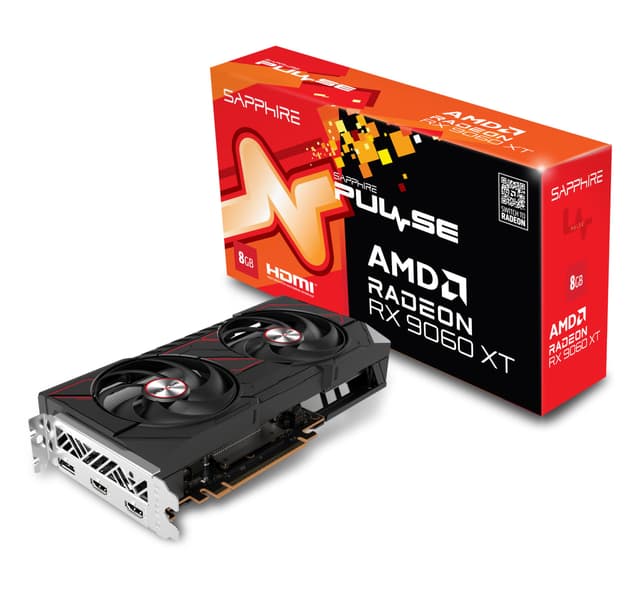
Those who want the most forward-looking option and can stretch to the budget ceiling should consider the Sapphire Pulse RX 9060 XT, which brings RDNA 4 efficiency, 16 GB VRAM, and DisplayPort 2.1 to the sub-£400 bracket. It is the card most likely to age well as game requirements evolve. For small form factor builders, the ASUS RTX 5060 LP BRK is the only serious option, combining Blackwell features with a low-profile design that fits cases no other card in this guide can.