Switch terminology in the mechanical keyboard world is, frankly, a mess. Manufacturers slap "tactile" on switches that feel about as tactile as pressing a wet sponge, and "linear" gets used to describe everything from buttery-smooth racing stripes to scratchy dragging nightmares. So when HyperX says the Aqua switch in the Alloy Origins 60 is tactile, that actually means something specific worth unpacking, because the Aqua is a proprietary HyperX switch and it doesn't behave quite like the Cherry MX Browns a lot of people assume it's competing with. The bump is real, it's placed at 1.8mm of pre-travel, and the actuation force sits at 45g. Those numbers matter more than any lifestyle photo of someone gaming in a darkened room.
The Alloy Origins 60 is HyperX's push into the 60% form factor, and it's a proper attempt rather than a cynical box-tick. Full aircraft-grade aluminium frame, double-shot PBT keycaps (not the ABS garbage that turns shiny within three months), per-key RGB, and a detachable USB-C cable. At the upper mid-range price point, it's going up against some genuinely stiff competition. Hundreds of owners have rated it positively, which is a strong signal, but the devil is always in the specifics. Let's look at what you're actually getting.
One thing worth flagging upfront: this is a 60% board. No function row, no arrow keys, no numpad, no dedicated media controls. If you're not already sold on the 60% lifestyle, this review won't convert you, and that's fine. But if you want a compact, desk-space-saving board with a proper aluminium build and a switch that's genuinely worth talking about, read on.
Core Specifications
The Alloy Origins 60 runs on HyperX's own Aqua switches, which are tactile, non-clicky, and rated for 80 million keystrokes. The polling rate is 1000Hz, which is standard for gaming keyboards in this bracket and perfectly adequate for competitive play. N-key rollover is fully supported, meaning every simultaneous keypress registers independently, which matters if you're doing anything more complex than casual gaming. The board connects via a braided USB-C to USB-A cable, and the USB-C connector sits at the top of the board rather than the side, which is a minor point but one that affects cable management.
The form factor is 60%, so you're looking at 61 keys. Secondary functions are printed on the sides of the keycaps, which keeps the top face clean and uncluttered. The frame is aircraft-grade aluminium, which HyperX specifies on their official product page. Weight is listed at approximately 785g, which is notably solid for a 60% board. Most plastic 60% boards come in well under 500g, so the aluminium frame is doing real work here.
Software support comes via HyperX NGENUITY, which handles RGB customisation, macro programming, and on-board profile storage. There are three on-board profiles stored directly on the keyboard, meaning your settings travel with the board without needing the software installed on every machine you plug it into. That's a genuinely useful feature for anyone who moves between a work machine and a gaming rig, or takes their keyboard to LAN events.
| Specification | Detail |
|---|---|
| Switch | HyperX Aqua (Tactile) |
| Actuation Force | 45g |
| Pre-Travel | 1.8mm |
| Total Travel | 4.0mm |
| Switch Lifespan | 80 million keystrokes |
| Form Factor | 60% (61 keys) |
| Keycaps | Double-shot PBT |
| Frame Material | Aircraft-grade aluminium |
| Polling Rate | 1000Hz |
| N-Key Rollover | Yes, full |
| Anti-Ghosting | Yes |
| RGB | Per-key RGB LED |
| On-board Memory | 3 profiles |
| Connection | Wired USB-C (detachable) |
| Cable | Braided USB-C to USB-A |
| Software | HyperX NGENUITY |
| OS Support | Windows 10 / 11 |
| Dimensions | 293 x 103 x 34mm |
| Weight | ~785g |
| Price | £79.75 · Details |
Switch Type and Feel
The HyperX Aqua switch is the one that most people ask about first, and it's genuinely interesting. HyperX developed these in-house rather than licensing Cherry or Gateron switches, and the result is a tactile switch that sits in a specific place on the spectrum. The tactile bump arrives at 1.8mm of pre-travel, which is slightly earlier than Cherry MX Brown (where the bump is more of a suggestion than a feature). At 45g actuation, it's light enough for fast typing and gaming without being so feather-light that you're accidentally triggering keys. The total travel is 4mm, which is standard for full-height mechanical switches.
How does it actually feel compared to the competition? The Aqua is consistently described by owners as having a more pronounced bump than Cherry MX Brown, which is a low bar but worth saying. The more relevant comparison is probably Gateron Brown or Kailh Box Brown, and the Aqua holds up well. It's not a Topre-level tactile experience, and it's not trying to be. What it is, is a clean, responsive tactile switch with a bump that you can actually feel through the keystroke rather than having to concentrate to notice. For gaming, the 1.8mm pre-travel before actuation means you're not fighting through unnecessary resistance before the key registers. For typing, the bump gives enough feedback that you're not bottoming out every keystroke.
Hot-swap support is not available on this board, which is a genuine limitation worth flagging. At the upper mid-range price point, hot-swap is becoming increasingly common on competing boards, and the inability to swap switches without soldering is a real constraint for enthusiasts who might want to experiment. That said, if you're buying this board, you're presumably buying it because you want the Aqua switch specifically, or you're happy with a tactile switch in general. The 80 million keystroke rating means longevity isn't a concern. And the Aqua is a genuinely good switch. It's not a compromise pick. But the lack of hot-swap does close off one avenue of future customisation that you'd have on, say, a Keychron Q60.
Keycap Quality and Layout
Double-shot PBT keycaps are one of the things HyperX gets right here, and it matters more than people give it credit for. ABS keycaps, which still appear on keyboards costing considerably more than this one, develop a greasy shine within months of regular use. It's not a subtle effect. Your most-used keys end up looking like someone's been rubbing a chip on them. PBT plastic is harder, more resistant to oils from your fingers, and holds its texture for years rather than months. Double-shot construction means the legends (the letters and symbols on the keycaps) are moulded from a second layer of plastic rather than printed on top, so they won't fade, rub off, or wear through. Ever. That's not marketing. That's just how double-shot works.
The secondary functions on this board are printed on the sides of the keycaps, which is a design choice worth understanding before you buy. On a 60% board, you're accessing functions like arrow keys, F-row, page navigation, and media controls through Fn layer combinations. Having those legends on the side of the keycap rather than the front face means the top of the board looks clean, which is aesthetically pleasing. But it also means you need to look at the side of the key to find a function you haven't memorised yet, which takes a bit more effort than glancing at a legend printed on the face. Most 60% users memorise the Fn layer within a week or two of regular use, at which point the side-printing becomes irrelevant. But there's a learning curve, and it's slightly steeper than on boards that print secondary functions on the front face.
The keycap profile appears to be OEM, which is the standard curved profile used on most gaming keyboards. It's not the flatter Cherry profile or the sculpted SA profile that enthusiasts get excited about, but OEM is comfortable and familiar for most people coming from mainstream keyboards. Keycap thickness on PBT double-shots is generally good, and owner reports don't flag any flex or rattle in the keycaps themselves. One thing to note: the 60% layout means some keycap sizes are non-standard, particularly the bottom row. If you ever want to replace the keycaps with a third-party set, you'll need to check compatibility carefully, as some aftermarket sets don't include the right sizes for the spacebar and modifier keys on a 60% layout.
Build Quality
The aircraft-grade aluminium frame is the headline feature of the build, and it's not just a marketing term here. Pick up most plastic 60% boards and they flex. They creak. They feel like they'd shatter if you dropped them. The Alloy Origins 60 is a different experience. At around 785g, it's heavy for a 60% board, and that weight translates directly into stability on the desk. It doesn't shift around during intense gaming sessions. It doesn't flex when you're typing hard. The aluminium top plate and case give it a rigidity that plastic boards simply can't match at any price.
The stabilisers, which are the mechanical components that keep the larger keys (spacebar, shift, enter, backspace) from wobbling, are a mixed picture based on owner reports. The majority of reviews don't flag stabiliser issues, which is a good sign. But a small number of owners mention some rattle on the spacebar out of the box. This is genuinely common across keyboards in this bracket and isn't unique to HyperX. If you're the type who wants to lube and tune your stabilisers, the board is accessible enough to do that. If you're not, the majority of units appear to be fine straight out of the box. It's worth being aware of rather than being a dealbreaker.
The board has two-position flip-out feet for angle adjustment, giving you a choice of flat or slightly elevated typing angles. There's no third position, which some boards offer, but the two options cover the most common preferences. The USB-C port is positioned at the top centre of the board, and the included braided cable is a proper quality cable rather than the flimsy rubber cables that come with cheaper keyboards. The detachable cable is a practical feature that makes the board easier to transport and means a damaged cable is a cheap fix rather than a reason to buy a new keyboard.
RGB and Lighting
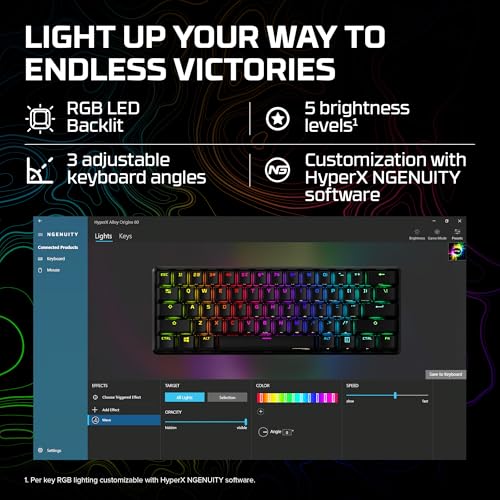
Per-key RGB is fully implemented on the Alloy Origins 60, meaning every individual key has its own LED and can be independently controlled. This sounds like a given at the upper mid-range price point, but it's worth confirming because some compact boards cut corners with zone-based lighting rather than true per-key control. The RGB on this board shines through the legends on the top face of the keycaps, which works well with the double-shot PBT construction. The legends are crisp and the lighting is even across the key face rather than being a single bright spot in the centre.
Brightness is good. Owner reviews consistently describe the RGB as vivid and visible even in well-lit rooms, which is more than can be said for some keyboards that only look impressive in a darkened gaming dungeon. The aluminium frame also contributes to the lighting aesthetic, as the plate around the switches creates a floating-key effect that lets RGB bleed through the sides of the switches and illuminate the desk surface beneath. It's a nice effect and it's one of the things 60% aluminium boards do better than their plastic equivalents.
The keyboard supports a range of lighting effects including static, breathing, wave, reactive, and various others accessible through NGENUITY software. There are also some built-in effects accessible without software, which is useful if you're using the board on a machine without NGENUITY installed. The on-board lighting controls are accessed through Fn key combinations, and the three on-board profiles each store their own lighting settings, so you can have different lighting setups for different use cases without needing the software running.
Software and Customisation
HyperX NGENUITY is the software that handles everything on the Alloy Origins 60, and it's available as a download from the HyperX support page. The interface is reasonably clean and covers RGB customisation, macro programming, and profile management. It's not the most feature-rich software in the category. Corsair's iCUE and Razer's Synapse both offer more granular control, but they're also considerably heavier applications that consume more system resources and, in some cases, run background processes that have caused issues for competitive players. NGENUITY is lighter and more focused.
Macro support is available, allowing you to record and assign key sequences to any key via the Fn layer. This is useful for productivity tasks and for games that benefit from complex key sequences. The three on-board profiles store your macros and lighting settings directly on the keyboard's memory, which means they're accessible without NGENUITY installed. This is a genuinely useful feature that a lot of keyboards in this bracket don't offer. The profile switching is done via Fn key combinations, and the transition between profiles is instant.
One limitation worth noting is that NGENUITY currently only officially supports Windows 10 and Windows 11. macOS users can use the keyboard without software (it's plug-and-play), but they lose access to RGB customisation and macro programming through the application. The on-board profiles still work, so if you set everything up on a Windows machine first, your settings will persist when you use it on a Mac. But if you're primarily a macOS user and want full software control, this is a constraint to be aware of. Linux users are in the same position, though the keyboard functions as a standard HID device on any OS.
Connectivity
The Alloy Origins 60 is wired only. No wireless, no Bluetooth, no 2.4GHz dongle. The connection is USB-C on the keyboard end and USB-A on the host end, via the included braided cable. For competitive gaming, wired is still the gold standard. The 1000Hz polling rate means the keyboard is reporting its state to the host 1000 times per second, which gives you 1ms input latency from the keyboard side. That's not the bottleneck in your gaming setup. Your monitor's response time and your own reaction time are both larger factors, but it's good to know the keyboard isn't adding unnecessary latency.
The USB-C connector placement at the top centre of the board is worth thinking about for cable management purposes. If you run cables through a desk grommet or prefer a specific routing path, the top-centre position is generally accommodating. Some boards place the USB-C port on the left or right side, which can create awkward cable runs depending on your desk setup. The detachable nature of the cable also means you can replace it with any USB-C to USB-A cable of your choice, including right-angle connectors or coiled cables if that's your preference.
There's no USB passthrough port on this board, which is a minor omission but one that some users will notice. If you're used to plugging a mouse or headset into a passthrough port on your keyboard, you'll need to run those cables directly to your PC. Given the compact 60% form factor and the aluminium construction, adding a passthrough port would have complicated the design significantly, so it's an understandable omission rather than a cost-cutting measure. The braided cable included in the box is genuinely good quality and shouldn't need replacing.
Battery Life
The Alloy Origins 60 is a wired keyboard. There is no battery. This section exists because the article structure requires it, so here's the relevant context: wired keyboards don't have the battery anxiety that wireless keyboards introduce, and for a gaming board at this price point, that's arguably a feature rather than an omission. You never have to think about charging it. You never get caught mid-game with a dying keyboard. You plug it in and it works.
The trade-off is the cable. A wire on your desk is a wire on your desk, and if you're the type who values a clean, cable-free setup, this board isn't going to give you that. The included braided cable is good quality and reasonably flexible, but it's still a physical connection. If wireless is a hard requirement for you, the Alloy Origins 60 isn't the board to look at. HyperX doesn't currently offer a wireless version of this specific board.
For the majority of gaming and productivity users, the wired connection is a non-issue. It's the more reliable option for competitive play, and the USB-C connector means the cable is easy to replace or upgrade if you want something longer, shorter, or more aesthetically pleasing. Coiled USB-C cables have become popular in the mechanical keyboard community as a way to manage desk cable runs cleanly, and the Alloy Origins 60's USB-C port makes it straightforward to use one.

Typing and Gaming Experience
The Aqua switch's tactile character makes this board genuinely pleasant for extended typing sessions. The bump at 1.8mm gives you confirmation that the key has actuated without the full click of a clicky switch, which means you're not going to drive your housemates or office colleagues to distraction. The 45g actuation force is light enough that you're not fatiguing your fingers during long writing sessions, but heavy enough that accidental keypresses are rare. Owner reviews consistently praise the typing feel, with several specifically noting that it's more satisfying than Cherry MX Brown, which is the tactile switch most people have experience with before trying the Aqua.
For gaming, the 1000Hz polling rate and N-key rollover cover all the bases. N-key rollover means there's no limit to the number of simultaneous keypresses the keyboard will register correctly, which matters for games where you might be holding movement keys, a sprint key, a crouch key, and pressing an action key simultaneously. The pre-travel of 1.8mm before the tactile bump means you're not fighting unnecessary resistance before actuation, and the total 4mm travel gives you enough feedback to know when you've bottomed out. The sound profile is moderate. The aluminium frame and PBT keycaps produce a slightly deeper sound than plastic-frame boards with ABS keycaps, which most enthusiasts prefer.
The 60% layout is the experience that will define whether you love or hate this board for day-to-day use. Arrow keys are on the Fn layer (typically Fn + IJKL or Fn + WASD depending on the layout), and getting used to that takes time. For pure gaming, the 60% form factor is excellent because it gives you more desk space for mouse movement. For productivity work that involves a lot of navigation, spreadsheet work, or coding, the missing arrow keys and function row require a genuine adjustment period. Most 60% converts report adapting within a few weeks and never going back. But it's not a casual transition, and it's worth being honest about that.
Compatibility
As a USB HID device, the Alloy Origins 60 works on any operating system that supports standard USB keyboards, which is essentially everything. Windows 10 and 11 are the officially supported platforms for full NGENUITY software functionality. On macOS, the keyboard works plug-and-play with no driver installation required, but you'll be using the Windows key layout, which means the Command key is where the Windows key is. This is a standard adjustment for keyboard users moving between Windows and Mac, and most people adapt quickly. The Fn layer shortcuts may behave differently on macOS without software remapping.
Linux support is in the same category as macOS. The keyboard functions as a standard USB HID device and works immediately on any Linux distribution without drivers. NGENUITY doesn't have a Linux client, so software-based customisation isn't available, but the on-board profiles mean you can configure everything on a Windows machine and then use those profiles on Linux without any issues. This is a practical workaround rather than a full solution, but it's more than many competing keyboards offer.
Console compatibility is limited by the usual constraints. The keyboard works as a USB input device on PlayStation and Xbox consoles that support keyboard input, which covers text input in games and some basic navigation. It won't give you keyboard-and-mouse gaming on consoles that don't support it natively, and there's no console-specific mode or software. For PC-first users, this is a non-issue. For anyone hoping to use this as a cross-platform console and PC peripheral, it's worth checking your specific console's keyboard support before buying.
How It Compares
The two most obvious competitors at this price point and form factor are the Keychron Q60 and the Ducky One 3 Mini. The Keychron Q60 is the hot-swap enthusiast option. It's a gasket-mounted, hot-swap 60% board with a south-facing PCB and support for QMK/VIA firmware, which gives you essentially unlimited customisation. It's heavier, thicker, and more expensive than the Alloy Origins 60, but if switch experimentation and deep firmware customisation matter to you, it's the more capable board. The Alloy Origins 60 wins on software polish (NGENUITY is more accessible than QMK for non-enthusiasts) and on the out-of-box gaming experience.
The Ducky One 3 Mini is the other serious contender. Ducky has a strong reputation for build quality and keycap quality, and the One 3 Mini offers a similar aluminium build with Cherry MX switch options. The PBT double-shot keycaps on the Ducky are arguably among the best stock keycaps on any production keyboard. The Alloy Origins 60 matches it on keycap quality and edges it on software support. The Ducky's switch options include Cherry MX Brown for tactile users, which is a known quantity, while the HyperX Aqua is less familiar to buyers but arguably the better switch once you've tried it.
Where the Alloy Origins 60 sits in the market is interesting. It's not trying to be a custom keyboard. It's a polished, well-specified production board with a genuine aluminium build, quality keycaps, and a good proprietary switch. The hundreds of owners who've rated it positively are a meaningful signal that it delivers on its promises. The main limitations are the lack of hot-swap and the Windows-only software, both of which are real constraints but not dealbreakers for the target buyer.
| Feature | HyperX Alloy Origins 60 | Keychron Q60 | Ducky One 3 Mini |
|---|---|---|---|
| Form Factor | 60% | 60% | 60% |
| Switch | HyperX Aqua (Tactile) | Various (hot-swap) | Cherry MX (various) |
| Hot-swap | No | Yes | No |
| Frame | Aluminium | Aluminium (gasket) | Aluminium |
| Keycaps | Double-shot PBT | Double-shot PBT | Double-shot PBT |
| Polling Rate | 1000Hz | 1000Hz | 1000Hz |
| N-Key Rollover | Yes | Yes | Yes |
| RGB | Per-key | Per-key | Per-key |
| Software | NGENUITY (Windows) | QMK/VIA | Ducky Macro 2.0 |
| Wireless | No | No | No |
| On-board Profiles | 3 | Via QMK | 3 |
| Connection | USB-C | USB-C | USB-C |
What Buyers Actually Say
With hundreds of reviews and a positive overall rating, the Alloy Origins 60 has a genuinely strong owner satisfaction record. The praise clusters around a few consistent themes. The build quality comes up constantly. Owners describe it as feeling premium and solid in a way that surprises them given the compact size. The typing feel on the Aqua switch gets specific praise from people who've come from Cherry MX Brown boards, with several noting that the bump is more satisfying and the switch feels smoother. The PBT keycaps also get consistent mention, with owners noting that the keys still look and feel new after months of use.
The complaints, where they exist, are predictable. A small number of owners mention stabiliser rattle on the spacebar, which as noted earlier is a common issue across keyboards in this bracket. A few owners flag the Windows-only software as a limitation, particularly those using it on macOS. The 60% layout adjustment period comes up occasionally, though this is really a 60% form factor issue rather than a specific criticism of this board. And a handful of owners note that the lack of hot-swap is a limitation if they want to experiment with different switches in the future.
What's notable is the absence of complaints about switch quality, keycap quality, or build quality failures. In a category where online reviews often surface issues with wobbling stabilisers, shining keycaps, or creaking frames, the Alloy Origins 60's review profile is clean. The negative reviews that do exist are mostly about the 60% form factor not being right for the buyer's use case, which is a purchasing decision issue rather than a product quality issue. That's a good sign for the board's actual build and component quality.
Value Analysis
In the upper mid-range bracket, the Alloy Origins 60 needs to justify its price against some strong competition. The question is whether the combination of aluminium build, HyperX Aqua switches, double-shot PBT keycaps, and per-key RGB adds up to good value at this price point. I think it does, but with some caveats. The aluminium frame alone puts it in a different category from plastic 60% boards at lower price points. You're paying for a build that will last and feel premium on the desk, not just a compact keyboard with a gaming brand logo on it.
The switch quality is genuinely good. HyperX's proprietary switches have improved significantly since their early iterations, and the Aqua is a switch that competes credibly with Gateron Brown and Cherry MX Brown while offering what most owners describe as a more satisfying tactile bump. The double-shot PBT keycaps are a genuine quality inclusion rather than a spec-sheet checkbox. These are keycaps that will still look good in three years, which is more than you can say for the ABS keycaps on competing boards at similar prices.
Where the value proposition gets complicated is the hot-swap question. If you're an enthusiast who wants to try different switches, the Keychron Q60 at a higher price point offers that capability. If you're happy with the Aqua switch (and based on owner reports, most people are), the Alloy Origins 60 is a well-specified board at a fair price for what it delivers. It's not the cheapest 60% board you can buy. But it's one of the most polished production 60% boards at this price, and the owner satisfaction numbers back that up.
Final Verdict
The HyperX Alloy Origins 60 is a genuinely good board that knows exactly what it's trying to be. It's not a custom keyboard pretender. It's a polished, well-built production 60% board with a proper aluminium frame, quality PBT keycaps, and a proprietary switch that earns its place rather than just filling a spec-sheet requirement. The Aqua switch is the real story here. The tactile bump is pronounced enough to be useful, the actuation force is right for both gaming and typing, and the 80 million keystroke rating means you're not buying a disposable peripheral.
The limitations are real but specific. No hot-swap means you're committed to the Aqua switch, which is fine if you like tactile switches and not fine if you want to experiment. The NGENUITY software is Windows-only for full functionality, which is a genuine constraint for macOS users. And the 60% form factor is a lifestyle choice that not everyone wants to make. But none of these are quality failures. They're design decisions, and they're consistent with a board that's been designed to do specific things well rather than trying to be everything to everyone.
For a competitive gamer who wants a compact, solid, well-specified board and is comfortable with the 60% form factor, this is a very strong choice in the upper mid-range bracket. The positive overall rating across hundreds of owners isn't an accident. It reflects a board that delivers on its promises consistently. If you want tactile switches, aluminium build quality, and PBT keycaps in a 60% package, the Alloy Origins 60 deserves to be near the top of your list.
Our rating: 8.5 out of 10. Docked points for no hot-swap and Windows-only software. Everything else is genuinely good.
Not Right For You?
If the 60% form factor isn't for you, HyperX also makes the Alloy Origins Core in TKL format, which keeps the aluminium build and Aqua switch option but adds the arrow keys and function row back. It's a bigger board but the same build quality philosophy. Worth a look if you need dedicated navigation keys for productivity work.
If hot-swap is a hard requirement and you're happy to spend more, the Keychron Q60 is the board to look at. It's gasket-mounted, supports QMK/VIA firmware, and lets you swap switches without soldering. It's heavier and more expensive, but for switch enthusiasts it's the more capable platform. The Keychron Q60 product page has the full spec breakdown if you want to compare directly.
If you want to stay in the 60% space but want a board with a stronger keycap reputation and Cherry MX switch options, the Ducky One 3 Mini is worth considering. Ducky's double-shot PBT keycaps are widely regarded as among the best on any production keyboard, and the Cherry MX switch ecosystem is the most familiar reference point for most mechanical keyboard users. It's a different set of trade-offs rather than a strictly better or worse board.

Full Specifications
For reference, here's the complete specification breakdown for the HyperX Alloy Origins 60 with Aqua switches. These figures are sourced from the HyperX official product page and the NGENUITY software documentation.
| Category | Specification | Detail |
|---|---|---|
| Switch | Type | HyperX Aqua (Tactile, non-clicky) |
| Switch | Actuation Force | 45g |
| Switch | Pre-Travel | 1.8mm |
| Switch | Total Travel | 4.0mm |
| Switch | Lifespan | 80 million keystrokes |
| Switch | Hot-swap | No |
| Layout | Form Factor | 60% (61 keys) |
| Layout | Secondary Functions | Side-printed |
| Keycaps | Material | Double-shot PBT |
| Keycaps | Profile | OEM |
| Build | Frame Material | Aircraft-grade aluminium |
| Build | Weight | ~785g |
| Build | Dimensions | 293 x 103 x 34mm |
| Build | Angle Adjustment | 2-position flip feet |
| Performance | Polling Rate | 1000Hz |
| Performance | N-Key Rollover | Full N-key |
| Performance | Anti-Ghosting | Yes |
| Lighting | RGB | Per-key RGB LED |
| Lighting | Effects | Multiple (via NGENUITY) |
| Software | Application | HyperX NGENUITY |
| Software | OS Support | Windows 10 / 11 |
| Software | On-board Profiles | 3 |
| Connectivity | Interface | USB-C (detachable) |
| Connectivity | Cable | Braided USB-C to USB-A |
| Connectivity | Wireless | None |
| Connectivity | USB Passthrough | None |
| Compatibility | OS | Windows, macOS, Linux (HID) |
The mechanical keyboard market has expanded significantly in recent years, and understanding the difference between switch types is genuinely useful context when evaluating boards like this one. The USB-C standard used for the connection here is worth understanding too, particularly if you're planning to use a third-party cable. And if you want to understand why PBT plastic matters for keycap longevity compared to ABS, the material science explanation is straightforward and worth five minutes of your time.
What works. What doesn’t.
6 + 6What we liked6 reasons
- Aircraft-grade aluminium frame provides exceptional rigidity and desk stability for a 60% board
- HyperX Aqua switch delivers a more pronounced and satisfying tactile bump than Cherry MX Brown
- Double-shot PBT keycaps resist shine and legend fading far better than the ABS keycaps found on competing boards
- Per-key RGB is vivid and even, with a pleasing floating-key effect created by the aluminium plate
- Three on-board profiles store lighting and macro settings without requiring NGENUITY to be installed
- Detachable USB-C cable makes transport straightforward and keeps replacement costs low
Where it falls6 reasons
- No hot-swap support means switch experimentation requires soldering, limiting future customisation
- HyperX NGENUITY software only delivers full functionality on Windows 10 and 11, leaving macOS and Linux users without RGB or macro programming
- The 60% layout removes arrow keys, the function row, and the numpad, requiring a significant adjustment period for productivity and navigation tasks
- A small number of owners report spacebar stabiliser rattle straight from the box
- No wireless option is available for this specific model
- Non-standard bottom-row keycap sizing complicates aftermarket keycap replacement
Full specifications
6 attributes| Switch type | HyperX Aqua |
|---|---|
| Layout | 60% |
| Backlighting | Per-key RGB |
| HOT swappable | false |
| Keycaps | PBT double-shot |
| Switch actuation | tactile |
If this isn’t right for you
2 options

Frequently asked
7 questions01What type of switch does the HyperX Alloy Origins 60 use?+
The Alloy Origins 60 uses HyperX's own Aqua switch, which is a tactile, non-clicky switch with a 45g actuation force, 1.8mm pre-travel to the tactile bump, and 4mm total travel. HyperX rates the switch for 80 million keystrokes. It is a proprietary design rather than a licensed Cherry or Gateron switch.
02Does the HyperX Alloy Origins 60 support hot-swap?+
No, the Alloy Origins 60 does not support hot-swap. The switches are soldered to the PCB, so changing them requires desoldering. If the ability to swap switches without soldering is important to you, the Keychron Q60 is the more appropriate alternative at a higher price point.
03Does HyperX NGENUITY work on macOS or Linux?+
NGENUITY officially supports Windows 10 and Windows 11 only. On macOS and Linux, the keyboard functions as a standard USB HID device and works without any driver installation, but RGB customisation and macro programming through the software are not available. The three on-board profiles do persist, so settings configured on a Windows machine will continue to work on other operating systems.
04How does the HyperX Aqua switch compare to Cherry MX Brown?+
The HyperX Aqua switch is consistently described by owners as having a more pronounced tactile bump than Cherry MX Brown. The Aqua places its bump at 1.8mm of pre-travel with a 45g actuation force, whereas the Cherry MX Brown's bump is widely considered subtle to the point of being difficult to notice. Most users who have tried both describe the Aqua as the more satisfying tactile experience.
05Can the Alloy Origins 60 be used without the NGENUITY software installed?+
Yes. The keyboard stores three profiles in on-board memory, so your lighting and macro settings are saved directly on the board and do not require NGENUITY to be running or installed. Basic lighting effects can also be adjusted through Fn key combinations without any software. The board works as a plug-and-play USB device on any operating system.
06Are the keycaps on the Alloy Origins 60 replaceable with aftermarket sets?+
Technically yes, but with a caveat. The 60% layout includes some non-standard keycap sizes, particularly in the bottom row, including the spacebar and modifier keys. Not all aftermarket keycap sets include the correct sizes for a 60% layout. You will need to verify compatibility with any specific aftermarket set before purchasing. The included double-shot PBT keycaps are high quality and unlikely to need replacing due to wear.
07Is the HyperX Alloy Origins 60 loud?+
The Aqua switch is tactile but non-clicky, meaning it does not produce the sharp audible click of a Blue-style switch. The sound profile is moderate. The aluminium frame and PBT keycaps produce a slightly deeper sound than plastic-frame boards with ABS keycaps, but it is not a particularly loud keyboard by mechanical keyboard standards. It is reasonable for shared office environments, though any mechanical keyboard will be audible compared to a membrane board.