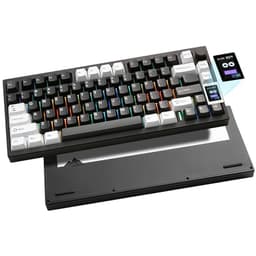
Choosing a keyboard brand is no longer as simple as picking between a handful of household names. The market in 2025 has expanded dramatically, with boutique manufacturers from China, such as EPOMAKER, YUNZII and GravaStar, now competing directly with established giants like SteelSeries, Logitech and Corsair. What has changed most notably over the past twelve months is the arrival of gasket-mount construction, TFT and LCD smart displays, and Hall Effect switch technology at price points that would have seemed impossible a year ago. This comparison is aimed at PC gamers and enthusiast typists who want to understand which brand actually delivers the best combination of build quality, features and value, whether they are spending £37 or £190. We have selected five keyboards, each representing a distinct brand and a distinct approach to the market, to give you a clear picture of where each manufacturer stands today.
Quick Verdict
Best Overall: SteelSeries Apex Pro TKL Gen 3. Hall Effect switches, outstanding software and a premium build make it the most capable gaming keyboard here, price aside.
Best Value: EPOMAKER X Aula F75 MAX. A TFT screen, tri-mode wireless, hot-swap sockets and a knob for under £80 is genuinely remarkable value in 2025.
The SteelSeries Apex Pro TKL Gen 3 sits at the top of the market for competitive PC gaming, and it earns that position through genuine engineering rather than marketing gloss. SteelSeries has been refining the Apex Pro line since 2019, and the third generation of the TKL variant represents the most mature version of the concept yet. It is aimed squarely at serious gamers, esports players and enthusiasts who demand the absolute lowest latency and the most customisable feel from their keyboard.
The headline feature is the OmniPoint 2.0 Hall Effect switch technology. Unlike traditional mechanical switches that use physical contact points, Hall Effect switches detect keystrokes magnetically. This means there is no contact wear, no debounce delay, and the actuation point can be set anywhere between 0.1 mm and 4.0 mm on a per-key basis directly in SteelSeries GG software. For a first-person shooter player, setting WASD to a hair-trigger 0.1 mm actuation while leaving other keys at a more deliberate 1.5 mm is a genuinely useful competitive advantage. The Gen 3 iteration also introduces a dual-zone actuation feature that allows a single key to register two distinct inputs at different depths, effectively giving you two actions from one keystroke.
The build quality is exceptional. The aluminium frame feels rigid and premium, the keycaps are double-shot PBT, and the RGB lighting is among the most vibrant available. The OLED smart display, present on the full-size Apex 7, is absent here, but SteelSeries compensates with a dedicated volume roller and multimedia controls that sit flush with the top-right corner. The USB-C cable is braided and detachable, which is a welcome addition at this price tier.
Where the Apex Pro TKL Gen 3 falls short is connectivity. It is a wired-only keyboard, which will disappoint those who want wireless flexibility. At nearly £190, it is also the most expensive option in this comparison, and buyers on a budget will find the value proposition challenging. SteelSeries GG software is powerful but can feel complex for newcomers. That said, for pure gaming performance, nothing else here comes close.
Verdict: The benchmark for competitive gaming keyboards in 2025. If you want the most technically advanced switch technology and can accept a wired-only connection, this is the one to buy.
Pros
- Per-key adjustable actuation from 0.1 mm to 4.0 mm via Hall Effect switches
- Dual-zone actuation registers two inputs from a single key at different depths
- Double-shot PBT keycaps and rigid aluminium frame justify the premium price
Cons
- Wired only, no wireless option at any price
- Close to £190 makes it the most expensive pick in this round-up
EPOMAKER has become one of the most talked-about brands in the enthusiast keyboard community over the past two years, and the X Aula F75 MAX is perhaps the clearest demonstration of why. Produced in collaboration with Aula, this 75% layout board packs a feature set that would have cost twice the price just eighteen months ago. It is aimed at enthusiasts who want a customisable, wireless-capable keyboard with a premium feel but do not want to spend over £100.
The TFT colour screen is the first thing most users notice. Positioned in the top-right corner of the board, it can display system stats, custom animations, the time, or keyboard status information, all configurable through EPOMAKER's companion software. Alongside it sits a physical knob that controls volume by default but can be remapped to any function. These two additions alone set the F75 MAX apart from the majority of keyboards at this price point.
Connectivity is tri-mode: 2.4 GHz wireless via a USB dongle, Bluetooth 5.0 for up to three paired devices, and wired USB-C. The 2.4 GHz mode is fast enough for gaming without any perceptible latency. The switch sockets are hot-swappable with 5-pin compatibility, so you can drop in any switch of your choice without soldering. The aluminium top plate gives the board a satisfying rigidity, and the gasket-style mounting dampens sound and adds a pleasant flex to keystrokes.
The keycaps are double-shot PBT, which is impressive at this price, and the RGB backlighting shines through them evenly. Battery life on 2.4 GHz sits around 2,000 mAh, which EPOMAKER rates at roughly 4,000 hours with backlighting off. In practice, with moderate RGB enabled, expect several weeks between charges with typical daily use.
The software is functional but not as polished as SteelSeries GG or Logitech G HUB. Some users report occasional connectivity hiccups when switching between Bluetooth devices, though firmware updates have improved stability. The included switches are competent but not exceptional, making a swap worthwhile if you have specific preferences.
Verdict: Extraordinary value. The TFT screen, tri-mode wireless, hot-swap sockets and aluminium build at under £80 make this the best value pick in this comparison by a considerable margin.
Pros
- TFT colour screen and physical knob at under £80 is genuinely rare
- Tri-mode wireless with 2.4 GHz, Bluetooth 5.0 and wired USB-C
- 5-pin hot-swap sockets and gasket-style mounting for easy customisation
Cons
- Companion software lacks the polish of Logitech G HUB or SteelSeries GG
- Occasional Bluetooth device-switching instability reported by some users
Logitech's G PRO X TKL LIGHTSPEED has been a staple recommendation for wireless gaming keyboards for several years, and it remains highly competitive in 2025 even as newer challengers have emerged. It is designed with professional esports players in mind, prioritising low-latency wireless performance, a compact tenkeyless footprint and reliable build quality over flashy extras. If you want a keyboard that just works, every time, this is Logitech's answer.
LIGHTSPEED wireless technology is Logitech's proprietary 2.4 GHz protocol, and it is genuinely excellent. Latency is indistinguishable from wired in blind testing, and the connection is rock solid across a typical gaming setup. The keyboard ships with GX Blue, GX Brown or GX Red switches depending on the variant, and all three are hot-swappable, allowing you to change your switch preference without soldering. This is a feature that Logitech introduced to the PRO X line and it remains one of the brand's key differentiators at this price point.
The build is tenkeyless, which keeps the footprint small enough for low-sensitivity mouse users who need maximum desk space. The case is primarily high-quality plastic rather than aluminium, which keeps the weight down to around 550 g, making it one of the lightest keyboards in this comparison. This is a deliberate design choice for players who travel to LAN events or move their setup frequently.
Logitech G HUB software is one of the most mature and user-friendly pieces of peripheral software available. Macro creation, RGB customisation, onboard profile storage and LIGHTSYNC integration with other Logitech G devices are all handled intuitively. Battery life is rated at around 40 hours with RGB lighting on, which is modest compared to some rivals but acceptable for a gaming-first product.
The PRO X TKL LIGHTSPEED does not have a screen, a knob, or a gasket mount. It is a straightforward, no-nonsense gaming keyboard, and that is precisely the point. At around £99, it is priced competitively for what it offers, though the EPOMAKER F75 MAX offers more features for less money. What Logitech provides is brand trust, excellent software and a proven wireless protocol that boutique brands are still catching up to.
Verdict: The safe, reliable choice for wireless gaming. LIGHTSPEED wireless is class-leading, the hot-swap feature adds longevity, and Logitech G HUB remains the gold standard for peripheral software.
Pros
- LIGHTSPEED 2.4 GHz wireless delivers wired-equivalent latency in competitive play
- Hot-swappable GX switches allow easy customisation without soldering
- Logitech G HUB is one of the most polished peripheral software suites available
Cons
- Plastic construction feels less premium than aluminium rivals at a similar price
- 40-hour battery life with RGB is modest compared to some tri-mode competitors
YUNZII is a brand that has been steadily building a reputation in the enthusiast community for producing keyboards that punch well above their price in terms of build quality and materials. The AL80 is the brand's most ambitious product to date, combining a full CNC-machined aluminium chassis, a smart LCD display, gasket mounting and tri-mode wireless connectivity. It is aimed at enthusiasts who want a premium typing experience and are willing to spend around £100 to get it, without committing to the higher prices of established Western brands.
The CNC aluminium construction is the AL80's most immediately impressive quality. The chassis is machined from a single block of aluminium, giving it a density and rigidity that plastic-bodied keyboards simply cannot match. At approximately 1,100 g, it is the heaviest keyboard in this comparison, which will either be a selling point or a drawback depending on your preferences. For desktop use where the keyboard stays in one place, the weight adds a sense of permanence and quality. For travel, it is impractical.
The gasket mounting system decouples the switch plate from the chassis, absorbing the impact of keystrokes and producing a softer, more cushioned sound profile. Combined with the pre-lubed switches and sound-dampening foam layers that YUNZII includes, the AL80 is one of the quieter keyboards in this comparison despite its mechanical switches. The typing sound is a muted, rounded thock that enthusiast communities tend to describe favourably.
The smart LCD display mirrors the concept seen on the EPOMAKER F75 MAX and can show system information, custom images or keyboard status. Tri-mode wireless covers 2.4 GHz, Bluetooth and wired USB-C. The hot-swap sockets accept both 3-pin and 5-pin switches. RGB backlighting is present and configurable through YUNZII's software, which is functional if not as feature-rich as Logitech or SteelSeries equivalents.
The AL80's main weaknesses are its software maturity and the relative newness of the YUNZII brand in Western markets, which means community support and third-party resources are less abundant than for Logitech or SteelSeries products. Firmware updates have been infrequent. That said, the hardware itself is genuinely impressive for the price.
Verdict: The most impressive build quality per pound in this comparison. If you prioritise materials and typing feel over software ecosystem and brand support, the AL80 is a compelling choice.
Pros
- Full CNC aluminium chassis delivers exceptional rigidity and premium feel for around £100
- Gasket mounting with foam dampening produces a notably quiet and cushioned typing experience
- Tri-mode wireless and 5-pin hot-swap sockets offer strong long-term flexibility
Cons
- At approximately 1,100 g, it is impractical for anyone who moves their setup regularly
- YUNZII's software and firmware update cadence lags behind established brands significantly
Corsair is one of the most recognisable names in PC peripherals, and the K55 RGB PRO represents the brand's entry-level gaming keyboard offering. It is a full-size membrane keyboard with RGB lighting, dedicated macro keys and an IP42 dust and spill resistance rating. It is aimed at casual gamers, first-time buyers and those who prefer the softer, quieter feel of membrane switches over the tactile click of mechanical alternatives.
The membrane switch mechanism is the defining characteristic here. Unlike mechanical keyboards, membrane boards use a rubber dome beneath each key that compresses to register a keystroke. The result is a quieter, softer typing experience that some users genuinely prefer, particularly in shared living spaces or offices where noise is a concern. The actuation force is consistent across all keys, and the travel distance is adequate for both gaming and everyday typing tasks.
Corsair has added six dedicated macro keys along the left side of the board, which can be programmed through iCUE software to execute complex command strings, launch applications or perform media functions. iCUE is one of the most feature-rich peripheral software suites available, offering deep RGB customisation, hardware monitoring integration and cross-device synchronisation with other Corsair products. For users already invested in the Corsair ecosystem, this integration is a genuine advantage.
The IP42 rating means the K55 RGB PRO can withstand dust ingress and light splashes, which is a practical benefit for a keyboard that will sit on a desk for years. The full-size layout includes a dedicated numpad, which remains useful for productivity tasks, spreadsheet work and games that use numpad bindings. The wrist rest is detachable and adds comfort during long sessions.
The K55 RGB PRO's limitations are clear when placed alongside mechanical competitors. The membrane switches lack the tactile precision and longevity of mechanical alternatives, and the polling rate and actuation consistency are not optimised for competitive gaming. There is no wireless option, no hot-swap capability and no premium materials. At under £37, however, it is the most affordable keyboard in this comparison and delivers solid value for its intended audience.
Verdict: The right choice for casual gamers and budget-conscious buyers who want a reliable, feature-complete keyboard from a trusted brand without spending over £40. Not for competitive players seeking precision.
Pros
- IP42 dust and spill resistance adds practical durability for everyday desktop use
- Six dedicated macro keys and full iCUE software integration for Corsair ecosystem users
Cons
- Membrane switches lack the tactile precision and rated lifespan of mechanical alternatives
- No wireless option and no hot-swap capability limit long-term customisation
- Full-size layout takes up significantly more desk space than 75% or TKL competitors
Buying Guide
Switch Type: Mechanical vs Membrane vs Hall Effect
The single most important decision when buying a keyboard is the switch type. Mechanical switches use individual physical mechanisms beneath each key, offering tactile feedback, audible clicks (on clicky variants) and rated lifespans of 50 to 100 million keystrokes. They are the preferred choice for gamers and enthusiasts who value precision and longevity. Membrane switches use a rubber dome layer and are quieter and cheaper to produce, making them suitable for casual users and shared spaces. Hall Effect switches, as found in the SteelSeries Apex Pro TKL Gen 3, use magnets rather than physical contacts, offering zero debounce delay, adjustable actuation and theoretically unlimited lifespan. They represent the cutting edge of gaming switch technology in 2025.
Layout: Full-Size, TKL, 75% or Smaller
Full-size keyboards include a numpad and typically measure around 440 mm wide. Tenkeyless (TKL) boards remove the numpad, saving roughly 80 mm of desk width. 75% layouts compress the keyboard further by tightening the spacing between keys and removing some navigation cluster keys, while retaining arrow keys and function row. Smaller layouts such as 65% and 60% remove even more keys. For gaming, TKL and 75% are the most popular choices because they free up desk space for mouse movement without sacrificing too much functionality.
Wireless vs Wired
Modern 2.4 GHz wireless keyboards, particularly those using proprietary protocols like Logitech LIGHTSPEED, are effectively indistinguishable from wired connections in latency terms for the vast majority of users. Bluetooth is more convenient for multi-device use but introduces slightly higher latency. Wired keyboards eliminate battery management entirely and are still preferred by some competitive players for absolute reliability. Many keyboards now offer tri-mode connectivity, covering all three options.
Hot-Swap Sockets
Hot-swap sockets allow you to remove and replace switches without soldering. This is a significant advantage for anyone who wants to experiment with different switch feels over time or replace worn switches. Look for 5-pin hot-swap sockets, which are compatible with both 3-pin and 5-pin switches, for maximum flexibility.
Software and Ecosystem
Established brands like Logitech and SteelSeries offer mature, well-supported software suites with regular updates, large user communities and extensive documentation. Boutique brands like EPOMAKER and YUNZII are improving rapidly but still trail in software polish and long-term support. If you are already invested in a particular brand's ecosystem, staying within it for software synchronisation and consistent user experience is worth considering.
Budget Considerations
The keyboard market in 2025 offers excellent options at every price point. Under £40, membrane boards from Corsair provide reliable everyday performance. Between £60 and £100, boutique brands like EPOMAKER and YUNZII offer mechanical keyboards with premium features that established brands charge significantly more for. Above £150, brands like SteelSeries deliver cutting-edge switch technology and software ecosystems that justify the premium for serious gamers.
The SteelSeries Apex Pro TKL Gen 3 is the overall winner of this comparison. Its Hall Effect OmniPoint 2.0 switches represent the most technically advanced gaming keyboard technology available in 2025, the per-key adjustable actuation is a genuine competitive advantage, and the build quality and software ecosystem are both class-leading. For any serious PC gamer who can stretch to the price, it is the keyboard to buy.
However, the story of this comparison is really about value, and the EPOMAKER X Aula F75 MAX is the most remarkable value proposition here. A TFT colour screen, tri-mode wireless, hot-swap sockets, gasket mounting and an aluminium top plate for under £80 would have been impossible to find twelve months ago. It demonstrates how rapidly the boutique keyboard market is evolving and how much pressure it is placing on established brands to justify their pricing.
For wireless gaming without boutique brand risk, the Logitech G PRO X TKL LIGHTSPEED remains a trusted, proven choice. For the finest typing feel and build materials at a mid-range price, the YUNZII AL80's CNC aluminium chassis is hard to beat. And for casual gamers or those on a tight budget, the Corsair K55 RGB PRO delivers the brand reliability and software integration of one of the biggest names in PC peripherals for under £40. There is a right keyboard for every buyer in this list.