Working from home while keeping a gaming setup on the same desk is a genuine balancing act. You need a keyboard that can handle spreadsheets and video calls without sounding like a hailstorm on a tin roof, yet still delivers the responsiveness and customisation that makes gaming feel rewarding after hours. The market has shifted noticeably over the past twelve months: Hall Effect magnetic switches have moved from enthusiast curiosity to mainstream availability at under £50, tri-mode wireless (USB-C, 2.4 GHz, Bluetooth) is now the expected standard rather than a premium feature, and gasket-mounted layouts with hot-swappable sockets have arrived at price points that would have seemed impossible in 2023. This guide focuses on keyboards that genuinely serve both roles, weighing typing comfort and noise levels alongside actuation precision and latency. Whether you share a home office with a partner, join Teams calls mid-afternoon, or simply want one board that does everything, the five picks below cover every realistic budget from under £30 to just over £250.
Quick Verdict
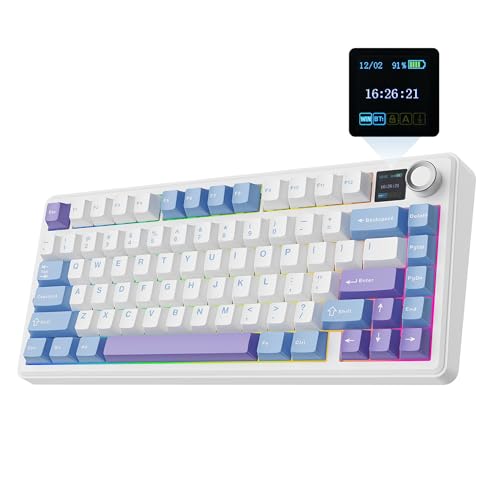
Best Overall: EPOMAKER X Aula F75 MAX. A tri-mode wireless 75% keyboard with a TFT display, knob control, hot-swap sockets and gasket mounting at a price that undercuts most rivals. It handles work and play with equal confidence.
Best Value: AULA F75 75% Wireless Mechanical Keyboard. Almost identical feature set to pricier boards, solid wireless performance, and a compact layout that leaves room for a mouse on a cramped desk.
The EPOMAKER X Aula F75 MAX is the pick that makes the strongest case for a single keyboard serving both a working day and an evening gaming session. It sits in the 75% layout sweet spot: you keep the function row for shortcuts, a dedicated Delete key and arrow cluster for document navigation, yet the footprint is compact enough to leave meaningful mouse space on a standard desk. That matters enormously when your desk doubles as a workstation.
The headline feature is the built-in TFT colour screen, which displays system stats, time, or custom animations. In a work context this sounds gimmicky, but it is genuinely useful for monitoring CPU load during a render or checking the time during a call without glancing away from your monitor. The rotary knob beside it handles volume, which is arguably more useful still when you are toggling between a Teams call and a game soundtrack.
Connectivity covers all three modes: a low-latency 2.4 GHz dongle for gaming, Bluetooth 5.0 for pairing a second device such as a laptop or tablet, and USB-C wired as a fallback. Switching between devices is a keyboard shortcut away, which suits anyone who runs a work laptop and a gaming PC side by side. The hot-swappable PCB accepts both 3-pin and 5-pin switches, so you can install quieter linear switches for daytime typing and swap back to tactile or clicky options at the weekend without soldering.
The gasket-mount construction gives the typing feel a softer, more cushioned bounce than a typical tray-mount board, reducing fatigue during long writing sessions. Pre-lubed stabilisers arrive in decent condition out of the box, meaning the spacebar and shift keys do not rattle annoyingly on video calls. RGB lighting is per-key and fully programmable, though you may prefer to dim it during work hours to avoid distracting colleagues on screen.
Battery life is quoted at around 4,000 mAh, which translates to several weeks of mixed use on Bluetooth with the screen dimmed. The TFT display does draw power, so keeping it on continuously will shorten that estimate. At its price point, the F75 MAX delivers a feature set that would have cost significantly more two years ago, making it the standout all-rounder in this category.
Verdict: The most feature-complete dual-use keyboard in this group. The TFT screen and knob are genuinely practical additions rather than marketing extras, and the hot-swap gasket construction means it can be tuned to suit any typing preference.
Pros
- TFT screen and rotary knob add real daily utility beyond aesthetics
- Tri-mode wireless with fast 2.4 GHz for gaming and BT for a second work device
- Hot-swappable gasket mount allows switch changes without soldering
Cons
- TFT display accelerates battery drain if left on maximum brightness
- Slightly heavier than competing 75% boards, less ideal for commuting
The AULA F75 is the keyboard that repeatedly surprises people who expect budget pricing to mean budget quality. At its price point it delivers tri-mode wireless connectivity, a hot-swappable PCB, per-key RGB, and a 75% layout with a volume knob, all in a package that looks and feels more expensive than the sticker suggests. For a home office gamer on a tighter budget, it is genuinely difficult to find more keyboard for the money.
The 75% layout is the right choice for most dual-use scenarios. The function row is present for F-key shortcuts in productivity software, the arrow keys are accessible without a layer shift, and there is a small navigation cluster for document editing. Yet the board is narrow enough that a full-size mouse pad fits comfortably alongside it on a standard 120 cm desk. If you previously used a full-size keyboard at work and are considering downsizing, the F75 is a manageable transition.
The volume knob is positioned in the upper right corner and doubles as a mute button when pressed, which is exactly what you need when a Teams notification fires mid-game or a colleague calls unexpectedly. This one feature alone justifies the layout choice over a plain 65% board for work use.
Switch options vary by retailer listing, but the board accepts both 3-pin and 5-pin switches, so swapping to quieter linears for daytime use is straightforward. The default switches are competent for gaming with a reasonably short actuation, though enthusiasts will want to replace them eventually. Pre-lubed stabilisers are adequate, with the spacebar being the weakest point, a small amount of additional lubing addresses any rattle.
Wireless performance on 2.4 GHz is reliable across typical home office distances. Bluetooth pairing supports up to three devices, useful if you switch between a desktop, a work laptop, and a tablet. Battery life on Bluetooth sits comfortably above a week of mixed use with RGB at moderate brightness.
The aluminium top plate gives the board a solid feel and prevents flex during fast typing. The plastic bottom is less premium but keeps weight sensible. Overall, the AULA F75 punches well above its price and represents the clearest value proposition in this roundup for buyers who want wireless freedom without spending over £100.
Verdict: Outstanding value for a wireless 75% board. The knob, hot-swap support, and tri-mode wireless at this price make it the obvious recommendation for budget-conscious home office gamers.
Pros
- Tri-mode wireless including 2.4 GHz at a sub-£70 price point
- Volume knob with mute press function is highly practical for work calls
- Hot-swappable 3-pin and 5-pin PCB for easy switch customisation
Cons
- Default switches are functional but benefit from replacement for premium feel
- Spacebar stabiliser benefits from additional lubing straight out of the box
Hall Effect keyboards have been a talking point in enthusiast circles for a couple of years, but the AULA WIN60 HE is among the first to bring the technology to a genuinely accessible price. Hall Effect switches use magnets rather than physical contacts to register keypresses, which means there is no debounce delay and the actuation point is adjustable in firmware, typically from around 0.1 mm to 4.0 mm. For gaming this is significant: you can set a hair-trigger actuation for rapid inputs in competitive titles, then dial it back to a deeper travel point for comfortable typing during work hours.
The 60% layout is the most divisive choice in this guide. You lose the function row, arrow keys, and navigation cluster, all of which require layer shifts via the Fn key. For experienced 60% users this is second nature, but if you spend significant time in spreadsheets, coding environments, or any application that relies on F-keys, there will be an adjustment period. That said, the compact footprint is genuinely useful on a small desk, and the lack of a numpad or navigation cluster means your mouse sits much closer to the centre of your body, reducing shoulder strain during long sessions.
The wired-only connection via USB-C is the main practical limitation for a home office scenario. If your gaming PC and work laptop share the same desk, you will need to replug the cable when switching between them, or use a USB switch. For users who game exclusively on one machine and work on a separate device, this is a meaningful inconvenience that the wireless boards in this list avoid entirely.
Where the WIN60 HE excels is in raw gaming performance. The adjustable actuation, zero debounce delay, and rapid polling rate make it one of the most responsive keyboards in this price range. Competitive FPS and RTS players who prioritise input precision above all else will appreciate what Hall Effect brings. The typing feel is smooth and consistent, and the absence of physical contact wear means the switches should maintain their characteristics for far longer than conventional mechanical options.
RGB lighting is per-key and bright, with a range of effects accessible through the firmware. The board is compact and light enough to pack into a bag if you occasionally work from a different location, though the wired connection makes it less flexible than a wireless alternative.
Verdict: The best choice for competitive gamers who also type a lot and want adjustable actuation precision. The 60% layout and wired-only connection are real trade-offs for home office use, but the Hall Effect technology is genuinely impressive at this price.
Pros
- Adjustable Hall Effect actuation point suits both gaming precision and comfortable typing
- Zero debounce delay and high polling rate deliver genuinely competitive responsiveness
- Compact 60% footprint frees up significant desk space
Cons
- Wired only, requiring cable reattachment when switching between PC and laptop
- 60% layout demands layer shifts for F-keys and arrow navigation, which disrupts productivity workflows
The EPOMAKER TH85 occupies a slightly unusual position in the market: an 85% layout that sits between a standard TKL and a 75%, retaining dedicated arrow keys, a full function row, and a small navigation cluster without the bulk of a full-size board. For home office users who genuinely need every key but still want to save some desk space compared to a full-size layout, this is a thoughtful compromise that most keyboard manufacturers overlook.
The headline differentiator for work use is QMK and VIA compatibility. QMK is open-source firmware that allows extraordinarily deep remapping: every key, every layer, every macro can be reprogrammed without manufacturer software. VIA is a graphical interface that makes this accessible without writing code. For a home office user who wants to map application shortcuts, create a dedicated layer for video editing controls, or remap keys to match a specific workflow, QMK and VIA support is a genuine productivity advantage that most gaming keyboards simply do not offer.
Tri-mode wireless covers 2.4 GHz for low-latency gaming, Bluetooth 5.0 for a secondary device, and USB-C wired. The hot-swappable PCB accepts 3-pin and 5-pin switches, and EPOMAKER offers the board with several switch options including quieter linears suitable for shared office environments. The gasket-mount construction softens the typing sound and feel compared to a rigid plate mount, which is a meaningful benefit if you are on video calls regularly.
Battery capacity sits around 3,000 mAh, delivering a week or more of typical mixed use on Bluetooth with RGB at moderate levels. The board charges via USB-C and can be used wired while charging, so running out of battery mid-workday is not a concern if you keep a cable nearby.
RGB lighting is per-key and programmable through VIA, which means you can set up colour-coded layers to remind yourself which mode you are in, a small but useful touch when switching between a gaming layer and a work layer. Build quality is solid, with a weight that feels premium without being impractical to reposition on a desk.
The TH85 is the pick for users who want maximum key availability in a slightly smaller footprint, combined with the deepest customisation options in this group. It rewards time spent in VIA with a keyboard that genuinely adapts to your workflow rather than forcing you to adapt to it.
Verdict: The best choice for power users who want deep firmware customisation alongside gaming capability. QMK and VIA support sets it apart from every other board in this list for serious productivity customisation.
Pros
- QMK and VIA support enables deep per-key remapping and macro programming for productivity workflows
- 85% layout retains all navigation keys without full-size bulk
- Gasket mount and hot-swap PCB make it adaptable for both quiet office typing and gaming
Cons
- QMK configuration has a learning curve that may deter less technical users
- 85% layout is still wider than 75% alternatives, leaving less mouse space on smaller desks
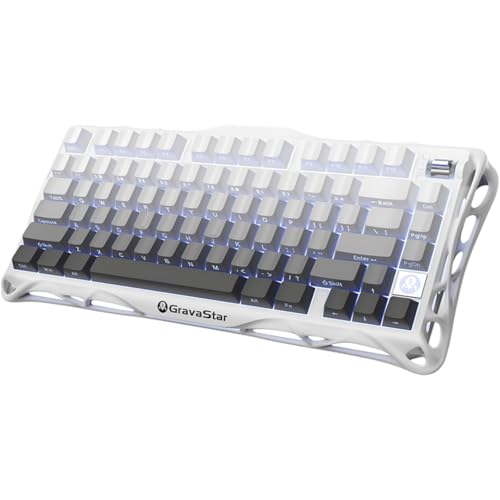
The GravaStar Mercury K1 is the premium option in this roundup, and it earns its higher price through build quality rather than feature padding. The aluminium alloy exoskeleton is the defining characteristic: where most keyboards at this price use aluminium top plates over plastic frames, the Mercury K1 uses machined aluminium throughout the main body, giving it a heft and rigidity that feels distinctly different from anything else in this group. If you spend eight hours a day at a keyboard and want it to feel like a quality tool rather than a consumer peripheral, this tactile difference is meaningful.
The 75% layout is well executed, with a function row, arrow keys, and a small navigation cluster fitting into a footprint that leaves adequate mouse space. The rotary knob in the upper right handles volume and can be remapped through the companion software. Per-key RGB lighting is bright and even, with the aluminium body reflecting light in a way that makes the effects look more premium than on plastic alternatives.
Tri-mode wireless covers the expected bases: 2.4 GHz dongle for gaming, Bluetooth 5.0 for a secondary device, and USB-C wired. The 2.4 GHz connection is responsive and stable across typical home office distances. Battery capacity at around 4,000 mAh delivers extended use between charges, and the board charges via USB-C while remaining usable in wired mode.
The hot-swappable PCB accepts 3-pin and 5-pin switches, and GravaStar offers the board with several switch options. The gasket-mount construction provides a softer, more cushioned keystroke that reduces fatigue during long typing sessions, and the sound profile is noticeably more muted and premium than tray-mount alternatives at similar prices.
Where the Mercury K1 asks you to compromise is in software depth. The companion application is functional but less feature-rich than EPOMAKER's VIA support or Logitech's G HUB. Macro creation and layer management are possible but require more effort than on QMK-compatible boards. For users who want a premium feel without deep firmware tinkering, this is not a problem. For power users who want to remap every key and build complex layers, the TH85 is a better fit.
The Mercury K1 is the keyboard for home office workers who value build quality and tactile premium feel above all else, and who game seriously enough to want reliable wireless performance without compromise. It is the most desk-presentable board in this group, which matters if your home office doubles as a video call backdrop.
Verdict: The premium build choice for buyers who want a keyboard that feels as good as it looks. Aluminium construction and gasket mounting justify the higher price for those who spend long hours at the desk daily.
Pros
- Full aluminium alloy exoskeleton delivers a premium, rigid feel that plastic-frame boards cannot match
- Gasket mount significantly reduces typing noise and fatigue during long work sessions
- 4,000 mAh battery provides extended wireless use between charges
Cons
- Companion software is less capable than QMK/VIA alternatives for deep remapping and macro creation
- Higher price than competing 75% boards with similar wireless and hot-swap features
Buying Guide
Layout: Choosing the Right Size for Your Desk
Layout is the most consequential decision when buying a keyboard for dual home office and gaming use. Full-size boards with numpads are rarely the right choice: the numpad pushes your mouse hand further right, increasing shoulder strain during long gaming sessions and extended typing. TKL (tenkeyless) removes the numpad but retains every other key, which suits users who rely heavily on F-keys and navigation shortcuts. The 75% layout is the most popular choice for this use case because it fits F-keys, arrow keys, and basic navigation into a footprint only slightly wider than a 65% board. The 60% layout is the most compact option and suits experienced users comfortable with layer shifts, but the absence of dedicated arrow keys and F-keys makes it genuinely less practical for spreadsheet work and productivity shortcuts.
Wireless vs Wired: What Actually Matters
For a home office setup where your keyboard stays on one desk, wired connectivity is perfectly adequate for gaming and eliminates battery management entirely. However, wireless becomes significantly more valuable if you switch between a gaming PC and a work laptop on the same desk. Tri-mode boards with 2.4 GHz and Bluetooth allow you to keep one keyboard paired to two devices simultaneously, switching with a shortcut rather than replugging cables. The 2.4 GHz connection is recommended for gaming due to its lower and more consistent latency compared to Bluetooth. Modern 2.4 GHz gaming keyboards from reputable manufacturers introduce latency that is imperceptible in all but the most competitive esports scenarios.
Switch Selection for Dual Use
Switch choice has a direct impact on both gaming performance and office usability. Linear switches with a smooth, consistent actuation are generally the quietest option and suit both fast gaming inputs and extended typing. Tactile switches provide a bump at the actuation point that many typists prefer for accuracy, but the audible click of clicky switches is inappropriate in most shared home office environments and will be picked up by microphones on video calls. If you are buying a hot-swappable board, consider purchasing a second set of quieter switches for work hours and swapping back to your preferred gaming switches in the evenings. This flexibility is one of the strongest arguments for prioritising hot-swap support in your purchase decision.
Noise and Microphone Pickup
Keyboard noise on video calls is a genuine concern that most gaming keyboard reviews ignore. Gasket-mounted boards are noticeably quieter than tray-mount alternatives because the PCB floats on silicone or foam dampeners rather than sitting directly on a rigid plate. Foam dampening layers inside the case further reduce the hollow resonance that makes some keyboards sound much louder than their switches warrant. If you are frequently on calls, prioritise gasket mounting and consider adding a desk mat, which absorbs sound reflected from the surface beneath the keyboard.
Customisation and Software
For home office use, remapping capability matters more than it does for pure gaming. The ability to create a dedicated work layer with application shortcuts, macro keys for common phrases, or media controls mapped to convenient positions can meaningfully improve daily productivity. QMK and VIA compatibility offers the deepest remapping available, with no manufacturer software required and no data sent to external servers. Proprietary software from established manufacturers is generally reliable but locks you into their ecosystem. Consider how much time you are willing to invest in configuration: QMK rewards effort but has a learning curve, while simpler companion apps offer less power but faster setup.
The EPOMAKER X Aula F75 MAX is the overall winner for home office gaming use. It combines tri-mode wireless, a practical 75% layout with volume knob, hot-swappable gasket construction, and a genuinely useful TFT display into a package that handles a full working day and a competitive gaming session with equal competence. The feature set at its price point is exceptional, and the wireless flexibility of pairing both a gaming PC and a work laptop simultaneously is the single most practical advantage for the dual-use scenario this guide addresses. For buyers on a tighter budget, the AULA F75 delivers nearly identical core functionality at a lower price and remains the strongest value recommendation in the category. Those who want the deepest customisation should look at the EPOMAKER TH85 for its QMK and VIA support, while buyers who prioritise premium build quality above all else will find the GravaStar Mercury K1 worth the additional investment. The AULA WIN60 HE is the specialist pick for competitive gamers who want Hall Effect precision and are comfortable with a 60% layout.