Working from home while also gaming in the evenings puts you in an awkward spot when it comes to keyboards. You need something that looks professional enough for video calls, quiet enough not to irritate housemates or colleagues on Teams, and capable enough to handle a competitive gaming session after hours. The market has shifted noticeably since last year: Hall Effect magnetic switches have dropped into genuinely affordable price brackets, gasket-mounted boards with wireless tri-mode connectivity are no longer premium-only, and 75% layouts have become the sweet spot for people who want function keys and arrow keys without sacrificing desk space. This guide focuses on five keyboards that genuinely serve both roles, evaluated on switch noise, build quality, wireless reliability, typing feel for long documents, and gaming responsiveness. Whether you are a remote developer who raids on weekends or a designer who needs a clean desk by day and RGB by night, there is a pick here for you.
Quick Verdict
Best Overall: EPOMAKER TH85 QMK/VIA Mechanical Gaming Keyboard. It offers the most complete package for dual-use professionals, with wireless tri-mode, hot-swap sockets, QMK/VIA programmability, and a gasket mount that keeps typing noise civil during calls.
Best Value: AULA WIN60 HE Mechanical Gaming Keyboard. Hall Effect switches at under £50 is genuinely remarkable, and the rapid-trigger capability makes it a serious gaming tool that doubles as a compact desk companion.
The EPOMAKER TH85 is the keyboard that most convincingly straddles the line between professional workhorse and capable gaming peripheral. It is aimed squarely at remote workers who spend eight hours typing documents, code, or spreadsheets and then want to jump into a competitive shooter or RPG without switching keyboards. The 85-key layout retains the full row of function keys and a dedicated arrow cluster, which is essential for anyone using Excel shortcuts or navigating an IDE, while still being compact enough to leave room for a mouse pad on a standard desk.
The gasket-mounted construction is the headline feature for office use. Rather than screwing the PCB directly to the case, EPOMAKER suspends it on silicone gaskets, which absorbs the impact of each keystroke and produces a softer, more muted thud rather than a sharp clack. On a video call, this difference is audible to your colleagues. The hot-swap PCB accepts both 3-pin and 5-pin switches, so if you find the stock switches too loud or too heavy for long typing sessions, you can swap them out without soldering. QMK and VIA firmware support means every key is fully remappable through a browser-based interface, which is genuinely useful for setting up macros for work applications or game-specific bindings.
Wireless performance covers all three modes: Bluetooth 5.0 for connecting to a laptop or tablet, a 2.4 GHz dongle for low-latency gaming, and USB-C for wired use when you want zero compromise. Battery life on Bluetooth with RGB off is quoted at several weeks, which is realistic for office use. The RGB lighting is vibrant but can be toned down or switched off entirely for a more professional appearance during calls. Polling rate reaches 1,000 Hz over 2.4 GHz, which is adequate for all but the most demanding competitive play.
The keycaps are PBT double-shot, meaning the legends will not fade with heavy use, and the surface texture is pleasant for extended typing. South-facing RGB LEDs reduce interference with Cherry-profile keycaps, a thoughtful detail. The only real compromise is price: at around £90, it is not the cheapest option here, but the combination of gasket mount, QMK support, tri-mode wireless, and hot-swap sockets at this price point is difficult to match.
Verdict: The most well-rounded dual-use keyboard in this selection. If you type for a living and game in the evenings, the TH85 earns its price.
Pros
- Gasket mount significantly reduces typing noise for video calls
- QMK/VIA support allows full remapping for both work and gaming macros
- Hot-swap PCB accepts 3-pin and 5-pin switches without soldering
- Tri-mode wireless covers Bluetooth, 2.4 GHz and USB-C wired
Cons
- Priced around £90, which is a stretch for budget-conscious buyers
- No dedicated number row or numpad, which some spreadsheet-heavy users will miss
Hall Effect switches were, until very recently, the preserve of keyboards costing £150 or more. The AULA WIN60 HE changes that calculation entirely, bringing magnetic Hall Effect technology to a 60% form factor at under £50. For home office professionals who also game competitively, this is a significant development. Hall Effect switches use magnets rather than physical contact points to register keypresses, which means they never wear out in the traditional sense and can be adjusted to trigger at any point in the travel range, from a hair-trigger 0.1 mm actuation to a deliberate 3.8 mm press.
The rapid-trigger feature is the gaming headline. In competitive titles such as Valorant or CS2, rapid-trigger allows the switch to reset the moment you release the key rather than waiting for it to physically return past the actuation point. This enables faster side-stepping, quicker re-presses, and more responsive movement inputs. It is a feature that top-ranked players pay a premium for on keyboards like the Wooting 60HE, and the AULA WIN60 HE delivers a comparable experience at a fraction of the price.
For office use, the adjustable actuation is equally valuable. Set the actuation point deeper, around 2.0 to 2.5 mm, and the switches feel similar to a quality linear mechanical switch, with a smooth, consistent press that suits long typing sessions. The 60% layout is the main professional compromise: there are no function keys, no arrow keys, and no numpad without using Fn-layer combinations. This suits developers who already use keyboard shortcuts and do not rely on F-keys, but it will frustrate anyone who regularly uses Excel or navigates large documents with arrow keys.
Build quality is solid for the price. The case has a reasonable heft, the USB-C cable is braided, and the hot-swap sockets mean you can install quieter switches if the stock options are too loud for your environment. RGB lighting is per-key and reasonably bright. The software for adjusting rapid-trigger and actuation points is Windows-only, which is a limitation for Mac users, though basic use requires no software at all.
The WIN60 HE is wired-only, which is a notable omission for desk-cleanliness enthusiasts, but at this price, wireless Hall Effect would be a miracle. For competitive gamers who also work from home and can tolerate the 60% layout, this is exceptional value.
Verdict: The best value Hall Effect keyboard available at this price. Remarkable gaming performance; the 60% layout is the only real ask.
Pros
- Hall Effect switches with rapid-trigger at under £50, genuinely unprecedented value
- Adjustable actuation point from 0.1 mm to 3.8 mm suits both gaming and typing preferences
- Hot-swap sockets allow quieter switch installation without soldering
Cons
- Wired-only, no wireless option, which limits desk tidiness
- 60% layout removes function row and arrow keys, requiring Fn-layer use
- Software for rapid-trigger configuration is Windows-only
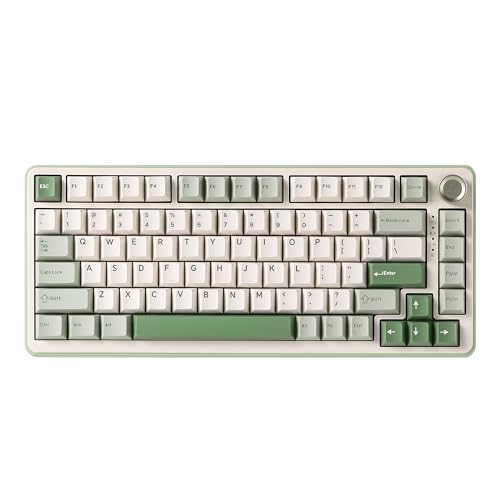
The EPOMAKER X AULA F75 MAX occupies a clever middle ground in this selection. It is a collaboration between EPOMAKER and AULA that combines the 75% layout beloved by WFH professionals with a TFT display screen, a control knob, and tri-mode wireless connectivity, all at a price that undercuts most of its direct competitors. At around £64, it delivers features that would have cost considerably more twelve months ago, which makes it one of the more interesting value propositions in the current market.
The TFT screen is a genuinely useful addition for home office users. Unlike the OLED displays found on keyboards like the SteelSeries Apex 7, the TFT panel on the F75 MAX can display custom images, system information, or animated graphics, which adds a degree of personalisation without being distracting. The rotary knob sits in the top-right corner and defaults to volume control, which is immediately practical for anyone jumping between Teams calls and music throughout the day. Both the screen and the knob can be reconfigured through the companion software.
The 75% layout is the right choice for most home office setups. You retain the function row for shortcuts, the arrow keys for document navigation, and a compact footprint that leaves room for a full-size mouse pad. The hot-swap PCB means switch swapping is straightforward, and the gasket-style mounting reduces the harshness of the typing sound compared to a tray-mounted board. Wireless performance across all three modes, Bluetooth 5.0, 2.4 GHz dongle, and USB-C wired, is reliable in everyday use, and the 2.4 GHz mode provides low enough latency for casual to moderate gaming.
The keycaps are PBT, which is the correct choice at this price point, and the legends are clear and legible under both RGB and ambient office lighting. Battery life is competitive, with several weeks achievable on Bluetooth with RGB reduced. The RGB lighting itself is per-key and supports a wide range of effects, though it can be set to a single static colour or switched off for a cleaner look during work hours.
Where the F75 MAX falls slightly short is in the depth of its software ecosystem and the polling rate ceiling, which sits at 1,000 Hz rather than the higher rates offered by dedicated gaming keyboards. For casual gaming and everyday work, this is irrelevant. For competitive play, it is a minor limitation worth noting.
Verdict: A feature-rich 75% board with a TFT screen and knob at a genuinely competitive price. Excellent for WFH users who want personality without paying a premium.
Pros
- TFT display and rotary volume knob add practical daily-use value at this price
- 75% layout retains function row and arrow keys for office productivity
- Tri-mode wireless with hot-swap PCB and gasket-style mounting
Cons
- Software ecosystem is less mature than established brands like SteelSeries or Keychron
- 1,000 Hz polling rate ceiling limits appeal for serious competitive gamers
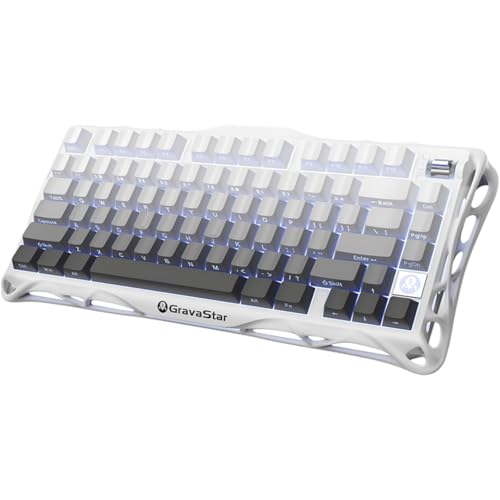
The GravaStar Mercury K1 is the premium choice in this selection, and it earns its position through a combination of genuinely distinctive build quality and a design language that is unlike anything else on a home office desk. GravaStar is a brand that has built its reputation on striking aesthetics, and the Mercury K1 continues that tradition with an aluminium alloy exoskeleton that looks more like a piece of industrial design than a peripheral. For professionals who care about how their workspace looks on camera, this is a meaningful differentiator.
The aluminium construction gives the K1 a substantial feel that cheaper keyboards simply cannot replicate. It sits firmly on the desk without flex or wobble, and the weight, around 1.1 kg, means it stays put during intense gaming sessions. The 75% layout is well executed, with a logical key arrangement that suits both typing and gaming. Hot-swap sockets allow switch customisation, and the board ships with a choice of switch options depending on the variant purchased, covering linear, tactile, and clicky preferences.
Wireless connectivity covers Bluetooth 5.0, a 2.4 GHz dongle, and USB-C wired, with the 2.4 GHz mode delivering reliable low-latency performance for gaming. The RGB lighting is per-key and interacts attractively with the aluminium case, producing a premium glow that photographs well and looks impressive during streaming or video calls. Battery capacity is generous, and the board manages power efficiently enough to last through a full working week on a single charge with moderate RGB use.
For typing, the gasket-inspired mounting reduces harshness and produces a satisfying, dampened sound profile that is appropriate for shared home office environments. The PBT keycaps have a smooth, slightly textured finish that suits long typing sessions, and the legends are sharp and legible. The south-facing RGB placement works well with the included keycaps.
The premium price of £129 is the obvious consideration. At this level, you are paying for the aluminium build and the distinctive aesthetic as much as for raw performance. The typing and gaming experience is excellent, but the EPOMAKER TH85 is objectively more feature-rich in terms of QMK support and software depth. The K1 wins on feel, looks, and build quality, and for some buyers, those factors are decisive.
Verdict: The most visually striking and physically premium keyboard in this selection. Worth the price if desk aesthetics and build quality matter as much as feature count.
Pros
- Aluminium alloy exoskeleton delivers premium rigidity and a distinctive on-desk presence
- Tri-mode wireless with hot-swap sockets and per-key RGB in a 75% layout
- Gasket-inspired mounting produces a dampened, professional typing sound
Cons
- At this price, it costs significantly more than comparably specced alternatives
- Lacks QMK/VIA support, limiting deep remapping for power users
- Heavier than most 75% keyboards at around 1.1 kg, which matters if portability is a factor
The YUNZII B75 PRO is the understated professional in this group. Where the GravaStar Mercury K1 makes a visual statement and the EPOMAKER TH85 leads with features, the B75 PRO focuses on delivering a refined typing and gaming experience through thoughtful construction choices at a mid-range price. It is aimed at home office professionals who want a gasket-mounted, hot-swap wireless keyboard without the learning curve of QMK firmware or the distraction of a TFT screen.
The gasket mount is the most important specification for WFH use. YUNZII has implemented a proper gasket system that noticeably softens the typing sound and adds a slight flex to the typing feel that many users find more comfortable over long sessions. Compared to a rigid tray-mounted board, the difference in noise level is meaningful, particularly during video calls where keyboard noise can be picked up by microphones. The 75% layout retains all the keys that office workers need daily: function row, arrow keys, and a logical arrangement that does not require relearning muscle memory.
Hot-swap sockets support both 3-pin and 5-pin switches, giving you the flexibility to install quieter linear switches, tactile switches for typing feedback, or any other preference without tools beyond a switch puller. The board ships with a choice of switch options, and the stock offerings are competent, though enthusiasts will likely want to upgrade. PBT double-shot keycaps are included, which is the correct choice at this price, offering durability and a pleasant typing texture.
Wireless connectivity spans Bluetooth 5.0, a 2.4 GHz dongle, and USB-C wired. Battery life is strong, with the board managing several weeks on Bluetooth with RGB at moderate brightness. The 2.4 GHz mode is responsive enough for casual to moderate gaming, covering most of the genres that WFH gamers tend to play in the evenings, including MMOs, strategy games, and action RPGs. For competitive FPS play at high level, the polling rate and latency are adequate but not class-leading.
The RGB lighting is per-key and supports a range of effects, though the implementation is slightly less polished than EPOMAKER's offering. The companion software is functional without being exceptional. At around £66, the B75 PRO represents solid value for a gasket-mounted, hot-swap, tri-mode wireless 75% keyboard, and its measured, professional appearance makes it easy to recommend for shared home office spaces.
Verdict: A well-built, quiet, and versatile 75% keyboard that prioritises typing comfort and wireless flexibility. A dependable all-rounder for the WFH gamer.
Pros
- Proper gasket mount reduces typing noise meaningfully compared to tray-mounted alternatives
- Tri-mode wireless with generous battery life suits all-day desk use
- Hot-swap sockets accept 3-pin and 5-pin switches for easy customisation
Cons
- Companion software is functional but lacks the depth of EPOMAKER or SteelSeries ecosystems
- RGB implementation is less polished than some competitors at a similar price
Buying Guide
Layout: 60% vs 75% for Home Office Use
The layout decision is the most consequential choice you will make. A 60% keyboard removes the function row, arrow keys, and everything to the right of the enter key. This produces a very compact footprint that suits minimalist desks and gamers who have already learned Fn-layer shortcuts. However, for most office workers, the absence of dedicated function keys and arrow keys creates friction throughout the working day. Spreadsheet navigation, IDE shortcuts, and document editing all become slightly more cumbersome. The 75% layout solves this by retaining the function row and arrow cluster while still being meaningfully smaller than a full-size or tenkeyless board. For the majority of WFH professionals, 75% is the correct choice.
Switch Type: Noise is the Priority
In a home office context, switch noise matters more than in a dedicated gaming setup. Clicky switches, such as Cherry MX Blue equivalents, are inappropriate for shared spaces or video calls. Tactile switches with a bump but no audible click are a reasonable compromise. Linear switches, which are smooth and quiet throughout the travel, are often the best choice for WFH use, particularly when combined with a gasket-mounted board. Hall Effect switches, as found on the AULA WIN60 HE, offer the additional benefit of adjustable actuation, allowing you to tune the feel for typing versus gaming without changing switches.
Wireless vs Wired
A wireless keyboard contributes significantly to desk tidiness, which matters when your desk also serves as a video call backdrop. Tri-mode wireless boards, offering Bluetooth, 2.4 GHz, and USB-C wired, are the most flexible: Bluetooth for connecting to a second device such as a tablet, 2.4 GHz for low-latency gaming, and wired when you want to charge and play simultaneously. Battery life varies considerably between boards, so check quoted figures and factor in whether you will be running RGB lighting, which reduces battery life substantially.
Gasket Mounting
Gasket-mounted keyboards suspend the PCB on silicone or foam gaskets rather than screwing it directly to the case. The result is a softer, more muted typing sound and a slight flex in the typing feel that many users find more comfortable over long sessions. For WFH use, the acoustic benefit alone justifies seeking out a gasket-mounted board. Several keyboards in this selection feature gasket or gasket-adjacent mounting, and the difference compared to a tray-mounted board is immediately apparent.
Hot-Swap Sockets
Hot-swap PCBs allow you to remove and replace switches without soldering. This is valuable for dual-use keyboards because you might want quieter switches for daytime office work and faster, lighter switches for gaming. The ability to change switches in minutes, with no tools beyond a switch puller, means your keyboard can evolve with your preferences without requiring a new purchase.
Software and Programmability
For home office use, the ability to remap keys and create macros for work applications is genuinely useful. QMK and VIA firmware, as found on the EPOMAKER TH85, offer the deepest level of programmability and are open-source, meaning they will be supported indefinitely. Proprietary software from brands like SteelSeries or EPOMAKER's own companion app is more accessible but less flexible. Consider how much customisation you actually need before treating QMK support as a requirement.
The EPOMAKER TH85 QMK/VIA Mechanical Gaming Keyboard is the overall winner for home office and gaming dual use. Its gasket-mounted construction keeps typing noise low enough for professional video calls, the QMK and VIA firmware support provides unmatched programmability for both work macros and gaming bindings, and the tri-mode wireless with hot-swap sockets covers every practical use case. The 75% layout is the right choice for most professionals, retaining the keys that matter for daily work without wasting desk space. At around £90, it is not the cheapest option, but the combination of features at this price point is the most compelling in the current market. For buyers on a tighter budget who prioritise gaming performance above all else, the AULA WIN60 HE delivers Hall Effect technology and rapid-trigger capability at under £50, which is a remarkable achievement that was simply not possible twelve months ago.