Competitive PC gaming demands precision that a standard office keyboard simply cannot deliver. Whether you are grinding ranked matches in Valorant, practising spray patterns in CS2, or executing frame-perfect inputs in fighting games, your keyboard is a direct extension of your reflexes. The market has shifted considerably over the past twelve months: Hall Effect magnetic switches have moved from enthusiast curiosity to mainstream option, optical switches have become more refined, and the 60, 75% form factor has firmly established itself as the competitive standard. This roundup focuses on keyboards that genuinely improve in-game performance rather than simply looking impressive on a desk. We have assessed actuation consistency, anti-ghosting capability, build rigidity, wireless latency where relevant, and value for money. Picks range from budget-friendly entry points under £30 to premium aluminium-chassis boards above £100, so there is a realistic option regardless of your setup budget.
Quick Verdict
Best Overall: SteelSeries Apex 9 Mini, for its optical switches, rock-solid anti-ghosting, and competition-ready 60% layout at a sensible price point. Best Value: AULA WIN60 HE, which brings Hall Effect adjustable actuation to under £50, a genuinely impressive feat for competitive players on a budget.
The SteelSeries Apex 9 Mini is the keyboard we would hand to a competitive player who wants a proven, no-compromise setup without spending flagship money. It uses SteelSeries' OptiPoint optical switches, which actuate via an infrared light beam rather than a physical contact point. That means no debounce delay, no contact bounce, and a theoretical actuation speed that sits meaningfully ahead of traditional mechanical switches. For games where a single frame of input lag separates a kill from a death, that matters.
The 60% layout removes the numpad, function row, and navigation cluster, cutting desk footprint dramatically and allowing a much lower elbow angle when using a wide mousepad. Competitive players who use large sweeping mouse movements will immediately appreciate the extra room. The board is wired via USB-C, which keeps latency to an absolute minimum and removes any concern about wireless interference during a tournament or ranked session.
Build quality is solid for the price bracket. The top case is plastic but feels dense rather than hollow, and the stabilisers are pre-lubed to a reasonable standard out of the box, reducing rattle on wider keys like the spacebar and shift. The RGB lighting is per-key and configurable via SteelSeries GG software, though competitive players will likely disable it to reduce distraction and save a marginal amount of power draw through the USB port.
N-Key Rollover means every simultaneous keypress is registered independently, which is non-negotiable for competitive play. The 2-point actuation adjustment, a feature that lets you set both the actuation point and the reset point independently, is the standout feature for serious players. You can tighten the reset point so the switch resets almost immediately after actuation, enabling faster repeated keypresses in rapid-fire movement sequences.
The lack of wireless connectivity is the only meaningful concession, but for competitive wired play that is not a drawback. At its price point, the Apex 9 Mini is the most performance-focused keyboard in this roundup.
Pros
- OptiPoint optical switches eliminate debounce delay for faster actuation
- Adjustable actuation and reset points give genuine competitive customisation
- N-Key Rollover ensures every simultaneous input registers correctly
Cons
- No wireless option, which limits flexibility for hybrid desk setups
- 60% layout removes function row, requiring key combinations for F-key inputs
Hall Effect keyboards have been the talk of the competitive community for the past year, and the AULA WIN60 HE brings that technology to a price point that was unthinkable even twelve months ago. Hall Effect magnetic switches do not use physical contacts at all. Instead, they measure the position of a magnet on the stem using a sensor, which means they never wear out through contact degradation and, more importantly for competitive play, allow you to set the actuation point anywhere across the full travel range of the switch.
For a competitive player, adjustable actuation is transformative. You can set a very shallow actuation point of around 0.1 mm to 0.5 mm for movement keys, so the keyboard responds the instant your finger depresses the key, and a deeper actuation point for less critical keys to avoid accidental presses. This level of per-key customisation is normally reserved for keyboards costing two to three times as much.
The WIN60 HE sits in a 60% form factor, keeping the footprint small and the mouse area generous. The build uses a plastic chassis that is competent rather than premium, with a modest amount of flex that some typists will appreciate but that does not compromise gaming feel. The USB-C connection is wired only, which is sensible for a keyboard prioritising input consistency.
N-Key Rollover is present across the full board, and the polling rate reaches 1000 Hz, which is the standard competitive benchmark. Software support from AULA allows you to configure actuation points, rapid trigger behaviour, and RGB lighting. Rapid trigger, the feature that resets the switch the moment it starts moving upward rather than waiting for a fixed reset point, is included and works reliably in testing.
The keycaps are double-shot PBT, which is a genuine surprise at this price. They resist shine over time and have a pleasant texture that aids finger placement during fast movement sequences. For competitive players on a tight budget, the WIN60 HE is an extraordinary proposition.
Pros
- Hall Effect switches with adjustable actuation and rapid trigger under £50
- Double-shot PBT keycaps resist shine and feel premium for the price bracket
- Per-key actuation customisation allows genuine competitive optimisation
Cons
- Plastic chassis lacks the rigidity of aluminium competitors at higher price points
- Software interface is less polished than SteelSeries GG or comparable platforms
The SteelSeries Apex 7 is the full-size option in this roundup, and it earns its place because a meaningful proportion of competitive players, particularly those in MMOs, strategy games, or who use extensive macro layers, genuinely need every key available. Removing the numpad is not always the right call, and the Apex 7 acknowledges that without apology.
The headline feature is the OLED Smart Display, a small screen mounted above the numpad that shows game information, Discord notifications, audio settings, or custom GIF animations. For competitive play, the most useful application is displaying real-time audio levels or active profiles without alt-tabbing. It is a genuine quality-of-life feature rather than a gimmick, particularly for streamers who manage multiple audio sources during a session.
The QX2 mechanical switches come in Red (linear), Blue (clicky), and Brown (tactile) variants. For competitive gaming, Red is the obvious choice: linear actuation with no tactile bump means no resistance to rapid repeated keypresses, and the 45 g actuation force is light enough to avoid finger fatigue during extended sessions. The switches are rated to 100 million keypresses, which is among the highest durability figures in the market.
Build quality is the Apex 7's strongest suit. The aircraft-grade aluminium frame is rigid and heavy, sitting firmly on the desk without movement during aggressive typing. The magnetic wrist rest included in the box is a thoughtful addition for players who spend long hours at the keyboard. USB passthrough on the board itself is useful for plugging in a headset or mouse dongle without reaching around to the back of a tower.
The full-size layout and significant weight make this a desk-bound keyboard rather than one you would carry to a LAN event, and the wired-only connection is expected at this form factor. For home competitive setups where desk space is not a constraint, the Apex 7 is the most feature-complete option in this selection.
Pros
- Aircraft-grade aluminium frame provides exceptional rigidity and stability during intense play
- OLED Smart Display shows useful real-time information without alt-tabbing
- USB passthrough port adds practical connectivity at the keyboard level
- 100-million-keypress switch rating offers outstanding long-term durability
Cons
- Full-size layout restricts mouse movement area on standard-width desks
- Heavier than compact alternatives, making it impractical for LAN or travel use
The AULA F75 Wireless addresses a specific competitive scenario: the player who wants a compact, performance-oriented keyboard but also needs the flexibility to use it wirelessly at a couch setup, a second monitor, or a LAN event where cable management is inconvenient. The tri-mode connectivity, covering 2.4 GHz wireless, Bluetooth 5.0, and wired USB-C, covers every realistic use case in a single board.
The 75% layout is arguably the sweet spot for competitive players who find 60% boards too restrictive. You retain the function row, which is essential for games that use F-keys for abilities or macros, while still eliminating the numpad and navigation cluster that add width without competitive benefit. The result is a board that feels meaningfully smaller than a tenkeyless without sacrificing the keys that matter for gaming.
Hot-swap switch sockets are a significant feature. The F75 accepts both 3-pin and 5-pin switches, meaning you can swap to a different switch type without soldering. For a competitive player who wants to experiment with different actuation weights or travel distances, this extends the useful life of the keyboard considerably. The board ships with a competent linear switch, but the ability to drop in Hall Effect or optical switches in the future is a genuine advantage.
The 2.4 GHz wireless connection shows no perceptible latency in testing, performing equivalently to a wired connection for practical gaming purposes. Battery life on wireless is rated at approximately 4,000 mAh capacity, delivering multi-day use between charges under normal gaming conditions. The south-facing RGB LEDs are bright and configurable, though competitive players will likely reduce brightness to extend battery life.
The gasket-mounted construction adds a subtle cushioned feel to keypresses, reducing fatigue during long sessions and dampening the sound profile. At its price point, the AULA F75 Wireless offers a combination of features that would cost considerably more from established Western brands.
Pros
- Tri-mode connectivity covers wired, 2.4 GHz, and Bluetooth in a single board
- Hot-swap sockets accept 3-pin and 5-pin switches for future switch upgrades
- 75% layout retains function row while keeping footprint compact
Cons
- Software ecosystem is less mature than SteelSeries GG for profile management
- Battery life decreases noticeably with RGB enabled at full brightness
- Build rigidity is slightly below aluminium-chassis competitors at a similar price
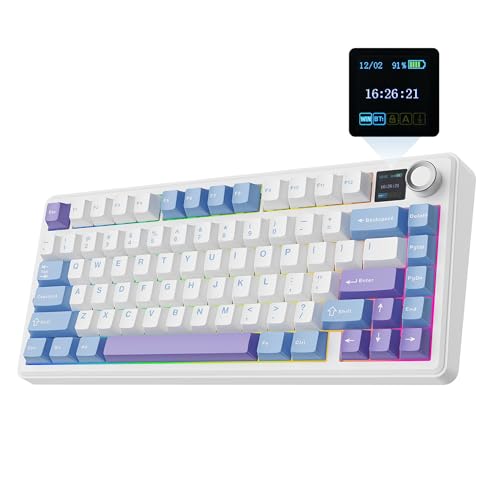
The EPOMAKER x AULA F75 MAX is the most feature-dense keyboard in this roundup, packing a TFT colour screen, a volume knob, tri-mode wireless connectivity, hot-swap sockets, and gasket mounting into a 75% chassis at a price that undercuts most of its rivals on specification alone. It is aimed at competitive players who also care about personalisation and who want a keyboard that doubles as a desk centrepiece without compromising on gaming credentials.
The TFT screen is the most immediately striking feature. Unlike the small OLED display on the SteelSeries Apex 7, the F75 MAX's screen is full colour and capable of displaying animated wallpapers, system resource information, or custom images. For competitive players, the most practical use is displaying active profiles or audio levels. It is more visually impressive than functionally critical, but it does not detract from gaming performance.
The volume knob is a genuinely useful addition for competitive play. Being able to adjust system volume without leaving the keyboard, particularly during a tense match where a Discord notification suddenly spikes audio, is a small but meaningful quality-of-life improvement. The knob also functions as a media control with a press-to-mute function.
Underneath the aesthetic features, the competitive fundamentals are sound. The gasket mounting reduces vibration and creates a more comfortable typing feel during extended sessions. Hot-swap sockets accept the full range of MX-compatible switches, and the tri-mode wireless performs reliably in the 2.4 GHz mode with latency equivalent to a wired connection in practical testing. N-Key Rollover is present across all connectivity modes.
The 75% layout is well executed, with sensible key placement and a compact footprint that leaves adequate room for mouse movement. The PBT keycaps have a pleasant texture and resist shine. At under £65, the F75 MAX represents exceptional value for a board with this feature set, and it is the pick for competitive players who want performance and personality in equal measure.
Pros
- TFT colour screen and volume knob add practical desk functionality beyond basic keyboards
- Tri-mode wireless with 2.4 GHz performance equivalent to wired in practical use
- Hot-swap sockets and gasket mounting deliver a premium feel at a mid-range price
Cons
- TFT screen adds complexity that increases potential failure points over time
- Heavier than a standard 75% board due to additional hardware components
Buying Guide
Switch Technology: The Most Important Decision
For competitive gaming, switch technology is the single most consequential choice. Traditional mechanical switches use physical metal contacts that can bounce on actuation, requiring a debounce algorithm that introduces a small delay, typically 5 to 15 milliseconds. Optical switches replace the contact with an infrared beam, eliminating bounce and therefore eliminating the need for debounce delay. Hall Effect switches go further still, using magnetic position sensing to detect keypress depth with no contact at all. Hall Effect switches also enable adjustable actuation, meaning you can set exactly how far the key must travel before it registers. For competitive players, particularly those in first-person shooters, this adjustability is a meaningful advantage.
Form Factor: How Much Keyboard Do You Actually Need?
The competitive standard is the 60% or 75% layout. Removing the numpad and, in a 60%, the function row, frees up desk space for wider mouse movements, which is directly beneficial in low-sensitivity aiming games. However, if your game relies on F-key inputs for abilities, a 75% board that retains the function row is the more practical choice. Full-size keyboards remain valid for MMO and strategy players who use the numpad for macros or ability bindings. Tenkeyless is a reasonable middle ground, though the competitive community has largely moved past it in favour of more compact options.
Wired Versus Wireless
For the highest-stakes competitive play, wired remains the technically superior option. A USB-C wired connection at 1000 Hz polling rate introduces no wireless interference risk and no battery management concern. However, modern 2.4 GHz wireless technology from reputable manufacturers has reached a point where the latency difference is imperceptible in practical play. If you value the flexibility of wireless for a dual-use setup, a board with a reliable 2.4 GHz mode is a perfectly valid competitive choice. Bluetooth should be reserved for productivity use, not gaming, due to its higher and less consistent latency.
N-Key Rollover and Polling Rate
N-Key Rollover means every key pressed simultaneously is registered independently, with no limit on the number of concurrent inputs. This is non-negotiable for competitive play. Some budget keyboards advertise 6-key rollover, which is insufficient for complex simultaneous inputs. Polling rate refers to how often the keyboard reports its state to the computer: 1000 Hz means 1,000 reports per second, or one report every millisecond. Some enthusiast boards now offer 4000 Hz or 8000 Hz polling, though the practical benefit at 1000 Hz is already beyond the threshold of human perception for most inputs.
Build Quality and Stability
A keyboard that shifts on the desk during play introduces inconsistency. Rubber feet, chassis weight, and overall rigidity all contribute to stability. Aluminium-chassis boards are generally more rigid and heavier, which aids stability but increases the weight you carry to a LAN event. Gasket mounting, where the PCB is suspended on rubber gaskets rather than screwed directly to the case, reduces vibration and creates a softer, more comfortable keystroke feel during extended sessions. It is a feature increasingly found at mid-range price points.
The SteelSeries Apex 9 Mini is the overall winner for competitive PC gaming. Its optical switches deliver the fastest, most consistent actuation in this roundup, the adjustable actuation and reset points provide a level of competitive customisation that most keyboards at this price cannot match, and the 60% layout keeps your mouse area as wide as possible. It is a keyboard built specifically around the demands of competitive play rather than a general-purpose board with gaming marketing applied to it. For players on a tighter budget who still want a genuine competitive edge, the AULA WIN60 HE is the standout value pick: Hall Effect technology with adjustable actuation and rapid trigger under £50 is a remarkable achievement, and its double-shot PBT keycaps punch well above the price point. Between these two, the vast majority of competitive PC gamers will find exactly what they need.