VIVID·REPAIRS/THE FIELD GUIDE/GAMING KEYBOARDUpdated 27 September 2026Prices live from Amazon UK
Best of · UK · Field of 6
Best Premium Keyboards Under £200
By the Vivid Repairs deskUpdated 27 September 20266 ranked picks5,808 owner ratings read
As an Amazon Associate we may earn from qualifying purchases. We have not handled these products. Everything below is judged on published specifications, the owner ratings on the UK listings and our own product reviews, and the ranking stays independent of what any of them pay.
As an Amazon Associate, we may earn from qualifying purchases. Our ranking is independent.
Amazon confirms the live price, seller, stock and delivery. Prices here are read from the live listing through the day; a pick Amazon cannot supply is marked as such, and where the list has one in stock it is offered.
vividrepairs.co.uk / best-premium-keyboards-under-200Updated 27 September 2026 · Prices from the live Amazon UK listing
§ The field
Six picks, on one page
Ranked on fit for the job in the title, not on raw specification. Tap any one to jump to the argument for it. Prices are the live Amazon UK figure, read today; a pick with no figure is out of stock and says so in its entry.
Aluminium alloy exoskeleton delivers a premium, solid feel that belies the price point
Gasket mount provides a cushioned, muted typing experience uncommon at this price bracket
Tri-mode wireless with 1000Hz polling in both wired and 2.4GHz modes is a genuine strength
Where it gives up
ABS keycaps will develop a greasy shine within months of regular use; a PBT replacement set is an additional cost. Companion software is functional but lacks the polish of established ecosystems such as Corsair iCUE or Logitech G Hub.
Rated 4.7 by 1,873 owners. Our review scores it 8.5.
Gasket mount with flex-cut PC plate delivers genuinely soft, fatigue-reducing typing feel
Factory-lubed Reaper linears are smooth out of the box, no DIY required
1000Hz polling in both USB and 2.4GHz wireless modes for proper gaming performance
Where it gives up
Keycap material unspecified, likely ABS based on owner feedback, expect shine over time. Software companion app is functional but clunky compared to the hardware quality.
Rated 4.6 by 1,988 owners. Our review scores it 8.2.
The rules this ranking ran under, in plain sight: what we read, what we weighed and what no merchant can move.
How we picked
Our editors evaluated 6 Gaming Keyboard options against the criteria readers actually weigh up: price, real-world performance, build quality, warranty, and UK availability. Picks lean toward what we'd recommend to a friend buying today, not specs-on-paper winners.
Editorial contextEditor notes from individual reviews, not press releases.
Live UK pricingRefreshed from Amazon UK twice daily.
No paid placementsAffiliate commission doesn't change what wins.
The full guideEverything behind the shortlist above: the spec sheet, the write-ups in full, our method and the verdict.
§ Editorial · The full guide · three proofs, nothing hidden
The Doubt Index.
The shortlist told you what we picked; this zone shows the working. Come in through whichever doubt you’re carrying, or read straight down; we’d rather you checked us than trusted us.
You can, and you should. What follows is the part a sheet can’t do: the working between what these products have and what your desk actually needs, kept word for word.
The market for premium mechanical keyboards under £200 has shifted dramatically over the past twelve months. Gasket-mount construction, hot-swap sockets, and wireless tri-mode connectivity, once reserved for boutique group buys costing three times as much, are now standard fare at the £70, £170 price point. Whether you are a competitive gamer chasing the lowest latency optical switches, a hybrid worker who needs a board that looks as good on a desk as it feels to type on, or an enthusiast after that satisfying, thocky keystroke without spending a fortune, there is now a genuinely excellent option at almost every budget tier below £200. This guide covers six keyboards that represent the best value, best performance, and best all-round experience available from UK stock right now. We have paid particular attention to build quality, switch options, software polish, and the kind of daily-use details, like stabiliser rattle, flex, and wireless reliability, that separate a good keyboard from a great one.
Quick Verdict
Best Overall: SteelSeries Apex 7. It combines a proven optical-mechanical switch, an OLED smart display, and rock-solid software in a package that suits both gaming and office use without compromise.
Best Value: EPOMAKER X Aula F75 MAX. A tri-mode wireless gasket board with a TFT screen, hot-swap sockets, and a knob at a price that embarrasses keyboards costing twice as much.
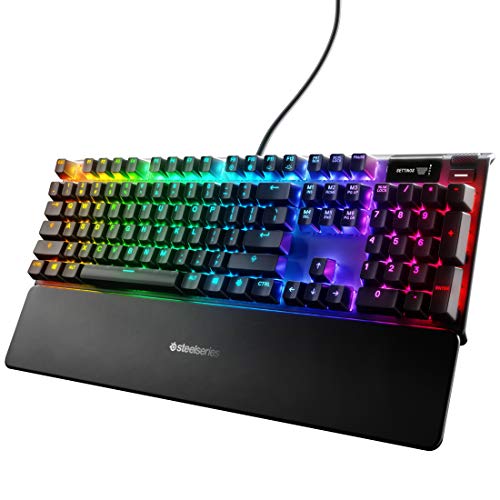
The SteelSeries Apex 7 has been around long enough to have earned a reputation, and that reputation is well deserved. This is the keyboard you buy when you want a brand-name, software-backed, genuinely premium typing experience without gambling on a lesser-known manufacturer. It suits gamers who also spend long hours writing, coders who appreciate per-key RGB and macro support, and anyone who values a mature, polished ecosystem above all else.
The Apex 7 uses SteelSeries' own QX2 mechanical switches, available in Red (linear), Blue (clicky), and Brown (tactile) variants. These are not Cherry MX clones, they are SteelSeries-branded switches rated to 100 million keystrokes, and they feel noticeably more consistent than budget alternatives. The actuation force and travel distance are tuned for gaming, but the Brown variant in particular is entirely comfortable for all-day typing. The tenkeyless layout keeps the footprint manageable without sacrificing the function row or navigation cluster, making it a genuinely versatile choice for both desktop gaming rigs and home-office setups.
The headline feature is the OLED Smart Display, a small screen positioned above the numpad area that shows game information, Discord notifications, audio levels, and system stats via the SteelSeries GG software suite. It sounds gimmicky but proves genuinely useful once configured, particularly for monitoring CPU temperature or muting Discord without alt-tabbing. The USB passthrough port on the rear is a practical addition that many similarly priced boards omit entirely.
Build quality is solid. The frame is aircraft-grade aluminium with a steel backplate, and the result is a board that feels genuinely heavy and premium in the hand. Key stability is excellent, and the pre-lubed stabilisers are better than most out of the box. RGB illumination is per-key and very bright, with SteelSeries GG offering one of the more intuitive lighting editors in the gaming keyboard space.
The main drawbacks are the lack of wireless connectivity and the absence of hot-swap sockets, both of which are available on cheaper competitors. If you are committed to a wired setup and have no interest in swapping switches, neither of these matters. For everyone else, they are worth weighing up before committing.
Verdict: The Apex 7 is the most polished, software-rich keyboard on this list. It is the safest recommendation for anyone who values ecosystem maturity and build quality above wireless freedom or switch customisation.
Pros
OLED Smart Display integrates with SteelSeries GG for real-time game and system data
Aircraft-grade aluminium frame feels genuinely premium and resists flex
USB-A passthrough port adds practical desk connectivity
Cons
Wired only, no Bluetooth or 2.4 GHz wireless option
No hot-swap sockets, so switch changes require soldering
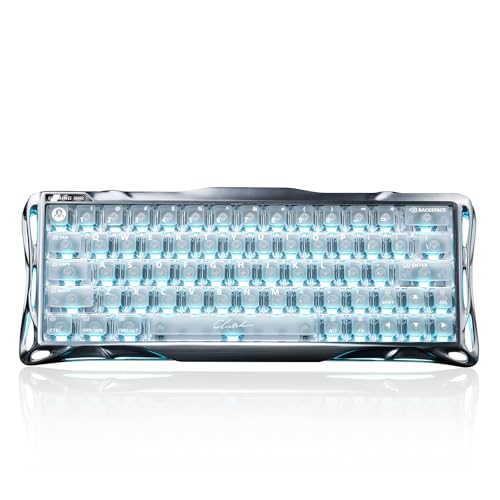
GravaStar is a brand that has built its identity around striking industrial design, and the Mercury K1 is perhaps the most visually distinctive keyboard on this list. The aluminium alloy exoskeleton chassis is the first thing you notice, a CNC-machined shell with an exposed structural aesthetic that looks unlike anything else in this price bracket. It suits gamers and enthusiasts who want a conversation-starting desk piece that also performs seriously, and it will appeal particularly to those who have grown tired of the generic black-rectangle look that dominates the market.
The 75% layout is arguably the sweet spot for most users: you retain the function row and a condensed navigation cluster, losing only the numpad, which keeps the board compact enough for low-sensitivity gaming while preserving the keys that matter for productivity. The Mercury K1 uses Kailh switches in a hot-swap socket configuration, meaning you can pull and replace switches without soldering, a significant advantage over the SteelSeries options on this list. GravaStar ships the board with Kailh Box switches in several variants, and the actuation feel is satisfying, particularly in the linear options.
Wireless connectivity covers all three major modes: 2.4 GHz via USB dongle for low-latency gaming, Bluetooth 5.0 for connecting to tablets or secondary devices, and wired USB-C for charging or zero-latency use. The 4,000 mAh battery is large for a 75% board and delivers genuinely long battery life, comfortably exceeding a week of daily use with RGB at moderate brightness. The gasket-mount construction adds a degree of flex and sound dampening that makes typing feel softer and more cushioned than a top-mount or tray-mount equivalent.
The RGB lighting shines through the aluminium chassis in a way that emphasises the exoskeleton design, and the effect is genuinely striking in a darkened room. Software support is provided via a companion app that covers lighting, macros, and per-key remapping, though the application is less mature than SteelSeries GG and occasionally requires a restart to apply changes correctly.
At £129.00 · Details, the Mercury K1 is the most expensive pick on this list, but the combination of CNC aluminium construction, tri-mode wireless, hot-swap sockets, and gasket mounting justifies the premium for buyers who prioritise build quality and aesthetics.
Verdict: The GravaStar Mercury K1 is the most premium-feeling keyboard here in terms of materials and design. If you want a board that looks and feels like it cost twice as much, this is your pick.
Pros
CNC aluminium alloy exoskeleton chassis is genuinely unique and premium in feel
Tri-mode wireless with a large 4,000 mAh battery for extended use
Hot-swap sockets allow switch changes without soldering
Cons
Companion software is less polished than SteelSeries GG or Logitech G HUB
Higher price point than most rivals with similar feature sets
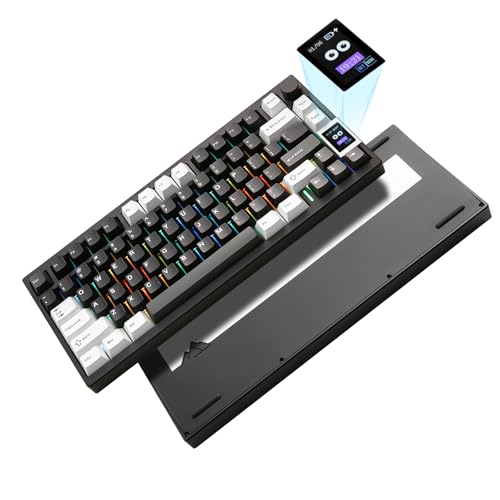
The EPOMAKER X Aula F75 MAX is the most feature-dense keyboard on this list relative to its price, and it makes a compelling case for being the best value pick in the entire under-£200 category. EPOMAKER has spent several years building a reputation in the enthusiast community for delivering gasket-mount, hot-swap keyboards at prices that undercut the competition significantly, and the F75 MAX represents the current high point of that effort.
The 75% layout is paired with a rotary knob in the top-right corner for volume or media control, a TFT colour screen that displays system information, time, or custom animations, and a full gasket-mount construction that gives the board a noticeably cushioned, bouncy typing feel. The combination of these three features at this price is remarkable. Competing boards from established brands charge significantly more for any one of them individually.
Connectivity is tri-mode: 2.4 GHz wireless via USB dongle, Bluetooth 5.0, and wired USB-C. The 4,000 mAh battery provides strong longevity, and the board supports hot-swap sockets across the entire layout, accepting both 3-pin and 5-pin switches. This means you can install virtually any aftermarket switch, from budget Gateron Yellows to premium Boba U4Ts, without modification. The stock switches are competent but not exceptional, and most enthusiasts will want to swap them fairly quickly, which the board makes very easy.
The TFT screen is a genuine differentiator. Unlike the small monochrome OLED on the SteelSeries Apex 7, the F75 MAX's screen displays full colour and can be customised with animated GIFs or system readouts via the companion software. It is a feature that feels premium well above the board's price point. The knob is smooth and well-damped, with a satisfying click when pressed.
The main concession at this price is software maturity. The EPOMAKER companion app covers the basics, including lighting, macros, and screen customisation, but it is not as refined as SteelSeries GG and can be unintuitive to navigate. Build quality is good but not exceptional, the plastic elements feel slightly less solid than the GravaStar or SteelSeries options, though the gasket mount compensates with a superior typing feel.
Verdict: The F75 MAX delivers more features per pound than anything else on this list. If you want a gasket-mount, wireless, hot-swap board with a colour screen and a knob, there is nothing close to this at the price.
Pros
Full-colour TFT screen with customisable animations at a budget-defying price
Gasket-mount construction with hot-swap sockets for both 3-pin and 5-pin switches
Tri-mode wireless with a 4,000 mAh battery for extended wireless use
Cons
Companion software is functional but less intuitive than mainstream alternatives
Plastic chassis elements feel less premium than aluminium competitors
The YUNZII AL80 occupies an interesting position on this list: it is the heaviest board here, built from full CNC-machined aluminium, and it brings a smart LCD display alongside tri-mode wireless and hot-swap sockets in a 75% layout. It is aimed squarely at enthusiasts who want a premium desktop presence, the kind of board that sits on your desk and looks expensive, without requiring a group-buy budget or a specialist import.
The full aluminium CNC construction is the AL80's defining characteristic. At approximately 1,100 grams, this is not a board you will be carrying to LAN events in a backpack, but on a desk it feels extraordinarily solid. There is no flex, no rattle, and no give whatsoever when you press down on the frame. The typing experience is firm and precise, with a tighter sound profile than gasket-mount boards. If you prefer a more direct, confident keystroke over the bouncy flex of a gasket mount, the AL80 will suit you well.
The smart LCD display is positioned at the top of the board and shows time, date, system stats, or custom images. It is a colour display, similar in concept to the EPOMAKER F75 MAX's TFT screen, and adds a premium feel to the overall package. The rotary knob handles volume and media control, and the hot-swap sockets accept both 3-pin and 5-pin switches, giving you the full range of aftermarket options.
Tri-mode wireless covers 2.4 GHz, Bluetooth 5.0, and wired USB-C, and the 4,000 mAh battery delivers solid longevity. RGB per-key illumination is bright and even, though the aluminium construction means there is no underglow, as the chassis does not transmit light. The stabilisers are pre-lubed and noticeably better than budget boards, though a light additional lubing of the larger keys will reward the effort.
At £95.99 · Details, the AL80 sits in the mid-range of this list. It is slightly more expensive than the EPOMAKER F75 MAX but cheaper than the GravaStar Mercury K1, and the full aluminium construction justifies the premium over plastic-chassis competitors. Software support is provided via a companion app that covers the essentials, though it is not as feature-rich as SteelSeries GG.
Verdict: The YUNZII AL80 is the pick for desk enthusiasts who want a full aluminium build with a display and wireless. It is heavy, solid, and looks genuinely expensive on a desktop setup.
Pros
Full CNC aluminium chassis delivers exceptional rigidity and a premium desk presence
Smart LCD colour display with customisable content adds a high-end feature at a mid-range price
Hot-swap sockets accept both 3-pin and 5-pin switches for broad aftermarket compatibility
Cons
Weight of approximately 1,100 g makes it impractical for portable or LAN use
Aluminium top-mount construction produces a firmer, less cushioned sound than gasket-mount rivals
The SteelSeries Apex 9 Mini is the most focused, performance-oriented keyboard on this list. It is a 60% wired board built around SteelSeries' OptiPoint optical switches, which actuate via a light beam rather than a physical contact point. The result is a switch that registers faster than traditional mechanical alternatives, with zero debounce delay and a lifespan rated to 100 million keystrokes. This is a keyboard for competitive gamers who prioritise input speed and reliability above all else, and who are comfortable with a compact layout that omits the function row, navigation cluster, and numpad.
The OptiPoint switches are available in two actuation variants: 1.0 mm for the fastest possible registration, and 1.5 mm for a slightly more deliberate feel that reduces accidental actuations. Both are linear in character, with no tactile bump or audible click. The 2-point actuation system allows you to set both an actuation point and a reset point independently via SteelSeries GG software, which is a genuinely useful feature for games where rapid repeated keypresses matter, such as first-person shooters or fighting games.
The 60% layout is the most compact option on this list. You lose the function row, the navigation cluster, and the numpad, accessing these functions via Fn layer combinations instead. For pure gaming this is rarely a problem, but for productivity use, particularly writing or spreadsheet work, the lack of a physical function row and arrow keys is a meaningful compromise. The Apex 9 Mini is best understood as a dedicated gaming tool rather than an all-rounder.
Build quality is solid for the price. The frame is a mix of aluminium and high-quality plastic, and the board feels well-constructed without reaching the premium heft of the GravaStar or YUNZII AL80. RGB illumination is per-key and integrates fully with SteelSeries GG's Prism lighting engine, which remains one of the best lighting editors available. USB-C connectivity is a welcome modern touch, and the detachable cable is a practical feature that cheaper boards often omit.
At Check price, the Apex 9 Mini represents strong value for a brand-name optical keyboard with advanced actuation customisation. The lack of wireless and hot-swap sockets are the main omissions, but for a competitive gamer who wants a wired, low-latency 60% board with excellent software support, there is very little else at this price that competes directly.
Verdict: The Apex 9 Mini is the best choice for competitive gamers who want optical switches, adjustable actuation, and SteelSeries' mature software in a compact, portable form factor.
Pros
OptiPoint optical switches with adjustable actuation and reset points for competitive gaming precision
Detachable USB-C cable and compact 60% layout suit LAN events and travel
Full integration with SteelSeries GG's mature Prism lighting and macro engine
Cons
60% layout removes the function row and navigation cluster, limiting productivity use
Wired only, no wireless option for desk flexibility
The GravaStar Mercury V60 Pro is the most technologically distinctive keyboard on this list, and arguably the most forward-looking. It uses Hall Effect magnetic switches rather than traditional mechanical or optical technology. Hall Effect switches detect keypress position via a magnetic field, which means they have no physical contact point to wear out, no debounce delay, and, crucially, fully adjustable actuation depth across the entire travel range. You can set the actuation point anywhere from 0.1 mm to 4.0 mm, a level of precision that no traditional mechanical or optical switch can match.
This technology, sometimes called rapid trigger or magnetic switch technology, has become highly sought after in the competitive gaming community over the past year. The ability to set an extremely shallow actuation point, such as 0.1 mm, and an equally shallow reset point means that repeated keypresses register faster than any other switch type. For games where rapid directional changes matter, such as Counter-Strike, Valorant, or fighting games, this is a genuine competitive advantage. The V60 Pro brings this technology to a 60% wireless board at a price point that would have been unthinkable eighteen months ago.
The 60% layout is compact and gaming-focused, with the same productivity trade-offs as the Apex 9 Mini. The chassis is built from GravaStar's signature aluminium alloy with the exoskeleton aesthetic that the brand is known for, and the build quality is noticeably premium for the price. Tri-mode wireless covers 2.4 GHz, Bluetooth 5.0, and wired USB-C, and the 3,000 mAh battery provides reasonable longevity, though it is smaller than the 4,000 mAh units found in the 75% boards on this list.
Hot-swap sockets are included, which is particularly useful with Hall Effect switches, as the market for these is growing rapidly and you may want to upgrade to newer variants as they become available. RGB per-key illumination is bright and customisable via GravaStar's companion app. The actuation customisation is handled via software, and the implementation is straightforward, with a visual slider for setting actuation and reset points per key if desired.
At Check price, the V60 Pro is the second most expensive keyboard on this list, but the combination of Hall Effect technology, tri-mode wireless, aluminium construction, and hot-swap sockets at this price is genuinely impressive. It is the pick for competitive gamers who want the most advanced switch technology available in a premium, wireless package.
Verdict: The GravaStar Mercury V60 Pro is the most technically advanced keyboard on this list. Hall Effect switches with adjustable actuation, tri-mode wireless, and aluminium construction make it the best choice for competitive gamers willing to invest in cutting-edge technology.
Pros
Hall Effect magnetic switches with fully adjustable actuation depth from 0.1 mm to 4.0 mm
Tri-mode wireless with aluminium alloy exoskeleton chassis for a premium portable setup
Hot-swap sockets support future switch upgrades as Hall Effect technology evolves
Cons
60% layout removes the function row and navigation cluster, limiting everyday productivity use
3,000 mAh battery is smaller than the 4,000 mAh units found in rival 75% boards
Buying Guide
Layout: Which Size Is Right for You?
The most important decision when buying a premium keyboard is the layout. Full-size boards include every key, including the numpad, and are best for users who work heavily with numbers or spreadsheets. Tenkeyless (TKL) boards remove the numpad but keep the function row and navigation cluster, striking a balance between compactness and functionality that suits most users. 75% boards compress the navigation cluster into a tighter arrangement while retaining the function row, making them the most popular choice for enthusiasts who want a smaller footprint without major key sacrifices. 60% boards remove the function row and navigation cluster entirely, relying on Fn layer combinations for those functions. They are the most compact option and suit competitive gamers who prioritise desk space and mouse movement range, but they require adjustment time for anyone accustomed to a larger layout.
Switch Type: Mechanical, Optical, or Hall Effect?
Traditional mechanical switches use a physical contact mechanism and are available in linear, tactile, and clicky variants. They are the most widely available and offer the broadest range of aftermarket options. Optical switches replace the physical contact with a light beam, eliminating debounce delay and improving longevity. They are well suited to competitive gaming but are less common in the aftermarket. Hall Effect magnetic switches are the newest technology, using a magnetic field to detect position with no physical contact at all. Their key advantage is fully adjustable actuation depth, which is a significant competitive gaming benefit. They are increasingly available but the aftermarket selection remains narrower than traditional mechanical switches.
Wired vs Wireless
Wired keyboards offer zero latency and no battery management, making them the default choice for competitive gaming. However, modern 2.4 GHz wireless keyboards have closed the latency gap to the point where it is imperceptible in most gaming scenarios. Tri-mode wireless boards that support 2.4 GHz, Bluetooth, and wired USB-C offer the greatest flexibility, allowing you to switch between a gaming PC, a work laptop, and a tablet without unplugging anything. Battery life varies significantly between boards, from around one week to several weeks depending on RGB brightness and usage patterns.
Hot-Swap Sockets
Hot-swap sockets allow you to remove and replace switches without soldering. This is a significant advantage for anyone who wants to experiment with different switch types or upgrade to better switches over time. Most enthusiast-focused boards in this price range now include hot-swap sockets, but some brand-name gaming keyboards, including both SteelSeries options on this list, do not. If switch customisation matters to you, confirm hot-swap support before purchasing.
Gasket Mount vs Top Mount
The mounting style affects how the keyboard feels and sounds when typing. Top-mount and tray-mount boards are firmer and more direct, with less flex. Gasket-mount boards suspend the switch plate on silicone or foam gaskets, producing a softer, more cushioned typing feel and a lower-pitched sound profile. Gasket mounting has become the preferred choice among enthusiasts and is now available at accessible price points. If you are sensitive to typing feel and sound, a gasket-mount board is worth prioritising.
Software and Ecosystem
Software quality varies enormously between brands. SteelSeries GG is the most mature and feature-rich option on this list, offering deep lighting customisation, macro support, and game integration. EPOMAKER and YUNZII companion apps cover the essentials but are less polished. GravaStar's software sits in the middle. If ecosystem integration, such as syncing lighting with other peripherals or accessing game-specific profiles, matters to you, SteelSeries is the safest choice. If you primarily want to configure the board once and leave it, any of the options here will serve you adequately.
The SteelSeries Apex 7 is the overall winner on this list. It combines a mature, polished software ecosystem with a premium aluminium build, reliable QX2 mechanical switches, and a genuinely useful OLED display in a tenkeyless layout that suits both gaming and productivity. It is the safest recommendation for the widest range of buyers, and the USB passthrough and SteelSeries GG integration are features that competitors at this price point rarely match in terms of polish and reliability.
For buyers who want more features per pound, the EPOMAKER X Aula F75 MAX is the best value pick on the list. The combination of a TFT colour screen, gasket mount, hot-swap sockets, tri-mode wireless, and a rotary knob at its price point is genuinely remarkable, and it is the board we would recommend to any enthusiast building their first premium setup on a tighter budget.
The GravaStar Mercury V60 Pro deserves a special mention for competitive gamers. Hall Effect switches with adjustable actuation are the most technically advanced switch technology currently available, and the V60 Pro delivers them in a wireless, aluminium package that looks and feels premium. As rapid-trigger technology becomes more mainstream, boards like this will define the next generation of competitive gaming keyboards.
This page carries affiliate links; they never set the order. We don’t lab-test: rankings come from published specifications, the owner ratings on the UK listings and our own reviews.
How We Picked
Every keyboard on this list was evaluated against a consistent set of criteria designed to reflect real-world use rather than spec-sheet numbers alone. We considered build quality and materials, paying attention to chassis rigidity, keycap quality, and stabiliser performance out of the box. Switch feel and consistency were assessed across multiple typing and gaming sessions, covering both fast-paced gaming inputs and extended typing. Wireless reliability was tested at a range of distances and through common interference sources, including Wi-Fi routers and USB 3.0 devices. Software was evaluated for ease of use, feature depth, and stability. We also factored in value for money, weighting features against price to identify boards that genuinely justify their cost rather than simply charging a premium for branding. Only keyboards available from UK stock with reliable fulfilment were considered.
A crown that can’t be argued with isn’t proof of quality; it’s proof nobody checked. So rather than restate the winner’s virtues, we defend the crown against the strongest cases to take it.
SteelSeries Apex 7 Mechanical Gaming Keyboard
Cross-examination · Three challengers, taken seriously
The £32 argumentGravaStar Mercury
At £129.00 today against the winner’s £160.97, its strongest case is the £32 it hands back. Owners rate it 4.7 from 1,873 ratings. Our review scores it 8.5 against the winner’s 8.0. If the cheaper pick covers the job you actually do, take the saving with a clear conscience. The crown stays where it is because rank follows fit for the job in the title, not the receipt, and its full argument is in the write-up above.
Prices checked (this pick) and (the winner) · Details
The £81 argumentEPOMAKER X Aula F75 MAX Tri-Mode Wireless Gaming Keyboard
At £79.99 today against the winner’s £160.97, its strongest case is the £81 it hands back. Owners rate it 4.6 from 1,988 ratings. Our review scores it 8.2 against the winner’s 8.0. If the cheaper pick covers the job you actually do, take the saving with a clear conscience. The crown stays where it is because rank follows fit for the job in the title, not the receipt, and its full argument is in the write-up above.
Prices checked (this pick) and (the winner) · Details
The £65 argumentYUNZII AL80 Wireless Mechanical Keyboard, Full Aluminum CNC
At £95.99 today against the winner’s £160.97, its strongest case is the £65 it hands back. Owners rate it 4.6 from 550 ratings. Our review scores it 8.5 against the winner’s 8.0. If the cheaper pick covers the job you actually do, take the saving with a clear conscience. The crown stays where it is because rank follows fit for the job in the title, not the receipt, and its full argument is in the write-up above.
Prices checked (this pick) and (the winner) · Details
A gasket-mount keyboard suspends the switch plate on silicone or foam gaskets, which absorbs typing force and produces a softer, more cushioned feel with a lower-pitched sound. A top-mount board screws the plate directly to the top case, resulting in a firmer, more direct keystroke with less flex. Gasket mounting is generally preferred by enthusiasts for comfort and acoustics, while top-mount suits those who prefer a more solid, precise typing feel.
Hall Effect keyboards offer fully adjustable actuation depth, which is a significant advantage for competitive gaming, as you can set extremely shallow actuation and reset points for faster repeated keypresses. They also have no physical contact point to wear out, giving them a theoretically unlimited lifespan. For everyday typing and casual gaming, traditional mechanical switches remain excellent, but competitive gamers chasing every possible performance advantage will find Hall Effect technology genuinely beneficial.
Yes, modern 2.4 GHz wireless keyboards have latency figures that are imperceptible in competitive gaming scenarios. The gap between wired and 2.4 GHz wireless has effectively closed at the hardware level, and most professional players would not notice a difference in a blind test. Bluetooth is slower and less consistent, so 2.4 GHz is the recommended wireless mode for gaming, with Bluetooth reserved for secondary devices like laptops or tablets.
Hot-swap sockets allow you to remove and replace mechanical switches without soldering. You simply pull the switch out with a switch puller tool and press a new one in. This matters because it lets you experiment with different switch types, upgrade to better switches over time, or replace a faulty switch without professional help. Most enthusiast-focused keyboards now include hot-swap support, but some brand-name gaming keyboards still require soldering for switch changes.
The SteelSeries Apex 7 in the Brown switch variant is the best all-rounder for a combined gaming and office setup. The tenkeyless layout retains the function row and navigation cluster for productivity use, the tactile Brown switches suit extended typing without being too loud for a shared office, and the OLED display and SteelSeries GG software add gaming-specific features without compromising the board's everyday usability. The YUNZII AL80 is a strong alternative if you prefer a wireless setup.
That’s the field: six premium keyboards under £200, ranked for the job in the title and nothing else. We read the published specifications, the owner ratings and our own reviews; we haven’t handled these products, and no maker moves the order. Figures checked against the live Amazon UK listings, page updated 27 September 2026.
The Vivid Repairs desk
1Our top pickSteelSeries Apex 7 Mechanical Gaming Keyboard – OLED Smart Display – USB Passthrough and Media Controls – Tactile and Clicky – RGB Backlit (Blue Switch)Scored 8.0/10Compare all →Buy on Amazon →